ESP32 ESP-IDF Windows 平台工具链的标准设置
ESP32-S3是乐鑫科技推出的高性能Wi-Fi & Bluetooth 5(BLE)双模物联网MCU,专为AIoT和边缘计算优化。搭载240MHz双核Xtensa LX7处理器,支持AI指令扩展,算力提升, 兼容ESP-IDF、Arduino、MicroPython,并支持ESP-NOW协议。本文主要介绍ESP-IDF window编译环境搭建。
版本和环境信息如下:
PC平台: Windows 11 专业版
ESP32-S3开发环境: ESP-IDF 5.4
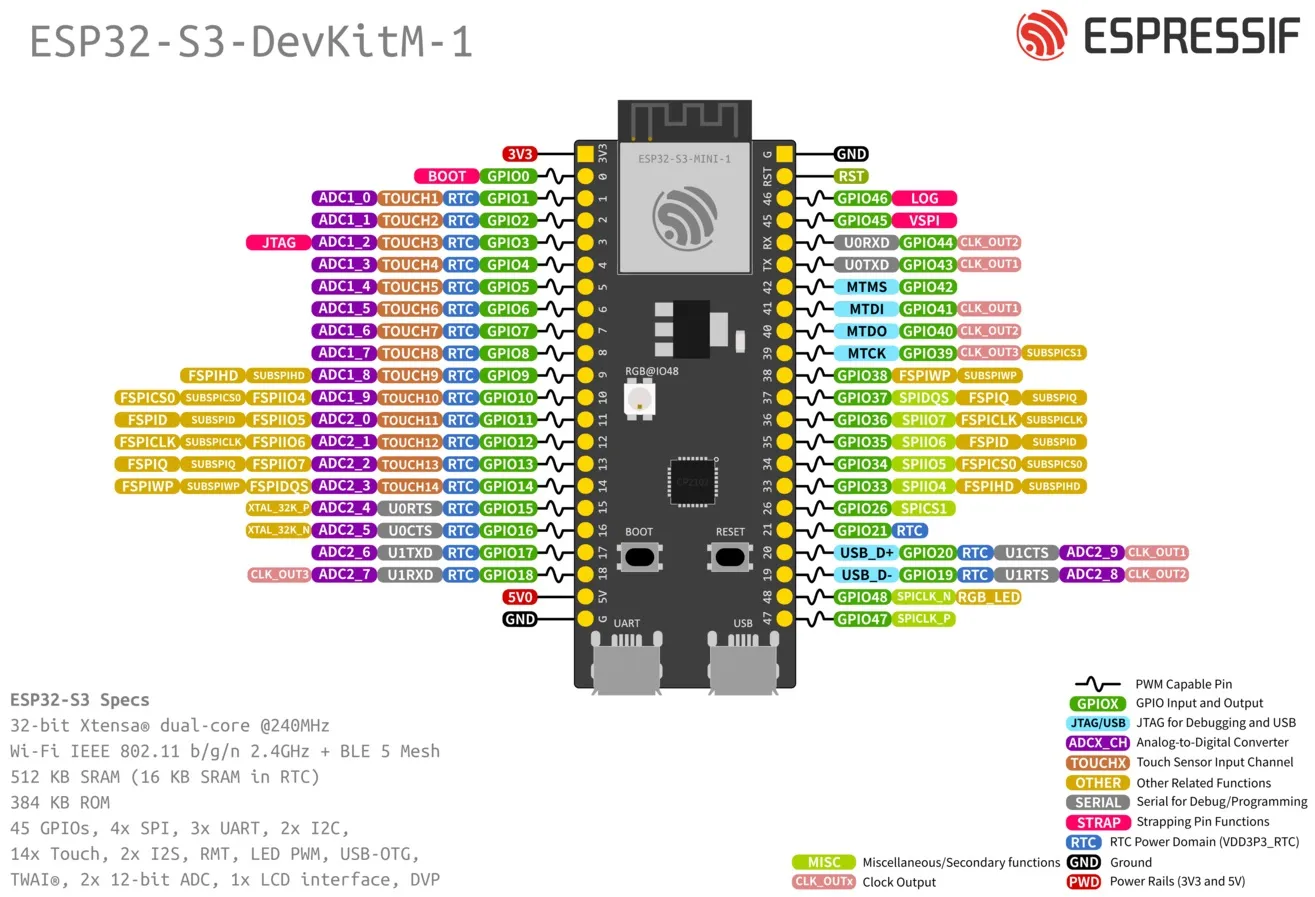
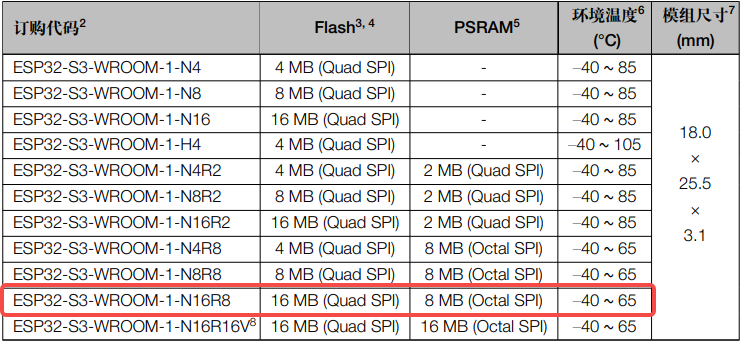
ESP32-S3开发板:DevKitC-1 WROOM-1乐鑫N16R8
ESP32-S3-WROOM-1 系列型号对比
ESP-IDF 工具安装器
安装 ESP-IDF 必备工具最简易的方式是下载一个 ESP-IDF 工具安装器。
|
|
在线安装与离线安装的区别
在线安装程序非常小,可以安装 ESP-IDF 的所有版本。在安装过程中,安装程序只下载必要的依赖文件,包括 Git For Windows 安装器。在线安装程序会将下载的文件存储在缓存目录 %userprofile%/espressif 中。
离线安装程序不需要任何网络连接。安装程序中包含了所有需要的依赖文件,包括 Git For Windows 安装器。
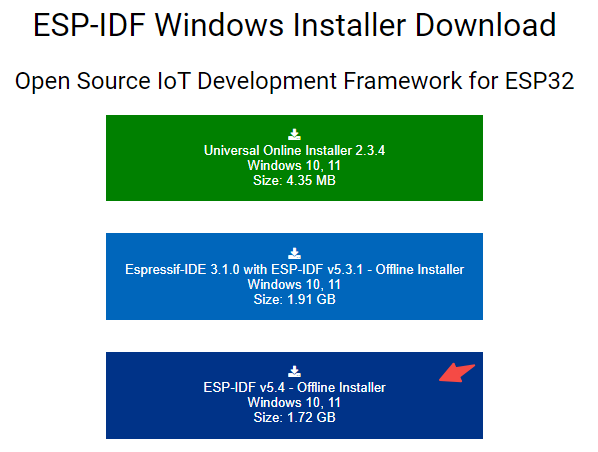
我选择的是离线安装包esp-idf-tools-setup-offline-5.4.exe
安装内容
安装程序会安装以下组件:
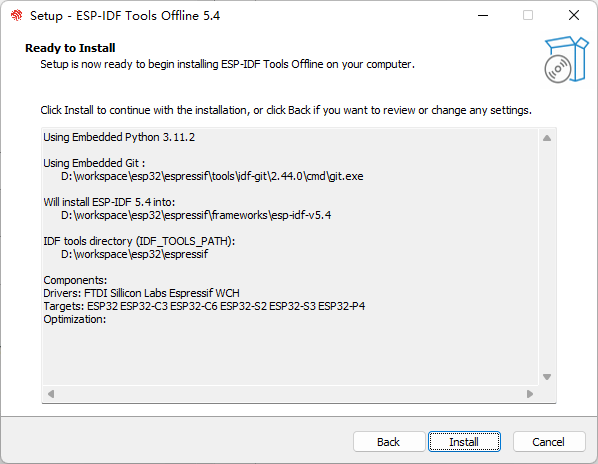
安装程序允许将程序下载到现有的 ESP-IDF 目录。推荐将 ESP-IDF 下载到 %userprofile%\Desktop\esp-idf 目录下,其中 %userprofile% 代表home目录。
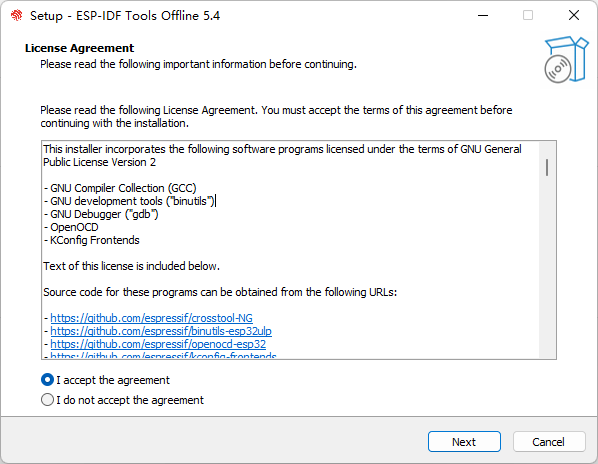
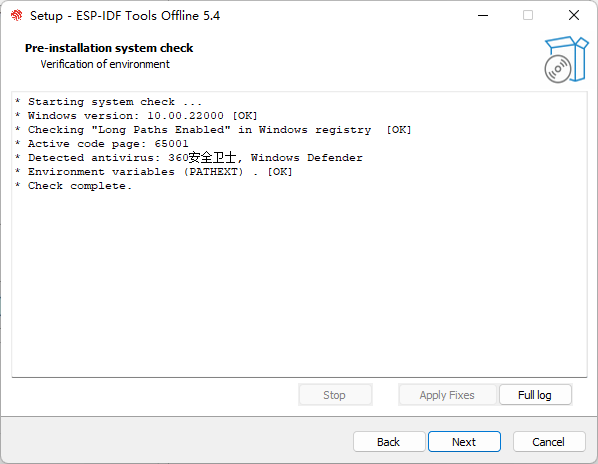
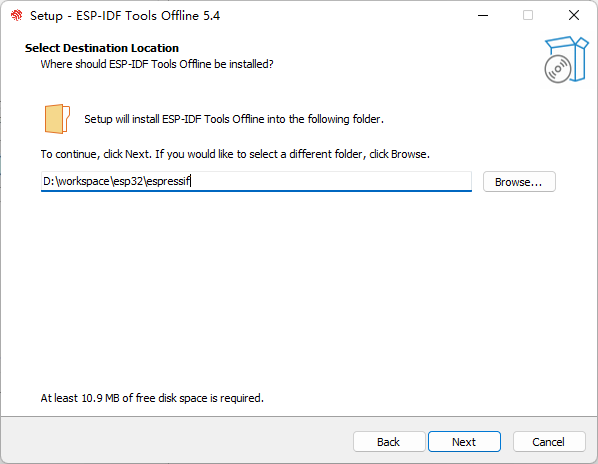
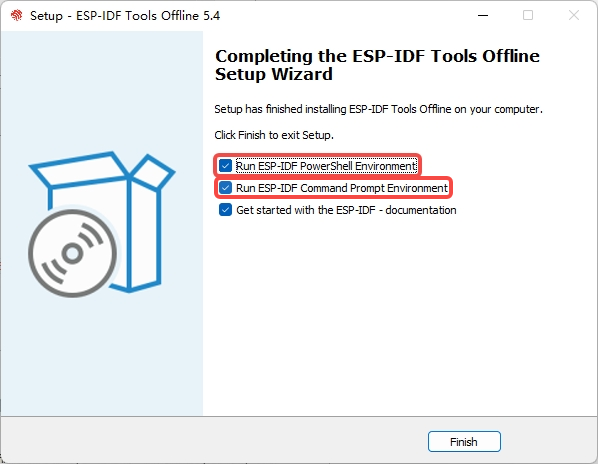
勾选了 Run ESP-IDF PowerShell Environment 和 Run ESP-IDF Command Prompt (cmd.exe)
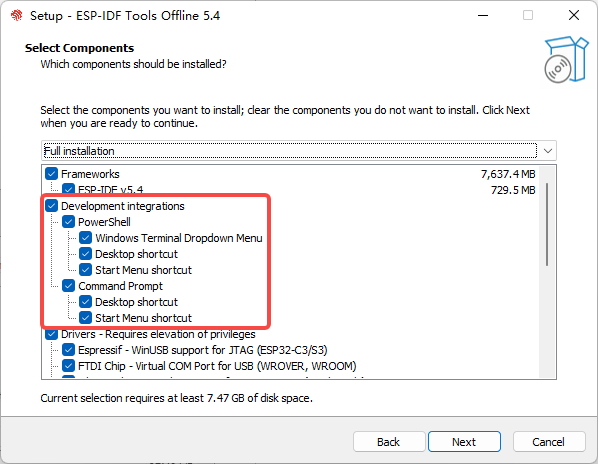
选择支持芯片ESP32系列
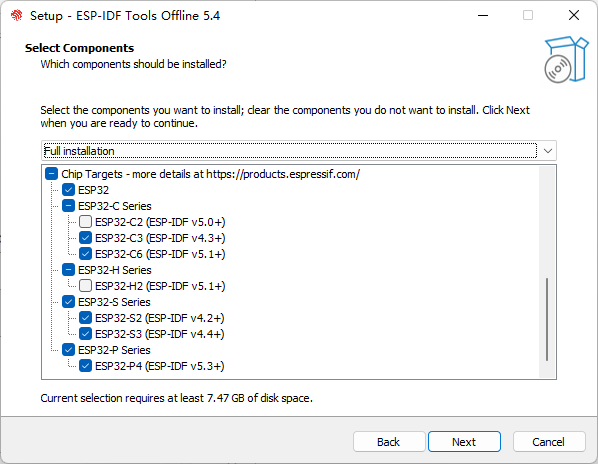
安装
启动 ESP-IDF 环境
安装结束时,如果勾选了 Run ESP-IDF PowerShell Environment 或 Run ESP-IDF Command Prompt (cmd.exe),安装程序会在选定的提示符窗口启动 ESP-IDF。
Run ESP-IDF PowerShell Environment:
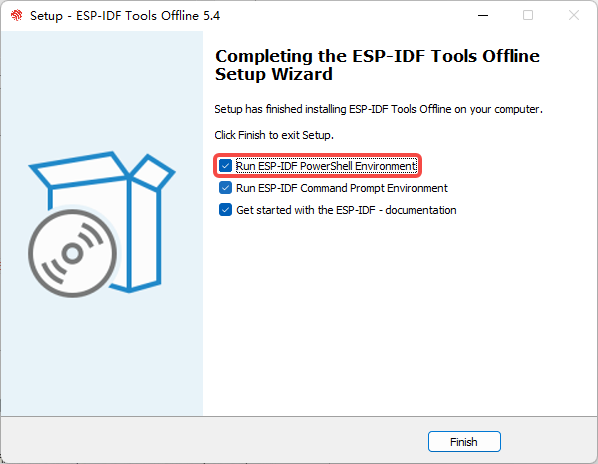
完成 ESP-IDF 工具安装向导时运行 Run ESP-IDF PowerShell Environment
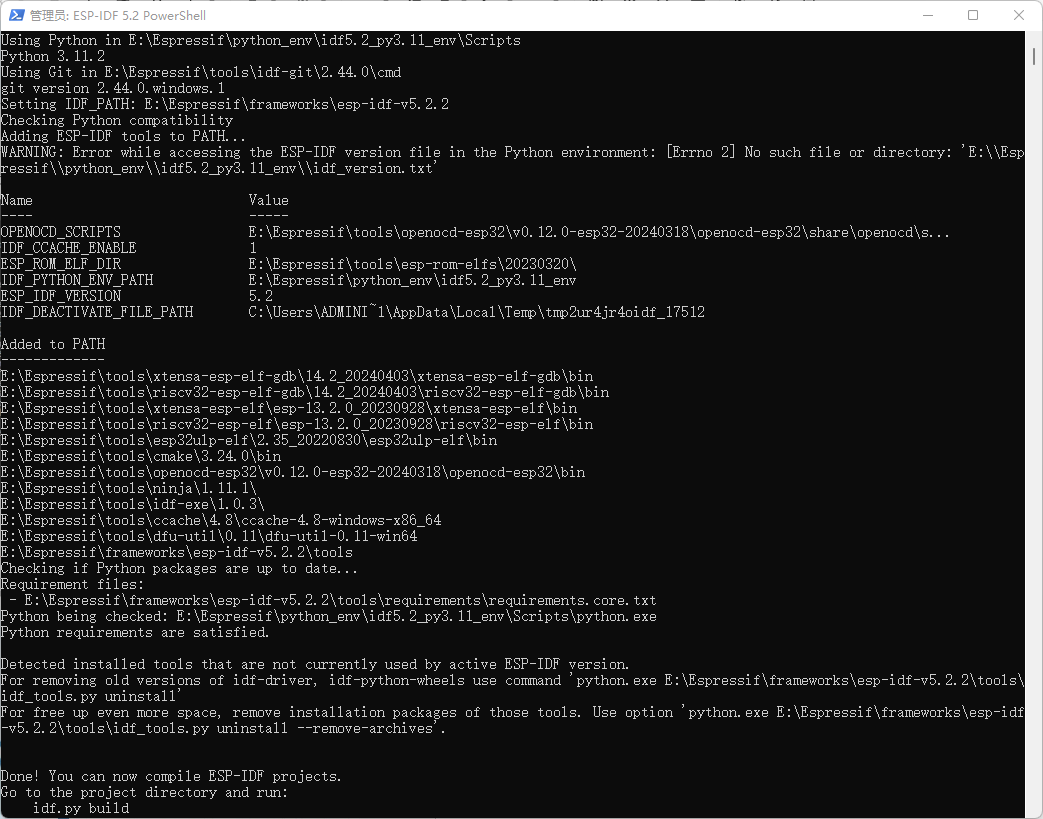
ESP-IDF PowerShell
Run ESP-IDF Command Prompt (cmd.exe):
完成 ESP-IDF 工具安装向导时运行 Run ESP-IDF Command Prompt (cmd.exe)
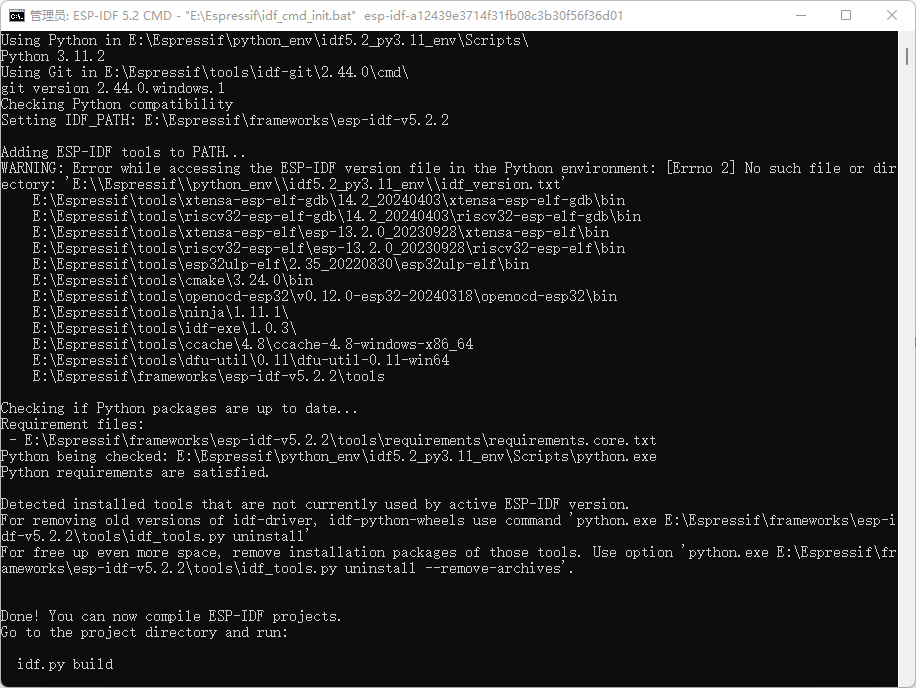
ESP-IDF 命令提示符窗口
使用命令提示符
在后续步骤中,将介绍如何使用 Windows 的命令提示符进行操作。
ESP-IDF 工具安装器可在“开始”菜单中,创建一个打开 ESP-IDF 命令提示符窗口的快捷方式。本快捷方式可以打开 Windows 命令提示符(即 cmd.exe),并运行 export.bat 脚本以设置各环境变量(比如 PATH,IDF_PATH 等)。此外,还可以通过 Windows 命令提示符使用各种已经安装的工具。
注意,本快捷方式仅适用 ESP-IDF 工具安装器中指定的 ESP-IDF 路径。如果电脑上存在多个 ESP-IDF 路径(比如需要不同版本的 ESP-IDF),有以下两种解决方法:
- 为 ESP-IDF 工具安装器创建的快捷方式创建一个副本,并将新快捷方式的 ESP-IDF 工作路径指定为希望使用的 ESP-IDF 路径。
- 或者,可以运行
cmd.exe,并切换至希望使用的 ESP-IDF 目录,然后运行export.bat。注意,这种方法要求PATH中存在 Python 和 Git。如果在使用时遇到有关“找不到 Python 或 Git”的错误信息,请使用第一种方法。
开始使用 ESP-IDF
现在你已经具备了使用 ESP-IDF 的所有条件,接下来将介绍如何开始第一个工程。
开始创建工程
现在,可以准备开发 ESP32-S3 应用程序了。可以从 ESP-IDF 中 examples 目录下的 get-started/hello_world 工程开始。
将 get-started/hello_world 工程复制至本地的 ~/esp 目录下:
cd E:\Espressif\
xcopy /e /i E:\Espressif\frameworks\esp-idf-v5.4\examples\get-started\hello_world hello_world
连接设备
现在,请将 ESP32-S3 开发板连接到 PC,并查看开发板使用的串口。
在 Windows 操作系统中,串口名称通常以 COM 开头。
配置工程
请进入 hello_world 目录,设置 ESP32-S3 为目标芯片,然后运行工程配置工具 menuconfig。
cd E:\Espressif\hello_world
idf.py set-target esp32s3
idf.py menuconfig
打开一个新工程后,应首先使用 idf.py set-target esp32s3 设置“目标”芯片。注意,此操作将清除并初始化项目之前的编译和配置(如有)。也可以直接将“目标”配置为环境变量(此时可跳过该步骤)。更多信息,请见 选择目标芯片:set-target。
正确操作上述步骤后,系统将显示以下菜单:
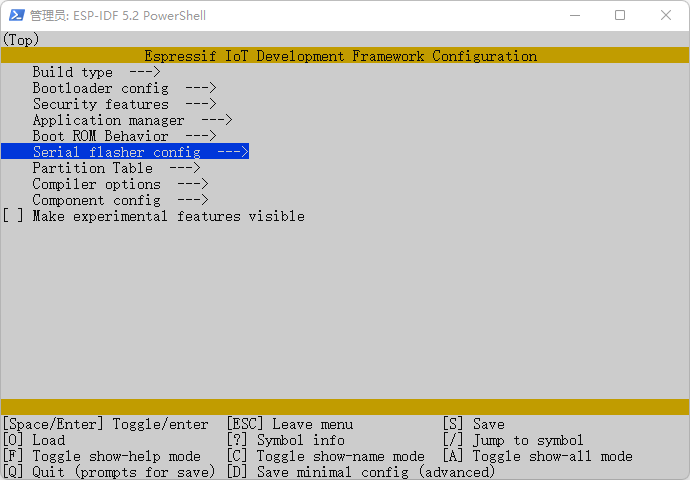
选择ESP32-S3-WROOM-1 N6R8的相应配置参数
选择"Serial flasher config"的Flash size为16 MB
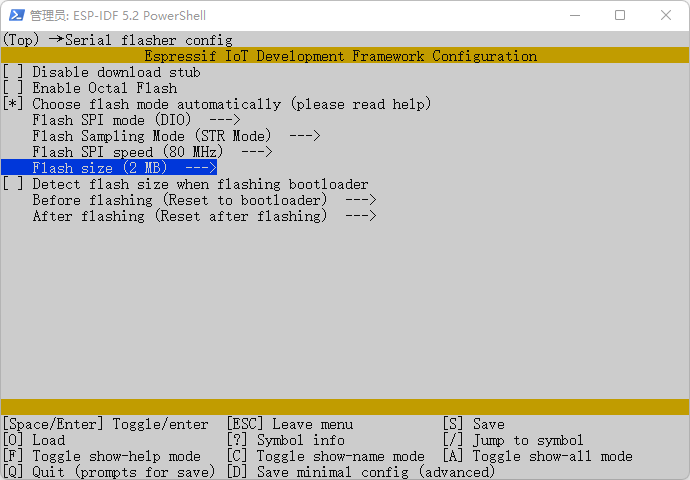
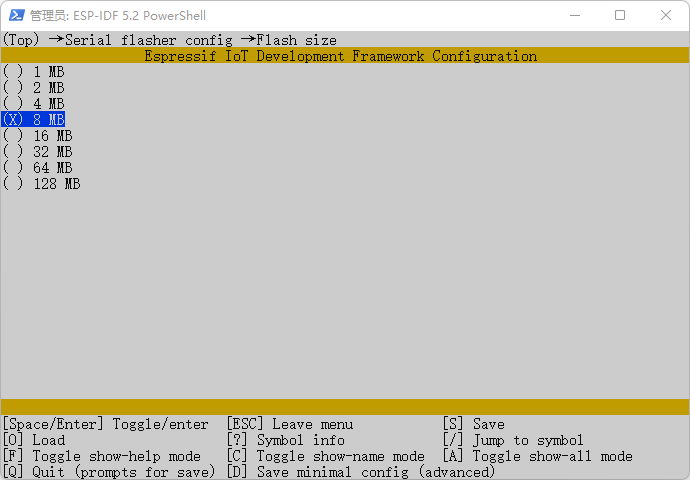
选择"ESP PSRAM"的Flash size为8 MB
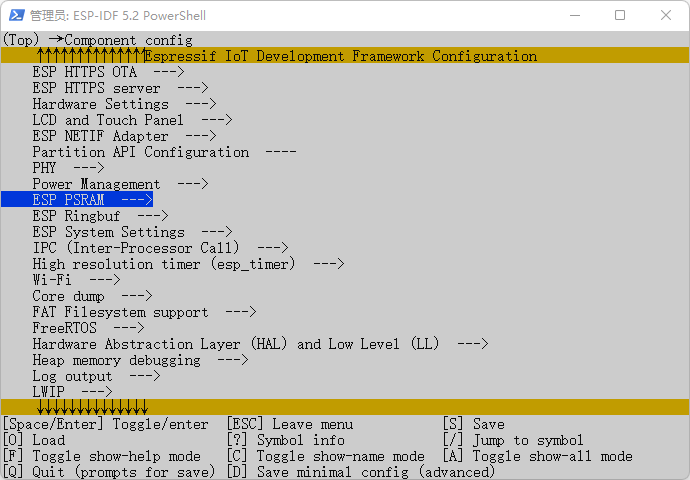
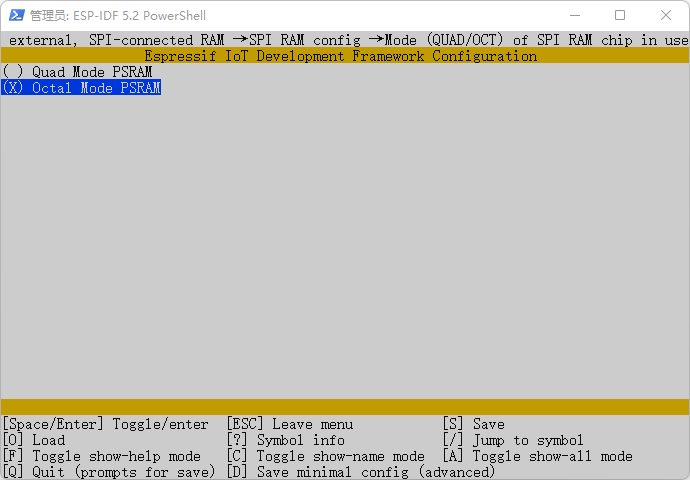
选择“Component config”的“ESP PSRAM”
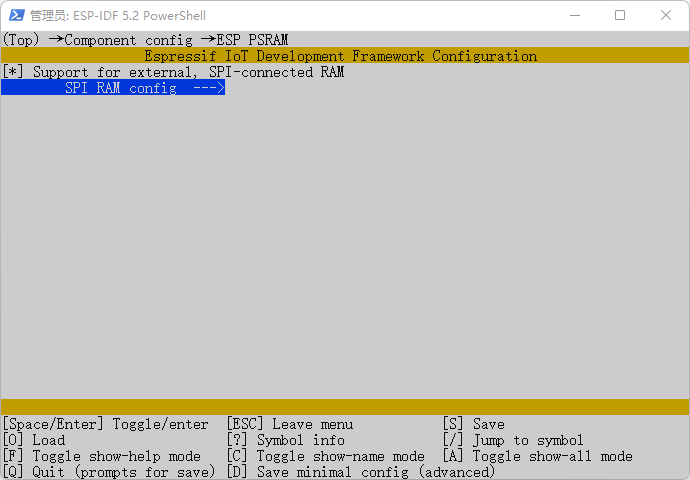
Mode (QUAD/OCT) of SPI RAM chip in use (Octal Mode PSRAM)
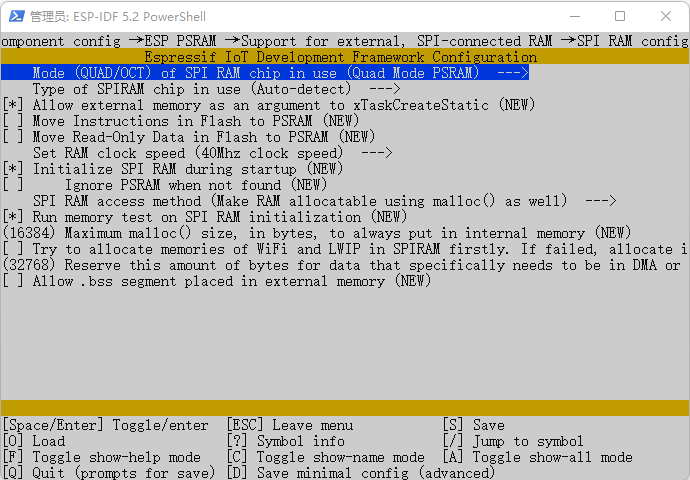
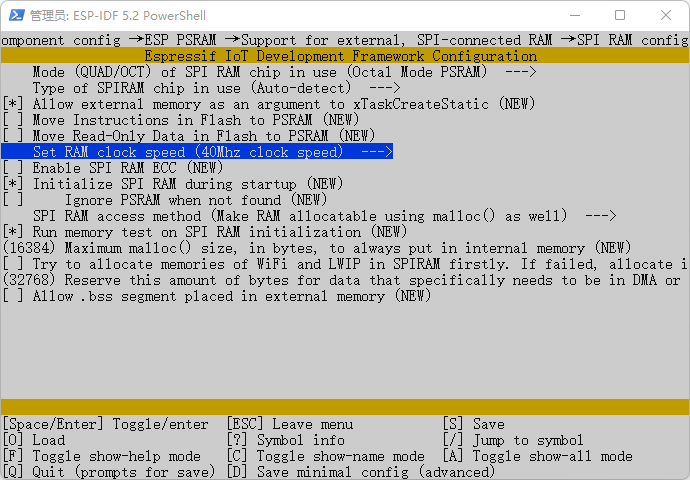
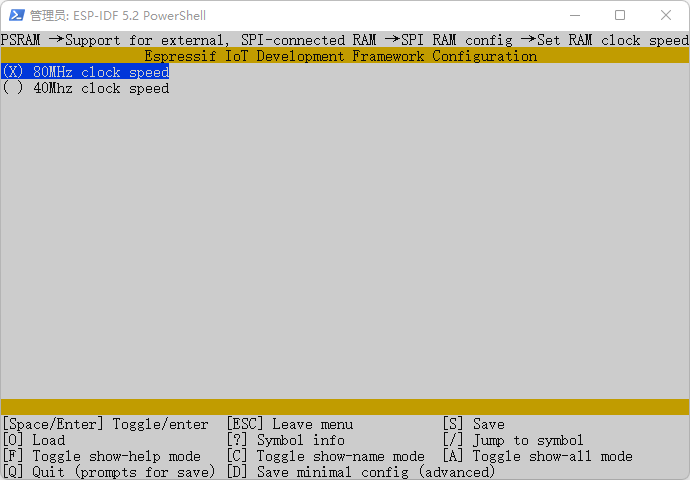
Set RAM clock speed (80Mhz clock speed)
CPU frequency (240 MHz)
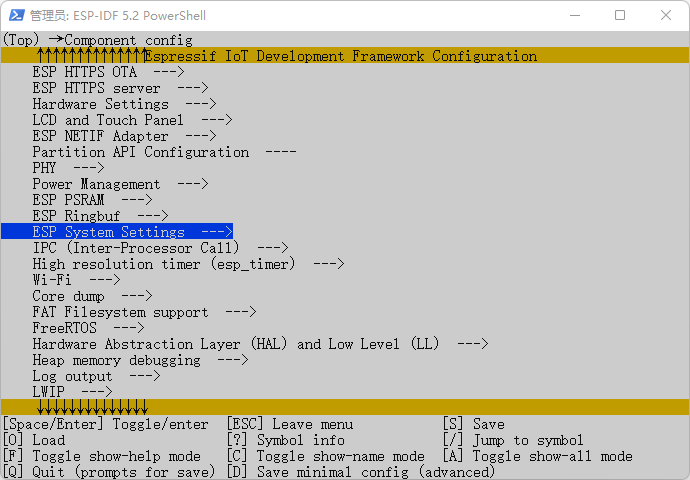
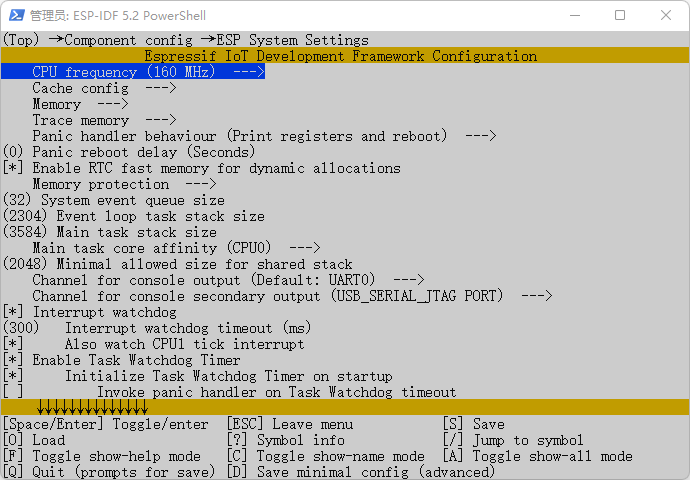
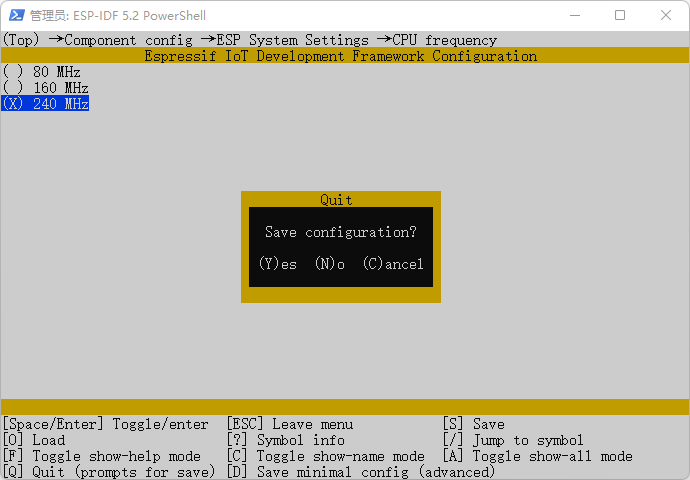
设置完成后 SHIFT+Q保存退出。
编译工程
请使用以下命令,编译烧录工程:
idf.py build运行以上命令可以编译应用程序和所有 ESP-IDF 组件,接着生成引导加载程序、分区表和应用程序二进制文件。
Executing action: all (aliases: build)
Running ninja in directory /home/weston/esp/hello_world/build
Executing "ninja all"...
[0/1] Re-running CMake...
-- git rev-parse returned 'fatal: not a git repository (or any of the parent directories): .git'
-- Could not use 'git describe' to determine PROJECT_VER.
-- Building ESP-IDF components for target esp32s3
-- Project sdkconfig file /home/weston/esp/hello_world/sdkconfig
-- Compiler supported targets: xtensa-esp-elf
-- App "hello_world" version: 1

... (more lines of build system output)

[966/967] Generating binary image from built executable
esptool.py v4.7.0
Creating esp32s3 image...
Merged 2 ELF sections
Successfully created esp32s3 image.
Generated /home/weston/esp/hello_world/build/hello_world.bin
[967/967] cd /home/weston/esp/hello_world/build/esp-idf/esptool_py ...tition-table.bin /home/weston/esp/hello_world/build/hello_world.binhello_world.bin binary size 0x3ac80 bytes. Smallest app partition is 0x100000 bytes. 0xc5380 bytes (77%) free.

Project build complete. To flash, run:
 idf.py flash
or
 idf.py -p PORT flash
or
 python -m esptool --chip esp32s3 -b 460800 --before default_reset --after hard_reset write_flash --flash_mode dio --flash_size 16MB --flash_freq 80m 0x0 build/bootloader/bootloader.bin 0x8000 build/partition_table/partition-table.bin 0x10000 build/hello_world.bin
or from the "/home/weston/esp/hello_world/build" directory
 python -m esptool --chip esp32s3 -b 460800 --before default_reset --after hard_reset write_flash "@flash_args"
如果一切正常,编译完成后将生成 .bin 文件。
烧录到设备
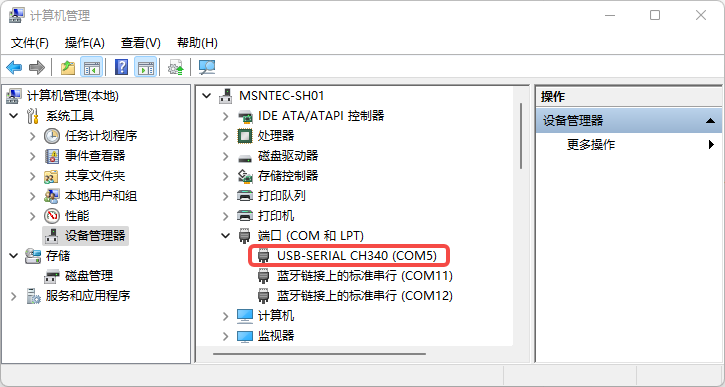
请运行以下命令,将刚刚生成的二进制文件烧录至 ESP32-S3 开发板:
idf.py -p COM5 flashCOM5为 ESP32-S3 开发板的ubuntu下串口名称。如果 PORT 未经定义,idf.py 将尝试使用可用的串口自动连接。
常规操作
在烧录过程中,会看到类似如下的输出日志:
$ idf.py -p COM5 flash
或者
$ idf.py flash

Executing action: flash
Serial port /dev/ttyUSB0
Connecting....
Detecting chip type... ESP32-S3
Running ninja in directory /home/weston/esp/hello_world/build
Executing "ninja flash"...
[1/5] cd /home/weston/esp/hello_world/build/esp-idf/esptool_py && /...tition-table.bin /home/weston/esp/hello_world/build/hello_world.binhello_world.bin binary size 0x3ac80 bytes. Smallest app partition is 0x100000 bytes. 0xc5380 bytes (77%) free.
[1/1] cd /home/weston/esp/hello_world/build/bootloader/esp-idf/espt...er 0x0 /home/weston/esp/hello_world/build/bootloader/bootloader.binBootloader binary size 0x5250 bytes. 0x2db0 bytes (36%) free.
[2/3] cd /home/weston/esp/esp-idf/components/esptool_py && /usr/bin...home/weston/esp/esp-idf/components/esptool_py/run_serial_tool.cmakeesptool.py --chip esp32s3 -p /dev/ttyUSB0 -b 460800 --before=default_reset --after=hard_reset write_flash --flash_mode dio --flash_freq 80m --flash_size 16MB 0x0 bootloader/bootloader.bin 0x10000 hello_world.bin 0x8000 partition_table/partition-table.bin
esptool.py v4.7.0
Serial port /dev/ttyUSB0
Connecting....
Chip is ESP32-S3 (QFN56) (revision v0.1)
Features: WiFi, BLE, Embedded PSRAM 8MB (AP_3v3)
Crystal is 40MHz
MAC: 7c:df:a1:fc:70:c0
Uploading stub...
Running stub...
Stub running...
Changing baud rate to 460800
Changed.
Configuring flash size...
Flash will be erased from 0x00000000 to 0x00005fff...
Flash will be erased from 0x00010000 to 0x0004afff...
Flash will be erased from 0x00008000 to 0x00008fff...
Compressed 21072 bytes to 13055...
Writing at 0x00000000... (100 %)
Wrote 21072 bytes (13055 compressed) at 0x00000000 in 0.8 seconds (effective 207.2 kbit/s)...
Hash of data verified.
Compressed 240768 bytes to 128045...
Writing at 0x00045456... (100 %)
Wrote 240768 bytes (128045 compressed) at 0x00010000 in 5.0 seconds (effective 388.9 kbit/s)...
Hash of data verified.
Compressed 3072 bytes to 103...
Writing at 0x00008000... (100 %)
Wrote 3072 bytes (103 compressed) at 0x00008000 in 0.1 seconds (effective 439.1 kbit/s)...
Hash of data verified.

Leaving...
Hard resetting via RTS pin...
Done
如果一切顺利,烧录完成后,开发板将会复位,应用程序 "hello_world" 开始运行。
监视输出
可以使用 idf.py -p PORT monitor 命令,监视 “hello_world” 工程的运行情况。注意,不要忘记将 PORT 替换为自己的串口名称。
运行该命令后,IDF 监视器 应用程序将启动::
$ idf.py -p COM5 monitor
或者
$ idf.py monitor

Executing action: monitor
Running idf_monitor in directory /home/weston/esp/hello_world
Executing "/home/weston/.espressif/python_env/idf5.2_py3.8_env/bin/python /home/weston/esp/esp-idf/tools/idf_monitor.py -p /dev/ttyUSB0 -b 115200 --toolchain-prefix xtensa-esp32s3-elf- --target esp32s3 --revision 0 /home/weston/esp/hello_world/build/hello_world.elf -m '/home/weston/.espressif/python_env/idf5.2_py3.8_env/bin/python' '/home/weston/esp/esp-idf/tools/idf.py' '-p' '/dev/ttyUSB0'"...
--- esp-idf-monitor 1.4.0 on /dev/ttyUSB0 115200 ---
--- Quit: Ctrl+] | Menu: Ctrl+T | Help: Ctrl+T followed by Ctrl+H ---
ESP-ROM:esp32s3-20210327
Build:Mar 27 2021
rst:0x1 (POWERON),boot:0x2a (SPI_FAST_FLASH_BOOT)
SPIWP:0xee
mode:DIO, clock div:1
load:0x3fce3810,len:0x178c
load:0x403c9700,len:0x4
load:0x403c9704,len:0xcbc
load:0x403cc700,len:0x2d9c
entry 0x403c9914
I (27) boot: ESP-IDF v5.2.2 2nd stage bootloader
I (27) boot: compile time Jul 20 2024 11:49:59
I (27) boot: Multicore bootloader
I (30) boot: chip revision: v0.1
I (34) boot.esp32s3: Boot SPI Speed : 80MHz
I (39) boot.esp32s3: SPI Mode       : DIO
I (43) boot.esp32s3: SPI Flash Size : 8MB
I (48) boot: Enabling RNG early entropy source...
I (53) boot: Partition Table:
I (57) boot: ## Label            Usage          Type ST Offset   Length
I (64) boot:  0 nvs              WiFi data        01 02 00009000 00006000
I (72) boot:  1 phy_init         RF data          01 01 0000f000 00001000
I (79) boot:  2 factory          factory app      00 00 00010000 00100000
I (87) boot: End of partition table
I (91) esp_image: segment 0: paddr=00010020 vaddr=3c020020 size=0b4d8h ( 46296) map
I (108) esp_image: segment 1: paddr=0001b500 vaddr=3fc93c00 size=02dc4h ( 11716) load
I (110) esp_image: segment 2: paddr=0001e2cc vaddr=40374000 size=01d4ch (  7500) load
I (118) esp_image: segment 3: paddr=00020020 vaddr=42000020 size=1ce70h (118384) map
I (146) esp_image: segment 4: paddr=0003ce98 vaddr=40375d4c size=0ddc0h ( 56768) load
I (165) boot: Loaded app from partition at offset 0x10000
I (165) boot: Disabling RNG early entropy source...
I (177) cpu_start: Multicore app
I (177) octal_psram: ECC is enabled
I (177) octal_psram: vendor id    : 0x0d (AP)
I (178) octal_psram: dev id       : 0x02 (generation 3)
I (184) octal_psram: density      : 0x03 (64 Mbit)
I (190) octal_psram: good-die     : 0x01 (Pass)
I (195) octal_psram: Latency      : 0x01 (Fixed)
I (200) octal_psram: VCC          : 0x01 (3V)
I (205) octal_psram: SRF          : 0x01 (Fast Refresh)
I (211) octal_psram: BurstType    : 0x00 ( Wrap)
I (217) octal_psram: BurstLen     : 0x03 (1024 Byte)
I (222) octal_psram: Readlatency  : 0x02 (10 cycles@Fixed)
I (228) octal_psram: DriveStrength: 0x00 (1/1)
I (234) MSPI Timing: PSRAM timing tuning index: 6
I (239) esp_psram: Found 8MB PSRAM device
I (244) esp_psram: Speed: 80MHz
I (714) esp_psram: SPI SRAM memory test OK
I (724) cpu_start: Pro cpu start user code
I (724) cpu_start: cpu freq: 240000000 Hz
I (724) cpu_start: Application information:
I (727) cpu_start: Project name:     hello_world
I (733) cpu_start: App version:      1
I (737) cpu_start: Compile time:     Jul 20 2024 11:49:55
I (743) cpu_start: ELF file SHA256:  2507c4390...
I (749) cpu_start: ESP-IDF:          v5.2.2
I (753) cpu_start: Min chip rev:     v0.0
I (758) cpu_start: Max chip rev:     v0.99
I (763) cpu_start: Chip rev:         v0.1
I (768) heap_init: Initializing. RAM available for dynamic allocation:
I (775) heap_init: At 3FC97308 len 00052408 (329 KiB): RAM
I (781) heap_init: At 3FCE9710 len 00005724 (21 KiB): RAM
I (787) heap_init: At 3FCF0000 len 00008000 (32 KiB): DRAM
I (793) heap_init: At 600FE010 len 00001FD8 (7 KiB): RTCRAM
I (800) esp_psram: Adding pool of 7680K of PSRAM memory to heap allocator
I (808) spi_flash: detected chip: generic
I (812) spi_flash: flash io: dio
I (816) sleep: Configure to isolate all GPIO pins in sleep state
I (823) sleep: Enable automatic switching of GPIO sleep configuration
I (830) main_task: Started on CPU0
I (840) esp_psram: Reserving pool of 32K of internal memory for DMA/internal allocations
I (840) main_task: Calling app_main()
Hello world!
This is esp32s3 chip with 2 CPU core(s), WiFi/BLE, silicon revision v0.1, 8MB external flash
Minimum free heap size: 8207072 bytes
Restarting in 10 seconds...
Restarting in 9 seconds...
Restarting in 8 seconds...
Restarting in 7 seconds...
Restarting in 6 seconds...
Restarting in 5 seconds...
Restarting in 4 seconds...
Restarting in 3 seconds...
Restarting in 2 seconds...
Restarting in 1 seconds...
Restarting in 0 seconds...
使用快捷键
Ctrl+],可退出 ESP-IDF 监视器。
也可以运行以下命令,一次性执行构建、烧录和监视过程:
idf.py -p <PORT> flash monitor
智能硬件社区聚焦AI智能硬件技术生态,汇聚嵌入式AI、物联网硬件开发者,打造交流分享平台,同步全国赛事资讯、开展 OPC 核心人才招募,助力技术落地与开发者成长。
更多推荐


 10
10 0
0- 0


 已为社区贡献2条内容

所有评论(0)