关于PC端和uni-app,获取图片验证码的问题
本文介绍了处理图片验证码的两种实现方式。在PC端,通过axios请求设置responseType为'blob'获取二进制数据,使用URL.createObjectURL()生成图片URL;在uni-app中,通过uni.request设置responseType为'arraybuffer'获取二进制数据,再转换为base64格式显示。两种方式都需要在请求时指定正确的响应类型,并提供了完整的代码示例
·
1.获取图片验证码,后端返回两种方案, 一种是后端返回base64,另一种是返回图片URL
2.这里讲是对第二种的处理
3.
一、pc端
export function getImgCodeAPI(data) {
  return axios({
    url: `/verify?${data}`,
    method: "post",
    data,
    responseType: 'blob' // 重要:指定响应类型为二进制数据
  });
}
// 获取图片验证码
const getImgCode = async () => {
ruleForm.captcha = '' // 清空验证码
// 获取当前时间戳
const timestamp = Math.floor(Date.now() / 1000)
try {
const res = await getImgCodeAPI(timestamp) // 获取图片验证码(接口要携带responseType: 'blob' 转成二进制数据)
/**
* URL.createObjectURL()方法会生成一个唯一的blob URL,
用于在浏览器中直接访问二进制数据(如图片、文件等),常用于预览上传的文件或显示动态生成的媒体内容。
*/
const imageUrl = URL.createObjectURL(res)
urlTime.value = imageUrl
} catch (error) {
console.log(error)
}
}
<img style="height: 100%;" :src="urlTime" alt="">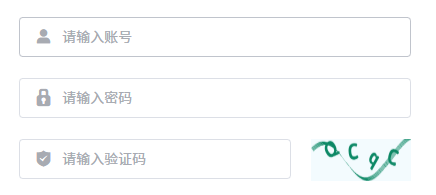
二、uni-app(uni.request在默认情况下,如果返回的是非JSON数据,比如图片,可能需要正确设置responseType为“arraybuffer”, 拿到二进制数据后再转换成base64)
export const getImgCodeAPI = (data: any) => {
  return http({
    url: `/verify?${data}`,
    method: 'POST',
    data,
    responseType: 'arraybuffer', // 重要:指定响应类型为二进制数据, 拿到二进制数据后再转换成base64,是uni-app里处理图片流的常见做法
  })
}
// 获取图片验证码
const getImgCode = async () => {
formData.captcha = '' // 清空上一个图片验证码
// 获取当前时间戳
const timestamp = Math.floor(Date.now() / 1000)
try {
const res = await getImgCodeAPI(timestamp) // 获取图片验证码(接口要携带responseType: 'blob' 转成二进制数据)
// 将 ArrayBuffer 转换为 Base64
const base64 = uni.arrayBufferToBase64(res)
imageUrl.value = `data:image/png;base64,${base64}`
// 根据实际情况设置MIME类型,常见为 image/jpeg 或 image/png
} catch (error) {
uni.showToast({
title: '图片验证码获取失败,请重试',
icon: 'none',
duration: 2000,
})
}
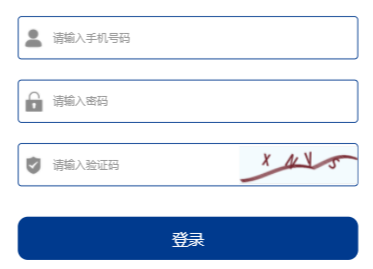
}
三、解决uni-app请求头的Set-Cookie不一致,导致验证码错误问题
1.uni-app小程序不会自动处理Set-Cookie,需要手动存储并在请求头中添加,包保证登录请求的cookie,获取验证码的set-cookie,一致
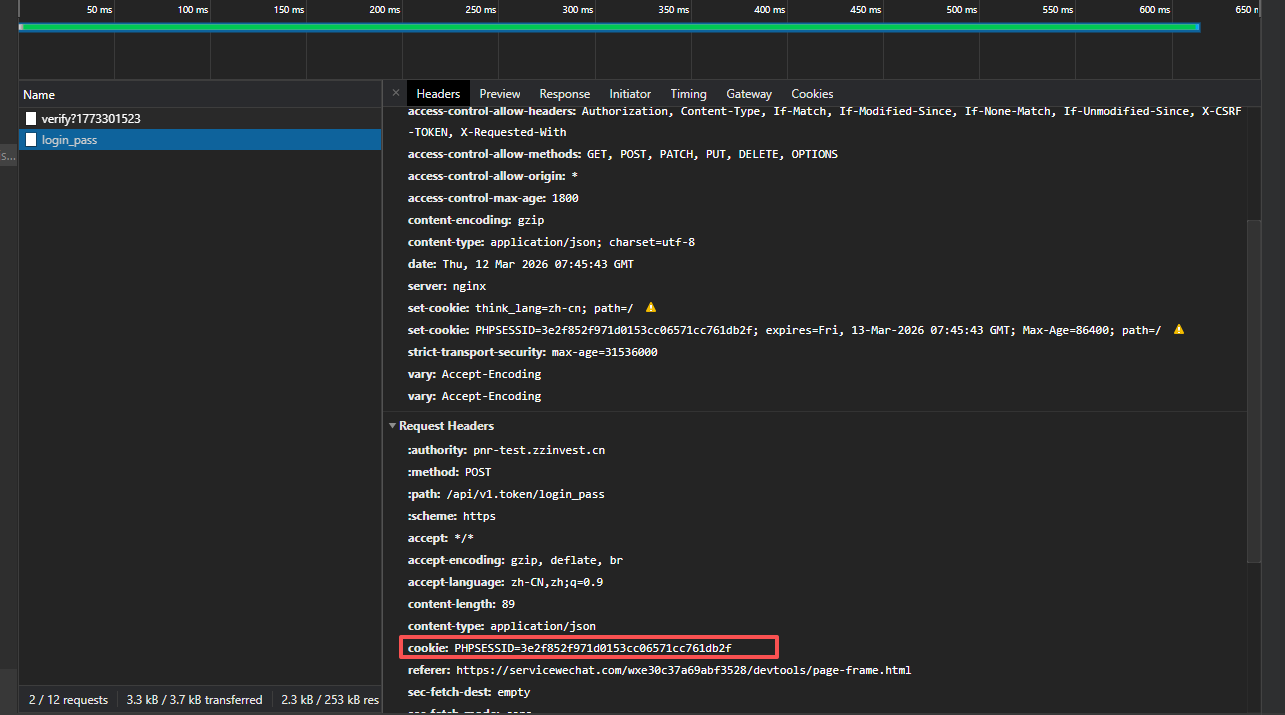
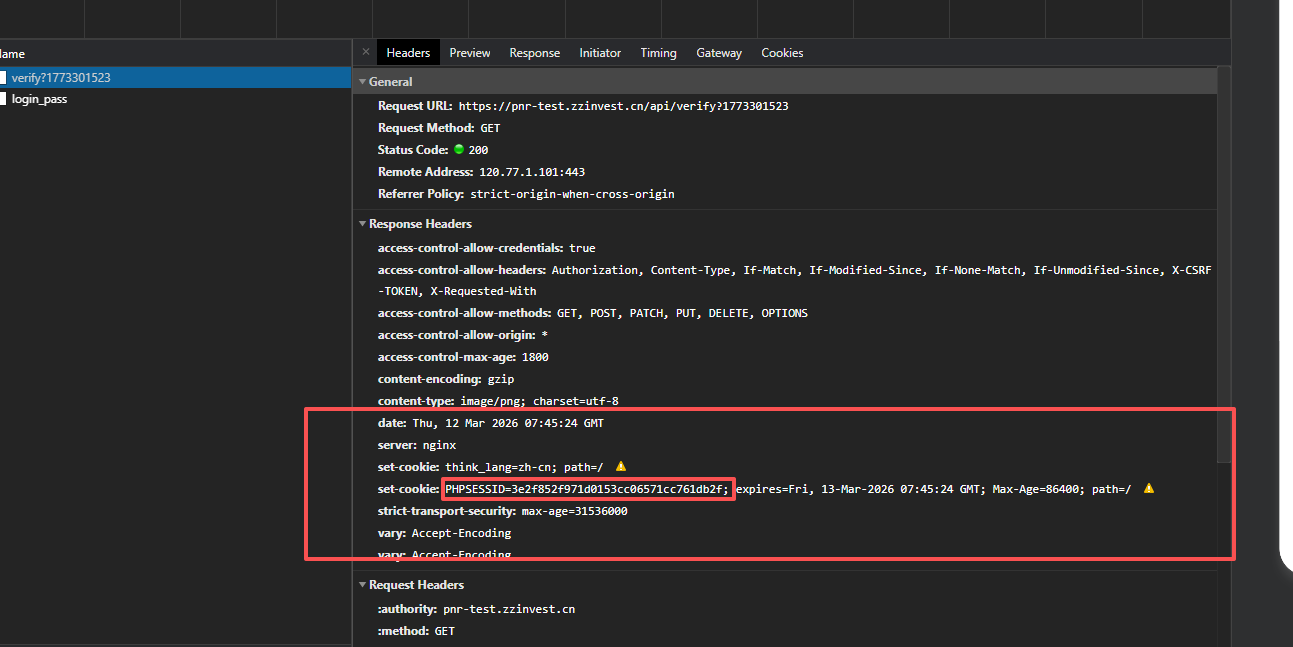
2.接口中设置withCredentials: true,这通常用于跨域请求携带Cookie
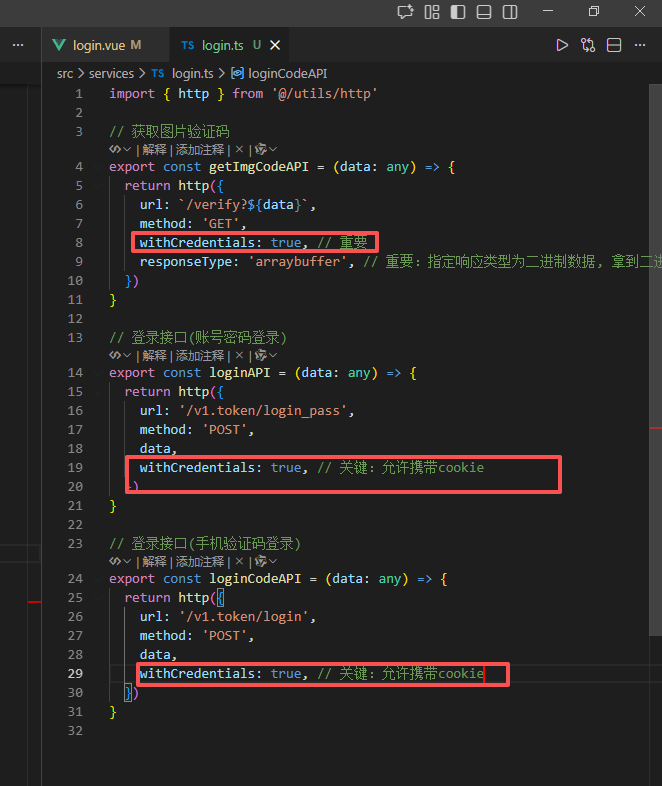
解决方案思路
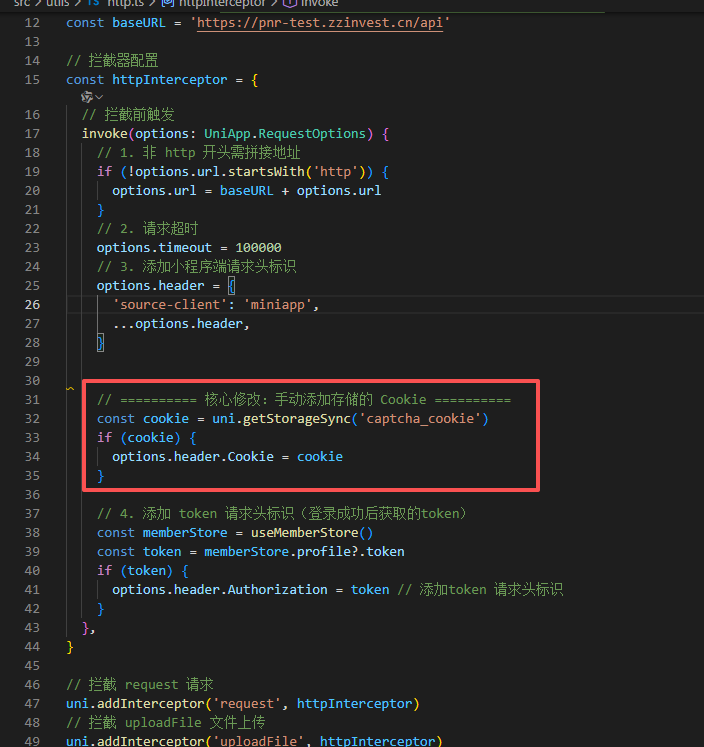
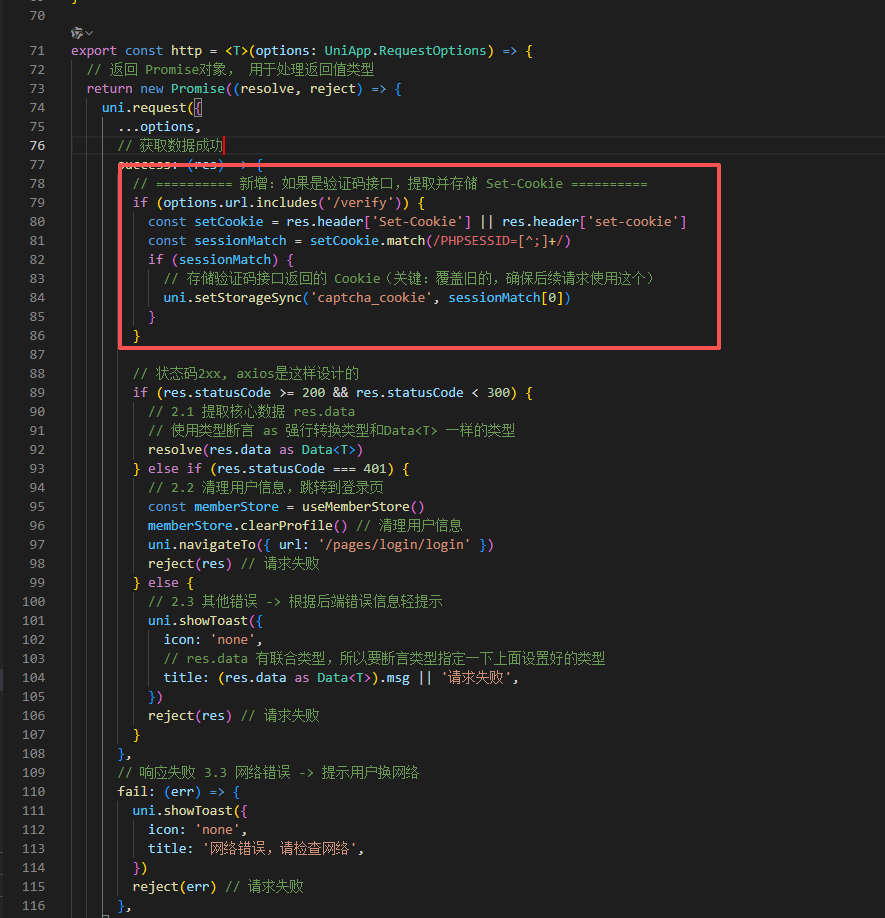
- 手动提取并存储验证码接口的 Set-Cookie:在获取验证码的请求成功后,从响应头中提取
Set-Cookie并保存到本地(如uni.setStorageSync)。 - 全局拦截所有请求,手动携带存储的 Cookie:修改请求拦截器,在每次请求时将存储的
Cookie手动添加到请求头中,确保所有请求使用同一个cookie。
/**
 * TCDD:
 * 1.非http开头需拼接地址
 * 2.请求超时
 * 3.添加小程序端请求头标识
 * 4.添加token 请求头标识
 */
import { useMemberStore } from '@/stores' // stores里的useMemberStore

// 基础地址
// const baseURL = 'https://pcapi-xiaotuxian-front-devtest.itheima.net'
const baseURL = 'https://pnr-test.zzinvest.cn/api'

// 拦截器配置
const httpInterceptor = {
  // 拦截前触发
  invoke(options: UniApp.RequestOptions) {
    // 1. 非 http 开头需拼接地址
    if (!options.url.startsWith('http')) {
      options.url = baseURL + options.url
    }
    // 2. 请求超时
    options.timeout = 100000
    // 3. 添加小程序端请求头标识
    options.header = {
      'source-client': 'miniapp',
      ...options.header,
    }
    console.log('🚀 ~ options.header:', options.header)

    // ========== 核心修改:手动添加存储的 Cookie ==========
    const cookie = uni.getStorageSync('captcha_cookie')
    if (cookie) {
      options.header.Cookie = cookie
    }

    // 4. 添加 token 请求头标识(登录成功后获取的token)
    const memberStore = useMemberStore()
    const token = memberStore.profile?.token
    if (token) {
      options.header.Authorization = token // 添加token 请求头标识
    }
  },
}

// 拦截 request 请求
uni.addInterceptor('request', httpInterceptor)
// 拦截 uploadFile 文件上传
uni.addInterceptor('uploadFile', httpInterceptor)

/**
 * 请求函数
 * @param UniApp.RequestOptions
 * @returns Promise
 * 1. 返回Promise对象,用于处理返回值类型1.
 * 2. 获取数据成功
 *  2.1提取核心数据 res.data
 *  2.2添加类型,支持泛型
 * 3. 获取数据失败
 *  3.1 401错误 -> 清理用户信息,跳转到登录页
 *  3.2 其他错误 -> 根据后端错误信息轻提示
 *  3.3 网络错误 -> 提示用户换网络
 */

// 2.2 添加类型,支持泛型(决定了,返回值类型)
interface Data<T> {
  code: number
  msg: string
  result: T
}

export const http = <T>(options: UniApp.RequestOptions) => {
  // 返回 Promise对象, 用于处理返回值类型
  return new Promise((resolve, reject) => {
    uni.request({
      ...options,
      // 获取数据成功
      success: (res) => {
        // ========== 新增:如果是验证码接口,提取并存储 Set-Cookie ==========
        if (options.url.includes('/verify')) {
          const setCookie = res.header['Set-Cookie'] || res.header['set-cookie']
          const sessionMatch = setCookie.match(/PHPSESSID=[^;]+/)
          if (sessionMatch) {
            console.log('🚀 ~ http ~ sessionMatch:', sessionMatch[0])
            // 存储验证码接口返回的 Cookie(关键:覆盖旧的,确保后续请求使用这个)
            uni.setStorageSync('captcha_cookie', sessionMatch[0])
          }
        }

        // 状态码2xx, axios是这样设计的
        if (res.statusCode >= 200 && res.statusCode < 300) {
          // 2.1 提取核心数据 res.data
          // 使用类型断言 as 强行转换类型和Data<T> 一样的类型
          resolve(res.data as Data<T>)
        } else if (res.statusCode === 401) {
          // 2.2 清理用户信息,跳转到登录页
          const memberStore = useMemberStore()
          memberStore.clearProfile() // 清理用户信息
          uni.navigateTo({ url: '/pages/login/login' })
          reject(res) // 请求失败
        } else {
          // 2.3 其他错误 -> 根据后端错误信息轻提示
          uni.showToast({
            icon: 'none',
            // res.data 有联合类型,所以要断言类型指定一下上面设置好的类型
            title: (res.data as Data<T>).msg || '请求失败',
          })
          reject(res) // 请求失败
        }
      },
      // 响应失败 3.3 网络错误 -> 提示用户换网络
      fail: (err) => {
        uni.showToast({
          icon: 'none',
          title: '网络错误,请检查网络',
        })
        reject(err) // 请求失败
      },
    })
  })
}
核心修改:手动添加存储的 Cookie
新增:如果是验证码接口,提取并存储 Set-Cookie
最终结果登录成功


智能硬件社区聚焦AI智能硬件技术生态,汇聚嵌入式AI、物联网硬件开发者,打造交流分享平台,同步全国赛事资讯、开展 OPC 核心人才招募,助力技术落地与开发者成长。
更多推荐



 0
0 0
0- 0


 已为社区贡献1条内容

所有评论(0)