esp32获取网络时间(基于esp-idf 5.2.3)
收到sntp服务器回应后立即更新时间、使用sdjtime函数平滑校准、自定义校准(需要重写sntp_sync_time()函数,在该函数中写自定义校准代码)对于esp32我们可以在连接wifi后获取网络时间,首先我们需要让开发板连接wifi,再通过sntp获取网路时间。这里要配置的话,我查看文档发现写的是在Example Connection Configuration菜单下配置,而在我这个。索性
对于esp32我们可以在连接wifi后获取网络时间,首先我们需要让开发板连接wifi,再通过sntp获取网路时间。这里开发板设置为STA模式连接手机热点
1.连接wifi代码 simple_wifi_sta.c
#include "simple_wifi_sta.h"

#define MY_WIFI_SSID    "your wifi_name"
#define MY_WIFI_PWD     "your wifi_password"

static const char* TAG = "wifi";
uint16_t wifi_ip_addr[4];

uint8_t wifi_connect_flag = 0;

// 事件处理回调
void event_handler_cb(void* event_handler_arg, esp_event_base_t event_base, int32_t event_id, void* event_data)
{
    if(event_base == WIFI_EVENT)
    {
        switch (event_id)
        {
        case WIFI_EVENT_STA_START:     //WIFI以STA模式启动后触发此事件
            esp_wifi_connect();
            break;

        case WIFI_EVENT_STA_CONNECTED:
            ESP_LOGI(TAG, "conneted success!");
            break;

        case WIFI_EVENT_STA_DISCONNECTED:
            wifi_connect_flag = 0;
            esp_wifi_connect();
            ESP_LOGI(TAG, "retry to connect...");
            break;

        default:
            break;
        }
    }
    if(event_base == IP_EVENT)
    {
        switch (event_id)
        {
        case IP_EVENT_STA_GOT_IP:
            wifi_connect_flag = 1;
            ip_event_got_ip_t* ev = (ip_event_got_ip_t*)event_data;
            wifi_ip_addr[0] = esp_ip4_addr1_16(&ev->ip_info.ip);
            wifi_ip_addr[1] = esp_ip4_addr2_16(&ev->ip_info.ip);
            wifi_ip_addr[2] = esp_ip4_addr3_16(&ev->ip_info.ip);
            wifi_ip_addr[3] = esp_ip4_addr4_16(&ev->ip_info.ip);
            ESP_LOGI(TAG, "get ip: %d.%d.%d.%d", wifi_ip_addr[0], wifi_ip_addr[1], wifi_ip_addr[2], wifi_ip_addr[3]);
            break;

        default:
            break;
        }
    }
}

esp_err_t wifi_sta_init(void)
{
    // 初始化tcpip协议栈
    ESP_ERROR_CHECK(esp_netif_init());
    //创建一个默认系统事件调度循环,之后可以注册回调函数来处理系统的一些事件
    ESP_ERROR_CHECK(esp_event_loop_create_default());
    //使用默认配置创建STA对象
    esp_netif_create_default_wifi_sta();

    // 初始化wifi
    wifi_init_config_t cfg = WIFI_INIT_CONFIG_DEFAULT();
    ESP_ERROR_CHECK(esp_wifi_init(&cfg));

    // 注册WIFI以及IP事件
    ESP_ERROR_CHECK(esp_event_handler_register(WIFI_EVENT, ESP_EVENT_ANY_ID, &event_handler_cb, NULL));
    ESP_ERROR_CHECK(esp_event_handler_register(IP_EVENT, IP_EVENT_STA_GOT_IP, &event_handler_cb, NULL));

    // wifi配置
    wifi_config_t wifi_cfg =
    {
        .sta =
        {
            .ssid = MY_WIFI_SSID,
            .password = MY_WIFI_PWD,
            .threshold.authmode = WIFI_AUTH_WPA2_PSK,      // 加密方式

            .pmf_cfg =
            {
                .capable = true,        // 启用保护管理帧
                .required = false       // 禁止仅与保护管理帧设备通信
            }
        }
    };
    esp_wifi_set_mode(WIFI_MODE_STA);
    esp_wifi_set_config(WIFI_IF_STA, &wifi_cfg);
    // 启动wifi
    esp_wifi_start();

    return ESP_OK;
}


uint8_t get_wifi_status(void)
{
    return wifi_connect_flag;
}
simple_wifi_sta.h
#ifndef __SIMPLE_WIFI_STA_H
#define __SIMPLE_WIFI_STA_H

#include <stdio.h>
#include "freertos/FreeRTOS.h"
#include "freertos/task.h"
#include "esp_system.h"
#include "nvs_flash.h"
#include "nvs.h"
#include "esp_wifi.h"
#include "esp_event.h"
#include "esp_err.h"
#include "esp_log.h"

esp_err_t wifi_sta_init(void);
uint8_t get_wifi_status(void);

#endif这里当wifi连接成功后,连接状态标志位通过get_wifi_status函数返回给main函数
2. 获取网络时间
由于这里是通过DHCP动态获取服务器IP,首先需要再idf.menuconfig里配置sntp, 这里我们直接看官方给的文档
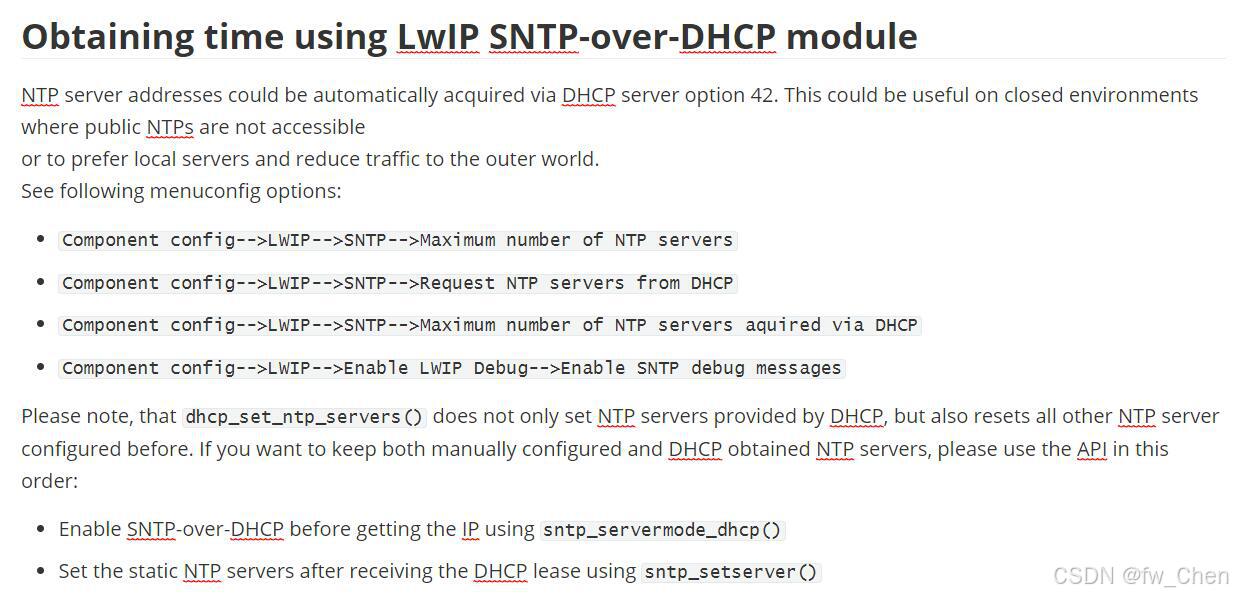
这里再终端中输入idf.menuconfig,在Component config-->LWIP-->SNTP下配置,如上图所示的3个配置项。
接下来是核心代码Ntp_time.c
#include <stdio.h>
#include "Ntp_time.h"
#include "freertos/FreeRTOS.h"
#include "freertos/task.h"
#include <string.h>
#include <time.h>
#include <sys/time.h>
#include "esp_system.h"
#include "esp_event.h"
#include "esp_log.h"
#include "esp_attr.h"
#include "esp_sleep.h"
#include "nvs_flash.h"
#include "esp_netif_sntp.h"
#include "esp_netif.h"
#include "lwip/ip_addr.h"
#include "esp_sntp.h"
#include "esp_mac.h"

static const char* TAG = "NTP";

#ifndef INET6_ADDRSTRLEN
#define INET6_ADDRSTRLEN 48
#endif

/* Variable holding number of times ESP32 restarted since first boot.
 * It is placed into RTC memory using RTC_DATA_ATTR and
 * maintains its value when ESP32 wakes from deep sleep.
 */
RTC_DATA_ATTR static int boot_count = 0;

static void obtain_time(void);

#ifdef CONFIG_SNTP_TIME_SYNC_METHOD_CUSTOM
void sntp_sync_time(struct timeval *tv)
{
   settimeofday(tv, NULL);
   ESP_LOGI(TAG, "Time is synchronized from custom code");
   sntp_set_sync_status(SNTP_SYNC_STATUS_COMPLETED);
}
#endif

void time_sync_notification_cb(struct timeval *tv)
{
    ESP_LOGI(TAG, "Notification of a time synchronization event");
}

void sntp_task(void* param)
{
    ++boot_count;
    ESP_LOGI(TAG, "Boot count: %d", boot_count);

    time_t now;
    struct tm timeinfo;

    time(&now);
    localtime_r(&now, &timeinfo);
    // Is time set? If not, tm_year will be (1970 - 1900).
    if (timeinfo.tm_year < (2016 - 1900)) {
    ESP_LOGI(TAG, "Time is not set yet. Connecting to WiFi and getting time over NTP.");
        obtain_time();
        // update 'now' variable with current time
        time(&now);
    }

#ifdef CONFIG_SNTP_TIME_SYNC_METHOD_SMOOTH
    else {
        // add 500 ms error to the current system time.
        // Only to demonstrate a work of adjusting method!
        {
            ESP_LOGI(TAG, "Add a error for test adjtime");
            struct timeval tv_now;
            gettimeofday(&tv_now, NULL);
            int64_t cpu_time = (int64_t)tv_now.tv_sec * 1000000L + (int64_t)tv_now.tv_usec;
            int64_t error_time = cpu_time + 500 * 1000L;
            struct timeval tv_error = { .tv_sec = error_time / 1000000L, .tv_usec = error_time % 1000000L };
            settimeofday(&tv_error, NULL);
        }

        ESP_LOGI(TAG, "Time was set, now just adjusting it. Use SMOOTH SYNC method.");
        obtain_time();
        // update 'now' variable with current time
        time(&now);
    }
#endif

    char strftime_buf[64];

    // Set timezone to China Standard Time
    setenv("TZ", "CST-8", 1);
    tzset();
    localtime_r(&now, &timeinfo);
    strftime(strftime_buf, sizeof(strftime_buf), "%c", &timeinfo);
    ESP_LOGI(TAG, "The current date/time in Shanghai is: %s", strftime_buf);

    uint8_t rest = sntp_get_sync_mode();
    printf("mode_id: %d\r\n", rest);
    if (rest == SNTP_SYNC_MODE_SMOOTH) {
        struct timeval outdelta;
        rest = sntp_get_sync_status();
        printf("sync status: %d\r\n", rest);
        while (rest == SNTP_SYNC_STATUS_IN_PROGRESS) {
            adjtime(NULL, &outdelta);
            ESP_LOGI(TAG, "Waiting for adjusting time ... outdelta = %jd sec: %li ms: %li us",
                        (intmax_t)outdelta.tv_sec,
                        outdelta.tv_usec/1000,
                        outdelta.tv_usec%1000);
            vTaskDelay(2000 / portTICK_PERIOD_MS);
        }
    }

    // const int deep_sleep_sec = 10;
    // ESP_LOGI(TAG, "Entering deep sleep for %d seconds", deep_sleep_sec);
    // esp_deep_sleep(1000000LL * deep_sleep_sec);
    vTaskDelete(NULL);
}

static void print_servers(void)
{
    ESP_LOGI(TAG, "List of configured NTP servers:");

    for (uint8_t i = 0; i < SNTP_MAX_SERVERS; ++i){
        if (esp_sntp_getservername(i)){
            ESP_LOGI(TAG, "server %d: %s", i, esp_sntp_getservername(i));
        } else {
            // we have either IPv4 or IPv6 address, let's print it
            char buff[INET6_ADDRSTRLEN];
            ip_addr_t const *ip = esp_sntp_getserver(i);
            if (ipaddr_ntoa_r(ip, buff, INET6_ADDRSTRLEN) != NULL)
                ESP_LOGI(TAG, "server %d: %s", i, buff);
        }
    }
}

static void obtain_time(void)
{
    ESP_ERROR_CHECK(esp_netif_init());

#if LWIP_DHCP_GET_NTP_SRV
    /**
     * NTP server address could be acquired via DHCP,
     * see following menuconfig options:
     * 'LWIP_DHCP_GET_NTP_SRV' - enable STNP over DHCP
     * 'LWIP_SNTP_DEBUG' - enable debugging messages
     *
     * NOTE: This call should be made BEFORE esp acquires IP address from DHCP,
     * otherwise NTP option would be rejected by default.
     */
    ESP_LOGI(TAG, "Initializing SNTP");
    esp_sntp_config_t config = ESP_NETIF_SNTP_DEFAULT_CONFIG_MULTIPLE(3, ESP_SNTP_SERVER_LIST("cn.pool.ntp.org", "time.windows.com", "ntp.sjtu.edu.cn"));

    config.start = false;                       // start SNTP service explicitly (after connecting)
    config.server_from_dhcp = true;             // accept NTP offers from DHCP server, if any (need to enable *before* connecting)
    config.renew_servers_after_new_IP = true;   // let esp-netif update configured SNTP server(s) after receiving DHCP lease
    config.index_of_first_server = 1;           // updates from server num 1, leaving server 0 (from DHCP) intact
    // configure the event on which we renew servers
#ifdef CONFIG_EXAMPLE_CONNECT_WIFI
    config.ip_event_to_renew = IP_EVENT_STA_GOT_IP;
#else
    config.ip_event_to_renew = IP_EVENT_ETH_GOT_IP;
#endif
    config.sync_cb = time_sync_notification_cb; // only if we need the notification function
    esp_netif_sntp_init(&config);

#endif /* LWIP_DHCP_GET_NTP_SRV */

#if LWIP_DHCP_GET_NTP_SRV
    ESP_LOGI(TAG, "Starting SNTP");
    esp_netif_sntp_start();
#endif

    print_servers();

    // wait for time to be set
    time_t now = 0;
    struct tm timeinfo = { 0 };
    int retry = 0;
    const int retry_count = 15;
    while (esp_netif_sntp_sync_wait(2000 / portTICK_PERIOD_MS) == ESP_ERR_TIMEOUT && ++retry < retry_count) {
        ESP_LOGI(TAG, "Waiting for system time to be set... (%d/%d)", retry, retry_count);
    }
    time(&now);
    localtime_r(&now, &timeinfo);

    esp_netif_sntp_deinit();
}
这是从官方例程中摘录下来的,这里获取时间后需要时间校准,总共分为三种校准模式:
收到sntp服务器回应后立即更新时间、使用sdjtime函数平滑校准、自定义校准(需要重写sntp_sync_time()函数,在该函数中写自定义校准代码)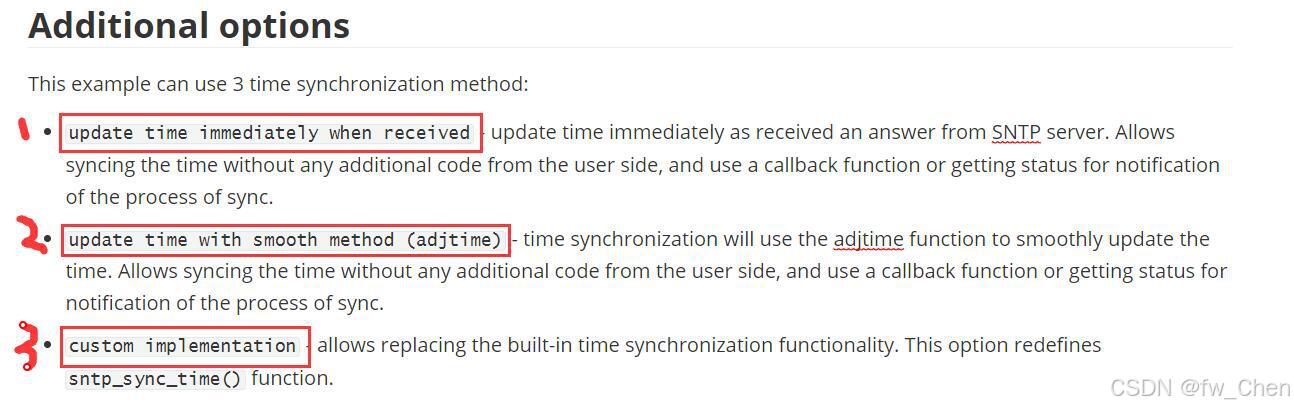
这里要配置的话,我查看文档发现写的是在Example Connection Configuration菜单下配置,而在我这个ESP-IDF-5.2.3的menuconfig中并没有发现这个选项,不知道是不是版本问题。有知道原因的朋友,可以发在评论区参考下。
索性这里我们就不配置,使用默认的校准方式1(收到sntp服务器回应后立即更新时间)。
接下来是main.c的代码
#include <stdio.h>
#include <time.h>
#include "simple_wifi_sta.h"
#include "Ntp_time.h"

void app_main(void)
{
    // nvs初始化(wifi数据存储在nvs分区中)
    nvs_flash_init();

    // wifi连接
    wifi_sta_init();

    do
    {
        vTaskDelay(1000 / portTICK_PERIOD_MS);
    } while (!get_wifi_status());

    xTaskCreatePinnedToCore(sntp_task, "sntp_task", 4096, NULL, 3, NULL, 1);

    while (1)
    {
        vTaskDelay(pdMS_TO_TICKS(1000));
    }
}
这里将sntp获取网路时间作为一个任务驱动。大功告成,接下来展示结果:


智能硬件社区聚焦AI智能硬件技术生态,汇聚嵌入式AI、物联网硬件开发者,打造交流分享平台,同步全国赛事资讯、开展 OPC 核心人才招募,助力技术落地与开发者成长。
更多推荐


 8
8 0
0- 0


 已为社区贡献5条内容

所有评论(0)