openmv vs canmv 线段查找:canmv报堆栈错误。内存2G还不够吗?K230很强,有bug不可怕
canmv k230报错了。k230开发板选配的是2G的RAM,堆栈是多少,如何处理?
·
openmv
# 线段检测例程
#
# 这个例子展示了如何在图像中查找线段。对于在图像中找到的每个线对象,
# 都会返回一个包含线条旋转的线对象。

# find_line_segments()找到有限长度的线(但是很慢)。
# Use find_line_segments()找到非无限的线(而且速度很快)。

enable_lens_corr = False # turn on for straighter lines...打开以获得更直的线条…

import sensor, image, time

sensor.reset()
sensor.set_pixformat(sensor.GRAYSCALE) # 灰度更快
sensor.set_framesize(sensor.SVGA)
sensor.skip_frames(time = 2000)
clock = time.clock()

# 所有线段都有 `x1()`, `y1()`, `x2()`, and `y2()` 方法来获得他们的终点
# 一个 `line()` 方法来获得所有上述的四个元组值,可用于 `draw_line()`.

while(True):
    clock.tick()
    img = sensor.snapshot()
    if enable_lens_corr: img.lens_corr(1.8) # for 2.8mm lens...

    # `merge_distance`控制附近行的合并。 在0(默认),没有合并。
    # 在1处,任何距离另一条线一个像素点的线都被合并...等等,
    # 因为你增加了这个值。 您可能希望合并线段,因为线段检测会产生大量
    # 的线段结果。

    # `max_theta_diff` 控制要合并的任何两线段之间的最大旋转差异量。
    # 默认设置允许15度。

    for l in img.find_line_segments(merge_distance = 0, max_theta_diff = 5):
        img.draw_line(l.line(), color = (255, 0, 0))
        # print(l)

    print("FPS %f" % clock.fps())
输出正常。
canmv
'''
实验名称:摄像头使用
实验平台:01Studio CanMV K230
说明:实现摄像头图像采集显示
'''

import time, os, sys,image

from media.sensor import * #导入sensor模块,使用摄像头相关接口
from media.display import * #导入display模块,使用display相关接口
from media.media import * #导入media模块,使用meida相关接口

sensor = Sensor() #构建摄像头对象 标配70°,可选140°
sensor.reset() #复位和初始化摄像头
sensor.set_framesize(Sensor.SVGA) #设置帧大小FHD(1920x1080),默认通道0
sensor.set_pixformat(Sensor.GRAYSCALE) #设置输出图像格式,默认通道0 RGB565

#使用IDE缓冲区输出图像,显示尺寸和sensor配置一致。
Display.init(Display.VIRT, sensor.width(), sensor.height())

MediaManager.init() #初始化media资源管理器

sensor.run() #启动sensor

clock = time.clock()
template = image.Image("/data/template.pgm")

while True:

    ################
    ## 这里编写代码 ##
    ################
    clock.tick()

    img = sensor.snapshot() #拍摄一张图

    for l in img.find_line_segments(merge_distance = 0, max_theta_diff = 5):
        img.draw_line(l.line(), color = (255, 0, 0))
    Display.show_image(img) #显示图片
    print(clock.fps()) #打印FPS
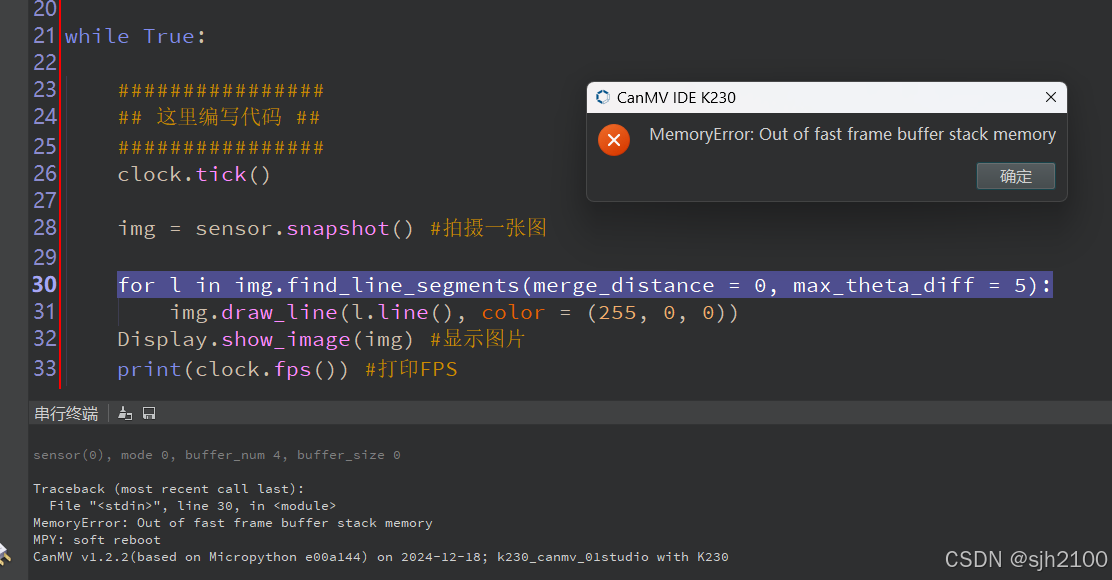
Traceback (most recent call last):
File "<stdin>", line 37, in <module>
MemoryError: Out of fast frame buffer stack memory
MPY: soft reboot
CanMV v1.2.2(based on Micropython e00a144) on 2024-12-18; k230_canmv_01studio with K230
canmv k230报错了。太奇怪了。k230开发板选配的是2G的RAM,堆栈是多少,如何处理?
找到例程试一下。
'''
实验名称:线段检测
实验平台:01Studio CanMV K230
教程:wiki.01studio.cc
说明:推荐使用320x240以下分辨率,分辨率过大会导致帧率下降。
'''

import time, os, sys

from media.sensor import * #导入sensor模块,使用摄像头相关接口
from media.display import * #导入display模块,使用display相关接口
from media.media import * #导入media模块,使用meida相关接口

enable_lens_corr = False # 设为True可以获得更直的线段

sensor = Sensor(width=1280, height=960) #构建摄像头对象,将摄像头长宽设置为4:3
sensor.reset() #复位和初始化摄像头
sensor.set_framesize(sensor.VGA) #设置帧大小,默认通道0
#下面改成GRAYSCALE也是一样。
sensor.set_pixformat(Sensor.RGB565) #设置输出图像格式,默认通道0

Display.init(Display.ST7701, to_ide=True) #同时使用3.5寸mipi屏和IDE缓冲区显示图像,800x480分辨率
#Display.init(Display.VIRT, sensor.width(), sensor.height()) #只使用IDE缓冲区显示图像

MediaManager.init() #初始化media资源管理器

sensor.run() #启动sensor

clock = time.clock()

while True:

    ################
    ## 这里编写代码 ##
    ################
    clock.tick()

    img = sensor.snapshot() #拍摄一张图片

    if enable_lens_corr: img.lens_corr(1.8) # for 2.8mm lens...

    # `merge_distance` 控制相近的线段是否合并.  数值 0 (默认值)表示不合并。数值
    #为1时候表示相近1像素的线段被合并。因此你可以通过改变这个参数来控制检测到线
    #段的数量。

    # `max_theta_diff` 控制相差一定角度的线段合并,默认是15度,表示15度内的线
    # 段都会合并

    for l in img.find_line_segments(merge_distance = 0, max_theta_diff = 5):

        img.draw_line(l.line(), color = (255, 0, 0), thickness=2)
        print(l)

    #Display.show_image(img) #显示图片

    #显示图片,仅用于LCD居中方式显示
    Display.show_image(img, x=round((800-sensor.width())/2),y=round((480-sensor.height())/2))

    print(clock.fps()) #打印FPS# Untitled - By: Administrator - Sun Feb 16 2025

import sys

for i in range(0, 2):
    print("hello canmv")
    print("hello ", end="canmv\n")

print("implementation:", sys.implementation)
print("platform:", sys.platform)
print("path:", sys.path)
print("Python version:", sys.version)
最大是VGA:640x480。超过后依然报堆栈故障。这可是2G的ram啊。
我c,我是不是错怪了openmv了。openmv的SVGA:800x600没有问题,而canmv就运行不了(sensor.set_pixformat(Sensor.RGB565) #设置输出图像格式,改成GRAYSCALE也是一样。)
openmv,32M RAM,跑SVGA800x600线段检测没有问题,而2G的canmv只能跑VGA:640x480的线段检测。这个玩笑太大了吧。
求破!
已经发到嘉楠论坛了。
GRAYSCALE+SVGA+find_line_segments 报堆栈错误,如何处理。
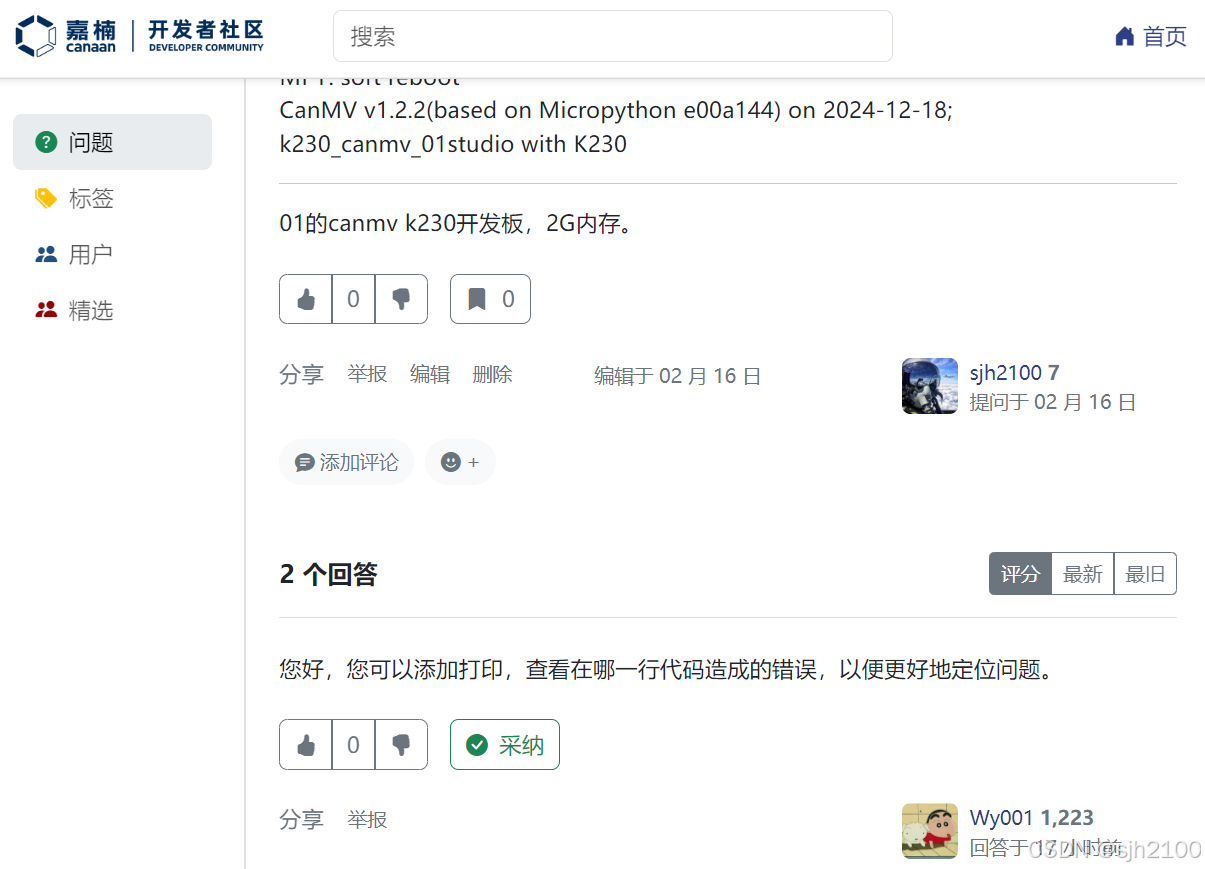
只有这个find_line_segment一个功能和语句,怀疑是固件bug。

智能硬件社区聚焦AI智能硬件技术生态,汇聚嵌入式AI、物联网硬件开发者,打造交流分享平台,同步全国赛事资讯、开展 OPC 核心人才招募,助力技术落地与开发者成长。
更多推荐

 4
4 0
0- 0


 已为社区贡献12条内容

所有评论(0)