STM32F103C8T6通过PWM旋转编码器控制WS2812亮度,
今天我们来玩玩用旋转编码器来控制灯带亮度,老规矩:软件使用STM32CubeIDE,用的HAL库。
今天我们来玩玩用旋转编码器来控制灯带亮度,老规矩:软件使用STM32CubeIDE,用的HAL库
-
新建工程
-
设置 RCC 和 SYS
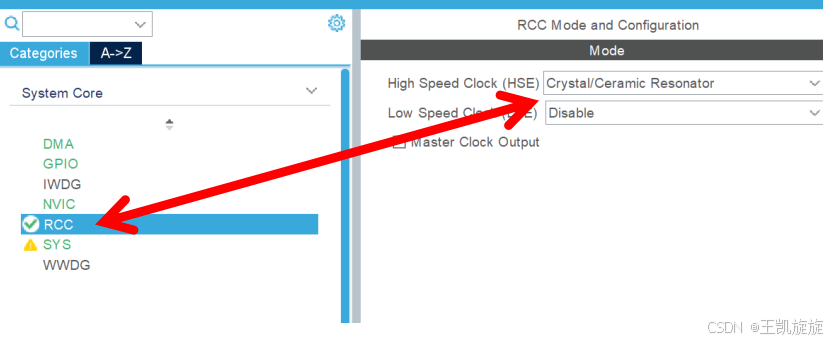
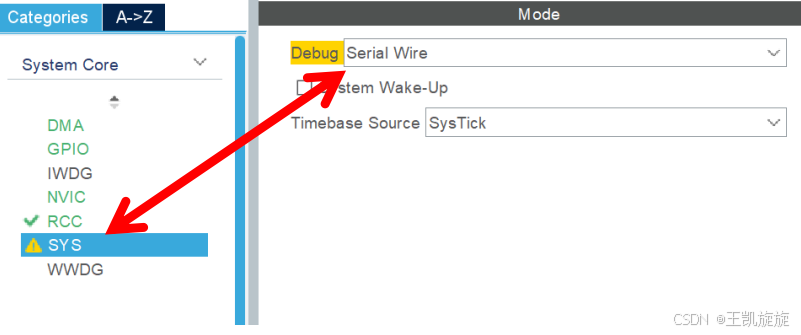
-
设置TIM1
开启旋转编码器
设置编码器反转
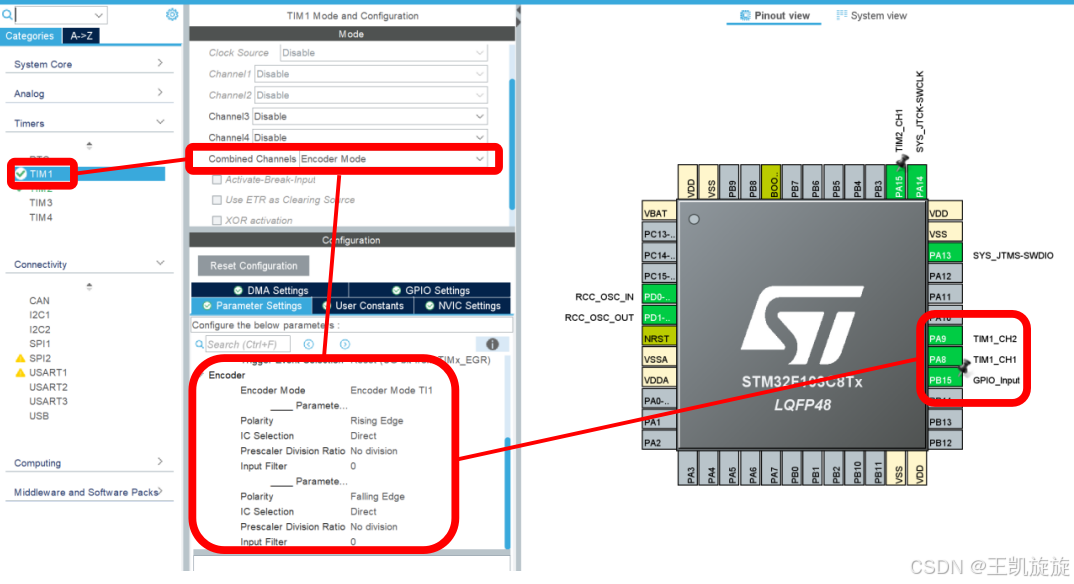
-
设置TIM2
Clock Source 选择 Internal Clock,开启 TIM2 的内部时钟源和通道 1,引脚使用 PA15,Prescaler 配置为 0,Counter Period配置为90-1
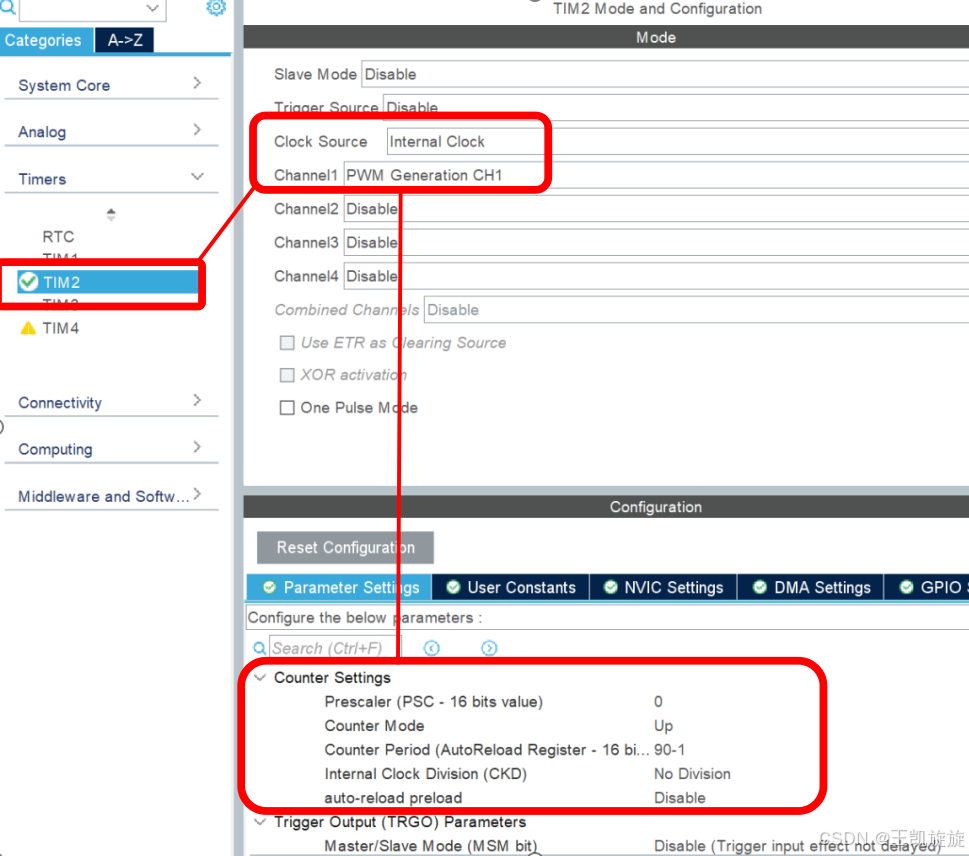
-
设置DMA
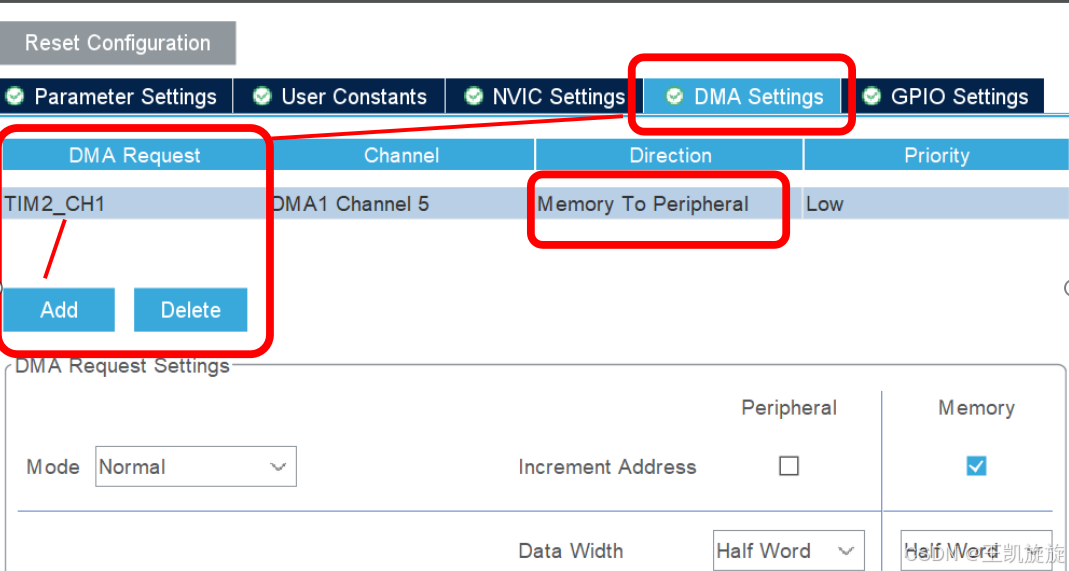
-
设置GPIO
我的旋转编码器按键引脚在PB15,所以设置引脚PB15
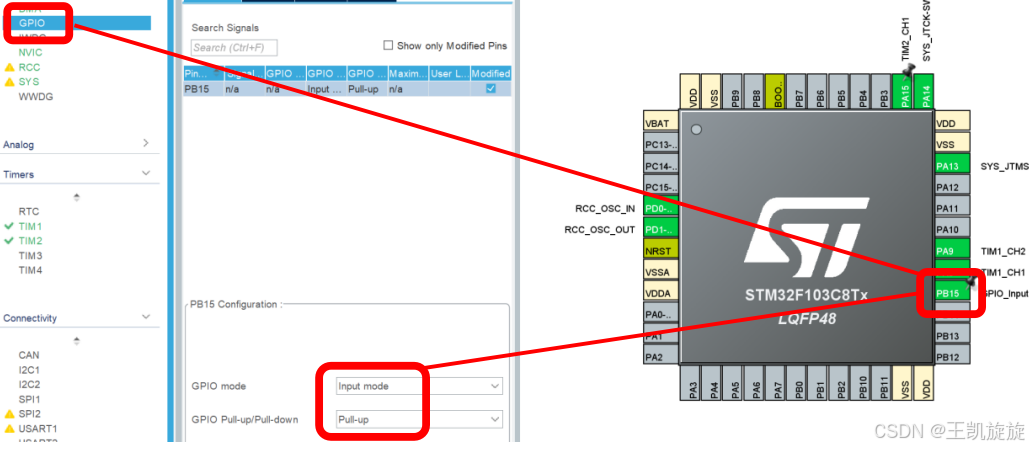
-
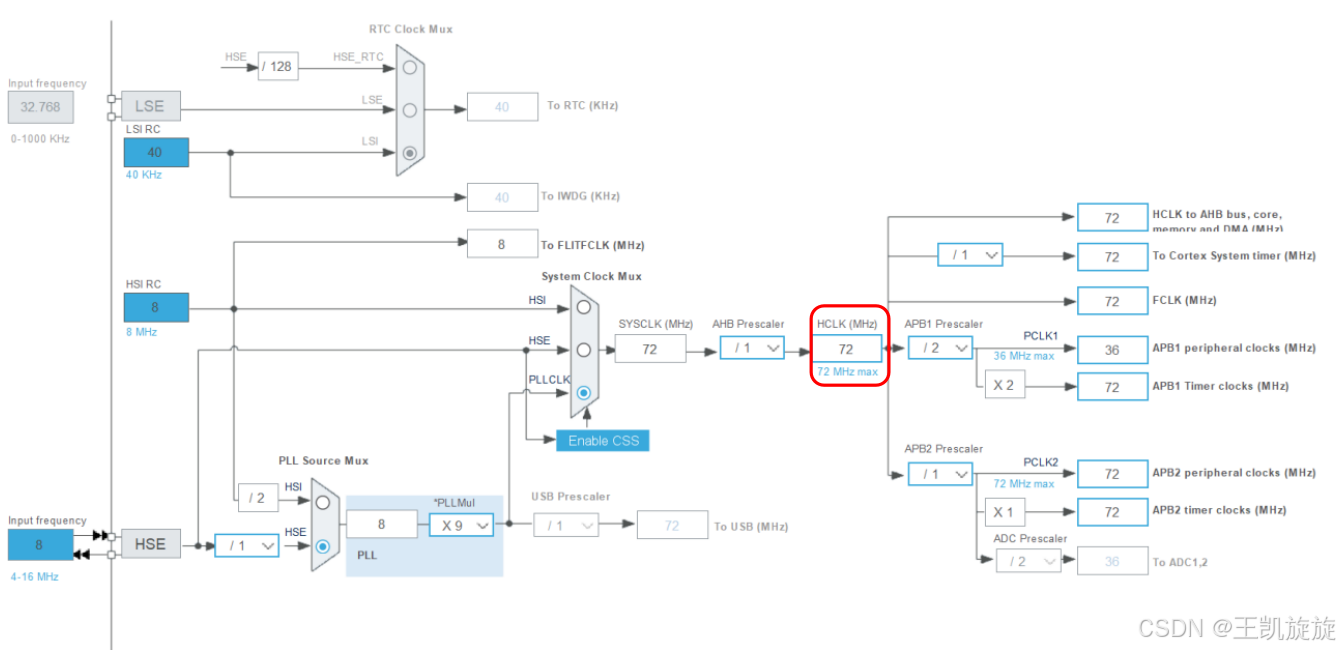
设置时钟树
将HCLK频率配置为 72 MHz
-
单独生成.c / .h 文件
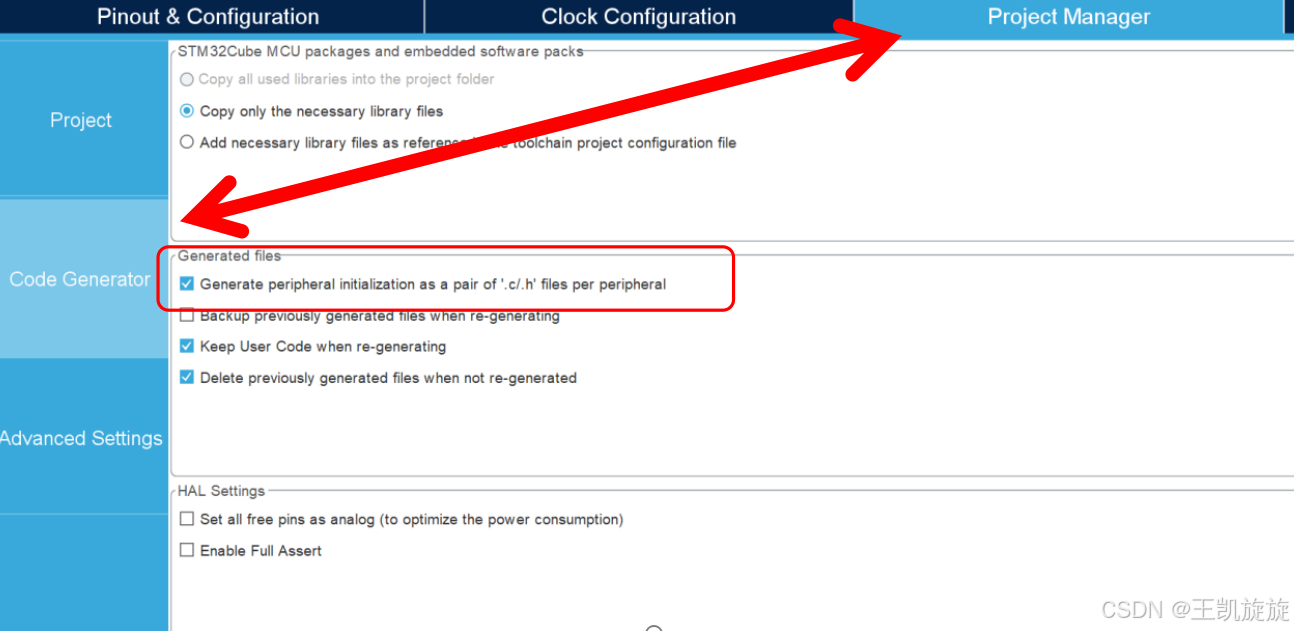
-
按下Ctrl + S 生成工程
-
添加WS2812.c 文件
注意在 void ws2812_update(void)函数中的HAL_TIM_PWM_Start_DMA(&htim2, TIM_CHANNEL_1, 如果你不是TIM2,channel 1,在这里修改
#include "ws2812.h"
#include <math.h>
#include <stdlib.h>
#include <string.h>

// LED颜色
uint32_t ws2812_color[WS2812_NUM] = {0};

// 当前LED颜色
static uint32_t _ws2812_color_current[WS2812_NUM];

/**
 * @brief  直接更新LED颜色
 */
void ws2812_update(void)
{
	// 数据缓冲,每个LED占用24个字节,共10个LED,前100个字节用于复位信号
	static uint16_t ws2812_data[RST_PERIOD_NUM + WS2812_NUM * 24];

	for (uint8_t led_id = 0; led_id < WS2812_NUM; led_id++)
	{
		_ws2812_color_current[led_id] = ws2812_color[led_id];
		static uint8_t r, g, b;
		color_to_rgb(_ws2812_color_current[led_id], &r, &g, &b);
		uint16_t *p = ws2812_data + RST_PERIOD_NUM + led_id * 24;
		for (uint8_t i = 0; i < 8; i++)
		{
			p[i] = (r << i) & (0x80) ? CODE_ONE_DUTY : CODE_ZERO_DUTY;
			p[i + 8] = (g << i) & (0x80) ? CODE_ONE_DUTY : CODE_ZERO_DUTY;
			p[i + 16] = (b << i) & (0x80) ? CODE_ONE_DUTY : CODE_ZERO_DUTY;
		}
	}
	HAL_TIM_PWM_Start_DMA(&htim2, TIM_CHANNEL_1, (uint32_t *)ws2812_data,
						  RST_PERIOD_NUM + WS2812_NUM * 24);
}

/**
 * @brief  通过渐变方式更新LED颜色(线性插值)
 * @param  steps: 渐变步数
 * @param  delay_ms: 每步之间的延迟时间(毫秒)
 */
void ws2812_gradient(uint8_t steps, uint16_t delay_ms)
{
	static uint8_t start_r[WS2812_NUM], start_g[WS2812_NUM], start_b[WS2812_NUM];
	static float r_step[WS2812_NUM], g_step[WS2812_NUM], b_step[WS2812_NUM];

	// 提取初始颜色,并计算每步的渐变步长
	for (uint8_t i = 0; i < WS2812_NUM; i++)
	{
		color_to_rgb(_ws2812_color_current[i], &start_r[i], &start_g[i], &start_b[i]);
		uint8_t target_r, target_g, target_b;
		color_to_rgb(ws2812_color[i], &target_r, &target_g, &target_b);

		r_step[i] = (float)(target_r - start_r[i]) / steps;
		g_step[i] = (float)(target_g - start_g[i]) / steps;
		b_step[i] = (float)(target_b - start_b[i]) / steps;
	}

	// 逐步渐变
	for (uint8_t step = 1; step <= steps; step++)
	{
		for (uint8_t led_id = 0; led_id < WS2812_NUM; led_id++)
		{
			// 计算当前步的颜色
			uint8_t r = (uint8_t)(start_r[led_id] + r_step[led_id] * step);
			uint8_t g = (uint8_t)(start_g[led_id] + g_step[led_id] * step);
			uint8_t b = (uint8_t)(start_b[led_id] + b_step[led_id] * step);

			ws2812_set_rgb(led_id, r, g, b);
		}

		ws2812_update();
		HAL_Delay(delay_ms);
	}
}

/**
 * @brief  设置LED颜色(RGB格式)
 * @param  led_id: LED编号(学习板一共有10个LED,编号范围0-9)
 * @param  r: 红色亮度(0-255)
 * @param  g: 绿色亮度(0-255)
 * @param  b: 蓝色亮度(0-255)
 */
void ws2812_set_rgb(uint8_t led_id, uint8_t r, uint8_t g, uint8_t b)
{
	ws2812_color[led_id] = rgb_to_color(r, g, b);
}

/**
 * @brief  设置LED颜色(24bit颜色格式)
 * @param  led_id: LED编号(学习板一共有10个LED,编号范围0-9)
 * @param  color: 24bit颜色
 */
void ws2812_set(uint8_t led_id, uint32_t color)
{
	ws2812_color[led_id] = color;
}

/**
 * @brief  设置所有LED颜色(24bit颜色格式)
 * @param  color: 24bit颜色
 */
void ws2812_set_all(uint32_t color)
{
	for (uint8_t led_id = 0; led_id < WS2812_NUM; led_id++)
	{
		ws2812_color[led_id] = color;
	}
}

/**
 * @brief  RGB转换为24bit颜色
 * @param  r: 红色亮度(0-255)
 * @param  g: 绿色亮度(0-255)
 * @param  b: 蓝色亮度(0-255)
 * @retval 24bit颜色
 */
uint32_t rgb_to_color(uint8_t r, uint8_t g, uint8_t b)
{
	return (r << 16) | (g << 8) | b;
}

/**
 * @brief  24bit颜色转换为RGB
 * @param  color: 24bit颜色
 * @param  r: 红色亮度(0-255)
 * @param  g: 绿色亮度(0-255)
 * @param  b: 蓝色亮度(0-255)
 */
void color_to_rgb(uint32_t color, uint8_t *r, uint8_t *g, uint8_t *b)
{
	*r = (color >> 16) & 0xFF;
	*g = (color >> 8) & 0xFF;
	*b = color & 0xFF;
}
注意 #define WS2812_NUM ,这是灯带LED的数量
#ifndef __WS2812_H__
#define __WS2812_H__

#include "main.h"
#include "gpio.h"
#include "tim.h"
#include "stdio.h"
#include "string.h"

#define CODE_ONE_DUTY 66
#define CODE_ZERO_DUTY 21
// #define CODE_ONE_DUTY	90
// #define CODE_ZERO_DUTY	32
#define RST_PERIOD_NUM 100
#define WS2812_NUM 60 //灯带LED灯数量

extern uint32_t ws2812_color[WS2812_NUM];

// 将颜色数组直接更新到 LED,不使用渐变过渡
void ws2812_update(void);

// 渐变的更新LED颜色
void ws2812_gradient(uint8_t steps, uint16_t delay_ms);

// 设置LED颜色(24bit颜色)
void ws2812_set(uint8_t led_id, uint32_t color);

// 设置LED颜色(RGB)
void ws2812_set_rgb(uint8_t led_id, uint8_t r, uint8_t g, uint8_t b);

// 设置所有LED颜色
void ws2812_set_all(uint32_t color);

// RGB转换为24bit颜色
uint32_t rgb_to_color(uint8_t r, uint8_t g, uint8_t b);

// 24bit颜色转换为RGB
void color_to_rgb(uint32_t color, uint8_t *r, uint8_t *g, uint8_t *b);

#endif
-
main.c
int main(void)
{

  /* USER CODE BEGIN 1 */

	uint8_t led_on_count = 0;// 当前点亮 LED 数量
	int16_t last_encoder_value = 0;	// 记录上一次编码器计数

  /* USER CODE END 1 */

  /* MCU Configuration--------------------------------------------------------*/

  /* Reset of all peripherals, Initializes the Flash interface and the Systick. */
  HAL_Init();

  /* USER CODE BEGIN Init */

  /* USER CODE END Init */

  /* Configure the system clock */
  SystemClock_Config();

  /* USER CODE BEGIN SysInit */

  /* USER CODE END SysInit */

  /* Initialize all configured peripherals */
  MX_GPIO_Init();
  MX_DMA_Init();
  MX_TIM1_Init();
  MX_TIM2_Init();
  /* USER CODE BEGIN 2 */

  // 启动定时器TIM1编码器模式
  HAL_TIM_Encoder_Start(&htim1, TIM_CHANNEL_1 | TIM_CHANNEL_2);

  /* USER CODE END 2 */

  /* Infinite loop */
  /* USER CODE BEGIN WHILE */
  while (1)
  {
    // 读取编码器计数
      int16_t current_encoder_value = __HAL_TIM_GET_COUNTER(&htim1);

      // 判断旋转方向
      if (current_encoder_value > last_encoder_value)
      {
          // 顺时针旋转,增加点亮的LED数量
          if (led_on_count < WS2812_NUM)
          {
              led_on_count++;
          }
      }
      else if (current_encoder_value < last_encoder_value)
      {
          // 逆时针旋转,减少点亮的LED数量
          if (led_on_count > 0)
          {
              led_on_count--;
          }
      }

      // 更新灯带状�??
      for (uint8_t i = 0; i < WS2812_NUM; i++)
      {
          if (i < led_on_count)
          {
              // 点亮LED

              ws2812_set_rgb(i,255, 255, 255);

        }
          else
          {
              // 熄灭LED
              ws2812_set_rgb(i, 0, 0, 0);
          }
      }
      ws2812_update();

      // 更新上一次编码器计数
      last_encoder_value = current_encoder_value;

      HAL_Delay(10);
  }
    /* USER CODE END WHILE */

    /* USER CODE BEGIN 3 */

  /* USER CODE END 3 */
}-
代码解释
uint8_t led_on_count = 0;// 当前点亮 LED 数量
int16_t last_encoder_value = 0; // 记录上一次编码器计数
// 启动定时器TIM1编码器模式
HAL_TIM_Encoder_Start(&htim1, TIM_CHANNEL_1 | TIM_CHANNEL_2);
// 读取编码器计数
int16_t current_encoder_value = __HAL_TIM_GET_COUNTER(&htim1);
// 判断旋转方向
if (current_encoder_value > last_encoder_value)
{
// 顺时针旋转,增加点亮的LED数量
if (led_on_count < WS2812_NUM)
{
led_on_count++;
}
}
else if (current_encoder_value < last_encoder_value)
{
// 逆时针旋转,减少点亮的LED数量
if (led_on_count > 0)
{
led_on_count--;
}
}
// 更新灯带状态
for (uint8_t i = 0; i < WS2812_NUM; i++)
{
if (i < led_on_count)
{
// 点亮LED
ws2812_set_rgb(i,255, 255, 255);//暖色
}
else
{
// 熄灭LED
ws2812_set_rgb(i, 0, 0, 0);
}
}
ws2812_update();
// 更新上一次编码器计数
last_encoder_value = current_encoder_value;
HAL_Delay(10);
-
来个好玩的
      // 更新灯带状态
      for (uint8_t i = 0; i < WS2812_NUM; i++)
      {
          if (i < led_on_count)
          {
              // 点亮LED

              ws2812_set_rgb(i-50,255, 255, 255);
              ws2812_set_rgb(i-40,153, 255, 102);
              ws2812_set_rgb(i-30,0, 51, 102);
              ws2812_set_rgb(i-20,102, 51, 0);
              ws2812_set_rgb(i-10,102, 0, 102);
              ws2812_set_rgb(i,51, 102, 204);
        }
          else
          {
              // 熄灭LED
              ws2812_set_rgb(i, 0, 0, 0);
          }
      }

智能硬件社区聚焦AI智能硬件技术生态,汇聚嵌入式AI、物联网硬件开发者,打造交流分享平台,同步全国赛事资讯、开展 OPC 核心人才招募,助力技术落地与开发者成长。
更多推荐


 22
22 0
0- 0


 已为社区贡献3条内容

所有评论(0)