cn0566相控阵天线使用指南
拷贝这个文件到目录下增加权限运行脚本执行之后的打印信息SD 卡设置完成!可能需要重新启动,或者运行“sudo reboot”如果您非常确定只使用无头模式或命令行进行操作,并且想要加快启动/关闭过程,请运行:然后在 GUI 或 CLI Raspi-config 工具中将 Pi 设置为启动到 CLI。重启。
·
开机之后执行的指令
拷贝这个文件到目录下
phaser_sdcard_setup.sh
或者
wget https://github.com/thorenscientific/rpi_setup_stuff/raw/main/phaser/phaser_sdcard_setup.sh
增加权限
sudo chmod +x phaser_sdcard_setup.sh
运行脚本
./phaser_sdcard_setup.sh
执行之后的打印信息
Fri 14 Mar 2025 04:20:19 PM GMT
Hit:1 http://archive.raspberrypi.org/debian bullseye InRelease
Hit:2 http://raspbian.raspberrypi.org/raspbian bullseye InRelease
Reading package lists... Done
Building dependency tree... Done
Reading state information... Done
379 packages can be upgraded. Run 'apt list --upgradable' to see them.
--2025-03-14 16:20:24--  https://github.com/thorenscientific/rpi_setup_stuff/raw/main/phaser/config_phaser.txt
Connecting to 192.168.1.7:7899... connected.
Proxy request sent, awaiting response... 302 Found
Location: https://raw.githubusercontent.com/thorenscientific/rpi_setup_stuff/main/phaser/config_phaser.txt [following]
--2025-03-14 16:20:24--  https://raw.githubusercontent.com/thorenscientific/rpi_setup_stuff/main/phaser/config_phaser.txt
Connecting to 192.168.1.7:7899... connected.
Proxy request sent, awaiting response... 200 OK
Length: 2402 (2.3K) [text/plain]
Saving to: ‘config_phaser.txt’

config_phaser.txt                       100%[============================================================================>]   2.35K  --.-KB/s    in 0s

2025-03-14 16:20:26 (4.85 MB/s) - ‘config_phaser.txt’ saved [2402/2402]

--2025-03-14 16:20:27--  https://github.com/thorenscientific/rpi_setup_stuff/raw/main/phaser/iiod-usb@.service
Connecting to 192.168.1.7:7899... connected.
Proxy request sent, awaiting response... 302 Found
Location: https://raw.githubusercontent.com/thorenscientific/rpi_setup_stuff/main/phaser/iiod-usb%40.service [following]
--2025-03-14 16:20:28--  https://raw.githubusercontent.com/thorenscientific/rpi_setup_stuff/main/phaser/iiod-usb%40.service
Connecting to 192.168.1.7:7899... connected.
Proxy request sent, awaiting response... 200 OK
Length: 253 [text/plain]
Saving to: ‘iiod-usb@.service’

iiod-usb@.service                       100%[============================================================================>]     253  --.-KB/s    in 0s

2025-03-14 16:20:29 (5.21 MB/s) - ‘iiod-usb@.service’ saved [253/253]

--2025-03-14 16:20:29--  https://github.com/thorenscientific/rpi_setup_stuff/raw/main/phaser/89-pluto.rules
Connecting to 192.168.1.7:7899... connected.
Proxy request sent, awaiting response... 302 Found
Location: https://raw.githubusercontent.com/thorenscientific/rpi_setup_stuff/main/phaser/89-pluto.rules [following]
--2025-03-14 16:20:29--  https://raw.githubusercontent.com/thorenscientific/rpi_setup_stuff/main/phaser/89-pluto.rules
Connecting to 192.168.1.7:7899... connected.
Proxy request sent, awaiting response... 200 OK
Length: 325 [text/plain]
Saving to: ‘89-pluto.rules’

89-pluto.rules                          100%[============================================================================>]     325  --.-KB/s    in 0s

2025-03-14 16:20:31 (2.01 MB/s) - ‘89-pluto.rules’ saved [325/325]

--2025-03-14 16:20:32--  https://github.com/thorenscientific/rpi_setup_stuff/raw/main/phaser/hosts_phaser
Connecting to 192.168.1.7:7899... connected.
Proxy request sent, awaiting response... 302 Found
Location: https://raw.githubusercontent.com/thorenscientific/rpi_setup_stuff/main/phaser/hosts_phaser [following]
--2025-03-14 16:20:32--  https://raw.githubusercontent.com/thorenscientific/rpi_setup_stuff/main/phaser/hosts_phaser
Connecting to 192.168.1.7:7899... connected.
Proxy request sent, awaiting response... 200 OK
Length: 126 [text/plain]
Saving to: ‘hosts_phaser’

hosts_phaser                            100%[============================================================================>]     126  --.-KB/s    in 0s

2025-03-14 16:20:33 (891 KB/s) - ‘hosts_phaser’ saved [126/126]

--2025-03-14 16:20:33--  https://github.com/thorenscientific/rpi_setup_stuff/raw/main/phaser/hostname_phaser
Connecting to 192.168.1.7:7899... connected.
Proxy request sent, awaiting response... 302 Found
Location: https://raw.githubusercontent.com/thorenscientific/rpi_setup_stuff/main/phaser/hostname_phaser [following]
--2025-03-14 16:20:34--  https://raw.githubusercontent.com/thorenscientific/rpi_setup_stuff/main/phaser/hostname_phaser
Connecting to 192.168.1.7:7899... connected.
Proxy request sent, awaiting response... 200 OK
Length: 7 [text/plain]
Saving to: ‘hostname_phaser’

hostname_phaser                         100%[============================================================================>]       7  --.-KB/s    in 0s

2025-03-14 16:20:35 (80.7 KB/s) - ‘hostname_phaser’ saved [7/7]

sudo: unable to resolve host analog: Name or service not known
sudo: unable to resolve host analog: Name or service not known
sudo: unable to resolve host analog: Name or service not known
--2025-03-14 16:20:35--  https://github.com/thorenscientific/rpi_setup_stuff/raw/main/phaser/pluto_update_ad9361.sh
Connecting to 192.168.1.7:7899... connected.
Proxy request sent, awaiting response... 302 Found
Location: https://raw.githubusercontent.com/thorenscientific/rpi_setup_stuff/main/phaser/pluto_update_ad9361.sh [following]
--2025-03-14 16:20:36--  https://raw.githubusercontent.com/thorenscientific/rpi_setup_stuff/main/phaser/pluto_update_ad9361.sh
Connecting to 192.168.1.7:7899... connected.
Proxy request sent, awaiting response... 200 OK
Length: 671 [text/plain]
Saving to: ‘pluto_update_ad9361.sh’

pluto_update_ad9361.sh                  100%[============================================================================>]     671  --.-KB/s    in 0s

2025-03-14 16:20:37 (6.53 MB/s) - ‘pluto_update_ad9361.sh’ saved [671/671]

sudo: unable to resolve host analog: Name or service not known
Found existing installation: pyadi-iio 0.0.14
Uninstalling pyadi-iio-0.0.14:
  Successfully uninstalled pyadi-iio-0.0.14
Cloning into 'pyadi-iio'...
remote: Enumerating objects: 36876, done.
remote: Counting objects: 100% (1092/1092), done.
remote: Compressing objects: 100% (366/366), done.
remote: Total 36876 (delta 881), reused 811 (delta 718), pack-reused 35784 (from 3)
Receiving objects: 100% (36876/36876), 103.07 MiB | 9.02 MiB/s, done.
Resolving deltas: 100% (30666/30666), done.
Already on 'main'
Your branch is up to date with 'origin/main'.
sudo: unable to resolve host analog: Name or service not known
Looking in indexes: https://pypi.org/simple, https://www.piwheels.org/simple
Processing /home/analog/pyadi-iio
  Installing build dependencies ... done
  Getting requirements to build wheel ... done
    Preparing wheel metadata ... done
Collecting pylibiio>=0.25
  Downloading pylibiio-0.25-py3-none-any.whl (11 kB)
Requirement already satisfied: numpy>=1.20 in /usr/local/lib/python3.9/dist-packages (from pyadi-iio==0.0.20) (1.24.2)
Building wheels for collected packages: pyadi-iio
  Building wheel for pyadi-iio (PEP 517) ... done
  Created wheel for pyadi-iio: filename=pyadi_iio-0.0.20-py3-none-any.whl size=188296 sha256=03611955c181c6dcfa83ec0cf8344b8a29b3ced6c647dade72d968641301c292  Stored in directory: /root/.cache/pip/wheels/7a/03/46/64e26b0c298ae5f42d027305c05e7893509eb3acc0f58c7ba8
Successfully built pyadi-iio
Installing collected packages: pylibiio, pyadi-iio
  Attempting uninstall: pylibiio
    Found existing installation: pylibiio 0.23.1
    Uninstalling pylibiio-0.23.1:
      Successfully uninstalled pylibiio-0.23.1
Successfully installed pyadi-iio-0.0.20 pylibiio-0.25
sudo: unable to resolve host analog: Name or service not known
Looking in indexes: https://pypi.org/simple, https://www.piwheels.org/simple
Requirement already satisfied: pyqtgraph in /usr/lib/python3/dist-packages (0.11.1)
Collecting pyqtgraph
  Downloading https://www.piwheels.org/simple/pyqtgraph/pyqtgraph-0.13.7-py3-none-any.whl (1.9 MB)
     |████████████████████████████████| 1.9 MB 19 kB/s
Requirement already satisfied: numpy>=1.22.0 in /usr/local/lib/python3.9/dist-packages (from pyqtgraph) (1.24.2)
Installing collected packages: pyqtgraph
  Attempting uninstall: pyqtgraph
    Found existing installation: pyqtgraph 0.11.1
    Not uninstalling pyqtgraph at /usr/lib/python3/dist-packages, outside environment /usr
    Can't uninstall 'pyqtgraph'. No files were found to uninstall.
Successfully installed pyqtgraph-0.13.7
sudo: unable to resolve host analog: Name or service not known
sudo: unable to resolve host analog: Name or service not known
Reading package lists... Done
Building dependency tree... Done
Reading state information... Done
The following NEW packages will be installed:
  sshpass
0 upgraded, 1 newly installed, 0 to remove and 379 not upgraded.
Need to get 11.9 kB of archives.
After this operation, 32.8 kB of additional disk space will be used.
Get:1 http://ftp.acc.umu.se/mirror/raspbian/raspbian bullseye/main armhf sshpass armhf 1.09-1 [11.9 kB]
Fetched 11.9 kB in 2s (5,528 B/s)
Selecting previously unselected package sshpass.
(Reading database ... 183583 files and directories currently installed.)
Preparing to unpack .../sshpass_1.09-1_armhf.deb ...
Unpacking sshpass (1.09-1) ...
Setting up sshpass (1.09-1) ...
Processing triggers for man-db (2.9.4-2) ...
--2025-03-14 16:22:07--  https://github.com/analogdevicesinc/plutosdr-fw/releases/download/v0.38/plutosdr-fw-v0.38.zip
Connecting to 192.168.1.7:7899... connected.
Proxy request sent, awaiting response... 302 Found
Location: https://objects.githubusercontent.com/github-production-release-asset-2e65be/72641214/64fca00a-c4f5-4e0b-9699-4d9fa5de236a?X-Amz-Algorithm=AWS4-HMAC-SHA256&X-Amz-Credential=releaseassetproduction%2F20250314%2Fus-east-1%2Fs3%2Faws4_request&X-Amz-Date=20250314T162209Z&X-Amz-Expires=300&X-Amz-Signature=60596924d0bc02929b05041eeb665489181138719b78b9738e2058553a777d66&X-Amz-SignedHeaders=host&response-content-disposition=attachment%3B%20filename%3Dplutosdr-fw-v0.38.zip&response-content-type=application%2Foctet-stream [following]
--2025-03-14 16:22:08--  https://objects.githubusercontent.com/github-production-release-asset-2e65be/72641214/64fca00a-c4f5-4e0b-9699-4d9fa5de236a?X-Amz-Algorithm=AWS4-HMAC-SHA256&X-Amz-Credential=releaseassetproduction%2F20250314%2Fus-east-1%2Fs3%2Faws4_request&X-Amz-Date=20250314T162209Z&X-Amz-Expires=300&X-Amz-Signature=60596924d0bc02929b05041eeb665489181138719b78b9738e2058553a777d66&X-Amz-SignedHeaders=host&response-content-disposition=attachment%3B%20filename%3Dplutosdr-fw-v0.38.zip&response-content-type=application%2Foctet-stream
Connecting to 192.168.1.7:7899... connected.
Proxy request sent, awaiting response... 200 OK
Length: 23276876 (22M) [application/octet-stream]
Saving to: ‘plutosdr-fw-v0.38.zip’

plutosdr-fw-v0.38.zip                   100%[============================================================================>]  22.20M  10.2MB/s    in 2.2s

2025-03-14 16:22:11 (10.2 MB/s) - ‘plutosdr-fw-v0.38.zip’ saved [23276876/23276876]

Done setting up SD card! A reboot is probably in order, sor run 'sudo reboot'
IF you are very sure you're only going to be operating headless or by command line and want to speed the boot / shutdown process, run:
sudo systemctl disable x11vnc.service
And then set the Pi to boot to CLI in either the GUI or CLI Raspi-config tool.
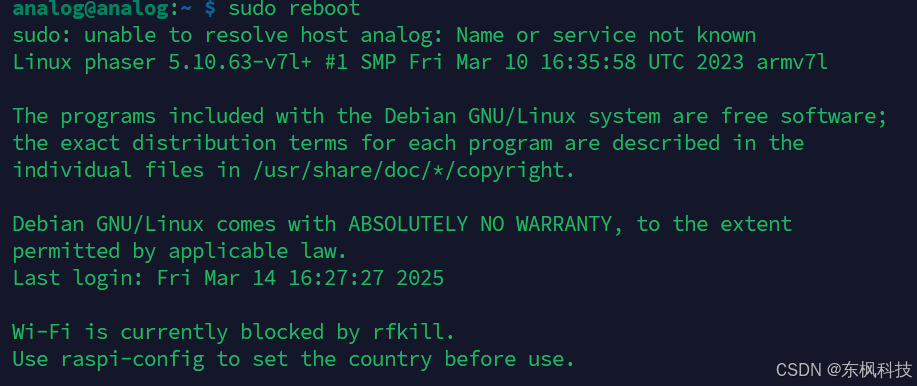
SD 卡设置完成!可能需要重新启动,或者运行“sudo reboot”
如果您非常确定只使用无头模式或命令行进行操作,并且想要加快启动/关闭过程,请运行:
sudo systemctl disable x11vnc.service
然后在 GUI 或 CLI Raspi-config 工具中将 Pi 设置为启动到 CLI。
重启
sudo reboot
设备使用:1、查找HB100
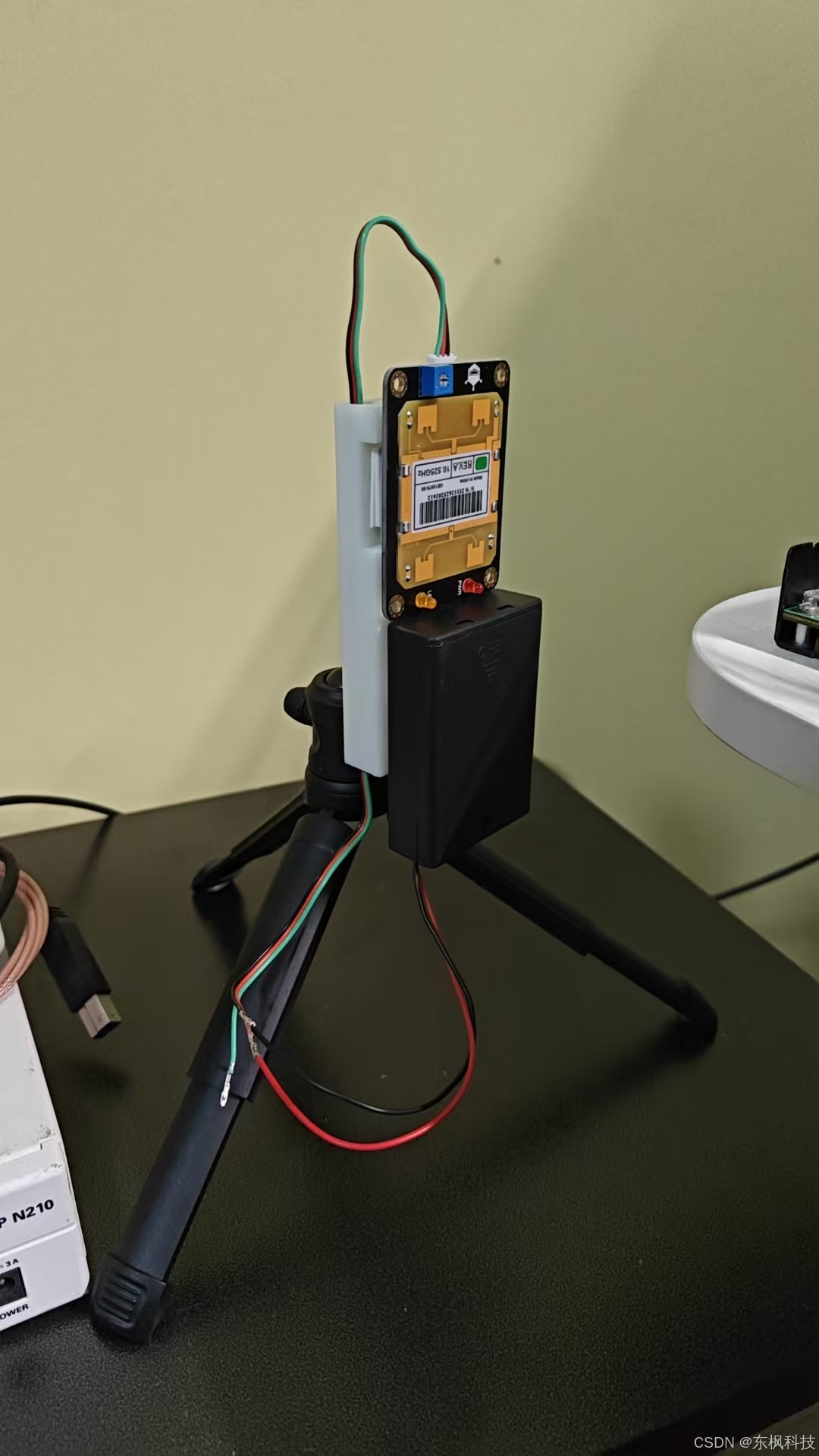
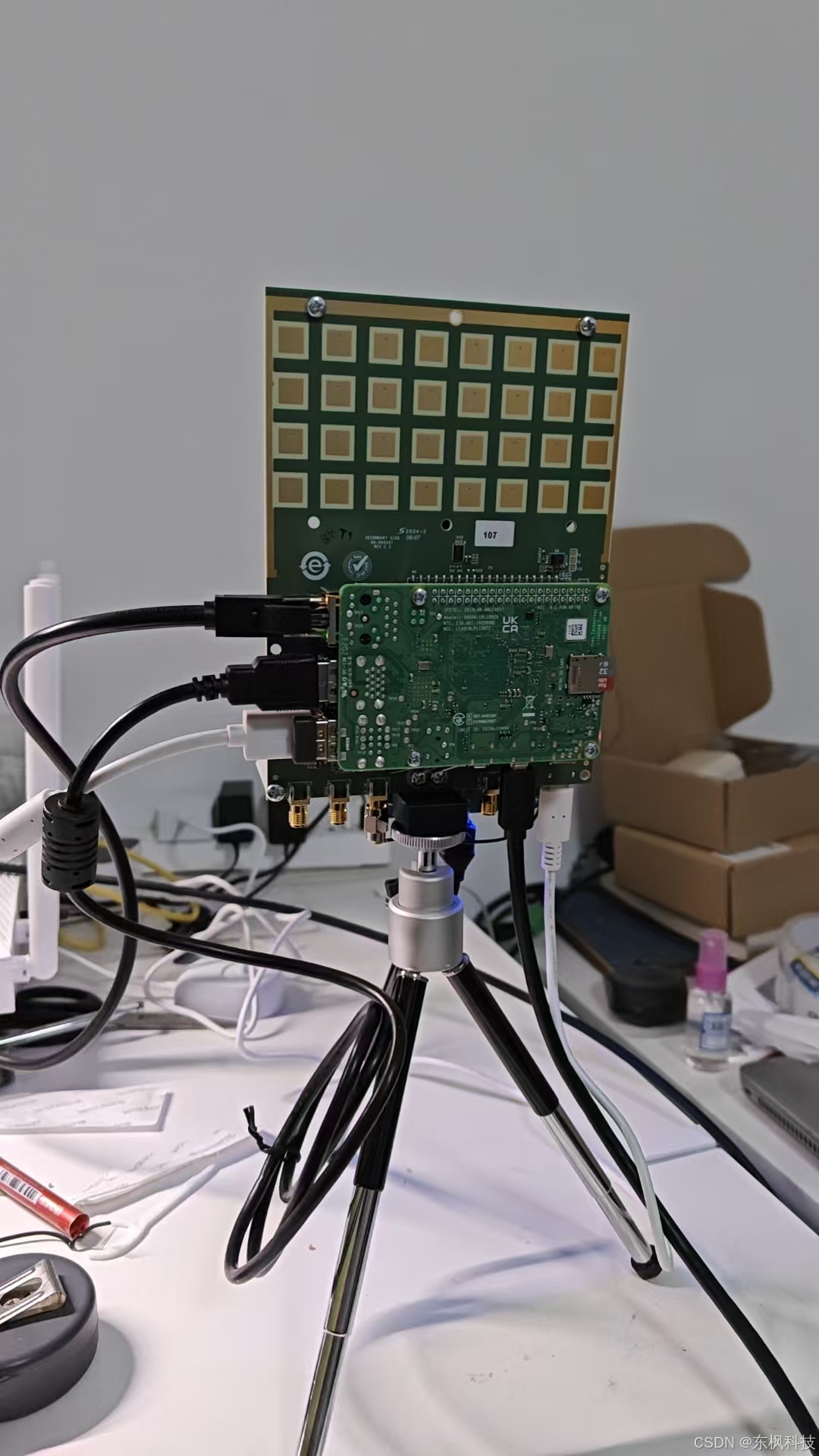
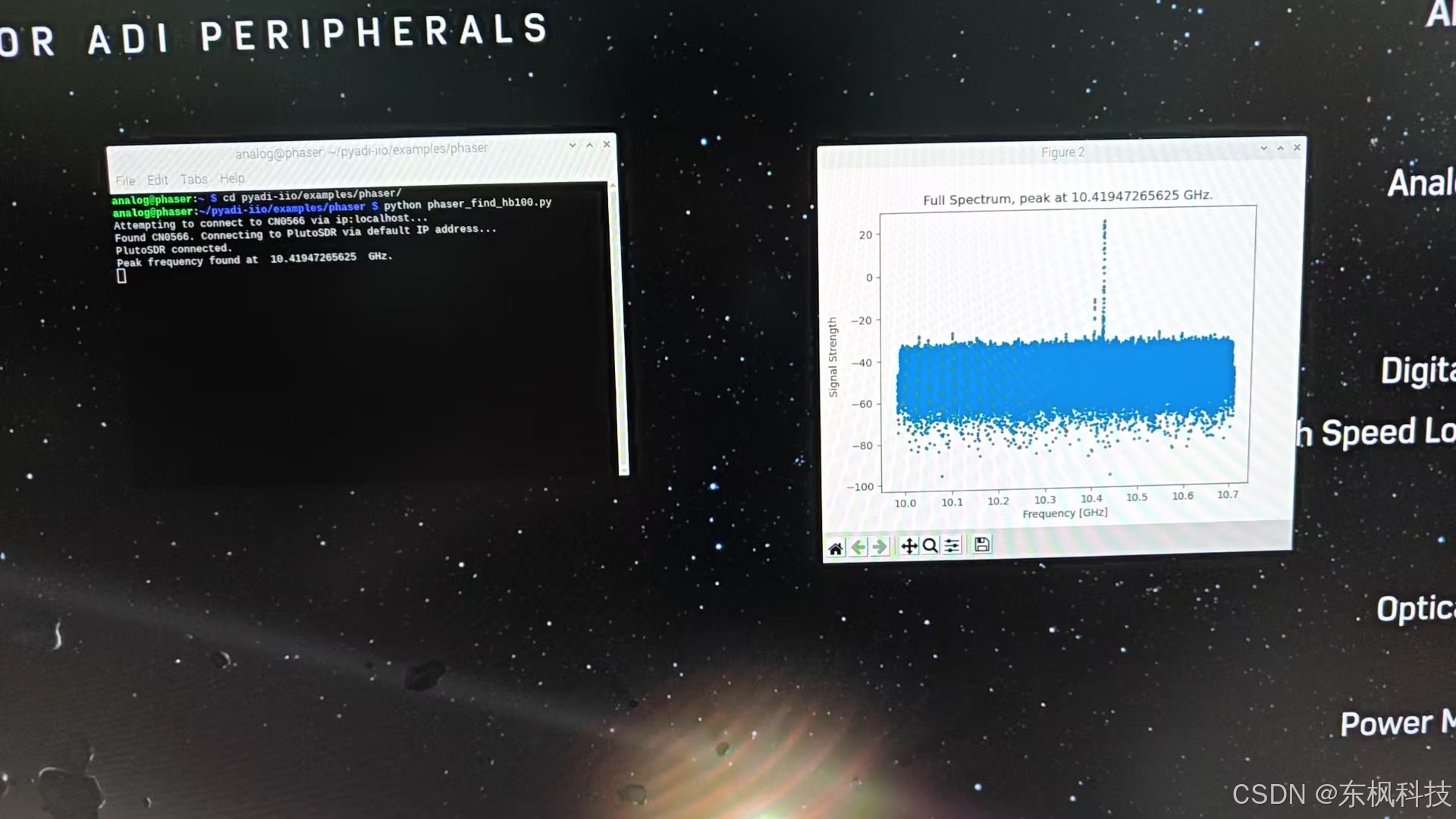
运行代码:
cd ~/pyadi-iio/examples/phaser
python phaser_find_hb100.py
设备使用:1、显示雷达界面
cd ~/pyadi-iio/examples/phaser
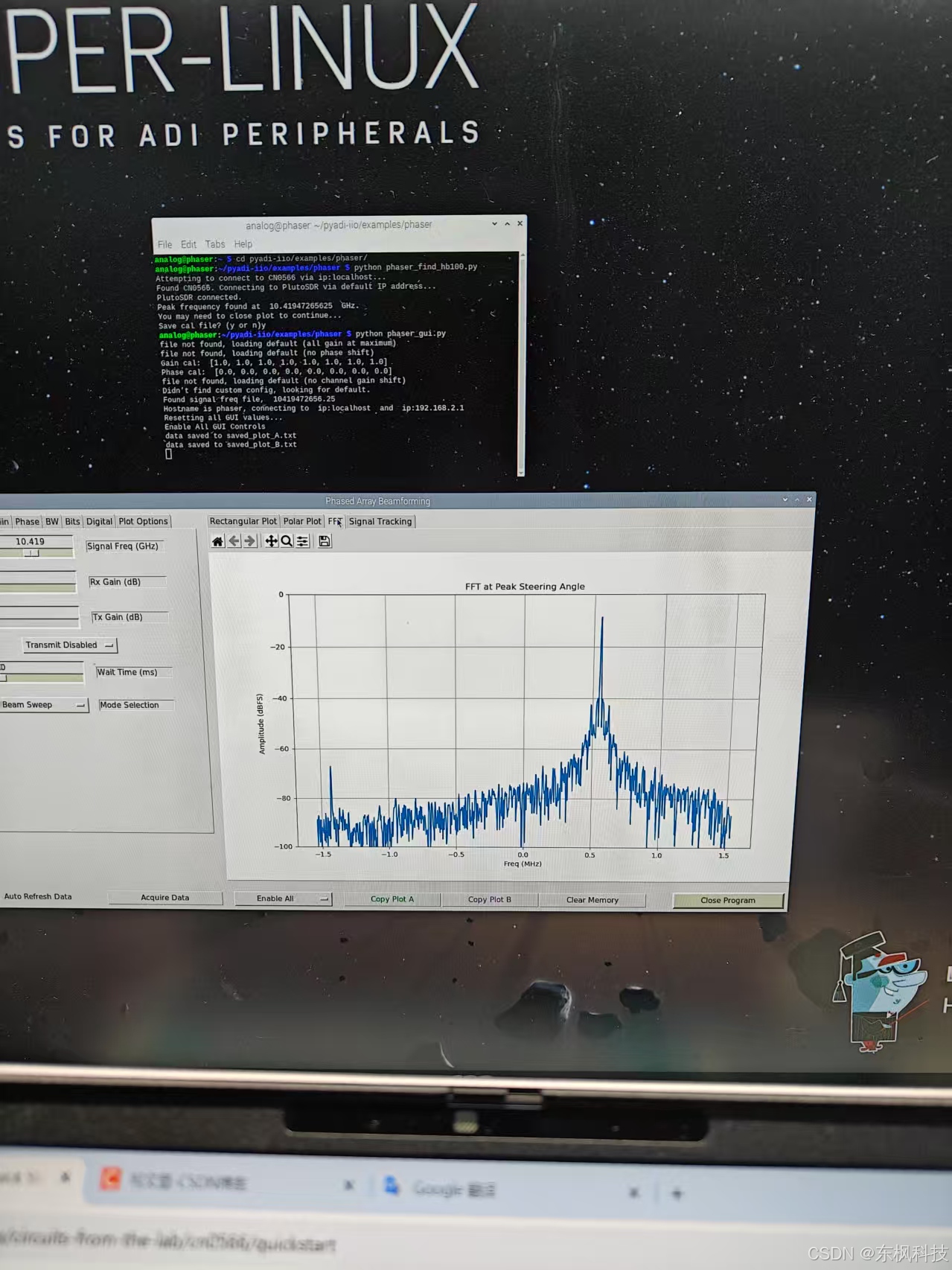
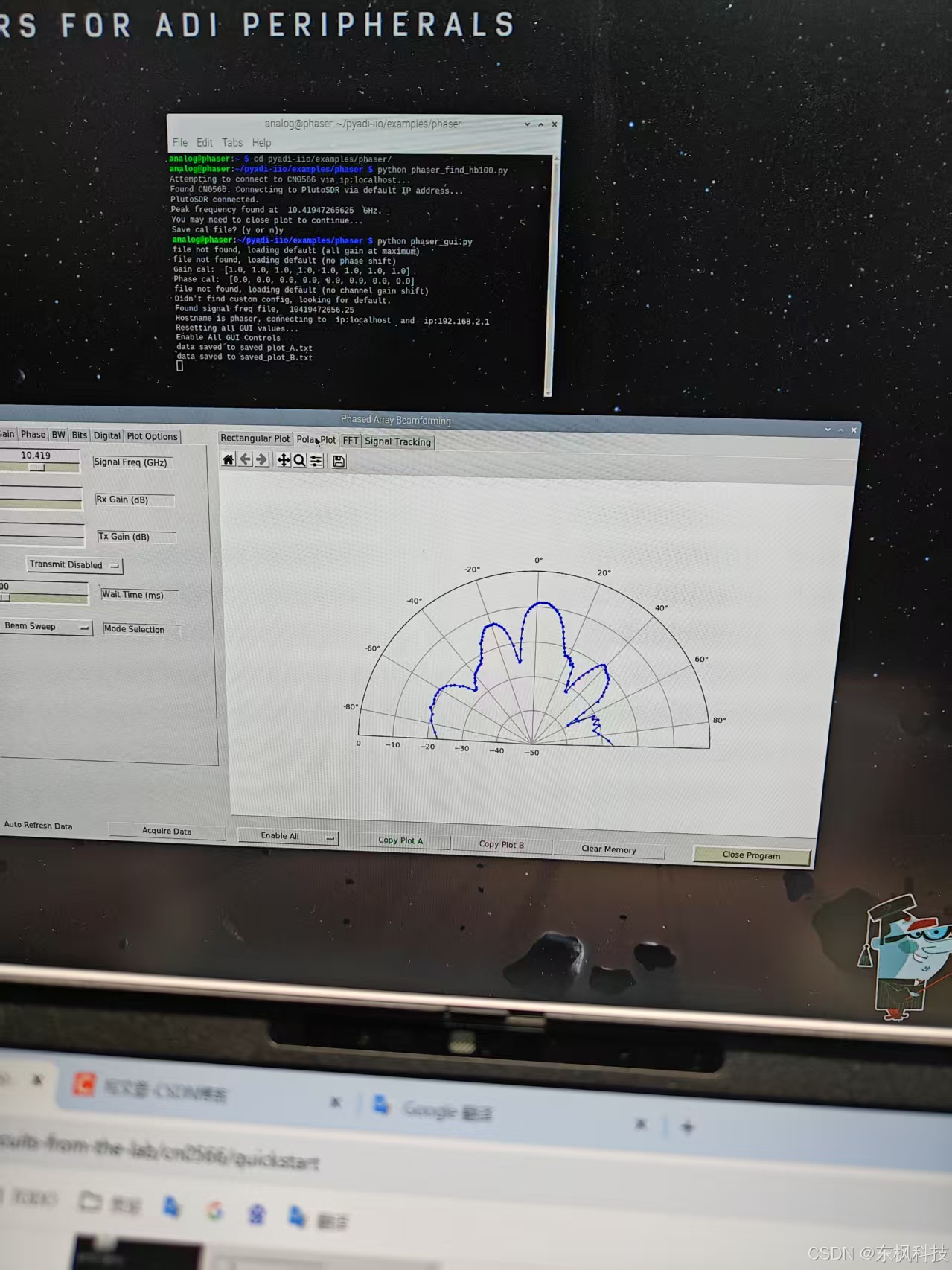
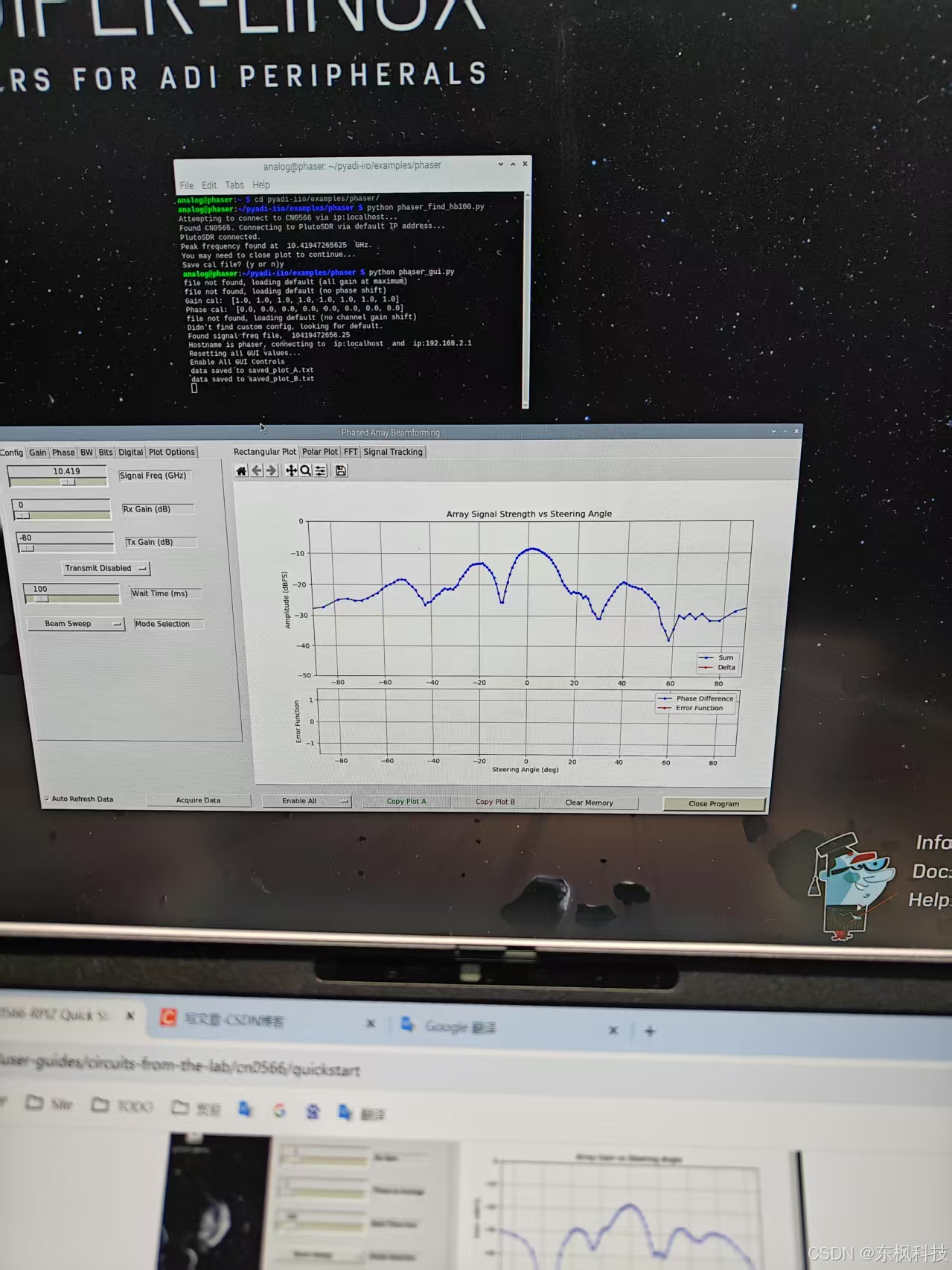
python phaser_gui.py

智能硬件社区聚焦AI智能硬件技术生态,汇聚嵌入式AI、物联网硬件开发者,打造交流分享平台,同步全国赛事资讯、开展 OPC 核心人才招募,助力技术落地与开发者成长。
更多推荐



 10
10 0
0- 0


 已为社区贡献8条内容

所有评论(0)