Django的用户登录注册机制
前端调用的在header中新增一条Authorization,然后用在settings.py中AUTH_HEADER_TYPES设置的前缀加上登录时返回的token,进行验证。在子模块中新增登录和注册两个视图,以及继承TokenObtainPairSerializer的序列化器。可在项目的根目录新增一个工具文件夹,然后新增应该是jsonResponse.py文件.我这边的用户模型使用了自定义的Us
Django的登录我们一般使用 djangorestframework-simplejwt组件进行验证和生成token
使用前先安装对应组件
pip install  -i https://pypi.tuna.tsinghua.edu.cn/simple  djangorestframework
pip install  -i https://pypi.tuna.tsinghua.edu.cn/simple  djangorestframework-simplejwt
调整一下settings.py中的配置
from datetime import timedelta
REST_FRAMEWORK = {

    'DEFAULT_AUTHENTICATION_CLASSES': (
        'rest_framework_simplejwt.authentication.JWTAuthentication',
        'rest_framework.authentication.SessionAuthentication',
    ),
    'DEFAULT_PERMISSION_CLASSES': (
        'rest_framework.permissions.IsAuthenticated',  # 仅登录用户
    ),
}

SIMPLE_JWT = {
    # token有效时长
    'ACCESS_TOKEN_LIFETIME': timedelta(days=7),
    # token刷新后的有效时间
    'REFRESH_TOKEN_LIFETIME': timedelta(days=7),
    # header中Authorization的值得前缀
    'AUTH_HEADER_TYPES': ('Bearer',),
    'ROTATE_REFRESH_TOKENS': True
}
在子模块中新增登录和注册两个视图,以及继承TokenObtainPairSerializer的序列化器。
我这边的用户模型使用了自定义的Users用户模型,具体可安装实际情况更换。
from django.contrib.auth.hashers import make_password
from rest_framework.views import APIView
from rest_framework_simplejwt.serializers import TokenObtainPairSerializer
from study.models import Users
from utils.jsonResponse import ErrorResponse, SuccessResponse
import re


class LoginSerializer(TokenObtainPairSerializer):
    @classmethod
    def get_token(cls, user):
        refresh = super(LoginSerializer,cls).get_token(user)
        data = {}
        data['identity'] = user.identity
        data['userId'] = user.id
        data['refresh_token'] = str(refresh)
        data['token'] = str(refresh.access_token)
        return data

class PasswordLoginView(APIView):
    authentication_classes = []
    permission_classes = []

    def post(self, request, *args, **kwargs):
        mobile = request.data.get('username', None)
        password = request.data.get('password', None)
        if mobile is None:
            return ErrorResponse(msg="请填写手机号")
        if password is None:
            return ErrorResponse(msg="请填写密码")
        user = Users.objects.filter(username=mobile).first()
        if user is None:
            return ErrorResponse(msg="用户不存在")
        if user and user.check_password(password):
            resdata = LoginSerializer.get_token(user)
            return SuccessResponse(data=resdata,msg="登录成功")
        return ErrorResponse(msg="登录失败")


class RegisterView(APIView):
    authentication_classes = []
    permission_classes = []

    def post(self, request, *args, **kwargs):
        mobile = request.data.get('mobile', None)
        password = request.data.get('password', None)
        password_confirm = request.data.get('password_confirm', None)

        if mobile is None or password is None or password_confirm is None:
            return ErrorResponse(msg="提交的参数不能为空")

        if len(password) < 6:
            return ErrorResponse(msg="密码长度至少6位")

        if not re.match(r'^[a-zA_Z0-9]{6,20}$', password):
            return ErrorResponse(msg="密码格式不正确(大小写字母、数字组合)")

        if password != password_confirm:
            return ErrorResponse(msg="两次密码输入不一致")

        if not re.match(r'^1[3-9]\d{9}$', mobile):
            return ErrorResponse(msg="手机号格式错误")
        Users.objects.create(username=mobile, password=make_password(password), mobile=mobile, is_staff=False,
                             identity=2)
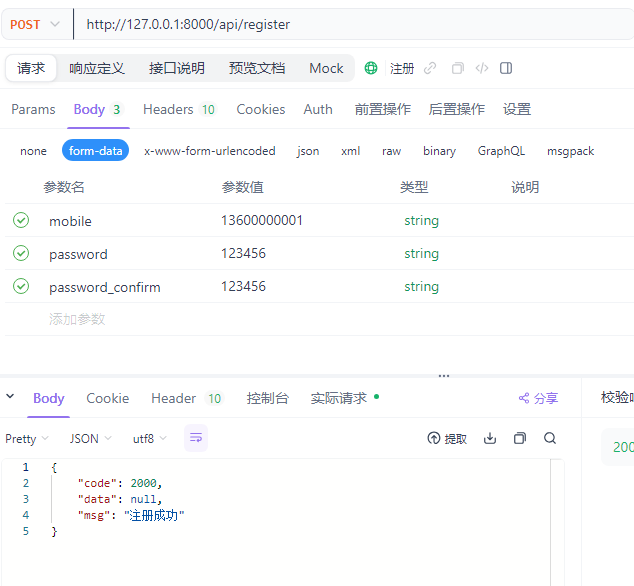
        return SuccessResponse(msg="注册成功")
我这边的代码重构过response函数
可在项目的根目录新增一个工具文件夹,然后新增应该是jsonResponse.py文件.
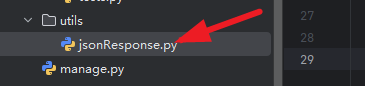
内部代码
from rest_framework.response import Response


class SuccessResponse(Response):

    def __init__(self, data=None, msg='success', status=None, template_name=None, headers=None, exception=False,
                 content_type=None, ):
        std_data = {
            "code": 2000,
            "data": data,
            "msg": msg
        }
        super().__init__(std_data, status, template_name, headers, exception, content_type)


class ErrorResponse(Response):

    def __init__(self, data=None, msg='error', code=400, status=None, template_name=None, headers=None,
                 exception=False, content_type=None):
        std_data = {
            "code": code,
            "data": data,
            "msg": msg
        }
        super().__init__(std_data, status, template_name, headers, exception, content_type)
随后我们在urls.py中添加路由,路径可自行调整。
from study.views.user import PasswordLoginView, RegisterView

urlpatterns = [
    path('admin/', admin.site.urls),
    path('api/login', PasswordLoginView.as_view(), name='账号登录'),
    path('api/register', RegisterView.as_view(), name='账号注册'),
]
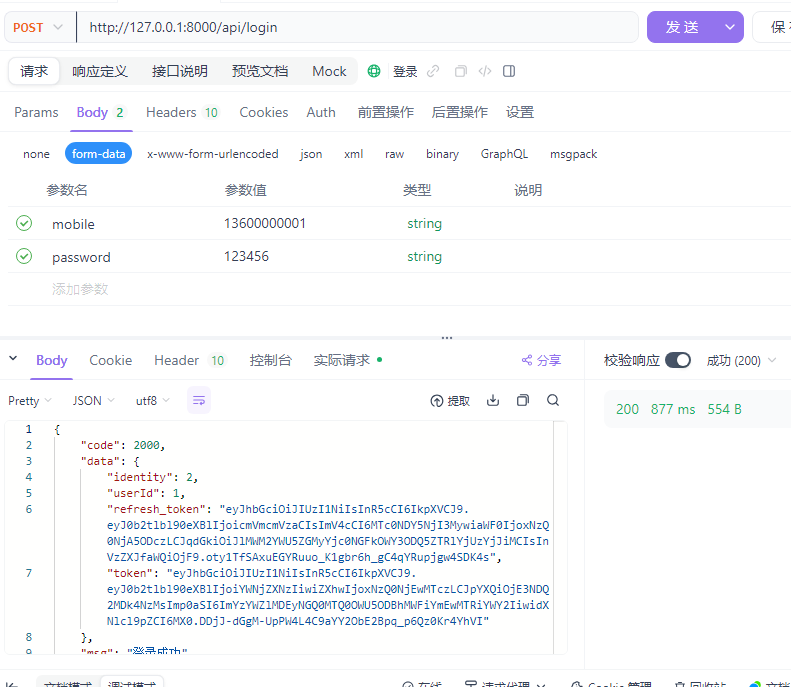
登录后会返回,token
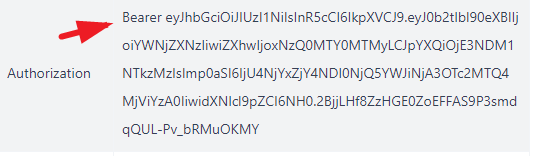
具体遇到需要登录才能使用的接口,主要先引入IsAuthenticated和JWTAuthentication
from rest_framework.permissions import IsAuthenticated
from rest_framework_simplejwt.authentication import JWTAuthentication
随后在视图内部引入就行了。
    permission_classes = [IsAuthenticated]
    authentication_classes = [JWTAuthentication]
如果不需要验证设置成空的就行了
 permission_classes = []
 authentication_classes = []
前端调用的在header中新增一条Authorization,然后用在settings.py中 AUTH_HEADER_TYPES设置的前缀加上登录时返回的token,进行验证。

智能硬件社区聚焦AI智能硬件技术生态,汇聚嵌入式AI、物联网硬件开发者,打造交流分享平台,同步全国赛事资讯、开展 OPC 核心人才招募,助力技术落地与开发者成长。
更多推荐


 3
3 0
0- 0


 已为社区贡献1条内容

所有评论(0)