Hi3861 通过串口控制 SG90 舵机转动角度
说明:2根线号线,TXD(发送),RXD(接收),TXD要接到单片机的RXD上,RXD要接到单片机的TXD上,GND(接地)要跟单片机的GND端连接。用串口通信工具连接控制舵机的串口,输入1个数值,点击发送,只要是0-180,单片机会控制舵机转到输入的角度,并把结果通过串口回传回来。说明:舵机有3条线,2条(VCC, GND)接单片机的电源接口上,VCC接在5V端口上,1条(脉冲信号)接单片机的端
完整接线图
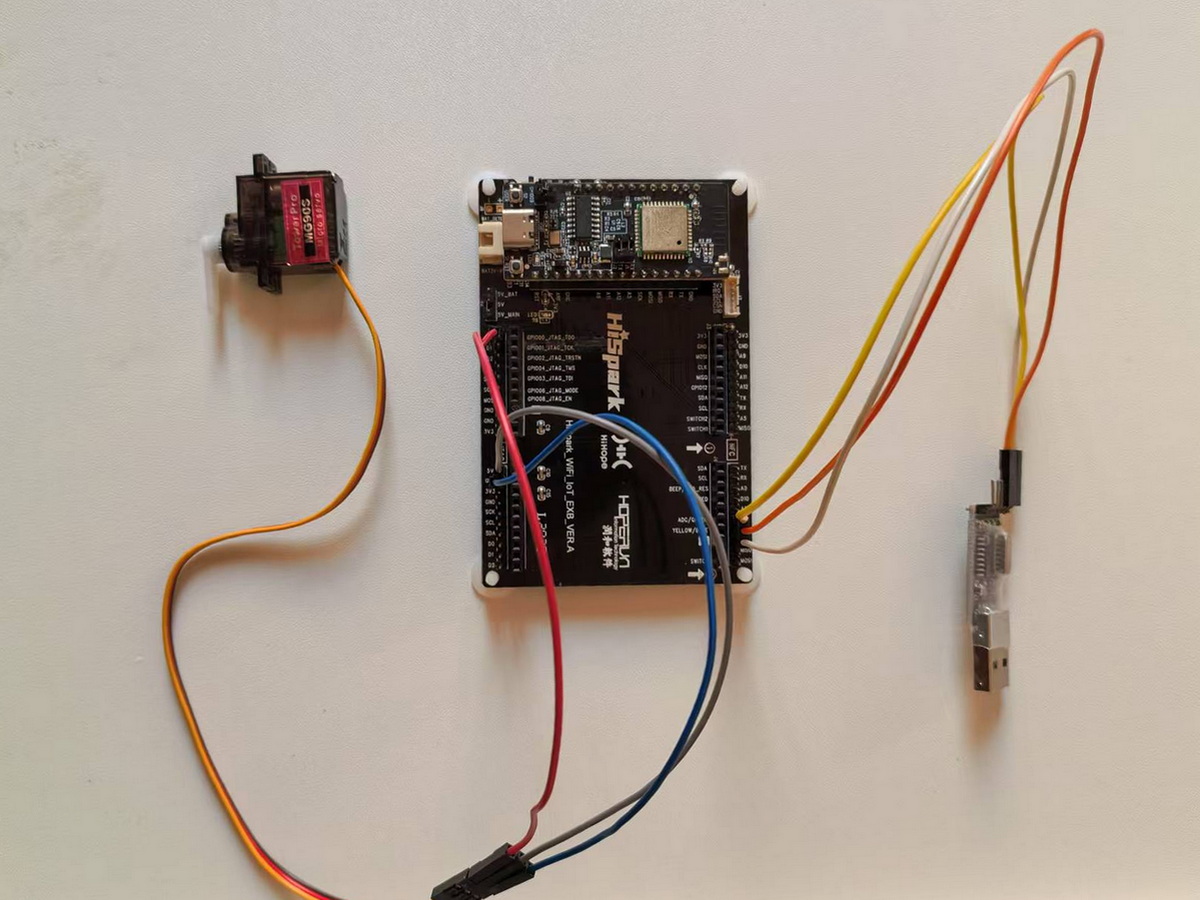
接线
串口模块接线:
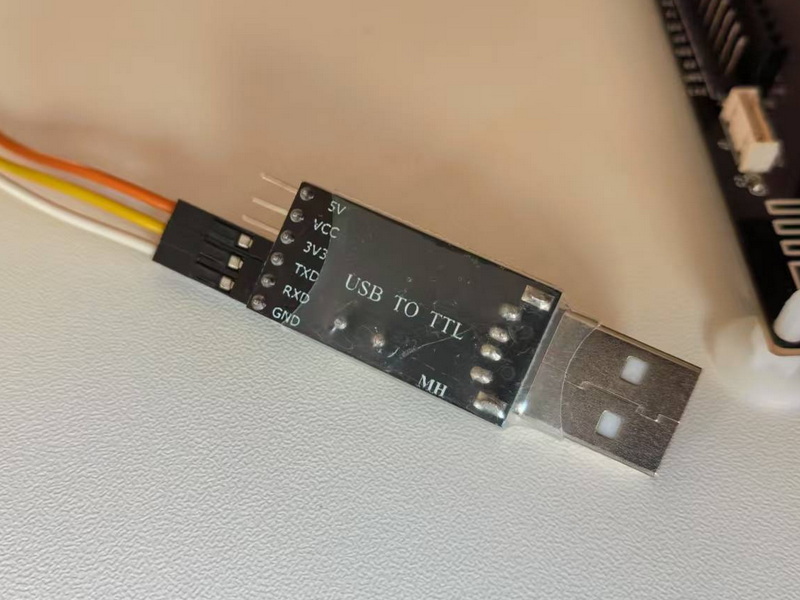
说明:2根线号线,TXD(发送),RXD(接收),TXD要接到单片机的RXD上,RXD要接到单片机的TXD上,GND(接地)要跟单片机的GND端连接。
舵机接线:
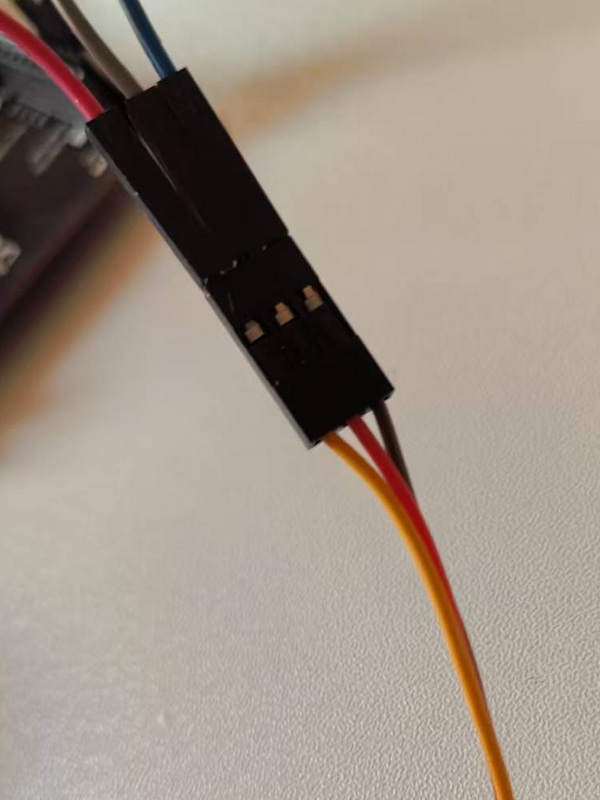
说明:舵机有3条线,2条(VCC, GND)接单片机的电源接口上,VCC接在5V端口上,1条(脉冲信号)接单片机的端口上。
代码
目录结构
└─uart_sg90_test
        BUILD.gn
        entry.c
        sg90.c
        sg90.h
        uart.c
        uart.h
串口设置 uart.h
#ifndef __UART_H__
#define __UART_H__

// 串口 端口
#define UART_IDX            HI_UART_IDX_2

// 串口 TX 管脚编号
#define UART_TXD_NAME       HI_IO_NAME_GPIO_11
#define UART_TXD_FUNC       HI_IO_FUNC_GPIO_11_UART2_TXD

// 串口 RX 管脚编号
#define UART_RXD_NAME       HI_IO_NAME_GPIO_12
#define UART_RXD_FUNC       HI_IO_FUNC_GPIO_12_UART2_RXD


// 串口 设置
void Uart_Init(void);

// 串口 读数据 buff 读入数据缓存 size 缓存大小
int Uart_Read_Data(char *buff, int size);

// 串口 输出数据  data 要输出的字符串 size 输出字符串大小
int Uart_Write_Data(char *data, int size);


#endif
使用的端口是,TX (GPIO 11), RX (GPIO 12), 11 接 串口模块 RX, 12接 串口模块 TX。
uart.c
#include <stdio.h>
#include <stdlib.h>
#include <string.h>

#include "ohos_init.h"
#include "cmsis_os2.h"
#include "iot_gpio.h"

#include "hi_types_base.h"
#include "hi_errno.h"

#include "hi_io.h"
#include "hi_gpio.h"
#include "hi_time.h"
#include "hi_uart.h"

#include "uart.h"

// 串口 设置
void Uart_Init(void)
{
    // 设置 端口 功能
    hi_io_set_func(UART_TXD_NAME, UART_TXD_FUNC);
    hi_io_set_func(UART_RXD_NAME, UART_RXD_FUNC);

    // 串口 通信 设置
    hi_uart_attribute uart_attr = {
        .baud_rate = 115200,    // 波特率
        .data_bits = 8,         // 数据位
        .stop_bits = 1,         // 停止位
        .parity = 0,            // 奇偶校验位
    };

    // 非 阻塞 模式
    hi_uart_extra_attr extra_attr = {
        .tx_block = HI_UART_BLOCK_STATE_NONE_BLOCK, // TX 非阻塞传输
        .rx_block = HI_UART_BLOCK_STATE_NONE_BLOCK, // RX 非阻塞传输
    };

    // 串口 初始化
    if(hi_uart_init(UART_IDX, &uart_attr, &extra_attr) != HI_ERR_SUCCESS)
    {
        printf(" [hi_uart_init ] FAILURE! \n");
        return;
    }
}

// 串口 读取数据 buff 读入数据缓存 size 缓存大小
int Uart_Read_Data(char *buff, int size)
{
    int len = hi_uart_read(UART_IDX, buff, size);

    if(len > 0)
    {
        printf(" [Uart_Read_Data] len = %d , buff = %s \n", len, buff);
    }

    return len;
}

// 串口 输出数据  data 要输出的字符串 size 输出字符串大小
int Uart_Write_Data(char *data, int size)
{
    int len = hi_uart_write(UART_IDX, data, size);

    if(len > 0)
    {
        printf(" [Uart_Write_Data] len = %d , data = %s \n", len, data);
    }

    // 输出 换行符
    char lf[2] = {'\r', '\n'};
    hi_uart_write(UART_IDX, lf, 2);

    return len;
}
舵机设置 sg90.h
#ifndef __SG90_H__
#define __SG90_H__

// 针脚 端口 功能 配置
#define SG90_IO_NAME      HI_IO_NAME_GPIO_0
#define SG90_IO_FUNC      HI_IO_FUNC_GPIO_0_GPIO
#define SG90_GPIO_ID      HI_GPIO_IDX_0

// sg90 舵机 端口 初始化
void SG90_Init(void);

// sg90 舵机 角度
void SG90_Angel(hi_gpio_idx id, int angel);

#endif
我使用的舵机信号端口是 GPIO 0, 功能就是普通的 GPIO口。
sg90.c 代码
#include <stdio.h>
#include <stdlib.h>
#include <string.h>

#include "hi_types_base.h"
#include "hi_errno.h"

#include "hi_io.h"
#include "hi_gpio.h"
#include "hi_time.h"

#include "sg90.h"

// sg90 舵机 端口 初始化
void SG90_Init(void)
{
    hi_io_set_func(SG90_IO_NAME, SG90_IO_FUNC);
    hi_gpio_set_dir(SG90_GPIO_ID, HI_GPIO_DIR_OUT);
    hi_gpio_set_ouput_val(SG90_GPIO_ID, HI_GPIO_VALUE0);
}

// sg90 舵机 角度
void SG90_Angel(hi_gpio_idx id, int angel)
{
    // hi_u16 t = 20000;
    // hi_u16 t0 = 500;
    // hi_u16 t180 = 2500;
    // hi_u16 t1 = (hi_u16)((t180 - t0)/180 + 0.5); = 11.11111

    // 高 低 时间
    int high = (int)(500 + angel * 11.11 + 0.5);
    int low = 20000 - high;

    printf(" [SG90_Angel] high = %d , low = %d, 20ms = %d \n", high, low, (high+low));

    // 输出
    hi_gpio_set_ouput_val(id, HI_GPIO_VALUE1);
    hi_udelay(high);
    hi_gpio_set_ouput_val(id, HI_GPIO_VALUE0);
    hi_udelay(low);

    // 等待 转完
    hi_udelay(100000);
}
先求出走1度所用的时间,结果是11.1111111..., 然后输入角度数 * 这个时间 ,就是运行所要的时间。
主函数 entry.c 代码
#include <stdio.h>
#include <stdlib.h>
#include <string.h>

#include "ohos_init.h"
#include "cmsis_os2.h"
#include "iot_gpio.h"

#include "hi_types_base.h"
#include "hi_errno.h"

#include "hi_io.h"
#include "hi_gpio.h"
#include "hi_time.h"

#include "hi_uart.h"

#include "sg90.h"
#include "uart.h"

#define TASK_SIZE 4096
#define TASK_PRIO 25

// 舵机 角度
int se_angel = 0;
// 舵机 状态
int se_state = 0;

// 整型 转 字符串
static char *Int_To_String(int num)
{
    int int_length = sizeof(num);
    char *result = (char *)malloc((int_length + 1) * sizeof(char));
    if(result == NULL)
    {
        return NULL;
    }
    sprintf(result, "%d", num);
    return result;
}

// 连接 字符串
static char *Connection_String(char *str1, char *str2)
{
    size_t len1 = strlen(str1);
    size_t len2 = strlen(str2);
    char *result = (char *)malloc((len1 + len2 + 1) * sizeof(char));
    if(result == NULL)
    {
        return NULL;
    }
    strcpy(result, str1);
    strcpy(result + len1, str2);
    return result;
}


//  串口 发送 舵机 角度
void Uart_Send_SE_Angel(void)
{
    char *se_angel_str = Connection_String("se angel = ", Int_To_String(se_angel));

    int str_size = strlen(se_angel_str);

    printf(" [Uart_Send_SE_Angel] se_angel_str = %s , str_size = %d \n", se_angel_str, str_size);

    Uart_Write_Data(se_angel_str, str_size);
}

static void *Uart_SG90_Task(const char *arg)
{
    (void)arg;

    printf(" [Uart SG90 test] Start \n");

    // 关狗
    hi_watchdog_disable();
    // 端口初始化
    hi_gpio_init();

    // 舵机初始化
    SG90_Init();
    // 串口初始化
    Uart_Init();

    // 读取数据
    char read_data[32] = {0};

    // 返回值
    int uart_ret = 0;

    while(1)
    {
        // 读取串口
        uart_ret = Uart_Read_Data(read_data, 32);

        // 如果有数据
        if(uart_ret > 0)
        {
            if(strlen(read_data) < 4)
            {
                char *re;
                int angel_num = (int)(strtol(read_data, &re, 10));
                printf(" [Array to integer] angel number = %d \n", angel_num);

                if(angel_num >=0 && angel_num <= 180)
                {
                    se_angel = angel_num;
                    se_state = 1;
                    printf(" [SE angle] angel = %d , state = %d \n", se_angel, se_state);
                }
                else
                {
                    // 如果不符合继续循环
                    continue;
                }
            }

            // 清空 数组
            memset(read_data, 0, sizeof(read_data));
        }

        if(se_state == 1)
        {
            SG90_Angel(SG90_GPIO_ID, se_angel);

            se_state = 0;

            Uart_Send_SE_Angel();
        }

        hi_udelay(500000);
    }

    return NULL;
}

static void Uart_SG90_Entry(void)
{
    osThreadAttr_t attr;

    attr.name = "UartSG90Task";
    attr.attr_bits = 0U;
    attr.cb_mem = NULL;
    attr.cb_size = 0U;
    attr.stack_mem = NULL;
    attr.stack_size = TASK_SIZE;
    attr.priority = TASK_PRIO;

    if (osThreadNew((osThreadFunc_t)Uart_SG90_Task, NULL, &attr) == NULL)
    {
        printf(" [Uart_SG90_Task] Falied! \n");
    }
}

SYS_RUN(Uart_SG90_Entry);
运行状态
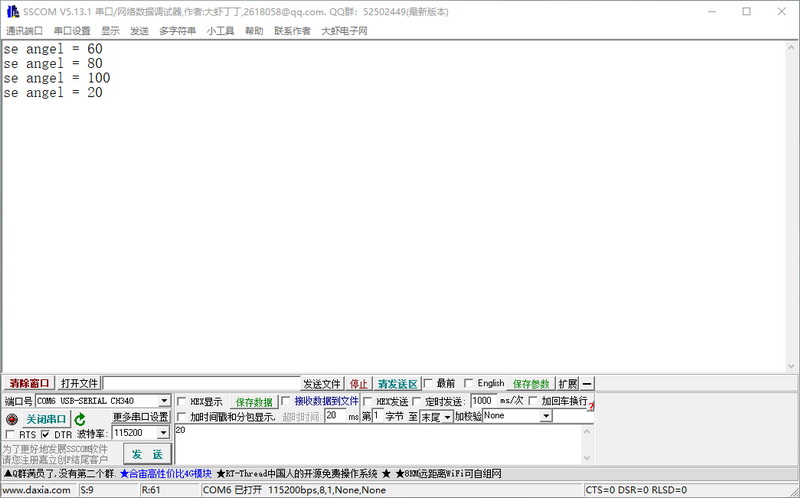
用串口通信工具连接控制舵机的串口,输入1个数值,点击发送,只要是0-180,单片机会控制舵机转到输入的角度,并把结果通过串口回传回来。
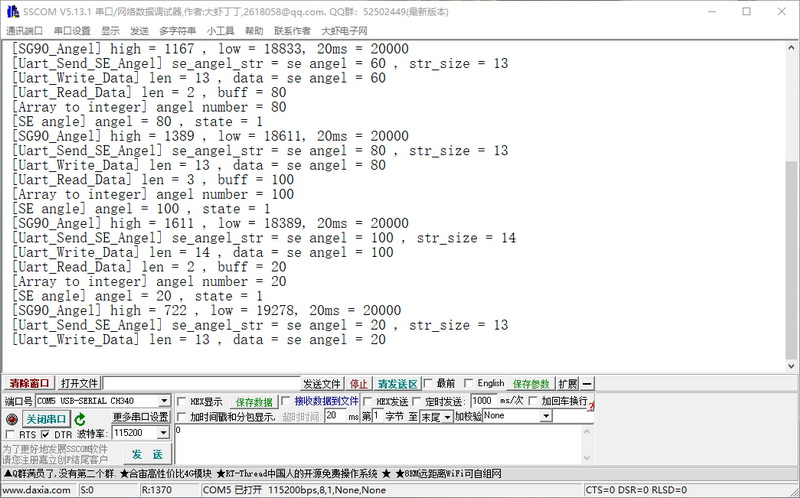
再开一个串口通信端,连接单片机通讯端口。
会打印单片机运行过程。
OK 结束。

智能硬件社区聚焦AI智能硬件技术生态,汇聚嵌入式AI、物联网硬件开发者,打造交流分享平台,同步全国赛事资讯、开展 OPC 核心人才招募,助力技术落地与开发者成长。
更多推荐



 5
5 0
0- 0


 已为社区贡献5条内容

所有评论(0)