基于 ESP32 扫描附近的蓝牙设备并且打印
基于 ESP32 扫描附近的蓝牙设备并且打印
·
参数
开发板:esp32
蓝牙扫描方式:异步扫描
编译工具:Arduino
完整代码
#include <BluetoothSerial.h>

// 检查蓝牙功能是否在配置中启用,如果未定义CONFIG_BT_ENABLED或者未定义CONFIG_BLUEDROID_ENABLED,意味着蓝牙未启用,此时会输出错误信息,并提示运行 `make menuconfig` 来启用蓝牙
#if !defined(CONFIG_BT_ENABLED) || !defined(CONFIG_BLUEDROID_ENABLED)
#error Bluetooth is not enabled! Please run `make menuconfig` to and enable it
#endif

// 检查串口蓝牙功能是否在配置中启用,如果未定义CONFIG_BT_SPP_ENABLED,意味着串口蓝牙不可用或未启用,同时会提示该功能仅适用于ESP32芯片
#if !defined(CONFIG_BT_SPP_ENABLED)
#error Serial Bluetooth not available or not enabled. It is only available for the ESP32 chip.
#endif

BluetoothSerial SerialBT;


String mus[32] = {" "};//默认保存32个设备信息
int zz;

//清除已扫描的设备
void clean_mus() {
 zz = 1;
   Serial.println("正在清除已扫描的设备");
  while (mus[zz] != 0)
  {
      mus[zz] = "";
      zz++;
  }
  zz = 0;

}

//打印已扫描的设备
void print_mus() {
 zz = 1;
  Serial.print("发现");
  while (mus[zz] != 0)
  {
      zz++;
  }
  Serial.print(zz-1);
  Serial.print("台设备,");
 zz = 1;
  Serial.println("准备打印设备列表");
  Serial.println("------------------------------------------");
  while (mus[zz] != 0)
  {
      Serial.print("设备");
      Serial.print(zz);
      Serial.print(":");
      Serial.println(mus[zz]);
      zz++;
  }
  Serial.println("------------------------------------------");
}

void bt_Find() {

 Serial.println("开始异步扫描...");

  if (SerialBT.discoverAsync(btAdvertisedDeviceFound)) {

    delay(10000);//等待扫描结束
    Serial.print("正在停止异步扫描... ");
    SerialBT.discoverAsyncStop();// 调用SerialBT.discoverAsyncStop函数停止异步扫描
    Serial.println("已停止");

  }

  else {

      Serial.println("扫描出现错误");

  }

}

// 当异步扫描到蓝牙设备时调用的回调函数
void btAdvertisedDeviceFound(BTAdvertisedDevice* pDevice) {
  zz++;
  mus[zz] = pDevice->toString().c_str();// pDevice 是指向扫描到的蓝牙设备的指针
}


void setup() {

  Serial.begin(115200);
  SerialBT.begin("ESP32"); //定义设备名称

}


void loop() {

   clean_mus();//清除已扫描的设备

   bt_Find();// 进行异步蓝牙设备扫描

   print_mus();//打印已扫描的设备

  delay(10000);// 等待10000毫秒重新扫描
}
效果
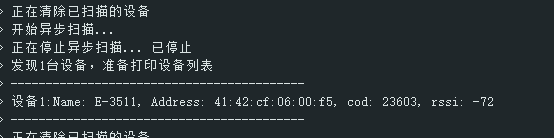
将代码烧录后,串口打印如上
提示及说明
在编译代码之前,请确保已经安装esp32开发板,没有安装去附件找离线安装包
本代码参考esp32开发板代码示例:“Bluetoothserial/bt_classic_device_discovery”
附件#001
链接: https://pan.baidu.com/s/1-amQeDQ9niJJg1_21mN5Fw?pwd=1234 提取码: 1234

智能硬件社区聚焦AI智能硬件技术生态,汇聚嵌入式AI、物联网硬件开发者,打造交流分享平台,同步全国赛事资讯、开展 OPC 核心人才招募,助力技术落地与开发者成长。
更多推荐

 7
7 0
0- 0


 已为社区贡献1条内容

所有评论(0)