Arduino 中断
指处理机处理程序运行中出现的紧急事件的整个过程,程序运行过程中,系统外部、系统内部或者现行程序本身若出现紧急事件,处理机立即中止现行程序的运行,自动转入相应的处理程序(中断服务程序),待处理完后,再返回原来的程序运行,这整个过程称为程序中断。
1.什么是中断
指处理机处理程序运行中出现的紧急事件的整个过程,程序运行过程中,系统外部、系统内部或者现行程序本身若出现紧急事件,处理机立即中止现行程序的运行,自动转入相应的处理程序(中断服务程序),待处理完后,再返回原来的程序运行,这整个过程称为程序中断。
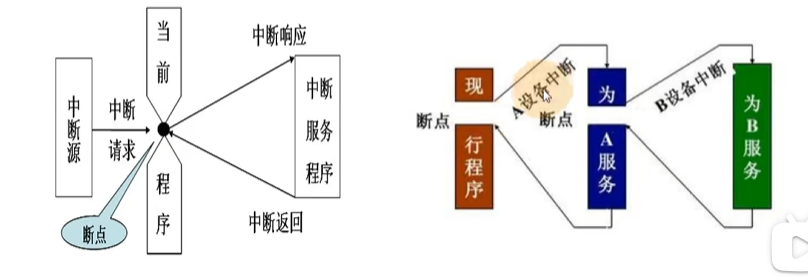
2.Arduino的外部中断
顾名思义,外部中断是由控制器外部设备发起请求的中断。要想使用Arduino的外部中断功能,需要明确所用控制器的中断引脚与中断编号,并根据实际情况选择合适的中断触发模式,并编写实现中断具体功能的中断服务函数。
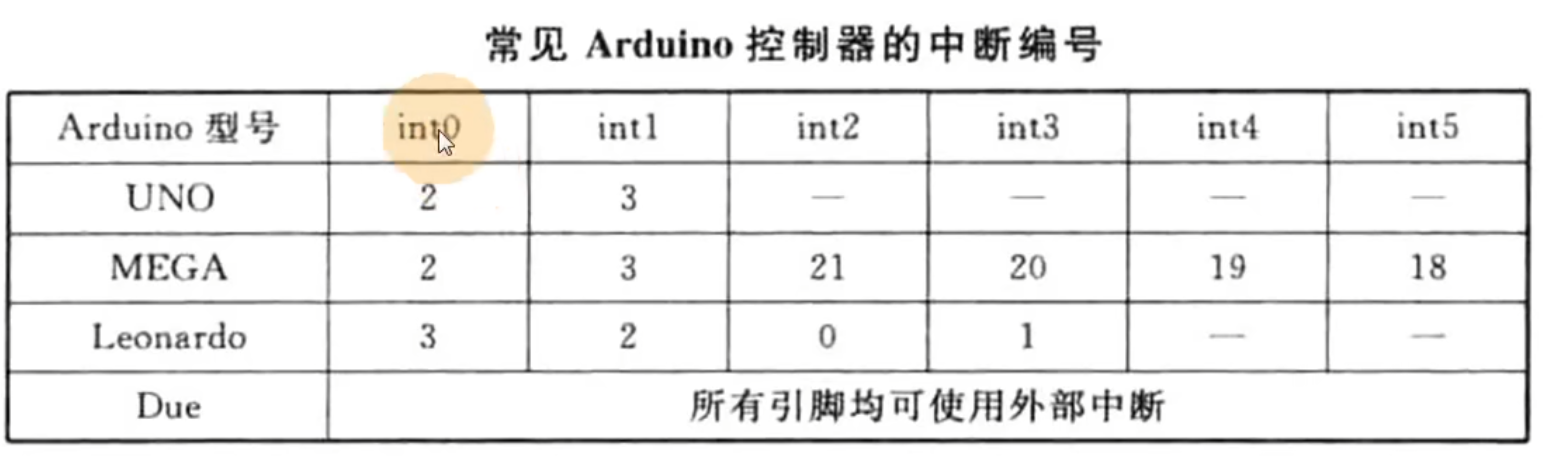
3.Arduino中断触发方式
大多数Arduino支持以下四种触发方式,在Arduino Due中还可以使用高电平(HIGH)作为触发方式,并且可以使用任一个I/0口触发中断,中断编号是对应的引脚号
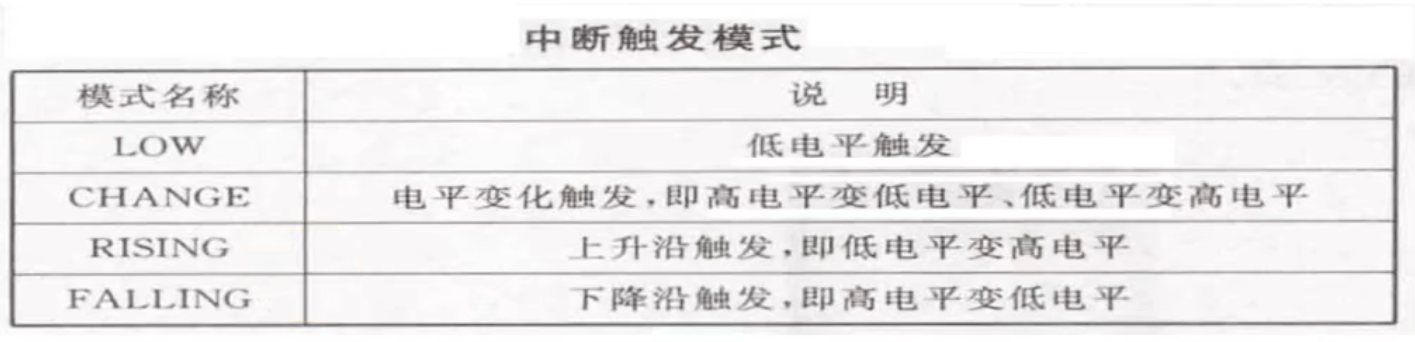
4.Arduino 中断配置
要在setup函数中进行中断的初始化配置,写法如下:
void setup{
    attachInterrupt(中断编号,中断服务函数,中断触发模式);
}注意第一个参数为中断编号而非引脚号
代码编写过程中我们大部分绑定的是开发板的引脚号,那可以通过digitalPinToInterrupt(pin)来获取引脚对应的中断编号,例如我们连接UNO板的2号引脚,则代码如下:
attachInterrupt(digitalPinToInterrupt(2),中断服务函数,中断模式);官方推荐如下:
-
(recommended)attachInterrupt(digitalPinToInterrupt(pin), ISR, mode) -
(not recommended)attachInterrupt(interrupt, ISR, mode)
5.中断服务函数
使用中断功能,除了对中断进行初始化配置以外,还需要编写一个中断请求被响应后能让Arduino运行实现具体中断功能的函数,即:中断函数。
初学者需要注意:
1、中断函数不能带任何参数,且返回值为空(void);
2、中断函数放在setup和loop函数之外。
void setup(){
}
void loop(){
}
//中断服务函数
void xxx(){}
6.注意事项
Arduino官方文档
Note: the attached function, delay() won’t work and the value returned by millis() will not increment. Serial data received while in the function may be lost. You should declare as volatile any variables that you modify within the attached function. See the section on ISRs below for more information.
millis() relies on interrupts to count, so it will never increment inside an ISR. The "Arduino AVR Boards" and "Arduino megaAVR Boards" cores use Timer0 to generate millis() .Since delay() requires interrupts to work, it will not work if called inside an ISR. micros() works initially but will start behaving erratically after 1-2 ms. delayMicroseconds() does not use any counter, so it will work as normal.
在中断服务函数中,delay()函数无法使用(因为该函数依赖interrupts去执行),对于millis()函数同样,在中断函数中可以使用delayMicroseconds()。
7.官方示例程序
const byte ledPin = 13;
    const byte interruptPin = 2;
    volatile byte state = LOW;

    void setup() {
      pinMode(ledPin, OUTPUT);
      pinMode(interruptPin, INPUT_PULLUP);
      attachInterrupt(digitalPinToInterrupt(interruptPin), blink, CHANGE);
    }

    void loop() {
      digitalWrite(ledPin, state);
    }

    void blink() {
      state = !state;
    }
智能硬件社区聚焦AI智能硬件技术生态,汇聚嵌入式AI、物联网硬件开发者,打造交流分享平台,同步全国赛事资讯、开展 OPC 核心人才招募,助力技术落地与开发者成长。
更多推荐



 1
1 0
0- 0


 已为社区贡献2条内容

所有评论(0)