STM32按键控制LED灯亮灭
STM32单片机学习记录
·
LED灯的底层函数
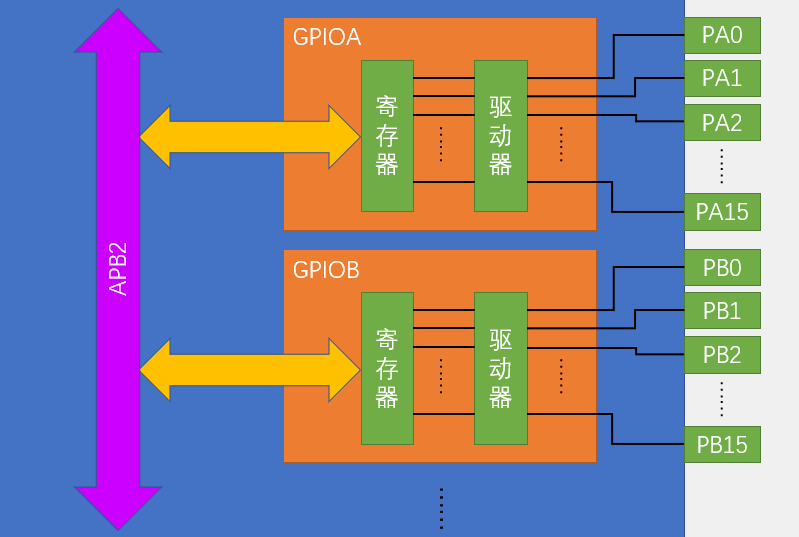
在任何模块底层首先进行初始化,进行时钟的初始化和GPIO口的初始化,由于我把LED灯连接在了A1口,所以我要对时钟的APB2和GPIOA进行设置,为了实现按键按下点亮LED和按键按下熄灭LED的功能,设置了LED转换函数(接收到的电平为低电平时将1引脚设置为高电平达到取反的目的)
#include "stm32f10x.h"                  // Device header

void Led_Init(void)
{
	RCC_APB2PeriphClockCmd(RCC_APB2Periph_GPIOA,ENABLE);//开启GPIOA时钟
	GPIO_InitTypeDef GPIO_InitStructure;//宏定义结构体变量
	GPIO_InitStructure.GPIO_Mode=GPIO_Mode_Out_PP;//设置为推挽输出模式
	GPIO_InitStructure.GPIO_Pin=GPIO_Pin_1;//设置GPIO的第1号引脚
	GPIO_InitStructure.GPIO_Speed=GPIO_Speed_50MHz;//GPIO的速度为50MHZ
	GPIO_Init(GPIOA,&GPIO_InitStructure);
	GPIO_SetBits(GPIOA,GPIO_Pin_1);//上电处于熄灭状态
}
void Led_On(void)
{
	GPIO_ResetBits(GPIOA,GPIO_Pin_1);//将1号引脚设置为低电平
}
void Led_Off(void)
{
	GPIO_SetBits(GPIOA,GPIO_Pin_1);//将1号引脚设置为高电平
}
void Led_Turn(void)//LED灯反转
{
	if(GPIO_ReadOutputDataBit(GPIOA,GPIO_Pin_1)==0)
	{
	GPIO_SetBits(GPIOA,GPIO_Pin_1);//将1号引脚设置为高电平
	}
	else
	{
	GPIO_ResetBits(GPIOA,GPIO_Pin_1);//将1号引脚设置为低电平
	}
}
#ifndef __LED_H
#define __LED_H
void Led_Init(void);
void Led_On(void);
void Led_Off(void);
void Led_Turn(void);
#endif
按键的底层函数
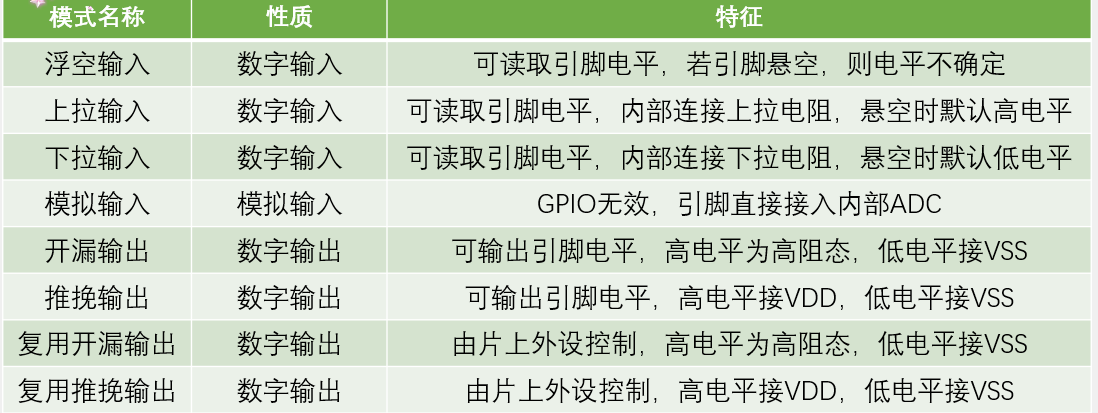
按键一定要进行消抖处理,由于我把按键插在B1口,所以要对GPIOB和Pin1进行设置,按键按下为低电平,所以我把默认设置为了上拉输入模式,默认是高电平
#include "stm32f10x.h"                  // Device header
#include "Delay.h"
void Key_Init(void)
{
	RCC_APB2PeriphClockCmd(RCC_APB2Periph_GPIOB,ENABLE);//开启GPIOB时钟
	GPIO_InitTypeDef GPIO_InitStructure;//宏定义结构体变量
	GPIO_InitStructure.GPIO_Mode=GPIO_Mode_IPU;//设置为上拉输入模式,默认为高电平
	GPIO_InitStructure.GPIO_Pin=GPIO_Pin_1;//设置GPIO的第1号引脚
	GPIO_InitStructure.GPIO_Speed=GPIO_Speed_50MHz;//GPIO的速度为50MHZ
	GPIO_Init(GPIOB,&GPIO_InitStructure);
}
uint8_t Key_Read(void)//按键读取函数
{
	uint8_t temp=0;
	if(GPIO_ReadInputDataBit(GPIOB,GPIO_Pin_1)==0)//按键按下
	{
		Delay_ms(20);//按键消抖
		while(GPIO_ReadInputDataBit(GPIOB,GPIO_Pin_1)==0);//等待松开按键
		Delay_ms(20);//按键消抖
		temp=1;
	}
	return temp;
}
#ifndef __Key_H
#define __Key_H
void Key_Init(void);
uint8_t Key_Read(void);
#endif主函数
#include "stm32f10x.h"                  // Device header
#include "Led.h"//LED专用头文件
#include "Delay.h"//延时函数专用头文件
#include "Key.h"//按键函数专用头文件
uint8_t Key_Down;
int main(void)
{
	Led_Init();//LED初始化函数
	Key_Init();//按键初始化函数
	while(1)
	{
		Key_Down=Key_Read();
		if(Key_Down==1)
		{
			Led_Turn();
		}
	}
}
智能硬件社区聚焦AI智能硬件技术生态,汇聚嵌入式AI、物联网硬件开发者,打造交流分享平台,同步全国赛事资讯、开展 OPC 核心人才招募,助力技术落地与开发者成长。
更多推荐


 6
6 0
0- 0


 已为社区贡献7条内容

所有评论(0)