Esp32 ST7789 + LVGL屏幕配置文档(从零开始)
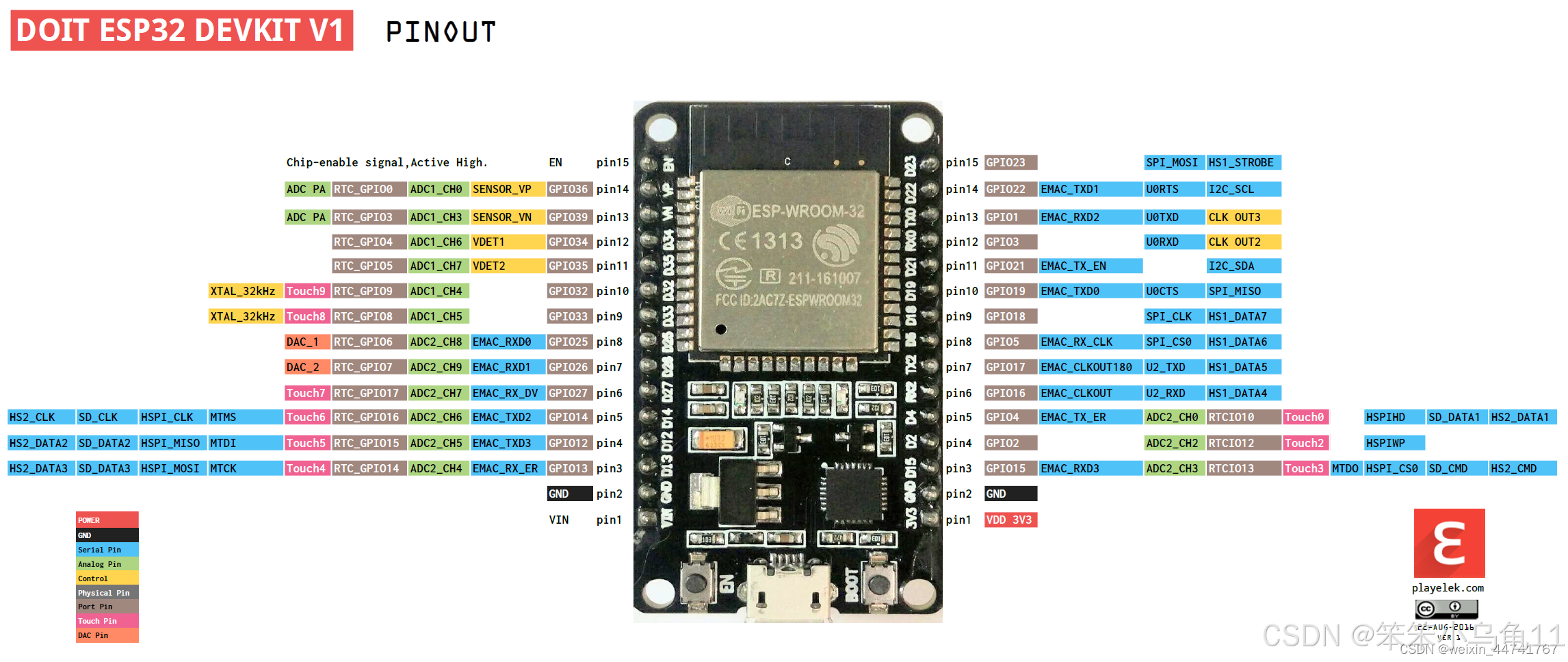
在文件中修改引脚定义。需要注意的是,如果你的SPI屏幕上没有DC,而是A0,那么A0就是DC,他们的作用相同。这里就跟据自己去接的引脚去改就可以,或者跟笔者的引脚对着去接也可以。LVGL(Light and Versatile Graphics Library)是一个免费开放源代码的图形库,专为嵌入式系统设计,用于创建具有吸引力的图形用户界面(GUI)。它支持多种显示设备,并且可以在资源受限的硬件
版本
TFT_eSPI:2.5.43
LVGL: 8.30
如果是新手推荐按着这个版本去安装,会少踩坑。
Esp32原理图
TFT_eSPI
1. 下载 TFT_eSPI 库
你需要从 GitHub 上下载 TFT_eSPI 库,其链接为:https://github.com/Bodmer/TFT_eSPI。.
2. 移植库到项目
将下载好的 TFT_eSPI 库移植到你的项目中,具体移植方式根据你所使用的开发环境而定。
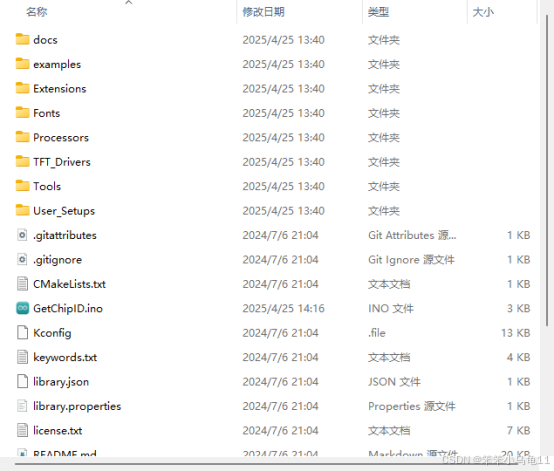
3. 修改引脚定义
在 User_Setup.h 文件中修改引脚定义。需要注意的是,如果你的SPI屏幕上没有DC,而是A0,那么A0就是DC,他们的作用相同。
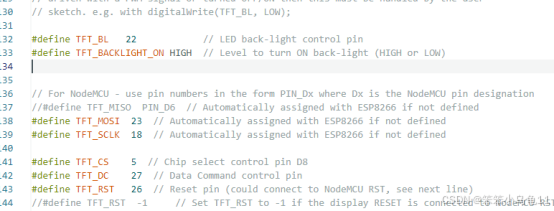
这里就跟据自己去接的引脚去改就可以,或者跟笔者的引脚对着去接也可以。
4. 解决颜色显示问题
若出现颜色显示不正确的情况,可按以下操作解决:将以下两处的注释解开,一处用于颜色反转,另一处用于将颜色显示模式修改为 BGR。具体在代码中找到对应的注释行并去掉注释符号即可。
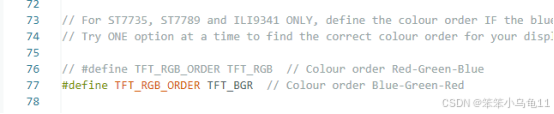
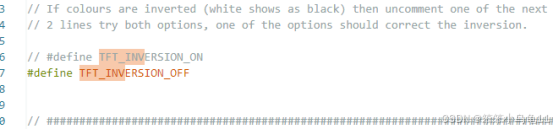
好了,此时上一段官方的demo运行代码检测一下就OK了。
/*
  Example animated analogue meters using a ILI9341 TFT LCD screen

  Needs Font 2 (also Font 4 if using large scale label)

  Make sure all the display driver and pin connections are correct by
  editing the User_Setup.h file in the TFT_eSPI library folder.

  #########################################################################
  ###### DON'T FORGET TO UPDATE THE User_Setup.h FILE IN THE LIBRARY ######
  #########################################################################
*/

#include <TFT_eSPI.h> // Hardware-specific library
#include <SPI.h>

TFT_eSPI tft = TFT_eSPI();       // Invoke custom library

#define TFT_GREY 0x5AEB

#define LOOP_PERIOD 35 // Display updates every 35 ms

float ltx = 0;    // Saved x coord of bottom of needle
uint16_t osx = 120, osy = 120; // Saved x & y coords
uint32_t updateTime = 0;       // time for next update

int old_analog =  -999; // Value last displayed
int old_digital = -999; // Value last displayed

int value[6] = {0, 0, 0, 0, 0, 0};
int old_value[6] = { -1, -1, -1, -1, -1, -1};
int d = 0;

void setup(void) {
  tft.init();
  tft.setRotation(0);
  Serial.begin(57600); // For debug
  tft.fillScreen(TFT_BLACK);

  analogMeter(); // Draw analogue meter

  // Draw 6 linear meters
  byte d = 40;
  plotLinear("A0", 0, 160);
  plotLinear("A1", 1 * d, 160);
  plotLinear("A2", 2 * d, 160);
  plotLinear("A3", 3 * d, 160);
  plotLinear("A4", 4 * d, 160);
  plotLinear("A5", 5 * d, 160);

  updateTime = millis(); // Next update time
}


void loop() {
  if (updateTime <= millis()) {
    updateTime = millis() + LOOP_PERIOD;

    d += 4; if (d >= 360) d = 0;

    //value[0] = map(analogRead(A0), 0, 1023, 0, 100); // Test with value form Analogue 0

    // Create a Sine wave for testing
    value[0] = 50 + 50 * sin((d + 0) * 0.0174532925);
    value[1] = 50 + 50 * sin((d + 60) * 0.0174532925);
    value[2] = 50 + 50 * sin((d + 120) * 0.0174532925);
    value[3] = 50 + 50 * sin((d + 180) * 0.0174532925);
    value[4] = 50 + 50 * sin((d + 240) * 0.0174532925);
    value[5] = 50 + 50 * sin((d + 300) * 0.0174532925);

    //unsigned long t = millis();

    plotPointer();

    plotNeedle(value[0], 0);

    //Serial.println(millis()-t); // Print time taken for meter update
  }
}


// #########################################################################
//  Draw the analogue meter on the screen
// #########################################################################
void analogMeter()
{
  // Meter outline
  tft.fillRect(0, 0, 239, 126, TFT_GREY);
  tft.fillRect(5, 3, 230, 119, TFT_WHITE);

  tft.setTextColor(TFT_BLACK);  // Text colour

  // Draw ticks every 5 degrees from -50 to +50 degrees (100 deg. FSD swing)
  for (int i = -50; i < 51; i += 5) {
    // Long scale tick length
    int tl = 15;

    // Coordinates of tick to draw
    float sx = cos((i - 90) * 0.0174532925);
    float sy = sin((i - 90) * 0.0174532925);
    uint16_t x0 = sx * (100 + tl) + 120;
    uint16_t y0 = sy * (100 + tl) + 140;
    uint16_t x1 = sx * 100 + 120;
    uint16_t y1 = sy * 100 + 140;

    // Coordinates of next tick for zone fill
    float sx2 = cos((i + 5 - 90) * 0.0174532925);
    float sy2 = sin((i + 5 - 90) * 0.0174532925);
    int x2 = sx2 * (100 + tl) + 120;
    int y2 = sy2 * (100 + tl) + 140;
    int x3 = sx2 * 100 + 120;
    int y3 = sy2 * 100 + 140;

    // Yellow zone limits
    //if (i >= -50 && i < 0) {
    //  tft.fillTriangle(x0, y0, x1, y1, x2, y2, TFT_YELLOW);
    //  tft.fillTriangle(x1, y1, x2, y2, x3, y3, TFT_YELLOW);
    //}

    // Green zone limits
    if (i >= 0 && i < 25) {
      tft.fillTriangle(x0, y0, x1, y1, x2, y2, TFT_GREEN);
      tft.fillTriangle(x1, y1, x2, y2, x3, y3, TFT_GREEN);
    }

    // Orange zone limits
    if (i >= 25 && i < 50) {
      tft.fillTriangle(x0, y0, x1, y1, x2, y2, TFT_ORANGE);
      tft.fillTriangle(x1, y1, x2, y2, x3, y3, TFT_ORANGE);
    }

    // Short scale tick length
    if (i % 25 != 0) tl = 8;

    // Recalculate coords incase tick lenght changed
    x0 = sx * (100 + tl) + 120;
    y0 = sy * (100 + tl) + 140;
    x1 = sx * 100 + 120;
    y1 = sy * 100 + 140;

    // Draw tick
    tft.drawLine(x0, y0, x1, y1, TFT_BLACK);

    // Check if labels should be drawn, with position tweaks
    if (i % 25 == 0) {
      // Calculate label positions
      x0 = sx * (100 + tl + 10) + 120;
      y0 = sy * (100 + tl + 10) + 140;
      switch (i / 25) {
        case -2: tft.drawCentreString("0", x0, y0 - 12, 2); break;
        case -1: tft.drawCentreString("25", x0, y0 - 9, 2); break;
        case 0: tft.drawCentreString("50", x0, y0 - 6, 2); break;
        case 1: tft.drawCentreString("75", x0, y0 - 9, 2); break;
        case 2: tft.drawCentreString("100", x0, y0 - 12, 2); break;
      }
    }

    // Now draw the arc of the scale
    sx = cos((i + 5 - 90) * 0.0174532925);
    sy = sin((i + 5 - 90) * 0.0174532925);
    x0 = sx * 100 + 120;
    y0 = sy * 100 + 140;
    // Draw scale arc, don't draw the last part
    if (i < 50) tft.drawLine(x0, y0, x1, y1, TFT_BLACK);
  }

  tft.drawString("%RH", 5 + 230 - 40, 119 - 20, 2); // Units at bottom right
  tft.drawCentreString("%RH", 120, 70, 4); // Comment out to avoid font 4
  tft.drawRect(5, 3, 230, 119, TFT_BLACK); // Draw bezel line

  plotNeedle(0, 0); // Put meter needle at 0
}

// #########################################################################
// Update needle position
// This function is blocking while needle moves, time depends on ms_delay
// 10ms minimises needle flicker if text is drawn within needle sweep area
// Smaller values OK if text not in sweep area, zero for instant movement but
// does not look realistic... (note: 100 increments for full scale deflection)
// #########################################################################
void plotNeedle(int value, byte ms_delay)
{
  tft.setTextColor(TFT_BLACK, TFT_WHITE);
  char buf[8]; dtostrf(value, 4, 0, buf);
  tft.drawRightString(buf, 40, 119 - 20, 2);

  if (value < -10) value = -10; // Limit value to emulate needle end stops
  if (value > 110) value = 110;

  // Move the needle util new value reached
  while (!(value == old_analog)) {
    if (old_analog < value) old_analog++;
    else old_analog--;

    if (ms_delay == 0) old_analog = value; // Update immediately id delay is 0

    float sdeg = map(old_analog, -10, 110, -150, -30); // Map value to angle
    // Calculate tip of needle coords
    float sx = cos(sdeg * 0.0174532925);
    float sy = sin(sdeg * 0.0174532925);

    // Calculate x delta of needle start (does not start at pivot point)
    float tx = tan((sdeg + 90) * 0.0174532925);

    // Erase old needle image
    tft.drawLine(120 + 20 * ltx - 1, 140 - 20, osx - 1, osy, TFT_WHITE);
    tft.drawLine(120 + 20 * ltx, 140 - 20, osx, osy, TFT_WHITE);
    tft.drawLine(120 + 20 * ltx + 1, 140 - 20, osx + 1, osy, TFT_WHITE);

    // Re-plot text under needle
    tft.setTextColor(TFT_BLACK);
    tft.drawCentreString("%RH", 120, 70, 4); // // Comment out to avoid font 4

    // Store new needle end coords for next erase
    ltx = tx;
    osx = sx * 98 + 120;
    osy = sy * 98 + 140;

    // Draw the needle in the new postion, magenta makes needle a bit bolder
    // draws 3 lines to thicken needle
    tft.drawLine(120 + 20 * ltx - 1, 140 - 20, osx - 1, osy, TFT_RED);
    tft.drawLine(120 + 20 * ltx, 140 - 20, osx, osy, TFT_MAGENTA);
    tft.drawLine(120 + 20 * ltx + 1, 140 - 20, osx + 1, osy, TFT_RED);

    // Slow needle down slightly as it approaches new postion
    if (abs(old_analog - value) < 10) ms_delay += ms_delay / 5;

    // Wait before next update
    delay(ms_delay);
  }
}

// #########################################################################
//  Draw a linear meter on the screen
// #########################################################################
void plotLinear(char *label, int x, int y)
{
  int w = 36;
  tft.drawRect(x, y, w, 155, TFT_GREY);
  tft.fillRect(x + 2, y + 19, w - 3, 155 - 38, TFT_WHITE);
  tft.setTextColor(TFT_CYAN, TFT_BLACK);
  tft.drawCentreString(label, x + w / 2, y + 2, 2);

  for (int i = 0; i < 110; i += 10)
  {
    tft.drawFastHLine(x + 20, y + 27 + i, 6, TFT_BLACK);
  }

  for (int i = 0; i < 110; i += 50)
  {
    tft.drawFastHLine(x + 20, y + 27 + i, 9, TFT_BLACK);
  }

  tft.fillTriangle(x + 3, y + 127, x + 3 + 16, y + 127, x + 3, y + 127 - 5, TFT_RED);
  tft.fillTriangle(x + 3, y + 127, x + 3 + 16, y + 127, x + 3, y + 127 + 5, TFT_RED);

  tft.drawCentreString("---", x + w / 2, y + 155 - 18, 2);
}

// #########################################################################
//  Adjust 6 linear meter pointer positions
// #########################################################################
void plotPointer(void)
{
  int dy = 187;
  byte pw = 16;

  tft.setTextColor(TFT_GREEN, TFT_BLACK);

  // Move the 6 pointers one pixel towards new value
  for (int i = 0; i < 6; i++)
  {
    char buf[8]; dtostrf(value[i], 4, 0, buf);
    tft.drawRightString(buf, i * 40 + 36 - 5, 187 - 27 + 155 - 18, 2);

    int dx = 3 + 40 * i;
    if (value[i] < 0) value[i] = 0; // Limit value to emulate needle end stops
    if (value[i] > 100) value[i] = 100;

    while (!(value[i] == old_value[i])) {
      dy = 187 + 100 - old_value[i];
      if (old_value[i] > value[i])
      {
        tft.drawLine(dx, dy - 5, dx + pw, dy, TFT_WHITE);
        old_value[i]--;
        tft.drawLine(dx, dy + 6, dx + pw, dy + 1, TFT_RED);
      }
      else
      {
        tft.drawLine(dx, dy + 5, dx + pw, dy, TFT_WHITE);
        old_value[i]++;
        tft.drawLine(dx, dy - 6, dx + pw, dy - 1, TFT_RED);
      }
    }
  }
}
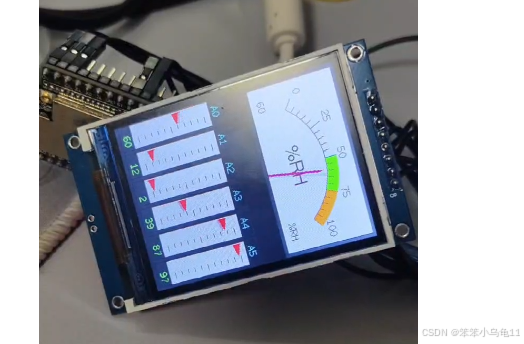
如果你的屏幕不亮的话且编译没报错那大概率就是引脚接错了。
LVGL
介绍:
LVGL(Light and Versatile Graphics Library)是一个免费开放源代码的图形库,专为嵌入式系统设计,用于创建具有吸引力的图形用户界面(GUI)。它支持多种显示设备,并且可以在资源受限的硬件上运行,比如微控制器。LVGL提供了丰富的GUI组件和功能,如按钮、图表、图像、标签等,使开发者能够快速构建复杂的用户界面。
1. 下载LVGL库
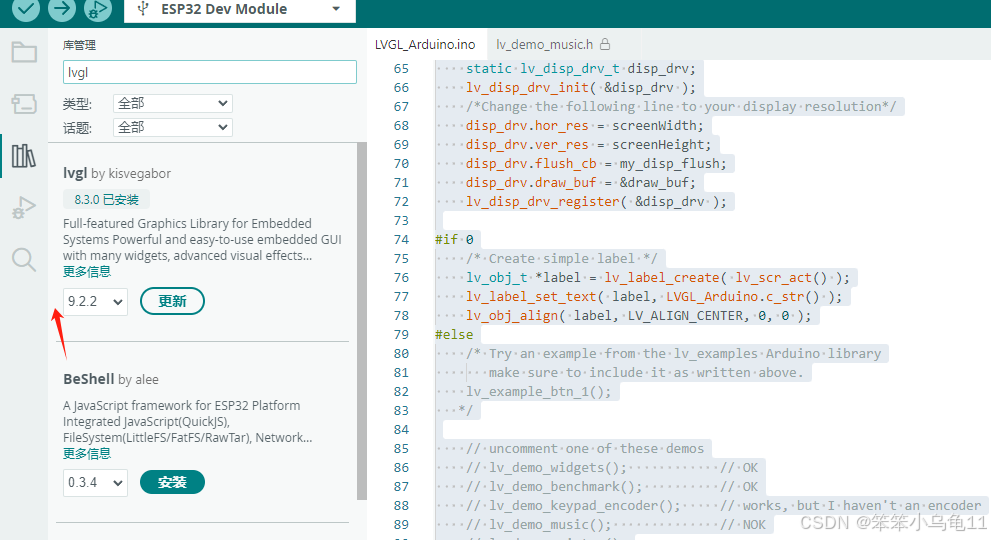
这里推荐去安装8.30以上的版本,因为 8.30里面有一些头文件包含的BUG需要手动去改一下。
如果安装不成功就是你的网络访问Github有问题,解决一下就可以了。可以用waittitok工具去加速Github.
问题链接如下:lvgl/lvgl.h: No such file or directory · Issue #3525 · lvgl/lvgl
2. 配置LVGL库
LVGL库下载下来是不能直接用的,需要去简单配置一下。
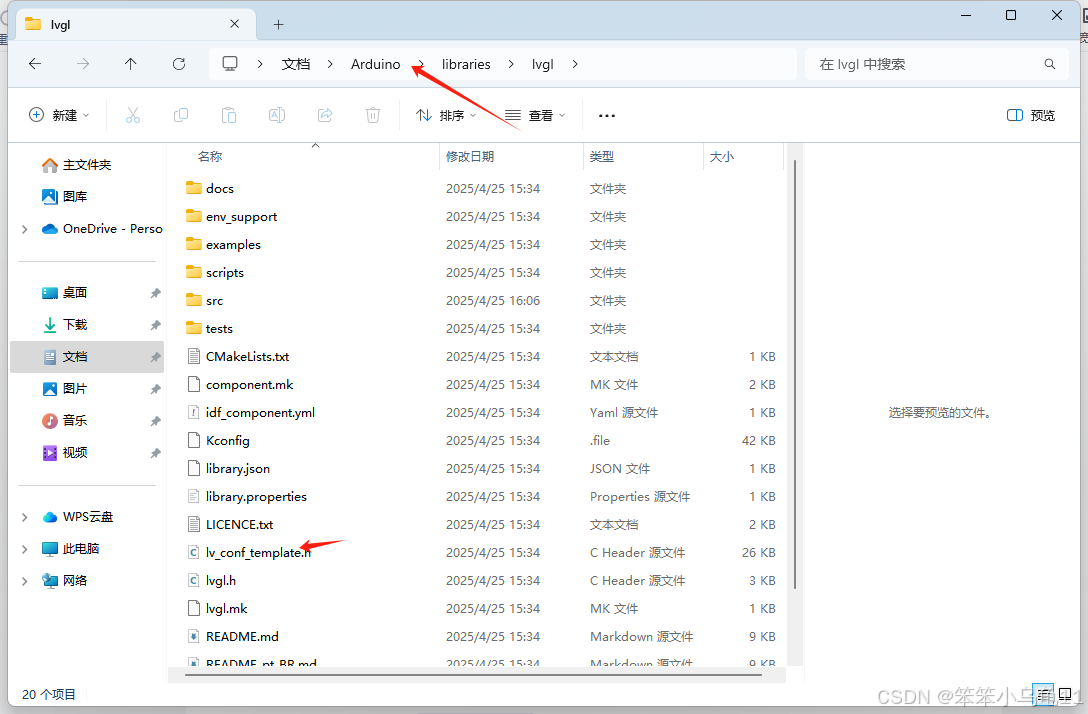
找到这个目录下的这个文件,这是官方给出的模板配置文件。把他改为lv_conf.h。然后复制到上一层目录下。
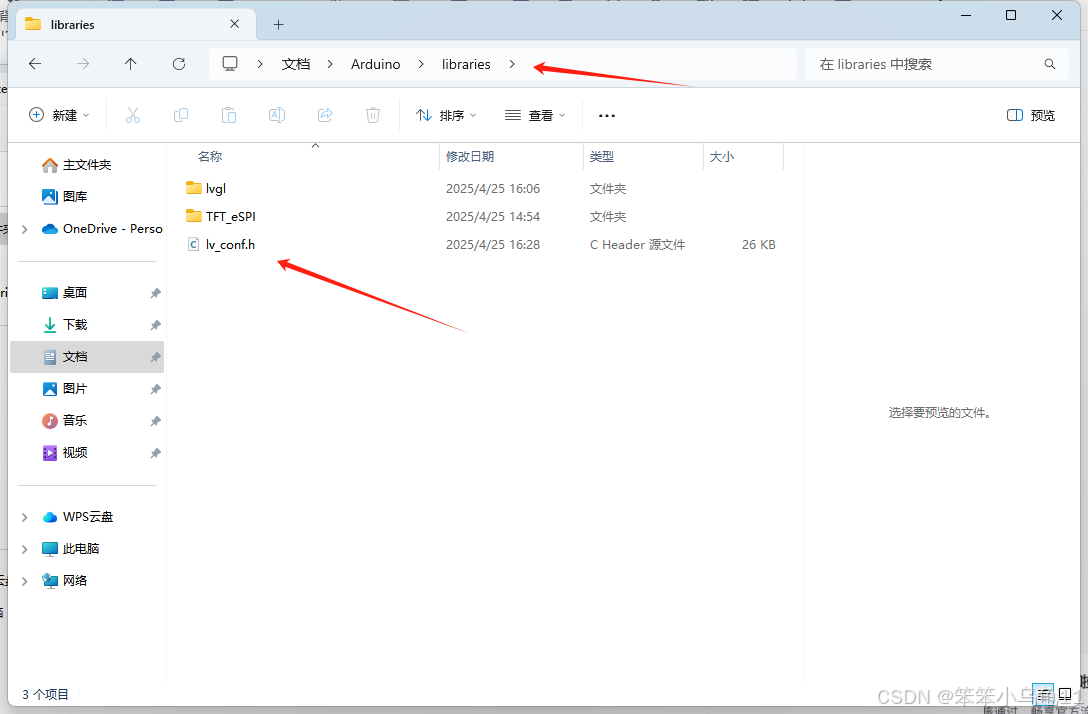
具体配置文件流程:
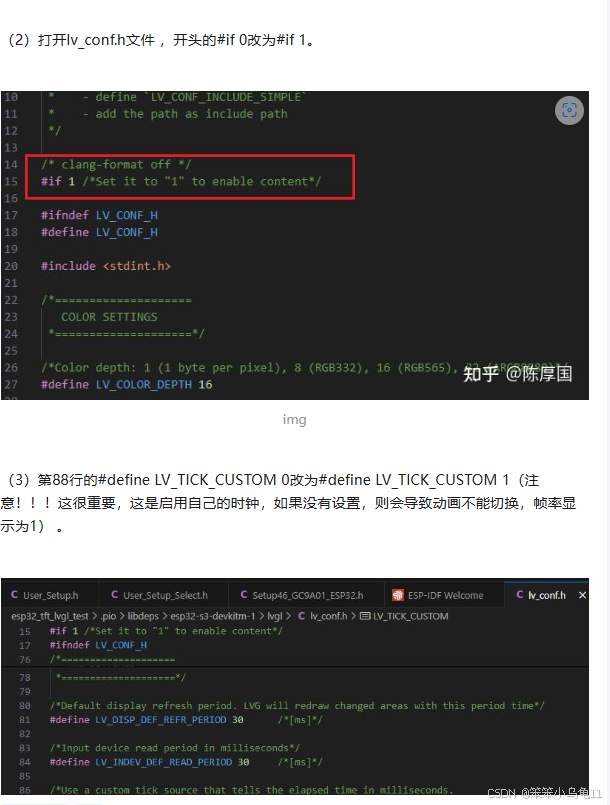
如果不想自己配置的话可以复制我的。前提是你得是8.30版本的LVGL
/**
 * @file lv_conf.h
 * Configuration file for v8.3.0
 */

/*
 * Copy this file as `lv_conf.h`
 * 1. simply next to the `lvgl` folder
 * 2. or any other places and
 *    - define `LV_CONF_INCLUDE_SIMPLE`
 *    - add the path as include path
 */

/* clang-format off */
#if 1 /*Set it to "1" to enable content*/

#ifndef LV_CONF_H
#define LV_CONF_H

#include <stdint.h>

/*====================
   COLOR SETTINGS
 *====================*/

/*Color depth: 1 (1 byte per pixel), 8 (RGB332), 16 (RGB565), 32 (ARGB8888)*/
#define LV_COLOR_DEPTH 16

/*Swap the 2 bytes of RGB565 color. Useful if the display has an 8-bit interface (e.g. SPI)*/
#define LV_COLOR_16_SWAP 0

/*Enable features to draw on transparent background.
 *It's required if opa, and transform_* style properties are used.
 *Can be also used if the UI is above another layer, e.g. an OSD menu or video player.*/
#define LV_COLOR_SCREEN_TRANSP 0

/* Adjust color mix functions rounding. GPUs might calculate color mix (blending) differently.
 * 0: round down, 64: round up from x.75, 128: round up from half, 192: round up from x.25, 254: round up */
#define LV_COLOR_MIX_ROUND_OFS 0

/*Images pixels with this color will not be drawn if they are chroma keyed)*/
#define LV_COLOR_CHROMA_KEY lv_color_hex(0x00ff00)         /*pure green*/

/*=========================
   MEMORY SETTINGS
 *=========================*/

/*1: use custom malloc/free, 0: use the built-in `lv_mem_alloc()` and `lv_mem_free()`*/
#define LV_MEM_CUSTOM 0
#if LV_MEM_CUSTOM == 0
    /*Size of the memory available for `lv_mem_alloc()` in bytes (>= 2kB)*/
    #define LV_MEM_SIZE (48U * 1024U)          /*[bytes]*/

    /*Set an address for the memory pool instead of allocating it as a normal array. Can be in external SRAM too.*/
    #define LV_MEM_ADR 0     /*0: unused*/
    /*Instead of an address give a memory allocator that will be called to get a memory pool for LVGL. E.g. my_malloc*/
    #if LV_MEM_ADR == 0
        #undef LV_MEM_POOL_INCLUDE
        #undef LV_MEM_POOL_ALLOC
    #endif

#else       /*LV_MEM_CUSTOM*/
    #define LV_MEM_CUSTOM_INCLUDE <stdlib.h>   /*Header for the dynamic memory function*/
    #define LV_MEM_CUSTOM_ALLOC   malloc
    #define LV_MEM_CUSTOM_FREE    free
    #define LV_MEM_CUSTOM_REALLOC realloc
#endif     /*LV_MEM_CUSTOM*/

/*Number of the intermediate memory buffer used during rendering and other internal processing mechanisms.
 *You will see an error log message if there wasn't enough buffers. */
#define LV_MEM_BUF_MAX_NUM 16

/*Use the standard `memcpy` and `memset` instead of LVGL's own functions. (Might or might not be faster).*/
#define LV_MEMCPY_MEMSET_STD 0

/*====================
   HAL SETTINGS
 *====================*/

/*Default display refresh period. LVG will redraw changed areas with this period time*/
#define LV_DISP_DEF_REFR_PERIOD 30      /*[ms]*/

/*Input device read period in milliseconds*/
#define LV_INDEV_DEF_READ_PERIOD 30     /*[ms]*/

/*Use a custom tick source that tells the elapsed time in milliseconds.
 *It removes the need to manually update the tick with `lv_tick_inc()`)*/
#define LV_TICK_CUSTOM 1
#if LV_TICK_CUSTOM
    #define LV_TICK_CUSTOM_INCLUDE "Arduino.h"         /*Header for the system time function*/
    #define LV_TICK_CUSTOM_SYS_TIME_EXPR (millis())    /*Expression evaluating to current system time in ms*/
#endif   /*LV_TICK_CUSTOM*/

/*Default Dot Per Inch. Used to initialize default sizes such as widgets sized, style paddings.
 *(Not so important, you can adjust it to modify default sizes and spaces)*/
#define LV_DPI_DEF 130     /*[px/inch]*/

/*=======================
 * FEATURE CONFIGURATION
 *=======================*/

/*-------------
 * Drawing
 *-----------*/

/*Enable complex draw engine.
 *Required to draw shadow, gradient, rounded corners, circles, arc, skew lines, image transformations or any masks*/
#define LV_DRAW_COMPLEX 1
#if LV_DRAW_COMPLEX != 0

    /*Allow buffering some shadow calculation.
    *LV_SHADOW_CACHE_SIZE is the max. shadow size to buffer, where shadow size is `shadow_width + radius`
    *Caching has LV_SHADOW_CACHE_SIZE^2 RAM cost*/
    #define LV_SHADOW_CACHE_SIZE 0

    /* Set number of maximally cached circle data.
    * The circumference of 1/4 circle are saved for anti-aliasing
    * radius * 4 bytes are used per circle (the most often used radiuses are saved)
    * 0: to disable caching */
    #define LV_CIRCLE_CACHE_SIZE 4
#endif /*LV_DRAW_COMPLEX*/

/**
 * "Simple layers" are used when a widget has `style_opa < 255` to buffer the widget into a layer
 * and blend it as an image with the given opacity.
 * Note that `bg_opa`, `text_opa` etc don't require buffering into layer)
 * The widget can be buffered in smaller chunks to avoid using large buffers.
 *
 * - LV_LAYER_SIMPLE_BUF_SIZE: [bytes] the optimal target buffer size. LVGL will try to allocate it
 * - LV_LAYER_SIMPLE_FALLBACK_BUF_SIZE: [bytes]  used if `LV_LAYER_SIMPLE_BUF_SIZE` couldn't be allocated.
 *
 * Both buffer sizes are in bytes.
 * "Transformed layers" (where transform_angle/zoom properties are used) use larger buffers
 * and can't be drawn in chunks. So these settings affects only widgets with opacity.
 */
#define LV_LAYER_SIMPLE_BUF_SIZE          (24 * 1024)
#define LV_LAYER_SIMPLE_FALLBACK_BUF_SIZE (3 * 1024)

/*Default image cache size. Image caching keeps the images opened.
 *If only the built-in image formats are used there is no real advantage of caching. (I.e. if no new image decoder is added)
 *With complex image decoders (e.g. PNG or JPG) caching can save the continuous open/decode of images.
 *However the opened images might consume additional RAM.
 *0: to disable caching*/
#define LV_IMG_CACHE_DEF_SIZE 0

/*Number of stops allowed per gradient. Increase this to allow more stops.
 *This adds (sizeof(lv_color_t) + 1) bytes per additional stop*/
#define LV_GRADIENT_MAX_STOPS 2

/*Default gradient buffer size.
 *When LVGL calculates the gradient "maps" it can save them into a cache to avoid calculating them again.
 *LV_GRAD_CACHE_DEF_SIZE sets the size of this cache in bytes.
 *If the cache is too small the map will be allocated only while it's required for the drawing.
 *0 mean no caching.*/
#define LV_GRAD_CACHE_DEF_SIZE 0

/*Allow dithering the gradients (to achieve visual smooth color gradients on limited color depth display)
 *LV_DITHER_GRADIENT implies allocating one or two more lines of the object's rendering surface
 *The increase in memory consumption is (32 bits * object width) plus 24 bits * object width if using error diffusion */
#define LV_DITHER_GRADIENT 0
#if LV_DITHER_GRADIENT
    /*Add support for error diffusion dithering.
     *Error diffusion dithering gets a much better visual result, but implies more CPU consumption and memory when drawing.
     *The increase in memory consumption is (24 bits * object's width)*/
    #define LV_DITHER_ERROR_DIFFUSION 0
#endif

/*Maximum buffer size to allocate for rotation.
 *Only used if software rotation is enabled in the display driver.*/
#define LV_DISP_ROT_MAX_BUF (10*1024)

/*-------------
 * GPU
 *-----------*/

/*Use Arm's 2D acceleration library Arm-2D */
#define LV_USE_GPU_ARM2D 0

/*Use STM32's DMA2D (aka Chrom Art) GPU*/
#define LV_USE_GPU_STM32_DMA2D 0
#if LV_USE_GPU_STM32_DMA2D
    /*Must be defined to include path of CMSIS header of target processor
    e.g. "stm32f769xx.h" or "stm32f429xx.h"*/
    #define LV_GPU_DMA2D_CMSIS_INCLUDE
#endif

/*Use SWM341's DMA2D GPU*/
#define LV_USE_GPU_SWM341_DMA2D 0
#if LV_USE_GPU_SWM341_DMA2D
    #define LV_GPU_SWM341_DMA2D_INCLUDE "SWM341.h"
#endif

/*Use NXP's PXP GPU iMX RTxxx platforms*/
#define LV_USE_GPU_NXP_PXP 0
#if LV_USE_GPU_NXP_PXP
    /*1: Add default bare metal and FreeRTOS interrupt handling routines for PXP (lv_gpu_nxp_pxp_osa.c)
    *   and call lv_gpu_nxp_pxp_init() automatically during lv_init(). Note that symbol SDK_OS_FREE_RTOS
    *   has to be defined in order to use FreeRTOS OSA, otherwise bare-metal implementation is selected.
    *0: lv_gpu_nxp_pxp_init() has to be called manually before lv_init()
    */
    #define LV_USE_GPU_NXP_PXP_AUTO_INIT 0
#endif

/*Use NXP's VG-Lite GPU iMX RTxxx platforms*/
#define LV_USE_GPU_NXP_VG_LITE 0

/*Use SDL renderer API*/
#define LV_USE_GPU_SDL 0
#if LV_USE_GPU_SDL
    #define LV_GPU_SDL_INCLUDE_PATH <SDL2/SDL.h>
    /*Texture cache size, 8MB by default*/
    #define LV_GPU_SDL_LRU_SIZE (1024 * 1024 * 8)
    /*Custom blend mode for mask drawing, disable if you need to link with older SDL2 lib*/
    #define LV_GPU_SDL_CUSTOM_BLEND_MODE (SDL_VERSION_ATLEAST(2, 0, 6))
#endif

/*-------------
 * Logging
 *-----------*/

/*Enable the log module*/
#define LV_USE_LOG 0
#if LV_USE_LOG

    /*How important log should be added:
    *LV_LOG_LEVEL_TRACE       A lot of logs to give detailed information
    *LV_LOG_LEVEL_INFO        Log important events
    *LV_LOG_LEVEL_WARN        Log if something unwanted happened but didn't cause a problem
    *LV_LOG_LEVEL_ERROR       Only critical issue, when the system may fail
    *LV_LOG_LEVEL_USER        Only logs added by the user
    *LV_LOG_LEVEL_NONE        Do not log anything*/
    #define LV_LOG_LEVEL LV_LOG_LEVEL_WARN

    /*1: Print the log with 'printf';
    *0: User need to register a callback with `lv_log_register_print_cb()`*/
    #define LV_LOG_PRINTF 0

    /*Enable/disable LV_LOG_TRACE in modules that produces a huge number of logs*/
    #define LV_LOG_TRACE_MEM        1
    #define LV_LOG_TRACE_TIMER      1
    #define LV_LOG_TRACE_INDEV      1
    #define LV_LOG_TRACE_DISP_REFR  1
    #define LV_LOG_TRACE_EVENT      1
    #define LV_LOG_TRACE_OBJ_CREATE 1
    #define LV_LOG_TRACE_LAYOUT     1
    #define LV_LOG_TRACE_ANIM       1

#endif  /*LV_USE_LOG*/

/*-------------
 * Asserts
 *-----------*/

/*Enable asserts if an operation is failed or an invalid data is found.
 *If LV_USE_LOG is enabled an error message will be printed on failure*/
#define LV_USE_ASSERT_NULL          1   /*Check if the parameter is NULL. (Very fast, recommended)*/
#define LV_USE_ASSERT_MALLOC        1   /*Checks is the memory is successfully allocated or no. (Very fast, recommended)*/
#define LV_USE_ASSERT_STYLE         0   /*Check if the styles are properly initialized. (Very fast, recommended)*/
#define LV_USE_ASSERT_MEM_INTEGRITY 0   /*Check the integrity of `lv_mem` after critical operations. (Slow)*/
#define LV_USE_ASSERT_OBJ           0   /*Check the object's type and existence (e.g. not deleted). (Slow)*/

/*Add a custom handler when assert happens e.g. to restart the MCU*/
#define LV_ASSERT_HANDLER_INCLUDE <stdint.h>
#define LV_ASSERT_HANDLER while(1);   /*Halt by default*/

/*-------------
 * Others
 *-----------*/

/*1: Show CPU usage and FPS count*/
#define LV_USE_PERF_MONITOR 0
#if LV_USE_PERF_MONITOR
    #define LV_USE_PERF_MONITOR_POS LV_ALIGN_BOTTOM_RIGHT
#endif

/*1: Show the used memory and the memory fragmentation
 * Requires LV_MEM_CUSTOM = 0*/
#define LV_USE_MEM_MONITOR 0
#if LV_USE_MEM_MONITOR
    #define LV_USE_MEM_MONITOR_POS LV_ALIGN_BOTTOM_LEFT
#endif

/*1: Draw random colored rectangles over the redrawn areas*/
#define LV_USE_REFR_DEBUG 0

/*Change the built in (v)snprintf functions*/
#define LV_SPRINTF_CUSTOM 0
#if LV_SPRINTF_CUSTOM
    #define LV_SPRINTF_INCLUDE <stdio.h>
    #define lv_snprintf  snprintf
    #define lv_vsnprintf vsnprintf
#else   /*LV_SPRINTF_CUSTOM*/
    #define LV_SPRINTF_USE_FLOAT 0
#endif  /*LV_SPRINTF_CUSTOM*/

#define LV_USE_USER_DATA 1

/*Garbage Collector settings
 *Used if lvgl is bound to higher level language and the memory is managed by that language*/
#define LV_ENABLE_GC 0
#if LV_ENABLE_GC != 0
    #define LV_GC_INCLUDE "gc.h"                           /*Include Garbage Collector related things*/
#endif /*LV_ENABLE_GC*/

/*=====================
 *  COMPILER SETTINGS
 *====================*/

/*For big endian systems set to 1*/
#define LV_BIG_ENDIAN_SYSTEM 0

/*Define a custom attribute to `lv_tick_inc` function*/
#define LV_ATTRIBUTE_TICK_INC

/*Define a custom attribute to `lv_timer_handler` function*/
#define LV_ATTRIBUTE_TIMER_HANDLER

/*Define a custom attribute to `lv_disp_flush_ready` function*/
#define LV_ATTRIBUTE_FLUSH_READY

/*Required alignment size for buffers*/
#define LV_ATTRIBUTE_MEM_ALIGN_SIZE 1

/*Will be added where memories needs to be aligned (with -Os data might not be aligned to boundary by default).
 * E.g. __attribute__((aligned(4)))*/
#define LV_ATTRIBUTE_MEM_ALIGN

/*Attribute to mark large constant arrays for example font's bitmaps*/
#define LV_ATTRIBUTE_LARGE_CONST

/*Compiler prefix for a big array declaration in RAM*/
#define LV_ATTRIBUTE_LARGE_RAM_ARRAY

/*Place performance critical functions into a faster memory (e.g RAM)*/
#define LV_ATTRIBUTE_FAST_MEM

/*Prefix variables that are used in GPU accelerated operations, often these need to be placed in RAM sections that are DMA accessible*/
#define LV_ATTRIBUTE_DMA

/*Export integer constant to binding. This macro is used with constants in the form of LV_<CONST> that
 *should also appear on LVGL binding API such as Micropython.*/
#define LV_EXPORT_CONST_INT(int_value) struct _silence_gcc_warning /*The default value just prevents GCC warning*/

/*Extend the default -32k..32k coordinate range to -4M..4M by using int32_t for coordinates instead of int16_t*/
#define LV_USE_LARGE_COORD 0

/*==================
 *   FONT USAGE
 *===================*/

/*Montserrat fonts with ASCII range and some symbols using bpp = 4
 *https://fonts.google.com/specimen/Montserrat*/
#define LV_FONT_MONTSERRAT_8  1
#define LV_FONT_MONTSERRAT_10 1
#define LV_FONT_MONTSERRAT_12 1
#define LV_FONT_MONTSERRAT_14 1
#define LV_FONT_MONTSERRAT_16 1
#define LV_FONT_MONTSERRAT_18 1
#define LV_FONT_MONTSERRAT_20 1
#define LV_FONT_MONTSERRAT_22 1
#define LV_FONT_MONTSERRAT_24 1
#define LV_FONT_MONTSERRAT_26 1
#define LV_FONT_MONTSERRAT_28 1
#define LV_FONT_MONTSERRAT_30 1
#define LV_FONT_MONTSERRAT_32 1
#define LV_FONT_MONTSERRAT_34 1
#define LV_FONT_MONTSERRAT_36 1
#define LV_FONT_MONTSERRAT_38 1
#define LV_FONT_MONTSERRAT_40 1
#define LV_FONT_MONTSERRAT_42 1
#define LV_FONT_MONTSERRAT_44 1
#define LV_FONT_MONTSERRAT_46 1
#define LV_FONT_MONTSERRAT_48 1

/*Demonstrate special features*/
#define LV_FONT_MONTSERRAT_12_SUBPX      0
#define LV_FONT_MONTSERRAT_28_COMPRESSED 0  /*bpp = 3*/
#define LV_FONT_DEJAVU_16_PERSIAN_HEBREW 0  /*Hebrew, Arabic, Persian letters and all their forms*/
#define LV_FONT_SIMSUN_16_CJK            0  /*1000 most common CJK radicals*/

/*Pixel perfect monospace fonts*/
#define LV_FONT_UNSCII_8  0
#define LV_FONT_UNSCII_16 0

/*Optionally declare custom fonts here.
 *You can use these fonts as default font too and they will be available globally.
 *E.g. #define LV_FONT_CUSTOM_DECLARE   LV_FONT_DECLARE(my_font_1) LV_FONT_DECLARE(my_font_2)*/
#define LV_FONT_CUSTOM_DECLARE

/*Always set a default font*/
#define LV_FONT_DEFAULT &lv_font_montserrat_14

/*Enable handling large font and/or fonts with a lot of characters.
 *The limit depends on the font size, font face and bpp.
 *Compiler error will be triggered if a font needs it.*/
#define LV_FONT_FMT_TXT_LARGE 0

/*Enables/disables support for compressed fonts.*/
#define LV_USE_FONT_COMPRESSED 0

/*Enable subpixel rendering*/
#define LV_USE_FONT_SUBPX 0
#if LV_USE_FONT_SUBPX
    /*Set the pixel order of the display. Physical order of RGB channels. Doesn't matter with "normal" fonts.*/
    #define LV_FONT_SUBPX_BGR 0  /*0: RGB; 1:BGR order*/
#endif

/*Enable drawing placeholders when glyph dsc is not found*/
#define LV_USE_FONT_PLACEHOLDER 1

/*=================
 *  TEXT SETTINGS
 *=================*/

/**
 * Select a character encoding for strings.
 * Your IDE or editor should have the same character encoding
 * - LV_TXT_ENC_UTF8
 * - LV_TXT_ENC_ASCII
 */
#define LV_TXT_ENC LV_TXT_ENC_UTF8

/*Can break (wrap) texts on these chars*/
#define LV_TXT_BREAK_CHARS " ,.;:-_"

/*If a word is at least this long, will break wherever "prettiest"
 *To disable, set to a value <= 0*/
#define LV_TXT_LINE_BREAK_LONG_LEN 0

/*Minimum number of characters in a long word to put on a line before a break.
 *Depends on LV_TXT_LINE_BREAK_LONG_LEN.*/
#define LV_TXT_LINE_BREAK_LONG_PRE_MIN_LEN 3

/*Minimum number of characters in a long word to put on a line after a break.
 *Depends on LV_TXT_LINE_BREAK_LONG_LEN.*/
#define LV_TXT_LINE_BREAK_LONG_POST_MIN_LEN 3

/*The control character to use for signalling text recoloring.*/
#define LV_TXT_COLOR_CMD "#"

/*Support bidirectional texts. Allows mixing Left-to-Right and Right-to-Left texts.
 *The direction will be processed according to the Unicode Bidirectional Algorithm:
 *https://www.w3.org/International/articles/inline-bidi-markup/uba-basics*/
#define LV_USE_BIDI 0
#if LV_USE_BIDI
    /*Set the default direction. Supported values:
    *`LV_BASE_DIR_LTR` Left-to-Right
    *`LV_BASE_DIR_RTL` Right-to-Left
    *`LV_BASE_DIR_AUTO` detect texts base direction*/
    #define LV_BIDI_BASE_DIR_DEF LV_BASE_DIR_AUTO
#endif

/*Enable Arabic/Persian processing
 *In these languages characters should be replaced with an other form based on their position in the text*/
#define LV_USE_ARABIC_PERSIAN_CHARS 0

/*==================
 *  WIDGET USAGE
 *================*/

/*Documentation of the widgets: https://docs.lvgl.io/latest/en/html/widgets/index.html*/

#define LV_USE_ARC        1

#define LV_USE_BAR        1

#define LV_USE_BTN        1

#define LV_USE_BTNMATRIX  1

#define LV_USE_CANVAS     1

#define LV_USE_CHECKBOX   1

#define LV_USE_DROPDOWN   1   /*Requires: lv_label*/

#define LV_USE_IMG        1   /*Requires: lv_label*/

#define LV_USE_LABEL      1
#if LV_USE_LABEL
    #define LV_LABEL_TEXT_SELECTION 1 /*Enable selecting text of the label*/
    #define LV_LABEL_LONG_TXT_HINT 1  /*Store some extra info in labels to speed up drawing of very long texts*/
#endif

#define LV_USE_LINE       1

#define LV_USE_ROLLER     1   /*Requires: lv_label*/
#if LV_USE_ROLLER
    #define LV_ROLLER_INF_PAGES 7 /*Number of extra "pages" when the roller is infinite*/
#endif

#define LV_USE_SLIDER     1   /*Requires: lv_bar*/

#define LV_USE_SWITCH     1

#define LV_USE_TEXTAREA   1   /*Requires: lv_label*/
#if LV_USE_TEXTAREA != 0
    #define LV_TEXTAREA_DEF_PWD_SHOW_TIME 1500    /*ms*/
#endif

#define LV_USE_TABLE      1

/*==================
 * EXTRA COMPONENTS
 *==================*/

/*-----------
 * Widgets
 *----------*/
#define LV_USE_ANIMIMG    1

#define LV_USE_CALENDAR   1
#if LV_USE_CALENDAR
    #define LV_CALENDAR_WEEK_STARTS_MONDAY 0
    #if LV_CALENDAR_WEEK_STARTS_MONDAY
        #define LV_CALENDAR_DEFAULT_DAY_NAMES {"Mo", "Tu", "We", "Th", "Fr", "Sa", "Su"}
    #else
        #define LV_CALENDAR_DEFAULT_DAY_NAMES {"Su", "Mo", "Tu", "We", "Th", "Fr", "Sa"}
    #endif

    #define LV_CALENDAR_DEFAULT_MONTH_NAMES {"January", "February", "March",  "April", "May",  "June", "July", "August", "September", "October", "November", "December"}
    #define LV_USE_CALENDAR_HEADER_ARROW 1
    #define LV_USE_CALENDAR_HEADER_DROPDOWN 1
#endif  /*LV_USE_CALENDAR*/

#define LV_USE_CHART      1

#define LV_USE_COLORWHEEL 1

#define LV_USE_IMGBTN     1

#define LV_USE_KEYBOARD   1

#define LV_USE_LED        1

#define LV_USE_LIST       1

#define LV_USE_MENU       1

#define LV_USE_METER      1

#define LV_USE_MSGBOX     1

#define LV_USE_SPAN       1
#if LV_USE_SPAN
    /*A line text can contain maximum num of span descriptor */
    #define LV_SPAN_SNIPPET_STACK_SIZE 64
#endif

#define LV_USE_SPINBOX    1

#define LV_USE_SPINNER    1

#define LV_USE_TABVIEW    1

#define LV_USE_TILEVIEW   1

#define LV_USE_WIN        1

/*-----------
 * Themes
 *----------*/

/*A simple, impressive and very complete theme*/
#define LV_USE_THEME_DEFAULT 1
#if LV_USE_THEME_DEFAULT

    /*0: Light mode; 1: Dark mode*/
    #define LV_THEME_DEFAULT_DARK 0

    /*1: Enable grow on press*/
    #define LV_THEME_DEFAULT_GROW 1

    /*Default transition time in [ms]*/
    #define LV_THEME_DEFAULT_TRANSITION_TIME 80
#endif /*LV_USE_THEME_DEFAULT*/

/*A very simple theme that is a good starting point for a custom theme*/
#define LV_USE_THEME_BASIC 1

/*A theme designed for monochrome displays*/
#define LV_USE_THEME_MONO 1

/*-----------
 * Layouts
 *----------*/

/*A layout similar to Flexbox in CSS.*/
#define LV_USE_FLEX 1

/*A layout similar to Grid in CSS.*/
#define LV_USE_GRID 1

/*---------------------
 * 3rd party libraries
 *--------------------*/

/*File system interfaces for common APIs */

/*API for fopen, fread, etc*/
#define LV_USE_FS_STDIO 0
#if LV_USE_FS_STDIO
    #define LV_FS_STDIO_LETTER '\0'     /*Set an upper cased letter on which the drive will accessible (e.g. 'A')*/
    #define LV_FS_STDIO_PATH ""         /*Set the working directory. File/directory paths will be appended to it.*/
    #define LV_FS_STDIO_CACHE_SIZE 0    /*>0 to cache this number of bytes in lv_fs_read()*/
#endif

/*API for open, read, etc*/
#define LV_USE_FS_POSIX 0
#if LV_USE_FS_POSIX
    #define LV_FS_POSIX_LETTER '\0'     /*Set an upper cased letter on which the drive will accessible (e.g. 'A')*/
    #define LV_FS_POSIX_PATH ""         /*Set the working directory. File/directory paths will be appended to it.*/
    #define LV_FS_POSIX_CACHE_SIZE 0    /*>0 to cache this number of bytes in lv_fs_read()*/
#endif

/*API for CreateFile, ReadFile, etc*/
#define LV_USE_FS_WIN32 0
#if LV_USE_FS_WIN32
    #define LV_FS_WIN32_LETTER '\0'     /*Set an upper cased letter on which the drive will accessible (e.g. 'A')*/
    #define LV_FS_WIN32_PATH ""         /*Set the working directory. File/directory paths will be appended to it.*/
    #define LV_FS_WIN32_CACHE_SIZE 0    /*>0 to cache this number of bytes in lv_fs_read()*/
#endif

/*API for FATFS (needs to be added separately). Uses f_open, f_read, etc*/
#define LV_USE_FS_FATFS 0
#if LV_USE_FS_FATFS
    #define LV_FS_FATFS_LETTER '\0'     /*Set an upper cased letter on which the drive will accessible (e.g. 'A')*/
    #define LV_FS_FATFS_CACHE_SIZE 0    /*>0 to cache this number of bytes in lv_fs_read()*/
#endif

/*PNG decoder library*/
#define LV_USE_PNG 0

/*BMP decoder library*/
#define LV_USE_BMP 0

/* JPG + split JPG decoder library.
 * Split JPG is a custom format optimized for embedded systems. */
#define LV_USE_SJPG 0

/*GIF decoder library*/
#define LV_USE_GIF 0

/*QR code library*/
#define LV_USE_QRCODE 0

/*FreeType library*/
#define LV_USE_FREETYPE 0
#if LV_USE_FREETYPE
    /*Memory used by FreeType to cache characters [bytes] (-1: no caching)*/
    #define LV_FREETYPE_CACHE_SIZE (16 * 1024)
    #if LV_FREETYPE_CACHE_SIZE >= 0
        /* 1: bitmap cache use the sbit cache, 0:bitmap cache use the image cache. */
        /* sbit cache:it is much more memory efficient for small bitmaps(font size < 256) */
        /* if font size >= 256, must be configured as image cache */
        #define LV_FREETYPE_SBIT_CACHE 0
        /* Maximum number of opened FT_Face/FT_Size objects managed by this cache instance. */
        /* (0:use system defaults) */
        #define LV_FREETYPE_CACHE_FT_FACES 0
        #define LV_FREETYPE_CACHE_FT_SIZES 0
    #endif
#endif

/*Rlottie library*/
#define LV_USE_RLOTTIE 0

/*FFmpeg library for image decoding and playing videos
 *Supports all major image formats so do not enable other image decoder with it*/
#define LV_USE_FFMPEG 0
#if LV_USE_FFMPEG
    /*Dump input information to stderr*/
    #define LV_FFMPEG_DUMP_FORMAT 0
#endif

/*-----------
 * Others
 *----------*/

/*1: Enable API to take snapshot for object*/
#define LV_USE_SNAPSHOT 0

/*1: Enable Monkey test*/
#define LV_USE_MONKEY 0

/*1: Enable grid navigation*/
#define LV_USE_GRIDNAV 0

/*1: Enable lv_obj fragment*/
#define LV_USE_FRAGMENT 0

/*1: Support using images as font in label or span widgets */
#define LV_USE_IMGFONT 0

/*1: Enable a published subscriber based messaging system */
#define LV_USE_MSG 0

/*1: Enable Pinyin input method*/
/*Requires: lv_keyboard*/
#define LV_USE_IME_PINYIN 0
#if LV_USE_IME_PINYIN
    /*1: Use default thesaurus*/
    /*If you do not use the default thesaurus, be sure to use `lv_ime_pinyin` after setting the thesauruss*/
    #define LV_IME_PINYIN_USE_DEFAULT_DICT 1
    /*Set the maximum number of candidate panels that can be displayed*/
    /*This needs to be adjusted according to the size of the screen*/
    #define LV_IME_PINYIN_CAND_TEXT_NUM 6

    /*Use 9 key input(k9)*/
    #define LV_IME_PINYIN_USE_K9_MODE      1
    #if LV_IME_PINYIN_USE_K9_MODE == 1
        #define LV_IME_PINYIN_K9_CAND_TEXT_NUM 3
    #endif // LV_IME_PINYIN_USE_K9_MODE
#endif

/*==================
* EXAMPLES
*==================*/

/*Enable the examples to be built with the library*/
#define LV_BUILD_EXAMPLES 1

/*===================
 * DEMO USAGE
 ====================*/

/*Show some widget. It might be required to increase `LV_MEM_SIZE` */
#define LV_USE_DEMO_WIDGETS 1
#if LV_USE_DEMO_WIDGETS
#define LV_DEMO_WIDGETS_SLIDESHOW 0
#endif

/*Demonstrate the usage of encoder and keyboard*/
#define LV_USE_DEMO_KEYPAD_AND_ENCODER 1

/*Benchmark your system*/
#define LV_USE_DEMO_BENCHMARK 1
#if LV_USE_DEMO_BENCHMARK
/*Use RGB565A8 images with 16 bit color depth instead of ARGB8565*/
#define LV_DEMO_BENCHMARK_RGB565A8 1
#endif

/*Stress test for LVGL*/
#define LV_USE_DEMO_STRESS 1

/*Music player demo*/
#define LV_USE_DEMO_MUSIC 1
#if LV_USE_DEMO_MUSIC
    #define LV_DEMO_MUSIC_SQUARE    1
    #define LV_DEMO_MUSIC_LANDSCAPE 1
    #define LV_DEMO_MUSIC_ROUND     1
    #define LV_DEMO_MUSIC_LARGE     1
    #define LV_DEMO_MUSIC_AUTO_PLAY 1
#endif

/*--END OF LV_CONF_H--*/

#endif /*LV_CONF_H*/

#endif /*End of "Content enable"*/
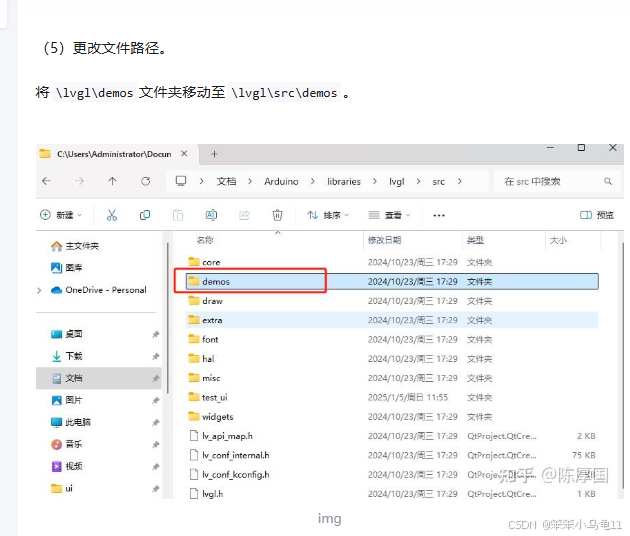
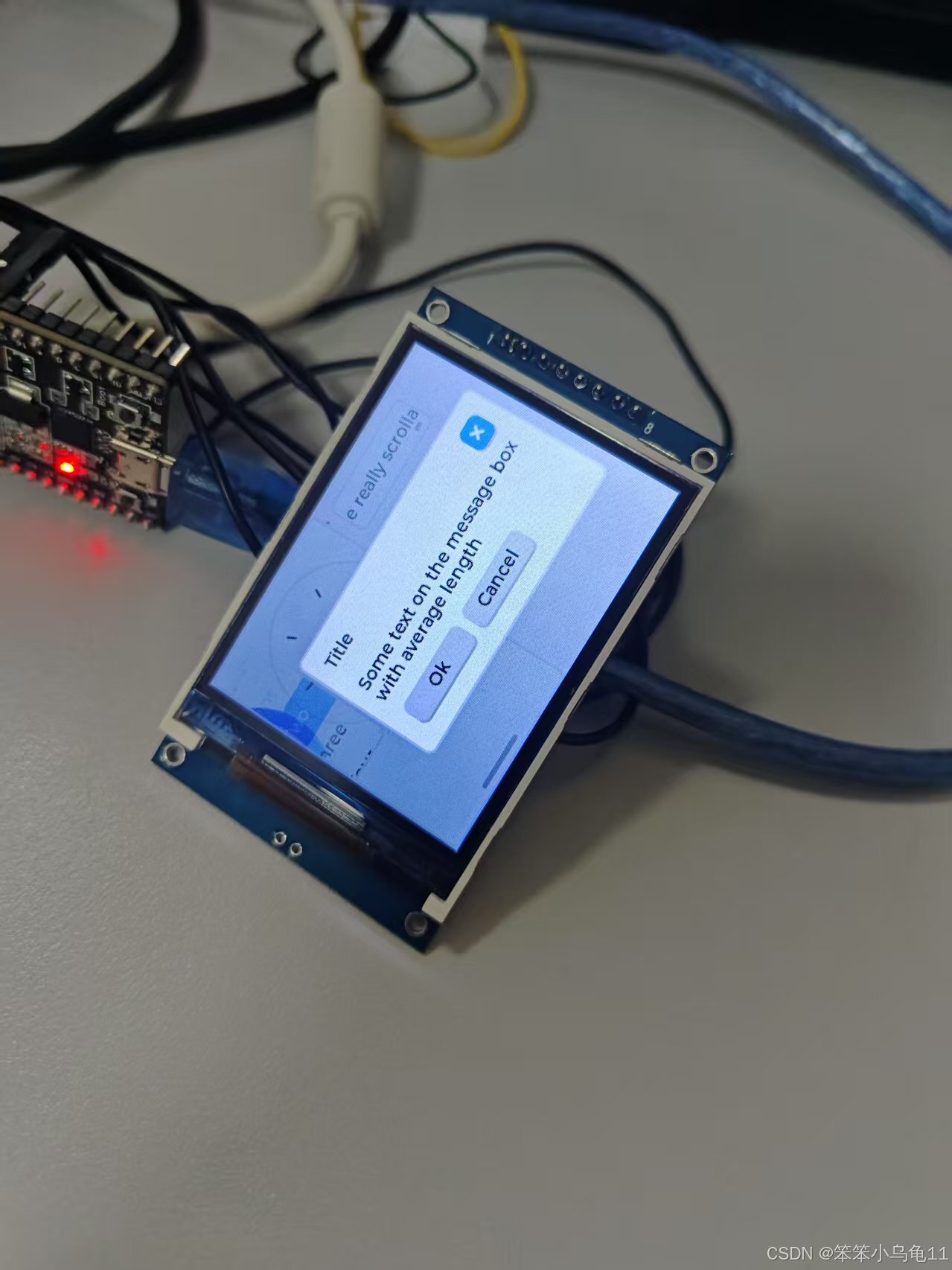
然后就配置完成了。跑一个LVGL的测试代码:
#include <lvgl.h>
#include <TFT_eSPI.h>
/*If you want to use the LVGL examples,
  make sure to install the lv_examples Arduino library
  and uncomment the following line.
#include <lv_examples.h>
*/

#include "demos/lv_demos.h"

/*Change to your screen resolution*/
static const uint16_t screenWidth  = 320;
static const uint16_t screenHeight = 240;

static lv_disp_draw_buf_t draw_buf;
static lv_color_t buf[ screenWidth * 10 ];

TFT_eSPI tft = TFT_eSPI(screenWidth, screenHeight); /* TFT instance */

#if LV_USE_LOG != 0
/* Serial debugging */
void my_print(const char * buf)
{
    Serial.printf(buf);
    Serial.flush();
}
#endif

/* Display flushing */
void my_disp_flush( lv_disp_drv_t *disp, const lv_area_t *area, lv_color_t *color_p )
{
    uint32_t w = ( area->x2 - area->x1 + 1 );
    uint32_t h = ( area->y2 - area->y1 + 1 );

    tft.startWrite();
    tft.setAddrWindow( area->x1, area->y1, w, h );
    tft.pushColors( ( uint16_t * )&color_p->full, w * h, true );
    tft.endWrite();

    lv_disp_flush_ready( disp );
}

void setup()
{
    Serial.begin( 115200 ); /* prepare for possible serial debug */

    String LVGL_Arduino = "Hello Arduino! ";
    LVGL_Arduino += String('V') + lv_version_major() + "." + lv_version_minor() + "." + lv_version_patch();

    Serial.println( LVGL_Arduino );
    Serial.println( "I am LVGL_Arduino" );

    lv_init();

#if LV_USE_LOG != 0
    lv_log_register_print_cb( my_print ); /* register print function for debugging */
#endif

    tft.begin();          /* TFT init */
    tft.setRotation( 3 ); /* Landscape orientation, flipped */

    lv_disp_draw_buf_init( &draw_buf, buf, NULL, screenWidth * 10 );

    /*Initialize the display*/
    static lv_disp_drv_t disp_drv;
    lv_disp_drv_init( &disp_drv );
    /*Change the following line to your display resolution*/
    disp_drv.hor_res = screenWidth;
    disp_drv.ver_res = screenHeight;
    disp_drv.flush_cb = my_disp_flush;
    disp_drv.draw_buf = &draw_buf;
    lv_disp_drv_register( &disp_drv );

#if 0
    /* Create simple label */
    lv_obj_t *label = lv_label_create( lv_scr_act() );
    lv_label_set_text( label, LVGL_Arduino.c_str() );
    lv_obj_align( label, LV_ALIGN_CENTER, 0, 0 );
#else
    /* Try an example from the lv_examples Arduino library
       make sure to include it as written above.
    lv_example_btn_1();
   */

    // uncomment one of these demos
    // lv_demo_widgets();            // OK
    // lv_demo_benchmark();          // OK
    // lv_demo_keypad_encoder();     // works, but I haven't an encoder
    // lv_demo_music();              // NOK
    // lv_demo_printer();
    lv_demo_stress();             // seems to be OK
#endif
    Serial.println( "Setup done" );
}

void loop()
{
    lv_timer_handler(); /* let the GUI do its work */
    delay( 5 );
}
配置完成。

智能硬件社区聚焦AI智能硬件技术生态,汇聚嵌入式AI、物联网硬件开发者,打造交流分享平台,同步全国赛事资讯、开展 OPC 核心人才招募,助力技术落地与开发者成长。
更多推荐


 24
24 0
0- 0


 已为社区贡献2条内容

所有评论(0)