【Tauri2】047——Image
本文介绍了如何在Tauri框架中使用Image结构体及其相关插件tauri_plugin_clipboard_manager。Image结构体用于处理图像数据,包含RGBA像素数据、宽度和高度。通过resources_table,可以将Image实例存储在BTreeMap中,并通过ResourceId进行访问。文章还展示了如何自定义通信函数,使用resources_table管理自定义结构体(如U
目录
前言
前面clipboard插件的时候,使用了Image这个结构体,但是这个东西也类似于window一样,是一个内置的插件。
 https://blog.csdn.net/qq_63401240/article/details/148077505?spm=1001.2014.3001.5501
Image结构体的定义
#[derive(Debug, Clone)]
pub struct Image<'a> {
rgba: Cow<'a, [u8]>,
width: u32,
height: u32,
}
插件源码参考如下
正文
看看注册的通信函数
/// Initializes the plugin.
pub fn init<R: Runtime>() -> TauriPlugin<R> {
  Builder::new("image")
    .invoke_handler(crate::generate_handler![
      #![plugin(image)]
      new, from_bytes, from_path, rgba, size
    ])
    .build()
}
有四个方法。
意思是很明显的,
看看new方法
#[command(root = "crate")]
fn new<R: Runtime>(
  webview: Webview<R>,
  rgba: Vec<u8>,
  width: u32,
  height: u32,
) -> crate::Result<ResourceId> {
  let image = Image::new_owned(rgba, width, height);
  let mut resources_table = webview.resources_table();
  let rid = resources_table.add(image);
  Ok(rid)
}
需要传入3个参数。
获取了resources_table ,这是什么?
跟着源码往里面走。
pub(crate) resources_table: Arc<Mutex<ResourceTable>>,#[derive(Default)]
pub struct ResourceTable {
index: BTreeMap<ResourceId, Arc<dyn Resource>>,
}可以发现本质是BTreeMap——平衡多路搜索树,基于 B树(B-Tree) 实现的键值对集合类型
意思就是初始化了一个Image,放到树里面。
let rid = resources_table.add(image);调用add方法会返回键rid——ResourceId
pub fn add<T: Resource>(&mut self, resource: T) -> ResourceId 把rid传回去。看来是这么初始化的。
那么from_bytes,和from_path,应该是差不多的,一个传字节数组,一个传路径,初始化,然后放到BtreeMap中。
使用
    async function clicked() {
        const image =await Image.fromPath("./icons/icon.png");
        console.log(image);
    }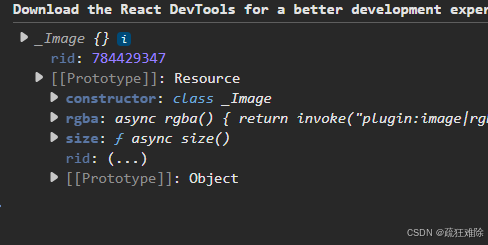
会返回rid。
看看rgba
#[command(root = "crate")]
fn rgba<R: Runtime>(webview: Webview<R>, rid: ResourceId) -> crate::Result<Vec<u8>> {
  let resources_table = webview.resources_table();
  let image = resources_table.get::<Image<'_>>(rid)?;
  Ok(image.rgba().to_vec())
}
需要传一个rid进来,然后获取rid这个键所对应的值。返回。
获取rgba,很简单
    async function clicked() {
        let res=await invoke("plugin:image|rgba",{"rid":784429347})
        console.log(res);
    }
结果如下

没问题。
这个插件很简单。
使用一下resources_table
不妨模仿一下,自定义通信函数,使用这个resources_table
先使用add方法,然后使用get
再先看看add
  pub fn add<T: Resource>(&mut self, resource: T) -> ResourceId {
    self.add_arc(Arc::new(resource))
}可以发现一个关键的东西,泛型T的泛型约束是Resource
意思是自定义了一个结构体,需要实现这个trait,才可以。
不妨自定义一个结构体叫User,不知道取什么名字,随便吧。
看看Image是怎么搞的
impl Resource for Image<'static> {}什么都不用实现
就这样???好。
因此,代码如下
use tauri::{Manager, Resource, ResourceId, Webview, command};
struct User {
    id: i32,
    name: String,
}
impl Resource for User {}

#[command]
fn greet(webview: Webview, id: i32) -> ResourceId {
    let mut table = webview.resources_table();
    let user = User {
        id,
        name: "hello world".to_string(),
    };
    let a = table.add(user);
    a
}
注册通信函数。触发
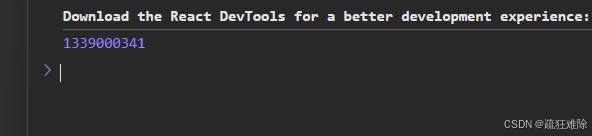
可以发现返回了这个所谓的rid。没问题。
获取user
#[command]
fn get_user(webview: Webview, id: ResourceId) -> String {
    let table = webview.resources_table();
    let user = table.get::<User>(id).unwrap();
    format!("id: {}, name: {}", user.id, user.name)
}
没有返回User,暂时返回一个String,
结果如下
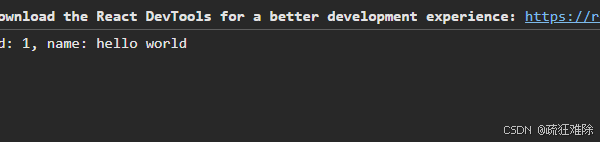
没问题。
返回User
即,希望如下代码运行
#[command]
fn get_user(webview: Webview, id: ResourceId) -> User {
    let table = webview.resources_table();
    let user = table.get::<User>(id).unwrap();
    User {
        id: user.id,
        name: user.name.clone(),
    }
}
实际上,编译会报错
error[E0599]: the method `blocking_kind` exists for reference `&User`, but its trait bounds were not satisfied
   --> src\main.rs:20:1
    |
4   | struct User {
    | ----------- doesn't satisfy `User: IpcResponse`


note: the trait `IpcResponse` must be implemented
   --> C:\Users\26644\.cargo\registry\src\index.crates.io-1949cf8c6b5b557f\tauri-2.5.1\src\ipc\mod.rs:171:1
    |
171 | pub trait IpcResponse {
    | ^^^^^^^^^^^^^^^^^^^^^
    = help: items from traits can only be used if the trait is implemented and in scope
    = note: the following traits define an item `blocking_kind`, perhaps you need to implement one of them:
            candidate #1: `tauri::ipc::private::ResponseKind`
            candidate #2: `tauri::ipc::private::ResultKind`
= note: this error originates in the macro `__cmd__get_user` which comes from the expansion of the macro `tauri::generate_handler` (in Nightly builds, run with -Z macro-backtrace for more info)一言以蔽之,需要为User实现IpcResponse这个trait。可以自己实现
但是,如下代码
pub trait IpcResponse {
  /// Resolve the IPC response body.
  fn body(self) -> crate::Result<InvokeResponseBody>;
}

impl<T: Serialize> IpcResponse for T {
  fn body(self) -> crate::Result<InvokeResponseBody> {
    serde_json::to_string(&self)
      .map(Into::into)
      .map_err(Into::into)
  }
}
从上面代码中可以知道,只需要实现Serialize这个triat,因为实现了Serialize这个trait,就实现IpcResponse 这个trait。
因此,代码如下
#[derive(Serialize)]
struct User {
    id: i32,
    name: String,
}
初始化并查询
    async function clicked() {
        let rid=await invoke("greet",{"id":1})
        let res = await invoke("get_user", {"id": rid});
        console.log(res);
    }
结果如下
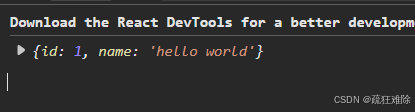
当然,也可以自定义IpcResponse这个trait,
实现IpcResponse,需要实现body方法
但是,同时考虑
#[derive(Debug, Clone)]
#[cfg_attr(test, derive(PartialEq))]
pub enum InvokeResponseBody {
  /// Json payload.
  Json(String),
  /// Bytes payload.
  Raw(Vec<u8>),
}
只能使用Json和Raw
因此,代码如下
use tauri::ipc::{InvokeResponseBody, IpcResponse};
use serde_json::json;
impl IpcResponse for User {
    fn body(self) -> tauri::Result<InvokeResponseBody> {
        let value = json!({
            "status": 200,
            "data": {
                "id": self.id,
                "name": self.name
            }
        });
        Ok(InvokeResponseBody::Json(value.to_string().into()))
    }
}
如果不是Json,运行可能报错
VM9:111 IPC custom protocol failed, Tauri will now use the postMessage interface instead SyntaxError: Unexpected token 'u', "user id=1 "... is not valid JSON
结果如下
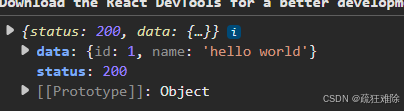
当然,没必要这么麻烦,实现序列化就可以了。没什么区别。
间接返回Image
前面提到通信函数中返回Image也会遇到没有实现IpcResponse这个trait的问题
而不能直接为Imgae实现IpcResponse这个trait,会触发孤儿规则,因此使用新的类型,包装Image。
比如
struct NewImage(Image<'static>);然后在前面User中使用Image,即
struct User {
    id: i32,
    name: String,
    picture: NewImage,
}
后面就是自定义序列化,因此,最后全部的代码如下
#![cfg_attr(not(debug_assertions), windows_subsystem = "windows")]
use base64::{Engine, engine::general_purpose};
use serde_json::json;
use tauri::image::Image;
use tauri::ipc::{InvokeResponseBody, IpcResponse};
use tauri::{Manager, Resource, ResourceId, Result, Webview, command};

#[derive(Clone)]
struct NewImage(Image<'static>);

impl NewImage {
    fn to_json_value(&self) -> serde_json::Value {
        let base64_str = general_purpose::STANDARD.encode(self.0.rgba());
        json!({ "image": base64_str })
    }
}

struct User {
    id: i32,
    name: String,
    picture: NewImage,
}

impl Resource for User {}
impl IpcResponse for User {
    fn body(self) -> Result<InvokeResponseBody> {
        let value = json!({
            "status": 200,
            "data": {
                "id": self.id,
                "name": self.name,
                "picture": self.picture.to_json_value()
            }
        });
        Ok(InvokeResponseBody::Json(value.to_string().into()))
    }
}

#[command]
fn greet(webview: Webview, id: i32) -> ResourceId {
    let mut table = webview.resources_table();
    let user = User {
        id,
        name: "hello world".to_string(),
        picture: NewImage(Image::from_path("./icons/icon.png").unwrap()),
    };
    table.add(user)
}
#[command]
fn get_user(webview: Webview, id: ResourceId) -> User {
    let table = webview.resources_table();
    let user = table.get::<User>(id).unwrap();
    User {
        id: user.id,
        name: user.name.clone(),
        picture: user.picture.clone(),
    }
}
fn main() {
    tauri::Builder::default()
        .invoke_handler(tauri::generate_handler![greet, get_user])
        .run(tauri::generate_context!())
        .expect("error while running tauri application");
}
笔者把rgba数据变成base64字符串。方便序列化。
base64 = { version = "0.22.1", features = ["default"] }添加克隆,结果如下。
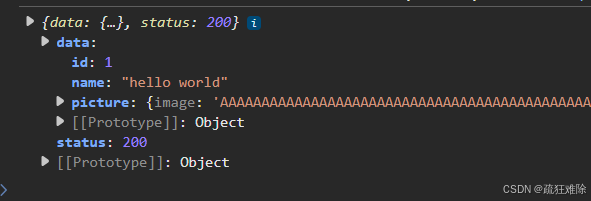
或者为User实现自定义序列化
 use serde::ser::SerializeMap;
impl Serialize for User {
    fn serialize<S>(&self, serializer: S) -> std::result::Result<S::Ok, S::Error>
    where
        S: Serializer,
    {
        let mut map = serializer.serialize_map(Some(3))?;
        map.serialize_entry("id", &self.id)?;
        map.serialize_entry("name", &self.name)?;
        map.serialize_entry("picture", &self.picture.to_json_value())?;
        map.end()
    }
}
结果如下
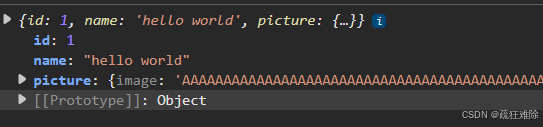
无论是实现IpcResponse这个trait还是实现Serialize ,都行。
总结
看了看Image这个插件。

智能硬件社区聚焦AI智能硬件技术生态,汇聚嵌入式AI、物联网硬件开发者,打造交流分享平台,同步全国赛事资讯、开展 OPC 核心人才招募,助力技术落地与开发者成长。
更多推荐


 11
11 0
0- 0


 已为社区贡献3条内容

所有评论(0)