从零开始打造 OpenSTLinux 6.6 Yocto 系统(基于STM32CubeMX)(七)
本文介绍了uboot设备树的修改配置,主要包括:1) 包含必要的头文件;2) 在根节点下增加设备别名、电源调节器等配置;3) 对i2c1、sdmmc2、usbh和usb_otg等接口进行详细配置;4) 修改uboot的Makefile.sdk文件,仅保留optee-emmc和optee-programmer-usb两种FIP配置;5) 最后编译uboot源码。这些修改主要涉及设备驱动配置、电源管理
·
-
uboot设备树修改
-
u-boot目录下打开u-boot
-
包含头文件
/* USER CODE BEGIN includes */ #include "stm32mp15-u-boot.dtsi" #include "stm32mp15-pinctrl.dtsi" /* USER CODE END includes */ -
根节点下增加
/* USER CODE BEGIN root */ aliases { serial0 = &uart4; //mmc0 = &sdmmc1; // solved emmc not found issue mmc0 = &sdmmc2; }; chosen { stdout-path = "serial0:115200n8"; }; usb_phy_tuning: usb-phy-tuning { st,hs-dc-level = <2>; st,fs-rftime-tuning; st,hs-rftime-reduction; st,hs-current-trim = <15>; st,hs-impedance-trim = <1>; st,squelch-level = <3>; st,hs-rx-offset = <2>; st,no-lsfs-sc; }; vddcore: buck1 { regulator-name = "vddcore"; regulator-min-microvolt = <1200000>; regulator-max-microvolt = <1350000>; regulator-always-on; regulator-initial-mode = <0>; regulator-over-current-protection; }; vdd_usb: regulator-vdd-usb { compatible = "regulator-fixed"; regulator-name = "vdd_usb"; regulator-min-microvolt = <3300000>; regulator-max-microvolt = <3300000>; regulator-always-on; regulator-boot-on; }; vin: vin { compatible = "regulator-fixed"; regulator-name = "vin"; regulator-min-microvolt = <5000000>; regulator-max-microvolt = <5000000>; regulator-always-on; }; vmmc: fixedregulator@1 { compatible = "regulator-fixed"; regulator-name = "vmmc"; regulator-min-microvolt = <3300000>; regulator-max-microvolt = <3300000>; startup-delay-us = <70000>; enable-active-high; }; /* USER CODE END root */ -
i2c1配置
&i2c1 { pinctrl-names = "default", "sleep"; pinctrl-0 = <&i2c1_pins_mx>; pinctrl-1 = <&i2c1_sleep_pins_mx>; status = "okay"; /* USER CODE BEGIN i2c1 */ i2c-scl-rising-time-ns = <100>; i2c-scl-falling-time-ns = <7>; /delete-property/dmas; /delete-property/dma-names; stusb1600@28 { compatible = "st,stusb1600"; reg = <0x28>; interrupts = <2 IRQ_TYPE_EDGE_FALLING>; interrupt-parent = <&gpiog>; pinctrl-names = "default"; pinctrl-0 = <&stusb1600_pins_a>; status = "okay"; vdd-supply = <&vin>; connector { compatible = "usb-c-connector"; label = "USB-C"; power-role = "dual"; power-opmode = "default"; port { con_usbotg_hs_ep: endpoint { remote-endpoint = <&usbotg_hs_ep>; }; }; }; }; /* USER CODE END i2c1 */ }; -
sdmmc2配置
&sdmmc2 { pinctrl-names = "default", "opendrain", "sleep"; pinctrl-0 = <&sdmmc2_pins_mx>; pinctrl-1 = <&sdmmc2_opendrain_pins_mx>; pinctrl-2 = <&sdmmc2_sleep_pins_mx>; status = "okay"; /* USER CODE BEGIN sdmmc2 */ non-removable; no-sd; no-sdio; st,dirpol; st,negedge; bus-width = <8>; vmmc-supply = <&vmmc>; vqmmc-supply = <&vmmc>; /* USER CODE END sdmmc2 */ }; -
usbh配置
&usbh_ehci { status = "okay"; /* USER CODE BEGIN usbh_ehci */ phys = <&usbphyc_port0>; /* USER CODE END usbh_ehci */ }; &usbh_ohci { status = "okay"; /* USER CODE BEGIN usbh_ohci */ phys = <&usbphyc_port0>; /* USER CODE END usbh_ohci */ }; -
usb_otg配置
&usbotg_hs { status = "okay"; /* USER CODE BEGIN usbotg_hs */ phys = <&usbphyc_port1 0>; phy-names = "usb2-phy"; usb-role-switch; port { usbotg_hs_ep: endpoint { remote-endpoint = <&con_usbotg_hs_ep>; }; }; /* USER CODE END usbotg_hs */ }; -
usb phy配置
&usbphyc {
	status = "okay";

	/* USER CODE BEGIN usbphyc */
	/* USER CODE END usbphyc */
};

&usbphyc_port0 {
	status = "okay";

	/* USER CODE BEGIN usbphyc_port0 */
	phy-supply = <&vdd_usb>;
	st,phy-tuning = <&usb_phy_tuning>;
	/* USER CODE END usbphyc_port0 */
};

&usbphyc_port1 {
	status = "okay";

	/* USER CODE BEGIN usbphyc_port1 */
	phy-supply = <&vdd_usb>;
	st,phy-tuning = <&usb_phy_tuning>;
	/* USER CODE END usbphyc_port1 */
};
-
-
修改uboot目录下Makefile.sdk
只编译生成optee-emmc和optee-programmer-usb两个fip
# Set default FIP config #FIP_CONFIG ?= optee-emmc optee-nand optee-nor optee-sdcard optee-programmer-usb opteemin-emmc opteemin-nand opteemin-nor opteemin-sdcard opteemin-programmer-usb FIP_CONFIG ?= optee-emmc optee-programmer-usb -
编译uboot源码
cd u-boot-stm32mp-v2023.10-stm32mp-r1
export FIP_DEPLOYDIR_ROOT=$PWD/../../FIP_artifacts
source ~/sdk6.6

make -f $PWD/../Makefile.sdk  UBOOT_DEFCONFIG=stm32mp15_defconfig UBOOT_BINARY=u-boot.dtb DEVICE_TREE=stm32mp157d-stm32mp157daa1-mx DEPLOYDIR=$FIP_DEPLOYDIR_ROOT/u-boot all
会在…/…/FIP_artifacts/fip生成
fip-stm32mp157d-stm32mp157daa1-mx-optee-emmc.bin
fip-stm32mp157d-stm32mp157daa1-mx-optee-emmc.txt
fip-stm32mp157d-stm32mp157daa1-mx-optee-programmer-usb.bin
fip-stm32mp157d-stm32mp157daa1-mx-optee-programmer-usb.txt
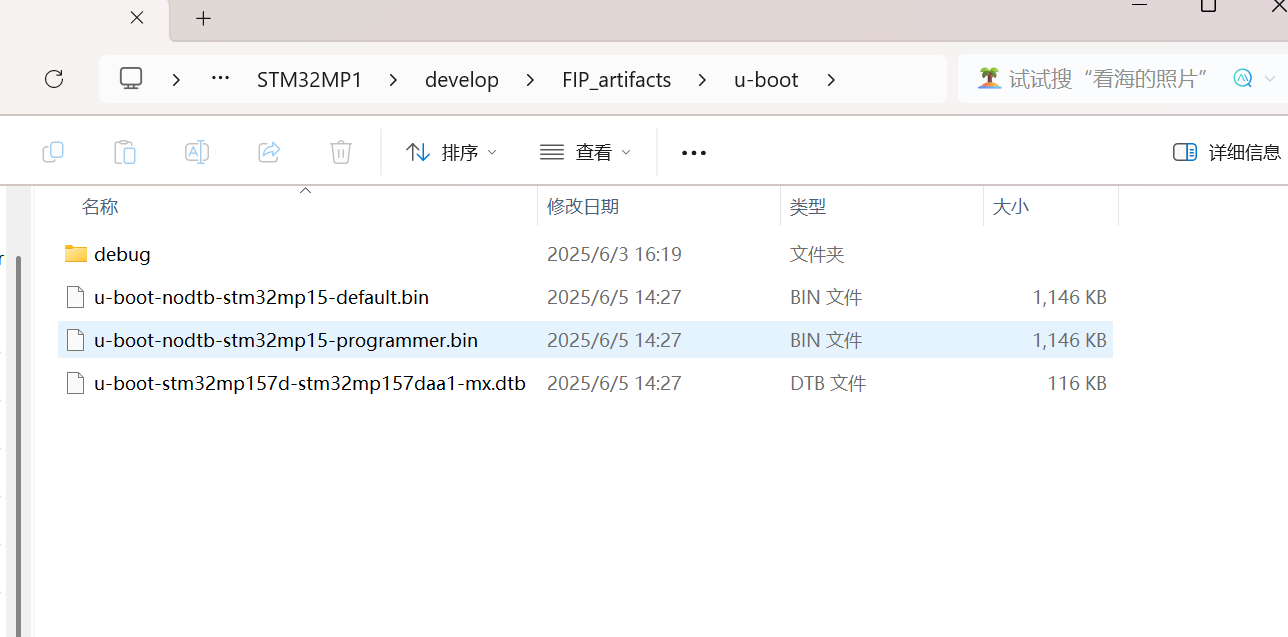
-
下载到板子上验证
新建flash.tsv文件,将下面的内容复制进来
#Opt	Id	Name	Type	Device	Offset	Binary
-	0x01	fsbl-boot	Binary	none	0x0	new/tf-a-stm32mp157d-stm32mp157daa1-mx-optee-programmer-usb.stm32
-	0x03	fip-boot	Binary	none	0x0	new/fip-stm32mp157d-stm32mp157daa1-mx-optee-programmer-usb.bin
P	0x04	fsbl1	Binary	mmc0	boot1	new/tf-a-stm32mp157d-stm32mp157daa1-mx-optee-emmc.stm32
P	0x05	fsbl2	Binary	mmc0	boot2	new/tf-a-stm32mp157d-stm32mp157daa1-mx-optee-emmc.stm32
PD	0x06	metadata1	FWU_MDATA	mmc0	0x00080000	new/metadata.bin
PD	0x07	metadata2	FWU_MDATA	mmc0	0x00100000	new/metadata.bin
P	0x08	fip-a	FIP	mmc0	0x00180000	new/fip-stm32mp157d-stm32mp157daa1-mx-optee-emmc.bin
使用STM32CubeProgrammer进行烧录,选择USB,点击connect,点击Download
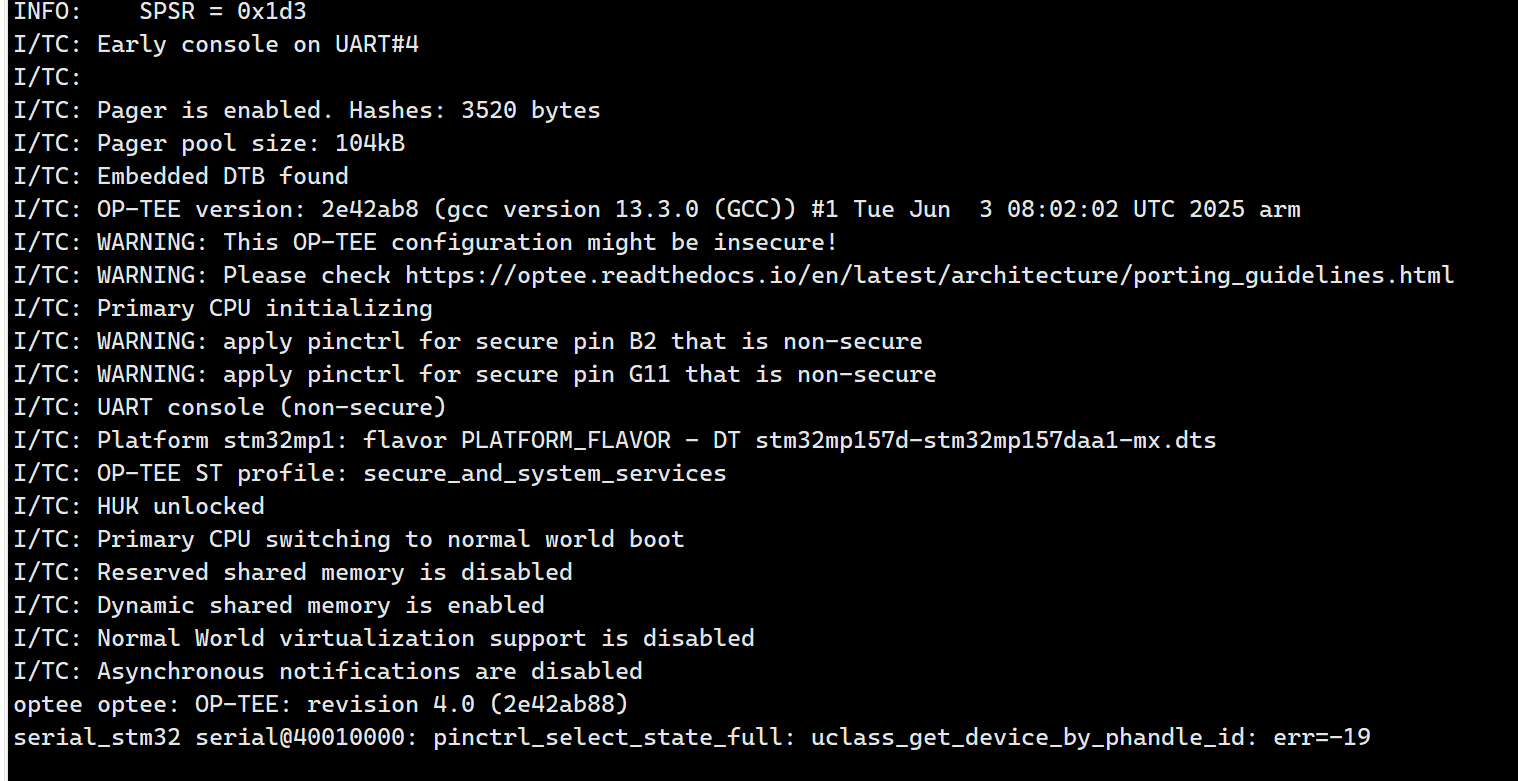
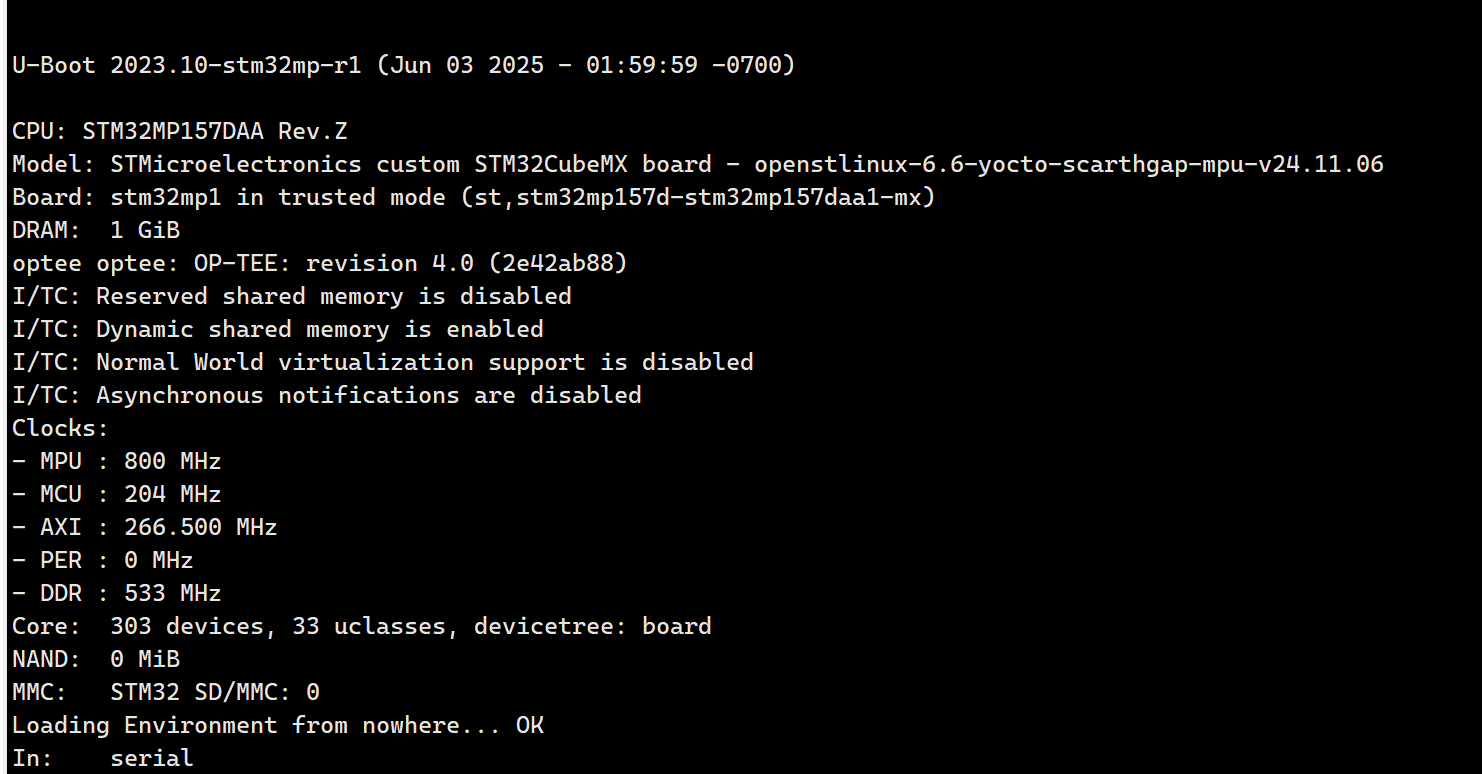
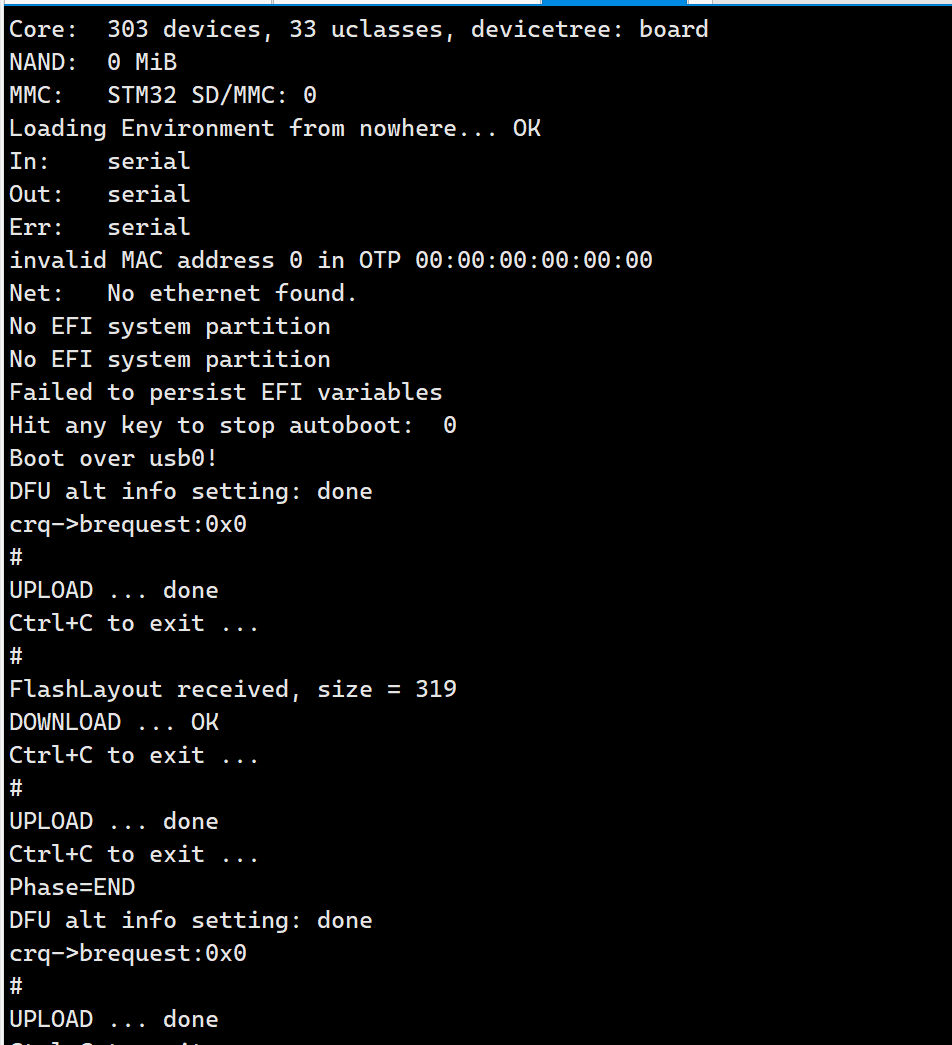
出现以下消息,则表示烧录成功
第一张图片是optee打印
下面图片是uboot打印
-
思考
-
第一张图片出现了这个错误,如何解决?
serial_stm32 serial@40010000: pinctrl_select_state_full: uclass_get_device_by_phandle_id: err=-19 -
STM32MP1支持几个USB?哪个支持USB_OTG?
-
思考这两个作用是什么?ID域0x01和0x03是什么?
tf-a-stm32mp157d-stm32mp157daa1-mx-optee-programmer-usb.stm32
fip-stm32mp157d-stm32mp157daa1-mx-optee-programmer-usb.bin

智能硬件社区聚焦AI智能硬件技术生态,汇聚嵌入式AI、物联网硬件开发者,打造交流分享平台,同步全国赛事资讯、开展 OPC 核心人才招募,助力技术落地与开发者成长。
更多推荐



 23
23 0
0- 0


 已为社区贡献11条内容

所有评论(0)