遨游Spring AI:连接多个模型(实战)
我们在本地部署了两个大模型,对应的就有两个Service的实现类,一个用于连接DeepSeek,一个用于Qwen。现在大模型层出不穷,版本也在不断的迭代,它们在各有优劣,在自己擅长的领域各显神通。ChatResponse,它里面还包含更多的元数据信息,包括token的数量等等,感兴趣的朋友可以debug进去看看详细信息。1. 使用不同的模型处理不同的任务(比如使用强悍的模型来进行推理,但对于简单的
现在大模型层出不穷,版本也在不断的迭代,它们在各有优劣,在自己擅长的领域各显神通。所以,在应用程序中需要连接多个大模型,充分利用它们的优势。
详细来讲,有如下几个原因使得我们需要多个大模型:
1. 使用不同的模型处理不同的任务(比如使用强悍的模型来进行推理,但对于简单的任务就使用一个更快、更便宜的大模型);
2. 如果其中一个模型不可用,应用程序不受影响;
3. 对于不同的模型或者配置可以进行A/B测试;
4. 提供给用户更多的选项;
5. 充分利用多个模型的优势(比如使用一个模型来生成代码,另外一个模型来生成创意内容)。
当然,Spring AI对于这样的需求也提供了很好的支持。下面我们以实例进行展示。
首先是在本地安装Ollama,然后再安装DeepSeek和Qwen,具体安装方法可以参考之前的文章:遨游Spring AI:第一盘菜Hello World
接下来编写代码,首先是Service接口:
package com.myai.demo.service;

/**
 * ai聊天服务
 * @author 公众号:互联网网全栈架构
 */
public interface ChatService {

    /**
     * 根据用户输入,调用大模型接口并返回结果
     * @param message 用户输入的聊天内容
     * @return 大模型返回的文本结果
     */
    String getChatResult(String message);
}
我们在本地部署了两个大模型,对应的就有两个Service的实现类,一个用于连接DeepSeek,一个用于Qwen。对于DeepSeek,它使用自动配置的方式创建ChatClient类,而Qwen则是通过手动配置的方式来创建:
先看DeepSeek的实现:
package com.myai.demo.service.impl;

import com.myai.demo.service.ChatService;
import org.springframework.ai.chat.client.ChatClient;
import org.springframework.beans.factory.annotation.Qualifier;
import org.springframework.stereotype.Service;

/**
 * 与DeepSeek模型聊天
 *
 * @author 公众号:互联网网全栈架构
 */
@Service
@Qualifier("deepseek")
publicclass DeepSeekChatService implements ChatService {

    privatefinal ChatClient chatClient;

    public DeepSeekChatService(ChatClient.Builder chatClient) {
        this.chatClient = chatClient.build();
    }

    /**
     * 根据用户输入,调用DeepSeek接口并返回结果
     * @param message 用户输入的聊天内容
     * @return DeepSeek返回的结果
     */
    @Override
    public String getChatResult(String message) {
        String result;
        try {
            result = "DeepSeek返回的结果:" + chatClient.prompt().user(message).call().content();
        } catch (Exception e) {
            return"Exception";
        }
        return result;
    }
}
应用的yml配置信息如下:
spring:
  http:
    encoding:
      charset: UTF-8
      enable: true
      force: true
  ai:
    ollama:
      base-url: http://localhost:11434
      chat:
        model: deepseek-r1:1.5b
而Qwen大模型相关的配置都是在代码中进行的,它的Service实现类如下。为了辨别是哪个模型处理的,我们在返回的消息中加了大模型的信息,以示区分:
package com.myai.demo.service.impl;

import com.myai.demo.service.ChatService;
import org.springframework.ai.chat.model.ChatResponse;
import org.springframework.ai.chat.prompt.Prompt;
import org.springframework.ai.ollama.OllamaChatModel;
import org.springframework.ai.ollama.api.OllamaApi;
import org.springframework.ai.ollama.api.OllamaOptions;
import org.springframework.beans.factory.annotation.Qualifier;
import org.springframework.stereotype.Service;

@Service
@Qualifier("qwen")
publicclass QwenChatService implements ChatService {

    privatestaticfinal String QWEN_MODEL = "qwen3:1.7b";

    /**
     * 根据用户输入,调用QWEN接口并返回结果
     * @param message 用户输入的聊天内容
     * @return QWEN返回的结果
     */
    @Override
    public String getChatResult(String message) {
        OllamaApi ollamaApi = OllamaApi.builder().build();

        OllamaChatModel chatModel = OllamaChatModel.builder()
                .ollamaApi(ollamaApi)
                .defaultOptions(OllamaOptions.builder()
                                .model(QWEN_MODEL)
                                .temperature(0.9)
                                .build())
                .build();

        ChatResponse response = chatModel.call(
                new Prompt(message));
        String result = response.getResult().getOutput().getText();
        return"QWEN返回的结果:" + result;
    }
}
这样,Service类就准备好了,接下来是controller类。它比较简单,就是调用Service里面的接口而已。我们做了一个简单的逻辑判断,如果用户输入的消息长度大于5,那么就调用Qwen的接口进行处理,否则,连接DeepSeek:
package com.myai.demo.controller;

import com.myai.demo.service.ChatService;
import org.springframework.beans.factory.annotation.Autowired;
import org.springframework.beans.factory.annotation.Qualifier;
import org.springframework.web.bind.annotation.GetMapping;
import org.springframework.web.bind.annotation.RequestMapping;
import org.springframework.web.bind.annotation.RequestParam;
import org.springframework.web.bind.annotation.RestController;

@RestController
@RequestMapping("/ai")
publicclass ChatController {

    @Autowired
    @Qualifier("deepseek")
    private ChatService deepSeekService;

    @Autowired
    @Qualifier("qwen")
    private ChatService qwenService;

    @GetMapping("/chat")
    public String chat(@RequestParam(value = "message") String message) {
        if(message.length()>5){
            return qwenService.getChatResult(message);
        }
        return deepSeekService.getChatResult(message);
    }
}
接下来我们测试一下,在浏览器里输入地址以及相应的聊天信息,如果message为你好,它调用DeepSeek接口,结果如下:

否则,就调用Qwen的接口进行处理:
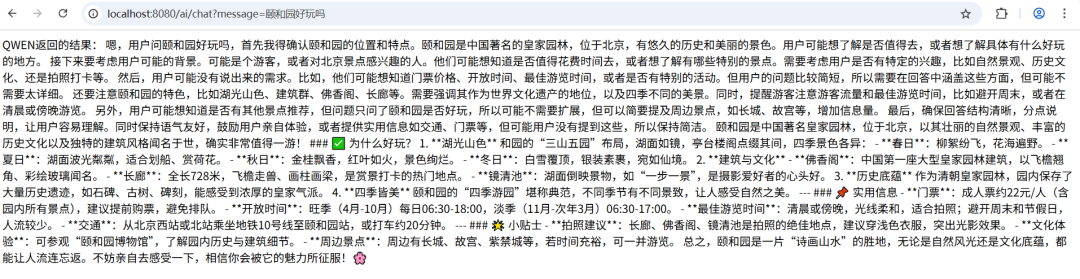
这样,我们在代码里面就可以综合利用各个大模型的优势了。另外,Spring AI调用大模型的接口,返回的结果为
ChatResponse,它里面还包含更多的元数据信息,包括token的数量等等,感兴趣的朋友可以debug进去看看详细信息。如果需要整体代码,或者在搭建过程有任何问题,欢迎后台私信或者留言讨论。
创作不易,烦请点个在看、点个赞。
有任何问题,也欢迎留言讨论。

智能硬件社区聚焦AI智能硬件技术生态,汇聚嵌入式AI、物联网硬件开发者,打造交流分享平台,同步全国赛事资讯、开展 OPC 核心人才招募,助力技术落地与开发者成长。
更多推荐


 7
7 0
0- 0


 已为社区贡献1条内容

所有评论(0)