用opencv和caixcam进行矩形框识别中点坐标输出,以及激光识别和激光坐标输出。#电赛E题
在嵌入式系统(如 MaixCAM)中,如何高效地识别图像中的特征,并将这些数据实时传输到主控板或机器人控制器,是实际应用中最关键的一环。本文将通过一个的完整案例,解析背后的原理与实现方法。适用场景如:棋盘识别(三子棋、定位标靶等)激光点跟踪系统机器人对位视觉引导人机交互识别与图像辅助控制。
主包比较懒不想写太多。
在嵌入式系统(如 MaixCAM)中,如何高效地识别图像中的特征,并将这些数据实时传输到主控板或机器人控制器,是实际应用中最关键的一环。本文将通过一个红点识别 + 矩形检测 + 串口传输的完整案例,解析背后的原理与实现方法。
适用场景如:
-
棋盘识别(三子棋、定位标靶等)
-
激光点跟踪系统
-
机器人对位视觉引导
-
人机交互识别与图像辅助控制
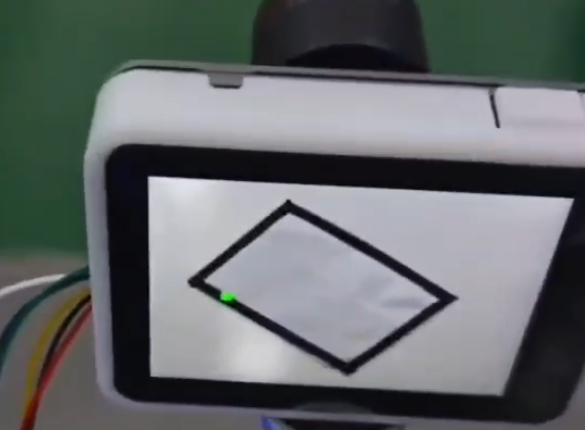
实现效果:
先将识别到的四个角点传出,传出后不再识别(因为是固定的)。
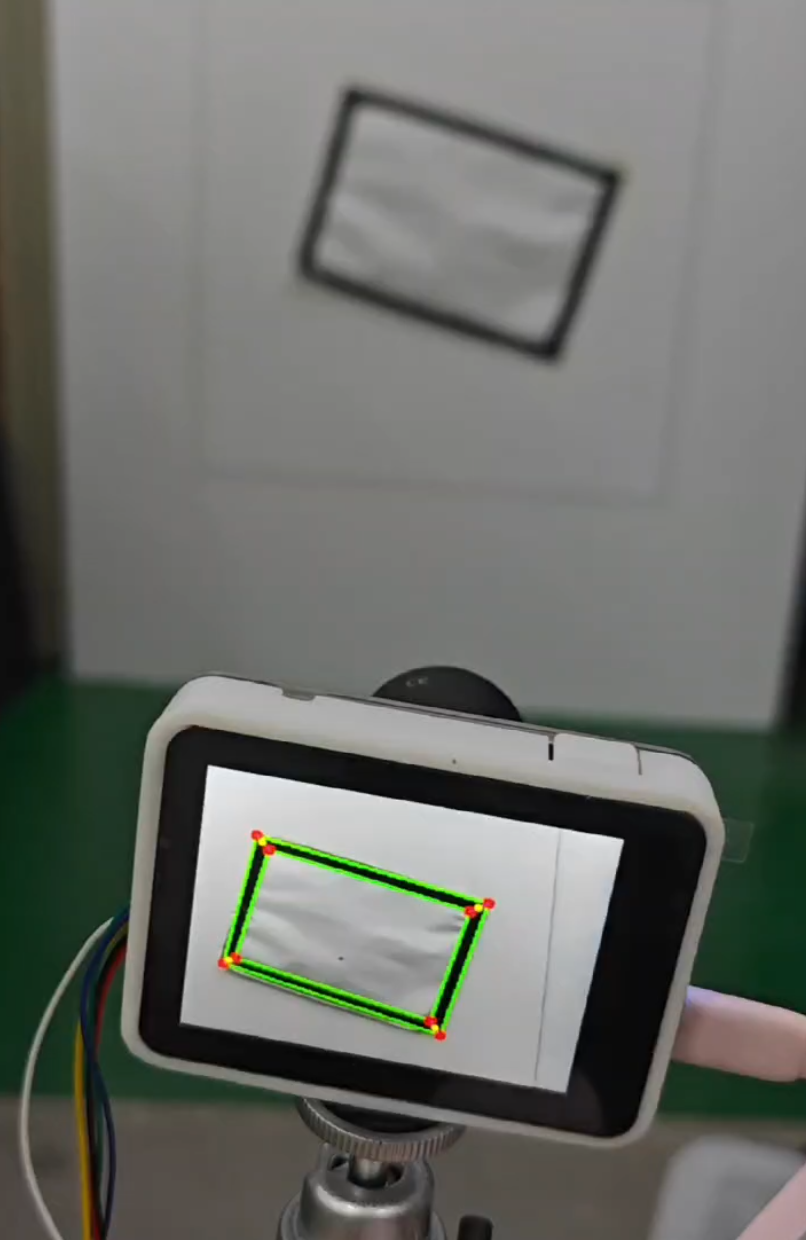
随后识别红激光。实时传输激光位置。
矩形检测与中点计算
目标:找到两个矩形之间的对应角点,并计算四个中点(例如:棋盘格或坐标定位板)
关键步骤:
-
轮廓提取:使用
adaptiveThreshold+morphologyEx组合增强二值图像 -
多边形拟合:
cv2.approxPolyDP找到4点的凸四边形 -
矩形判断:角度接近90°、边界不越界、面积合理
-
重复矩形去重:使用
is_similar_rect判定是否为“同一个矩形” -
角点匹配:使用欧几里得距离最短匹配两个矩形角点之间的对应关系
最终计算两个矩形的 4 个中点位置。
系统通过串口向主控发送如下格式的数据包:
| AA 55 | 红点X | 红点Y | 中点1X | 中点1Y | ... | 中点4X | 中点4Y |
payload = b'\xAA\x55'
payload += pack("<hh", *red_dot)
for x, y in midpoints:
    payload += pack("<hh", x, y)
serial.write(payload)
发送格式采用小端字节序(<h),方便主控直接反序列化读取。
完整代码如下:
from maix import image, camera, display, app, uart, time

import cv2

import numpy as np

from struct import pack


# 初始化串口

serial = uart.UART("/dev/ttyS0", 115200)


# 初始化摄像头和显示器

cam = camera.Camera(320, 240, fps=80)

disp = display.Display()

#红色在 RGB 空间容易受光照干扰,而在 LAB 色彩空间的 A 通道 中,红色数值范围更集中。

# 红点检测阈值(LAB 色彩空间 A 通道)

A_MIN = 150

A_MAX = 255

kernel_red = cv2.getStructuringElement(cv2.MORPH_ELLIPSE, (3, 3))


MIN_AREA = 2000

MAX_AREA = 80000


pause_rect_detect = False  # 是否暂停矩形检测


def sort_rect_points(pts):

    pts = sorted(pts, key=lambda p: (p[1], p[0]))

    top = sorted(pts[:2], key=lambda p: p[0])

    bottom = sorted(pts[2:], key=lambda p: p[0], reverse=True)

    return [top[0], top[1], bottom[0], bottom[1]]


def match_corners_by_distance(ref_pts, target_pts):

    matched = [None] * 4

    used = [False] * 4

    for i, p1 in enumerate(ref_pts):

        min_dist = float("inf")

        min_j = -1

        for j, p2 in enumerate(target_pts):

            if used[j]:

                continue

            dist = np.linalg.norm(np.array(p1) - np.array(p2))

            if dist < min_dist:

                min_dist = dist

                min_j = j

        matched[i] = target_pts[min_j]

        used[min_j] = True

    return matched


def is_similar_rect(rect1, rect2, threshold=8, area_thresh=0.05):

    try:

        rect1 = sort_rect_points(rect1)

        rect2 = sort_rect_points(rect2)

        avg_dist = np.mean([np.linalg.norm(np.array(p1) - np.array(p2)) for p1, p2 in zip(rect1, rect2)])

        area1 = cv2.contourArea(np.array(rect1, dtype=np.int32))

        area2 = cv2.contourArea(np.array(rect2, dtype=np.int32))

        area_diff_ratio = abs(area1 - area2) / max(area1, area2)

        return avg_dist < threshold and area_diff_ratio < area_thresh

    except Exception as e:

        print("矩形比较异常:", e)

        return False


def is_rectangle(approx):

    if approx is None or len(approx) != 4 or not cv2.isContourConvex(approx):

        return False

    pts = [point[0] for point in approx]

    def angle(p1, p2, p3):

        v1 = np.array(p1) - np.array(p2)

        v2 = np.array(p3) - np.array(p2)

        norm1 = np.linalg.norm(v1)

        norm2 = np.linalg.norm(v2)

        if norm1 == 0 or norm2 == 0:

            return 0

        cos_angle = np.clip(np.dot(v1, v2) / (norm1 * norm2), -1.0, 1.0)

        return np.arccos(cos_angle) * 180 / np.pi

    angles = [angle(pts[i - 1], pts[i], pts[(i + 1) % 4]) for i in range(4)]

    return all(80 < ang < 100 for ang in angles)


# 主循环

while not app.need_exit():

    try:

        # 检查串口是否接收到 0x66

        try:

            data = serial.read()

            if data and b'\x66' in data:

                pause_rect_detect = True

        except Exception as e:

            print("串口读取异常:", e)


        img = cam.read()

        if img is None:

            continue


        try:

            img_raw = image.image2cv(img, copy=True)

        except Exception as e:

            print("图像转换失败:", e)

            continue


        red_dot = (-1, -1)

        midpoints = [(-1, -1)] * 4


        # 红点检测(使用 LAB 色彩空间)

        try:

            lab = cv2.cvtColor(img_raw, cv2.COLOR_BGR2Lab)

            _, A, _ = cv2.split(lab)

            A = A.astype(np.uint8)

            mask = cv2.inRange(A, np.array(A_MIN, dtype=np.uint8), np.array(A_MAX, dtype=np.uint8))

            mask = cv2.morphologyEx(mask, cv2.MORPH_OPEN, kernel_red)

            mask = cv2.morphologyEx(mask, cv2.MORPH_DILATE, kernel_red)


            contours, _ = cv2.findContours(mask, cv2.RETR_EXTERNAL, cv2.CHAIN_APPROX_SIMPLE)

            if contours:

                max_cnt = max(contours, key=cv2.contourArea)

                if cv2.contourArea(max_cnt) > 20:

                    M = cv2.moments(max_cnt)

                    if M["m00"] != 0:

                        cx = int(M["m10"] / M["m00"])

                        cy = int(M["m01"] / M["m00"])

                        red_dot = (cx, cy)

                        cv2.circle(img_raw, (cx, cy), 5, (0, 255, 0), -1)

        except Exception as e:

            print("红点检测异常:", e)


        # 矩形检测与中点计算

        if not pause_rect_detect:

            try:

                gray = cv2.cvtColor(img_raw, cv2.COLOR_BGR2GRAY)

                bin_img = cv2.adaptiveThreshold(gray, 255, cv2.ADAPTIVE_THRESH_MEAN_C,

                                                cv2.THRESH_BINARY, 11, 2)

                closed = cv2.morphologyEx(bin_img, cv2.MORPH_CLOSE,

                                           cv2.getStructuringElement(cv2.MORPH_RECT, (3, 3)))

                contours, _ = cv2.findContours(closed, cv2.RETR_TREE, cv2.CHAIN_APPROX_SIMPLE)

                rectangles = []


                for contour in contours:

                    area = cv2.contourArea(contour)

                    if not (MIN_AREA <= area <= MAX_AREA):

                        continue

                    x, y, w, h = cv2.boundingRect(contour)

                    margin = 1  # 可调边缘安全距离(像素)

                    if x < margin or y < margin or x + w > img_raw.shape[1] - margin or y + h > img_raw.shape[0] - margin:

                            continue

                    approx = cv2.approxPolyDP(contour, 0.02 * cv2.arcLength(contour, True), True)

                    if is_rectangle(approx):

                        rect = [tuple(pt[0]) for pt in approx]

                        if not any(is_similar_rect(rect, r) for r in rectangles):

                            rectangles.append(rect)

                            cv2.drawContours(img_raw, [np.array(rect, dtype=np.int32)], -1, (0, 255, 0), 2)

                            for x, y in rect:

                                cv2.circle(img_raw, (x, y), 5, (0, 0, 255), -1)


                if len(rectangles) == 2:

                    r1 = sort_rect_points(rectangles[0])

                    r2_unsorted = sort_rect_points(rectangles[1])

                    r2 = match_corners_by_distance(r1, r2_unsorted)


                    for i in range(4):

                        mid = ((r1[i][0] + r2[i][0]) // 2, (r1[i][1] + r2[i][1]) // 2)

                        midpoints[i] = mid

                        cv2.line(img_raw, r1[i], r2[i], (255, 0, 255), 1)

                        cv2.circle(img_raw, mid, 3, (0, 255, 255), -1)

            except Exception as e:

                print("矩形检测异常:", e)


        # 数据打包并发送

        try:

            payload = b'\xAA\x55'

            if red_dot[0] < 0 or red_dot[1] < 0:

                payload += pack("<hh", 0, 0)

            else:

                payload += pack("<hh", *red_dot)


            for x, y in midpoints:

                if x < 0 or y < 0:

                    payload += pack("<hh", 0, 0)

                else:

                    payload += pack("<hh", x, y)


            serial.write(payload)

        except Exception as e:

            print("串口发送异常:", e)


        # 显示图像

        try:

            img_show = image.cv2image(img_raw, copy=False)

            disp.show(img_show)

        except Exception as e:

            print("图像显示失败:", e)


        time.sleep_ms(1)


    except Exception as e:

        print("主循环异常:", e)
智能硬件社区聚焦AI智能硬件技术生态,汇聚嵌入式AI、物联网硬件开发者,打造交流分享平台,同步全国赛事资讯、开展 OPC 核心人才招募,助力技术落地与开发者成长。
更多推荐



 23
23 0
0- 0


 已为社区贡献1条内容

所有评论(0)