Buildroot 介绍和实操
在上篇文章我介绍了如何使用 busybox 来构建文件系统,但是 busybox 构建的文件系统很多东西需要自己交叉编译添加,某些软件需要自己去移植,所以移植过程是非常繁琐的。使用Busybox制作根文件系统还有另外一种非常实用的根文件系统构建方法——使用 Buildroot 来构建根文件系统。Buildroot 不仅集成了 busybox,而且还集成了各种常见的第三方库和软件,需要什么软件,选择
前言
在上篇文章我介绍了如何使用 busybox 来构建文件系统,但是 busybox 构建的文件系统很多东西需要自己交叉编译添加,某些软件需要自己去移植,所以移植过程是非常繁琐的。
链接如下:
还有另外一种非常实用的根文件系统构建方法——使用 Buildroot 来构建根文件系统。Buildroot 不仅集成了 busybox,而且还集成了各种常见的第三方库和软件,需要什么软件,选择哪个软件就好,Buildroot 上手门槛低,极大的方便了嵌入式Linux开发人员构建根文件系统。
一、Buildroot 基本介绍
Buildroot 是一个可以使用交叉编译简单且自动化地为嵌入式系统构建完整Linux系统的工具。Buildroot 可以为你的系统生成交叉编译工具链,根文件系统,Linux内核镜像和引导加载程序。Buildroot 可以独立地用于这些选项的任意组合(比如,你可以使用现有的交叉编译工具链,并且仅仅只编译文件系统)。
Buildroot 主要用于使用嵌入式系统的开发者,嵌入式系统通常使用的处理器并不是PC电脑上的X86处理器,他们可以是PowerPc处理器,MIPS处理器或者ARM处理器等等。Buildroot支持很多处理器,它还具有一些可用目标板的默认配置。除此之外,许多第三方项目的SDK都是基于buildroot开发。
构建开源软件包工作流程大致如下所示:
- 获取:获取软件包的源码
- 解压:解压软件包源码
- 补丁:针对缺陷修复和增加的功能应用补丁
- 配置:根据环境准备构建过程
- 安装:复制二进制和辅助文件到目标目录
- 打包:为在其他系统上安装而打包二进制和辅助文件
如上所示,我们可以看到构建每个软件包的工作流程几乎是相同的,buildroot主要的功能就是把这些重复操作自动化,用户只需要勾选上所需软件包,便自动完成以上所有操作。Buildroot 生成 uboot Linux Kernel 的编译工作流程是差不多的,只要配置好自定义的参数,在 buildroot 配置好编译生成即可。
二、Buildroot 目录简介
Buildroot 基本上是一组Makefile 文件,可以使用正确的选项对所需的软件进行下载,配置和编译。它还包含各种软件包的补丁,主要是那些涉及交叉编译工具链(gcc,binutils 和 uClibc)的软件包。每个软件包基本只有一个Makefile文件,它们以.mk扩展名命名。
Buildroot 编译之前的目录如下所示:
Buildroot 编译之后会多出来俩个文件夹,一个是 dl 文件夹,一个是 output 目录文件夹,
最终生成的板子镜像在output/images目录下。
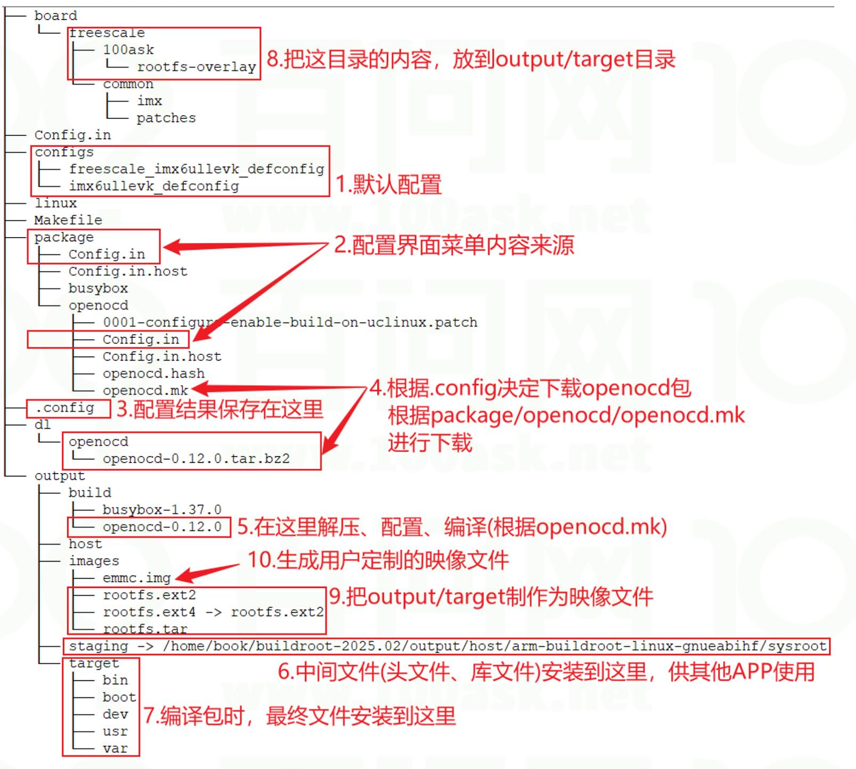
buildroot/arch:
- 目录存放 CPU 架构相关的配置脚本,如arm/mips/x86 ,这些CPU相关的配置,在制作工具链,编译boot和内核时很关键。
buildroot/board:
- 存放某个具体单板紧密相关的文件,比如内核配置文件、sd卡制作脚本、rootfs覆盖文件等。
buildroot/boot:
- 存放各种 Bootloaders 相关的的补丁*.patch、校验文件*.hash、构建脚本*.mk、配置选项Config.in
buildroot/configs:
- 存放各个单板的 buildroot 配置文件
buildroot/dl:
- 目录存放从官网上下载的开源软件包,第一次下载后,下次就不会再去从官网下载了,而是从dl/目录下拿开源包,以节约时间。本身下载通常都是很慢的,你可以手动找到相关包下载后放到这里就OK了,make时会自动检测这个目录。
buildroot/docs:
- 存放 pdf,html 格式的 buildroot 详细说明。
buildroot/fs:
- 放各种文件系统的源代码
buildroot/fs/skeleton:
- 放生成文件系统镜像的地方,及板子里面的系统
buildroot/linux:
- 存放 Linux 的构建脚本*.mk 和配置选项Config.in
buildroot/package/:
- 此目录下放着应用软件的配置文件,每个应用软件的配置文件有Config.in和软件包名字.mk。软件包名字.mk文件可以下载应用软件包,是Makefile脚本的自动构建脚本。
buildroot/output/:
- 是编译的输出文件夹,里面的build/目录存放着解压后的各种软件包编译完后的现场。
- build:
- 所有源码包解压出来的文件存放地和编译的发生地
- staging:
- 包含了根文件系统的层次结构,编译生成的所有头文件和库,以及其他开发文件,体积较大;
- target:
- 目录是用来制作 rootfs 的,里面放着Linux系统基本的目录结构,以及各种编译好的应用库和bin可执行文件。
- Images:
- 目录下就是最终生成的可烧写到板子上的各种image。
- host:
- 是由各类源码编译后在你主机上运行的工具的安装目录,如arm-linux-gcc就是安装在这里;编译出来的主机工具在host/usr下;根目录所需要的库及一些基本目录就在host//sysroot/ 或 host/usr//sysroot/里
buildroot/support:
- 存放一些为 bulidroot 提供功能支持的脚本、配置文件
buildroot/system:
- 这里就是根目录的主要骨架了和相关的启动初始化配置,当制作根目录时就
是将此处的文件cp到output里去.然后再安装toolchain的动态库和你勾选的package的可执行
文件之类的.
buildroot/toolchain:
- 存放制作各种交叉编译工具链的构建脚本*.mk和配置选项Config.in
buildroot/utils:
- 存放一些 buildroot 的实用脚本和工具。
buildroot/CHANGES:
- buildroot 的修改日志。
buildroot/.config:
- make menuconfig 后生成的最终配置文件。
buildroot/Config.in :
- 所有 Config.in 的入口,也是 Build options 的提供者
buildroot/Config.in.legacy :
- Legacy config options 的提供者
buildroot/DEVELOPERS :
- 开发人员列表,N后面是开发人员名字,F后面是开发的软件
buildroot/Makefile :
- 顶层 Makefile
buildroot/Makefile.legacy :
- 旧的 Makefile,为了支持向后兼容
buildroot/README :
- buildroot 简单说明。
用一张图来表示:
三、Buildroot 帮助命令
在buildroot根目录执行make help,即可获得buildroot常用命令的提示信息,内容如下:
book@100ask:~/buildroot-2025.02$ make help
Cleaning:
  clean                  - delete all files created by build
  distclean              - delete all non-source files (including .config)

Build:
  all                    - make world
  toolchain              - build toolchain
  sdk                    - build relocatable SDK

Configuration:
  menuconfig             - interactive curses-based configurator
  nconfig                - interactive ncurses-based configurator
  xconfig                - interactive Qt-based configurator
  gconfig                - interactive GTK-based configurator
  oldconfig              - resolve any unresolved symbols in .config
  syncconfig             - Same as oldconfig, but quietly, additionally update deps
  olddefconfig           - Same as syncconfig but sets new symbols to their default value
  randconfig             - New config with random answer to all options
  defconfig              - New config with default answer to all options;
                             BR2_DEFCONFIG, if set on the command line, is used as input
  savedefconfig          - Save current config to BR2_DEFCONFIG (minimal config)
  update-defconfig       - Same as savedefconfig
  allyesconfig           - New config where all options are accepted with yes
  allnoconfig            - New config where all options are answered with no
  alldefconfig           - New config where all options are set to default
  randpackageconfig      - New config with random answer to package options
  allyespackageconfig    - New config where pkg options are accepted with yes
  allnopackageconfig     - New config where package options are answered with no

Package-specific:
  <pkg>                  - Build and install <pkg> and all its dependencies
  <pkg>-source           - Only download the source files for <pkg>
  <pkg>-extract          - Extract <pkg> sources
  <pkg>-patch            - Apply patches to <pkg>
  <pkg>-depends          - Build <pkg>'s dependencies
  <pkg>-configure        - Build <pkg> up to the configure step
  <pkg>-build            - Build <pkg> up to the build step
  <pkg>-show-info        - generate info about <pkg>, as a JSON blurb
  <pkg>-show-depends     - List packages on which <pkg> depends
  <pkg>-show-rdepends    - List packages which have <pkg> as a dependency
  <pkg>-show-recursive-depends
                         - Recursively list packages on which <pkg> depends
  <pkg>-show-recursive-rdepends
                         - Recursively list packages which have <pkg> as a dependency
  <pkg>-graph-depends    - Generate a graph of <pkg>'s dependencies
  <pkg>-graph-rdepends   - Generate a graph of <pkg>'s reverse dependencies
  <pkg>-graph-both-depends
                         - Generate a graph of both <pkg>'s forward and
                           reverse dependencies.
  <pkg>-dirclean         - Remove <pkg> build directory
  <pkg>-reconfigure      - Restart the build from the configure step
  <pkg>-rebuild          - Restart the build from the build step
  <pkg>-reinstall        - Restart the build from the install step

busybox:
  busybox-menuconfig     - Run busybox menuconfig
  busybox-xconfig        - Run busybox xconfig
  busybox-gconfig        - Run busybox gconfig
  busybox-update-config  - Save the busybox configuration as a full .config file
                             to package/busybox/busybox.config
                             (or override with BUSYBOX_KCONFIG_FILE)

Documentation:
  manual                 - build manual in all formats
  manual-html            - build manual in HTML
  manual-split-html      - build manual in split HTML
  manual-pdf             - build manual in PDF
  manual-text            - build manual in text
  manual-epub            - build manual in ePub
  graph-build            - generate graphs of the build times
  graph-depends          - generate graph of the dependency tree
  graph-size             - generate stats of the filesystem size
  list-defconfigs        - list all defconfigs (pre-configured minimal systems)

Miscellaneous:
  source                 - download all sources needed for offline-build
  external-deps          - list external packages used
  legal-info             - generate info about license compliance
  show-info              - generate info about packages, as a JSON blurb
  pkg-stats              - generate info about packages as JSON and HTML
  printvars              - dump internal variables selected with VARS=...
  show-vars              - dump all internal variables as a JSON blurb; use VARS=...
                           to limit the list to variables names matching that pattern

  make V=0|1             - 0 => quiet build (default), 1 => verbose build
  make O=dir             - Locate all output files in "dir", including .config

For further details, see README, generate the Buildroot manual, or consult
it on-line at http://buildroot.org/docs.html
四、安装编译环境
通过查看官方手册可知构建系统需要的工具有如下图所示,这些工具需要我们在 ubuntu 虚拟机上安装。
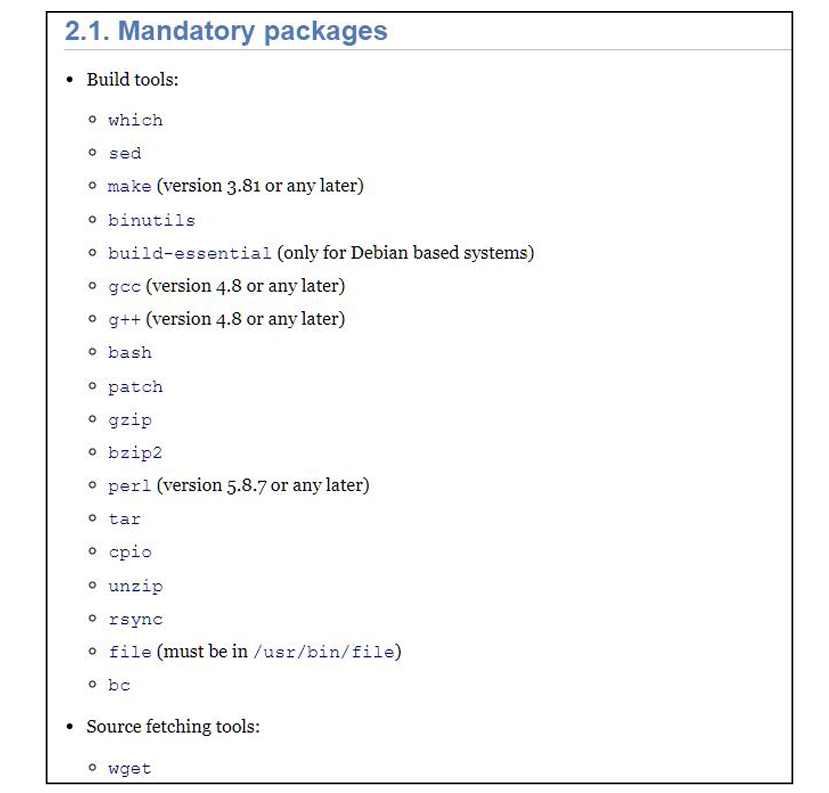
我们需要安装这些编译必须工具,不然编译过程会出错。
我们可以使用以下命令来安装这些工具,安装过程如下图所示:
sudo apt install -y sed make binutils build-essential gcc g++ patch gzip bzip2 perl tar cpio unzip rsync file bc wget
五、Buildroot 配置
Buildroot可以和配置内核一样,使用 menuconfig 进行图形化配置。输入 “make menuconfig” 命令可以打开图形化配置界面,如下所示:
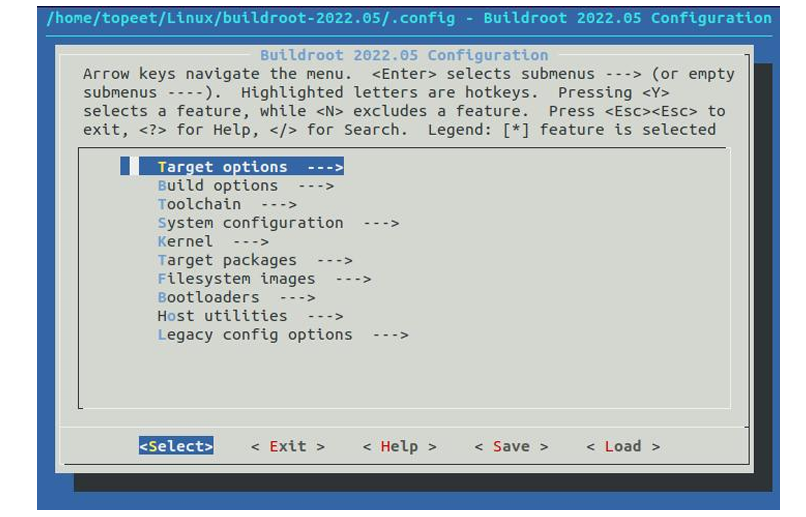
由上图可知,在每条选项的前面可以看到[]、<>、()三种表示方式
- []有俩种状态,[*]代表选中,[]代表没有选中。选中的意思是选择对应的功能选项编译进内核镜像文件中
- <>有三种状态,<*>代表选中,<>代表没有选中,代表选为模块
- ()存放十进制或十六进制或字符串
make *config 命令还提供了搜索工具。在不同的前台菜单中来查看帮助消息,以了解如何使用它。在 menuconfig 中, 按“/”调用搜索工具,搜索结果将显示匹配目标的帮助信息。
比如按下“/”打开搜索框,并输入“qt”,如下图所示: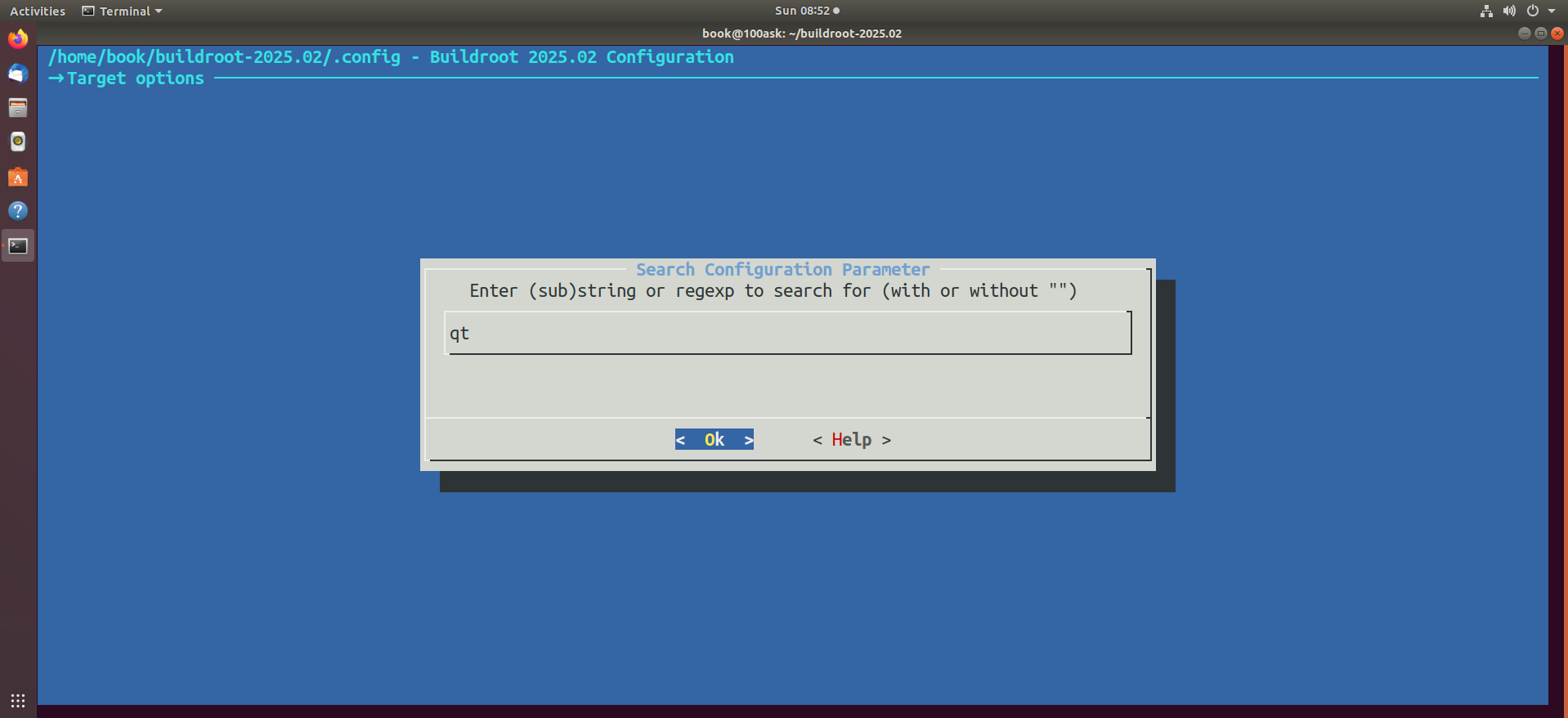
然后点击回车,搜索的信息如下所示: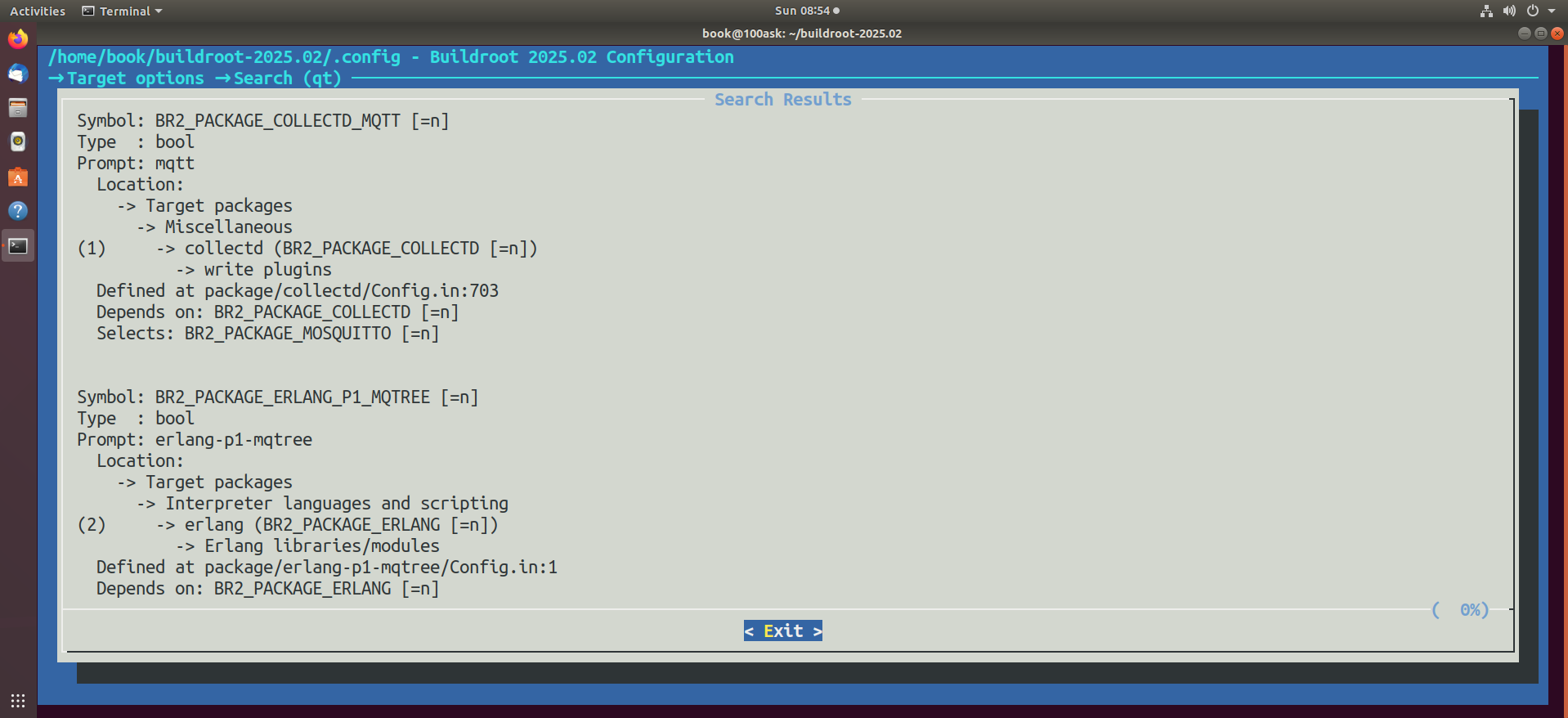

智能硬件社区聚焦AI智能硬件技术生态,汇聚嵌入式AI、物联网硬件开发者,打造交流分享平台,同步全国赛事资讯、开展 OPC 核心人才招募,助力技术落地与开发者成长。
更多推荐



 25
25 0
0- 0


 已为社区贡献8条内容

所有评论(0)