S32K312 环境搭建 6路CANFD收发测试
S32K312, CANFD x6 1M+5M 测试, S32DS RTD 开发环境搭建, DIO, UART, FlexCAN
文章目录
S32K312 评估板概览
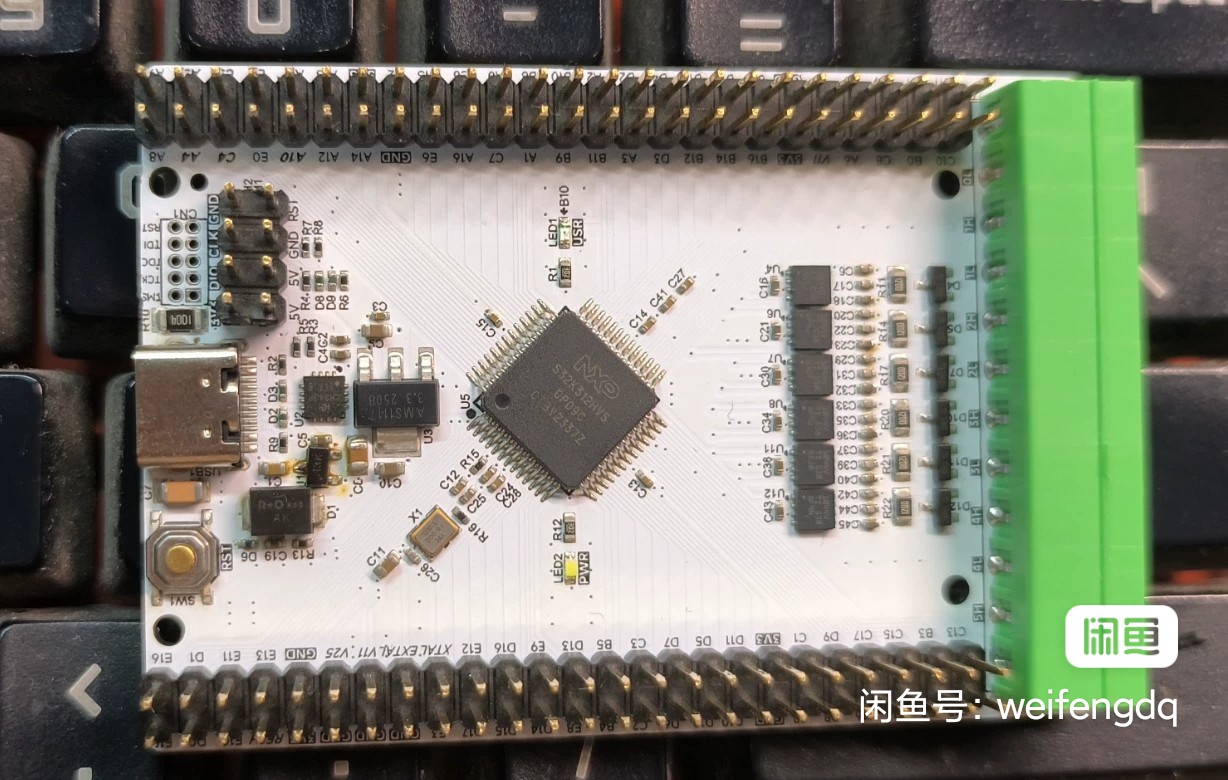
NXP S32K312 评估板:
- S32K312NHT0VPAST, 1 x M7 core, 120M, 2MB P-Flash, 192KB SRAM, -40 °C to 105 °C, MaxQFP-100 封装, 外部 16M 晶振
- USB转高速串口芯片 CH343, 最高可支持到 6Mbps
- 6路CANFD接口, 收发器型号 TCAN1044VDRBRQ1, AEC-Q100, 支持到 8Mbps, 通过 KF2EDGR-3.81-12P 绿色插座引出, 配套插头为 KF2EDGK-3.81-12P
- 引出所有的 100PIN 引脚
- 其它: RST按键, 用户LED, SWD接口, 1.27_2*5P JTAG接口, TypeC 或 排针5V 供电
硬件设计
S32K312 的硬件资源:
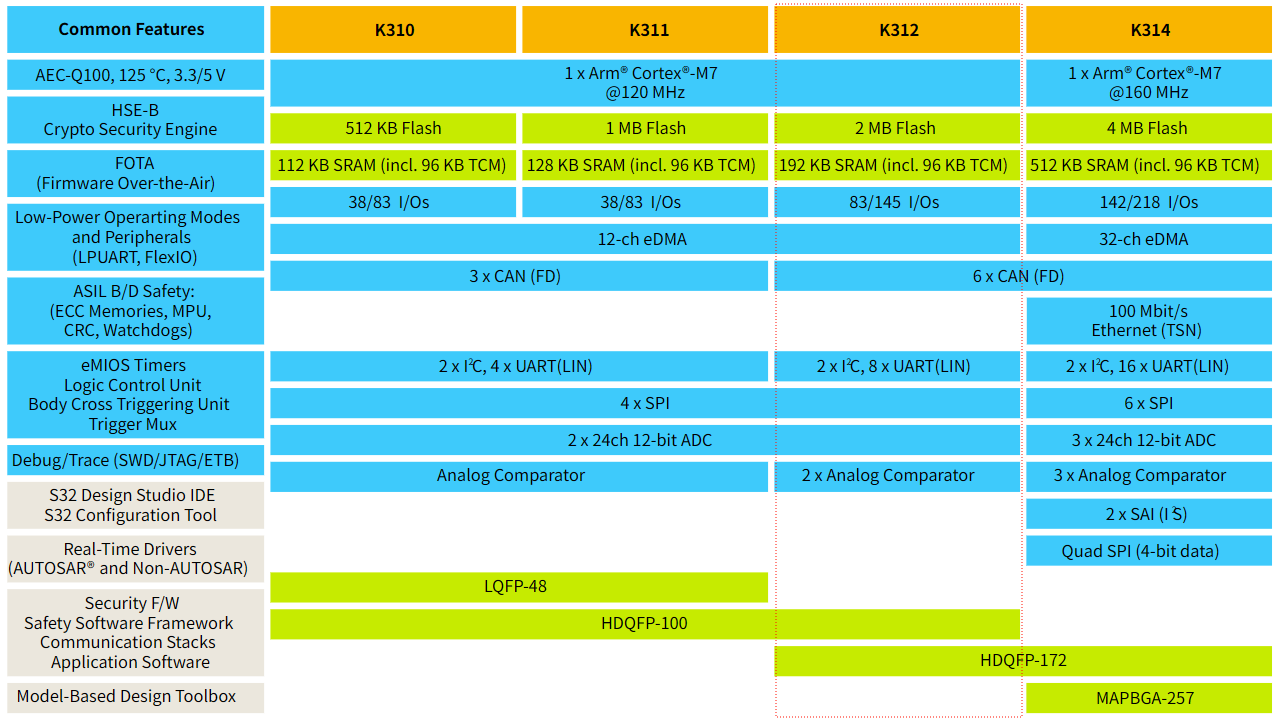
硬件设计参考资料:
S32K3 MCUs for General Purpose – Hardware Design Package中的S32K3xx - Hardware Design Guidelines -- Rev_E2.pdf文档- S32K31XEVB-Q100 Evaluation Board | NXP 半导体, 官方的评估板设计文件
- S32DS 的 引脚配置工具
电源
有以下电源类型:
- VDD_HV_A, 主 I/O 和模拟电源电压, 3.3V 或 5V
- VREFH, ADC 高参考电压
- V11, 内部生成的核心逻辑电压供应 (+1.1 V), 外接电容即可
- V25, 内部产生的闪存电源 (+2.5 V), 外接电容即可
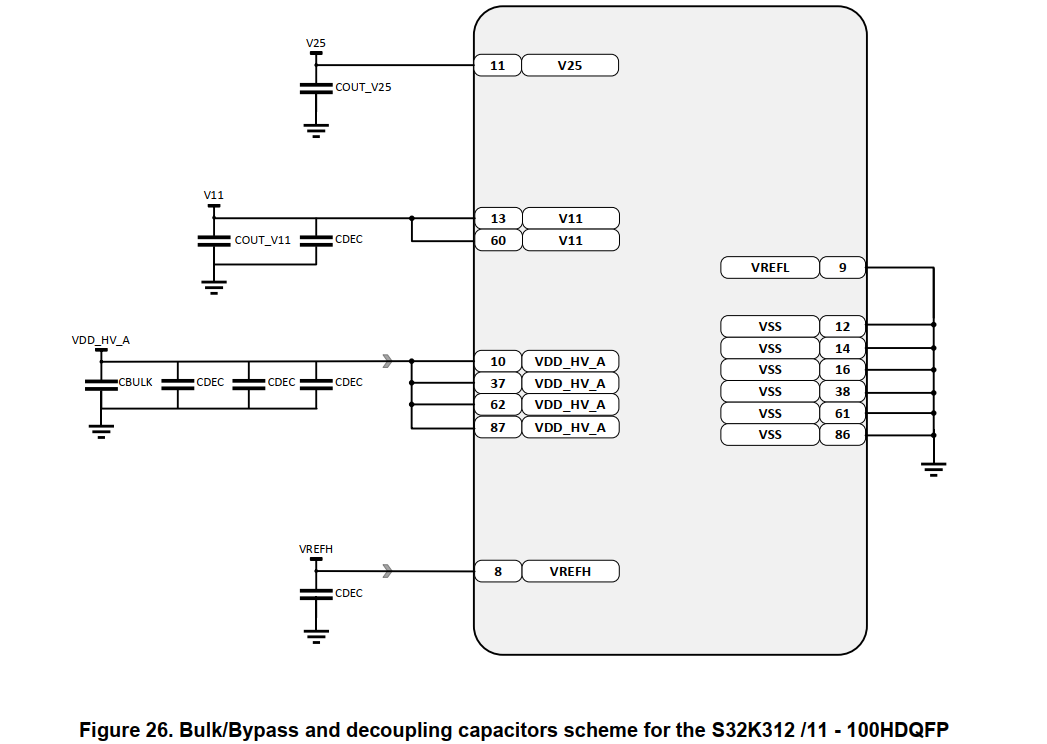
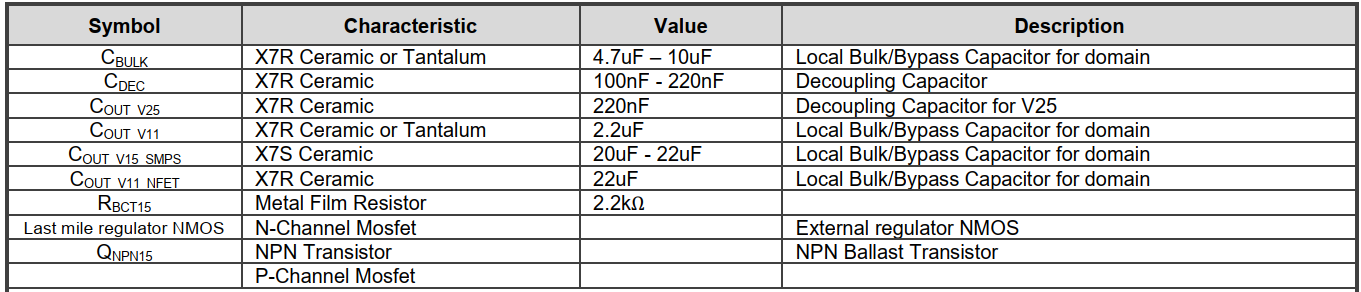
对于 S32K312 100PIN, 单 3.3V 供电即可.
时钟
S32K3xx MCU有以下时钟源:
- 8 ~ 40 MHz Fast External Oscillator (FXOSC), 外部晶振
- 48 MHz Fast Internal RC oscillator (FIRC)
- 32 kHz Low Power Oscillator (SIRC)
- 32 kHz Slow External Oscillator (SXOSC)
- Up to 320 MHz System Phased Lock Loop (SPLL)
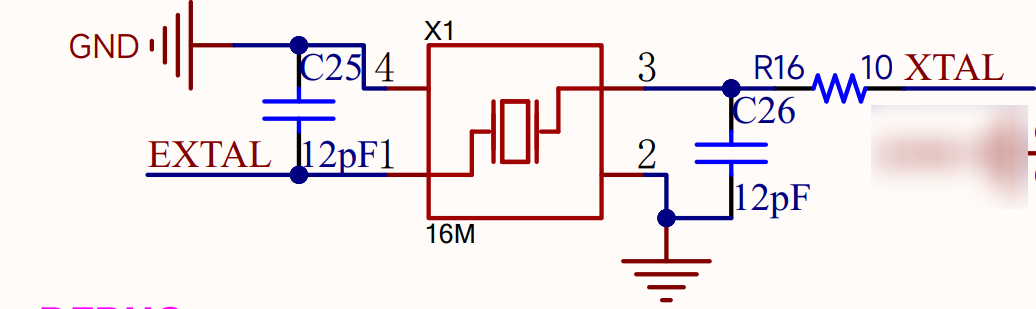
选 16MHz 无源晶振即可, 因为官方评估板就是这个, S32DS默认新工程也是这个, 立创基础库也有这个, 一般外部搭配 12~20pF 电容使用
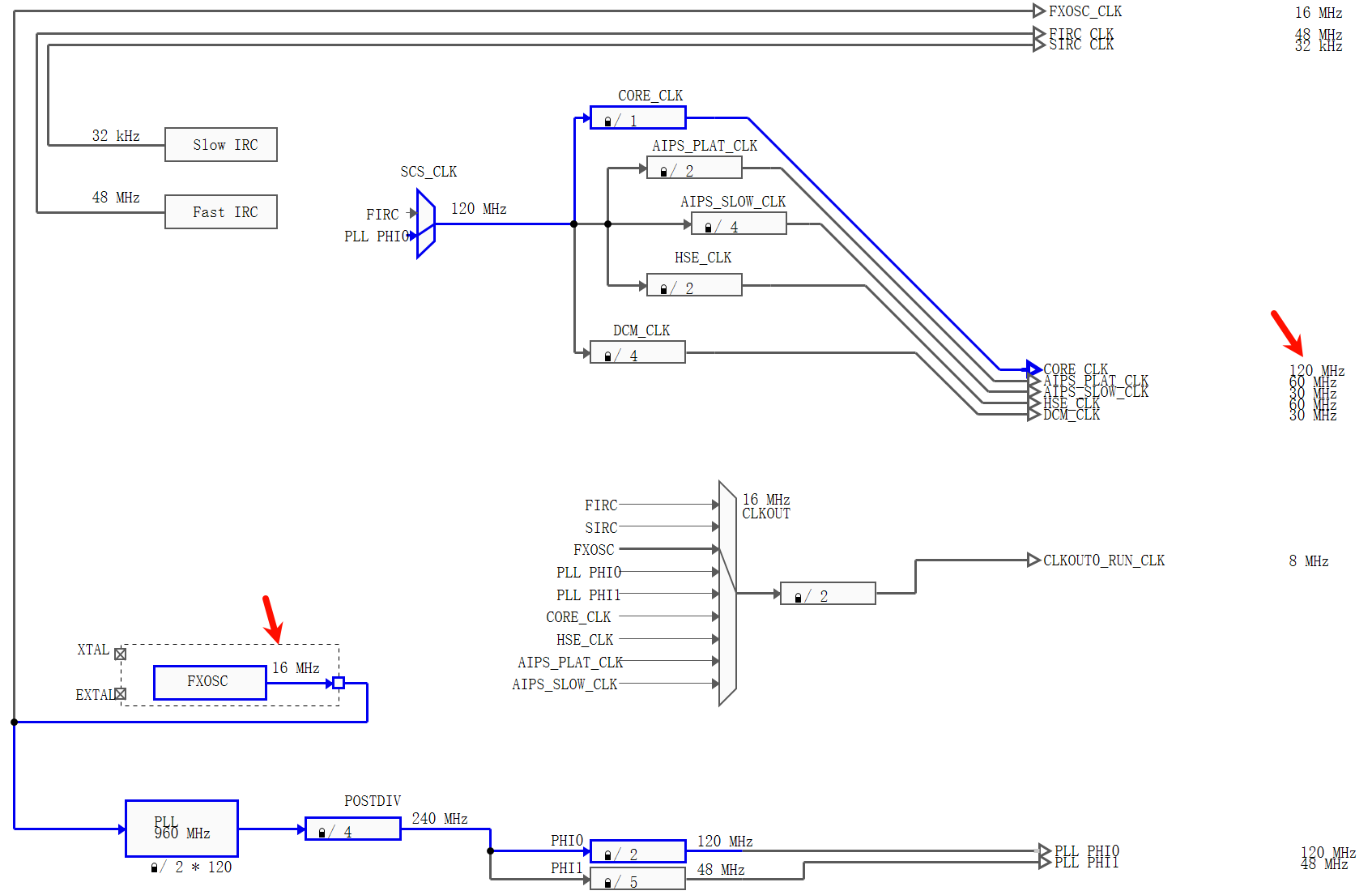
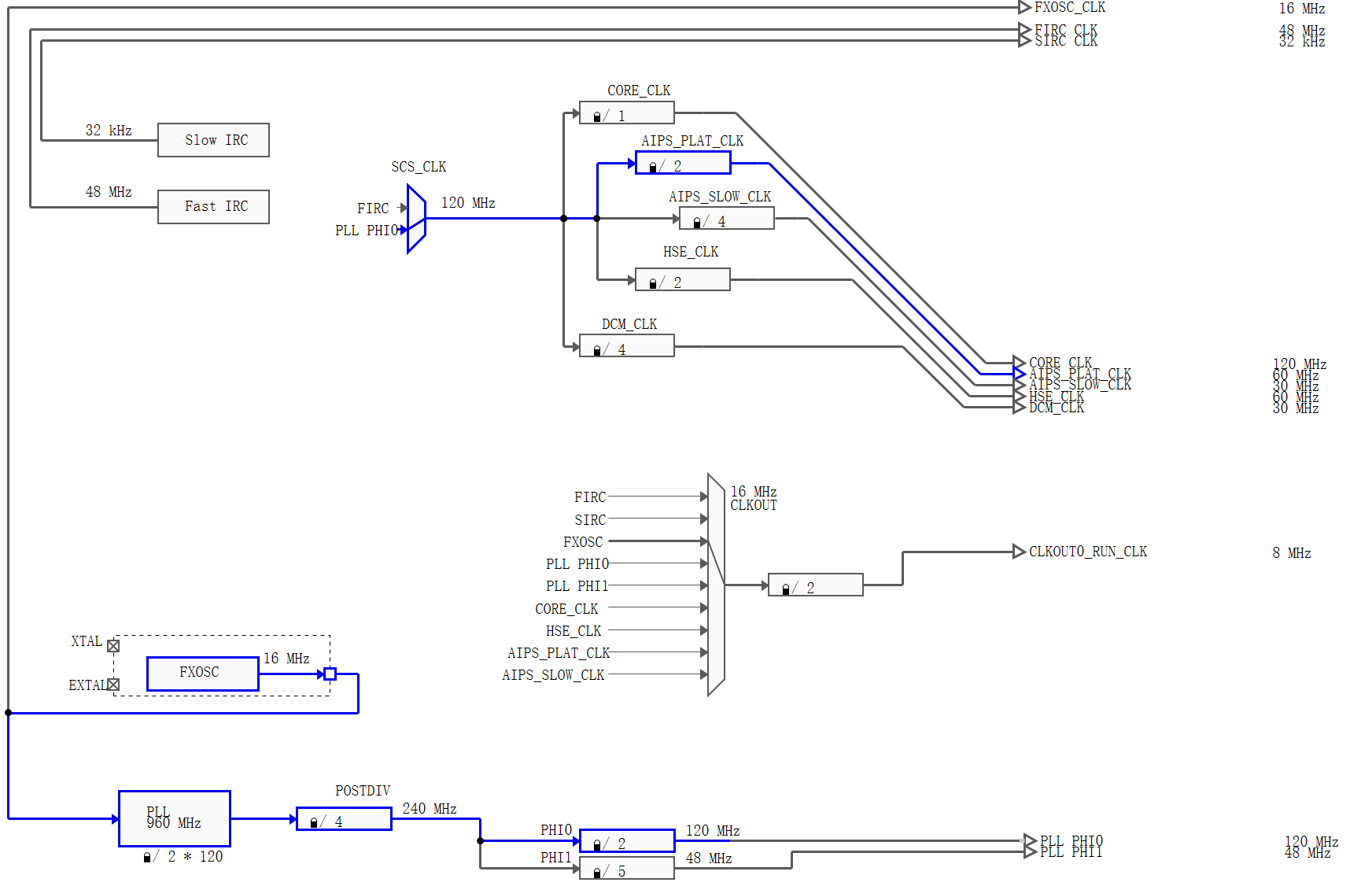
下面是 S32DS 里面 S32K312 默认新工程的时钟树:
复位
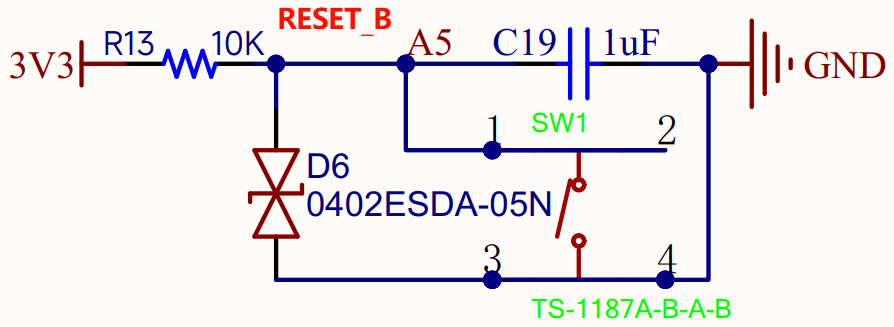
对于所有复位源,RESET_B 引脚(PTA5)均由 MCU 驱动至低电平至少 128 个总线时钟周期,直至闪存初始化完成。闪存初始化完成后,RESET_B 引脚释放,内部芯片复位。保持 RESET_B 引脚外部有效可延迟内部芯片复位的取消。有内部弱上拉。继续使用 10K + 100nF或1uF 的经典组合即可。
调试
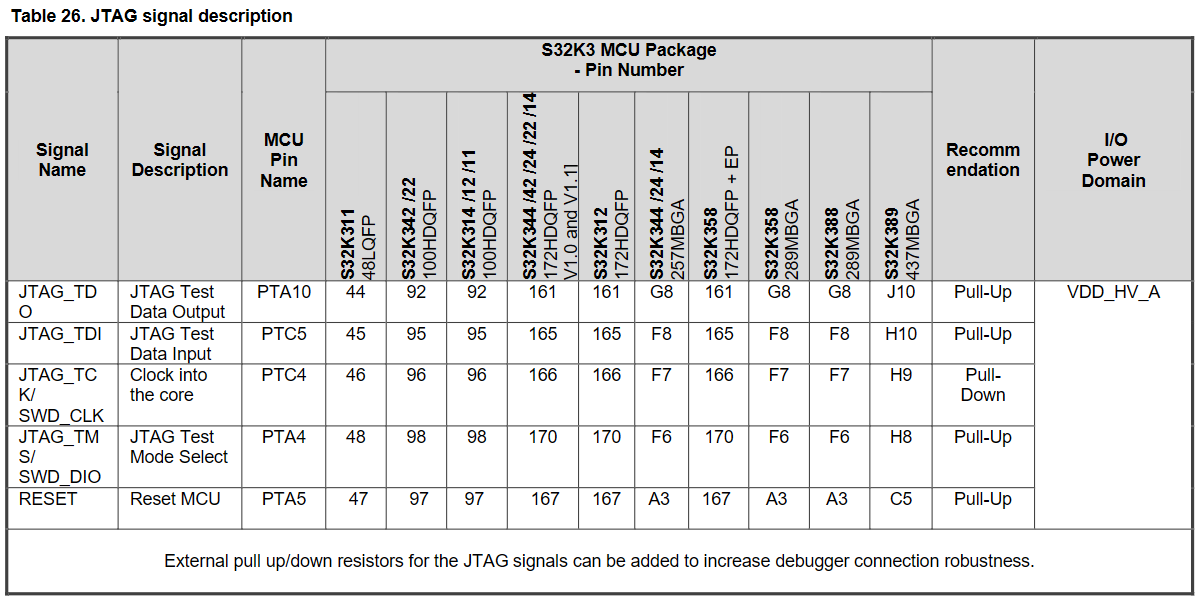
SWD 或 JTAG
一般 SWD 接口即可:
- SWCLK, PTC4
- SWDIO, PTA4
- 建议加上 RESET_B PTA5 引脚方便直接复位运行
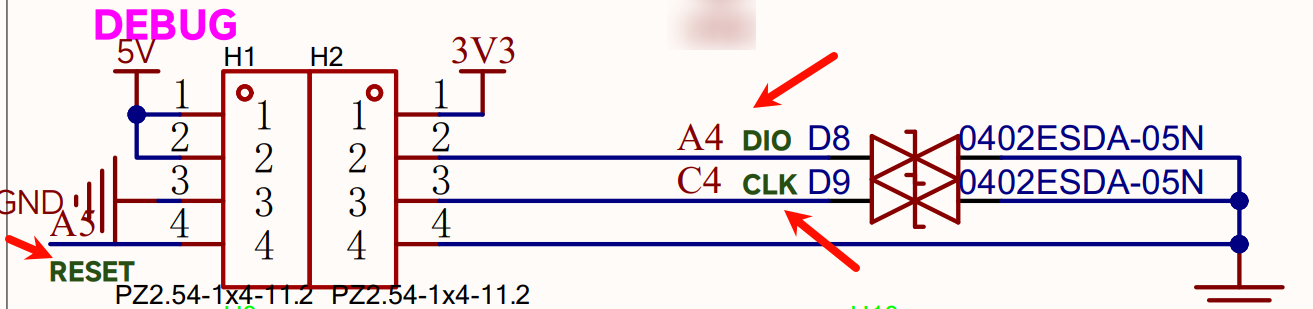
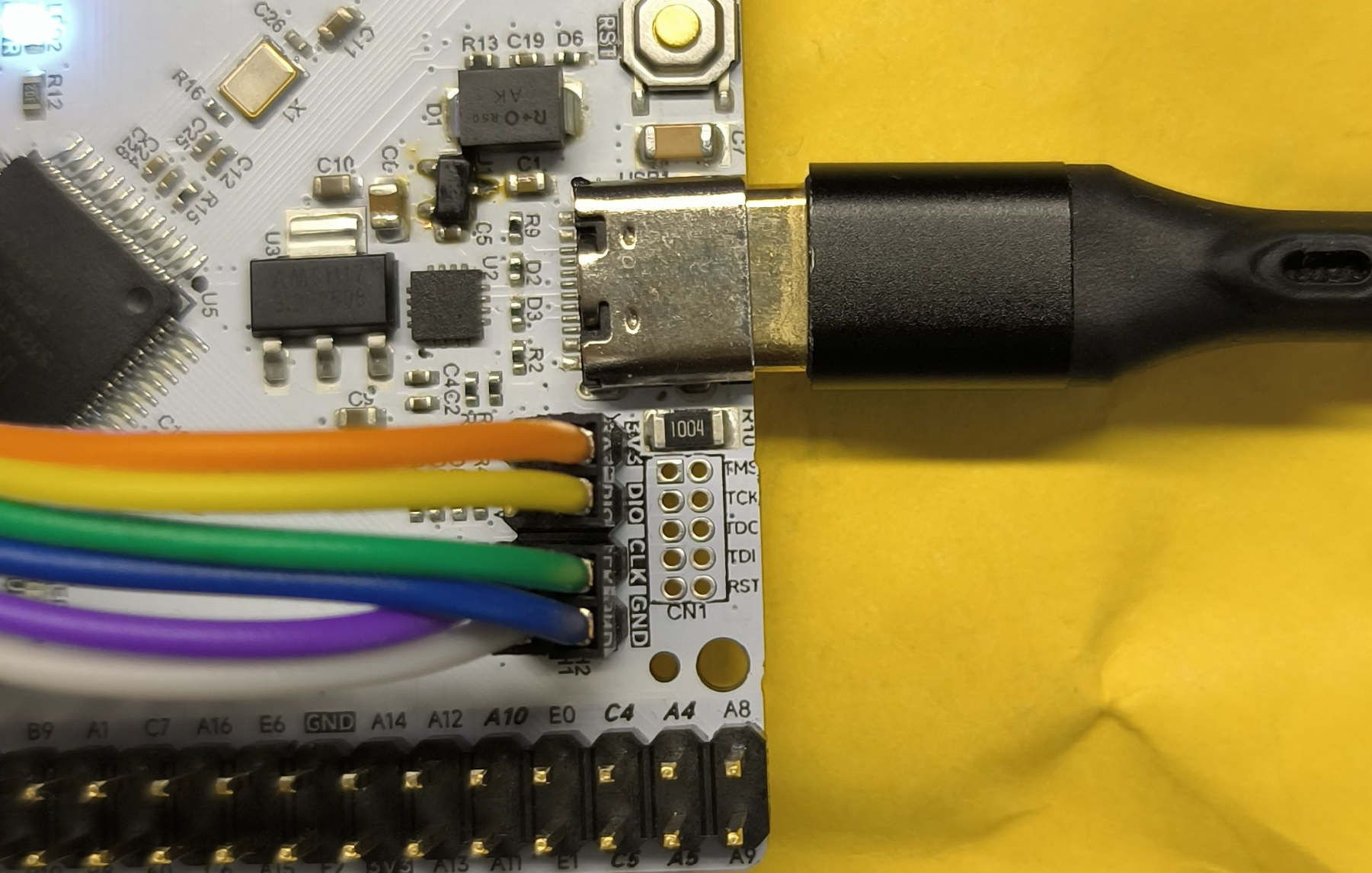
如图连接了 3V3 DIO CLK GND RST 5根线到 Jlink 的 Vref SWDIO SWCLK GND RESET 上:
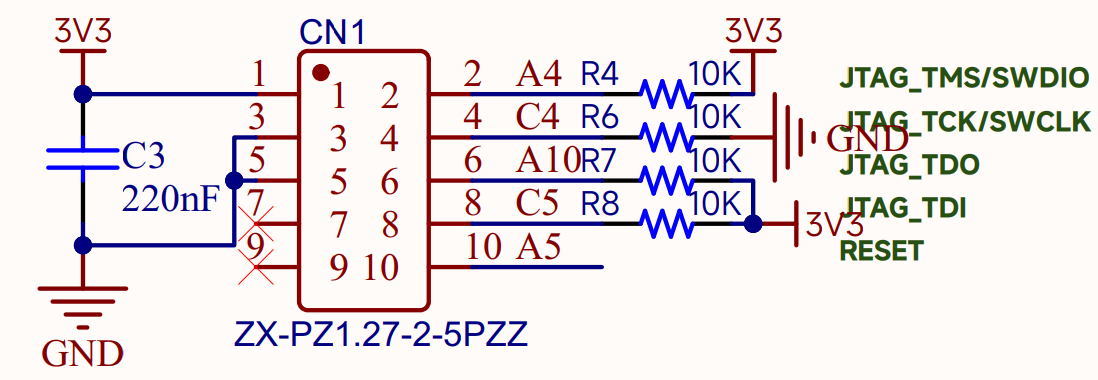
JTAG 接口有常见的 2.54_2*10P 20PIN 和 1.27_2*5P 10PIN 两种接口, 后者 7 9 有的调试器拿来做调试串口, 有的直接接地, 这里为了避免冲突, 直接悬空, 如下图:
因为 100PIN 都引出来了, 所以 JTAG 用杜邦线连接的也可以直接插到引出的 2.54 排针上.
LED
板载两个 LED:
- PWR, 3.3V 电源指示灯
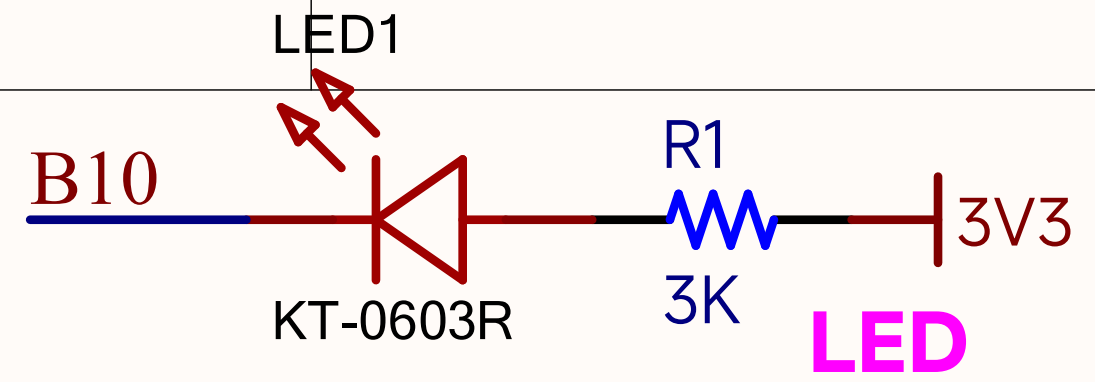
- USR, 用户LED, 低电平点亮, 接到了 PTB10
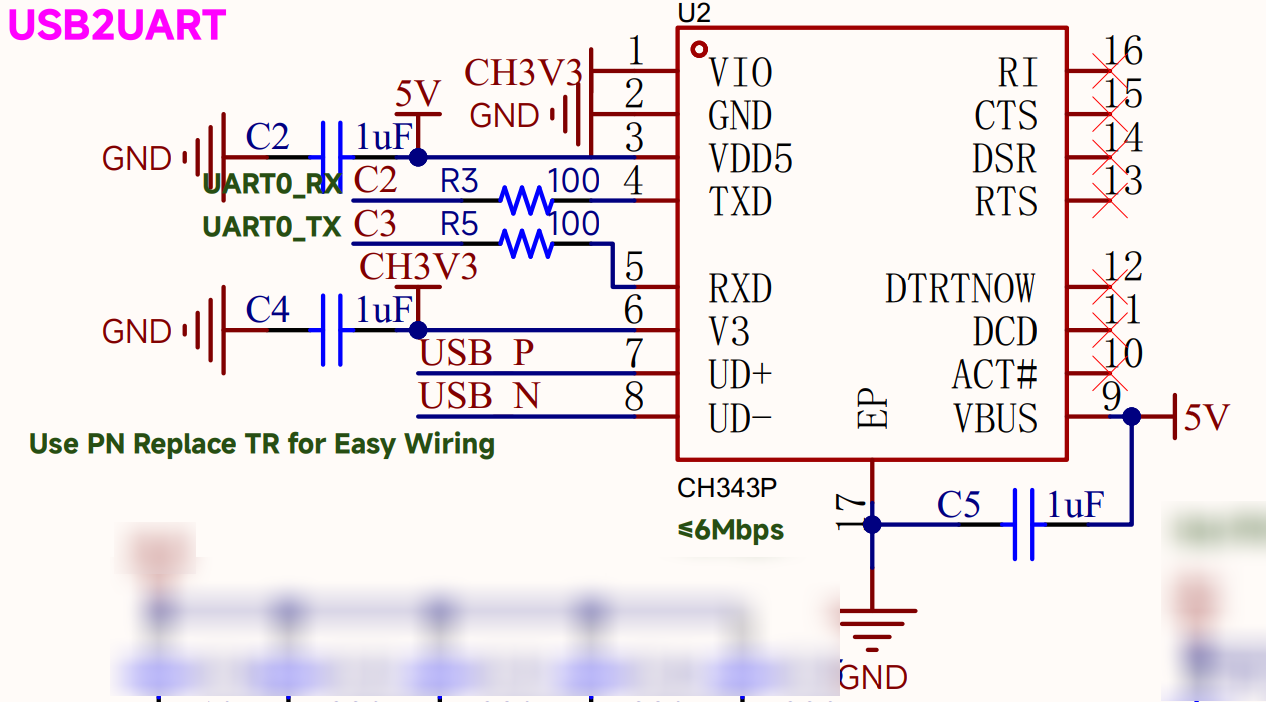
串口
调试串口:
- LPUART0_RX, PTC2
- LPUART0_TX, PTC3
CAN
6路CANFD的引脚映射:
| CANx | 引脚TX | 引脚RX |
|---|---|---|
| 0 | A7 | A6 |
| 1 | C8 | C9 |
| 2 | C15 | C14 |
| 3 | C0 | C1 |
| 4 | B3 | B2 |
| 5 | C10 | C11 |
其中 CAN5 的原理图:

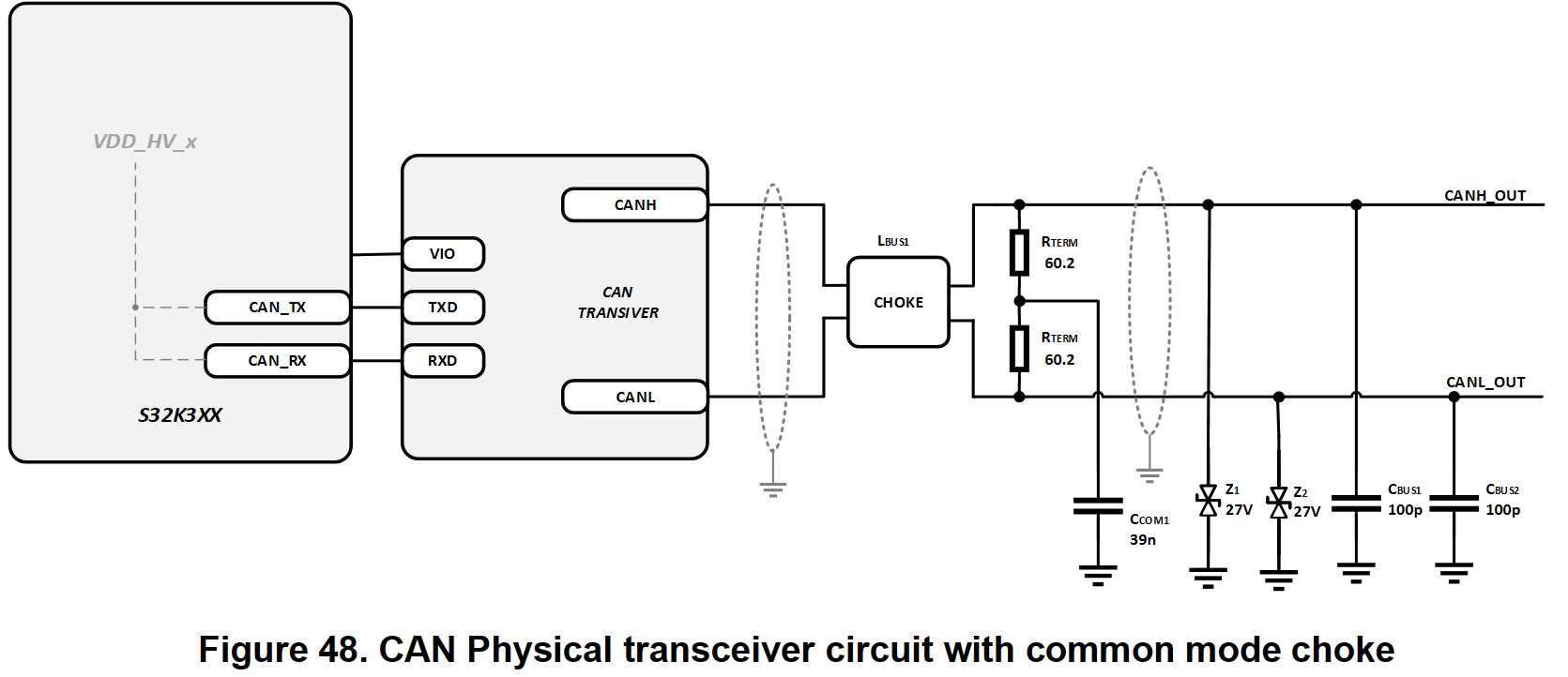
这里 120Ω 最终还是全贴上了, 方便调试, 毕竟调试时多了问题不大, 忘了没有就问题很大.
实际项目也可选择贴共模电感和把120Ω拆成两个60Ω, 如下图
开发环境搭建
需要先到 恩智浦半导体官方网站 | NXP 半导体 官网注册帐号.
大部分选用官方的 S32DS, 之前 S32K1 时也可以用 Keil MDK, 方便使用 DAP_Link 等, 但还是推荐 NXP 官方的 IDE. S32DS 新建工程默认支持 PEMicro, JTAG 等调试器. 如果不调试只下载, 那么 DAP Link, HSLinkPro/MicroLink, 硬汉的安富莱 等都是可以下载程序的.
Real-Time Drivers (RTD) SDK 支持AUTOSAR®(配合EB)和非AUTOSAR应用上的实时软件, 大概是大家常说的 RTD MCAL 和 RTD LLD 两种开发方式.
这里为方便快速验证硬件, 开发环境为非AUTOSAR的 S32K3 Standard Software:
- IDE: S32DS 3.6.2
- SDK: RTD 6.0.0
S32DS
Design : Product Information : Automotive SW - S32K3 - S32 Design Studio:
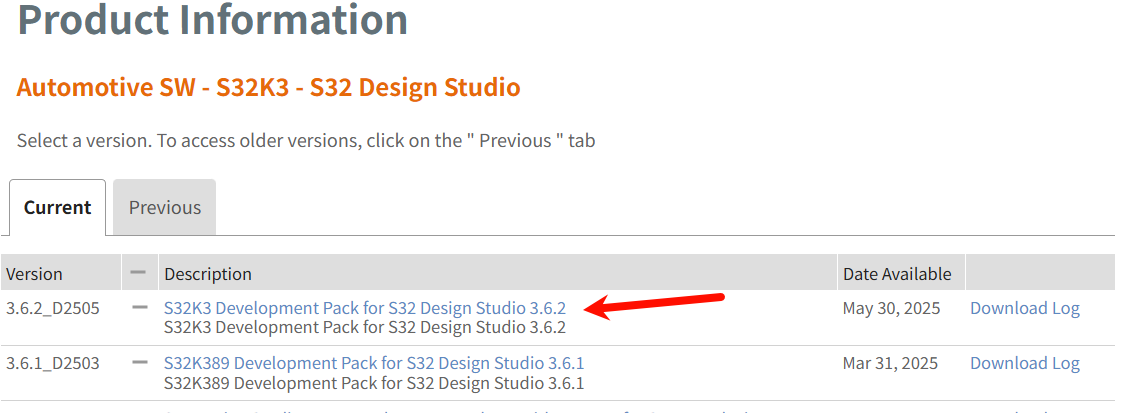
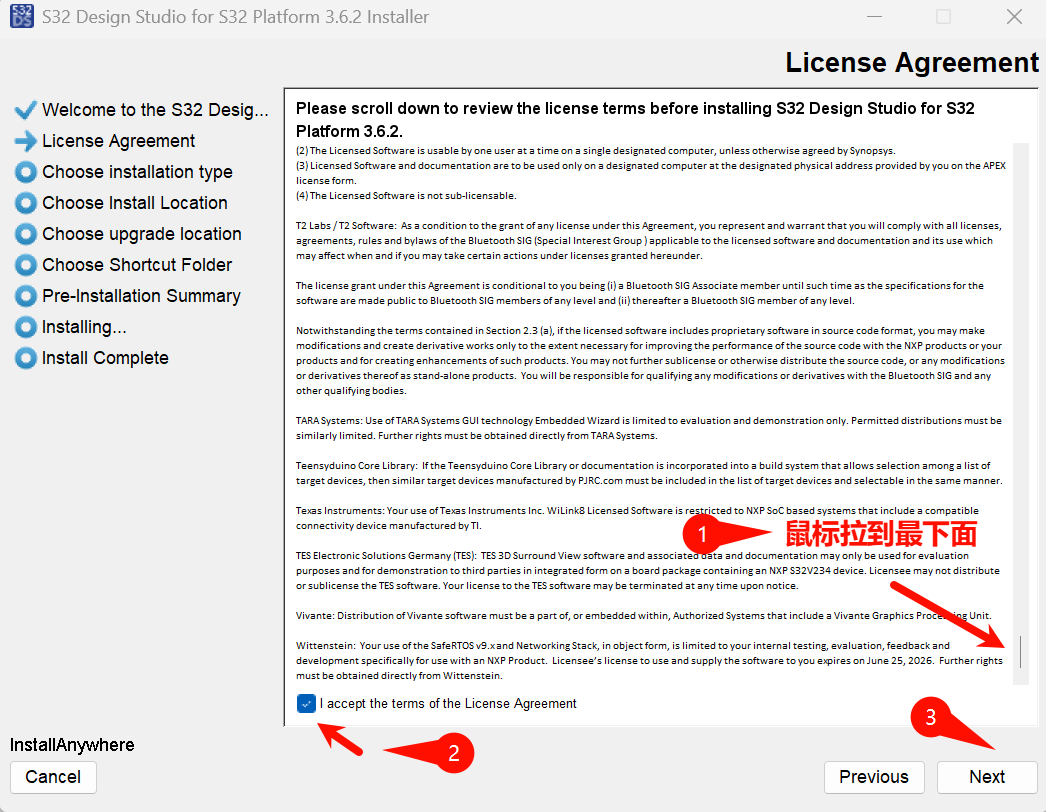
同意许可
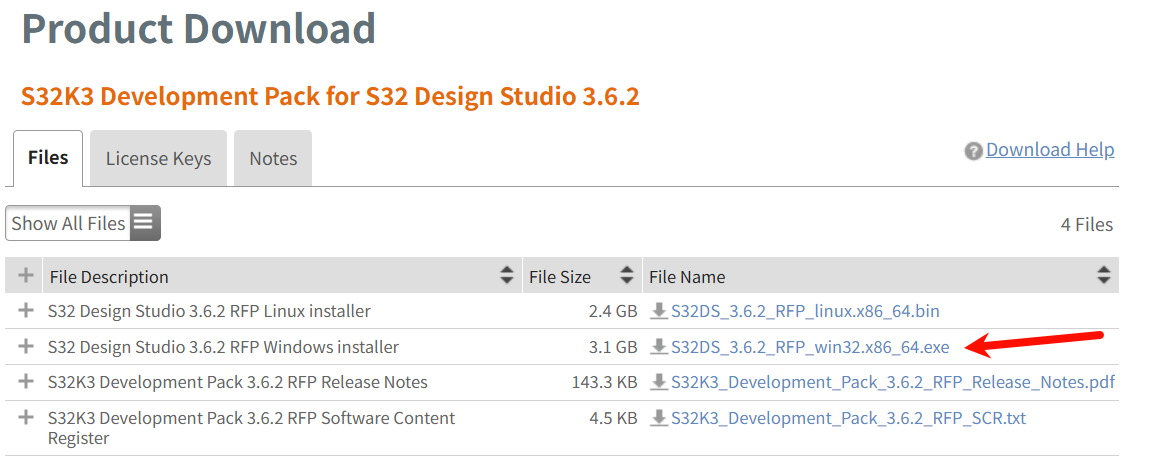
下载完后双击, 一步步安装即可, 现在也不需要 License Key 了, 可能需要注意的是 同意许可需要鼠标拉到最下面才能勾选, 还有安装路径的修改:
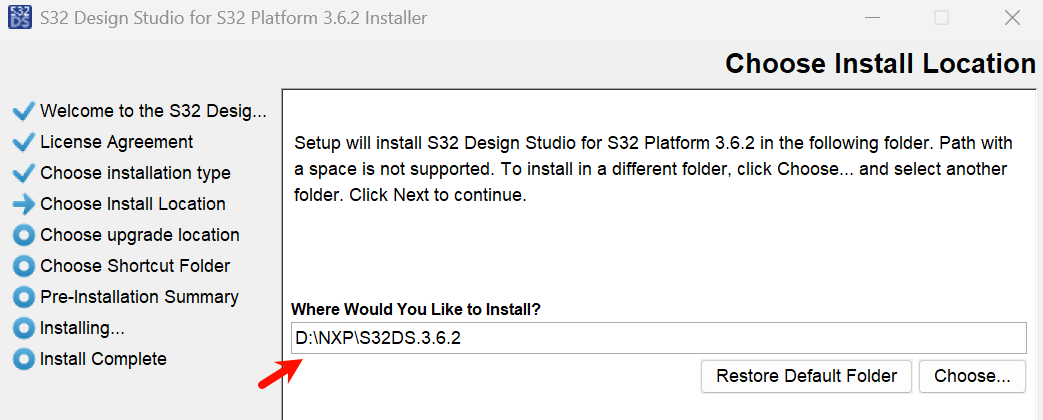
装完占用 11.7GB 空间,
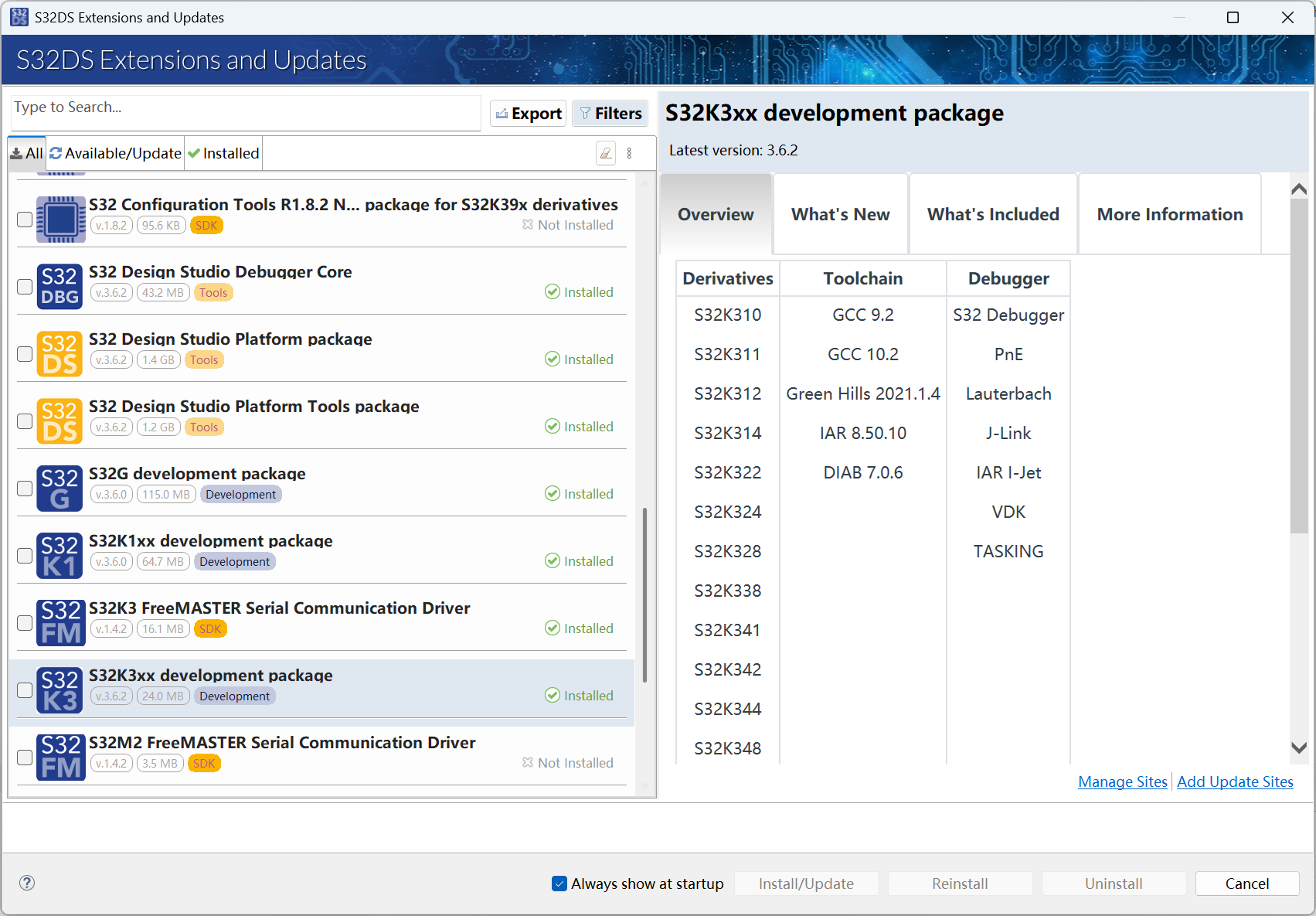
常用的开发组件都可以在 S32DS Extensions and Updates 里面安装或更新, 如 GCC, Configuration Tools, S32K3xx development package 等:
RTD
Design : Product Information : Automotive SW - S32K3/S32M27x - Real-Time Drivers for Cortex-M
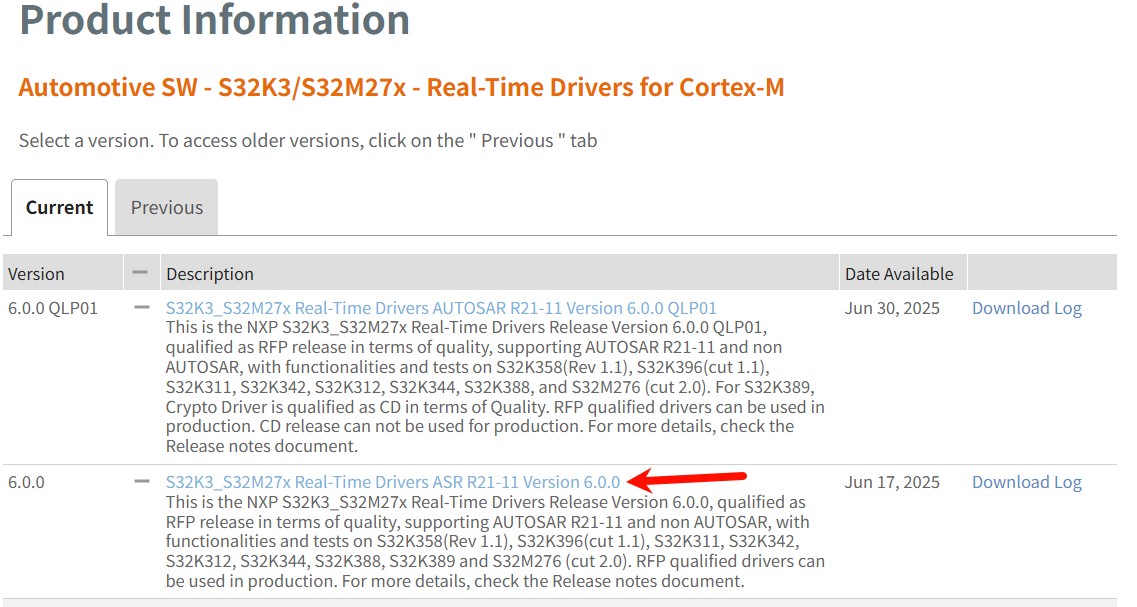
同意许可, 下图中的 exe 用于 AutoSAR EB 方式, 此处不用, 只需 updatesite.zip 即可
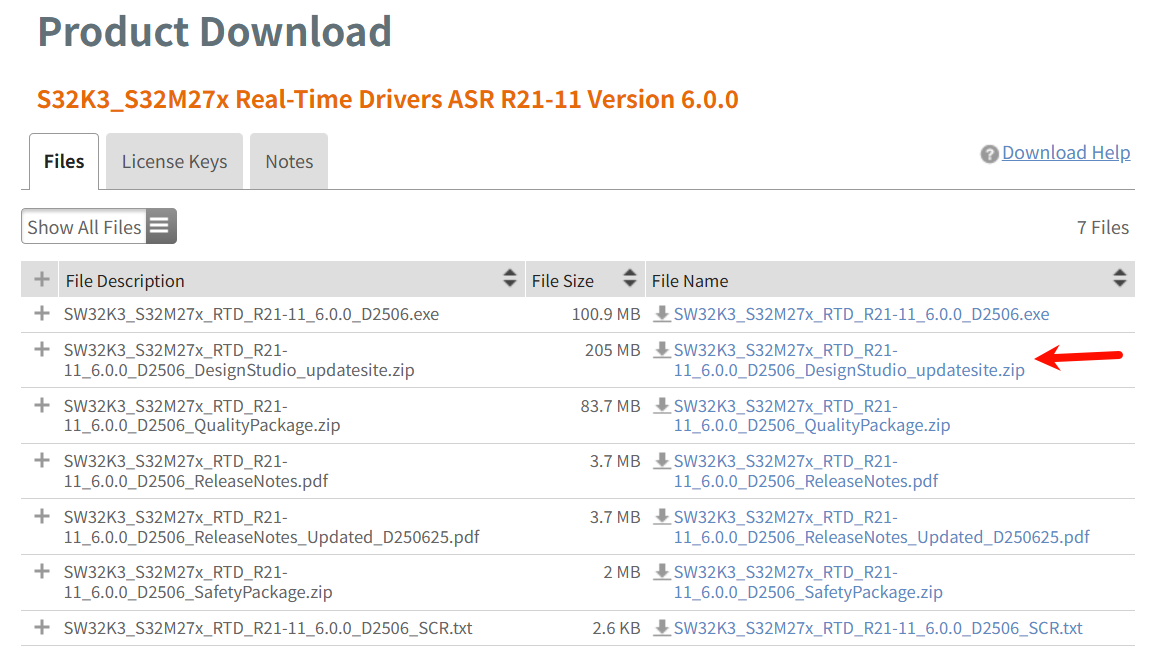
下载完后无需解压, 打开 S32DS:
至于上面 updatesite.zip 这类的安装包: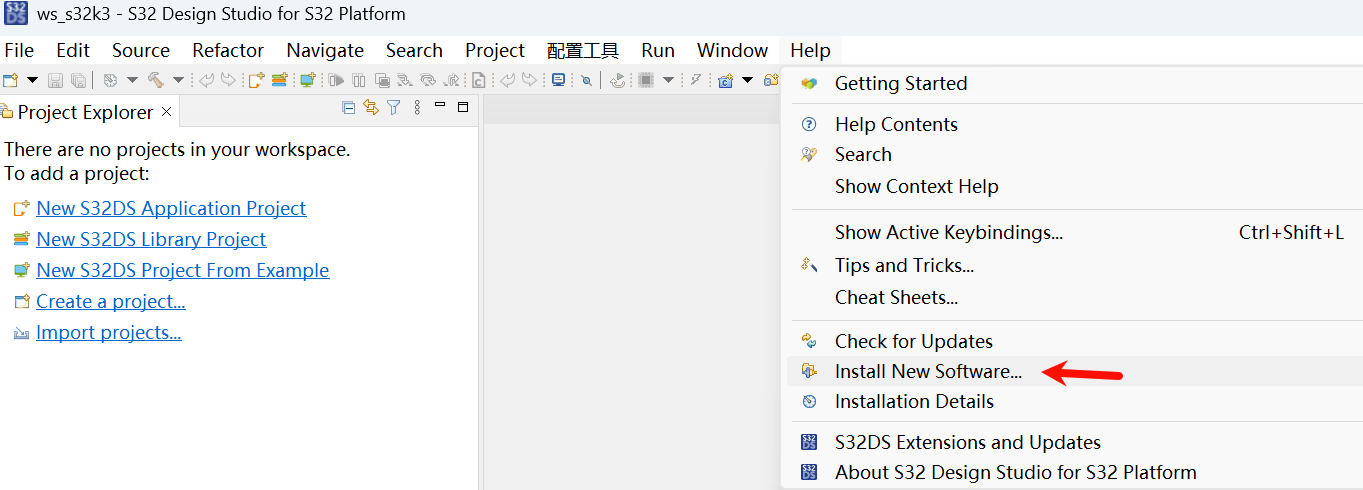
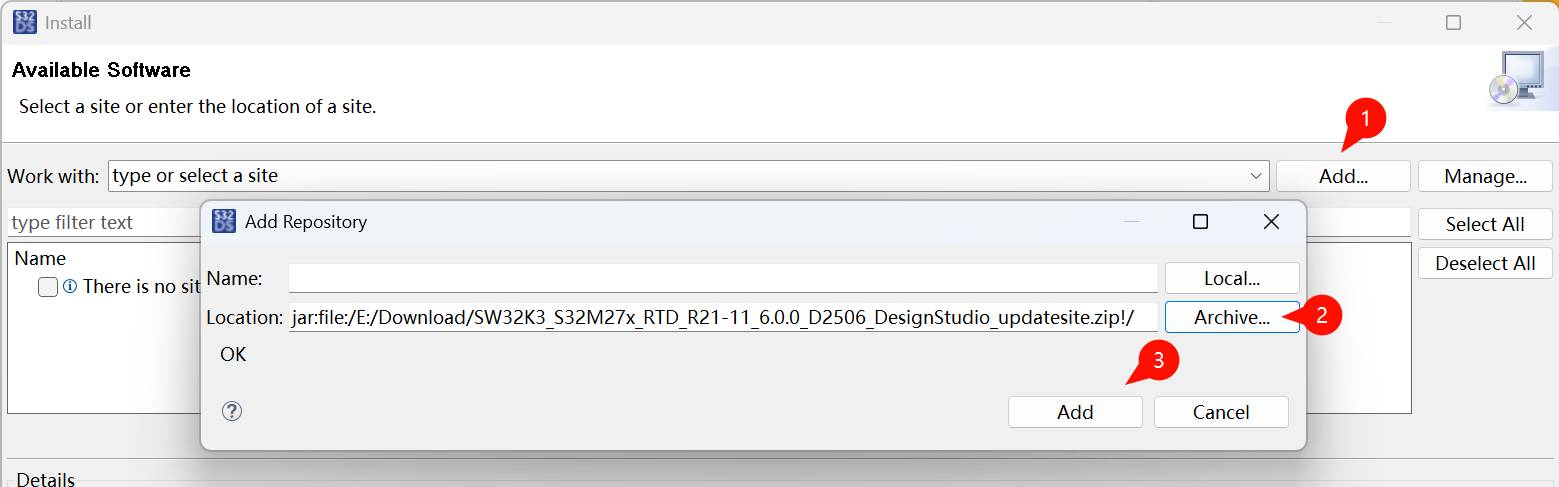
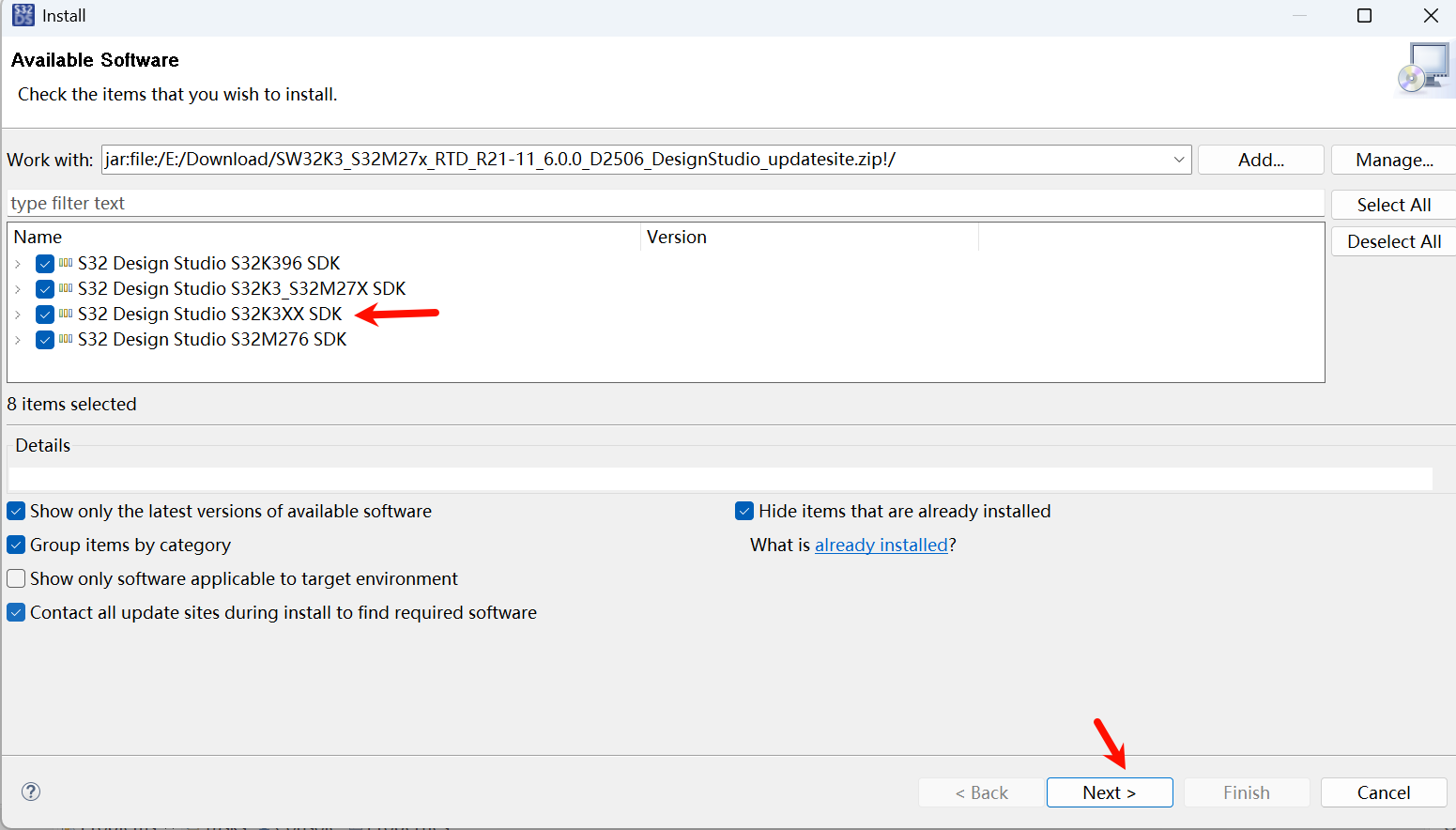
Next, accept, 中间还会弹出信任组件:
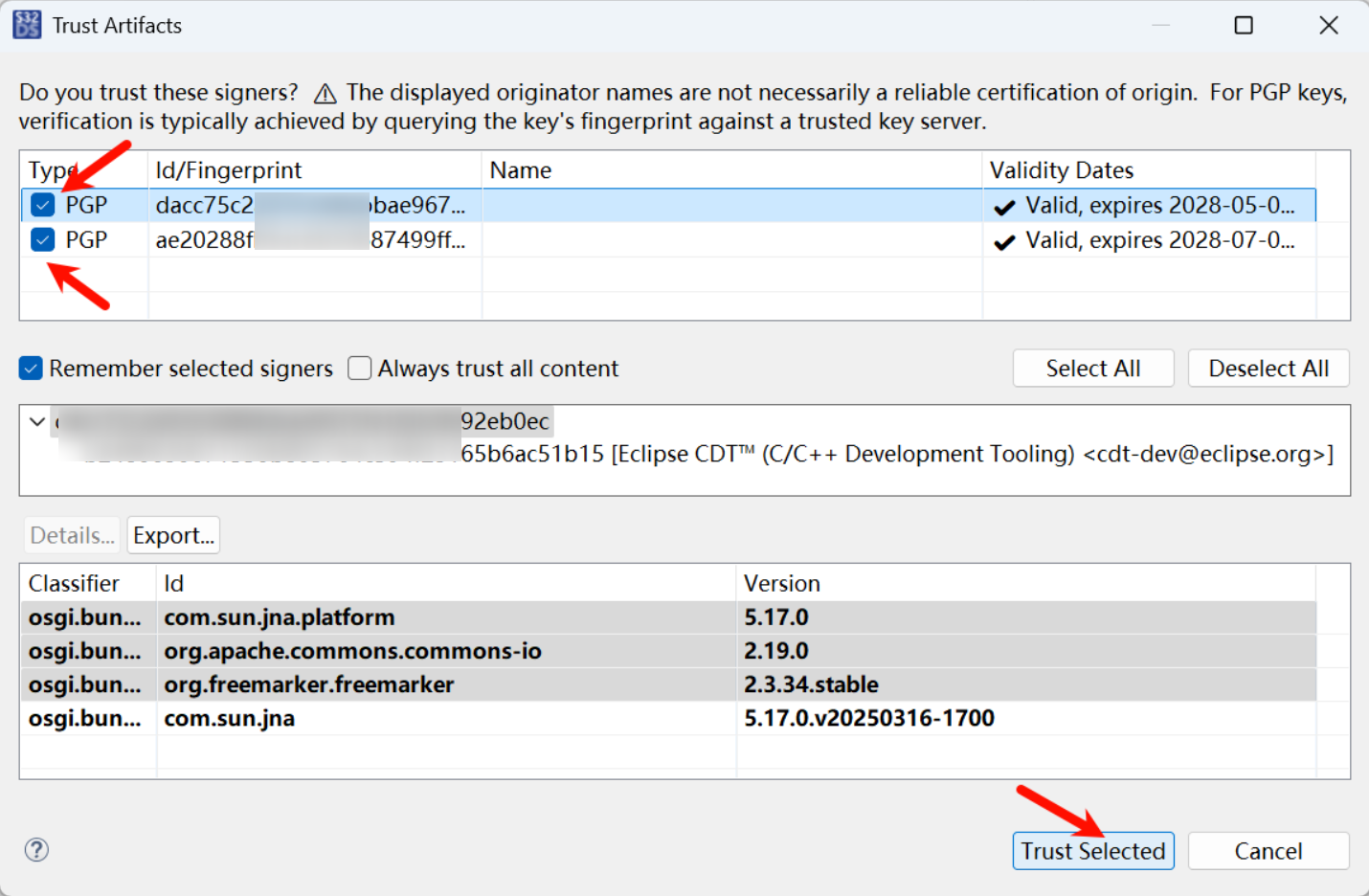
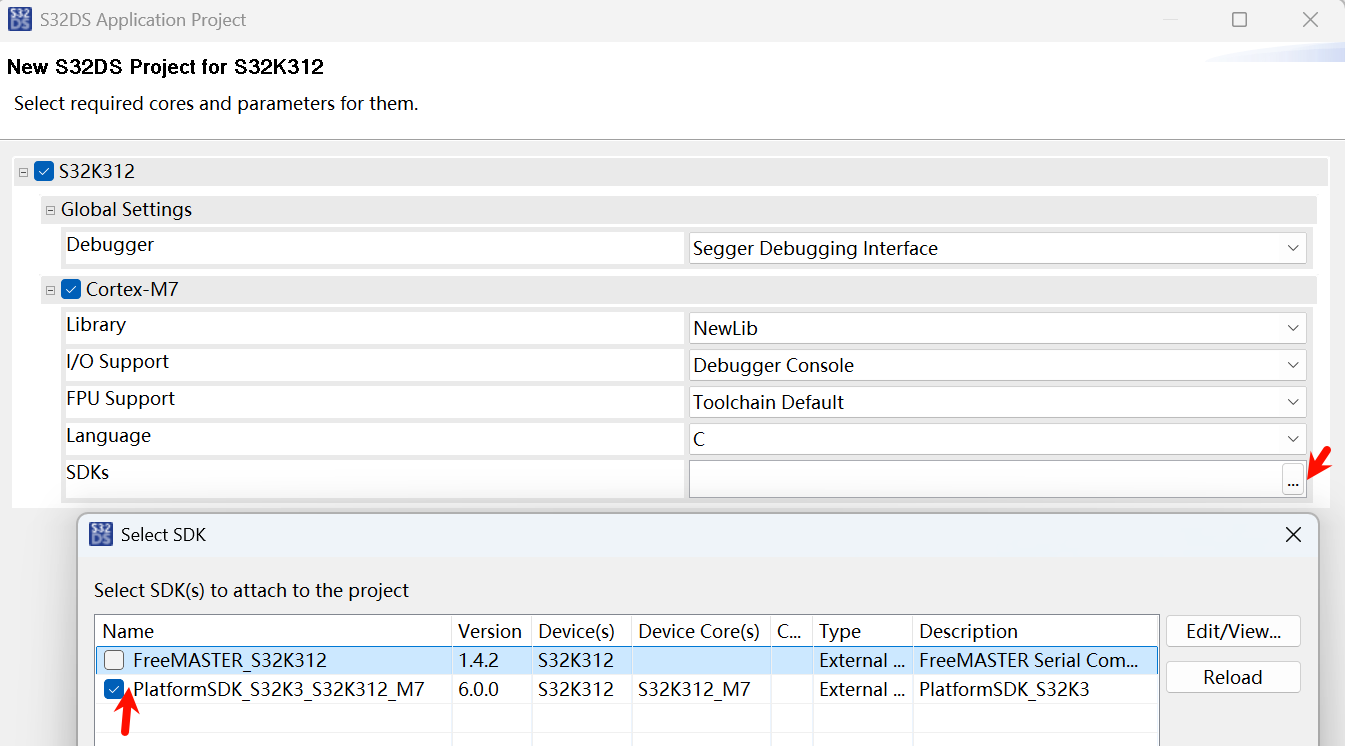
装完以后, 才能 S32DS 新建工程时找到 SDKs
JTAG 设置
之前买的 V11 仿真器在 J-Link 7.9x 版本下使用正常, 但在 S32K3 默认的驱动版本 8.28 不匹配
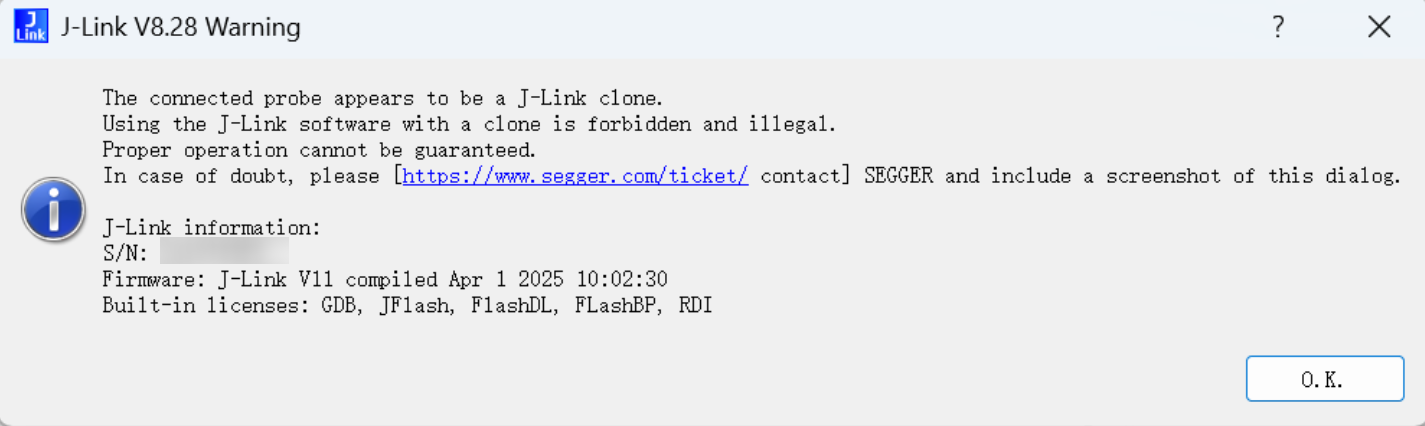
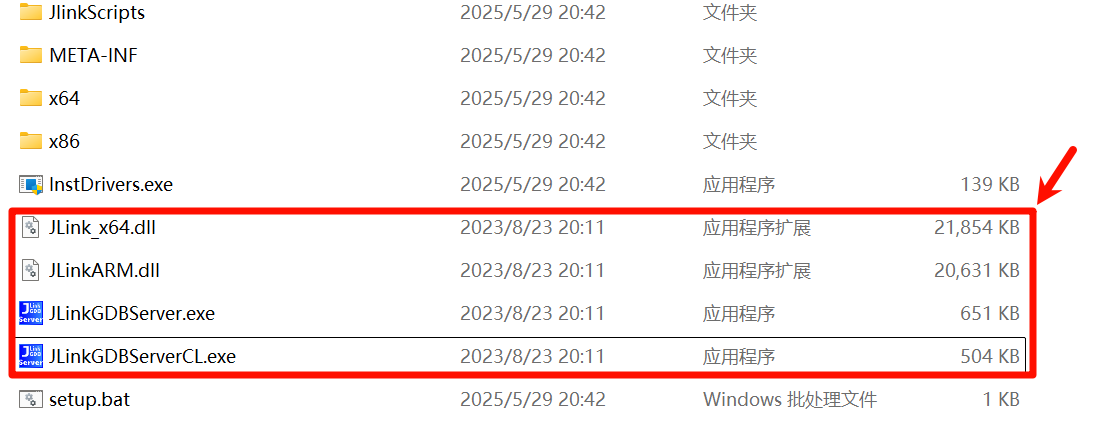
S32DS 安装的路径下 D:\NXP\S32DS.3.6.2\Drivers\Segger 的四个文件替换成 V7.9x 的即可, 可以用 Everything 辅助查找
这样 IDE 里面就能正常调试了
新建工程 LED Blink
新建工程
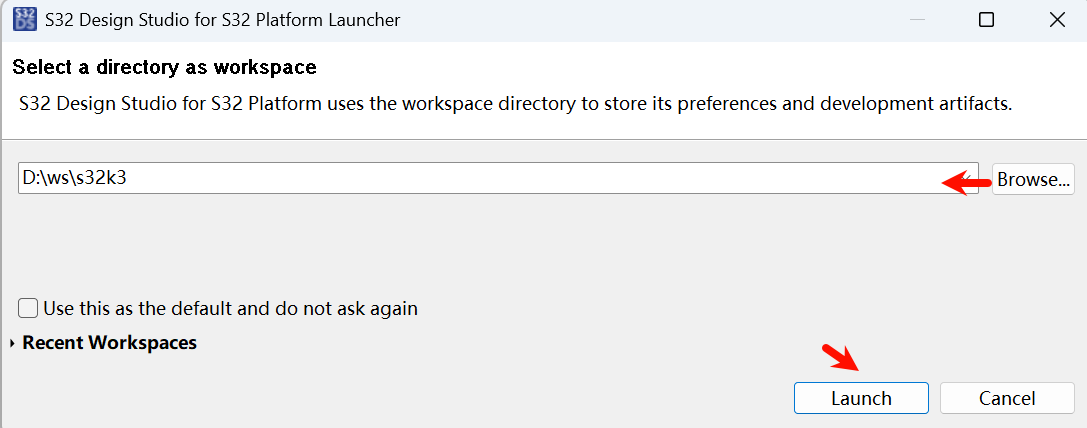
打开 S32DS, 多个 S32DS 可以同时打开, 但需要选择(Choose)不同的工作目录
File -> New -> S32DS Application Project 新建新工程, 下面也有库工程和从官方例子中导入工程

找到芯片, 输入工程名
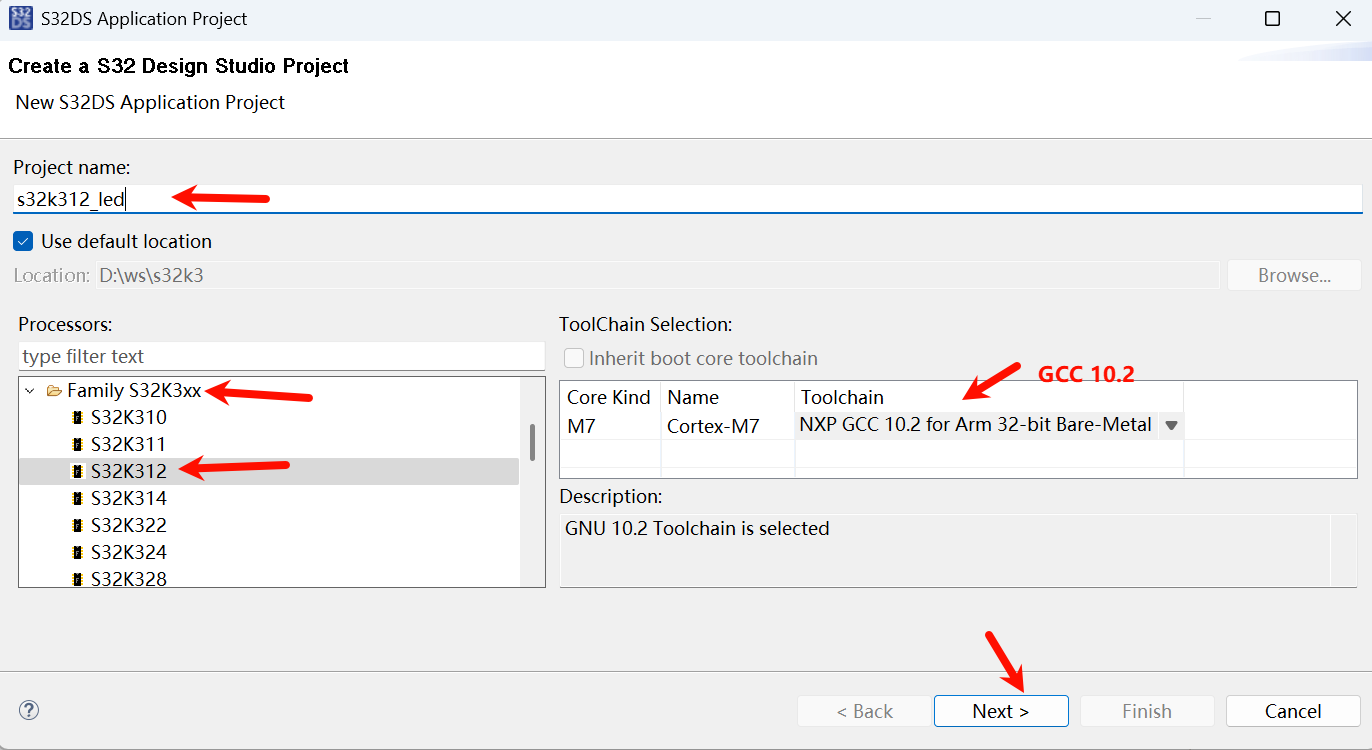
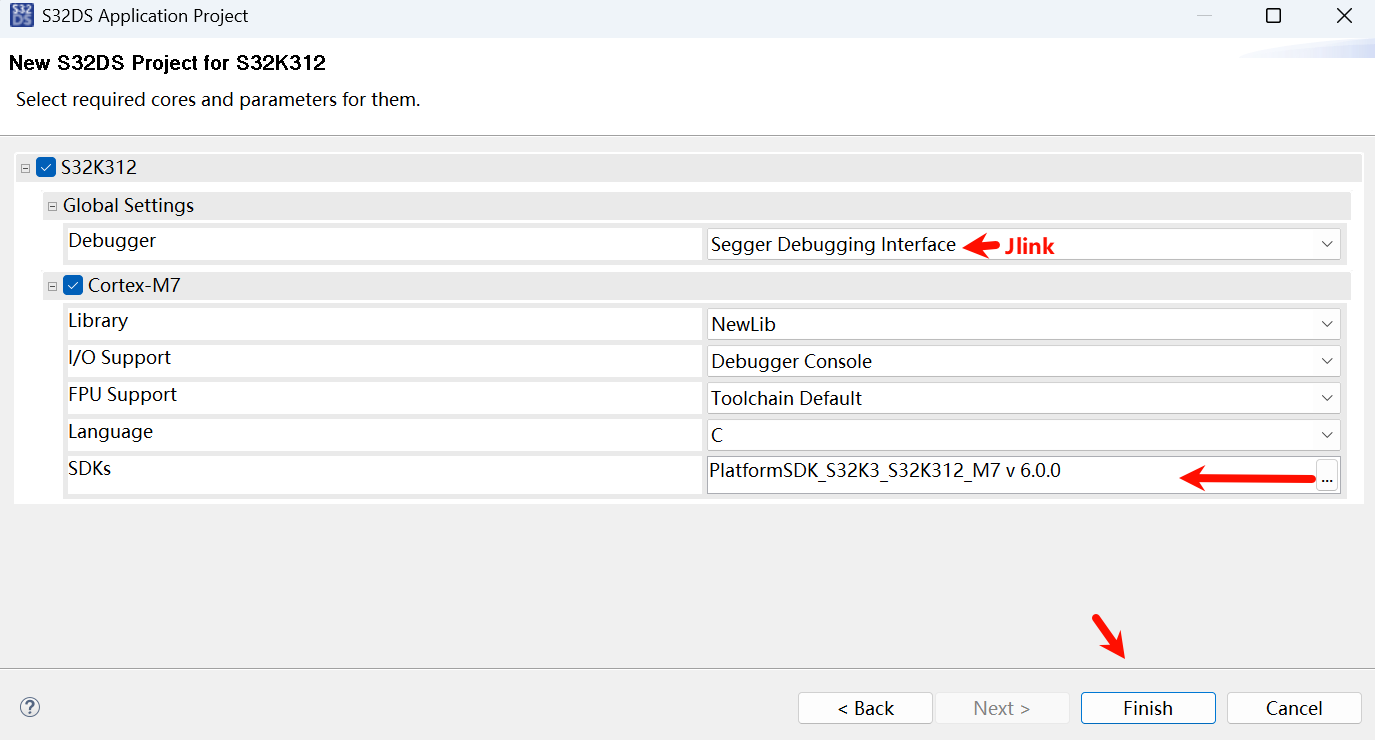
调试器 Jlink, SDK 选 6.0.0
引脚配置
双击 .mex 文件打开配置工具
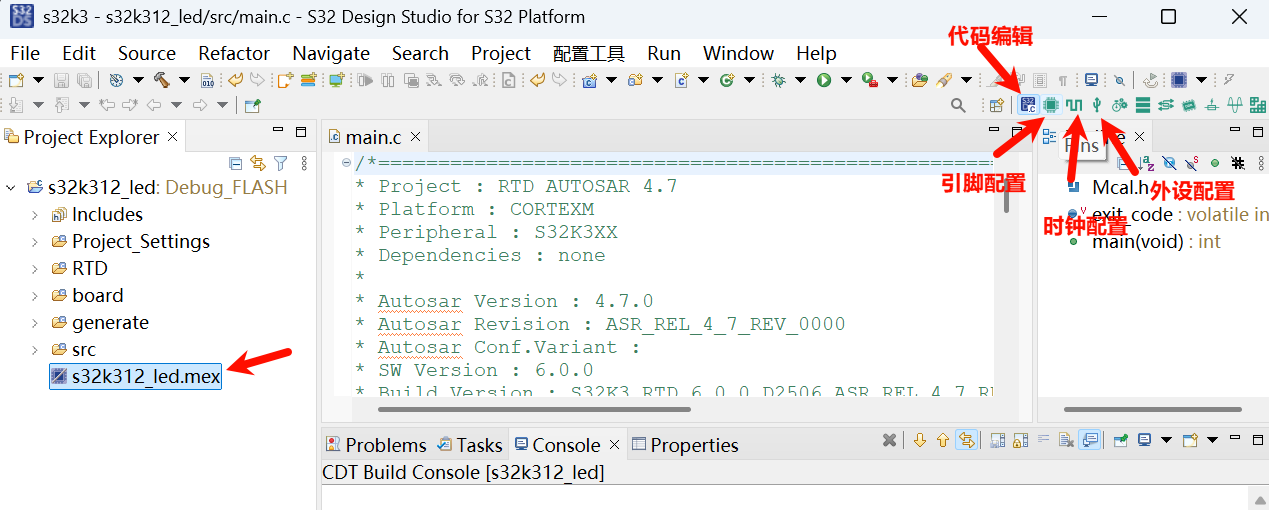
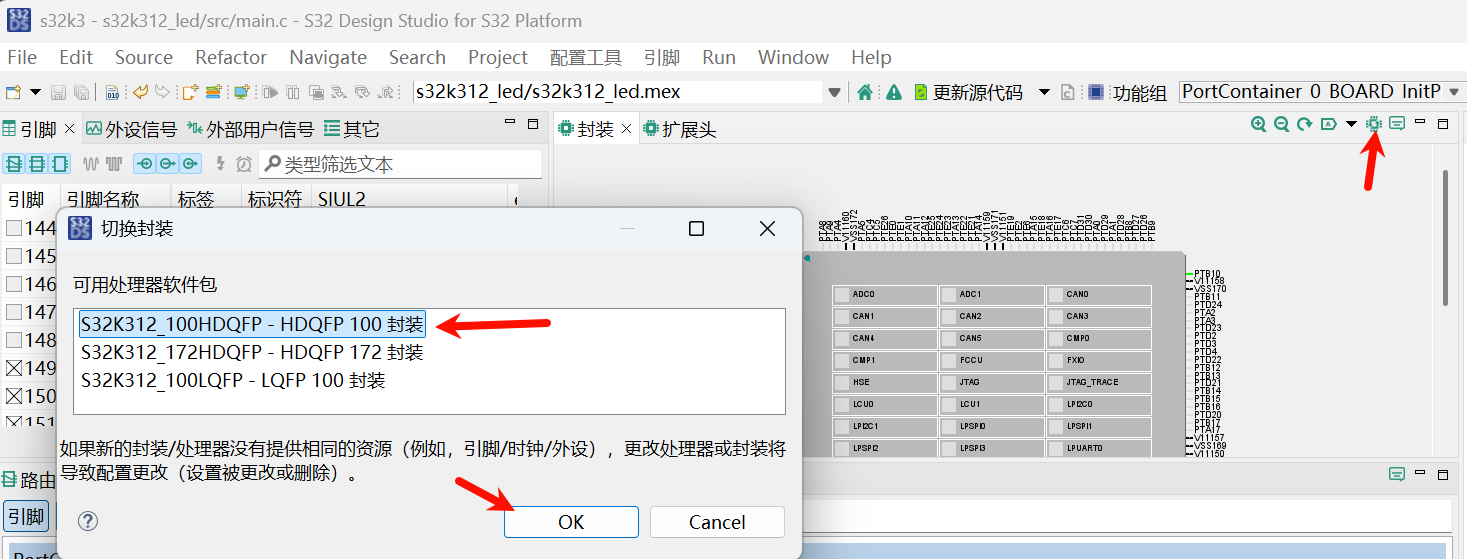
更换封装
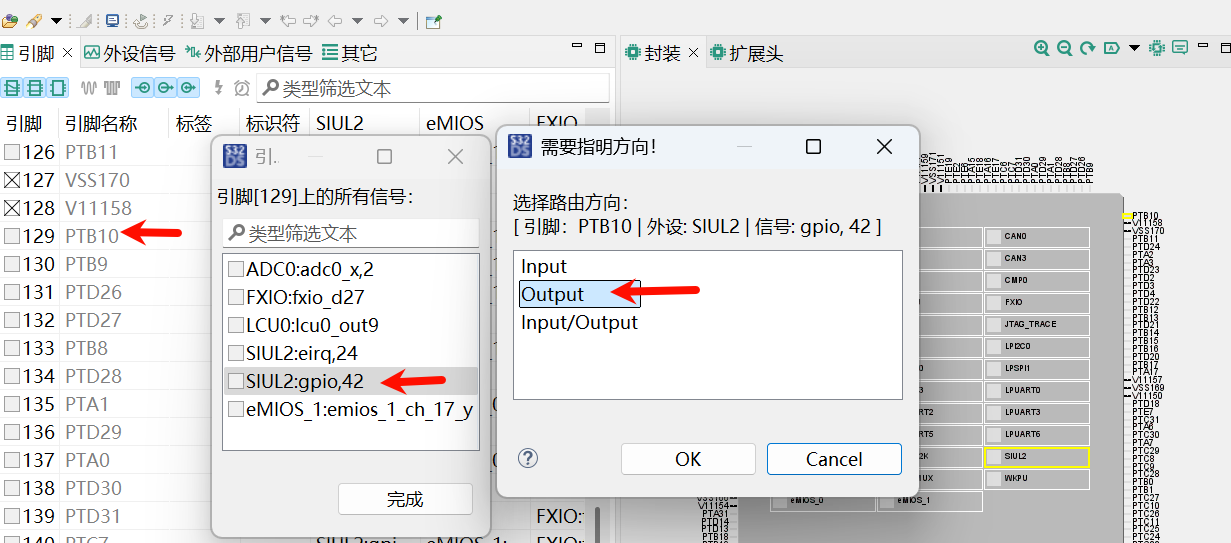
引脚列取消默认的 PTA0 引脚配置, 然后找到 PTB10, 选择 SIUL2:gpio,42, 方向输出 Output
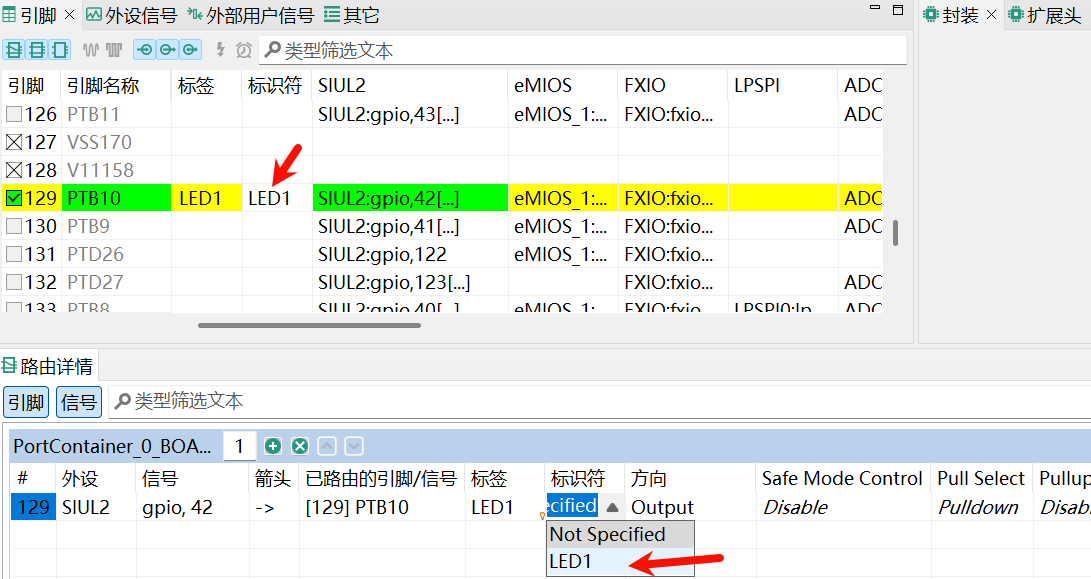
标签和标识符取名 LED1
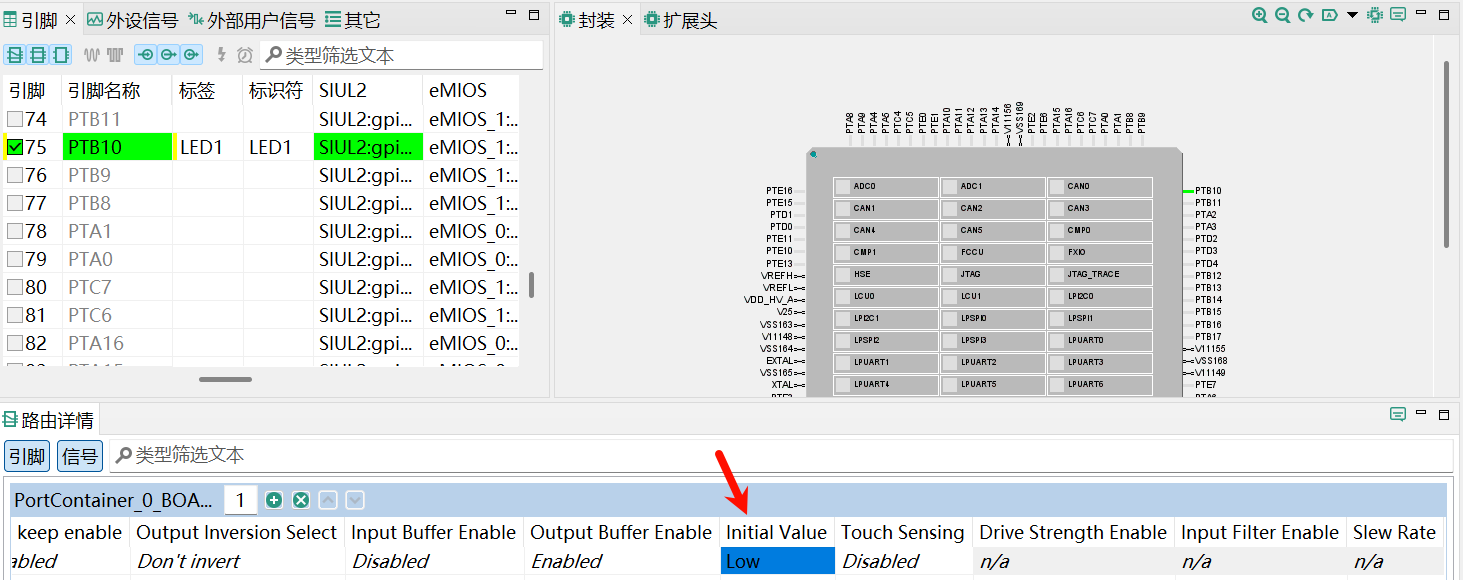
默认输出电平 LOW, 可以不改或改成 HIGH
时钟配置
时钟配置可以不用修改, 默认外部晶振 16MHz, 系统时钟 120MHz
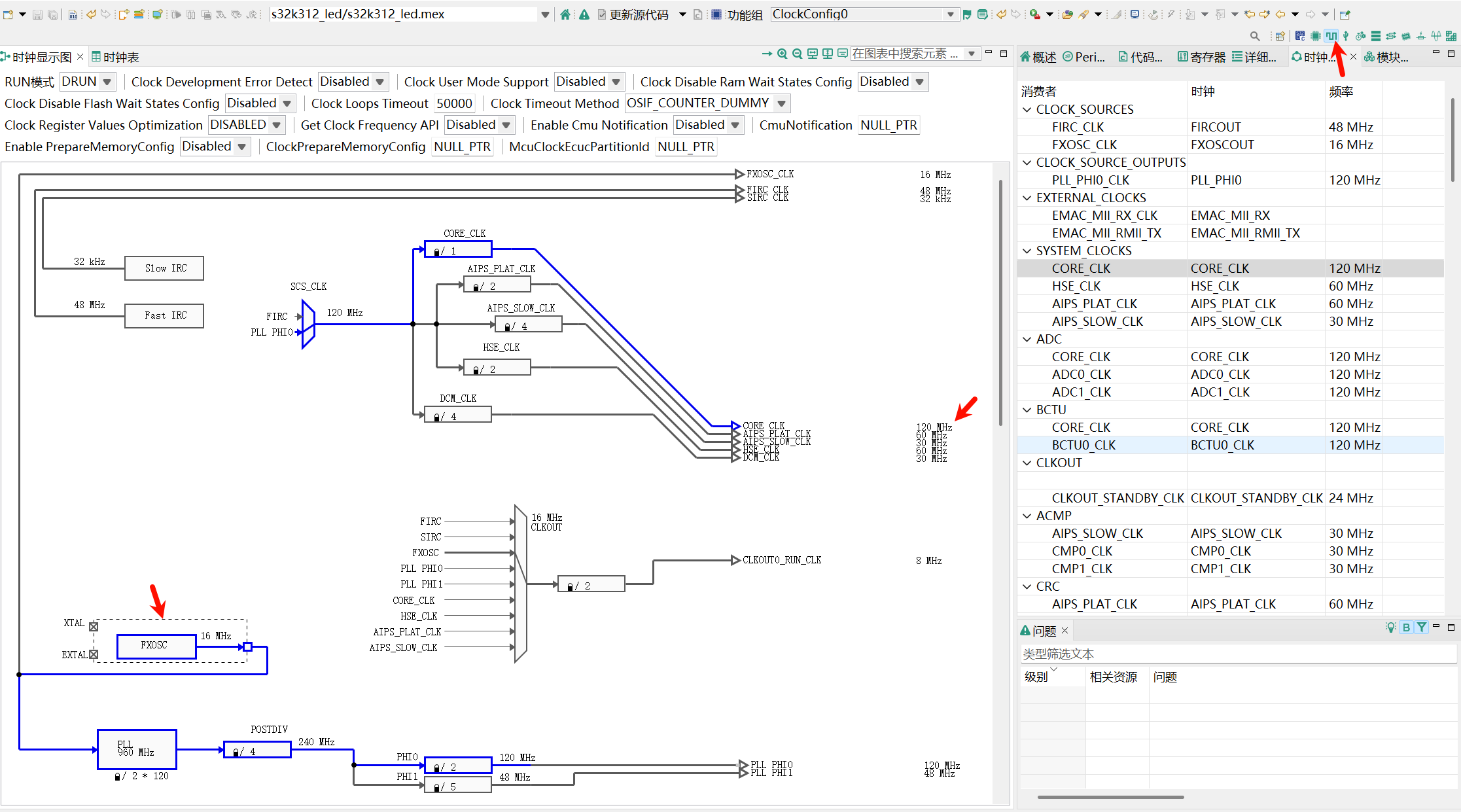
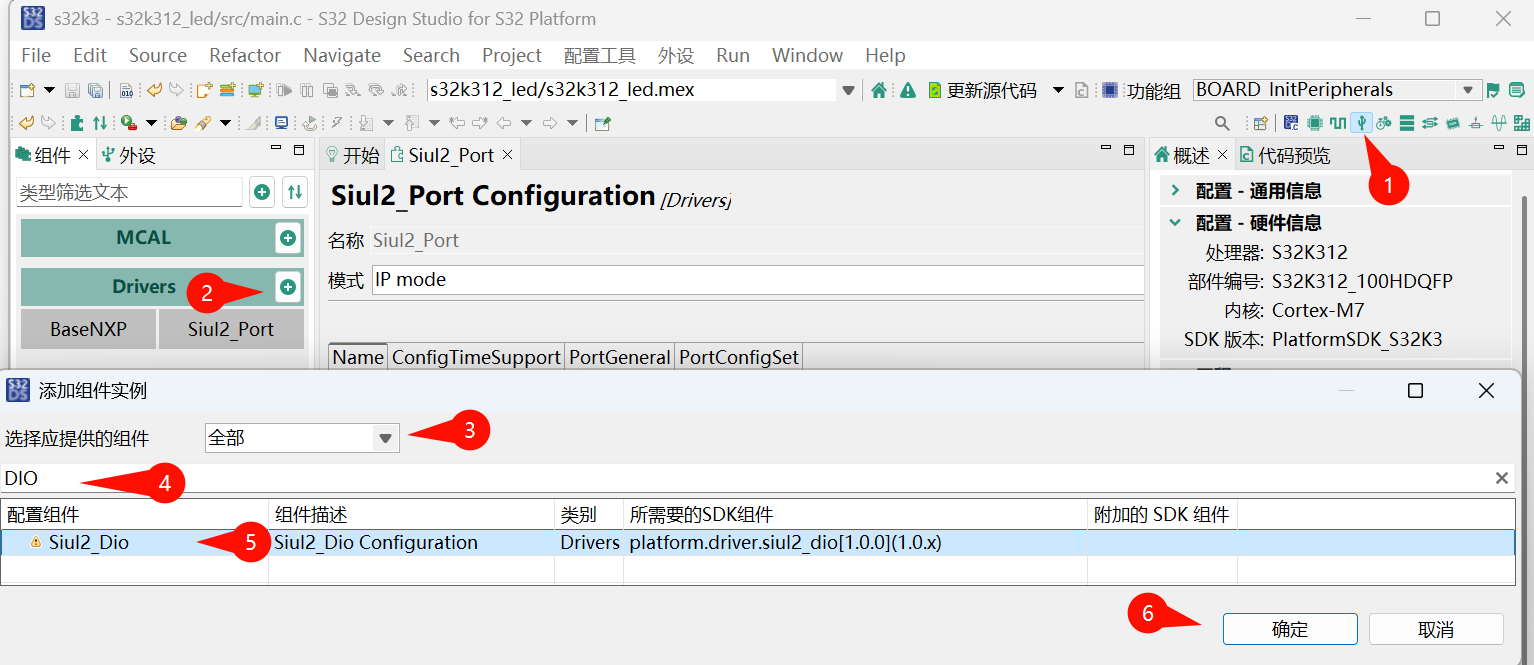
外设配置
点开外设配置, 加入DIO组件
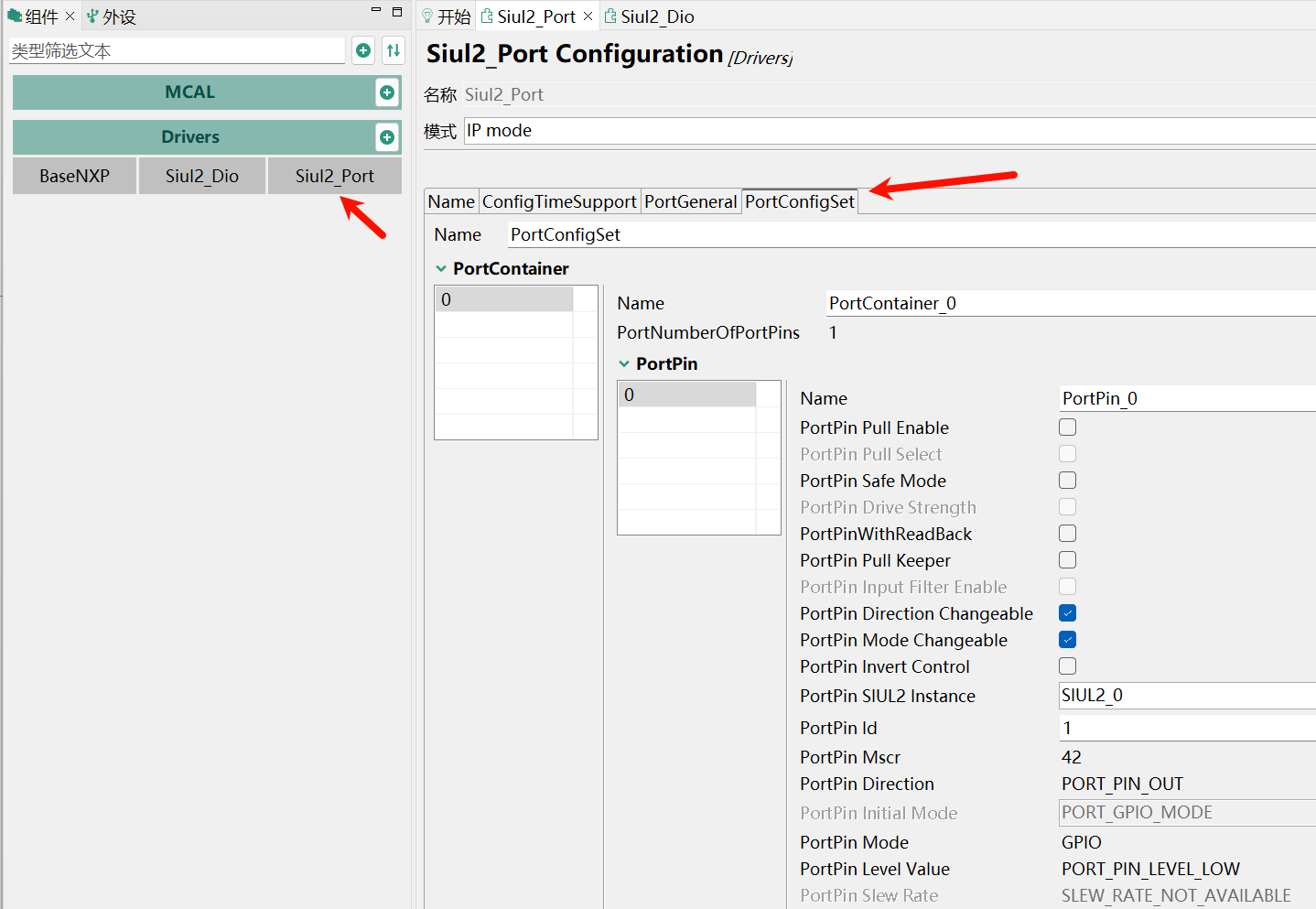
Port组件可以默认不修改
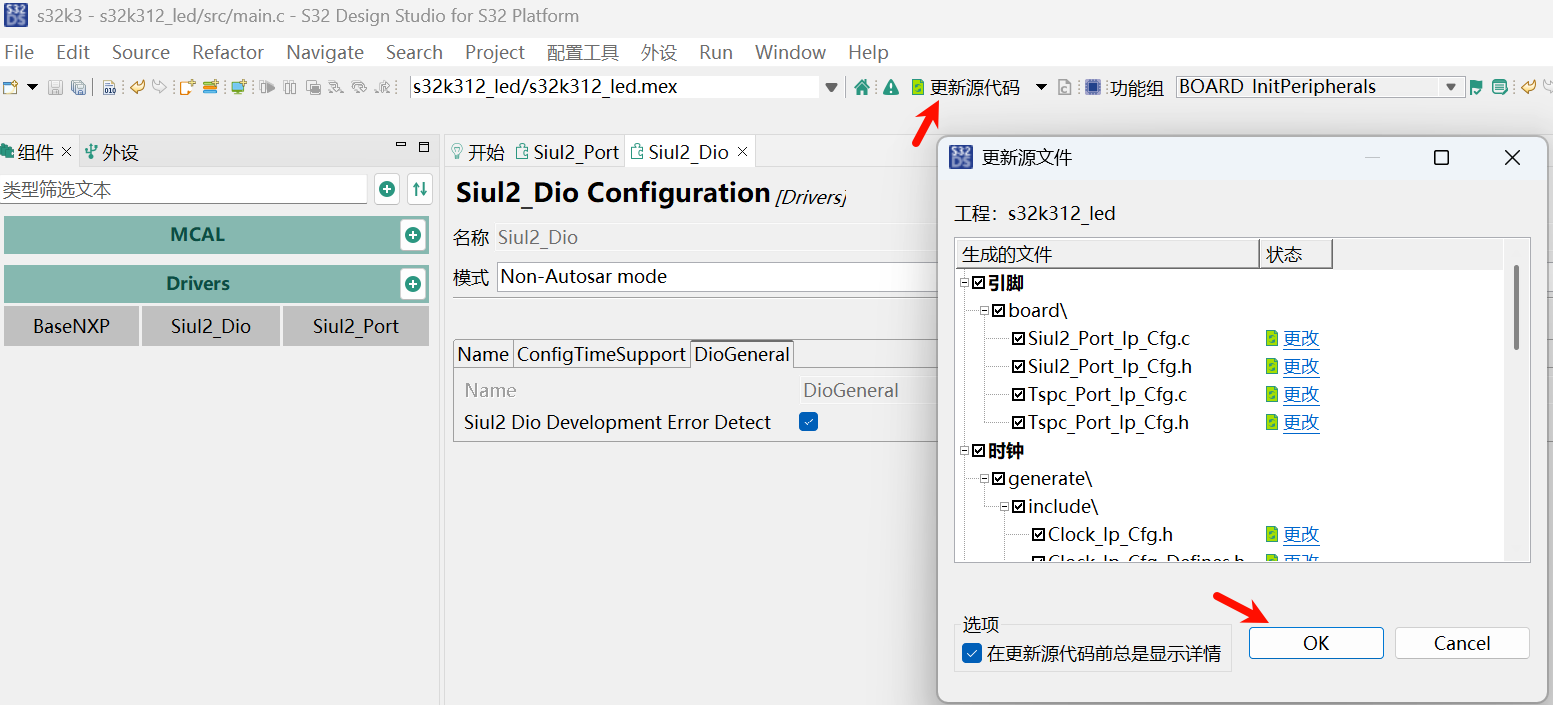
DIO 组件没有什么配置的, 也保持默认. 点击更新源代码
代码修改
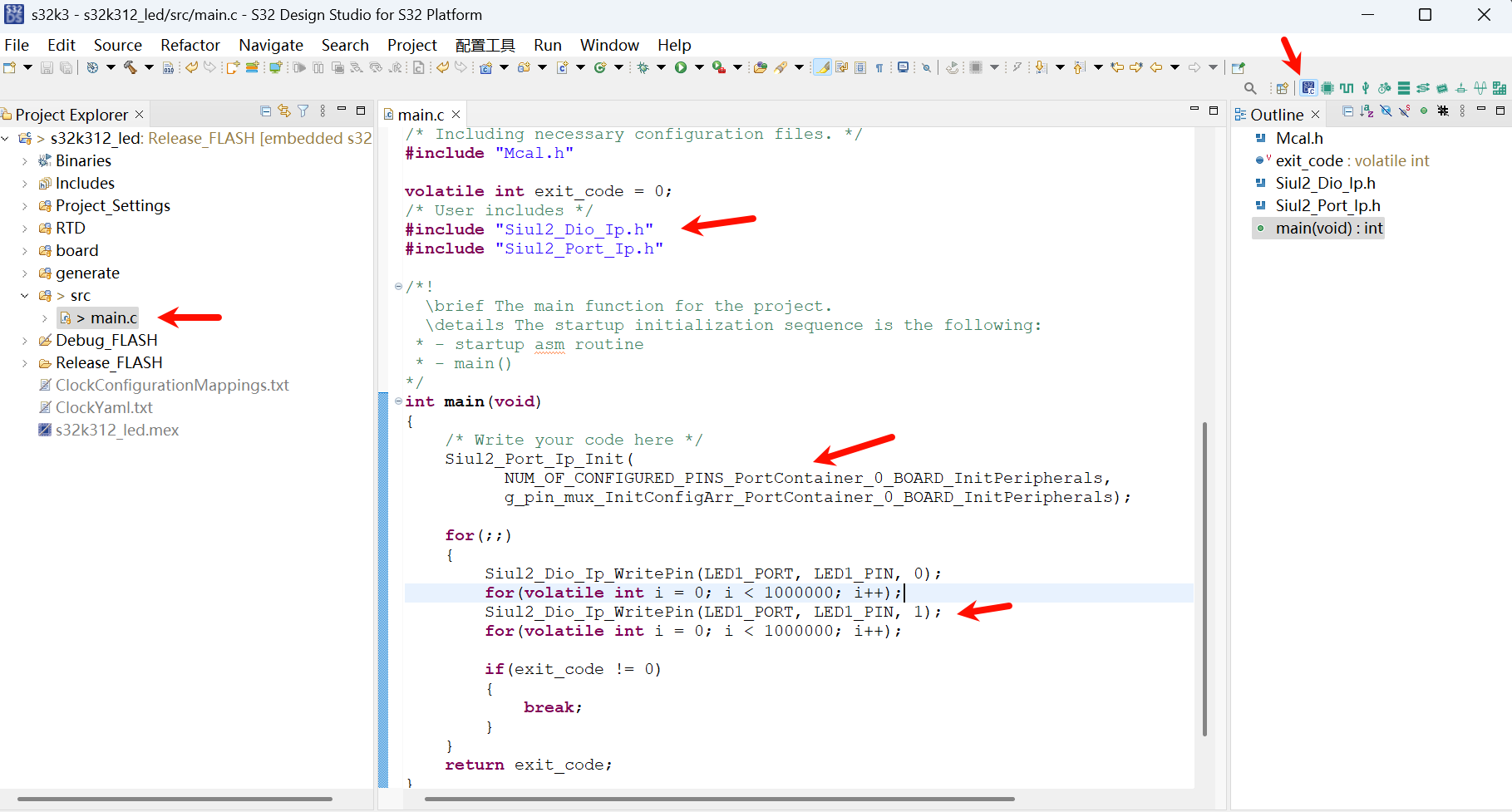
回到代码编辑界面, 添加 Blink 需要的简易代码, main.c 文件中
#include "Siul2_Dio_Ip.h"
#include "Siul2_Port_Ip.h"

Siul2_Port_Ip_Init(
      NUM_OF_CONFIGURED_PINS_PortContainer_0_BOARD_InitPeripherals,
      g_pin_mux_InitConfigArr_PortContainer_0_BOARD_InitPeripherals);

Siul2_Dio_Ip_WritePin(LED1_PORT, LED1_PIN, 0);
for(volatile int i = 0; i < 1000000; i++);
Siul2_Dio_Ip_WritePin(LED1_PORT, LED1_PIN, 1);
for(volatile int i = 0; i < 1000000; i++);
如图:
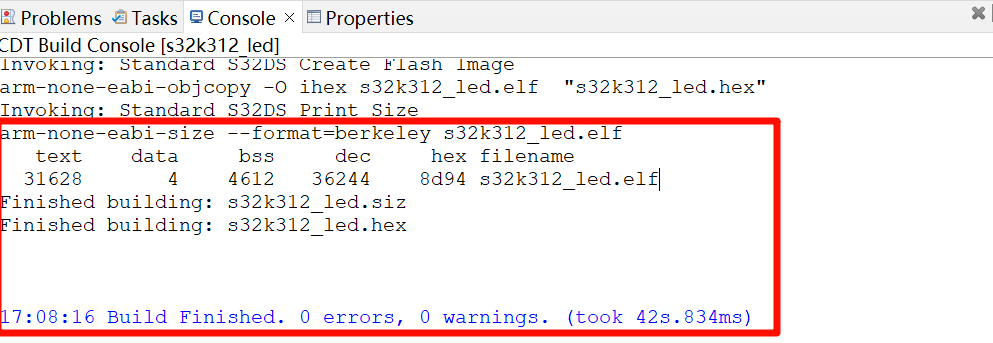
工程编译
工程右键 Build Project
代码调试
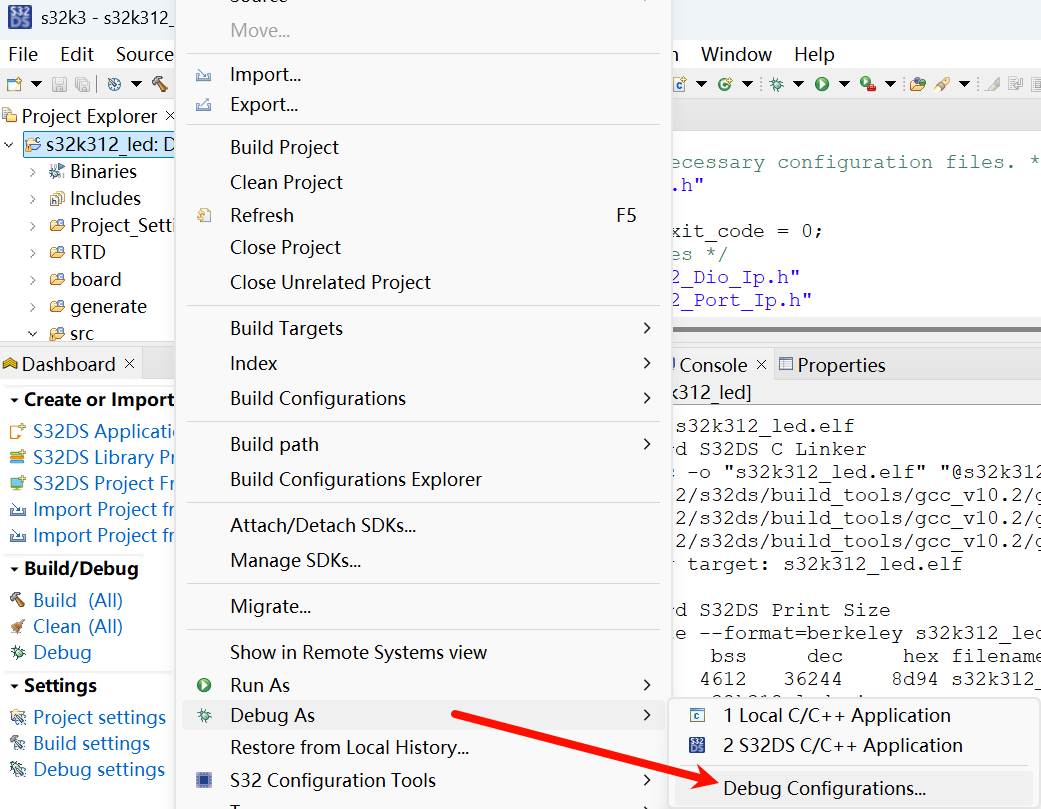
展开 GDB SEGGER J-Link Debugging (如果没有可以右键新建配置), 可以看到默认 SWD 接口
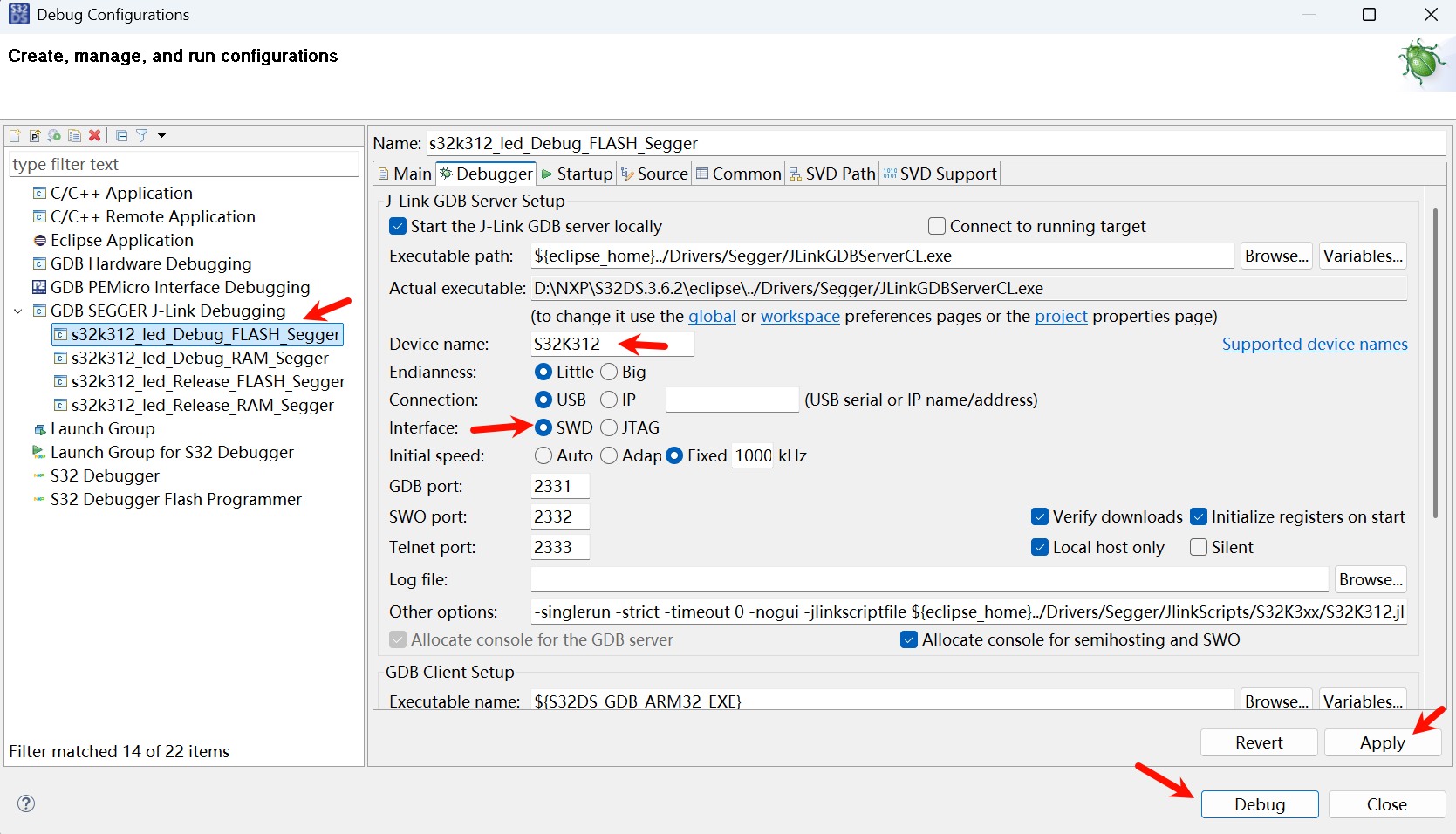
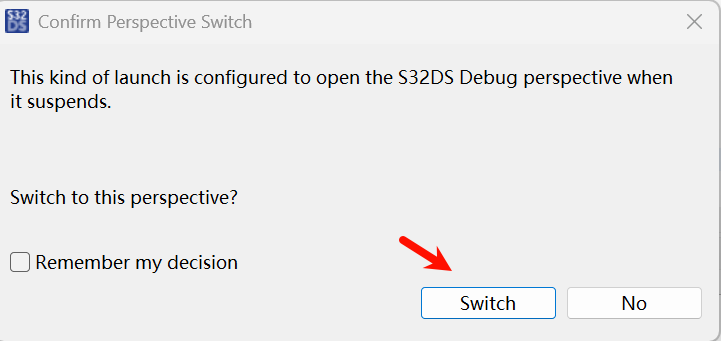
点击 Debug, 切换视图
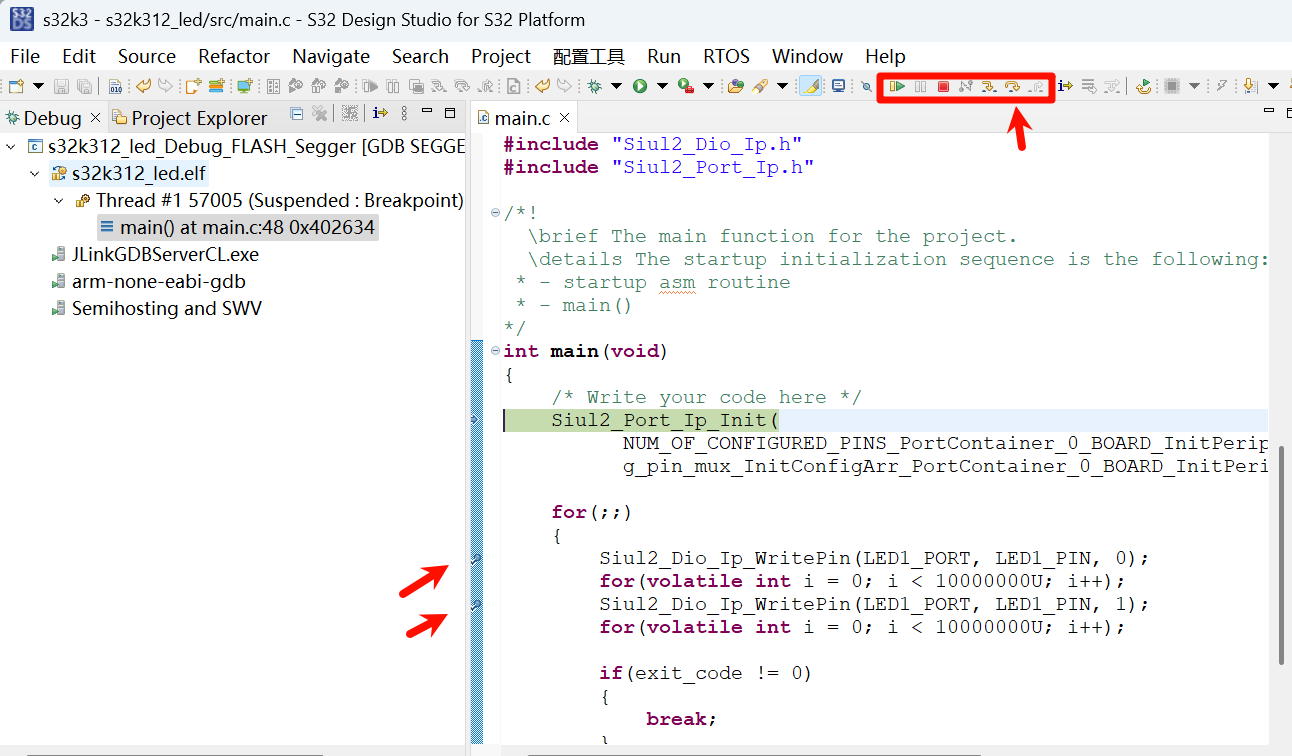
双击打断点, Step Over 单步执行, 右边可以查看变量等
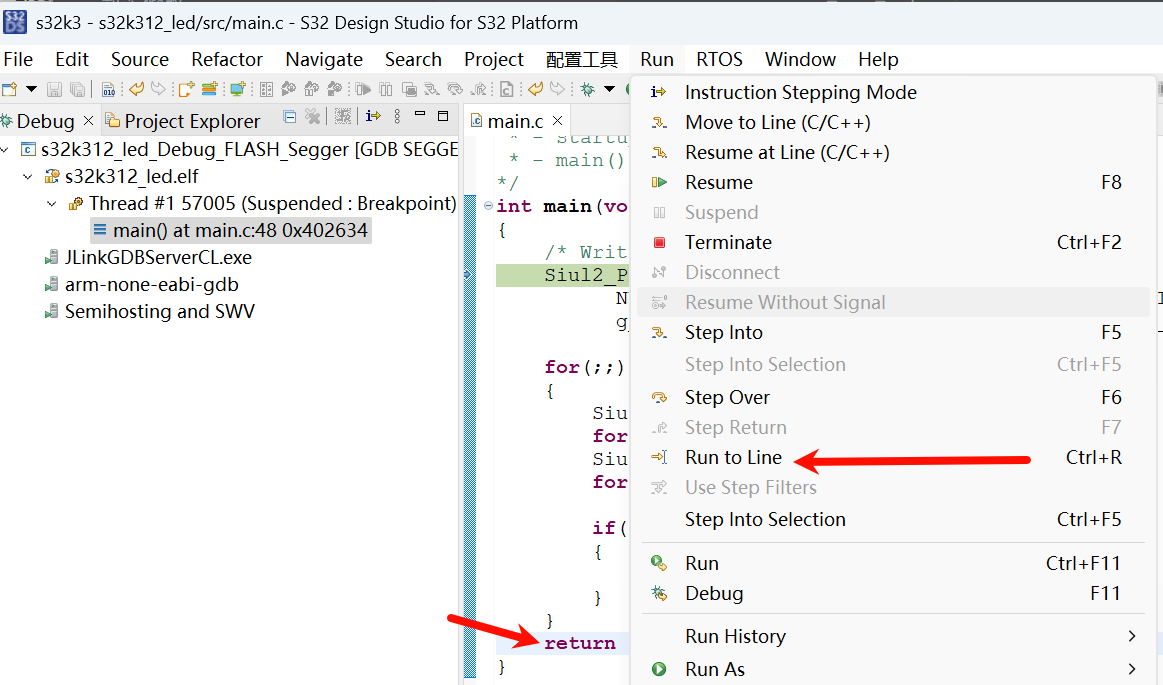
如果想一直执行, 可以取消断点, 鼠标点到return行, 然后 run to line 运行
就可以看到 LED 在一直闪烁
HEX 文件生成
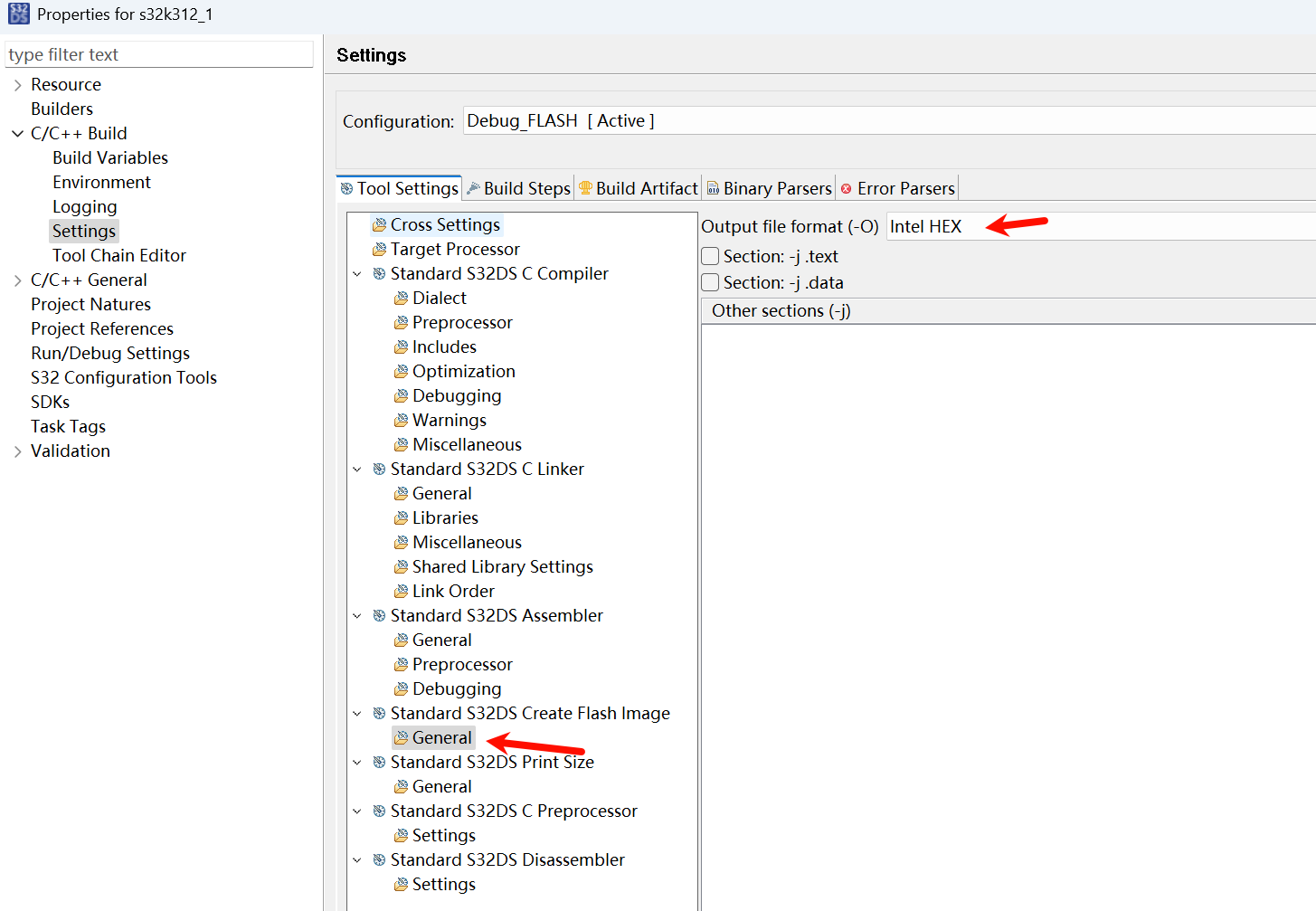
S32DS 工程右键 Properties
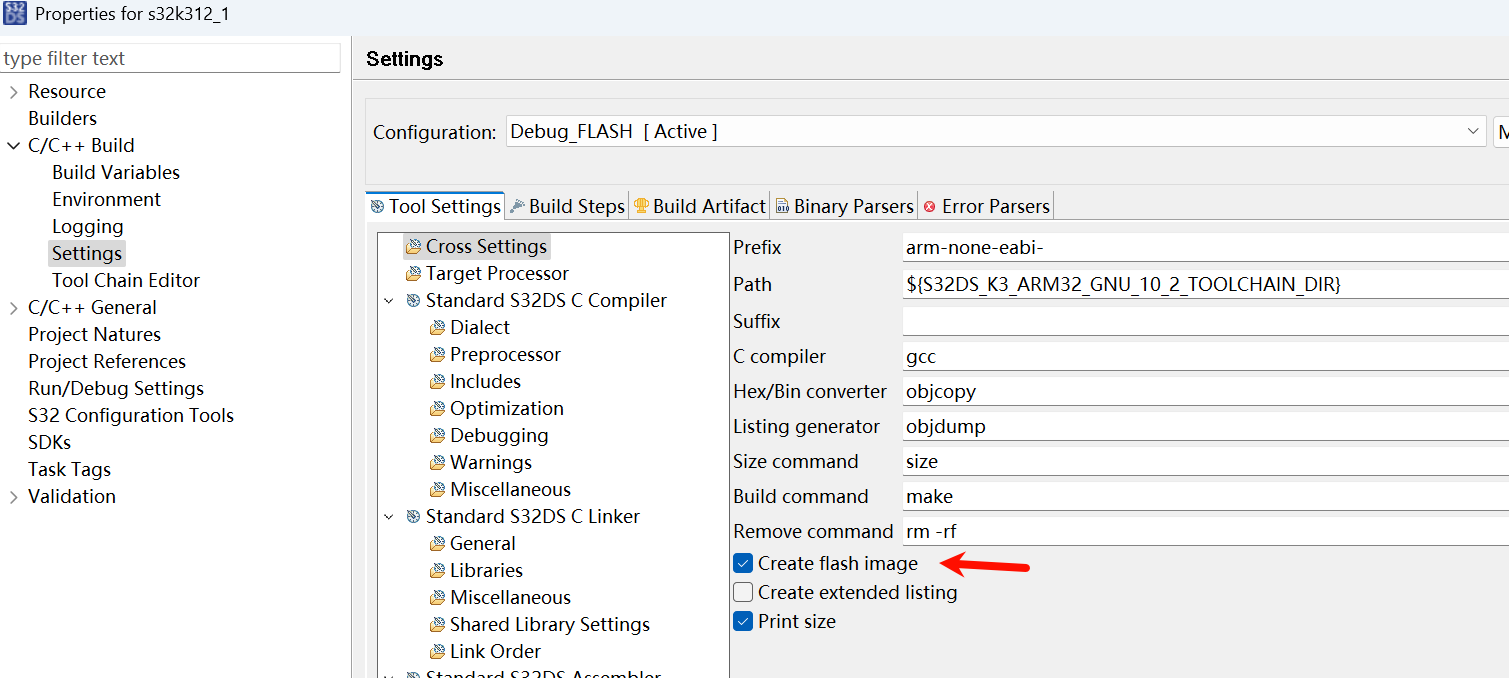
勾选完后, 再随便点击最左侧某个设置项比如Logging转移一下IDE的注意力, 然后再点回来Settings页面
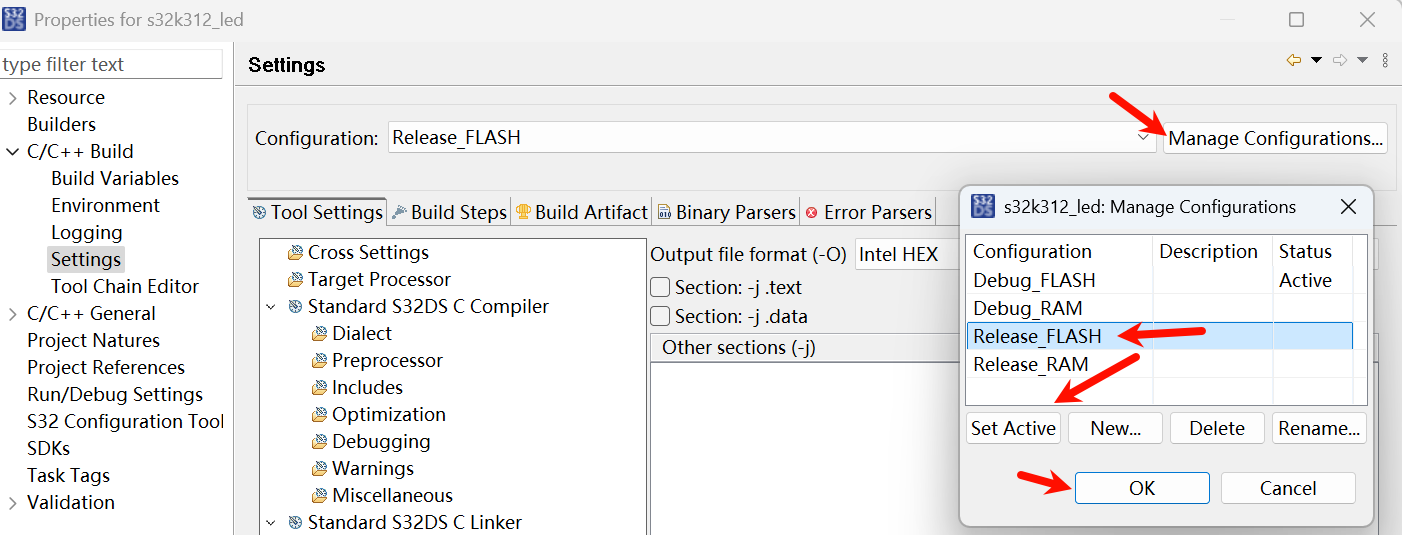
一般发布的 HEX 文件先把工程切换到 Release FLASH, 再编译生成 HEX 文件.
烧录
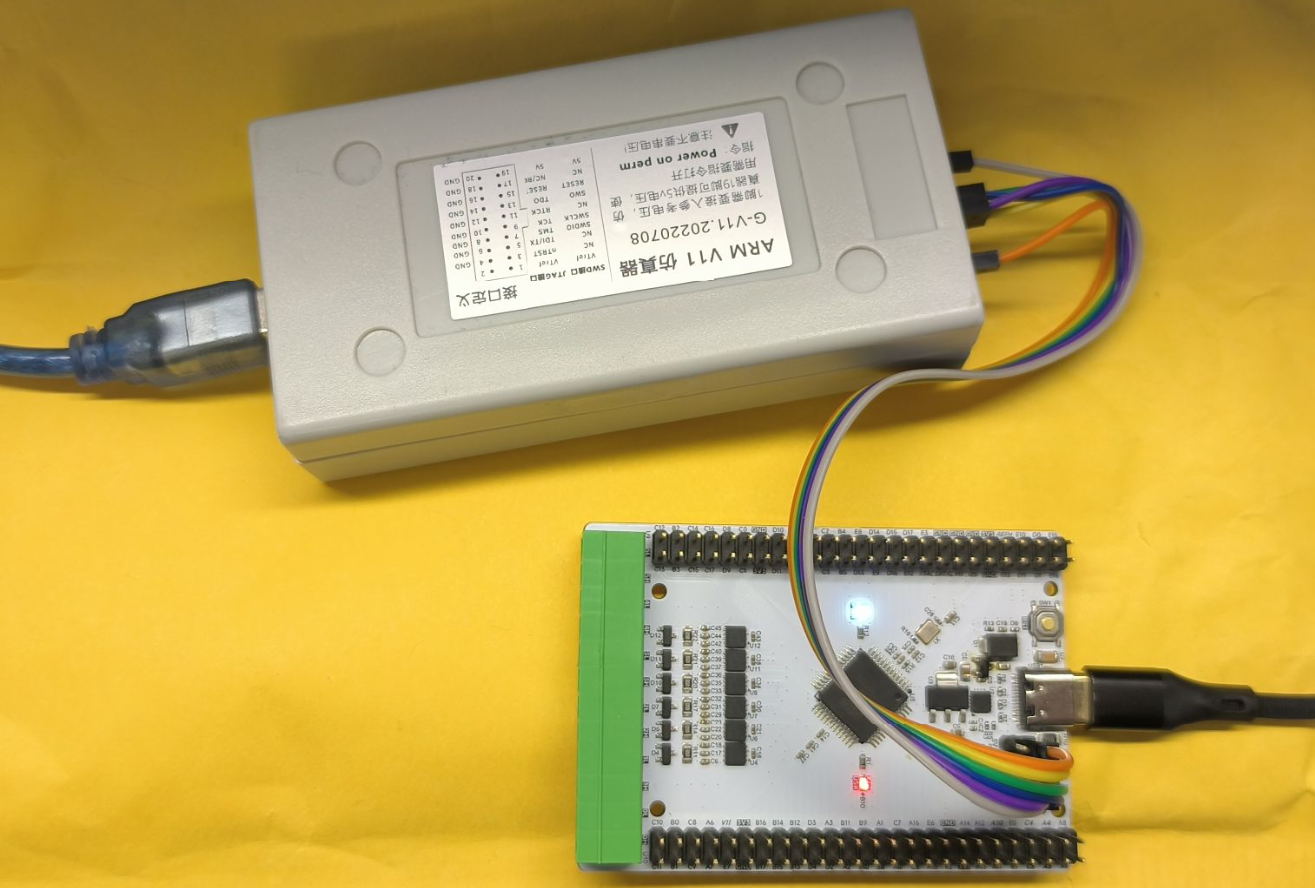
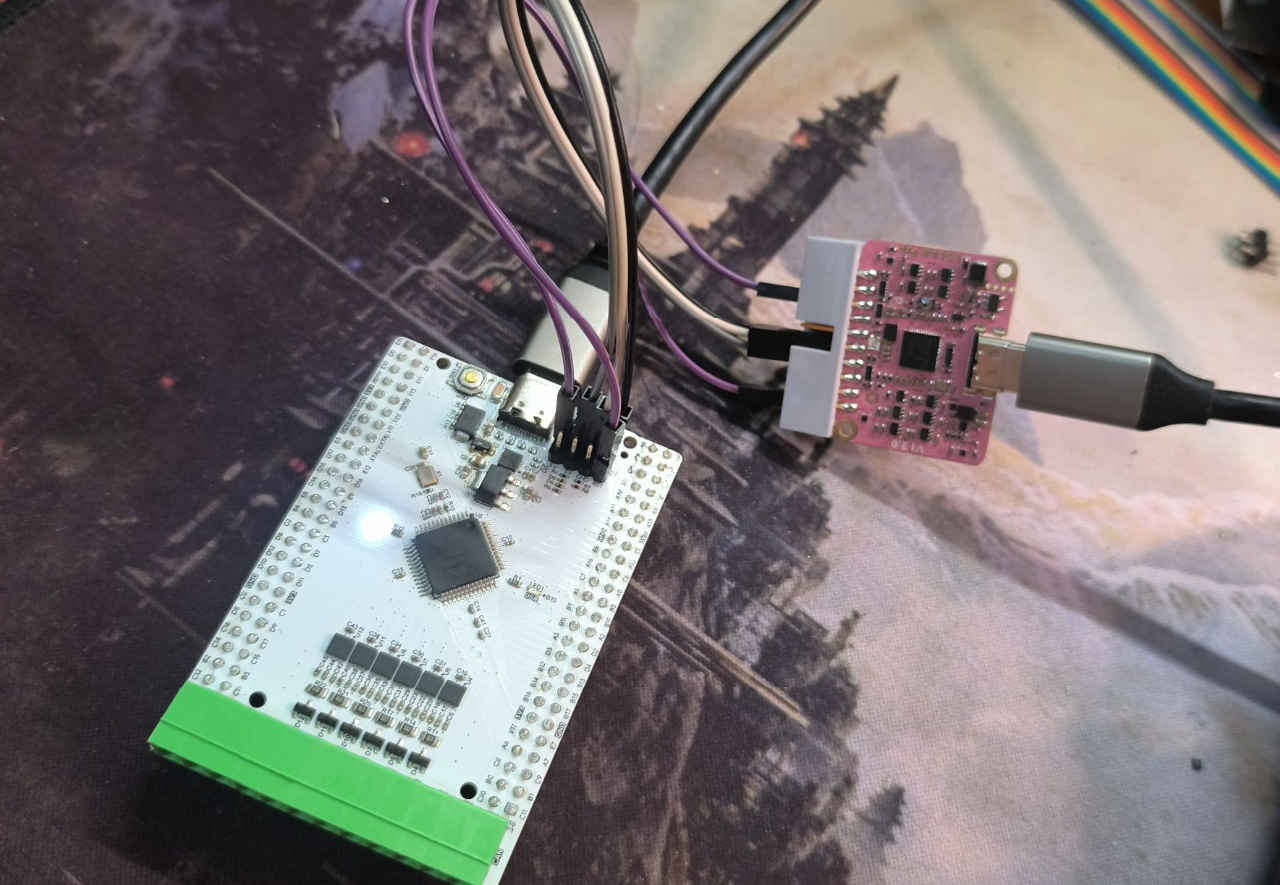
使用 SWD 接口连接, 外加 3.3V 接 Vref, RESET_B 接 JTAG 15PIN SRST
JFlash
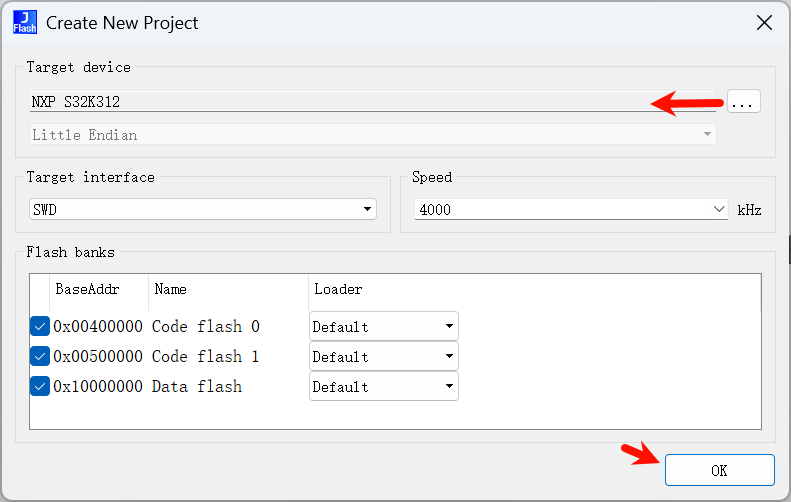
File -> Creat Project, 选择 S32K312, SWD 接口
File -> Open data file 载入HEX 文件.
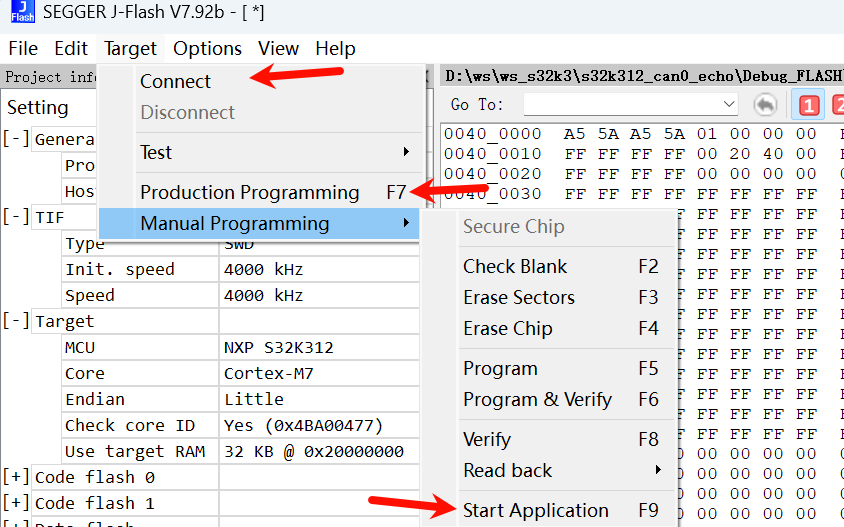
然后 F7 直接烧录, F9 直接执行(可能需要连接RESET引脚) 即可:
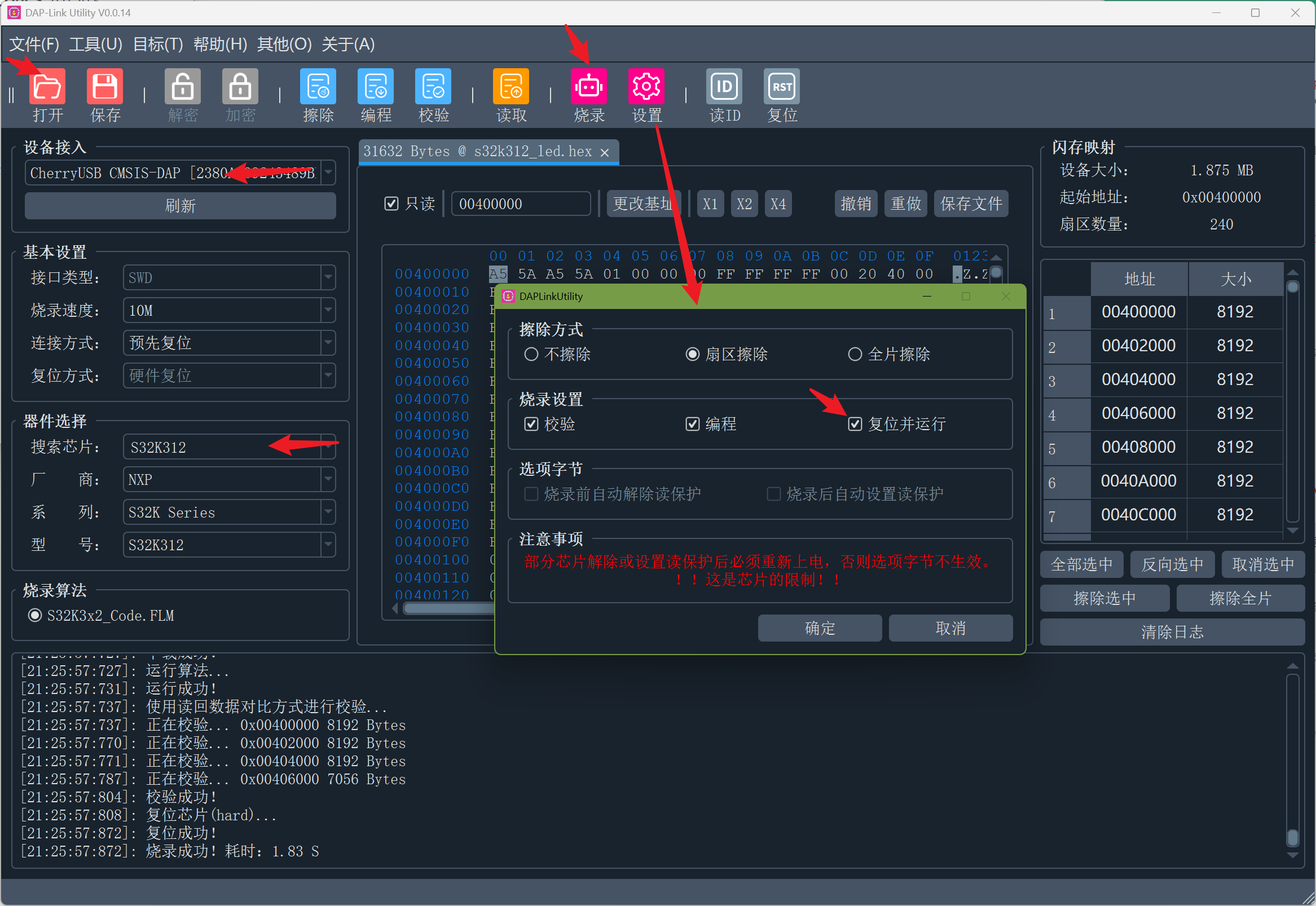
DAP-Link Utility
导入工程
File -> Import, 导入本地已有工程
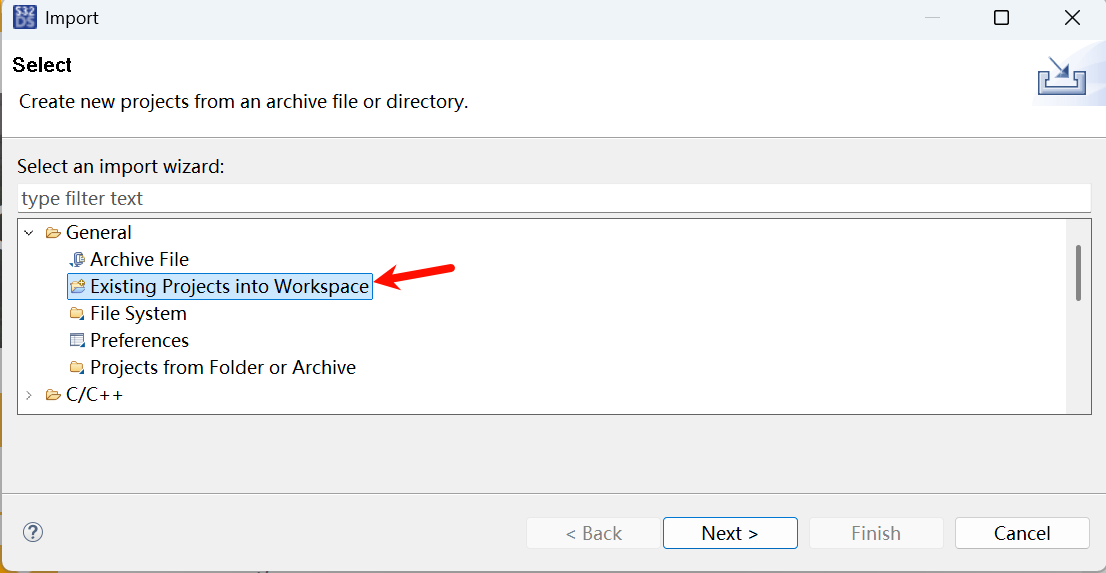
选择已有的工程目录
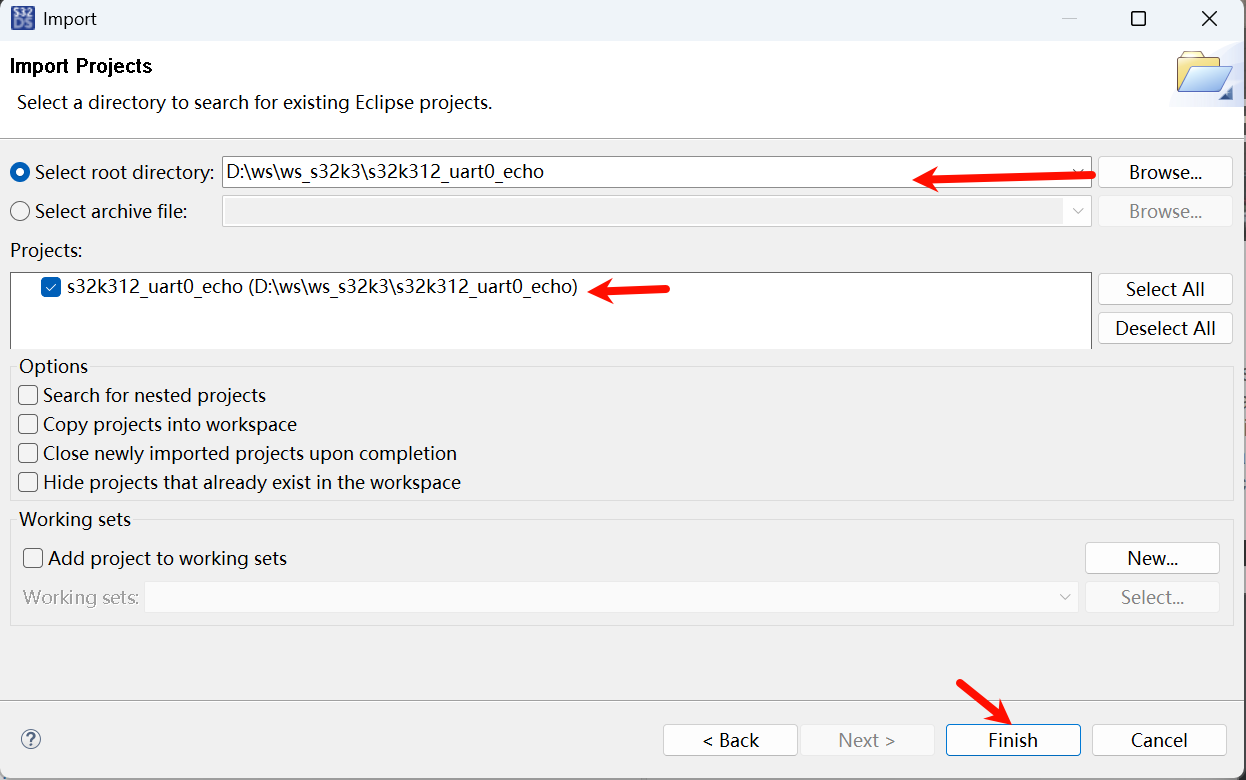
重命名工程
很多时候需要改个名, 工程右键 -> Rename
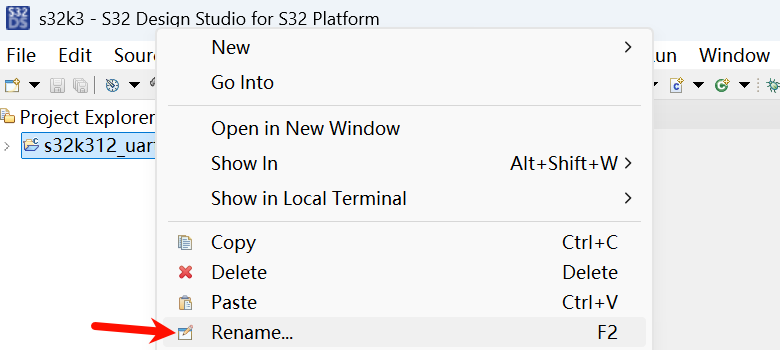
输入新名称即可
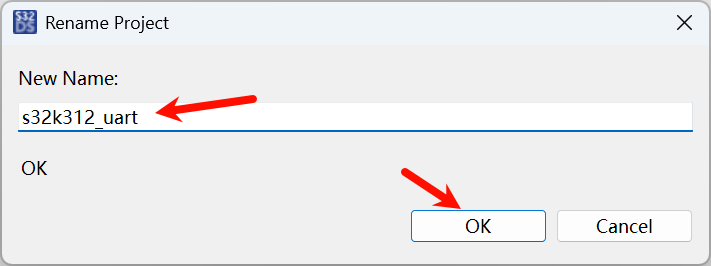
UART 2M
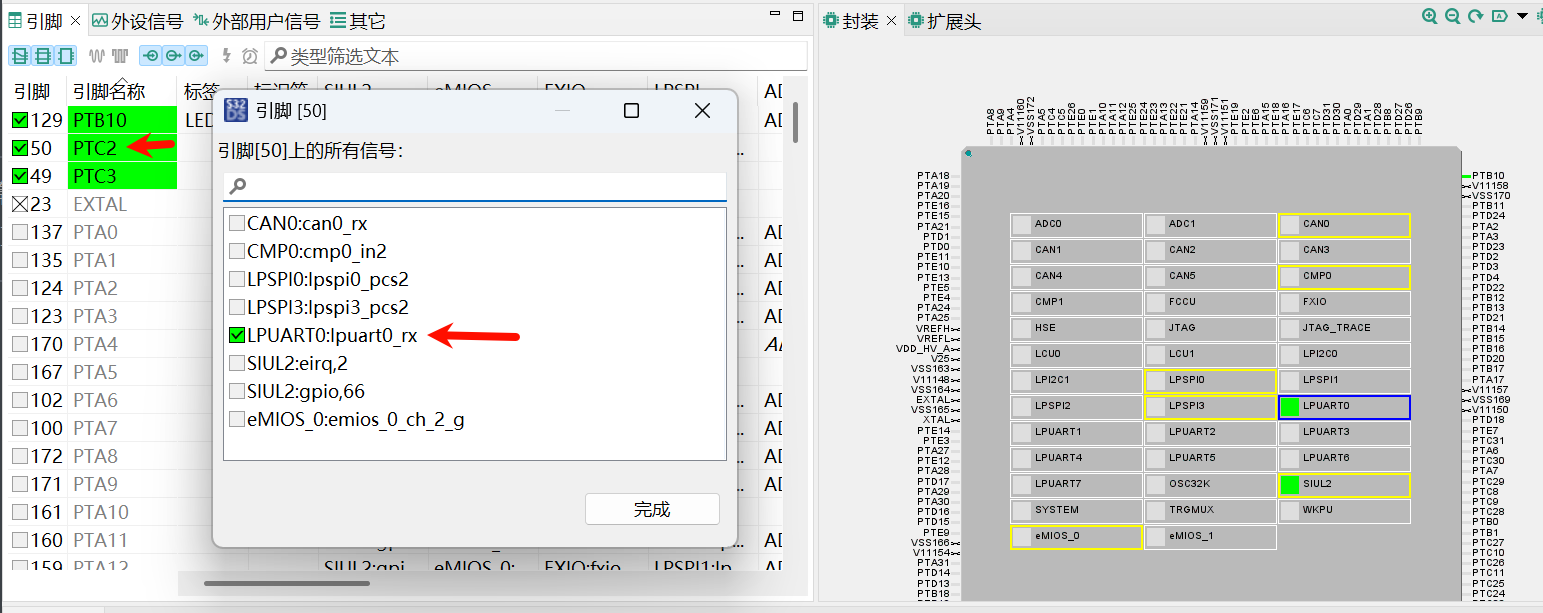
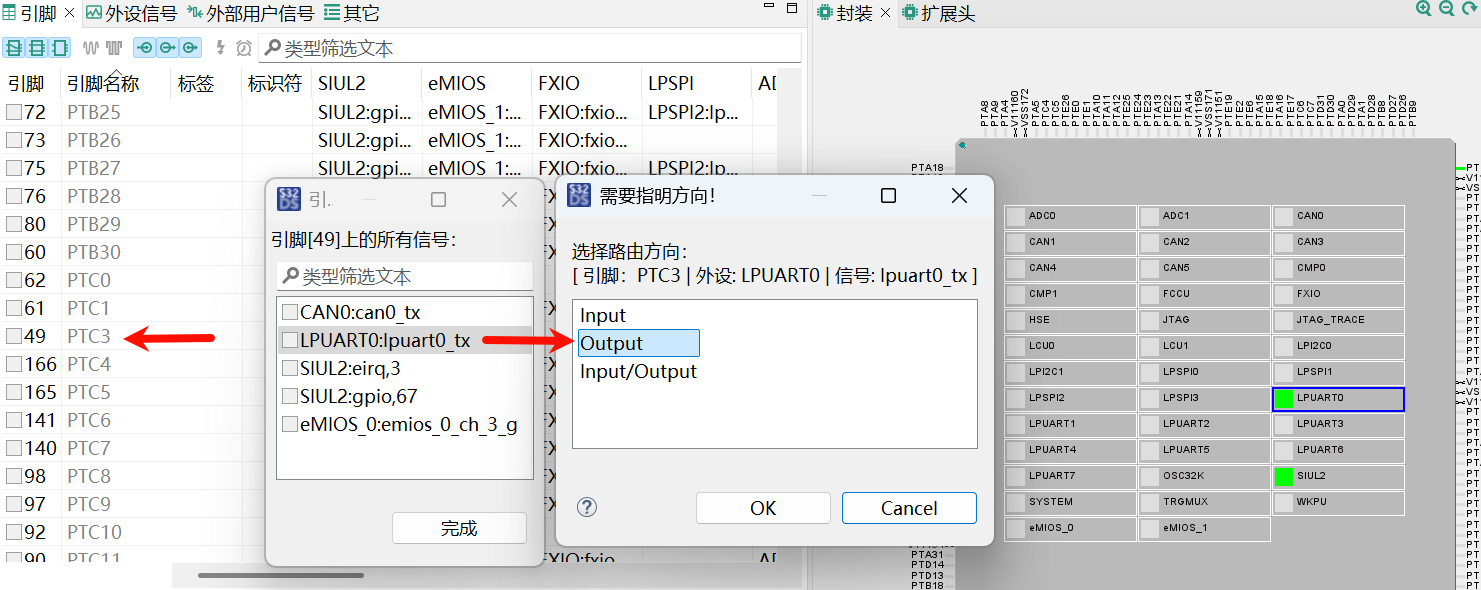
引脚配置:
- LPUART0_RX, PTC2
- LPUART0_TX, PTC3
这里配置成 2Mbps, 实现一个串口 echo 的硬件测试程序
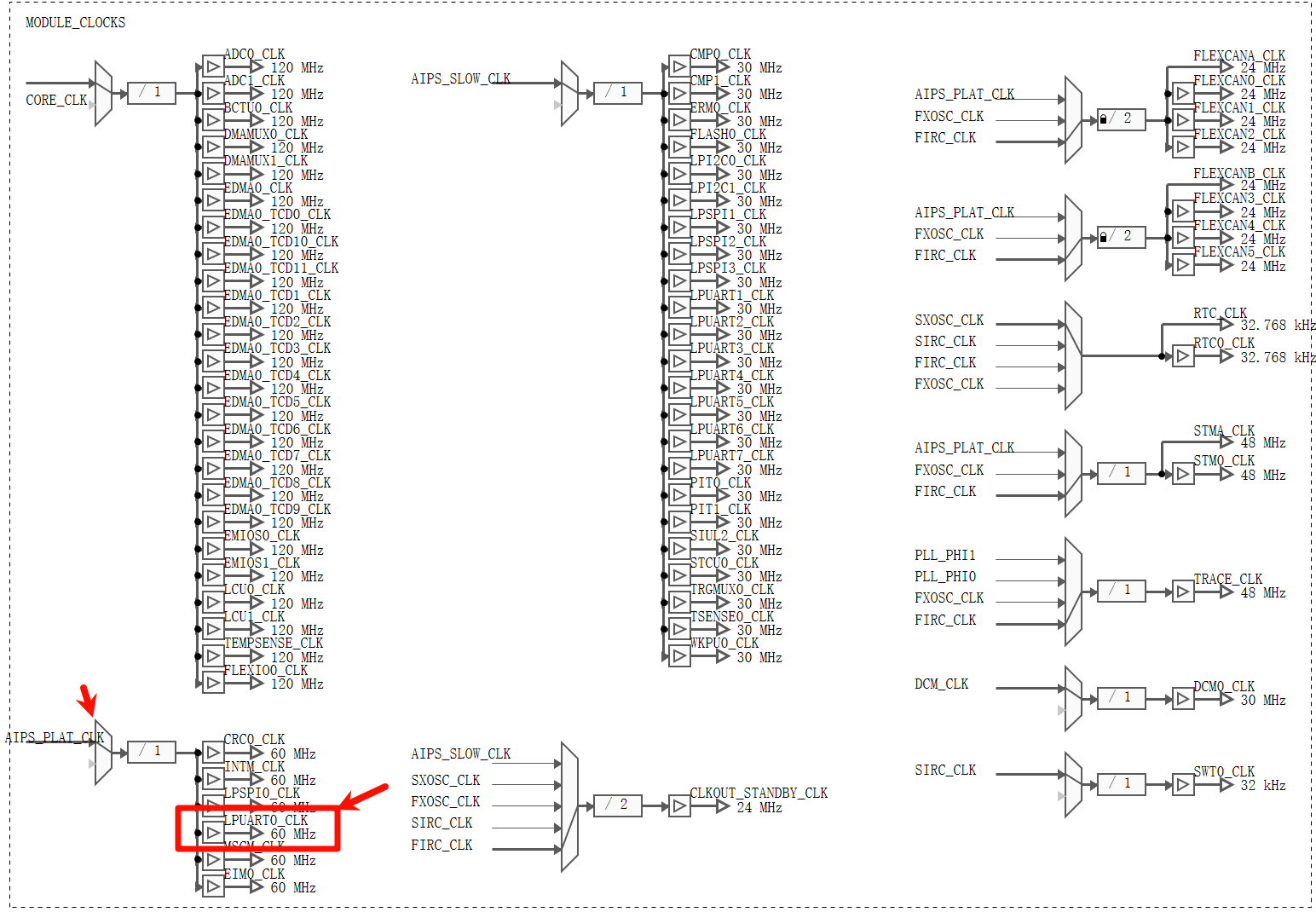
时钟配置 LPUART0 的时钟默认是 60MHz
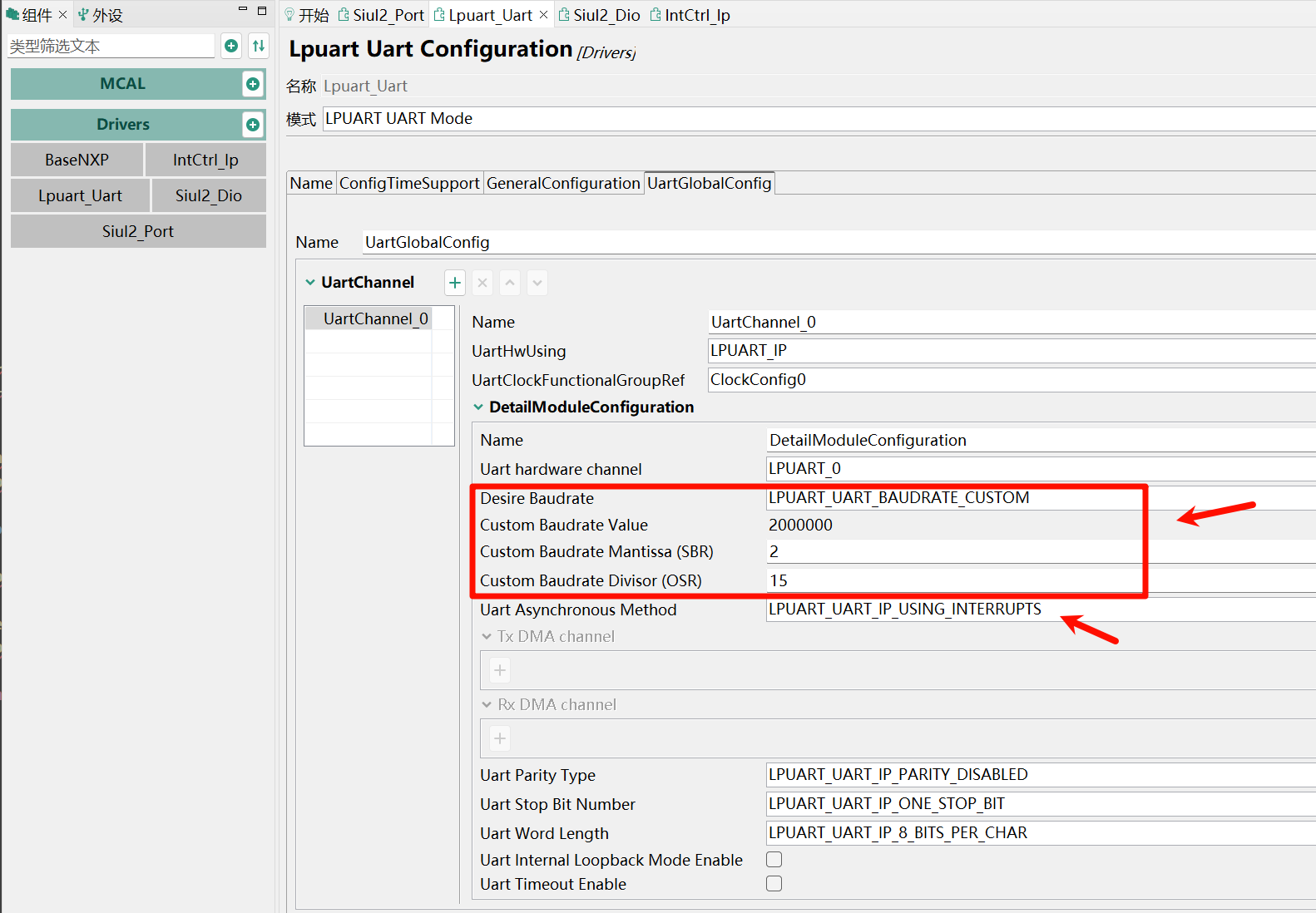
外设配置加入 Lpuart 和 中断控制IntCtrl
自定义 60M / 2 / 15 = 2M 波特率
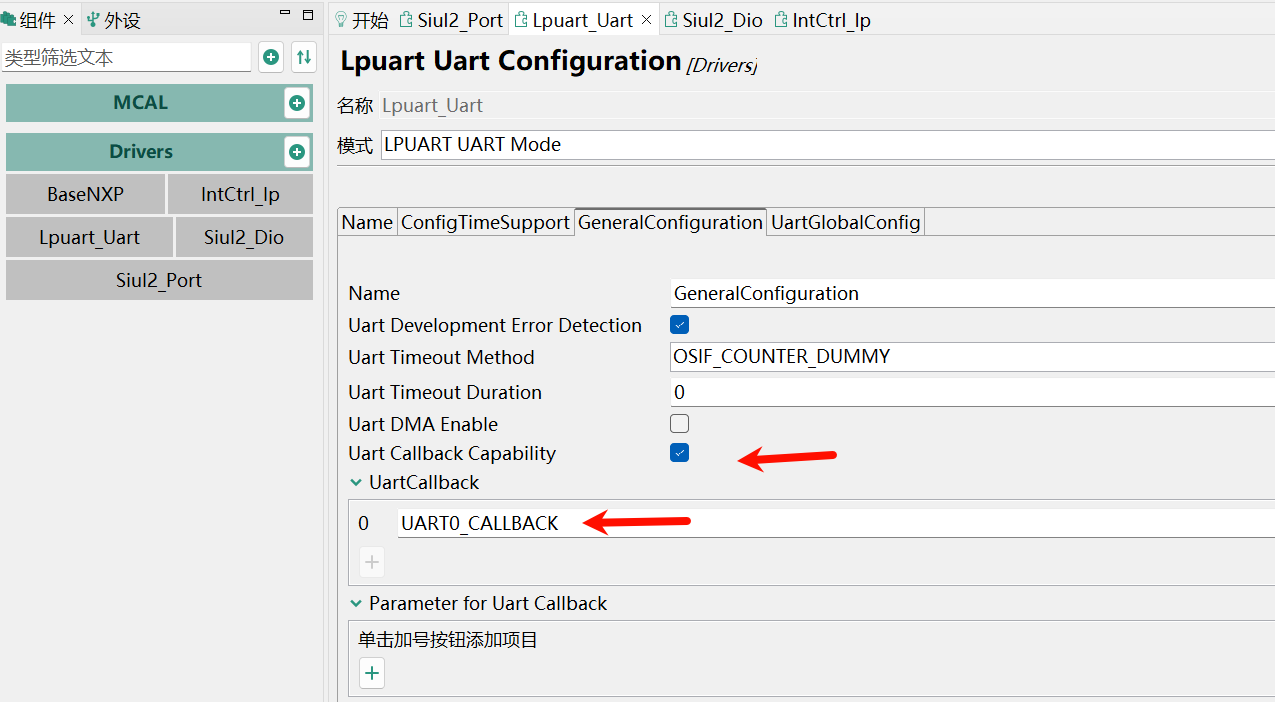
设置中断的回调函数
打开中断
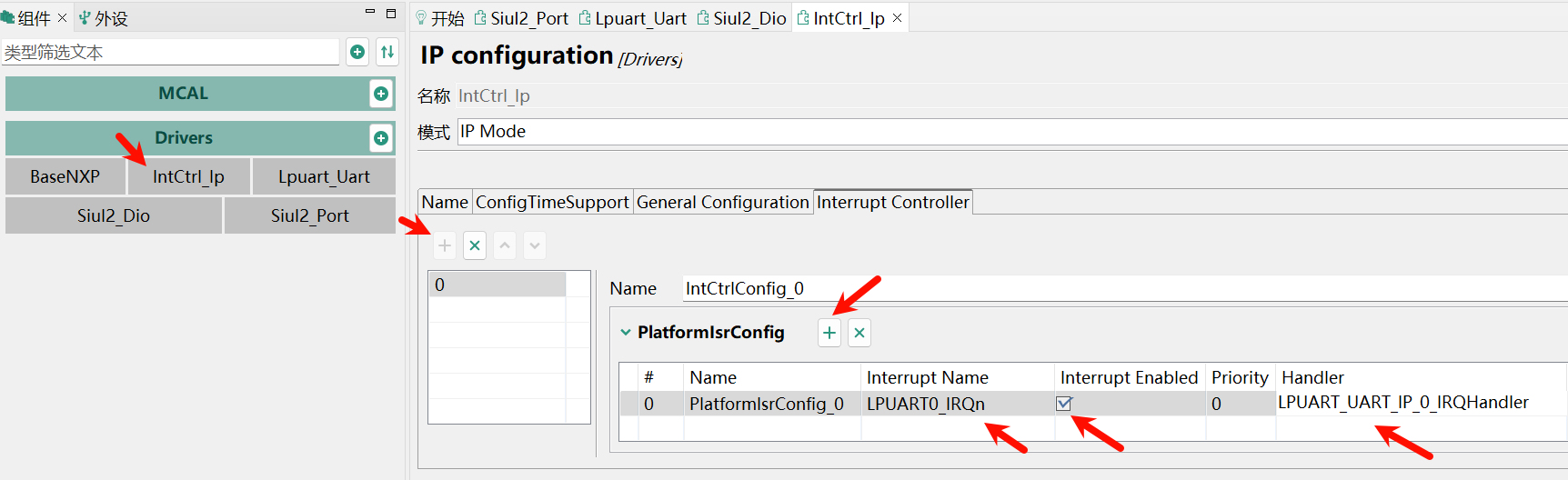
这里的 Handler 是和 s32k3\s32k312_uart\RTD\include\Lpuart_Uart_Ip_Irq.c 中的名称对应上的
点击 更新源代码, 然后修改 main.c
#include "Clock_Ip.h"
#include "IntCtrl_Ip.h"
#include "Lpuart_Uart_Ip.h"
#include "Lpuart_Uart_Ip_Irq.h"
#include "Mcal.h"
#include "Siul2_Port_Ip.h"
#include <stdint.h>
#include <stdio.h>
#include <string.h>

const uint8 UART_INSTANCE = 0; // LPUART0
// 环形缓冲区相关定义
#define UART_RX_BUFFER_SIZE 256
uint8_t g_uart0_rx_buffer[UART_RX_BUFFER_SIZE] = {0};
uint8_t g_uart0_cmd_buf[UART_RX_BUFFER_SIZE] = {0};
volatile uint16_t g_uart0_rx_head = 0;
volatile uint16_t g_uart0_rx_tail = 0;
volatile uint8_t g_uart0_cmd_ready = 0;
volatile uint8_t g_uart0_cmd_len = 0;

void UART0_CALLBACK(const uint8 HwInstance,
                    const Lpuart_Uart_Ip_EventType Event,
                    const void *UserData) {
  (void)UserData;
  if (Event == LPUART_UART_IP_EVENT_RX_FULL) {
    // 写入数据到环形缓冲区
    uint8_t data = g_uart0_rx_buffer[g_uart0_rx_head]; // 当前收到的数据
    g_uart0_rx_head = (g_uart0_rx_head + 1) % UART_RX_BUFFER_SIZE;
    // 检查是否收到换行符
    if (data == '\n') {
      // 取出一条命令(从 tail 到 head,遇到 \n 截止)
      while (g_uart0_rx_tail != g_uart0_rx_head) {
        uint8_t ch = g_uart0_rx_buffer[g_uart0_rx_tail];
        g_uart0_rx_tail = (g_uart0_rx_tail + 1) % UART_RX_BUFFER_SIZE;
        g_uart0_cmd_buf[g_uart0_cmd_len++] = ch;
        if (ch == '\n') {
          break;
        }
      }
      g_uart0_cmd_ready = 1;
    }
    // 继续接收下一个字节
    Lpuart_Uart_Ip_SetRxBuffer(HwInstance, &g_uart0_rx_buffer[g_uart0_rx_head],
                               1);
  }
}

int main(void) {
  Clock_Ip_Init(&Clock_Ip_aClockConfig[0]);
  Siul2_Port_Ip_Init(
      NUM_OF_CONFIGURED_PINS_PortContainer_0_BOARD_InitPeripherals,
      g_pin_mux_InitConfigArr_PortContainer_0_BOARD_InitPeripherals);
  IntCtrl_Ip_Init(&IntCtrlConfig_0);
  Lpuart_Uart_Ip_Init(UART_INSTANCE, &Lpuart_Uart_Ip_xHwConfigPB_0);

  const char *message =
      "UART Ping-Pong Buffer Example\r\nType something and press enter...\r\n";
  Lpuart_Uart_Ip_SyncSend(UART_INSTANCE, (const uint8_t *)message,
                          strlen(message), 0xFFFF);
  memset(g_uart0_rx_buffer, 0, sizeof(g_uart0_rx_buffer));
  Lpuart_Uart_Ip_AsyncReceive(UART_INSTANCE, g_uart0_rx_buffer, 1);

  while (1) {
    // 检查是否收到完整命令(遇到换行符)
    if (g_uart0_cmd_ready) {
      // 处理命令, 这里原封不动发回
      if (LPUART_UART_IP_STATUS_BUSY !=
          Lpuart_Uart_Ip_GetTransmitStatus(UART_INSTANCE, NULL)) {
        Lpuart_Uart_Ip_AsyncSend(UART_INSTANCE, g_uart0_cmd_buf,
                                 g_uart0_cmd_len);
      }
      g_uart0_cmd_len = 0; // 重置命令长度
      g_uart0_cmd_ready = 0;
    }
  }

  return 0;
}
代码解释:
- 初始化部分, 配置时钟、端口、中断、UART 等外设。发送欢迎信息,并启动异步 1字节 接收。
- UART 回调函数
UART0_CALLBACK, 存放收到的字节到环形缓冲区, 遇到\n结尾取出命令, 设置标志 - 主循环, 检查标志, 处理串口命令, 此处是直接异步回传
测试, 打开串口调试助手, 2M-8-N-1, 收到欢迎语后清空, 然后每 1ms 定时发送 100字节(含回车换行), 可以看到收发字节相同:
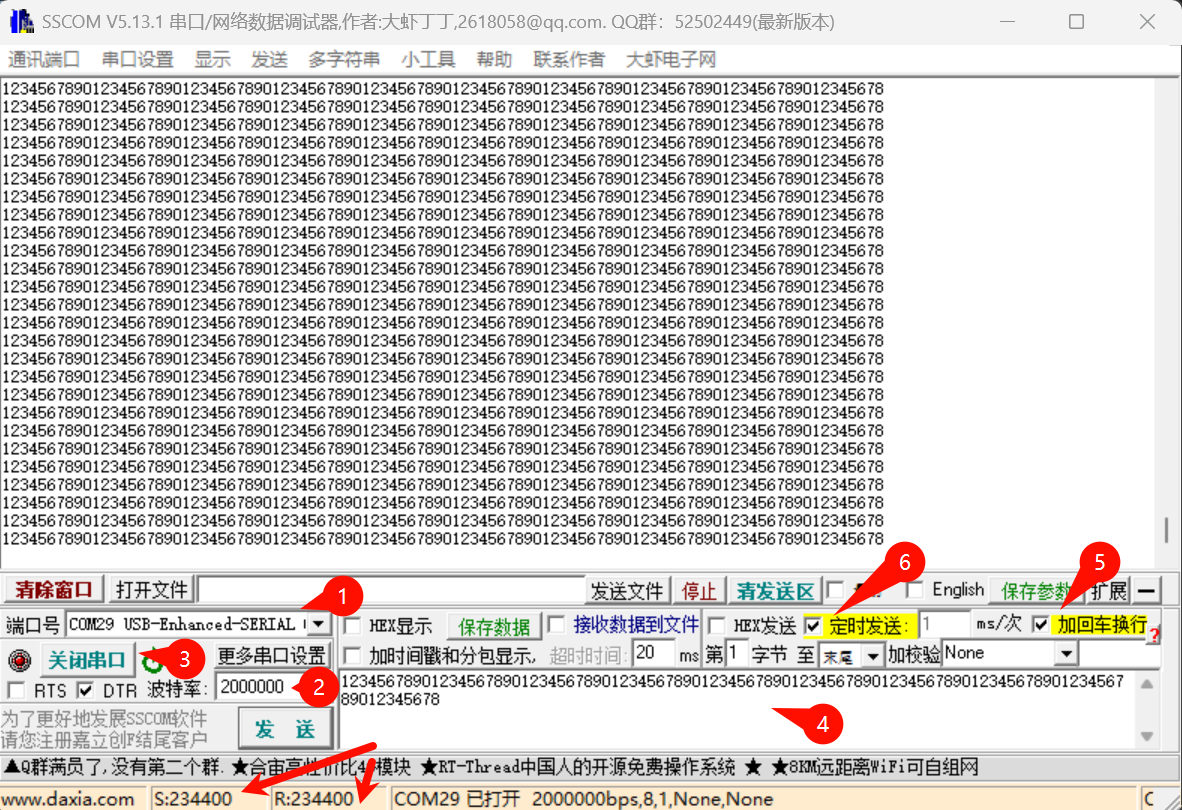
CANFD 1M+5M
这里以 flexcan0 为例, 配置成 CANFD 仲裁段速率1M采样点80% + 数据段5M采样点75%, 设置了 TDC, 对 CAN/CANFD/CANFD加速, 标准帧/扩展帧, 数据帧/远程帧 进行了测试.
Message Buffer 划分
类似于 BxCAN 或 MCAN, S32K3 的 FlexCAN 也遵循 CAN 的基本配置:
- 直接配置成 CANFD 64字节 使能 BRS, 正常模式, 这样不论 CAN2.0 还是 CANFD 都能正常使用, 一劳永逸
- 主时钟一般 40/80M 居多, 60/120M 也常见, 这里使用 60M
- 仲裁段 预分频6得 10M, 然后 1+6+1+2 得 1M 和 80% 采样点
- 数据段 预分频1得 60M, 然后 1+7+1+3 得 12M 和 75% 采样点
MessageRAM(MessageBuffers, MBs) 按 72B(Header_8B + Data_64B) 分, 同时还要注意 512B Block 对齐, 也就是80B对齐, 得出 RX + TX 总的Buffer数()MBs), 刚好MB也是mailbox邮箱的缩写, 这里姑且叫它邮箱吧- RX 全接收一般占 2 个邮箱(Buffer), 用于设置一个标准帧滤波器 + 一个扩展帧滤波器
- 剩下的邮箱(Buffer)可以全给 TX, 方便能一次性填充多个
- 超过 2M 速率要配置 TDC, 一般可优先尝试 (数据段时钟 / 数据段速率 * 采样点) 的计算方式, 这里 5M 对应的 TDC 是 60M/5M*0.75 = 9
再看 S32K312 6路 CANFD 的资源:
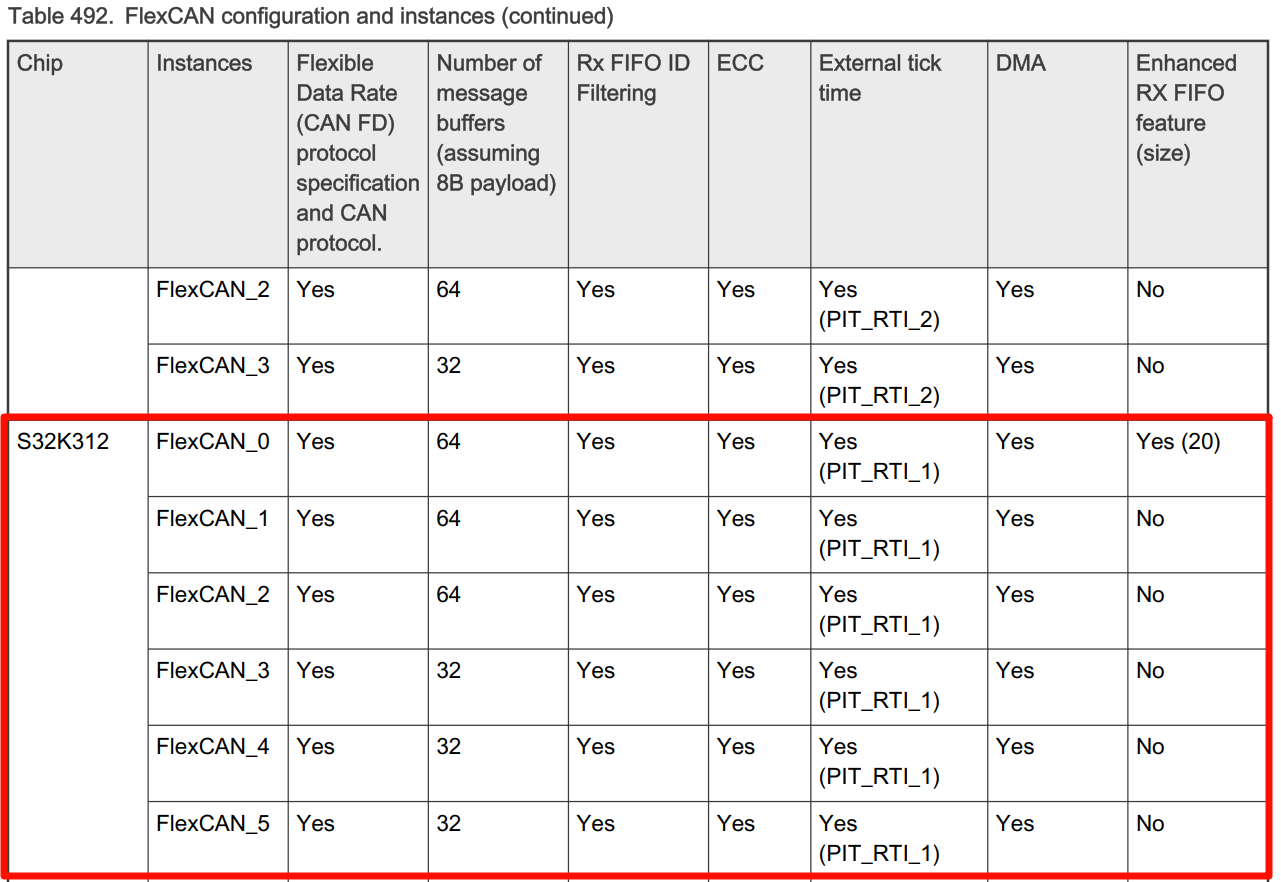
表中:
- CAN0, CAN1, CAN2 可用 64*16 = 1024B, 刚好 2个 Block, 每个 Block 可分出 512/72= 7.111, 2 个Block合计 14个 MBs (64B负载的)
- CAN3, CAN4, CAN5 的 RX + TX 合计可用 7 MBs
我们就按 7 个分吧, 这样 6 路都适用. 前 2 个给 RX, 后面 5 个给 TX. 其它独有的或高级的特性也暂且不用.
附上 Block 的解释
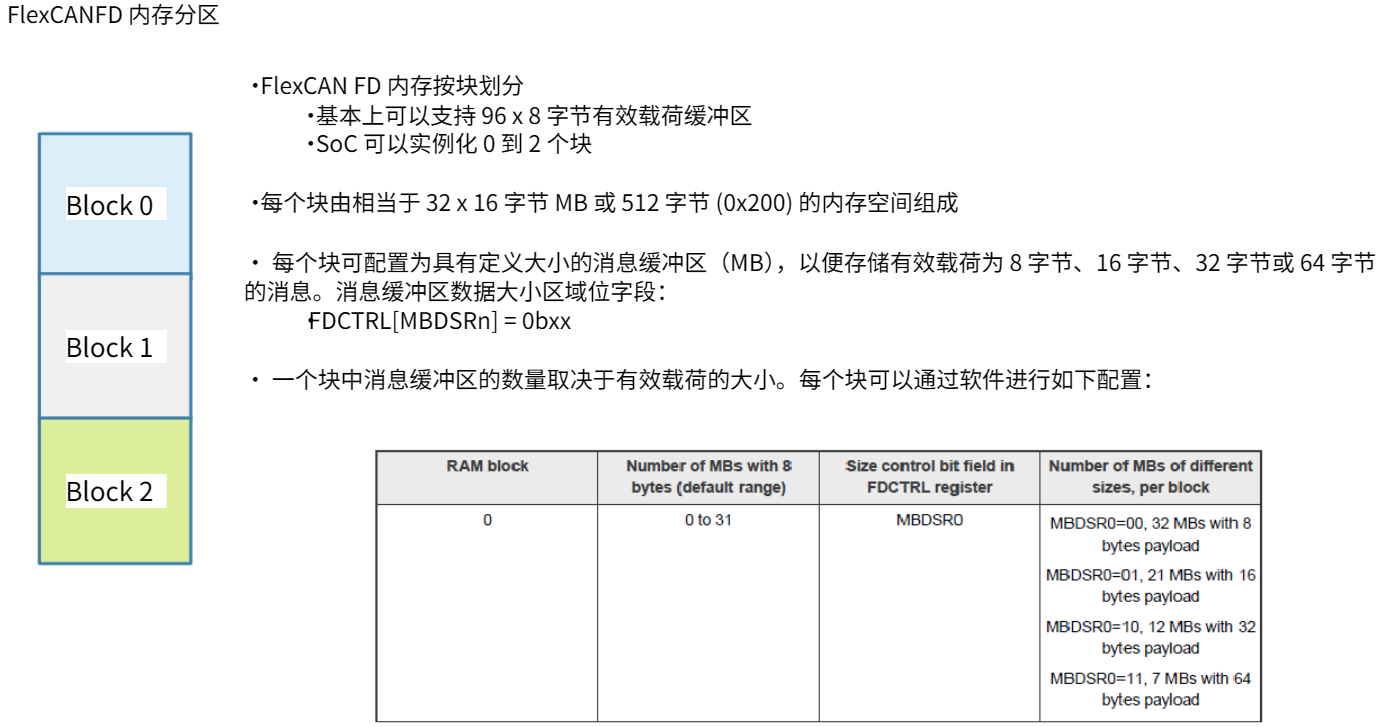
Header 定义
72B 的 Header 部分的定义:
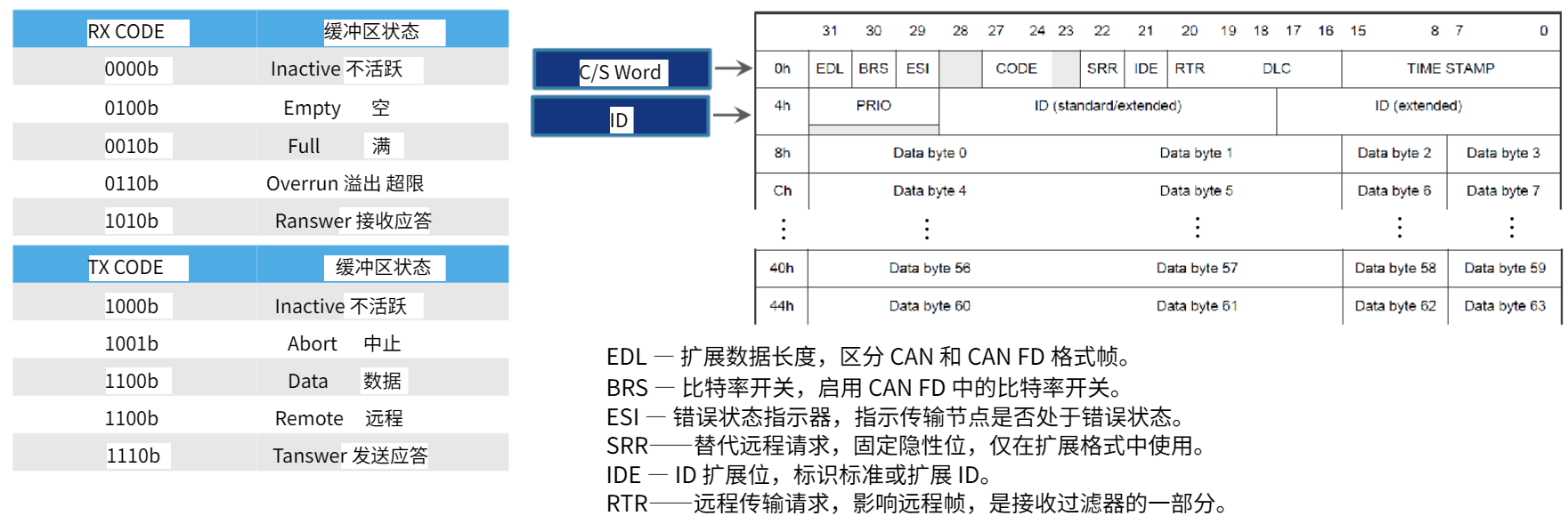
图中:
- IDE, 区分 标准帧 / 扩展帧
- EDL, 区分 CAN / CANFD, 也就是常说的 FDF
- BRS, 区分 CANFD / CANFD加速, 位速率变换
- RTR, 区分 数据帧 / 远程帧
图形配置
切换封装到 100PIN
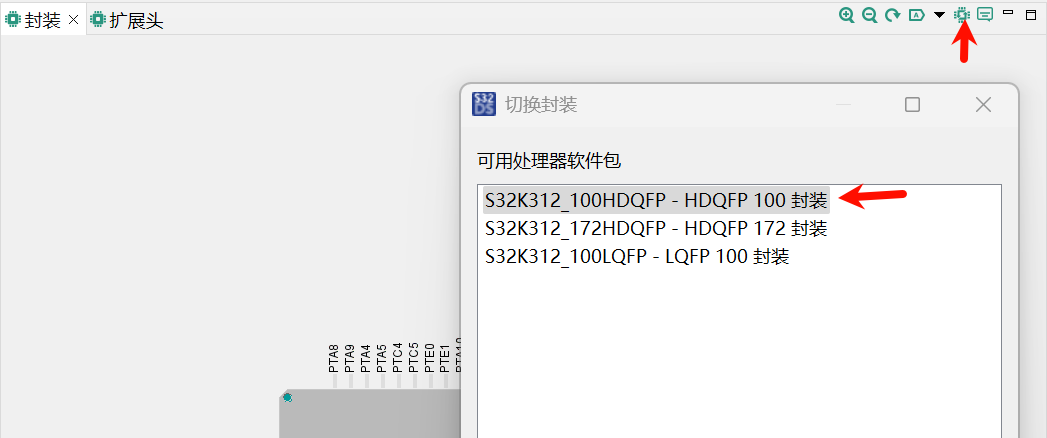
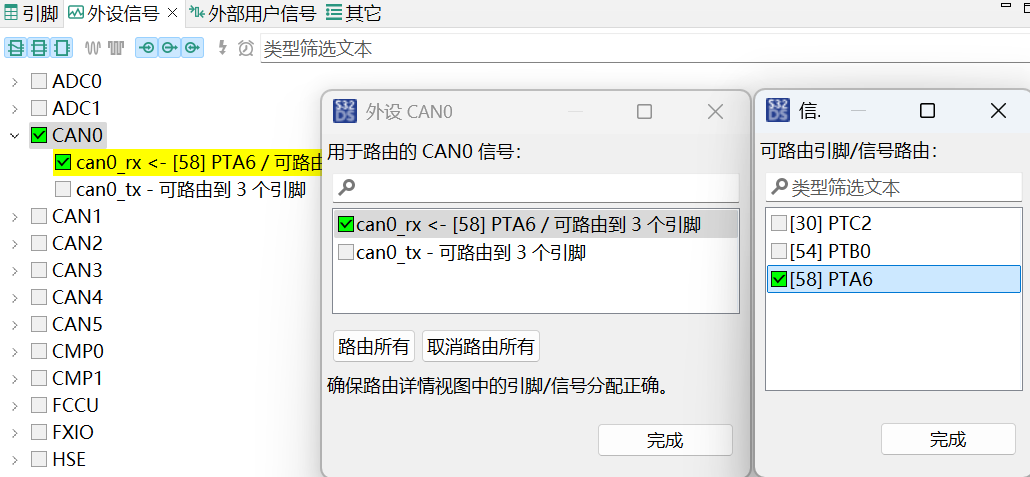
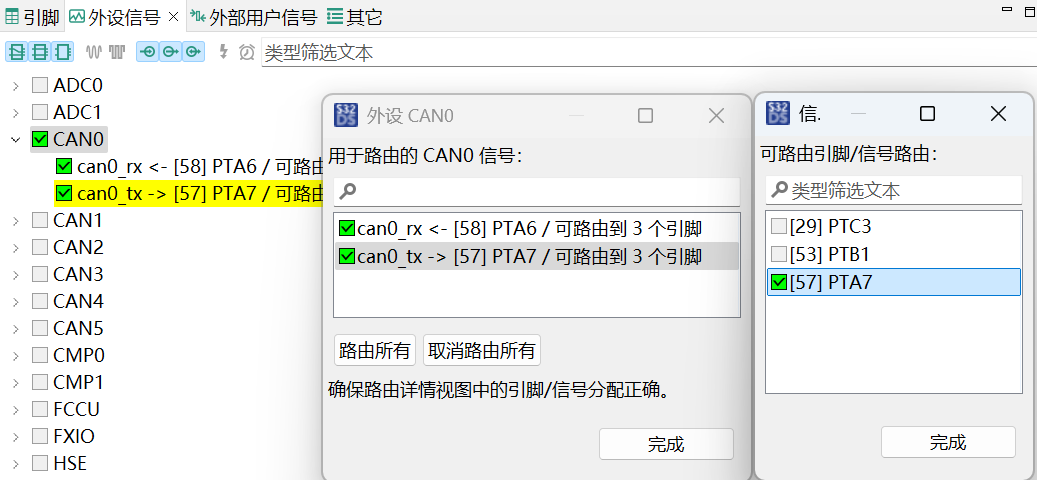
引脚配置:
- CAN0_TX, PTA7
- CAN0_RX, PTA6
时钟配置成使用 AIPS_PLAT_CLK 1分频 得到 60M
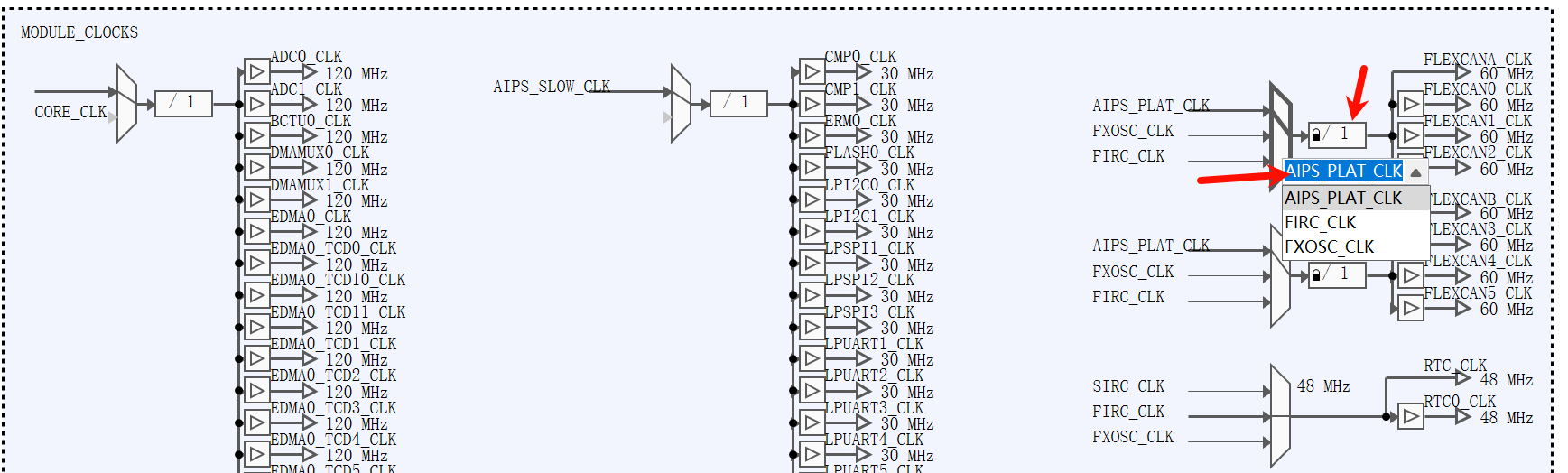
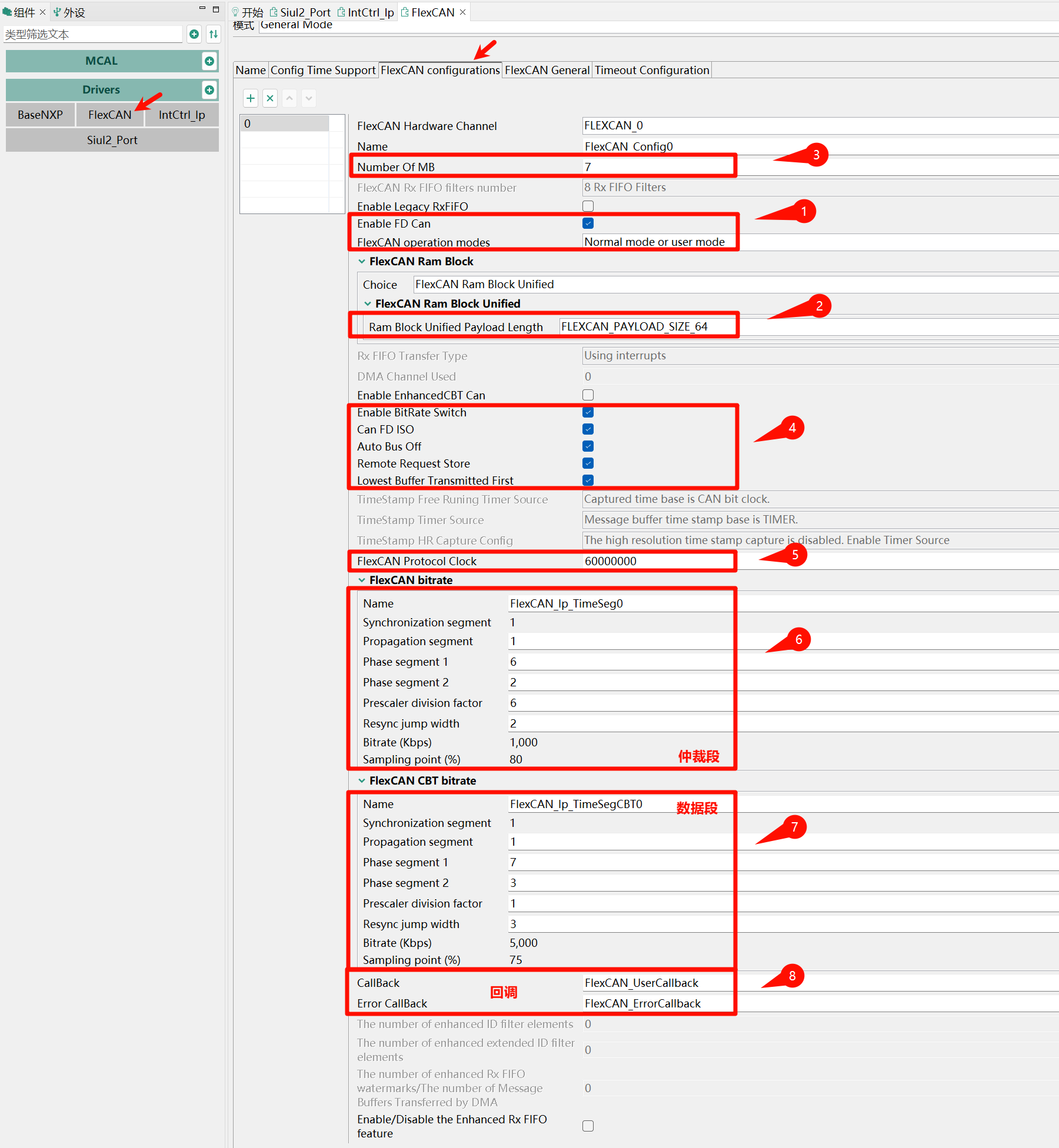
FlexCAN 配置:
- 正常模式
- 64B Payload, RX+TX 7MBs, 这对于其它CAN也适用
- 使能 BRS CANFDISO 远程帧接收 自动BusOff
- 主时钟 60M, 仲裁段 1M 80%, 数据段 5M 75%
- 设置中断回调函数
中断控制器里开中断:
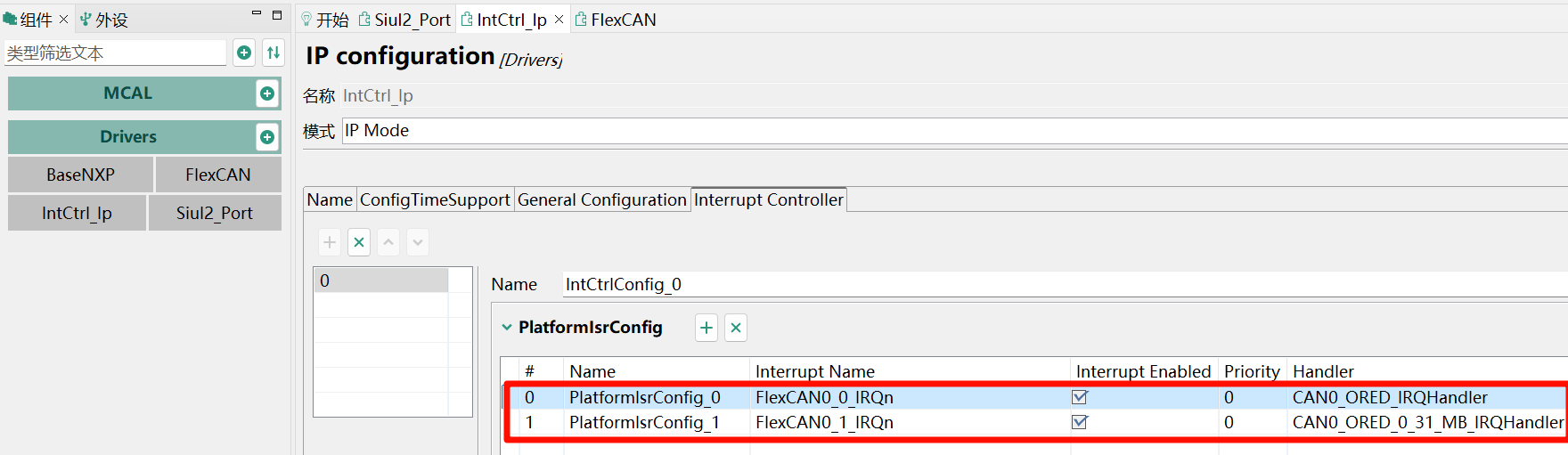
其中:
- Interrupt Name 是
D:\NXP\S32DS.3.6.2\S32DS\software\PlatformSDK_S32K3\RTD\BaseNXP_TS_T40D34M60I0R0\header\S32K312_COMMON.h中定义了的:- FlexCANx_0_IRQn, 用于 Busoff (Interrupt indicating that the CAN bus went to Bus Off state)
- FlexCANx_1_IRQn, 用于 Block0 的指示 (Message Buffer Interrupt line 0-31,ORed Interrupt for Message Buffers)
- Handler 是
s32k3\s32k312_can0\RTD\src\FlexCAN_Ip_Irq.c中定义的- FlexCANx_0_IRQn, Busoff 对应 CAN0_ORED_IRQHandler
- FlexCANx_1_IRQn 对应 CAN0_ORED_0_31_MB_IRQHandler
代码编写
概况:
- 初始化时钟, 引脚, 中断控制器
- 初始化FlexCAN驱动, 设置TDC, 设置接收滤波器(1 STD + 1 EXT), 开始接收
- 发送只用了一个 TX MB, 剩余4个暂且不用
- 连续发送 9标准帧 + 9扩展帧 + 65CANFD_BRS标准帧 + 65CANFD_BRS扩展帧, 合计 148 帧
- 收发都用到了 CircleBuffer, 深度32, 都是 Linux SocketCAN风格, 方便理解
- While 中把收到的帧原封不动回传回去
代码如下:
#include "Clock_Ip.h"
#include "FlexCAN_Ip.h"
#include "FlexCAN_Ip_HwAccess.h"
#include "IntCtrl_Ip.h"
#include "Mcal.h"
#include "Siul2_Port_Ip.h"
#include <stdbool.h>
#include <stdint.h>
#include <string.h>

// Linux SocketCAN 风格
#define CAN_EFF_FLAG 0x80000000U
#define CAN_RTR_FLAG 0x40000000U
#define CAN_ERR_FLAG 0x20000000U
#define CAN_SFF_MASK 0x000007FFU
#define CAN_EFF_MASK 0x1FFFFFFFU
#define CAN_ERR_MASK 0x1FFFFFFFU
#define CANFD_BRS 0x01
#define CANFD_ESI 0x02
#define CANFD_FDF 0x04
typedef uint32_t canid_t;
struct canfd_frame {
  canid_t can_id; /* 32 bit CAN_ID + EFF/RTR/ERR flags */
  uint8_t len;    /* frame payload length in byte */
  uint8_t flags;  /* additional flags for CAN FD */
  uint8_t __res0; /* reserved / padding */
  uint8_t __res1; /* reserved / padding */
  uint8_t data[64];
};

const uint8_t FLEXCAN_INSTANCE = 0; // FlexCAN0
const uint8_t RX_STD_MB_IDX = 0;    // 接收标准帧的消息缓冲区索引
const uint8_t RX_EXT_MB_IDX = 1;    // 接收扩展帧
const uint8_t TX_MBS[5] = {2, 3, 4, 5, 6}; // 发送消息缓冲区索引

static Flexcan_Ip_DataInfoType rx_std_info = {.msg_id_type = FLEXCAN_MSG_ID_STD,
                                              .data_length = 64U,
                                              .is_polling = false,
                                              .is_remote = true};
static Flexcan_Ip_DataInfoType rx_ext_info = {.msg_id_type = FLEXCAN_MSG_ID_EXT,
                                              .data_length = 64U,
                                              .is_polling = false,
                                              .is_remote = true};
static Flexcan_Ip_MsgBuffType can_rx_msg[2];
static volatile uint8_t can_tx_busy = 0;

// 通用环形缓冲区结构体及操作函数
#define CAN_CIRCLE_BUF_SIZE 32
struct canfd_frame_circlebuf {
  struct canfd_frame buf[CAN_CIRCLE_BUF_SIZE];
  volatile uint8_t head;
  volatile uint8_t tail;
  volatile uint8_t ready;
};

static inline int
canfd_cbuf_is_empty(const struct canfd_frame_circlebuf *cbuf) {
  return cbuf->head == cbuf->tail;
}

static inline int canfd_cbuf_is_full(const struct canfd_frame_circlebuf *cbuf) {
  return ((cbuf->head + 1) % CAN_CIRCLE_BUF_SIZE) == cbuf->tail;
}

static inline int canfd_cbuf_push(struct canfd_frame_circlebuf *cbuf,
                                  const struct canfd_frame *frame) {
  if (canfd_cbuf_is_full(cbuf)) {
    return -1; // 满
  }
  memcpy(&cbuf->buf[cbuf->head], frame, sizeof(struct canfd_frame));
  cbuf->head = (cbuf->head + 1) % CAN_CIRCLE_BUF_SIZE;
  cbuf->ready = 1;
  return 0;
}

static inline int canfd_cbuf_pop(struct canfd_frame_circlebuf *cbuf,
                                 struct canfd_frame *frame) {
  if (canfd_cbuf_is_empty(cbuf)) {
    cbuf->ready = 0;
    return -1; // 空
  }
  memcpy(frame, &cbuf->buf[cbuf->tail], sizeof(struct canfd_frame));
  cbuf->tail = (cbuf->tail + 1) % CAN_CIRCLE_BUF_SIZE;
  if (cbuf->tail == cbuf->head) {
    cbuf->ready = 0;
  }
  return 0;
}

struct canfd_frame_circlebuf can_rx_cbuf = {.head = 0, .tail = 0, .ready = 0};
struct canfd_frame_circlebuf can_tx_cbuf = {.head = 0, .tail = 0, .ready = 0};

// FlexCAN消息与canfd_frame转换
static inline void flexcan_msg_to_canfd_frame(const Flexcan_Ip_MsgBuffType *msg,
                                              struct canfd_frame *frame) {
  bool is_ext = !!(msg->cs & FLEXCAN_IP_CS_IDE_MASK);
  bool is_fdf = !!(msg->cs & FLEXCAN_IP_MB_EDL_MASK);
  bool is_brs = !!(msg->cs & FLEXCAN_IP_MB_BRS_MASK);
  bool is_rmt = !!(msg->cs & FLEXCAN_IP_CS_RTR_MASK);
  uint8_t dlc = (msg->cs & FLEXCAN_IP_CS_DLC_MASK) >> FLEXCAN_IP_CS_DLC_SHIFT;
  const uint8_t dlc2len[16] = {0, 1,  2,  3,  4,  5,  6,  7,
                               8, 12, 16, 20, 24, 32, 48, 64};
  frame->can_id =
      msg->msgId | (is_ext ? CAN_EFF_FLAG : 0) | (is_rmt ? CAN_RTR_FLAG : 0);
  frame->len = dlc2len[dlc];
  frame->flags = (is_fdf ? CANFD_FDF : 0) | (is_brs ? CANFD_BRS : 0);
  memcpy(frame->data, msg->data, frame->len);
}

// canfd_frame 到 FlexCAN 发送参数的转换
static inline void canfd_frame_to_tx(const struct canfd_frame *frame,
                                     Flexcan_Ip_DataInfoType *tx_info,
                                     uint32_t *msg_id, uint8_t *data) {
  tx_info->msg_id_type =
      (frame->can_id & CAN_EFF_FLAG) ? FLEXCAN_MSG_ID_EXT : FLEXCAN_MSG_ID_STD;
  tx_info->data_length = frame->len;
  tx_info->is_remote = (frame->can_id & CAN_RTR_FLAG) ? true : false;
  tx_info->is_polling = false;
  tx_info->enable_brs = (frame->flags & CANFD_BRS) ? true : false;
  tx_info->fd_enable =
      (tx_info->enable_brs || (frame->flags & CANFD_FDF)) ? true : false;
  tx_info->fd_padding = 0;
  *msg_id = frame->can_id & CAN_EFF_FLAG ? (frame->can_id & CAN_EFF_MASK)
                                         : (frame->can_id & CAN_SFF_MASK);
  memcpy(data, frame->data, frame->len);
}

extern void FlexCAN_UserCallback(uint8 instance, Flexcan_Ip_EventType eventType,
                                 uint32 buffIdx,
                                 const Flexcan_Ip_StateType *flexcanState) {
  (void)flexcanState;
  if (FLEXCAN_EVENT_RX_COMPLETE == eventType) {
    if (buffIdx >= sizeof(can_rx_msg) / sizeof(can_rx_msg[0])) {
      // 错误处理: 缓冲区索引超出范围
      return;
    }
    struct canfd_frame frame;
    flexcan_msg_to_canfd_frame(&can_rx_msg[buffIdx], &frame);
    canfd_cbuf_push(&can_rx_cbuf, &frame);
    // re-enable reception for the next message
    FlexCAN_Ip_Receive(instance, buffIdx, &can_rx_msg[buffIdx], false);
  } else if (FLEXCAN_EVENT_TX_COMPLETE == eventType) {
    // 发送完成, 检查软件环形缓冲区是否有待发送帧
    struct canfd_frame frame;
    if (canfd_cbuf_pop(&can_tx_cbuf, &frame) == 0) {
      Flexcan_Ip_DataInfoType tx_info;
      uint32_t msg_id;
      uint8_t data[64];
      canfd_frame_to_tx(&frame, &tx_info, &msg_id, data);
      int ret = FlexCAN_Ip_Send(instance, TX_MBS[0], &tx_info, msg_id, data);
      if (ret == FLEXCAN_STATUS_SUCCESS) {
        can_tx_busy = 1;
      } else {
        // 发送失败,等待下次中断再尝试
      }
    } else {
      can_tx_busy = 0;
    }
  }
}

extern void FlexCAN_ErrorCallback(uint8 instance,
                                  Flexcan_Ip_EventType eventType,
                                  uint32 u32ErrStatus,
                                  const Flexcan_Ip_StateType *flexcanState) {
  (void)instance;
  (void)eventType;
  (void)u32ErrStatus;
  (void)flexcanState;
}

// Linux SocketCAN 风格的发送函数
int bsp_can_send(int channel, struct canfd_frame *frame) {
  FlexCAN_Ip_DisableInterrupts(channel);
  if (!can_tx_busy) {
    Flexcan_Ip_DataInfoType tx_info;
    uint32_t msg_id;
    uint8_t data[64];
    canfd_frame_to_tx(frame, &tx_info, &msg_id, data);
    int ret =
        FlexCAN_Ip_Send((uint8_t)channel, TX_MBS[0], &tx_info, msg_id, data);
    if (ret == FLEXCAN_STATUS_SUCCESS) {
      can_tx_busy = 1;
      FlexCAN_Ip_EnableInterrupts(channel);
      return 0;
    } else if (ret == FLEXCAN_STATUS_BUFF_OUT_OF_RANGE) {
      FlexCAN_Ip_EnableInterrupts(channel);
      return -1;
    } else if (ret == FLEXCAN_STATUS_BUSY) {
      // 放入软件环形缓冲区
      if (canfd_cbuf_push(&can_tx_cbuf, frame) != 0) {
        FlexCAN_Ip_EnableInterrupts(channel);
        return -4; // 缓冲区满
      }
      FlexCAN_Ip_EnableInterrupts(channel);
      return 1;
    } else {
      FlexCAN_Ip_EnableInterrupts(channel);
      return -3;
    }
  } else {
    // 正在发送,放入软件环形缓冲区
    if (canfd_cbuf_push(&can_tx_cbuf, frame) != 0) {
      FlexCAN_Ip_EnableInterrupts(channel);
      return -4; // 缓冲区满
    }
    FlexCAN_Ip_EnableInterrupts(channel);
    return 0;
  }
}

// less than 100us? delay
void delay(int count) {
  int cnt = count * 1200;
  while (cnt--) {
    __asm__ volatile("nop");
  }
}

int main(void) {
  /* 初始化时钟, 引脚, 中断控制器 */
  Clock_Ip_Init(&Clock_Ip_aClockConfig[0]);
  Siul2_Port_Ip_Init(
      NUM_OF_CONFIGURED_PINS_PortContainer_0_BOARD_InitPeripherals,
      g_pin_mux_InitConfigArr_PortContainer_0_BOARD_InitPeripherals);
  IntCtrl_Ip_Init(&IntCtrlConfig_0);

  /* 初始化FlexCAN驱动 */
  FlexCAN_Ip_Init(FLEXCAN_INSTANCE, &FlexCAN_State0, &FlexCAN_Config0);
  // TDC: 60M/5M*0.75 = 9
  FlexCAN_Ip_SetTDCOffset(FLEXCAN_INSTANCE, TRUE, 9U);
  // rx filter, mb0: std, mb1: ext, id:mask = 0:0
  FlexCAN_Ip_SetRxMaskType(FLEXCAN_INSTANCE, FLEXCAN_RX_MASK_INDIVIDUAL);
  FlexCAN_Ip_SetRxIndividualMask(FLEXCAN_INSTANCE, RX_STD_MB_IDX, 0x0U);
  FlexCAN_Ip_ConfigRxMb(FLEXCAN_INSTANCE, RX_STD_MB_IDX, &rx_std_info, 0x0U);
  FlexCAN_Ip_SetRxIndividualMask(FLEXCAN_INSTANCE, RX_EXT_MB_IDX, 0x0U);
  FlexCAN_Ip_ConfigRxMb(FLEXCAN_INSTANCE, RX_EXT_MB_IDX, &rx_ext_info, 0x0U);
  // start FlexCAN
  FlexCAN_Ip_SetStartMode(FLEXCAN_INSTANCE);

  // 开始接收
  FlexCAN_Ip_Receive(FLEXCAN_INSTANCE, RX_STD_MB_IDX, &can_rx_msg[0], false);
  FlexCAN_Ip_Receive(FLEXCAN_INSTANCE, RX_EXT_MB_IDX, &can_rx_msg[1], false);

  // 发送测试, 合计 9+9+65+65 = 148 帧
  struct canfd_frame frame;
  int i;

  // 0~8字节标准CAN帧
  for (i = 0; i <= 8; i++) {
    frame.can_id = 0x123 + i;
    frame.len = i;
    frame.flags = 0;
    memset(frame.data, 0xA5, i);
    while (bsp_can_send(FLEXCAN_INSTANCE, &frame) != 0) {
      // delay(1);
    }
  }

  // 0~8字节扩展CAN帧
  for (i = 0; i <= 8; i++) {
    frame.can_id = (0x12345678 | CAN_EFF_FLAG) + i;
    frame.len = i;
    frame.flags = 0;
    memset(frame.data, 0x5A, i);
    while (bsp_can_send(FLEXCAN_INSTANCE, &frame) != 0) {
      // delay(1);
    }
  }

  // CANFD 不带BRS 测试略

  // 0~64字节 CANFD/CANFD_BRS 标准帧
  for (i = 0; i <= 64; i++) {
    frame.can_id = 0x321 + i;
    frame.len = i;
    frame.flags = CANFD_FDF | CANFD_BRS;
    memset(frame.data, 0x11, i);
    while (bsp_can_send(FLEXCAN_INSTANCE, &frame) != 0) {
      // delay(1);
    }
  }

  // 0~64字节 CANFD/CANFD_BRS 扩展帧
  for (i = 0; i <= 64; i++) {
    frame.can_id = (0x12ABCEDF | CAN_EFF_FLAG) + i;
    frame.len = i;
    frame.flags = CANFD_FDF | CANFD_BRS;
    memset(frame.data, 0x22, i);
    while (bsp_can_send(FLEXCAN_INSTANCE, &frame) != 0) {
      // delay(1);
    }
  }

  while (1) {
    // 检查是否有接收到的帧
    struct canfd_frame frame;
    while (canfd_cbuf_pop(&can_rx_cbuf, &frame) == 0) {
      // echo 回去
      while (bsp_can_send(FLEXCAN_INSTANCE, &frame) != 0) {
        delay(1);
      }
    }
  }

  return 0;
}
收发测试
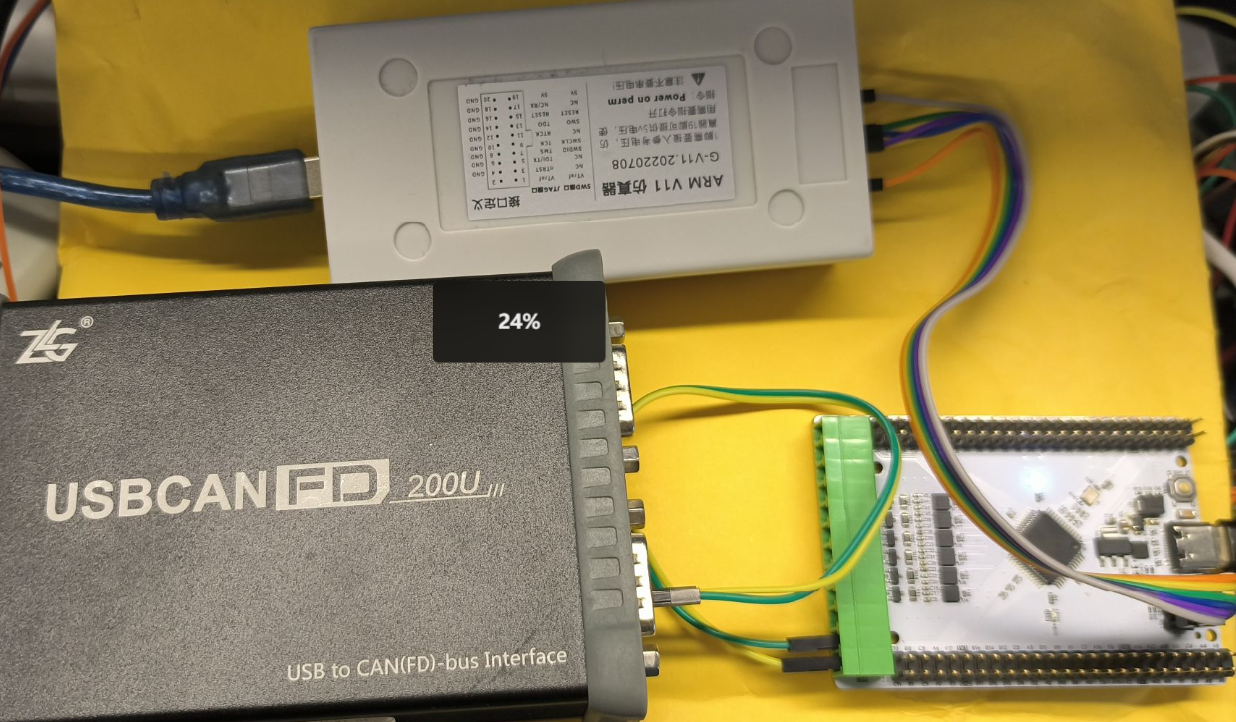
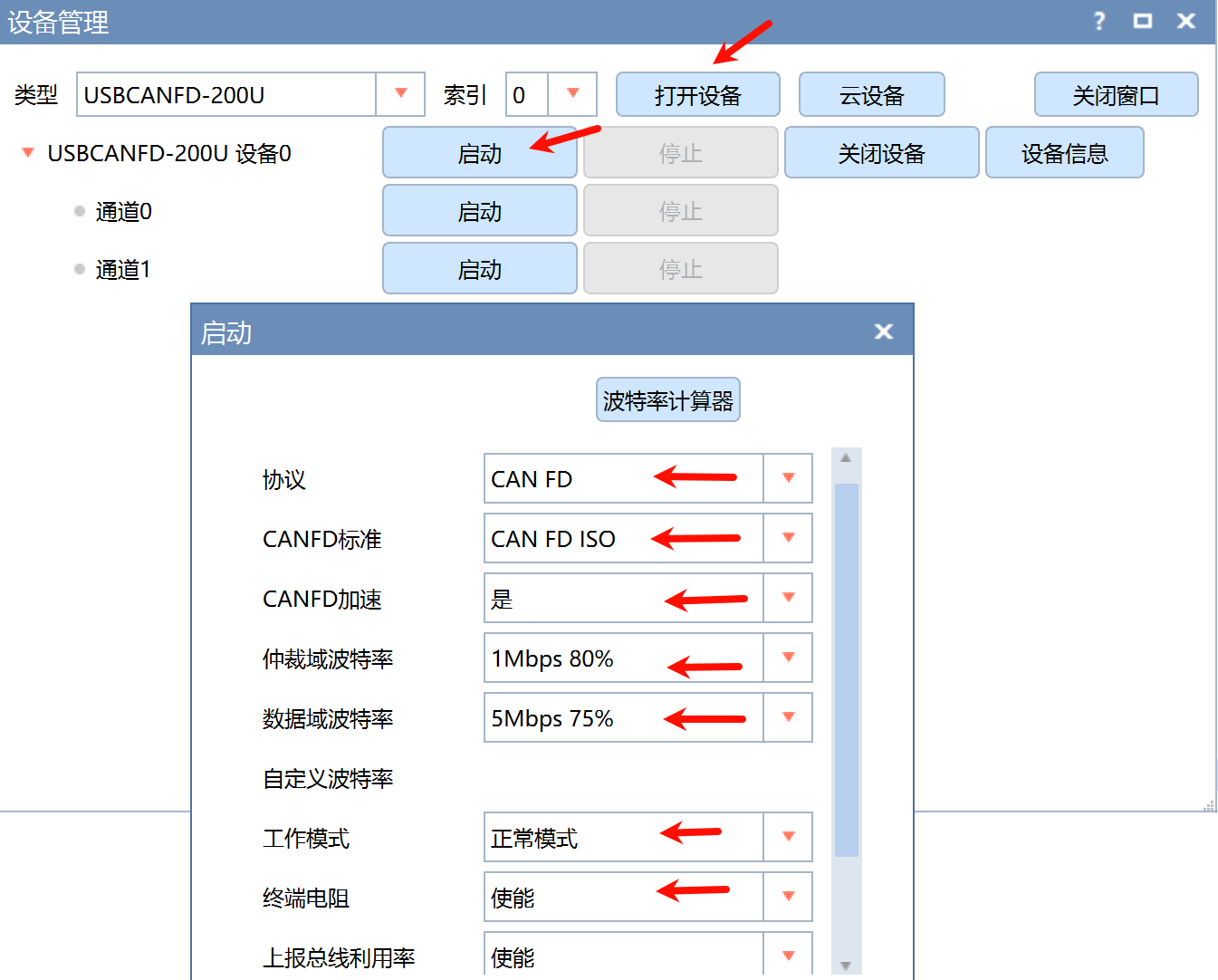
打开 ZCANPro, 设置 1M+5M, 开中断电阻, S32K312板子上也焊接好了 120Ω 终端电阻:
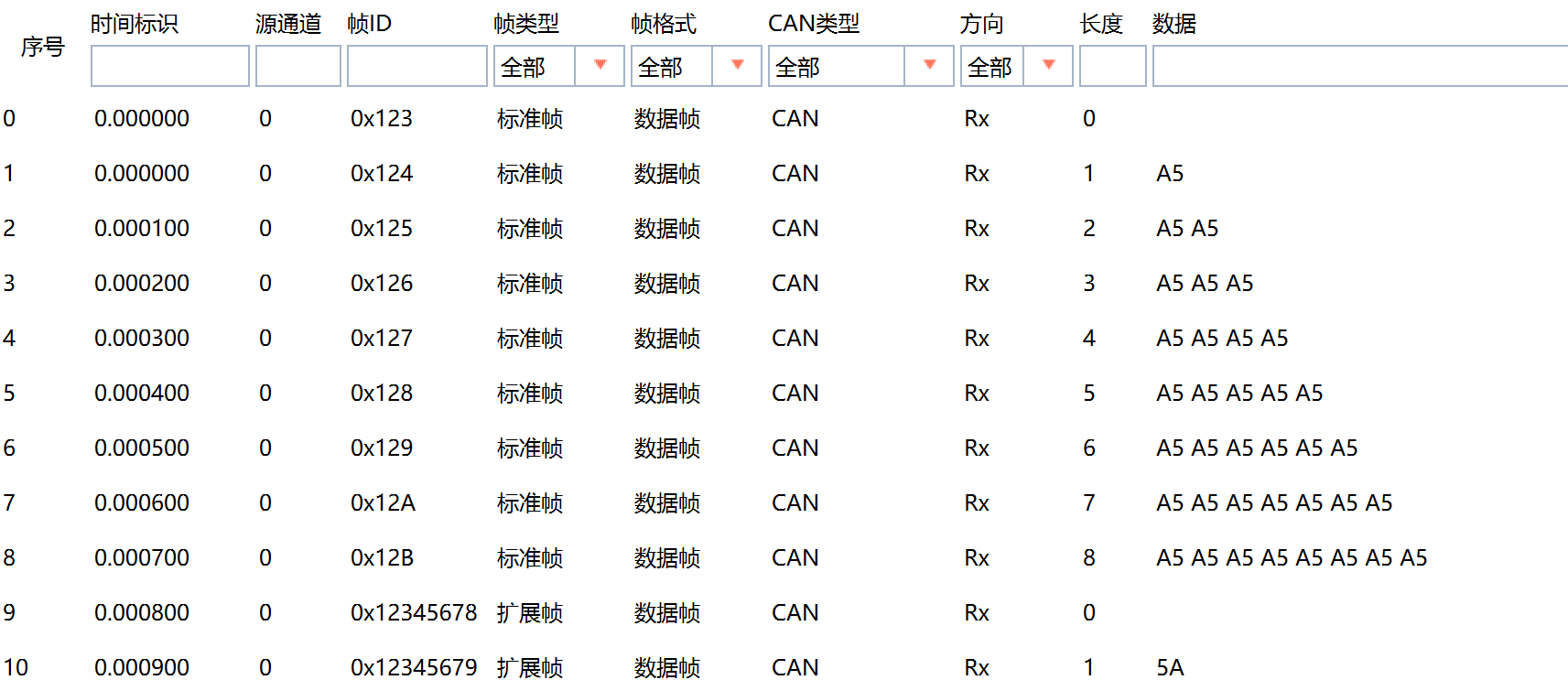
下载程序, 初始 148 帧的发送:
padding, len 填充9, 但是 canfd 标准长度没有9, 就自动扩充到 12, 不够的数据补 0
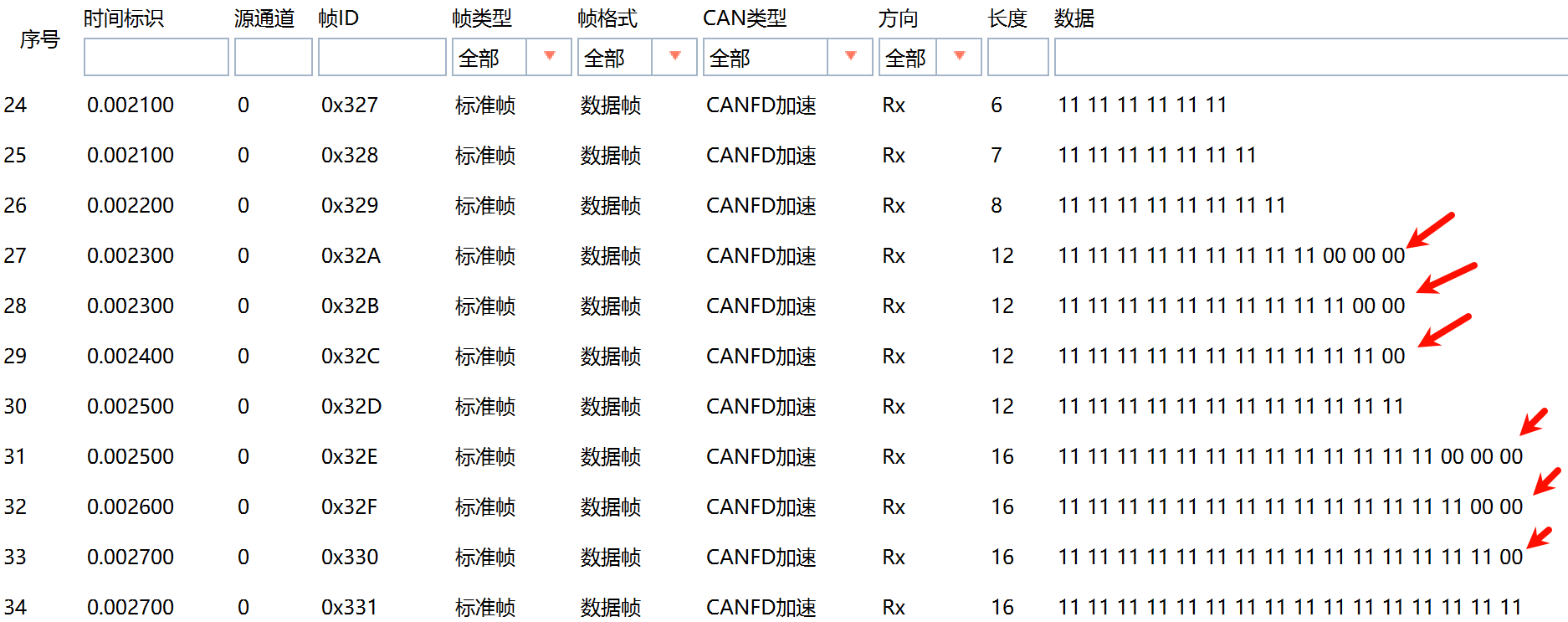
64字节
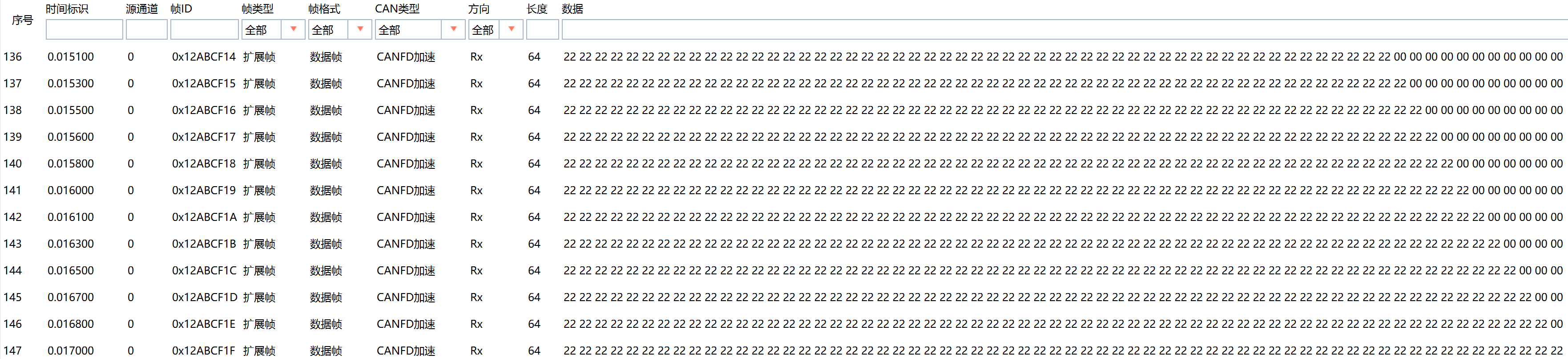
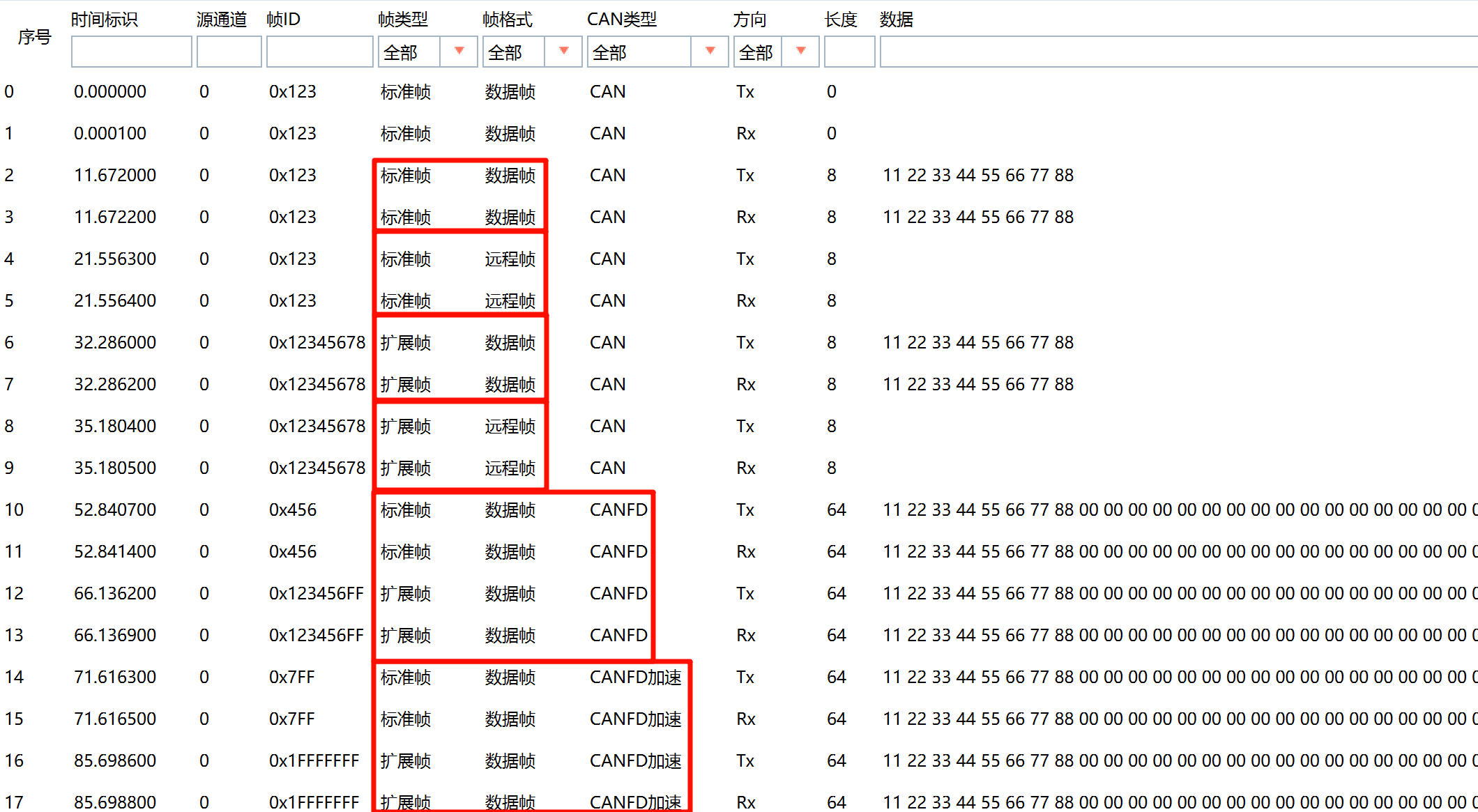
之后清空, 测试 收发回传, 如下对 标准/扩展帧, 数据/远程帧, CAN/CANFD/CANFD加速 都进行了测试:
6路 CANFD
引脚 时钟 FlexCAN 中断
引脚配置: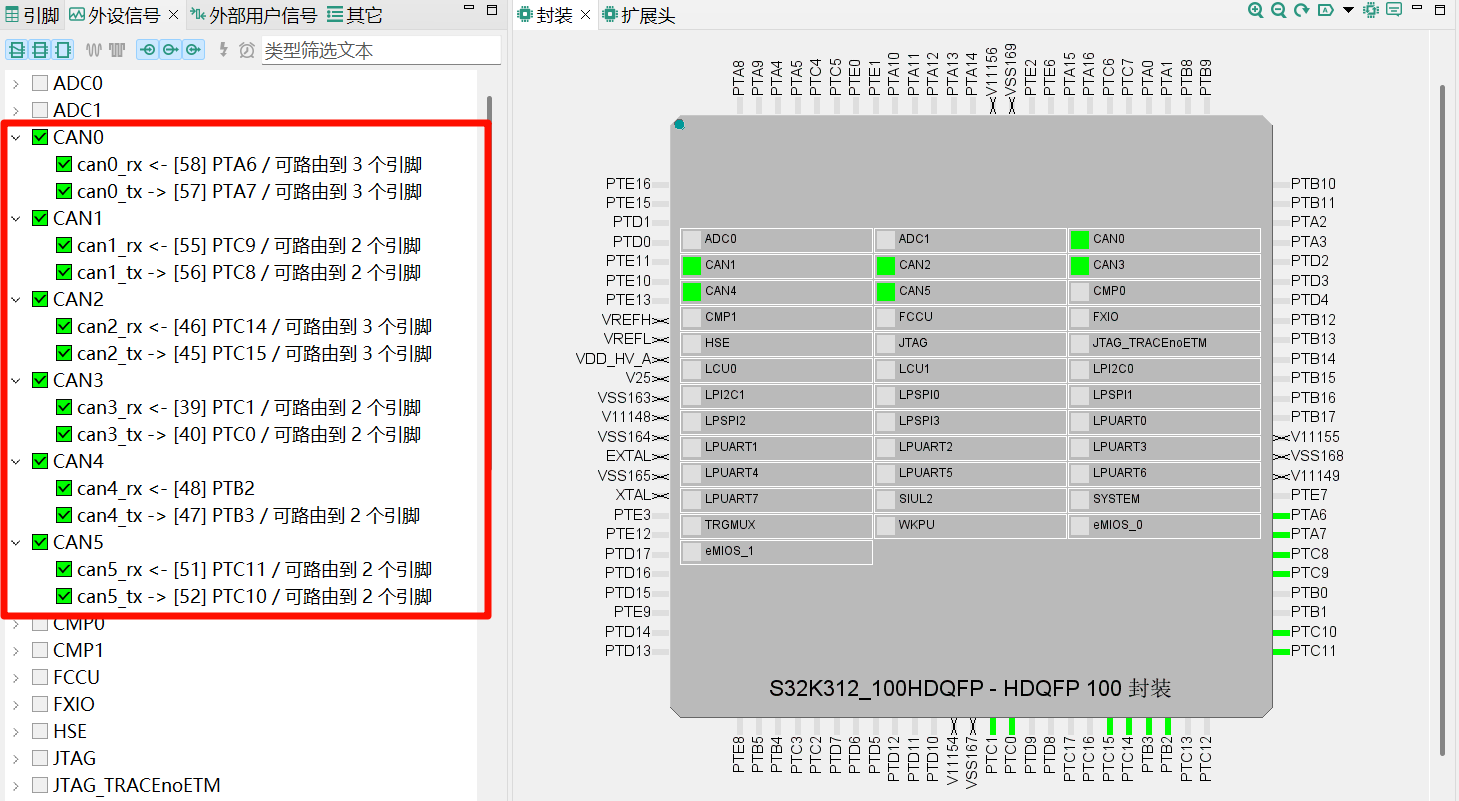
时钟配置成 60MHz 主时钟:
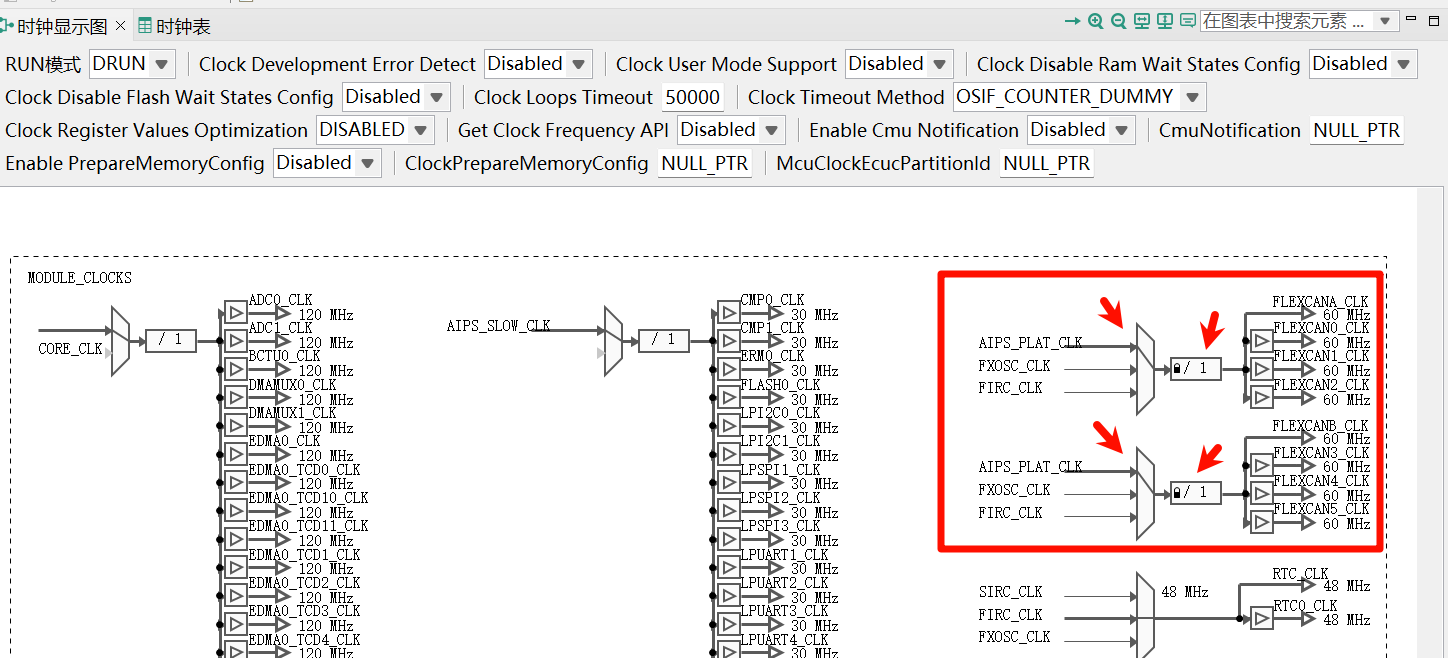
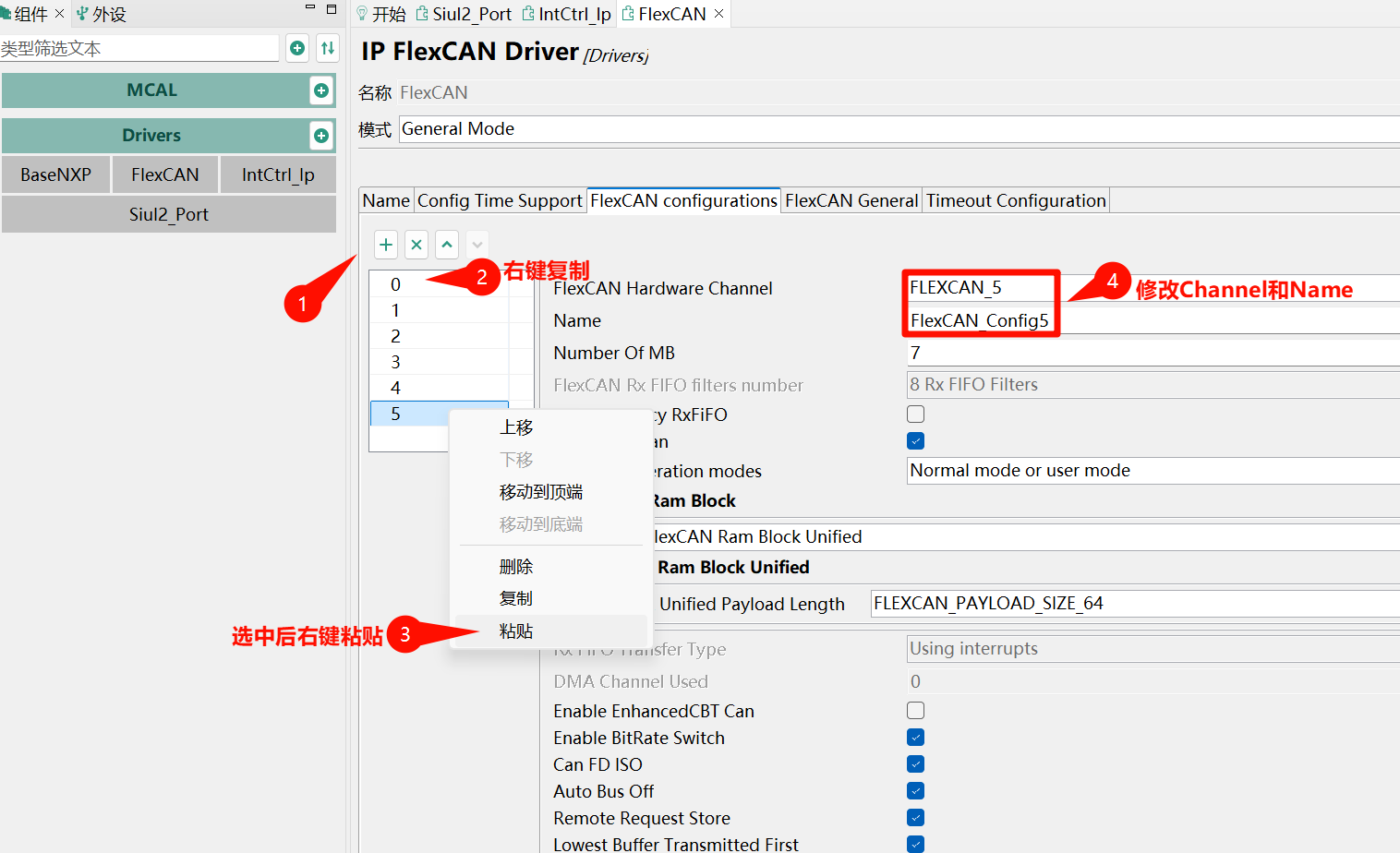
FlexCAN 先按照上节配置好 CAN0, 然后右键复制, 粘贴出其它5路, 修改 Channel 和 Name 即可:
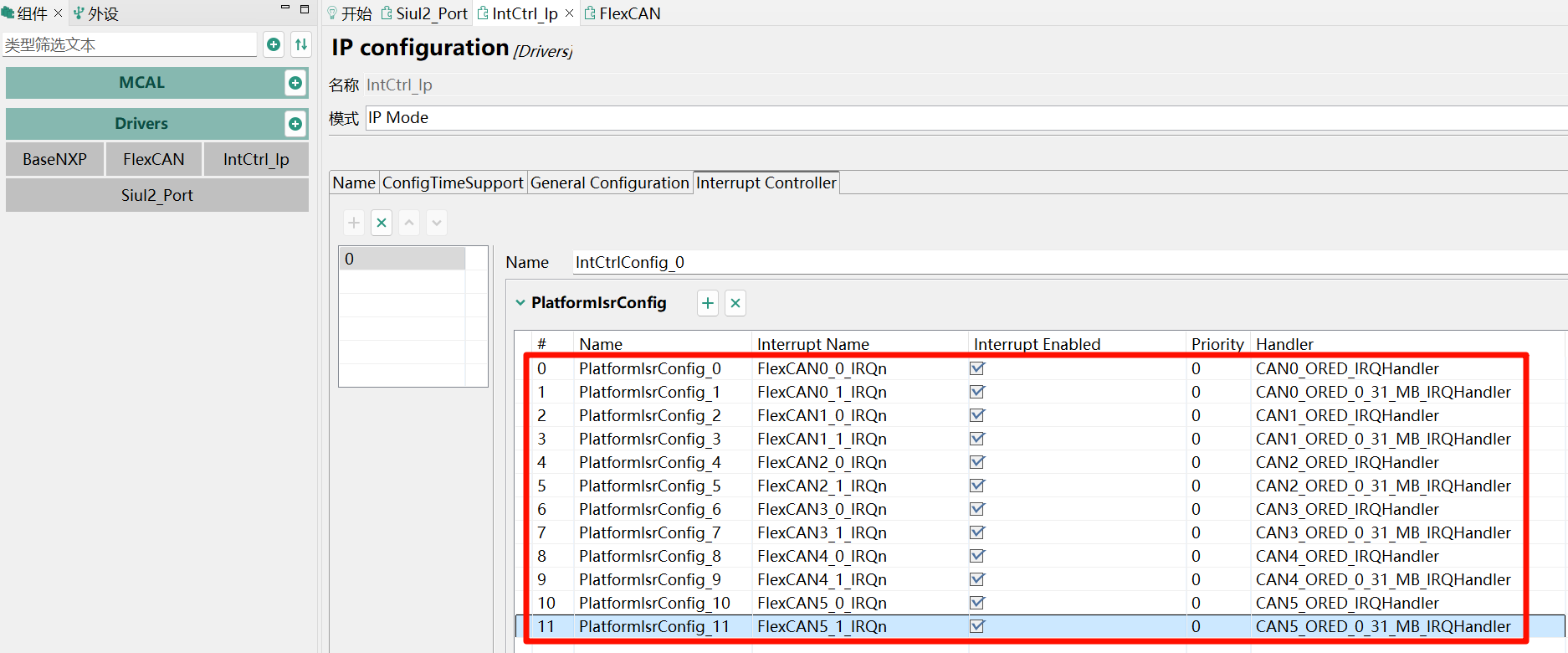
中断配置:
代码编写
实现6路 CANFD 的初始化和 echo 回传:
#include "Clock_Ip.h"
#include "FlexCAN_Ip.h"
#include "FlexCAN_Ip_HwAccess.h"
#include "IntCtrl_Ip.h"
#include "Mcal.h"
#include "Siul2_Port_Ip.h"
#include <stdbool.h>
#include <stdint.h>
#include <string.h>

#define CAN_EFF_FLAG 0x80000000U
#define CAN_RTR_FLAG 0x40000000U
#define CAN_EFF_MASK 0x1FFFFFFFU
#define CAN_SFF_MASK 0x000007FFU
#define CANFD_BRS 0x01
#define CANFD_FDF 0x04
#define CAN_CIRCLE_BUF_SIZE 32
#define CAN_CHANNEL_NUM 6

typedef uint32_t canid_t;
struct canfd_frame {
  canid_t can_id;
  uint8_t len;
  uint8_t flags;
  uint8_t __res0;
  uint8_t __res1;
  uint8_t data[64];
};

struct canfd_frame_circlebuf {
  struct canfd_frame buf[CAN_CIRCLE_BUF_SIZE];
  volatile uint8_t head;
  volatile uint8_t tail;
  volatile uint8_t ready;
};

static inline int canfd_cbuf_is_empty(const struct canfd_frame_circlebuf *cbuf) {
  return cbuf->head == cbuf->tail;
}
static inline int canfd_cbuf_is_full(const struct canfd_frame_circlebuf *cbuf) {
  return ((cbuf->head + 1) % CAN_CIRCLE_BUF_SIZE) == cbuf->tail;
}
static inline int canfd_cbuf_push(struct canfd_frame_circlebuf *cbuf, const struct canfd_frame *frame) {
  if (canfd_cbuf_is_full(cbuf)) return -1;
  memcpy(&cbuf->buf[cbuf->head], frame, sizeof(struct canfd_frame));
  cbuf->head = (cbuf->head + 1) % CAN_CIRCLE_BUF_SIZE;
  cbuf->ready = 1;
  return 0;
}
static inline int canfd_cbuf_pop(struct canfd_frame_circlebuf *cbuf, struct canfd_frame *frame) {
  if (canfd_cbuf_is_empty(cbuf)) { cbuf->ready = 0; return -1; }
  memcpy(frame, &cbuf->buf[cbuf->tail], sizeof(struct canfd_frame));
  cbuf->tail = (cbuf->tail + 1) % CAN_CIRCLE_BUF_SIZE;
  if (cbuf->tail == cbuf->head) cbuf->ready = 0;
  return 0;
}

// 6路实例相关定义
const uint8_t FLEXCAN_INSTANCE[CAN_CHANNEL_NUM] = {0,1,2,3,4,5};
const uint8_t RX_STD_MB_IDX = 0;
const uint8_t RX_EXT_MB_IDX = 1;
static Flexcan_Ip_MsgBuffType can_rx_msg[CAN_CHANNEL_NUM][2];
static volatile uint8_t can_tx_busy[CAN_CHANNEL_NUM] = {0};
// 未初始化 .bss, 初始化 .data
__attribute__((section(".dtcm_bss"))) struct canfd_frame_circlebuf can_rx_cbuf[CAN_CHANNEL_NUM];
__attribute__((section(".dtcm_bss"))) struct canfd_frame_circlebuf can_tx_cbuf[CAN_CHANNEL_NUM];

static Flexcan_Ip_DataInfoType rx_std_info[CAN_CHANNEL_NUM];
static Flexcan_Ip_DataInfoType rx_ext_info[CAN_CHANNEL_NUM];

// FlexCAN消息与canfd_frame转换
static inline void flexcan_msg_to_canfd_frame(const Flexcan_Ip_MsgBuffType *msg, struct canfd_frame *frame) {
  bool is_ext = !!(msg->cs & FLEXCAN_IP_CS_IDE_MASK);
  bool is_fdf = !!(msg->cs & FLEXCAN_IP_MB_EDL_MASK);
  bool is_brs = !!(msg->cs & FLEXCAN_IP_MB_BRS_MASK);
  bool is_rmt = !!(msg->cs & FLEXCAN_IP_CS_RTR_MASK);
  uint8_t dlc = (msg->cs & FLEXCAN_IP_CS_DLC_MASK) >> FLEXCAN_IP_CS_DLC_SHIFT;
  const uint8_t dlc2len[16] = {0, 1, 2, 3, 4, 5, 6, 7, 8, 12, 16, 20, 24, 32, 48, 64};
  frame->can_id = msg->msgId | (is_ext ? CAN_EFF_FLAG : 0) | (is_rmt ? CAN_RTR_FLAG : 0);
  frame->len = dlc2len[dlc];
  frame->flags = (is_fdf ? CANFD_FDF : 0) | (is_brs ? CANFD_BRS : 0);
  memcpy(frame->data, msg->data, frame->len);
}

static inline void canfd_frame_to_tx(const struct canfd_frame *frame, Flexcan_Ip_DataInfoType *tx_info, uint32_t *msg_id, uint8_t *data) {
  tx_info->msg_id_type = (frame->can_id & CAN_EFF_FLAG) ? FLEXCAN_MSG_ID_EXT : FLEXCAN_MSG_ID_STD;
  tx_info->data_length = frame->len;
  tx_info->is_remote = (frame->can_id & CAN_RTR_FLAG) ? true : false;
  tx_info->is_polling = false;
  tx_info->enable_brs = (frame->flags & CANFD_BRS) ? true : false;
  tx_info->fd_enable = (tx_info->enable_brs || (frame->flags & CANFD_FDF)) ? true : false;
  tx_info->fd_padding = 0;
  *msg_id = frame->can_id & CAN_EFF_FLAG ? (frame->can_id & CAN_EFF_MASK) : (frame->can_id & CAN_SFF_MASK);
  memcpy(data, frame->data, frame->len);
}

// 回调函数
void FlexCAN_UserCallback(uint8 instance, Flexcan_Ip_EventType eventType, uint32 buffIdx, const Flexcan_Ip_StateType *flexcanState) {
  (void)flexcanState;
  if (FLEXCAN_EVENT_RX_COMPLETE == eventType) {
    if (buffIdx >= 2) return;
    struct canfd_frame frame;
    flexcan_msg_to_canfd_frame(&can_rx_msg[instance][buffIdx], &frame);
    canfd_cbuf_push(&can_rx_cbuf[instance], &frame);
    FlexCAN_Ip_Receive(instance, buffIdx, &can_rx_msg[instance][buffIdx], false);
  } else if (FLEXCAN_EVENT_TX_COMPLETE == eventType) {
    struct canfd_frame frame;
    if (canfd_cbuf_pop(&can_tx_cbuf[instance], &frame) == 0) {
      Flexcan_Ip_DataInfoType tx_info;
      uint32_t msg_id;
      uint8_t data[64];
      canfd_frame_to_tx(&frame, &tx_info, &msg_id, data);
      int ret = FlexCAN_Ip_Send(instance, 2, &tx_info, msg_id, data);
      if (ret == FLEXCAN_STATUS_SUCCESS) {
        can_tx_busy[instance] = 1;
      }
    } else {
      can_tx_busy[instance] = 0;
    }
  }
}

void FlexCAN_ErrorCallback(uint8 instance, Flexcan_Ip_EventType eventType, uint32 u32ErrStatus, const Flexcan_Ip_StateType *flexcanState) {
  (void)instance; (void)eventType; (void)u32ErrStatus; (void)flexcanState;
}

int bsp_can_send(uint8 channel, struct canfd_frame *frame) {
  FlexCAN_Ip_DisableInterrupts(channel);
  if (!can_tx_busy[channel]) {
    Flexcan_Ip_DataInfoType tx_info;
    uint32_t msg_id;
    uint8_t data[64];
    canfd_frame_to_tx(frame, &tx_info, &msg_id, data);
    int ret = FlexCAN_Ip_Send(channel, 2, &tx_info, msg_id, data);
    if (ret == FLEXCAN_STATUS_SUCCESS) {
      can_tx_busy[channel] = 1;
      FlexCAN_Ip_EnableInterrupts(channel);
      return 0;
    } else if (ret == FLEXCAN_STATUS_BUFF_OUT_OF_RANGE) {
      FlexCAN_Ip_EnableInterrupts(channel);
      return -1;
    } else if (ret == FLEXCAN_STATUS_BUSY) {
      if (canfd_cbuf_push(&can_tx_cbuf[channel], frame) != 0) {
        FlexCAN_Ip_EnableInterrupts(channel);
        return -4;
      }
      FlexCAN_Ip_EnableInterrupts(channel);
      return 1;
    } else {
      FlexCAN_Ip_EnableInterrupts(channel);
      return -3;
    }
  } else {
    if (canfd_cbuf_push(&can_tx_cbuf[channel], frame) != 0) {
      FlexCAN_Ip_EnableInterrupts(channel);
      return -4;
    }
    FlexCAN_Ip_EnableInterrupts(channel);
    return 0;
  }
}

void delay(int count) {
  int cnt = count * 1200;
  while (cnt--) {
    __asm__ volatile("nop");
  }
}

int main(void) {
  Clock_Ip_Init(&Clock_Ip_aClockConfig[0]);
  Siul2_Port_Ip_Init(NUM_OF_CONFIGURED_PINS_PortContainer_0_BOARD_InitPeripherals,
                     g_pin_mux_InitConfigArr_PortContainer_0_BOARD_InitPeripherals);
  IntCtrl_Ip_Init(&IntCtrlConfig_0);

  // 初始化6路FlexCAN
  FlexCAN_Ip_Init(0, &FlexCAN_State0, &FlexCAN_Config0);
  FlexCAN_Ip_Init(1, &FlexCAN_State1, &FlexCAN_Config1);
  FlexCAN_Ip_Init(2, &FlexCAN_State2, &FlexCAN_Config2);
  FlexCAN_Ip_Init(3, &FlexCAN_State3, &FlexCAN_Config3);
  FlexCAN_Ip_Init(4, &FlexCAN_State4, &FlexCAN_Config4);
  FlexCAN_Ip_Init(5, &FlexCAN_State5, &FlexCAN_Config5);
  for (uint8_t ch = 0; ch < CAN_CHANNEL_NUM; ch++) {
    FlexCAN_Ip_SetTDCOffset(ch, TRUE, 9U);
    FlexCAN_Ip_SetRxMaskType(ch, FLEXCAN_RX_MASK_INDIVIDUAL);
    FlexCAN_Ip_SetRxIndividualMask(ch, RX_STD_MB_IDX, 0x0U);
    rx_std_info[ch].msg_id_type = FLEXCAN_MSG_ID_STD;
    rx_std_info[ch].data_length = 64U;
    rx_std_info[ch].is_polling = false;
    rx_std_info[ch].is_remote = true;
    FlexCAN_Ip_ConfigRxMb(ch, RX_STD_MB_IDX, &rx_std_info[ch], 0x0U);
    FlexCAN_Ip_SetRxIndividualMask(ch, RX_EXT_MB_IDX, 0x0U);
    rx_ext_info[ch].msg_id_type = FLEXCAN_MSG_ID_EXT;
    rx_ext_info[ch].data_length = 64U;
    rx_ext_info[ch].is_polling = false;
    rx_ext_info[ch].is_remote = true;
    FlexCAN_Ip_ConfigRxMb(ch, RX_EXT_MB_IDX, &rx_ext_info[ch], 0x0U);
    FlexCAN_Ip_SetStartMode(ch);
    can_rx_cbuf[ch].head = can_rx_cbuf[ch].tail = can_rx_cbuf[ch].ready = 0;
    can_tx_cbuf[ch].head = can_tx_cbuf[ch].tail = can_tx_cbuf[ch].ready = 0;
    can_tx_busy[ch] = 0;
    FlexCAN_Ip_Receive(ch, RX_STD_MB_IDX, &can_rx_msg[ch][0], false);
    FlexCAN_Ip_Receive(ch, RX_EXT_MB_IDX, &can_rx_msg[ch][1], false);
  }

  while (1) {
    for (uint8_t ch = 0; ch < CAN_CHANNEL_NUM; ch++) {
      struct canfd_frame frame;
      while (canfd_cbuf_pop(&can_rx_cbuf[ch], &frame) == 0) {
        while (bsp_can_send(ch, &frame) != 0) {
          delay(1);
        }
      }
    }
  }
  return 0;
}
指定内存区域
注意到上面代码中有 __attribute__((section(".dtcm_bss"))) , 如果不加, 会报 SRAM 不够用了:

默认的 sram 只有 32KB, 默认链接很快就不够用了, 而 S32K312 号称 192KB SRAM(include 96KB TCM), 剩下的 RAM 想用得手动指定, 查看链接脚本文件 s32k3\s32k312_can_x6\Project_Settings\Linker_Files\linker_flash_s32k312.ld, 发现 dtcm 有 60KB:
MEMORY
{
    int_pflash              : ORIGIN = 0x00400000, LENGTH = 0x001D4000    /* 2048KB - 176KB (sBAF + HSE)*/
    int_dflash              : ORIGIN = 0x10000000, LENGTH = 0x00020000    /* 128KB */
    int_itcm                : ORIGIN = 0x00000000, LENGTH = 0x00008000    /* 32KB */
    int_dtcm                : ORIGIN = 0x20000000, LENGTH = 0x0000F000    /* 60KB */
    int_stack_dtcm          : ORIGIN = 0x2000F000, LENGTH = 0x00001000    /* 4KB */
    int_sram                : ORIGIN = 0x20400000, LENGTH = 0x00007F00    /* 32KB , needs to include int_sram_fls_rsv*/
    int_sram_fls_rsv        : ORIGIN = 0x20407F00, LENGTH = 0x00000100
    int_sram_no_cacheable   : ORIGIN = 0x20408000, LENGTH = 0x00007F00    /* 32KB , needs to include int_sram_results  */
    int_sram_results        : ORIGIN = 0x2040FF00, LENGTH = 0x00000100
    int_sram_shareable      : ORIGIN = 0x20410000, LENGTH = 0x00008000    /* 32KB */
    ram_rsvd2               : ORIGIN = 0x20418000, LENGTH = 0             /* End of SRAM */
}

    .data_tcm_data : AT(__tcm_data_rom)
    {
        . = ALIGN(4);
        __dtcm_data_start__ = .;
        *(.dtcm_data*)
        . = ALIGN(4);
        __dtcm_data_end__ = .;
    } > int_dtcm

    __tcm_data_rom_end = __tcm_data_rom + (__dtcm_data_end__ - __dtcm_data_start__);

    .bss_tcm_data (NOLOAD) :
    {
        . = ALIGN(4);
        __dtcm_bss_start__ = .;
        *(.dtcm_bss*)
        . = ALIGN(4);
        __dtcm_bss_end__ = .;
    } > int_dtcm
把大数组丢到这 60KB 的 dtcm 里面, 默认初始化的是 dtcm_data, 未初始化的变量是 dtcm_bss, 这里把最大的默认未初始化的数组丢到 dtcm 里面, GCC链接就是下面的写法:
__attribute__((section(".dtcm_bss"))) struct canfd_frame_circlebuf can_rx_cbuf[CAN_CHANNEL_NUM];
__attribute__((section(".dtcm_bss"))) struct canfd_frame_circlebuf can_tx_cbuf[CAN_CHANNEL_NUM];
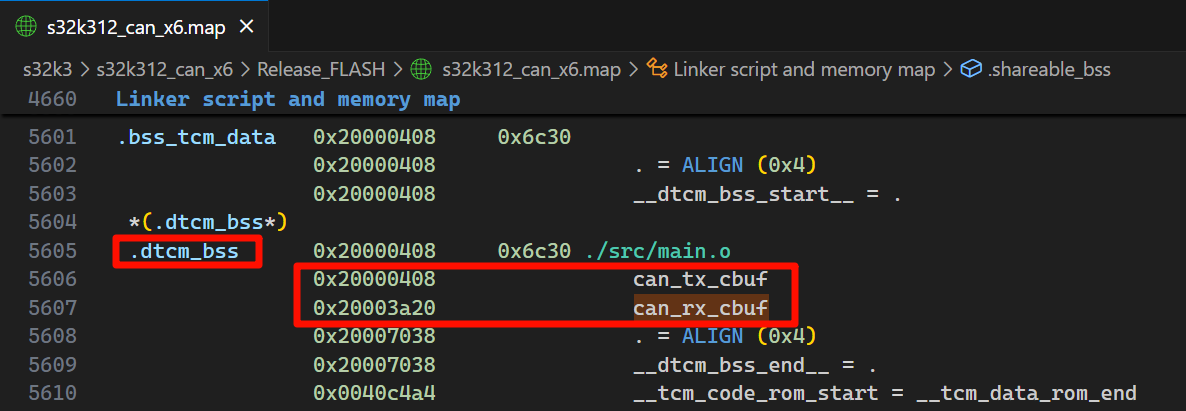
编译完后, 查看 map 文件, 两个数组分配到了 [0x20000000, 0x2000EFFFF] 地址区间的 dtcm 内存中
收发测试
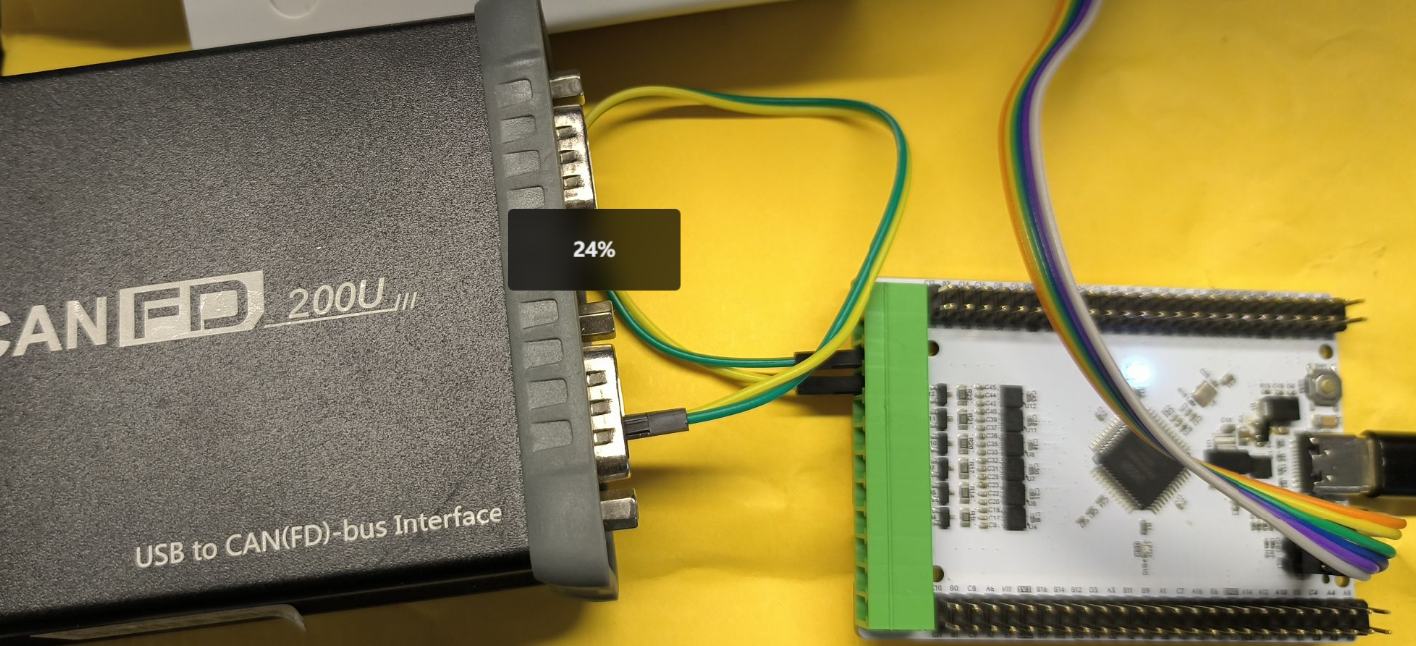
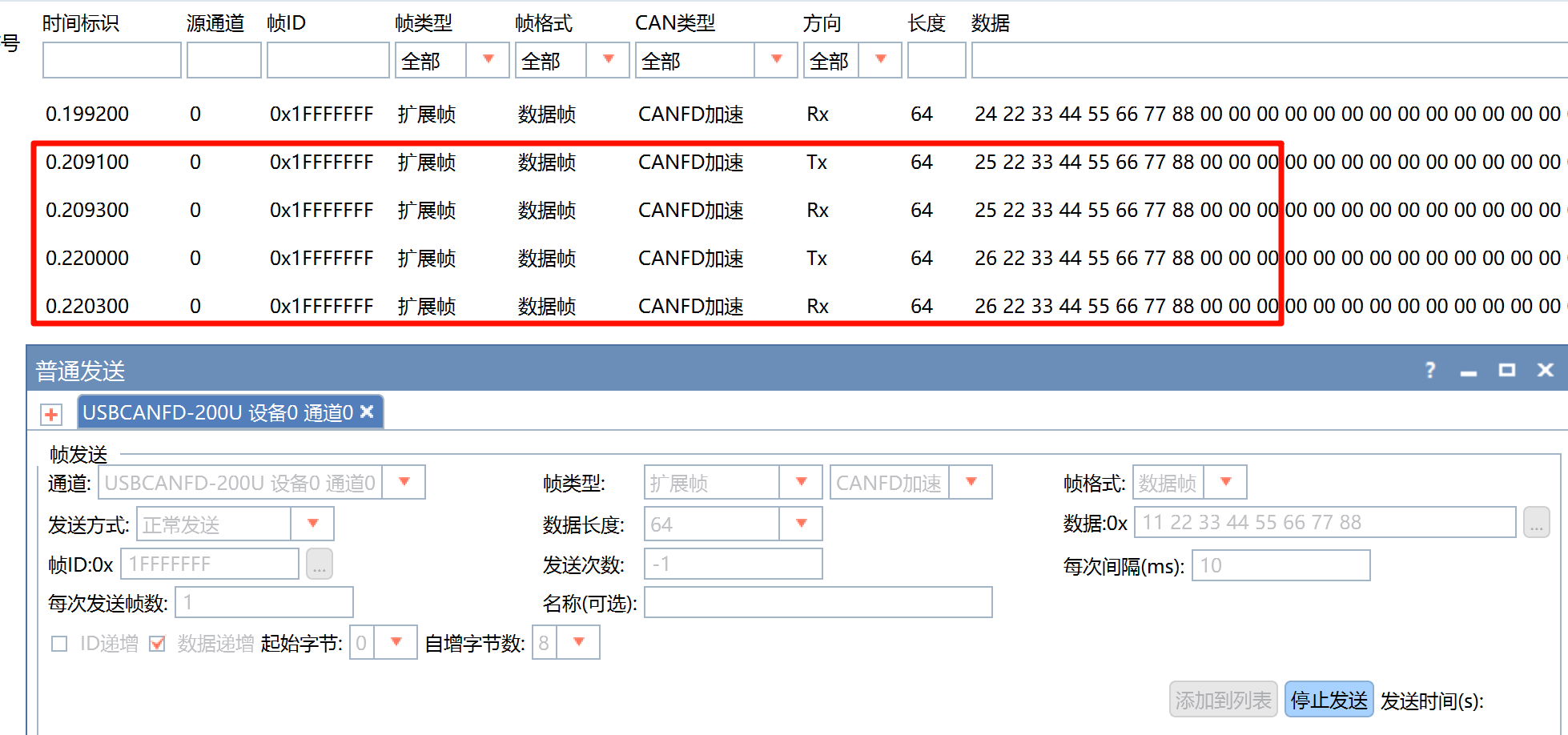
连接任意一路CAN:
分析仪发送任意CAN帧, 可以看到被回传回来:
交流群与板子购买
嵌入式_机器人_自动驾驶交流 QQ群: 1040239879
闲鱼: weifengdq
原理图与代码链接
github.com/weifengdq/embedded 的 s32k3 目录, 每个工程下的 Release_Flash 文件夹中有编译好的 hex 文件, 可以直接下载测试.

智能硬件社区聚焦AI智能硬件技术生态,汇聚嵌入式AI、物联网硬件开发者,打造交流分享平台,同步全国赛事资讯、开展 OPC 核心人才招募,助力技术落地与开发者成长。
更多推荐



 9
9 0
0- 0


 已为社区贡献6条内容

所有评论(0)