SDS800X HD系列示波器固件升级/带宽升级教程
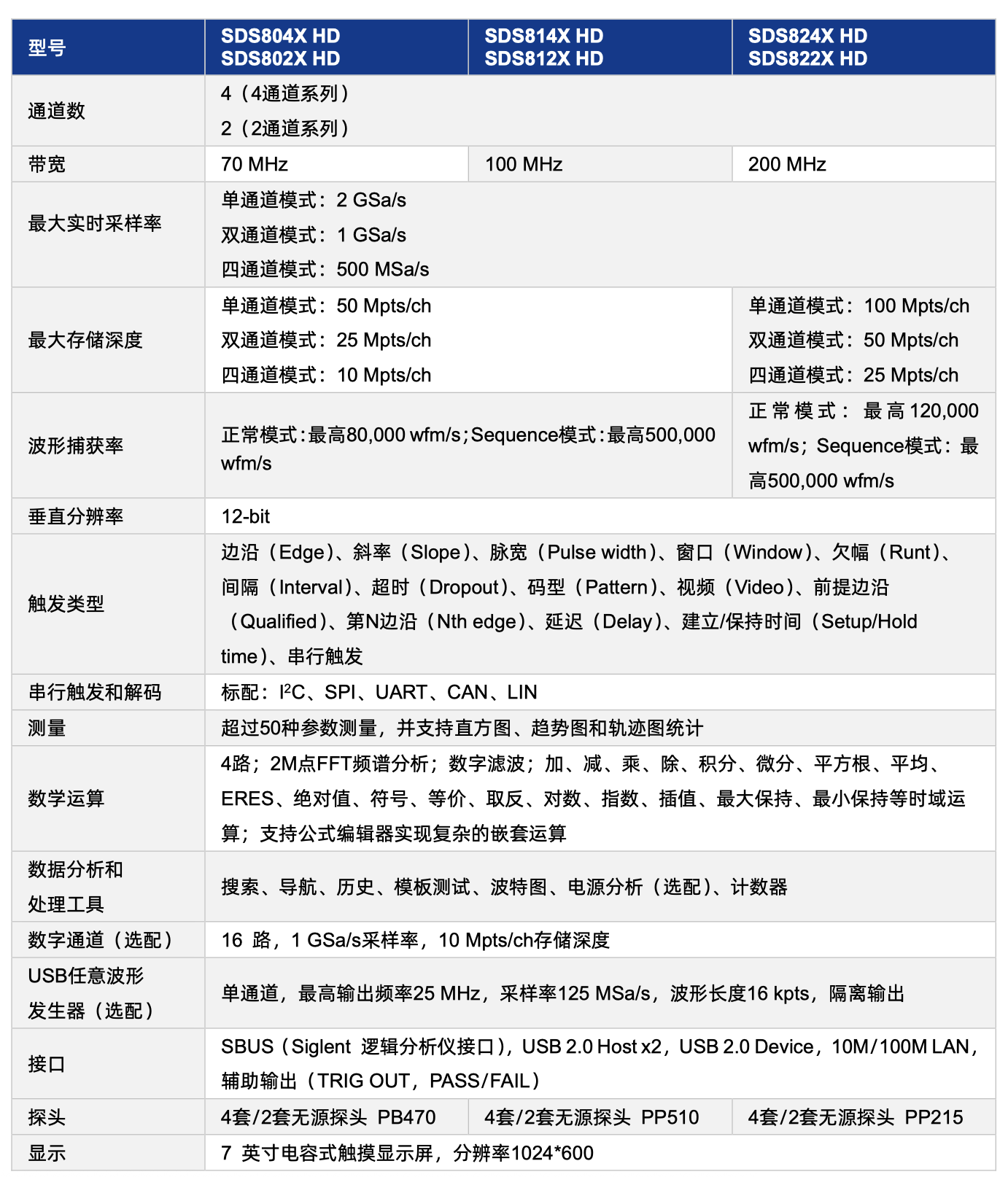
下面的教程我们会教大家怎么给示波器升级最新固件,以及怎么把804 814的示波器带宽升级到824,两通道的示波器同样适用, SDS800X HD系列示波器包含了下表中的所有型号,请知悉
下载最新固件
从以下地址选取需要的最新固件,注意区分设备型号, SDS800XHD系列包括了(804 814 824等)主要区别在带宽和通道数上面
https://www.siglent.com/products-overview/sds800hd/
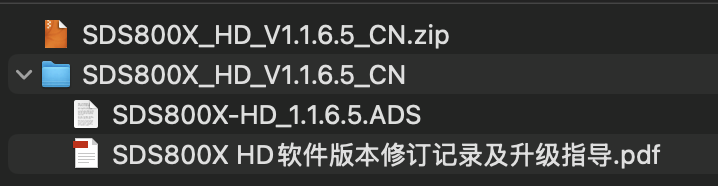
下载完成后解压,得到我们需要的ADS后缀的升级文件
升级固件
准备一个Fat32格式的U盘,最好预先格式化一下,将ADS升级文件放在U盘根目录,将U盘插入示波器背后的USB槽
执行 功能 > 菜单 > 维护 > 升级, 可调出升级对话框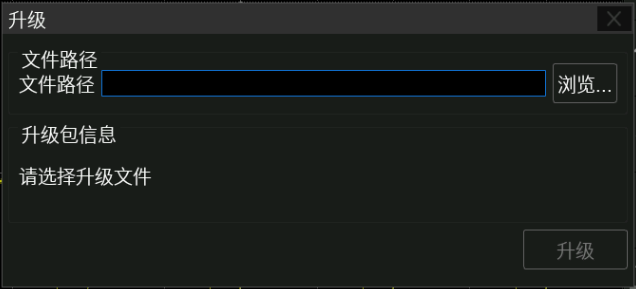
点击 浏览, 即可调出文件管理器。在资源管理器中选择正确的升级文件,并点击“调出”图标:
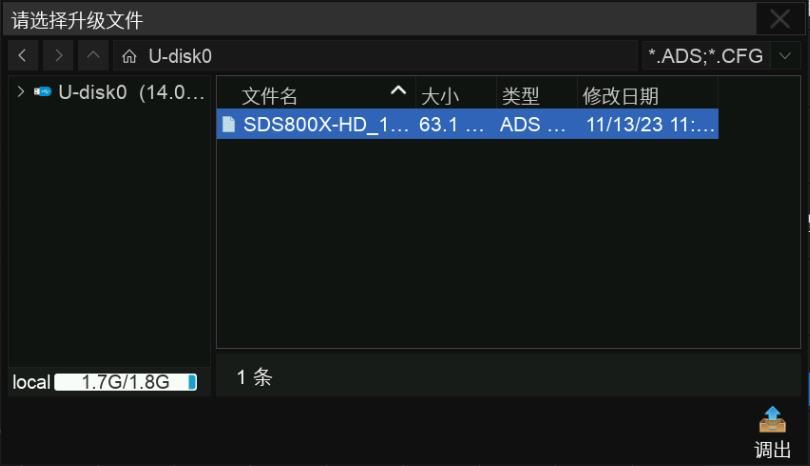
在升级对话框中点击或触摸 升级 ,即开始升级操作。
升级结束
升级完毕后建议执行一次自测试和自校准,自校准开始前请确保示波器已预 热或运行 30 分钟以上。
自测试: 功能 > 菜单 > 维护 > 自测试
自校准: 功能 > 菜单 > 维护 > 自校正
示波器带宽升级
以下教程参考自EEVblog论坛,该论坛介绍了鼎阳示波器和信号发生器的带宽升级方法,有需要可自行参考
https://www.eevblog.com/forum/testgear/siglent-sds-sdg-hack-script/
接下来我们主要讲一下示波器的带宽升级方法:
-
首先通过示波器的LAN口,接入到你家的局域网中,注意需要开启路由器的DHCP地址分配功能,为示波器分配一个局域网地址,或者手动输入一个固定的IP地址
通过功能 > 接口设置 > 局域网配置 查看示波器的IP地址
-
使用在同个局域网下的电脑,打开浏览器输入示波器的IP地址,进入示波器的后台管理页面
-
点击SCPI, 在command输入框中输入MD5_SRLN? 或者 SCOPEID? 来获得SCOPEID信息
-
通过后台HOME页,获取设备SN号,通常在Serial Number栏
-
将上面获取的信息填入下面Python脚本中
import hashlib

# You get this by running "SCOPEID?" at the SCIP prompt and removing the dashes
# Or with "MD5_SRLN?" over the SCIP promt without the dashes
SCOPEID = '0000000000000000'

# Replace this with your SN
# You get this over the info from the UI
# Sometime find this under "Info"
SN = 'SDS00000000000'

# Enter here the basic model
# You get this by running "MD5_PR?" at the SCIP prompt
# A sample: You have the SDS1104X-E than enter "SDS1000X-E"
# Some more basic models: "SDS1000X-E", "SDS2000X-E", "SDS2000X+", "SDS5000X", "ZODIAC-"
Model = 'SDS800X-HD'

# You can add more bandwidhts here, when you have the ríght keyword
# Not all bandwidths works on your device!
bwopt = ('70M', '100M', '200M')

# You can add more options here, when you have the ríght keyword
# Not all options works on your device!
otheropt = ('AWG', 'MSO', 'PWA')

# NO CHANGES HERE !!!
# NO MORE INFORMATION HERE !!!
hashkey = '5zao9lyua01pp7hjzm3orcq90mds63z6zi5kv7vmv3ih981vlwn06txnjdtas3u2wa8msx61i12ueh14t7kqwsfskg032nhyuy1d9vv2wm925rd18kih9xhkyilobbgy'

def gen(x):
    h = hashlib.md5((
        hashkey +
        (Model+'\n').ljust(32, '\x00') +
        opt.ljust(5, '\x00') +
        2*(((SCOPEID if opt in bwopt else SN) + '\n').ljust(32, '\x00')) +
        '\x00'*16).encode('ascii')
    ).digest()
    key = ''
    for b in h:
        if (b <= 0x2F or b > 0x39) and (b <= 0x60 or b > 0x7A):
            m = b % 0x24
            b = m + (0x57 if m > 9 else 0x30)
        if b == 0x30:
            b = 0x32
        if b == 0x31:
            b = 0x33
        if b == 0x6c:
            b = 0x6d
        if b == 0x6f:
            b = 0x70
        key += chr(b)
    return key.upper()

print('INFO: CHECK YOUR GENERATED KEY BEFOR ENTER A NEW ONE !!!' + '\n')
print('You get your bandwidth by running "PRBD?" at the SCIP prompt' + '\n')
print('You get your bandwidth key by running "MCBD?" at the SCIP prompt' + '\n')
print('Compare your key with the generated key')
print('INFO: IT HAVE TO BE SAME !!!')
print('\n')
print('\n')
print('--------------------------------')
print('Here are the bandwidth codes')
print('Enter these codes over SCIP prompt')
print('The SCIP promt is "MCBD"')
print('A sample with the 500M keyword: "MCBD 6M5VE9723IR5RACG"')
print('\n')
for opt in bwopt:
    print('{:5} {}'.format(opt, gen(SCOPEID)))

print('\n')
print('--------------------------------')
print('Here are the options codes')
print('Enter these codes over the UI')
print('\n')
for opt in otheropt:
    print('{:5} {}'.format(opt, gen(SN)))
- 将修改完后的python代码复制到在线python工具中运行
https://www.jyshare.com/compile/9/
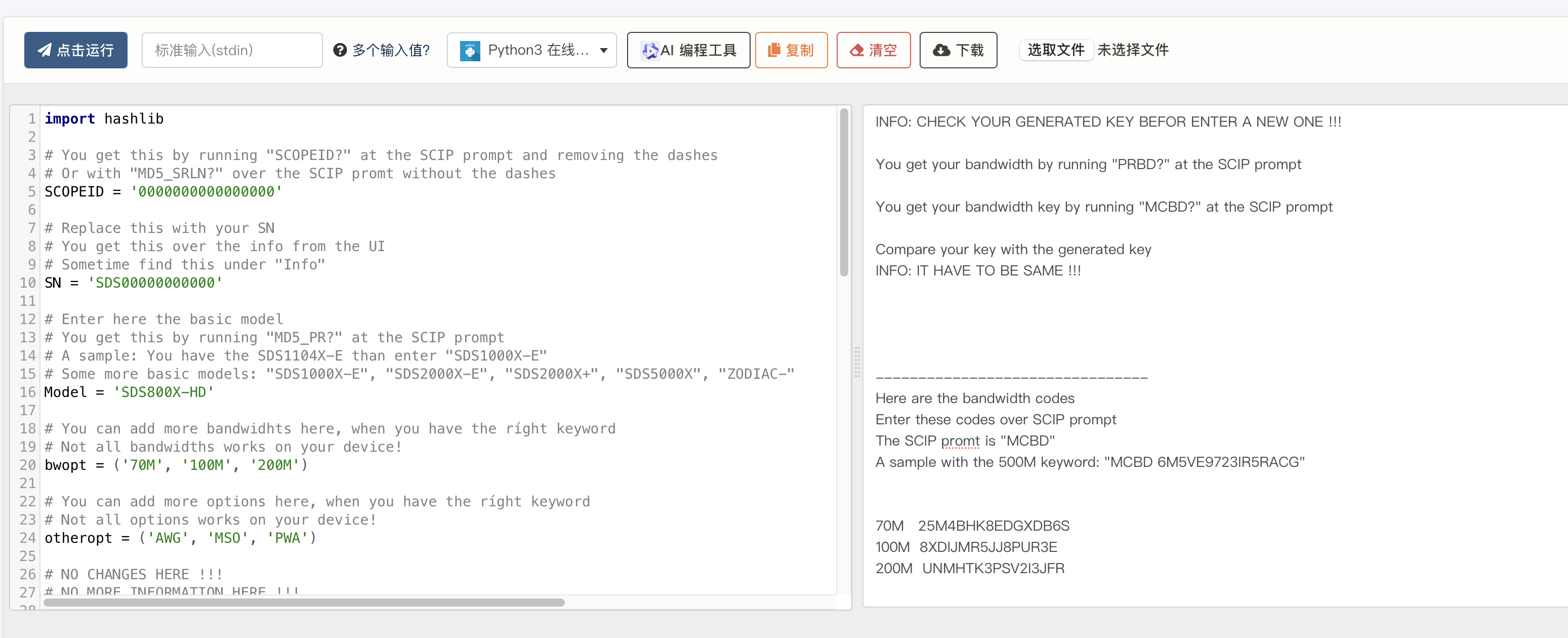
- 注意这里请先进行一次核对, python运行出来的密钥必须要与你示波器原本的带宽密钥一致,通过在command输入框中运行 PRBD? 检查示波器带宽, 通过运行 MCBD? 查看示波器带宽密钥
- 确认无误后,将需要升级的配置密钥复制, 这里举个例子,比如我需要升级到200M,就在command中运行如下代码
MCBD UNMHTK3PSV2I3JFR
至此升级完毕, 即可正常使用

智能硬件社区聚焦AI智能硬件技术生态,汇聚嵌入式AI、物联网硬件开发者,打造交流分享平台,同步全国赛事资讯、开展 OPC 核心人才招募,助力技术落地与开发者成长。
更多推荐

 52
52 0
0- 0


 已为社区贡献1条内容

所有评论(0)