大联大控股世平集团WPI-NXP S32K312 DVK核心板(二)
·
(三)大联大控股世平集团WPI-NXP S32K312 DVK核心板点亮LED灯
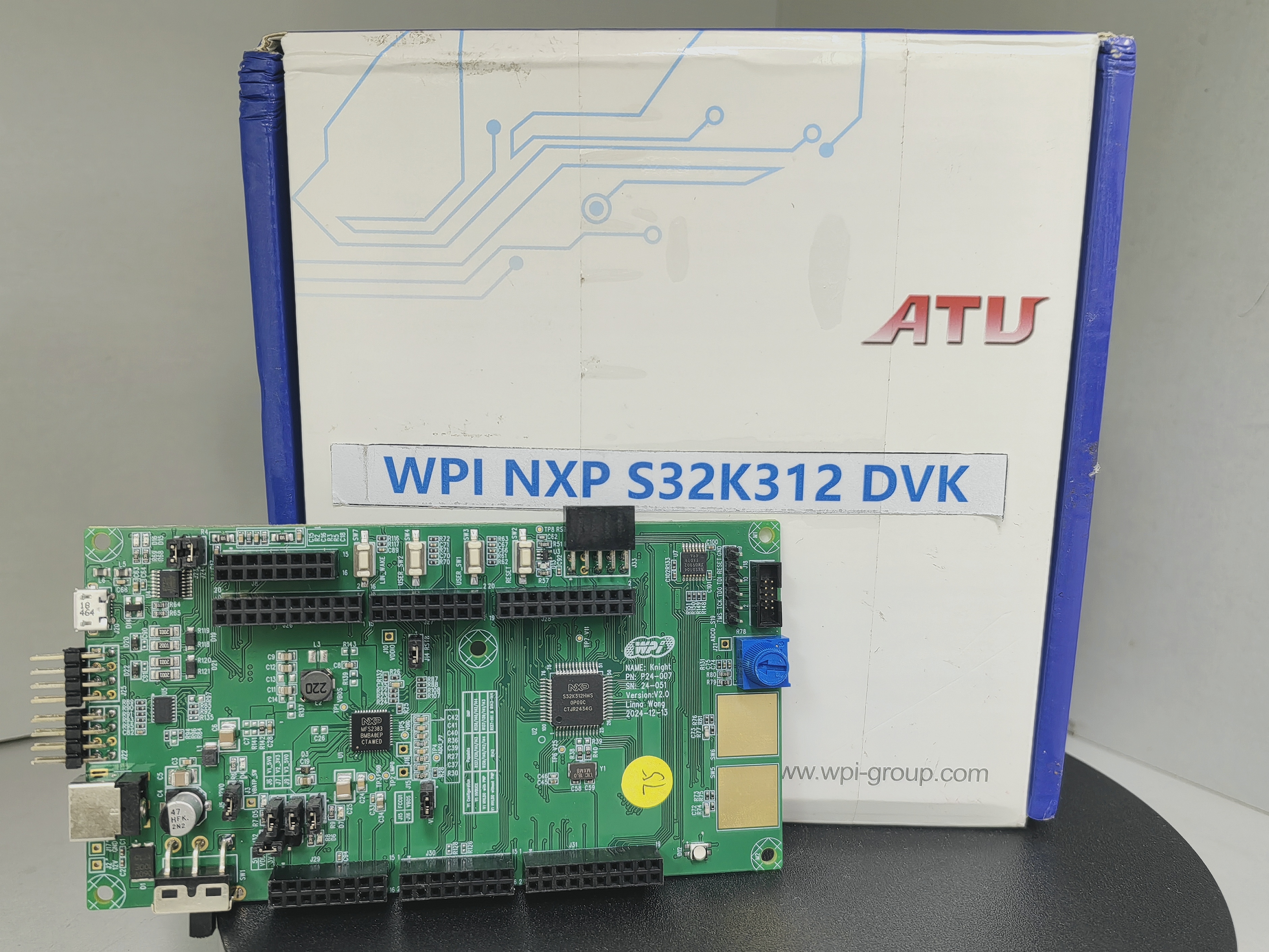
1.新建工程及代码设计
1.1双击“S32 Design Studio for S32 Platform 3.6.3”;
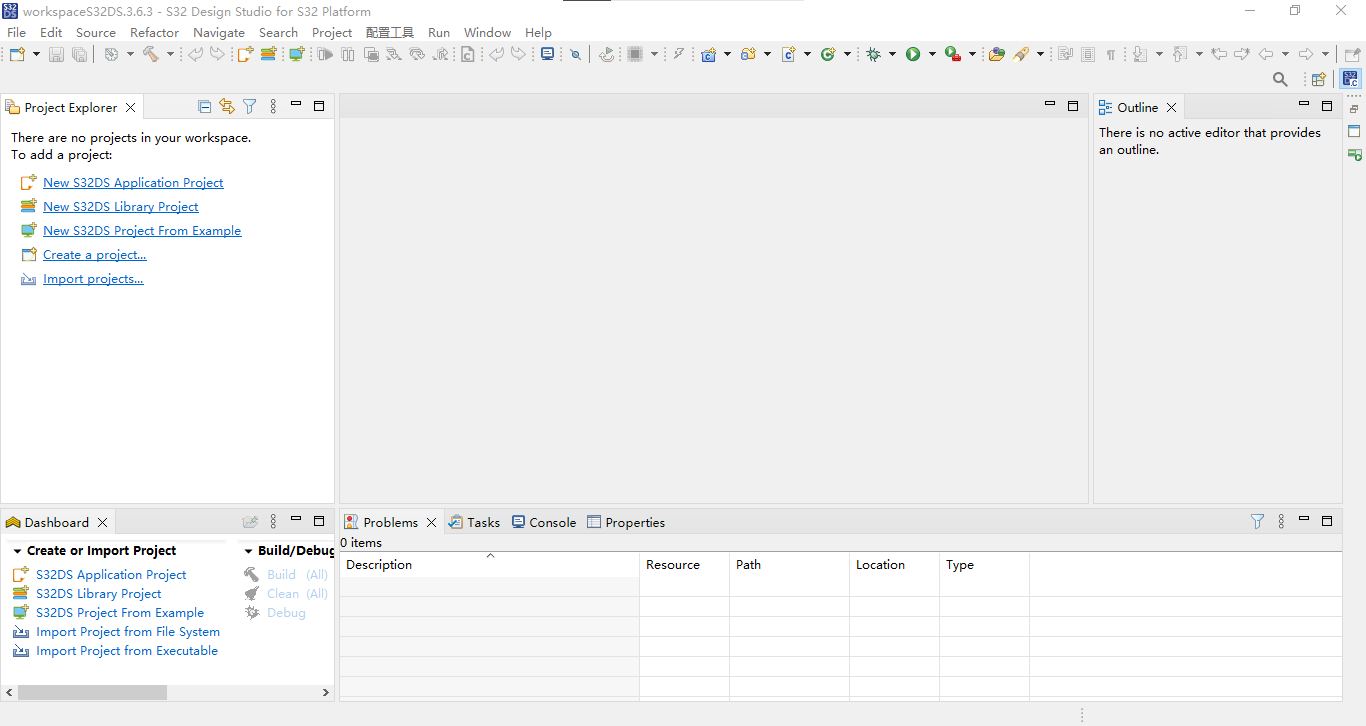
1.2点击“File”,选择“New”,选择“S32DS Application Project”;
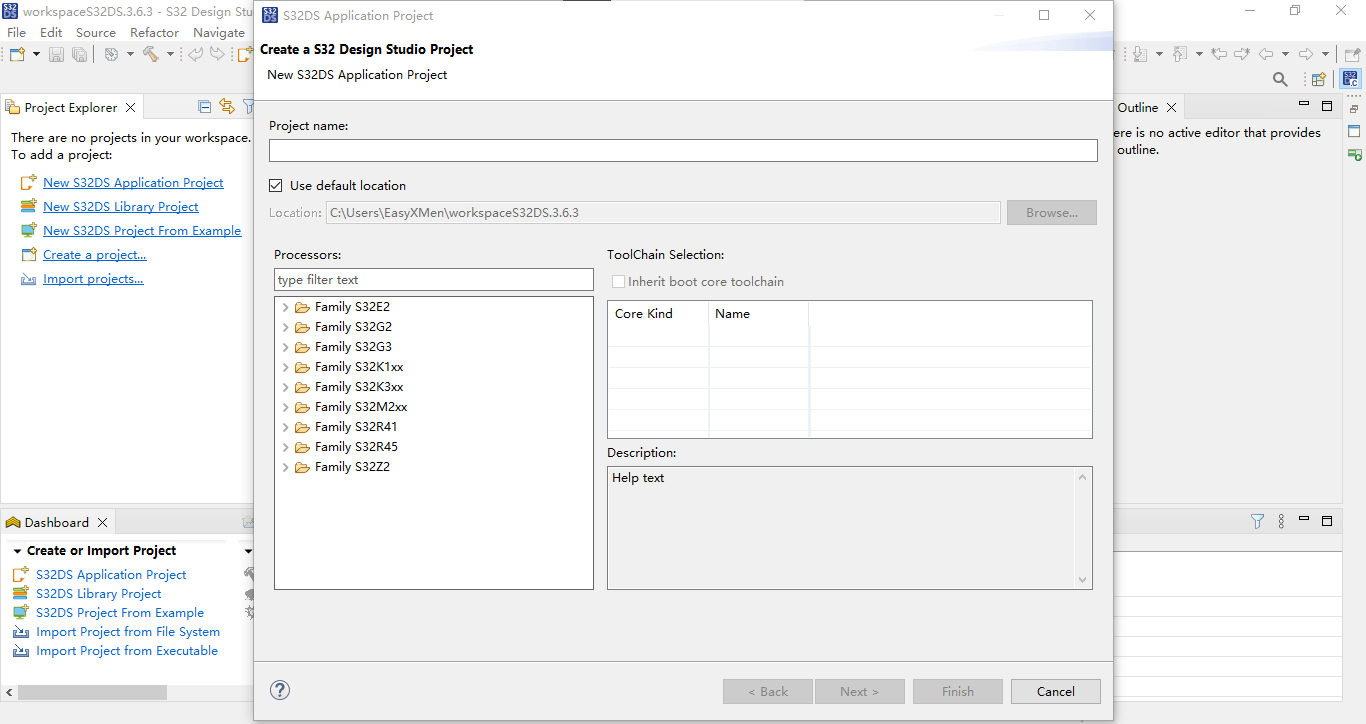
1.3输入“Project Name”,“Processors”选择“Family S32K3xx”中的“S32K312”,“ToolChain Selection”选择“M7”,点击“Next”;
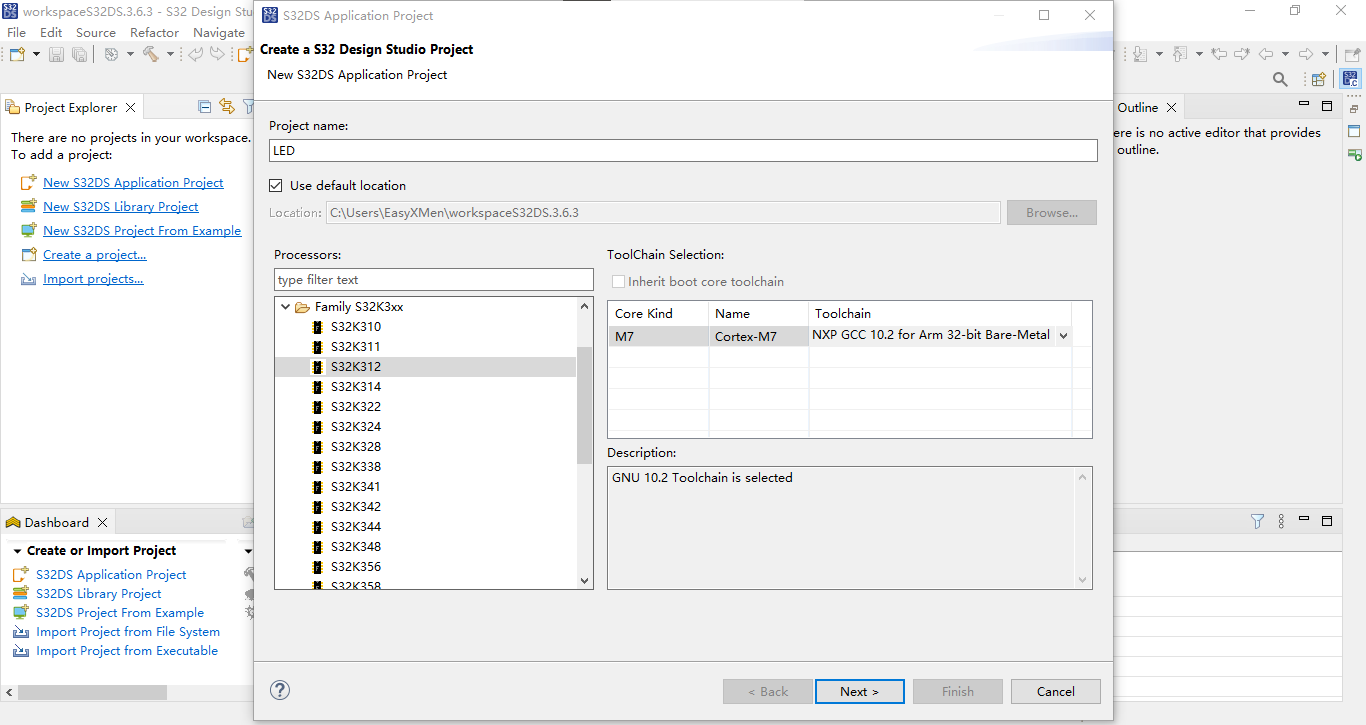
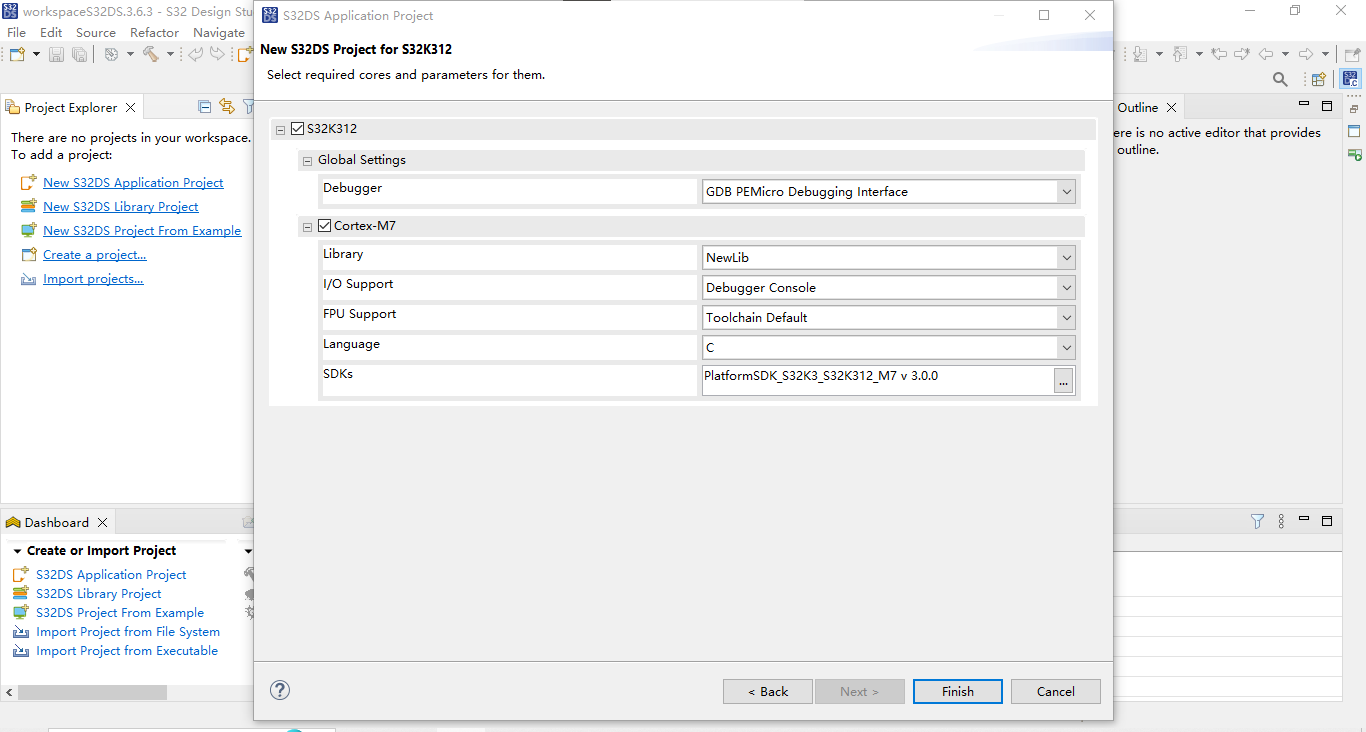
1.4确认相关配置项,点击“Finish”;
1.5此时获得初始化模板;
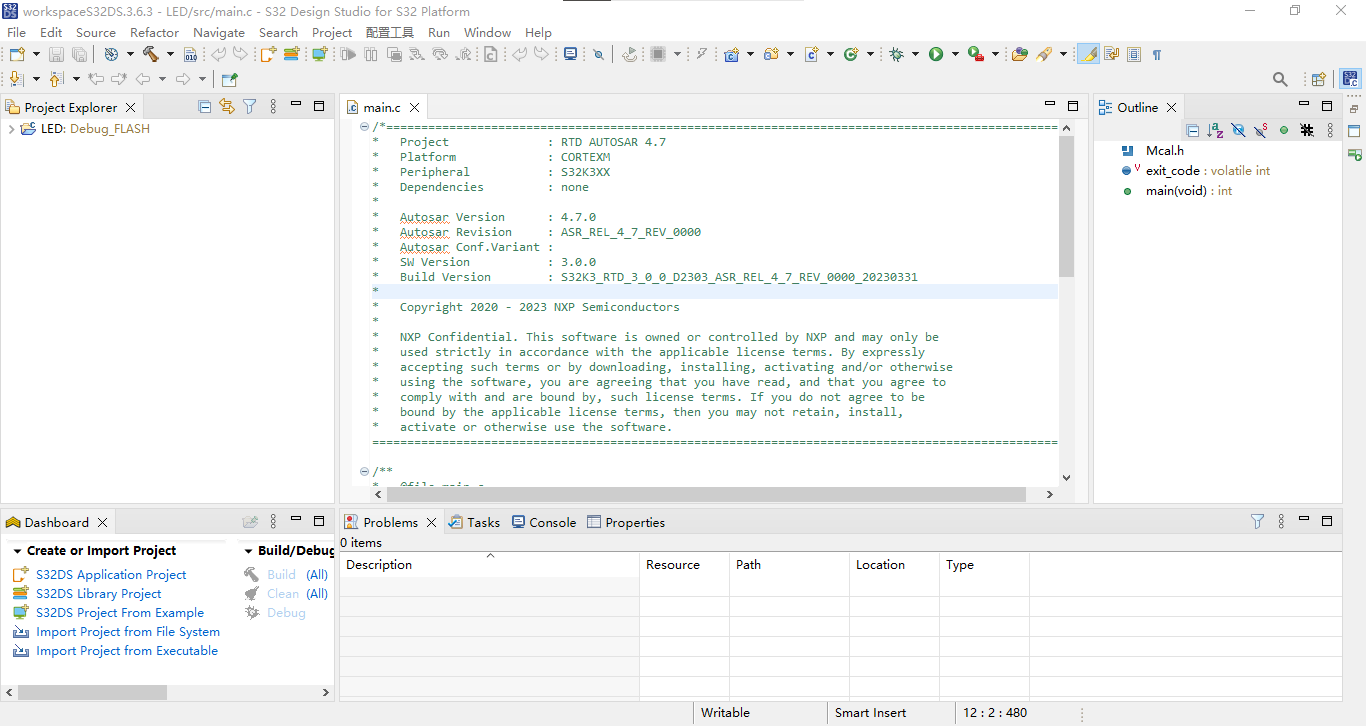
/*==================================================================================================
*   Project              : RTD AUTOSAR 4.7
*   Platform             : CORTEXM
*   Peripheral           : S32K3XX
*   Dependencies         : none
*
*   Autosar Version      : 4.7.0
*   Autosar Revision     : ASR_REL_4_7_REV_0000
*   Autosar Conf.Variant :
*   SW Version           : 3.0.0
*   Build Version        : S32K3_RTD_3_0_0_D2303_ASR_REL_4_7_REV_0000_20230331
*
*   Copyright 2020 - 2023 NXP Semiconductors
*
*   NXP Confidential. This software is owned or controlled by NXP and may only be
*   used strictly in accordance with the applicable license terms. By expressly
*   accepting such terms or by downloading, installing, activating and/or otherwise
*   using the software, you are agreeing that you have read, and that you agree to
*   comply with and are bound by, such license terms. If you do not agree to be
*   bound by the applicable license terms, then you may not retain, install,
*   activate or otherwise use the software.
==================================================================================================*/

/**
*   @file main.c
*
*   @addtogroup main_module main module documentation
*   @{
*/

/* Including necessary configuration files. */
#include "Mcal.h"

volatile int exit_code = 0;
/* User includes */

/*!
  \brief The main function for the project.
  \details The startup initialization sequence is the following:
 * - startup asm routine
 * - main()
*/
int main(void)
{
    /* Write your code here */

    for(;;)
    {
        if(exit_code != 0)
        {
            break;
        }
    }
    return exit_code;
}

/** @} */
1.6在左侧“Project Explorer”中打开项目,双击“.mex”;
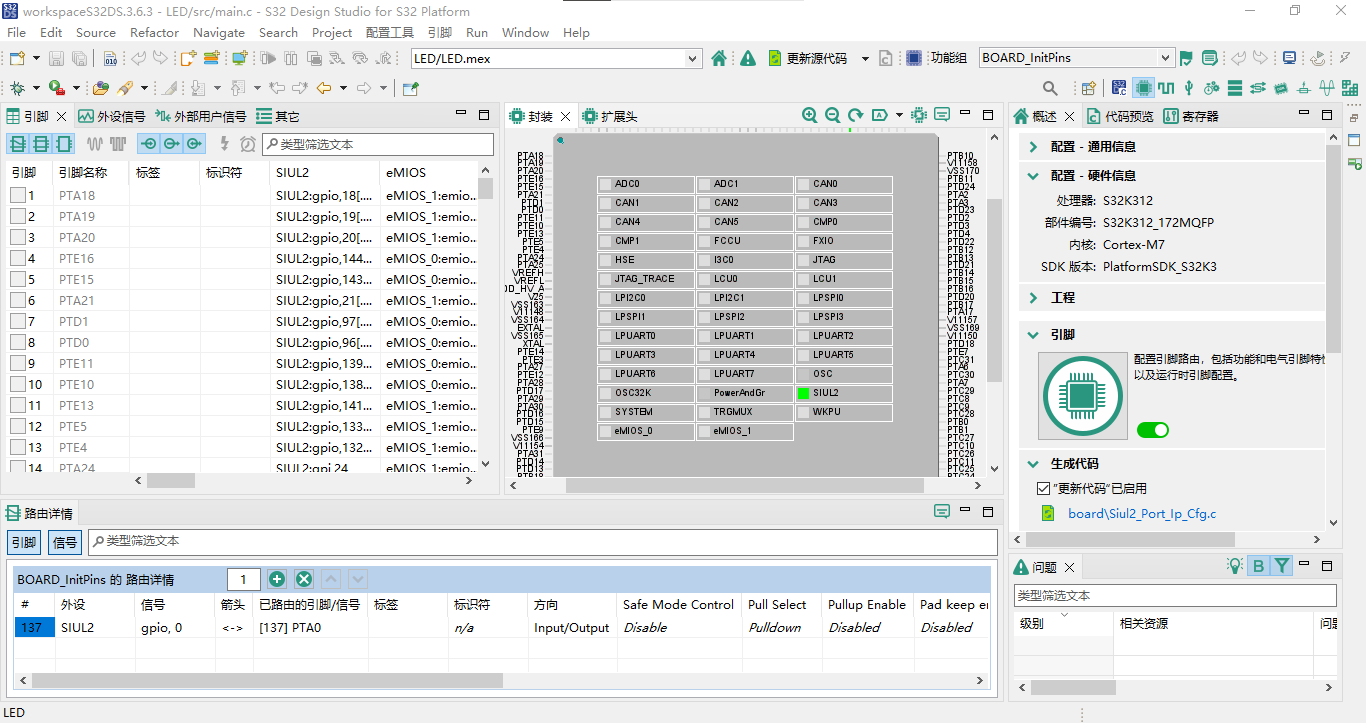
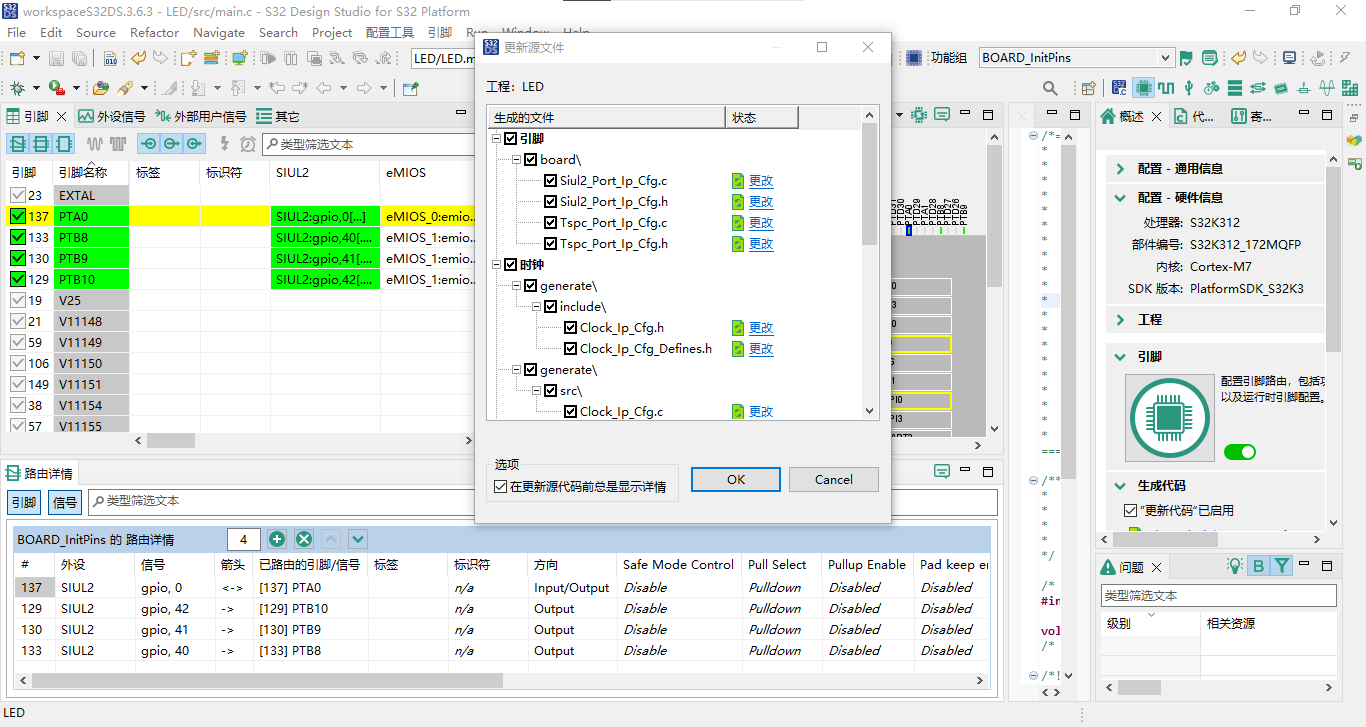
1.7在左侧“引脚”中选择勾选129号引脚“PTB10”,“引脚[129]上的所有信号”勾选“SIUL2:gpio,42”,“选择路由方向”选择“Output”,点击“OK”,点击“完成”;
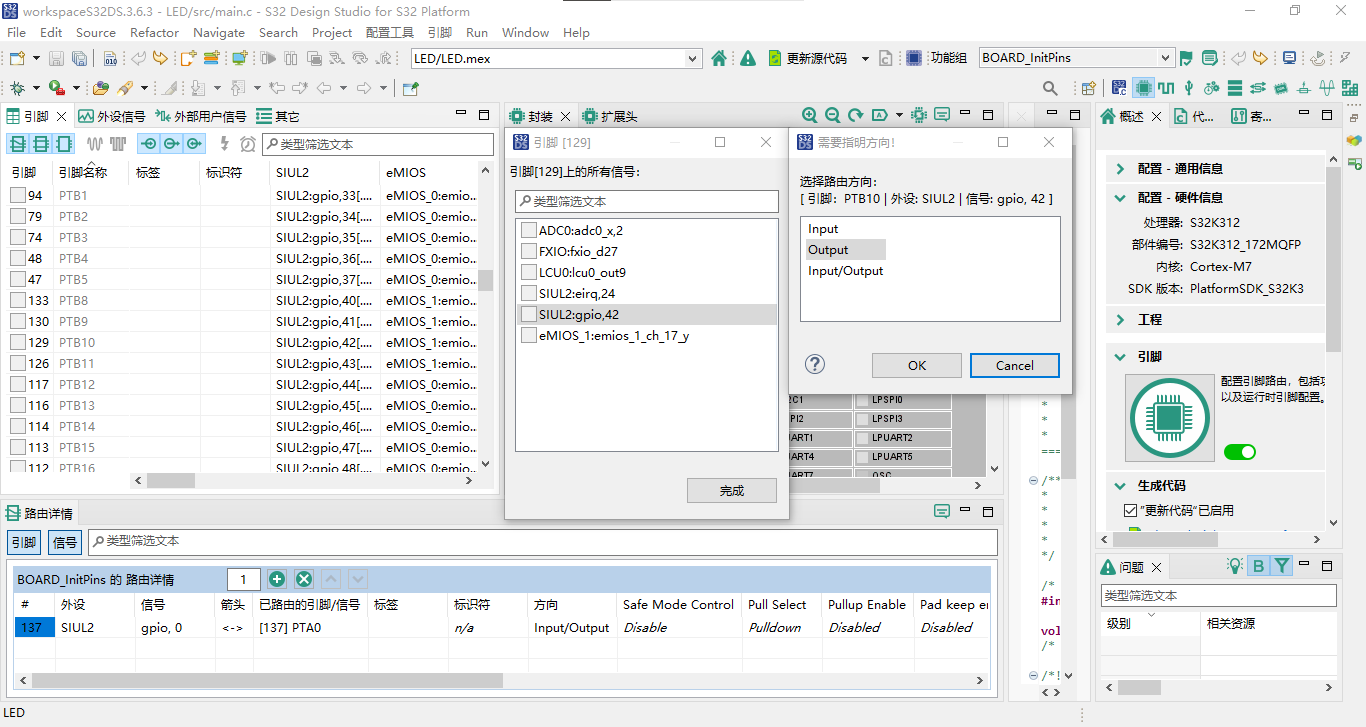
1.8在左侧“引脚”中选择勾选130号引脚“PTB9”,“引脚[130]上的所有信号”勾选“SIUL2:gpio,41”,“选择路由方向”选择“Output”,点击“OK”,点击“完成”;
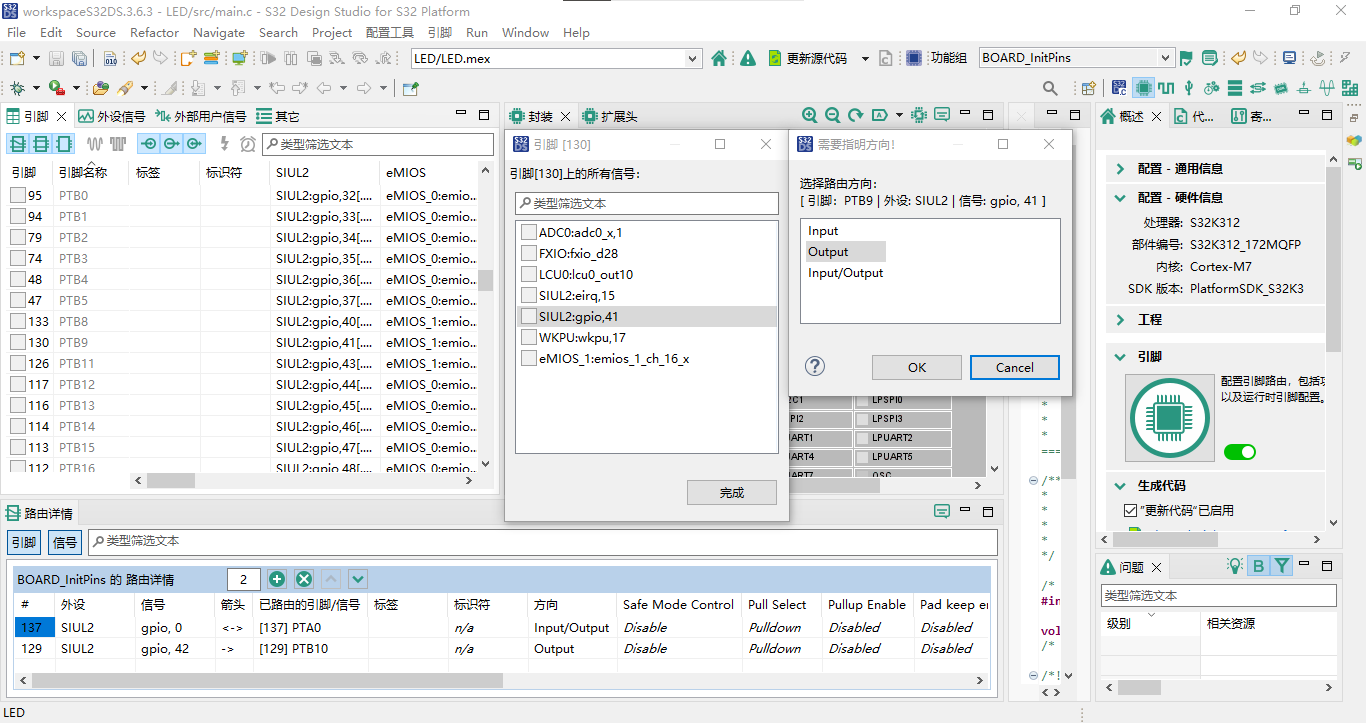
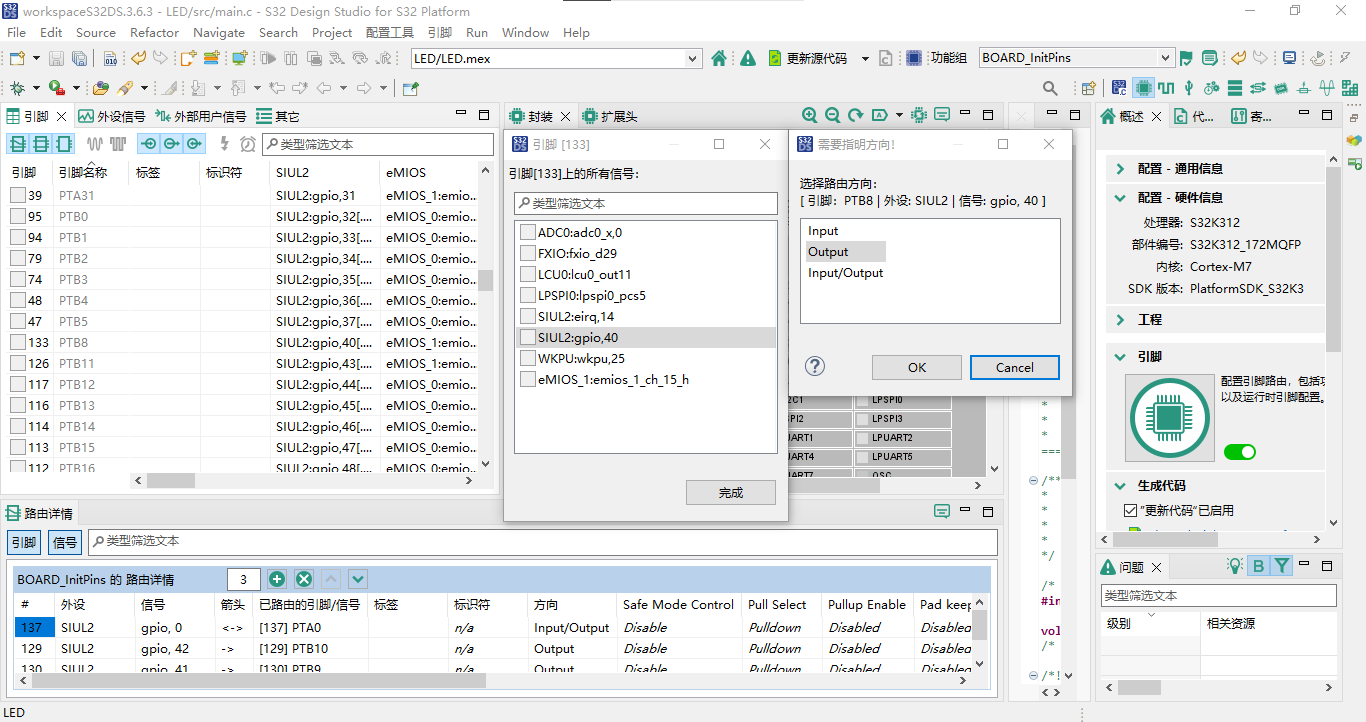
1.9在左侧“引脚”中选择勾选133号引脚“PTB8”,“引脚[133]上的所有信号”勾选“SIUL2:gpio,40”,“选择路由方向”选择“Output”,点击“OK”,点击“完成”;
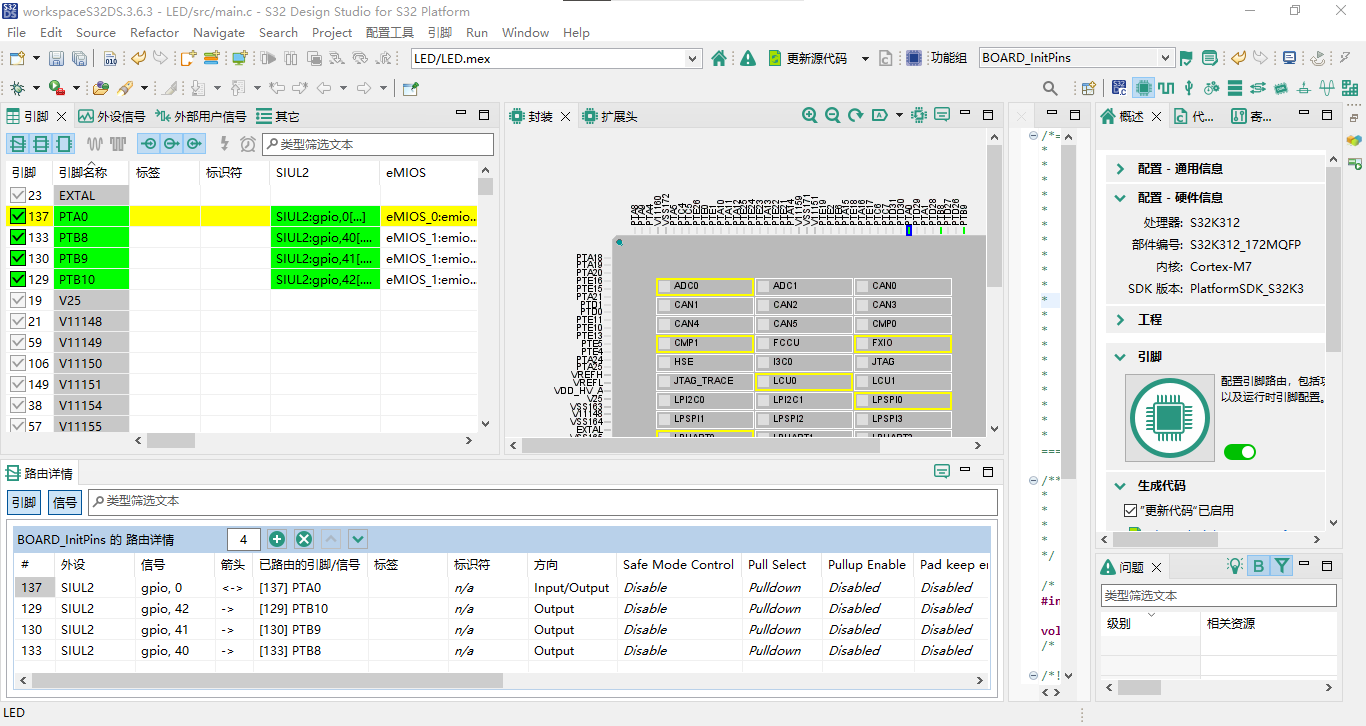
1.10如下图所示即为完成大联大控股世平集团WPI-NXP S32K312 DVK核心板LED灯引脚配置;
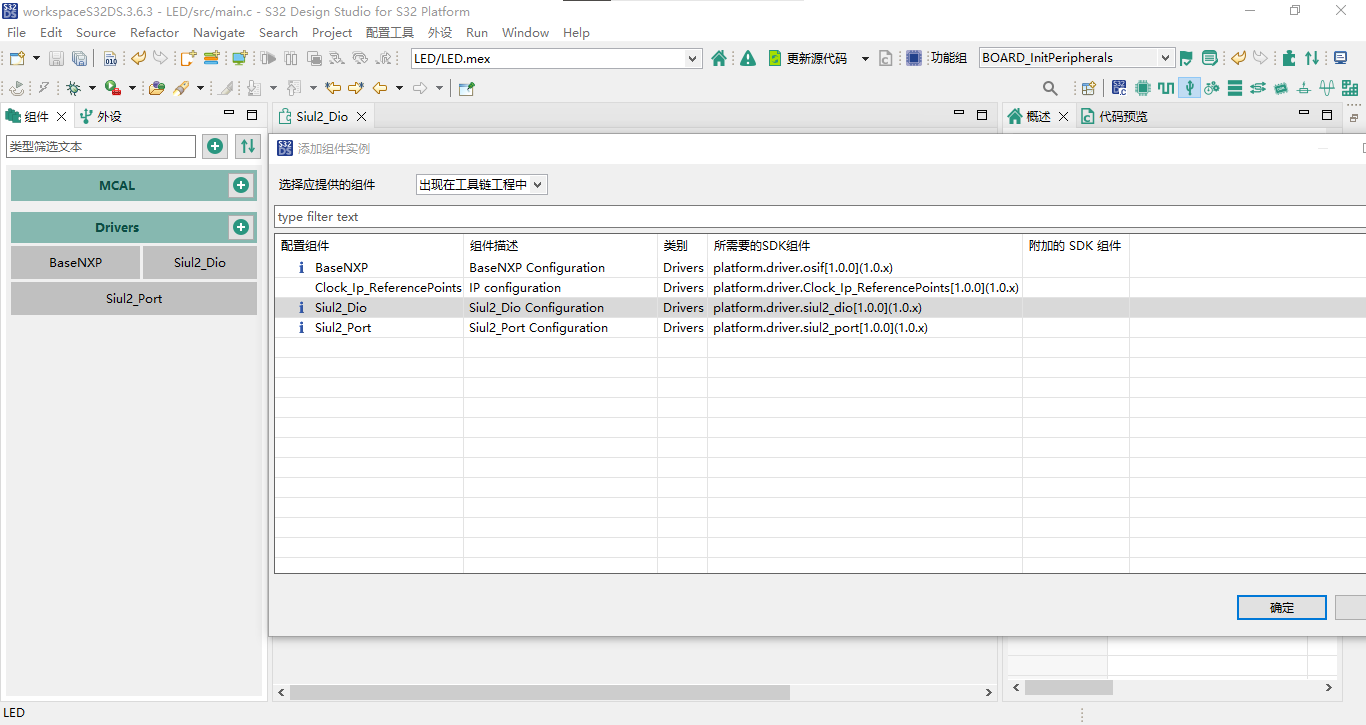
1.11点击右上角“外设”,点击“Drivers”,选择“Siul2_Dio”,点击“确定”;
1.12点击右上角“更新源代码”,点击“OK”;
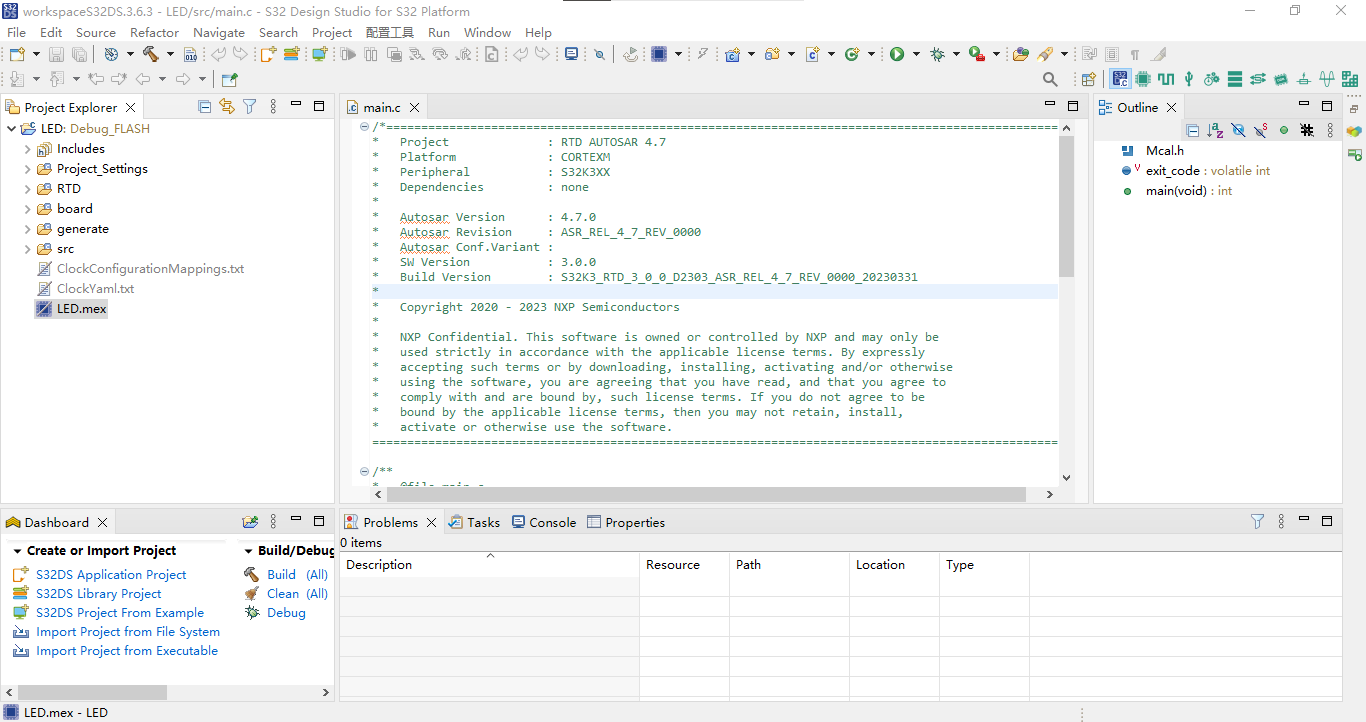
1.13点击右上角“S32DS C/C++”;
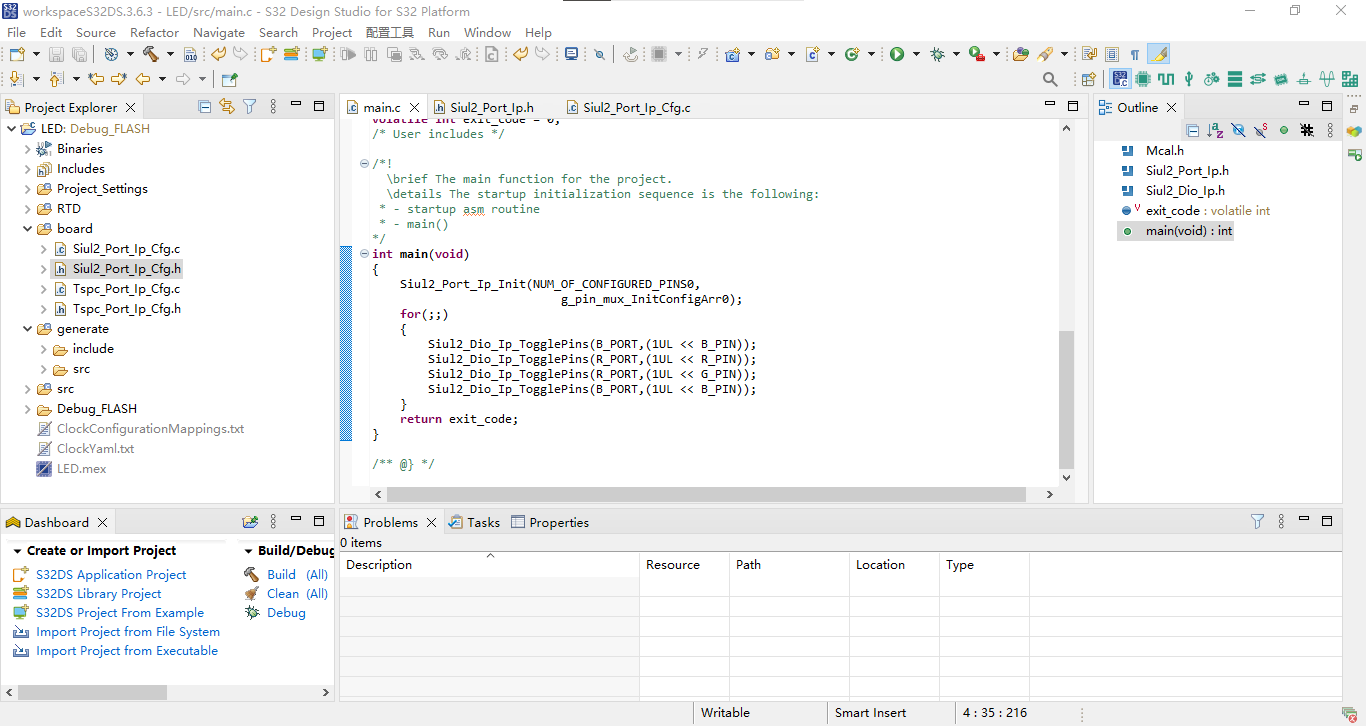
1.14修改main.c如下;
/*==================================================================================================
*   Project              : RTD AUTOSAR 4.7
*   Platform             : CORTEXM
*   Peripheral           : S32K3XX
*   Dependencies         : none
*
*   Autosar Version      : 4.7.0
*   Autosar Revision     : ASR_REL_4_7_REV_0000
*   Autosar Conf.Variant :
*   SW Version           : 3.0.0
*   Build Version        : S32K3_RTD_3_0_0_D2303_ASR_REL_4_7_REV_0000_20230331
*
*   Copyright 2020 - 2023 NXP Semiconductors
*
*   NXP Confidential. This software is owned or controlled by NXP and may only be
*   used strictly in accordance with the applicable license terms. By expressly
*   accepting such terms or by downloading, installing, activating and/or otherwise
*   using the software, you are agreeing that you have read, and that you agree to
*   comply with and are bound by, such license terms. If you do not agree to be
*   bound by the applicable license terms, then you may not retain, install,
*   activate or otherwise use the software.
==================================================================================================*/

/**
*   @file main.c
*
*   @addtogroup main_module main module documentation
*   @{
*/

/* Including necessary configuration files. */
#include "Mcal.h"
#include "Siul2_Port_Ip.h"
#include "Siul2_Dio_Ip.h"
volatile int exit_code = 0;
/* User includes */

/*!
  \brief The main function for the project.
  \details The startup initialization sequence is the following:
 * - startup asm routine
 * - main()
*/
int main(void)
{
	Siul2_Port_Ip_Init(NUM_OF_CONFIGURED_PINS0,
	                       g_pin_mux_InitConfigArr0);
    for(;;)
    {
        Siul2_Dio_Ip_TogglePins(B_PORT,(1UL << B_PIN));
        Siul2_Dio_Ip_TogglePins(R_PORT,(1UL << R_PIN));
        Siul2_Dio_Ip_TogglePins(R_PORT,(1UL << G_PIN));
        Siul2_Dio_Ip_TogglePins(B_PORT,(1UL << B_PIN));
    }
    return exit_code;
}

/** @} */
1.15点击左上角“Build”,若显示下属内容则为编译成功。
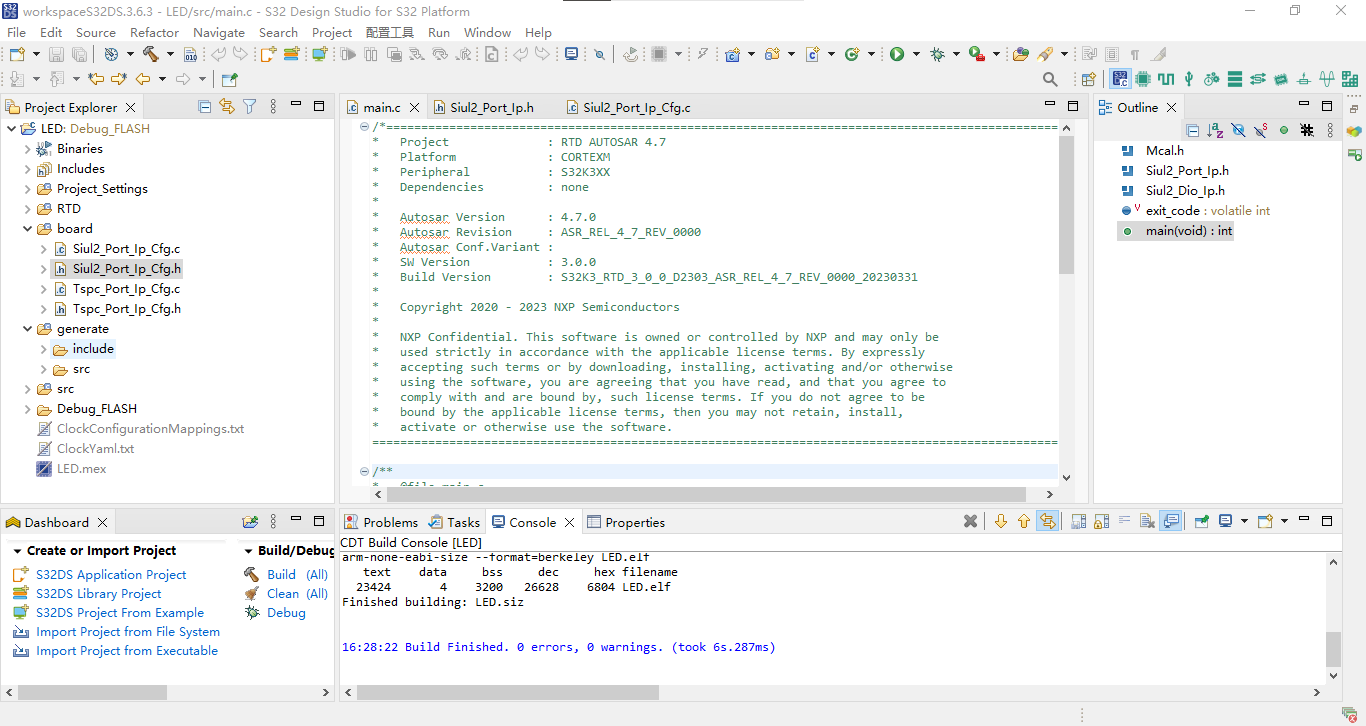
**** Incremental Build of configuration Debug_FLASH for project LED ****
make -j4 all
Building file: ../src/main.c
Invoking: Standard S32DS C Compiler
arm-none-eabi-gcc "@src/main.args" -MMD -MP -MF"src/main.d" -MT"src/main.o" -o "src/main.o" "../src/main.c"
Finished building: ../src/main.c

Building target: LED.elf
Invoking: Standard S32DS C Linker
arm-none-eabi-gcc -o "LED.elf" "@LED.args"
c:/nxp/s32ds.3.6.3/s32ds/build_tools/gcc_v10.2/gcc-10.2-arm32-eabi/bin/../lib/gcc/arm-none-eabi/10.2.0/../../../../arm-none-eabi/bin/real-ld.exe: warning: c:/nxp/s32ds.3.6.3/s32ds/build_tools/gcc_v10.2/gcc-10.2-arm32-eabi/bin/../lib/gcc/arm-none-eabi/10.2.0/../../../../arm-none-eabi/lib/thumb/v7e-m+fp/hard\libc_nano.a(lib_a-memmove.o) uses variable-size enums yet the output is to use 32-bit enums; use of enum values across objects may fail
c:/nxp/s32ds.3.6.3/s32ds/build_tools/gcc_v10.2/gcc-10.2-arm32-eabi/bin/../lib/gcc/arm-none-eabi/10.2.0/../../../../arm-none-eabi/bin/real-ld.exe: warning: c:/nxp/s32ds.3.6.3/s32ds/build_tools/gcc_v10.2/gcc-10.2-arm32-eabi/bin/../lib/gcc/arm-none-eabi/10.2.0/../../../../arm-none-eabi/lib/thumb/v7e-m+fp/hard\libc_nano.a(lib_a-memset.o) uses variable-size enums yet the output is to use 32-bit enums; use of enum values across objects may fail
Finished building target: LED.elf

Invoking: Standard S32DS Print Size
arm-none-eabi-size --format=berkeley LED.elf
   text	   data	    bss	    dec	    hex	filename
  23424	      4	   3200	  26628	   6804	LED.elf
Finished building: LED.siz


Build Finished. 0 errors, 0 warnings. (took 6s.287ms)
2.烧录实现
2.1点击右上角“Debug Configurations …”;
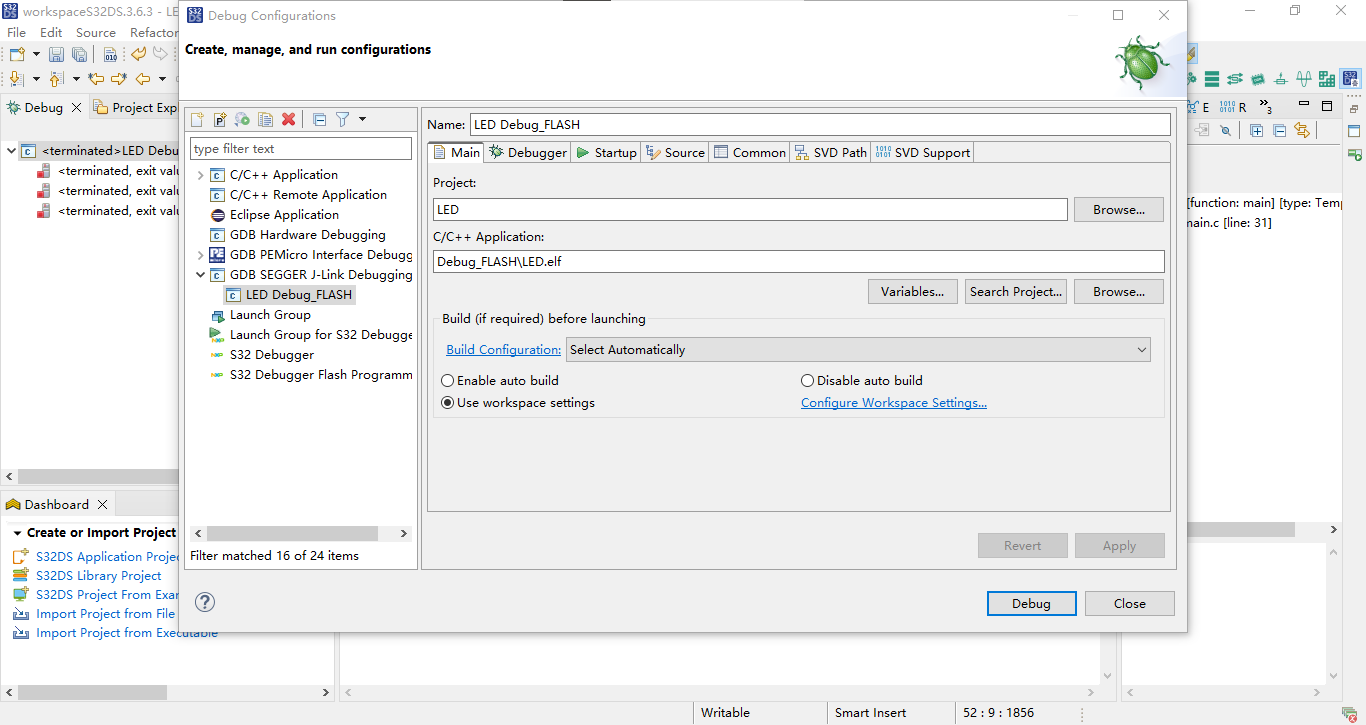
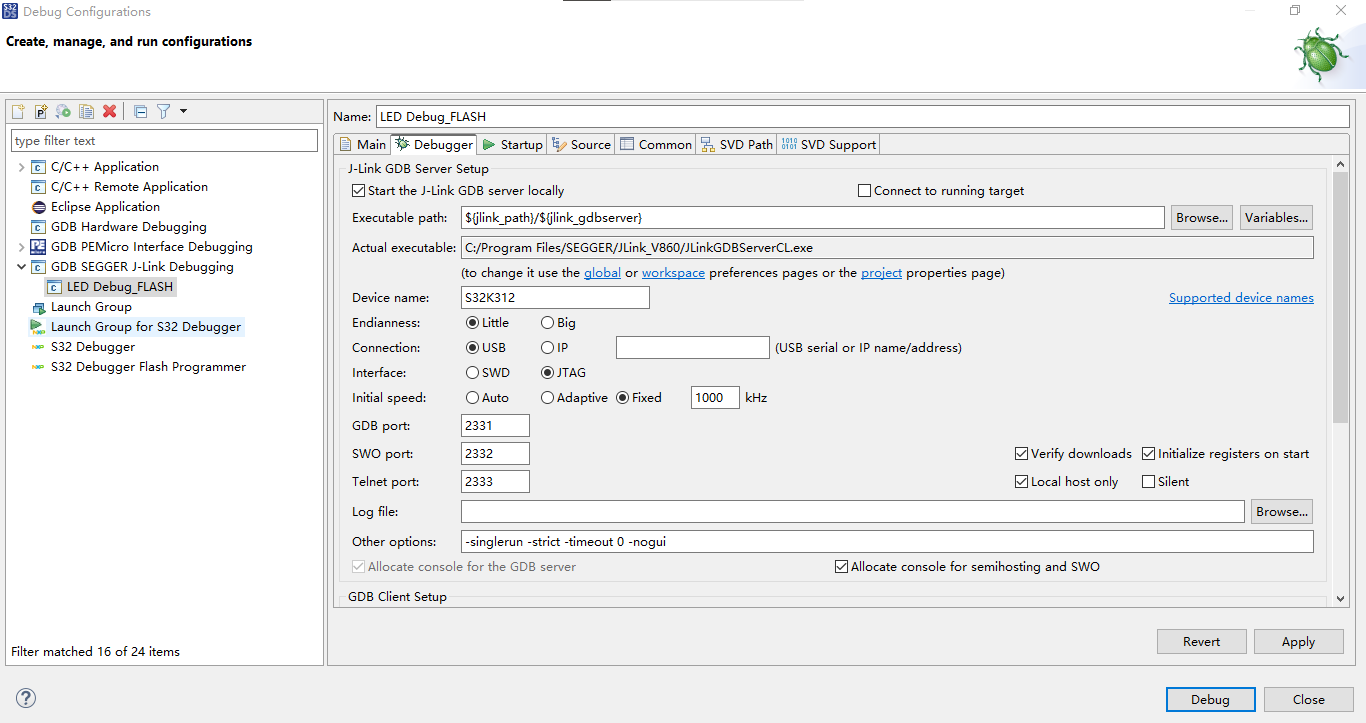
2.2点击“Debugger”,“Device name”输入“S32K312”,“Interface”选择“JTAG”,“Executable name”输入“${S32DS_GDB_ARM32_EXE}”,点击“Apply”;
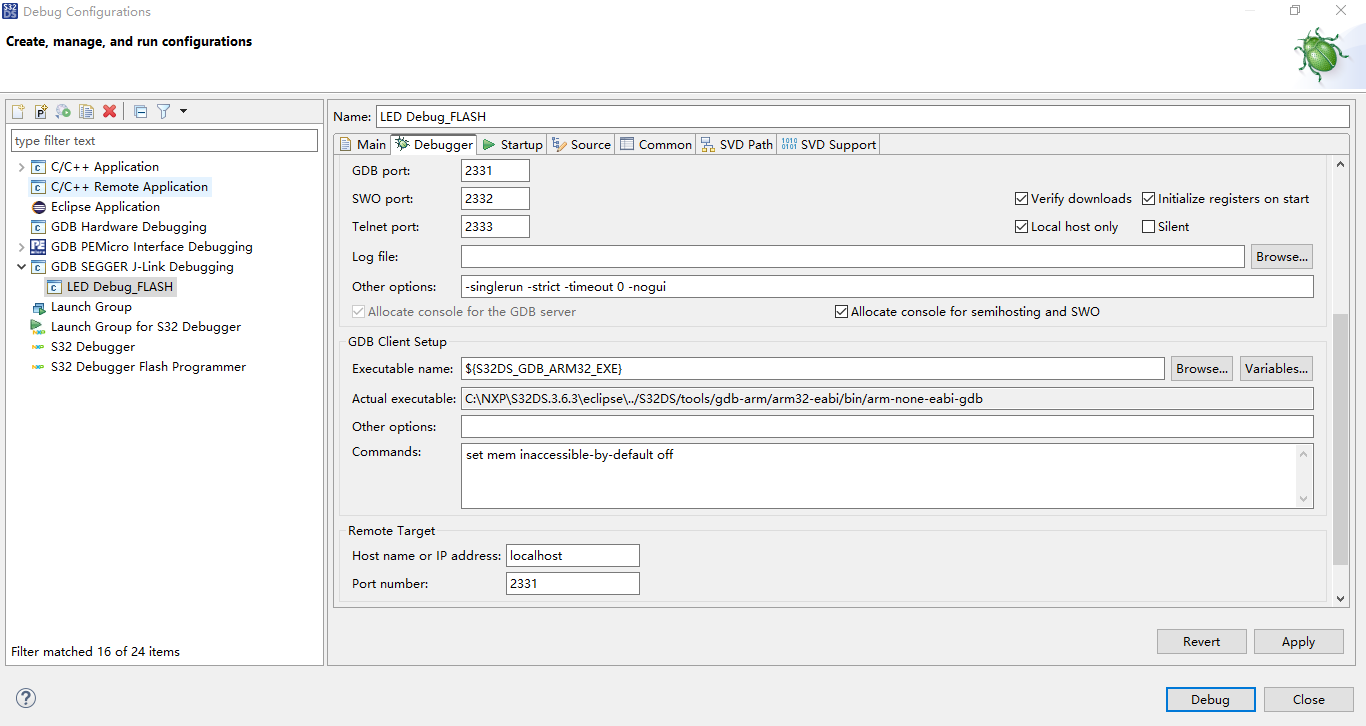
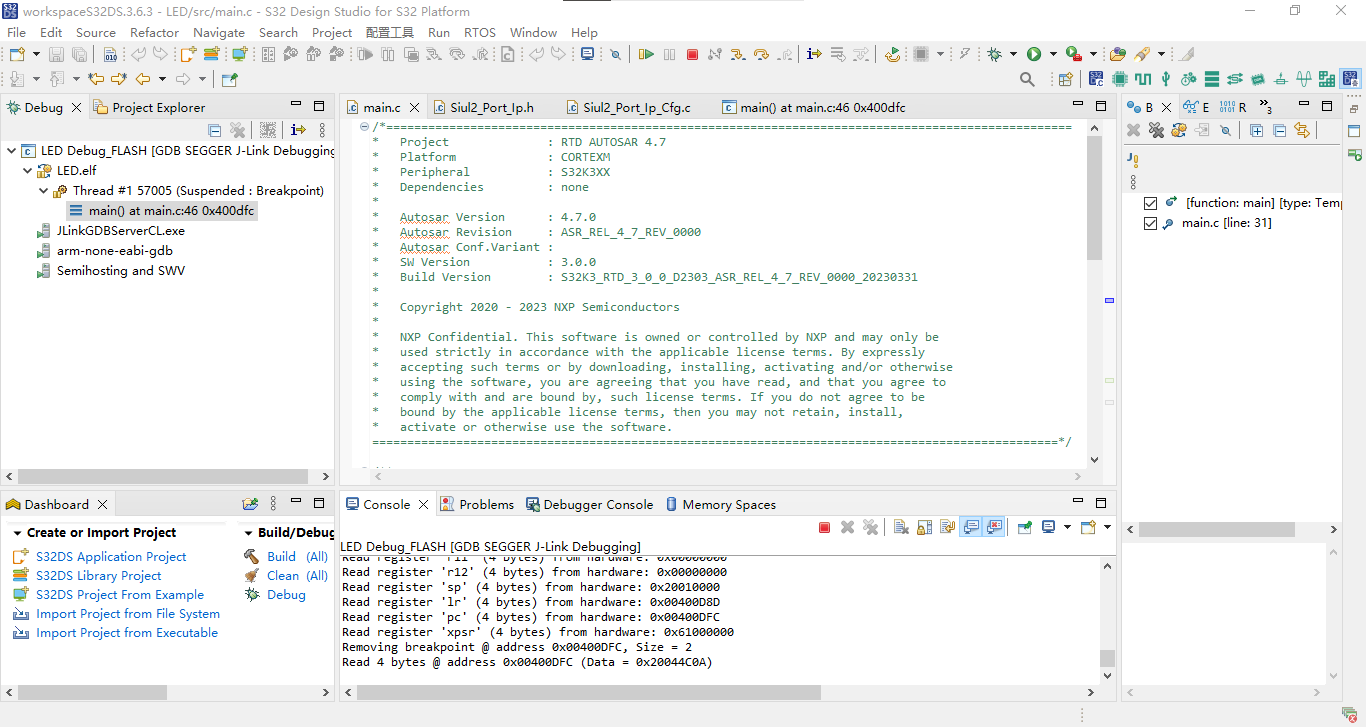
2.3点击“Debug”,若显示下属内容则为Debug成功。
SEGGER J-Link GDB Server V8.60 Command Line Version

JLinkARM.dll V8.60 (DLL compiled Aug 13 2025 12:08:34)

Command line: -if jtag -device S32K312 -endian little -speed 1000 -port 2331 -swoport 2332 -telnetport 2333 -vd -ir -localhostonly 1 -singlerun -strict -timeout 0 -nogui
-----GDB Server start settings-----
GDBInit file:                  none
GDB Server Listening port:     2331
SWO raw output listening port: 2332
Terminal I/O port:             2333
Accept remote connection:      localhost only
Generate logfile:              off
Verify download:               on
Init regs on start:            on
Silent mode:                   off
Single run mode:               on
Target connection timeout:     0 ms
------J-Link related settings------
J-Link Host interface:         USB
J-Link script:                 none
J-Link settings file:          none
------Target related settings------
Target device:                 S32K312
Target device parameters:      none
Target interface:              JTAG
Target interface speed:        1000kHz
Target endian:                 little

Connecting to J-Link...
J-Link is connected.
Firmware: J-Link V9 compiled May  7 2021 16:26:12
Hardware: V9.50
S/N: 695546630
Feature(s): JFlash, GDB, RDI, FlashBP, FlashDL
Checking target voltage...
Target voltage: 3.28 V
Listening on TCP/IP port 2331
Connecting to target...

J-Link found 1 JTAG device, Total IRLen = 8
JTAG ID: 0x0996801D (Cortex-M7)
Initializing CPU registers...Connected to target
Waiting for GDB connection...Connected to 0000:0000:0000:0000:0000:0000:0000:0001
GDB client (conn. 836) requested target.xml from GDB Server
Reading common registers:
Read register 'r0' (4 bytes) from hardware: 0x00000000
Read register 'r1' (4 bytes) from hardware: 0x00000000
Read register 'r2' (4 bytes) from hardware: 0x00000000
Read register 'r3' (4 bytes) from hardware: 0x00000000
Read register 'r4' (4 bytes) from hardware: 0x00000000
Read register 'r5' (4 bytes) from hardware: 0x00000000
Read register 'r6' (4 bytes) from hardware: 0x00000000
Read register 'r7' (4 bytes) from hardware: 0x00000000
Read register 'r8' (4 bytes) from hardware: 0x00000000
Read register 'r9' (4 bytes) from hardware: 0x00000000
Read register 'r10' (4 bytes) from hardware: 0x00000000
Read register 'r11' (4 bytes) from hardware: 0x00000000
Read register 'r12' (4 bytes) from hardware: 0x00000000
Read register 'sp' (4 bytes) from hardware: 0x00000000
Read register 'lr' (4 bytes) from hardware: 0x00000000
Read register 'pc' (4 bytes) from hardware: 0x00000000
Read register 'xpsr' (4 bytes) from hardware: 0x01000000
Read 4 bytes @ address 0x00000000 (Data = 0x00000000)
Read 2 bytes @ address 0x00000000 (Data = 0x0000)
Received monitor command: speed 1000
Target interface speed set to 1000 kHz
Received monitor command: clrbp
Received monitor command: reset
Resetting target
Received monitor command: halt
Halting target CPU...
...Target halted (PC = 0x00400C20)
Received monitor command: regs
R0 = 00000000, R1 = 00000000, R2 = 00000000, R3 = 00000000
R4 = 00000000, R5 = 00000000, R6 = 00000000, R7 = 00000000
R8 = 00000000, R9 = 00000000, R10= 00000000, R11= 00000000
R12= 00000000, R13= 20010000, MSP= 20010000, PSP= 00000000
R14(LR) = FFFFFFFF, R15(PC) = 00400C20
XPSR 01000000, APSR 00000000, EPSR 01000000, IPSR 00000000
CFBP 00000000, CONTROL 00, FAULTMASK 00, BASEPRI 00, PRIMASK 00

Security extension regs:
MSP_S  = 00000000, MSPLIM_S  = 00000000
PSP_S  = 00000000, PSPLIM_S  = 00000000
MSP_NS = 20010000, MSPLIM_NS = 00000000
PSP_NS = 00000000, PSPLIM_NS = 00000000
CONTROL_S  00, FAULTMASK_S  00, BASEPRI_S  00, PRIMASK_S  00
CONTROL_NS 00, FAULTMASK_NS 00, BASEPRI_NS 00, PRIMASK_NS 00

Reading common registers:
Read register 'r0' (4 bytes) from hardware: 0x00000000
Read register 'r1' (4 bytes) from hardware: 0x00000000
Read register 'r2' (4 bytes) from hardware: 0x00000000
Read register 'r3' (4 bytes) from hardware: 0x00000000
Read register 'r4' (4 bytes) from hardware: 0x00000000
Read register 'r5' (4 bytes) from hardware: 0x00000000
Read register 'r6' (4 bytes) from hardware: 0x00000000
Read register 'r7' (4 bytes) from hardware: 0x00000000
Read register 'r8' (4 bytes) from hardware: 0x00000000
Read register 'r9' (4 bytes) from hardware: 0x00000000
Read register 'r10' (4 bytes) from hardware: 0x00000000
Read register 'r11' (4 bytes) from hardware: 0x00000000
Read register 'r12' (4 bytes) from hardware: 0x00000000
Read register 'sp' (4 bytes) from hardware: 0x20010000
Read register 'lr' (4 bytes) from hardware: 0xFFFFFFFF
Read register 'pc' (4 bytes) from hardware: 0x00400C20
Read register 'xpsr' (4 bytes) from hardware: 0x01000000
Received monitor command: speed auto
Select auto target interface speed (4000 kHz)
Received monitor command: flash breakpoints 1
Flash breakpoints enabled
Received monitor command: semihosting enable
Semi-hosting enabled (Handle on breakpoint instruction hit)
Received monitor command: semihosting IOClient 1
Semihosting I/O set to TELNET Client
Downloading 23264 bytes @ address 0x00400000 - Verified OK
Downloading 152 bytes @ address 0x00405AE0 - Verified OK
Downloading 4 bytes @ address 0x00405B78 - Verified OK
Reading 64 bytes @ address 0x00400DC0
Read 4 bytes @ address 0x00400E28 (Data = 0x40291706)
Read 4 bytes @ address 0x00400E28 (Data = 0x40291706)
Read 2 bytes @ address 0x00400DFC (Data = 0x4C0A)
Read 4 bytes @ address 0x00400E28 (Data = 0x40291706)
Read 2 bytes @ address 0x00400DFC (Data = 0x4C0A)
Received monitor command: clrbp
Received monitor command: reset
Comparing flash   [....................] Done.
Resetting target
Received monitor command: halt
Halting target CPU...
...Target halted (PC = 0x00400C20)
Read 4 bytes @ address 0x00400E28 (Data = 0x40291706)
Read 4 bytes @ address 0x00400E28 (Data = 0x40291706)
Read 2 bytes @ address 0x00400DFC (Data = 0x4C0A)
Received monitor command: regs
R0 = 00000000, R1 = 00000000, R2 = 00000000, R3 = 00000000
R4 = 00000000, R5 = 00000000, R6 = 00000000, R7 = 00000000
R8 = 00000000, R9 = 00000000, R10= 00000000, R11= 00000000
R12= 00000000, R13= 20010000, MSP= 20010000, PSP= 00000000
R14(LR) = FFFFFFFF, R15(PC) = 00400C20
XPSR 01000000, APSR 00000000, EPSR 01000000, IPSR 00000000
CFBP 00000000, CONTROL 00, FAULTMASK 00, BASEPRI 00, PRIMASK 00

Security extension regs:
MSP_S  = 00000000, MSPLIM_S  = 00000000
PSP_S  = 00000000, PSPLIM_S  = 00000000
MSP_NS = 20010000, MSPLIM_NS = 00000000
PSP_NS = 00000000, PSPLIM_NS = 00000000
CONTROL_S  00, FAULTMASK_S  00, BASEPRI_S  00, PRIMASK_S  00
CONTROL_NS 00, FAULTMASK_NS 00, BASEPRI_NS 00, PRIMASK_NS 00

Reading common registers:
Read register 'r0' (4 bytes) from hardware: 0x00000000
Read register 'r1' (4 bytes) from hardware: 0x00000000
Read register 'r2' (4 bytes) from hardware: 0x00000000
Read register 'r3' (4 bytes) from hardware: 0x00000000
Read register 'r4' (4 bytes) from hardware: 0x00000000
Read register 'r5' (4 bytes) from hardware: 0x00000000
Read register 'r6' (4 bytes) from hardware: 0x00000000
Read register 'r7' (4 bytes) from hardware: 0x00000000
Read register 'r8' (4 bytes) from hardware: 0x00000000
Read register 'r9' (4 bytes) from hardware: 0x00000000
Read register 'r10' (4 bytes) from hardware: 0x00000000
Read register 'r11' (4 bytes) from hardware: 0x00000000
Read register 'r12' (4 bytes) from hardware: 0x00000000
Read register 'sp' (4 bytes) from hardware: 0x20010000
Read register 'lr' (4 bytes) from hardware: 0xFFFFFFFF
Read register 'pc' (4 bytes) from hardware: 0x00400C20
Read register 'xpsr' (4 bytes) from hardware: 0x01000000
Setting breakpoint @ address 0x00400DFC, Kind = 2, Type = THUMB, BPHandle = 0x0001
Starting target CPU...
...Breakpoint (set by 'GDB') reached @ address 0x00400DFC
Reading common registers:
Read register 'r0' (4 bytes) from hardware: 0x00000003
Read register 'r1' (4 bytes) from hardware: 0xFFFFFFFF
Read register 'r2' (4 bytes) from hardware: 0x00070200
Read register 'r3' (4 bytes) from hardware: 0xE000E000
Read register 'r4' (4 bytes) from hardware: 0x00000000
Read register 'r5' (4 bytes) from hardware: 0x00000000
Read register 'r6' (4 bytes) from hardware: 0x00000000
Read register 'r7' (4 bytes) from hardware: 0x00000000
Read register 'r8' (4 bytes) from hardware: 0x00000000
Read register 'r9' (4 bytes) from hardware: 0x00000000
Read register 'r10' (4 bytes) from hardware: 0x00000000
Read register 'r11' (4 bytes) from hardware: 0x00000000
Read register 'r12' (4 bytes) from hardware: 0x00000000
Read register 'sp' (4 bytes) from hardware: 0x20010000
Read register 'lr' (4 bytes) from hardware: 0x00400D8D
Read register 'pc' (4 bytes) from hardware: 0x00400DFC
Read register 'xpsr' (4 bytes) from hardware: 0x61000000
Removing breakpoint @ address 0x00400DFC, Size = 2
Read 4 bytes @ address 0x00400DFC (Data = 0x20044C0A)
3.效果演示
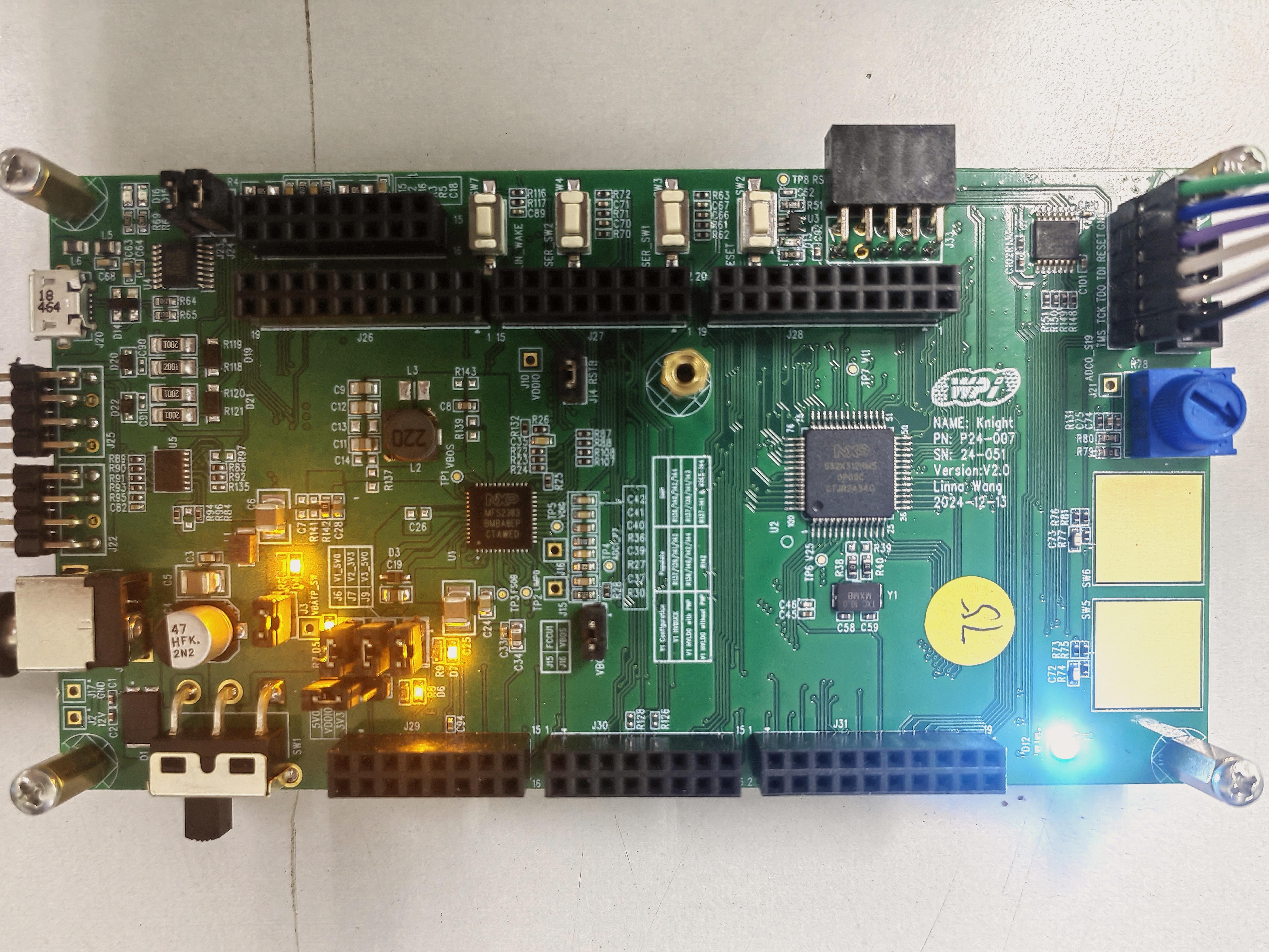
3.1短按大联大控股世平集团WPI-NXP S32K312 DVK核心板RESET键,若LED灯为白灯常亮则为成功。
(四)在NXP Cloud Lab 云实验室中使用大联大控股世平集团WPI-NXP S32K312 DVK核心板点亮LED灯
NXP Cloud Lab 云实验室官方介绍
NXP Cloud Lab云实验室是恩智浦全球首个对外开放的全线上实验室。 通过网络为用户提供探索恩智浦最新硬件、软件和解决方案的平台。
用户通过简单的网页操作便可实时和恩智浦的最新产品与解决方案进行互动,并支持在线远程调试、评估、更新代码、自动测试及软件性能的体验等。
NXP Cloud Lab 云实验室的亮点
- 实时互动,功能强大通过网页操作即可与恩智浦最新硬件和解决方案实时互动,支持远程调试、代码更新、自动测试等功能。
- 专业技术支持云实验室提供实时的技术支持,帮助用户解决开发过程中的问题。
- 便捷操作,快速上手无需复杂的安装和配置,用户可以轻松通过浏览器完成开发板的调试和评估。
(以上内容取自NXP Cloud Lab云实验室官网:https://aiotcloud.nxp.com.cn/及大联大工程师社区微信公众号:https://mp.weixin.qq.com/s/CzE4W8bffiJzm8rPPRHE6g)
NXP Cloud Lab 云实验室申请使用
1.使用浏览器打开NXP Cloud Lab 云实验室官网(地址:https://aiotcloud.nxp.com.cn/);

2.点击右上角“登录/注册”,登录或注册NXP账号;
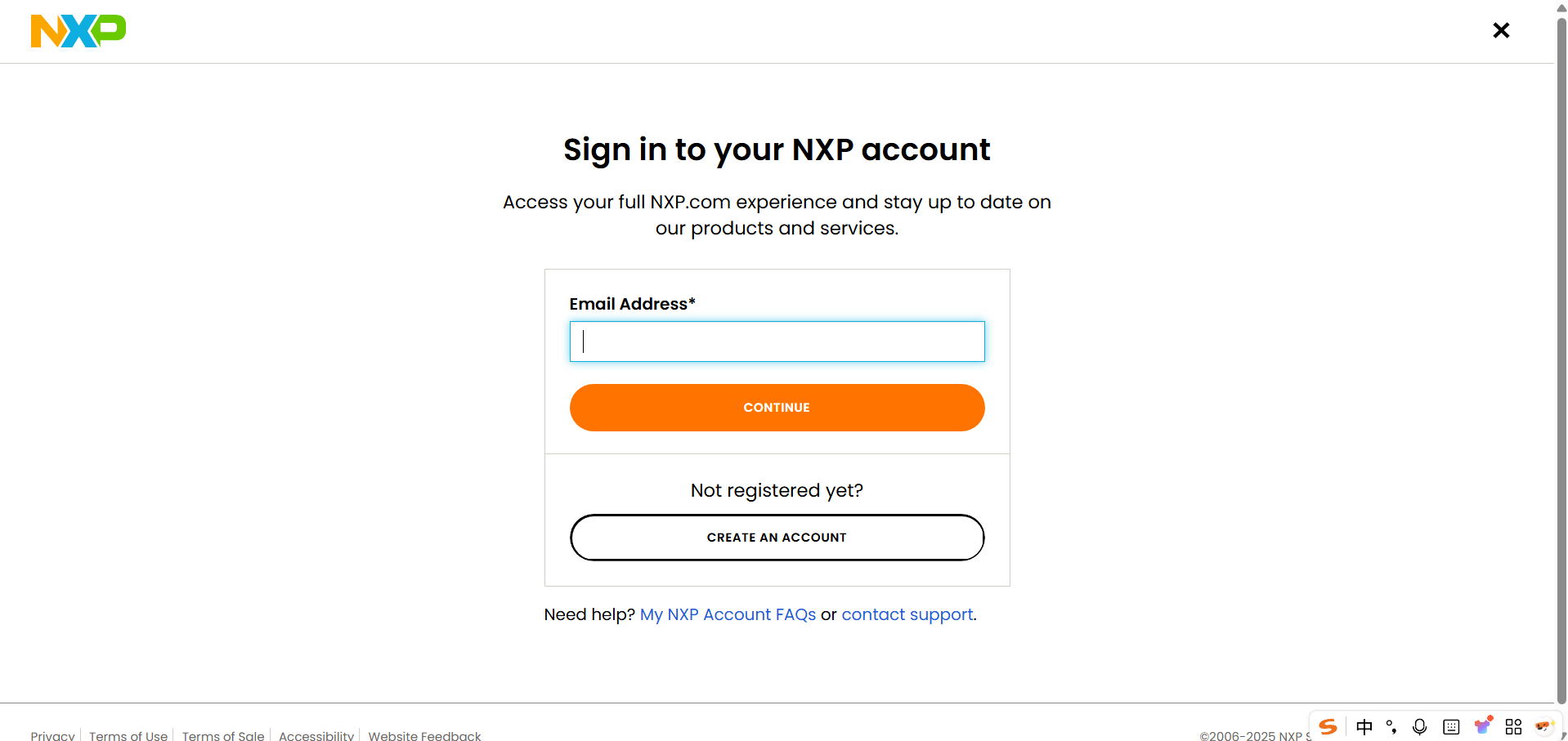
3.选择“登录即代表您同意《恩智浦云实验室使用条款》和《恩智浦云实验室隐私政策》”,并点击“确认登录”;

4.点击“探索恩智浦云实验室”中的“硬件”;
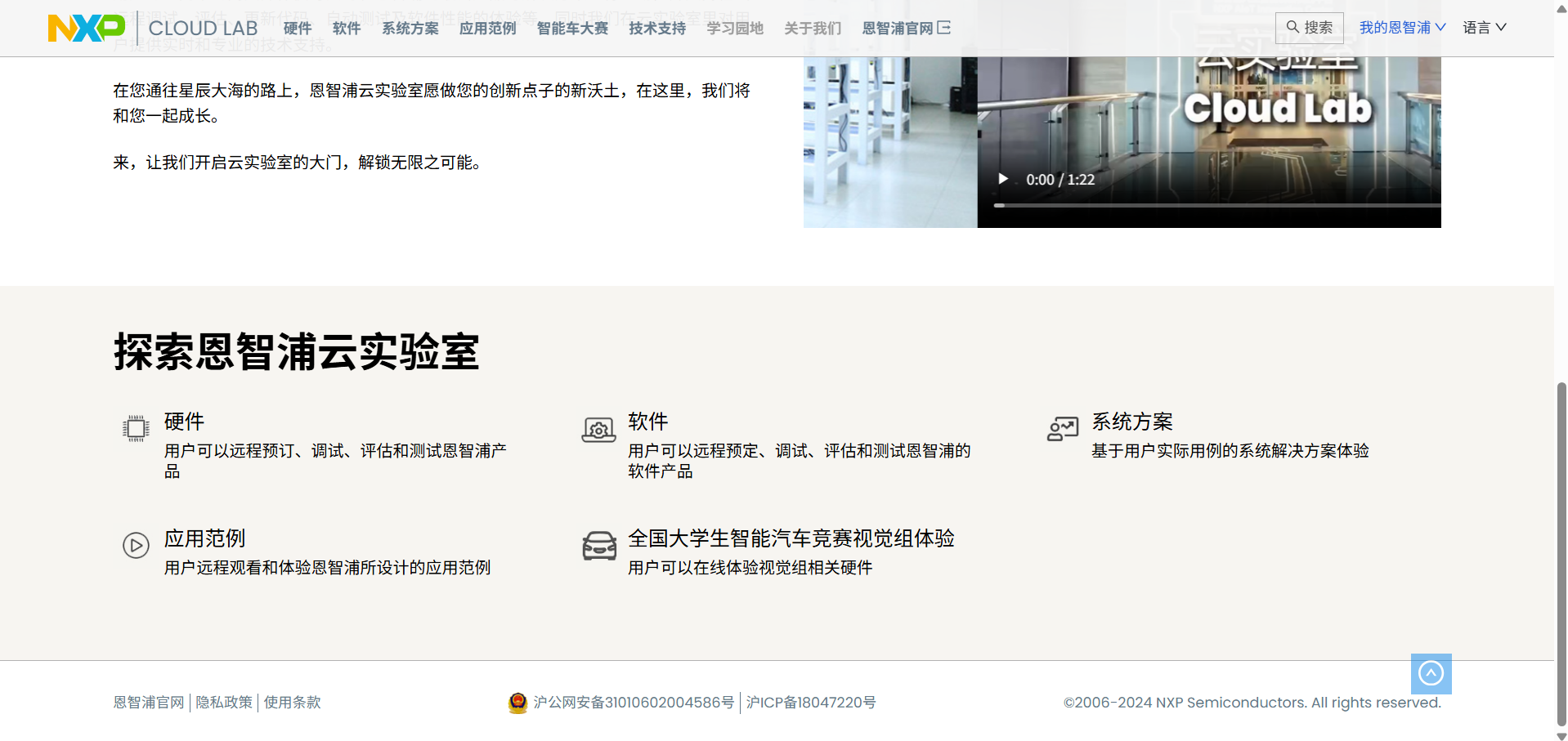
5.选择“WPIg 世平集团开发板”中的“WPIg S32K312 开发板”;
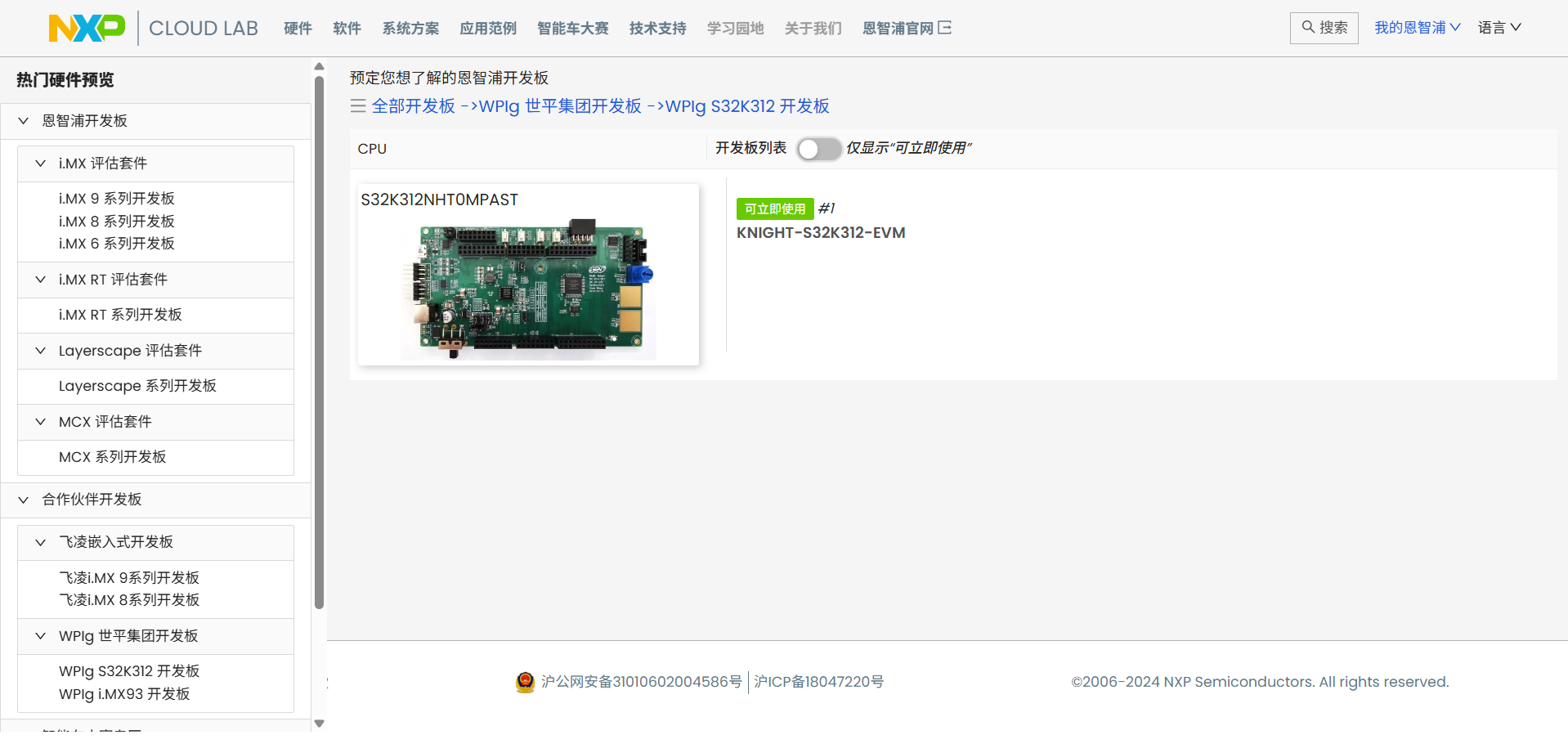
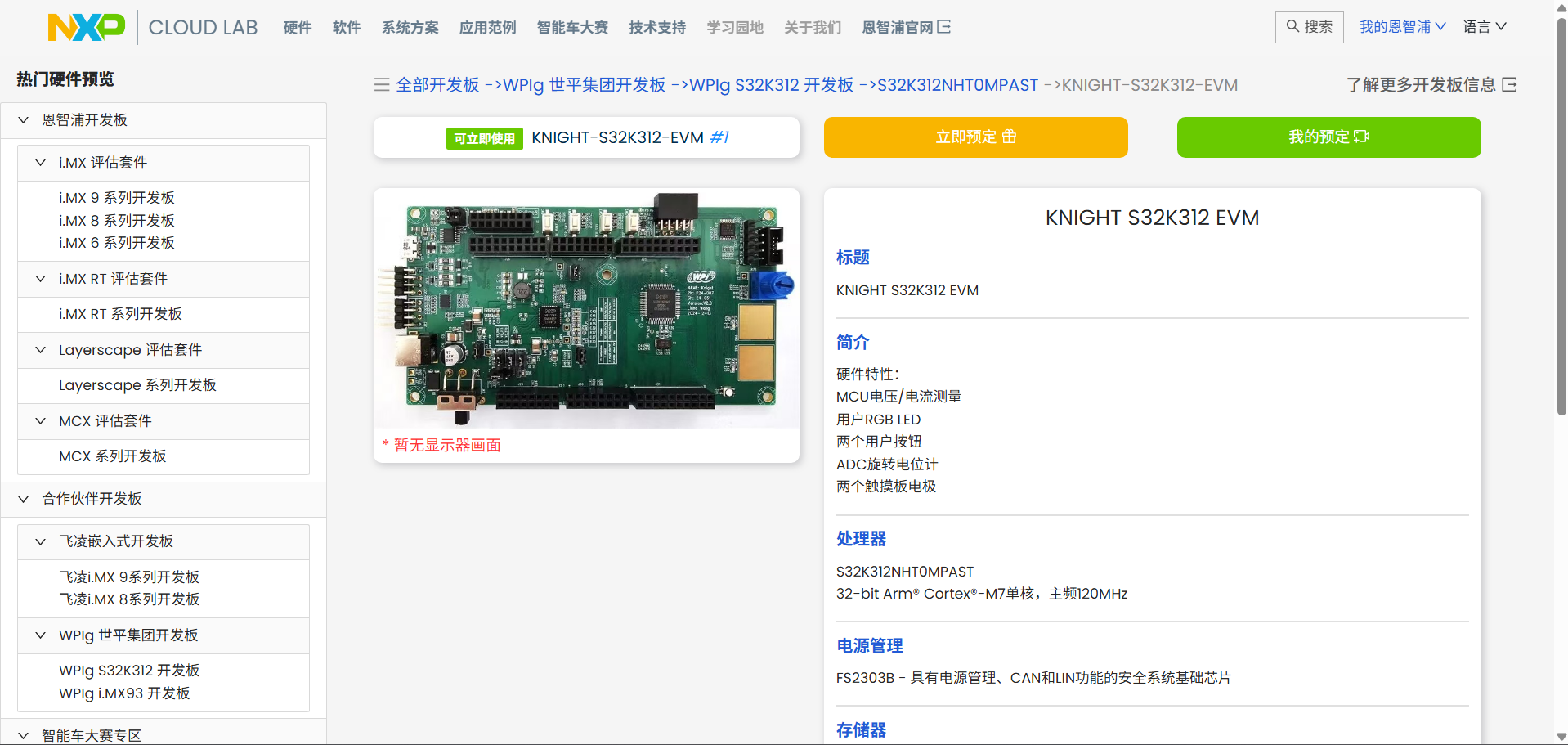
6.点击“KNIGHT-S32K312-EVM”,点击“立即预订”;
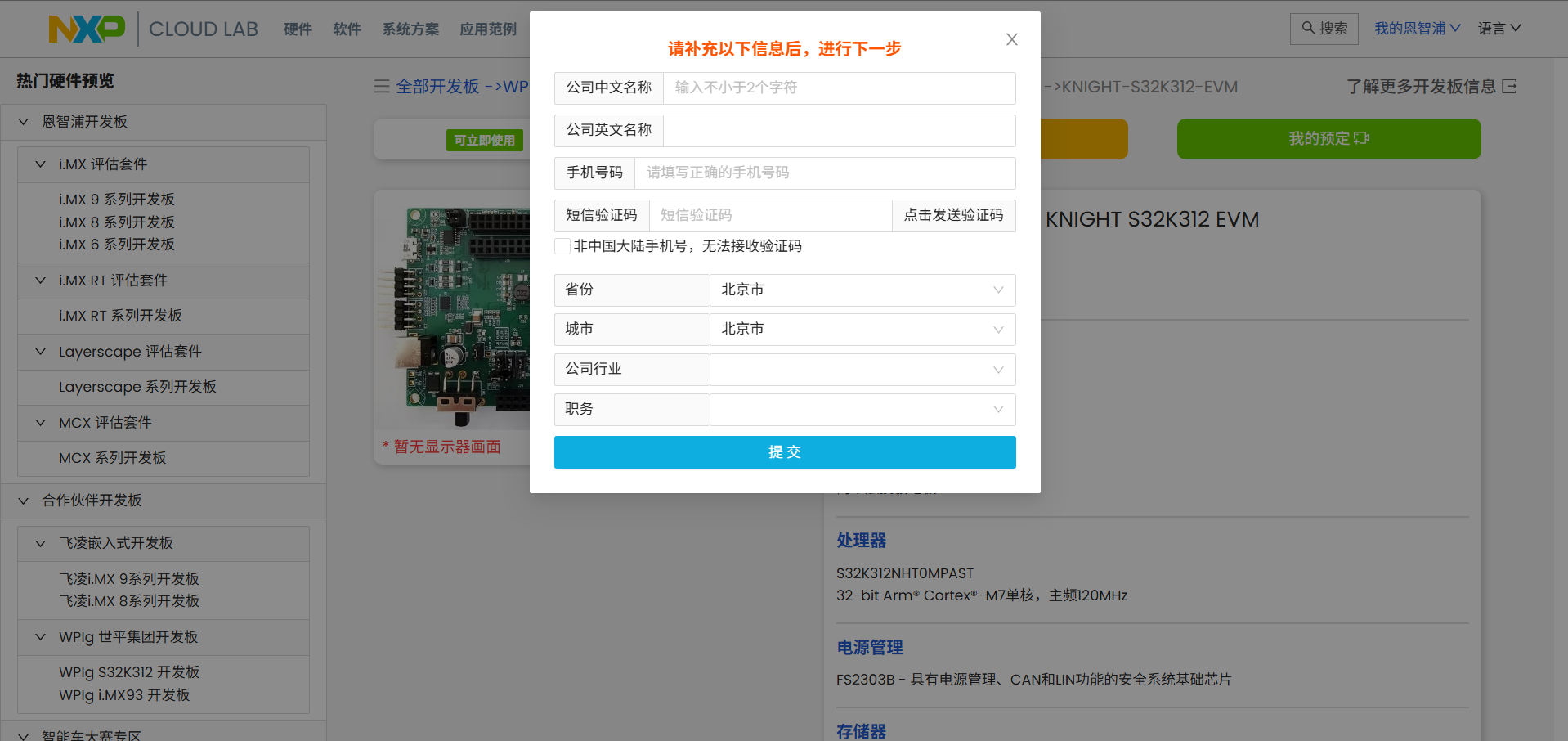
7.补充相关信息后点击“提交”;
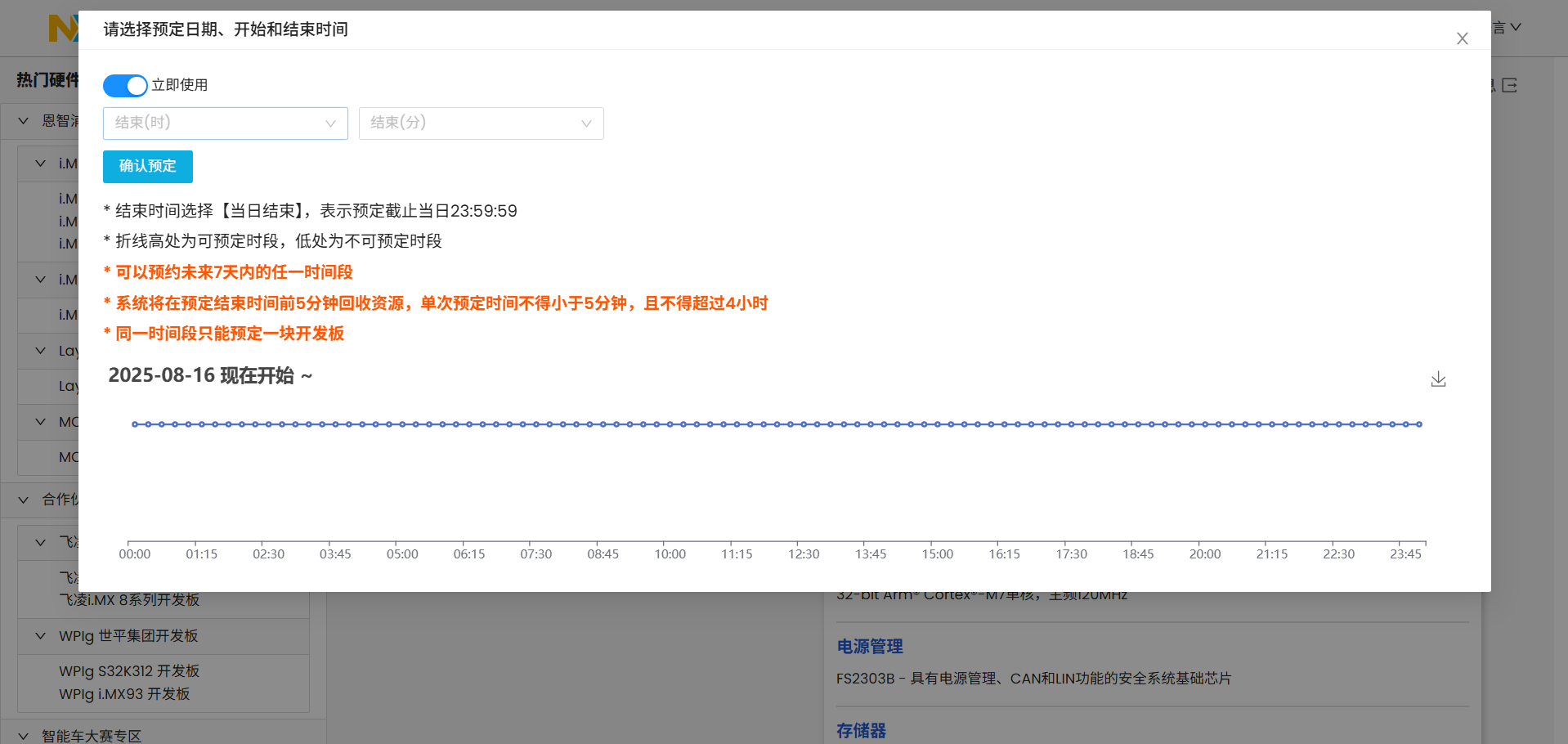
8.选择“立即使用”,并选择结束使用的时间,点击“确认预订”;
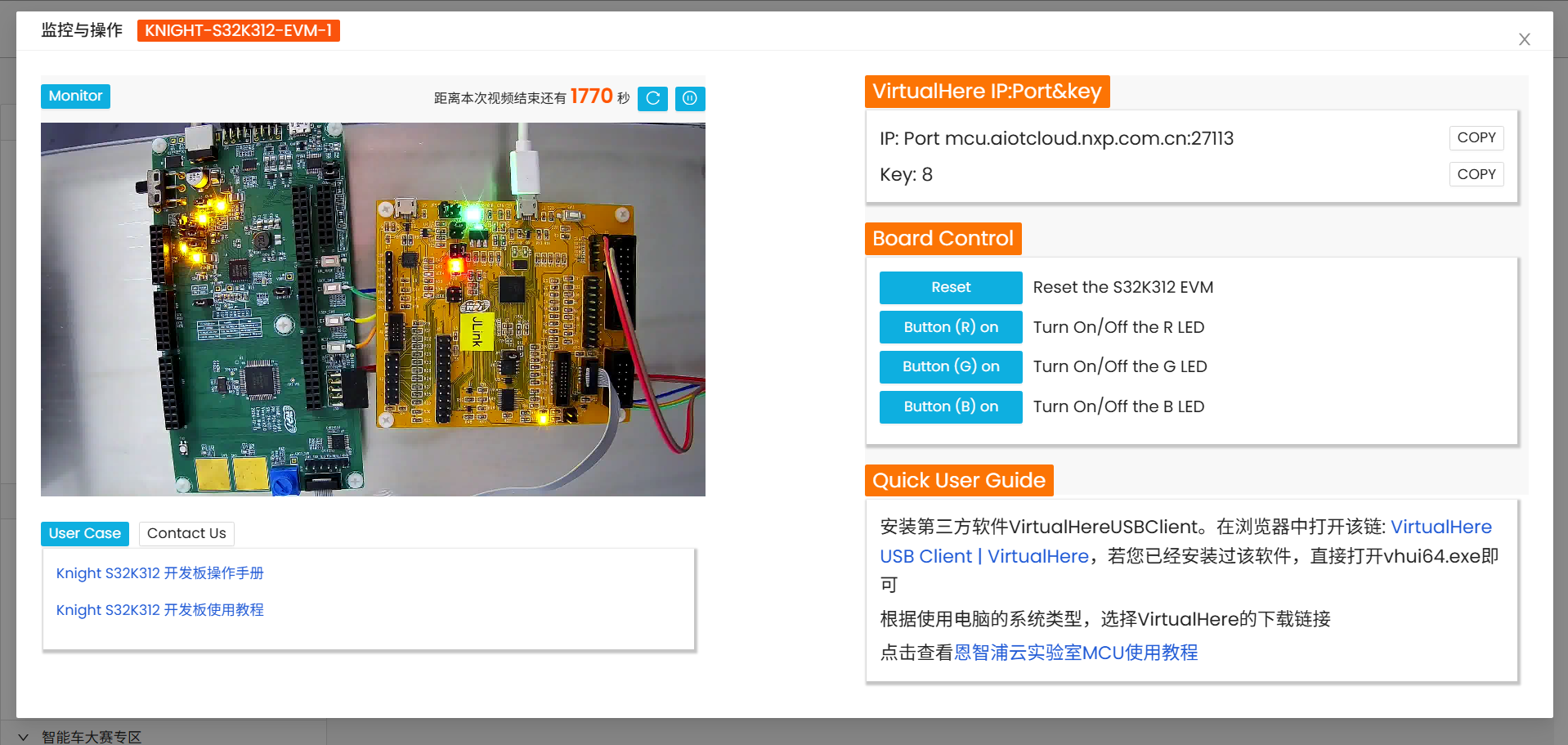
9.显示如下画面即为预订成功,可以在NXP Cloud Lab 云实验室中使用WPI-NXP S32K DVK核心板。
NXP Cloud Lab 云实验室安装VirtualHereUSBClient插件
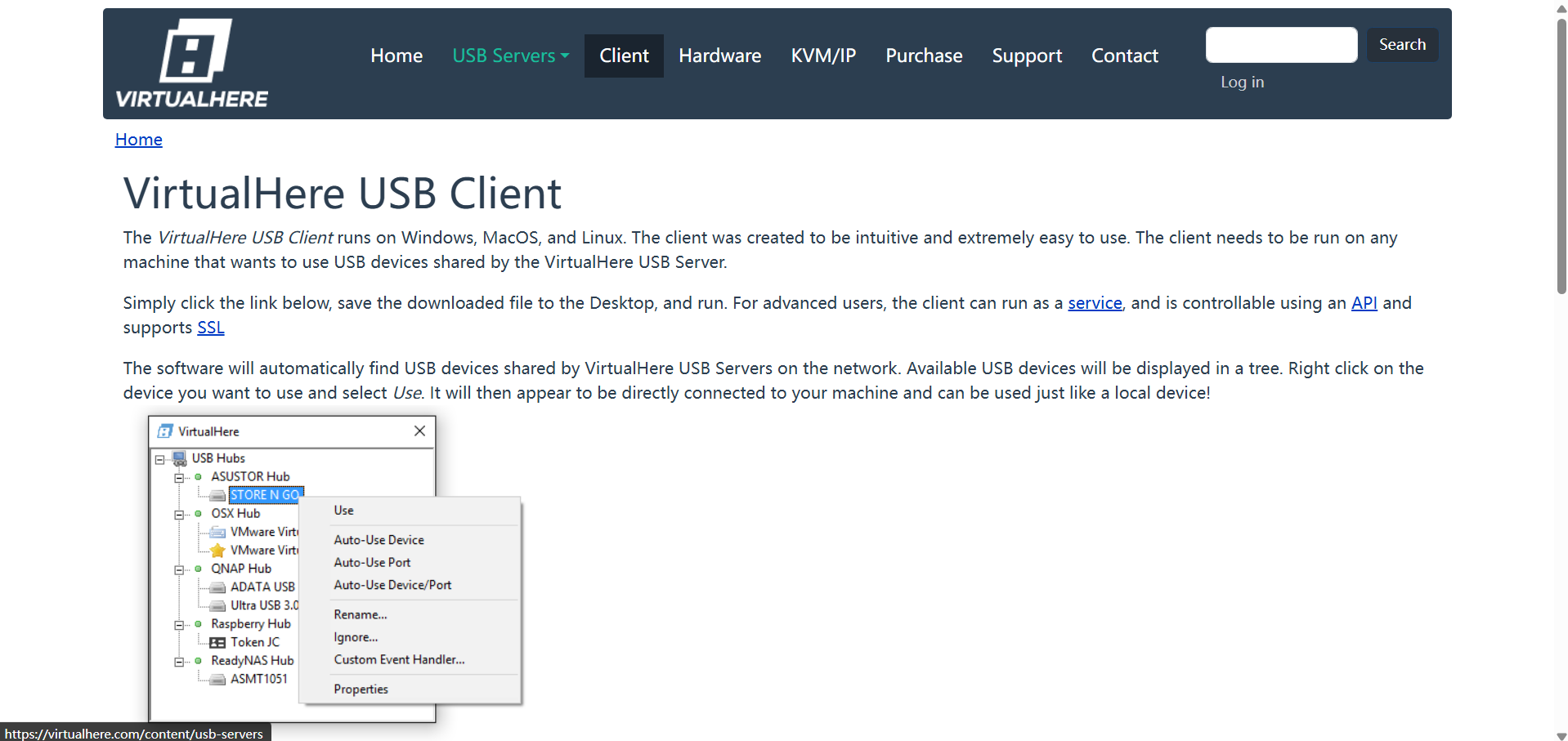
1.点击右侧“Quick User Guide”中的“VirtualHere USB Client | VirtualHere”;
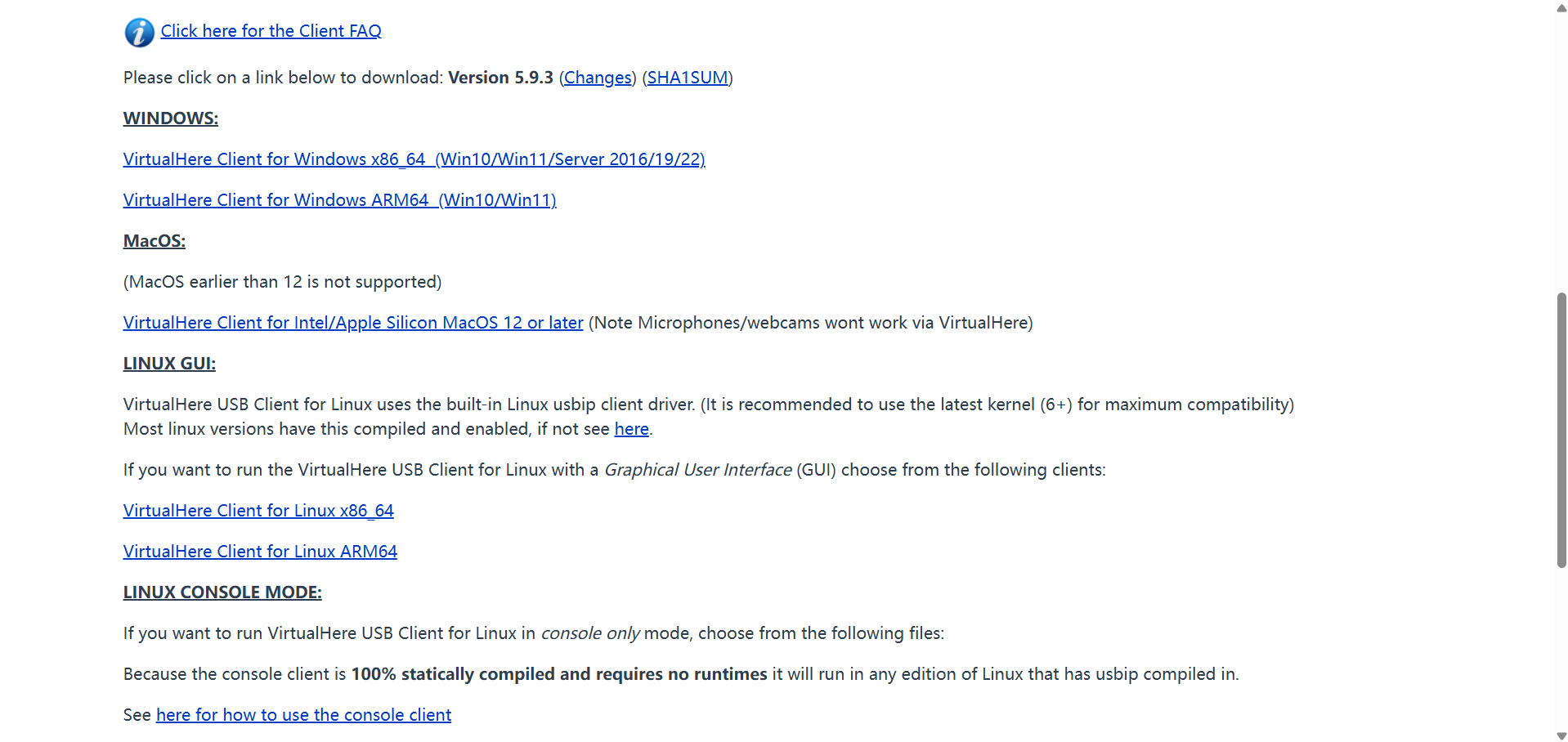
2.选择“WINDOWS:VirtualHere Client for Windows x86_64 (Win10/Win11/Server 2016/19/22)”,点击下载插件;
3.双击“vhui64.exe”;
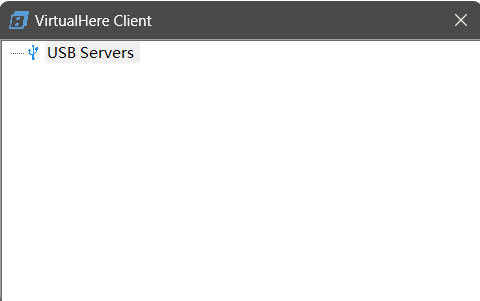
4.右击“USB Servers”选择“Specify USB Server …”;
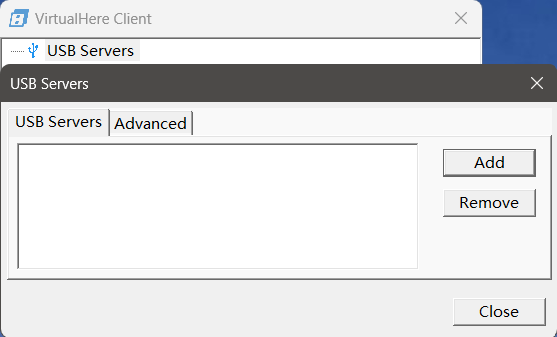
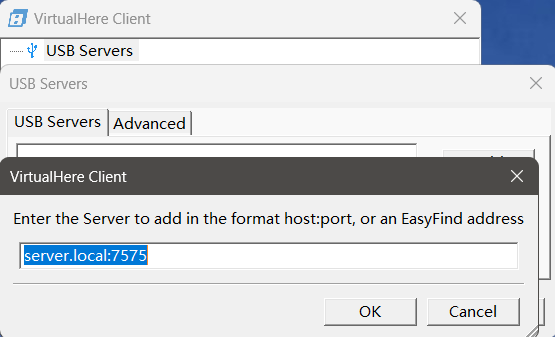
5.点击 “Add”,输入“VirtualHere IP:Port&key”中的“IP”,点击“OK”;
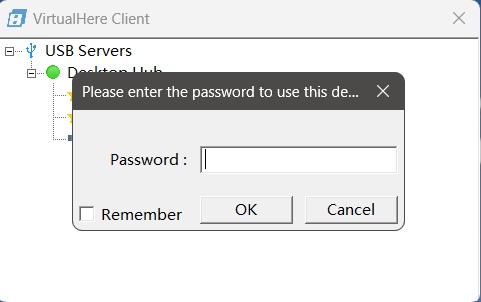
6.双击“J-Link”,在“Password”中输入“VirtualHere IP:Port&key”中的“Key”;
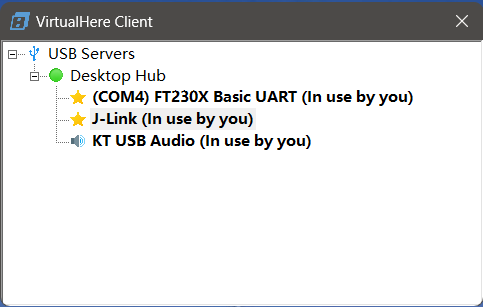
7.J-Link成功连接至终端。
NXP Cloud Lab 云实验室中使用WPI-NXP S32K312 DVK核心板点亮LED灯
烧录实现
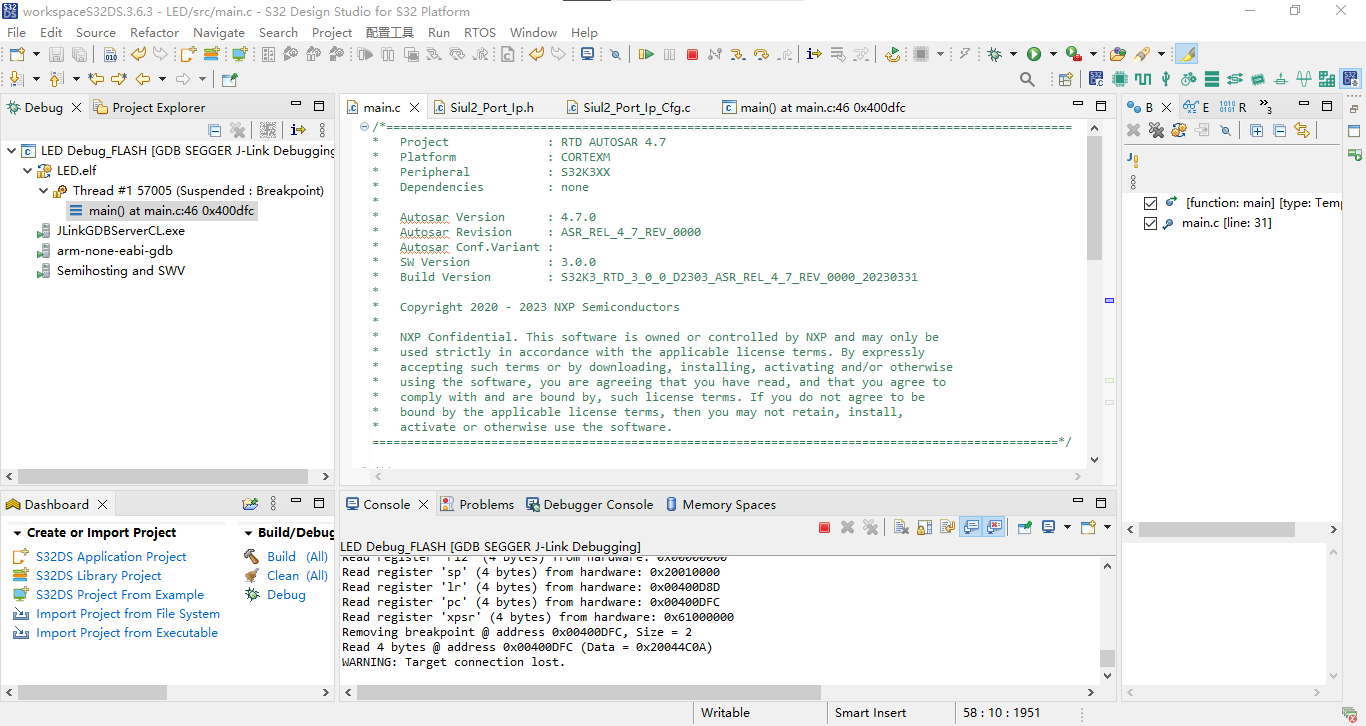
点击“Debug”,若显示下属内容则为Debug成功。
SEGGER J-Link GDB Server V8.60 Command Line Version

JLinkARM.dll V8.60 (DLL compiled Aug 13 2025 12:08:34)

Command line: -if jtag -device S32K312 -endian little -speed 1000 -port 2331 -swoport 2332 -telnetport 2333 -vd -ir -localhostonly 1 -singlerun -strict -timeout 0 -nogui
-----GDB Server start settings-----
GDBInit file:                  none
GDB Server Listening port:     2331
SWO raw output listening port: 2332
Terminal I/O port:             2333
Accept remote connection:      localhost only
Generate logfile:              off
Verify download:               on
Init regs on start:            on
Silent mode:                   off
Single run mode:               on
Target connection timeout:     0 ms
------J-Link related settings------
J-Link Host interface:         USB
J-Link script:                 none
J-Link settings file:          none
------Target related settings------
Target device:                 S32K312
Target device parameters:      none
Target interface:              JTAG
Target interface speed:        1000kHz
Target endian:                 little

Connecting to J-Link...
J-Link is connected.
Firmware: J-Link LPC-Link 2 compiled Apr  4 2019 16:55:05
Hardware: V1.00
S/N: 611000000
Checking target voltage...
Target voltage: 3.30 V
Listening on TCP/IP port 2331
Connecting to target...

J-Link found 1 JTAG device, Total IRLen = 8
JTAG ID: 0x0996801D (Cortex-M7)
Initializing CPU registers...Connected to target
Waiting for GDB connection...Connected to 0000:0000:0000:0000:0000:0000:0000:0001
GDB client (conn. 984) requested target.xml from GDB Server
Reading common registers:
Read register 'r0' (4 bytes) from hardware: 0x00000000
Read register 'r1' (4 bytes) from hardware: 0x00000000
Read register 'r2' (4 bytes) from hardware: 0x00000000
Read register 'r3' (4 bytes) from hardware: 0x00000000
Read register 'r4' (4 bytes) from hardware: 0x00000000
Read register 'r5' (4 bytes) from hardware: 0x00000000
Read register 'r6' (4 bytes) from hardware: 0x00000000
Read register 'r7' (4 bytes) from hardware: 0x00000000
Read register 'r8' (4 bytes) from hardware: 0x00000000
Read register 'r9' (4 bytes) from hardware: 0x00000000
Read register 'r10' (4 bytes) from hardware: 0x00000000
Read register 'r11' (4 bytes) from hardware: 0x00000000
Read register 'r12' (4 bytes) from hardware: 0x00000000
Read register 'sp' (4 bytes) from hardware: 0x00000000
Read register 'lr' (4 bytes) from hardware: 0x00000000
Read register 'pc' (4 bytes) from hardware: 0x00000000
Read register 'xpsr' (4 bytes) from hardware: 0x01000000
Read 4 bytes @ address 0x00000000 (Data = 0x00000000)
Read 2 bytes @ address 0x00000000 (Data = 0x0000)
Received monitor command: speed 1000
Target interface speed set to 1000 kHz
Received monitor command: clrbp
Received monitor command: reset
Resetting target
Received monitor command: halt
Halting target CPU...
...Target halted (PC = 0x00402420)
Received monitor command: regs
R0 = 00000000, R1 = 00000000, R2 = 00000000, R3 = 00000000
R4 = 00000000, R5 = 00000000, R6 = 00000000, R7 = 00000000
R8 = 00000000, R9 = 00000000, R10= 00000000, R11= 00000000
R12= 00000000, R13= 20010000, MSP= 20010000, PSP= 00000000
R14(LR) = FFFFFFFF, R15(PC) = 00402420
XPSR 01000000, APSR 00000000, EPSR 01000000, IPSR 00000000
CFBP 00000000, CONTROL 00, FAULTMASK 00, BASEPRI 00, PRIMASK 00

Security extension regs:
MSP_S  = 00000000, MSPLIM_S  = 00000000
PSP_S  = 00000000, PSPLIM_S  = 00000000
MSP_NS = 20010000, MSPLIM_NS = 00000000
PSP_NS = 00000000, PSPLIM_NS = 00000000
CONTROL_S  00, FAULTMASK_S  00, BASEPRI_S  00, PRIMASK_S  00
CONTROL_NS 00, FAULTMASK_NS 00, BASEPRI_NS 00, PRIMASK_NS 00

Reading common registers:
Read register 'r0' (4 bytes) from hardware: 0x00000000
Read register 'r1' (4 bytes) from hardware: 0x00000000
Read register 'r2' (4 bytes) from hardware: 0x00000000
Read register 'r3' (4 bytes) from hardware: 0x00000000
Read register 'r4' (4 bytes) from hardware: 0x00000000
Read register 'r5' (4 bytes) from hardware: 0x00000000
Read register 'r6' (4 bytes) from hardware: 0x00000000
Read register 'r7' (4 bytes) from hardware: 0x00000000
Read register 'r8' (4 bytes) from hardware: 0x00000000
Read register 'r9' (4 bytes) from hardware: 0x00000000
Read register 'r10' (4 bytes) from hardware: 0x00000000
Read register 'r11' (4 bytes) from hardware: 0x00000000
Read register 'r12' (4 bytes) from hardware: 0x00000000
Read register 'sp' (4 bytes) from hardware: 0x20010000
Read register 'lr' (4 bytes) from hardware: 0xFFFFFFFF
Read register 'pc' (4 bytes) from hardware: 0x00402420
Read register 'xpsr' (4 bytes) from hardware: 0x01000000
Received monitor command: speed auto
Select auto target interface speed (4000 kHz)
Received monitor command: flash breakpoints 1
Flash breakpoints enabled
Received monitor command: semihosting enable
Semi-hosting enabled (Handle on breakpoint instruction hit)
Received monitor command: semihosting IOClient 1
Semihosting I/O set to TELNET Client
Downloading 23264 bytes @ address 0x00400000 - Verified OK
Downloading 152 bytes @ address 0x00405AE0 - Verified OK
Downloading 4 bytes @ address 0x00405B78 - Verified OK
Writing register 'pc' = 0x00400C20
Comparing flash   [....................] Done.
Erasing flash     [....................] Done.
Programming flash [....................] Done.
Read 4 bytes @ address 0x00400C20 (Data = 0xF04FB672)
Read 2 bytes @ address 0x00400C20 (Data = 0xB672)
Reading 64 bytes @ address 0x00400DC0
Read 4 bytes @ address 0x00400E28 (Data = 0x40291706)
Read 4 bytes @ address 0x00400E28 (Data = 0x40291706)
Read 2 bytes @ address 0x00400DFC (Data = 0x4C0A)
Read 4 bytes @ address 0x00400E28 (Data = 0x40291706)
Read 2 bytes @ address 0x00400DFC (Data = 0x4C0A)
Received monitor command: clrbp
Received monitor command: reset
Resetting target
Received monitor command: halt
Halting target CPU...
...Target halted (PC = 0x00400C20)
Read 4 bytes @ address 0x00400E28 (Data = 0x40291706)
Read 4 bytes @ address 0x00400E28 (Data = 0x40291706)
Read 2 bytes @ address 0x00400DFC (Data = 0x4C0A)
Received monitor command: regs
R0 = 00000000, R1 = 00000000, R2 = 00000000, R3 = 00000000
R4 = 00000000, R5 = 00000000, R6 = 00000000, R7 = 00000000
R8 = 00000000, R9 = 00000000, R10= 00000000, R11= 00000000
R12= 00000000, R13= 20010000, MSP= 20010000, PSP= 00000000
R14(LR) = FFFFFFFF, R15(PC) = 00400C20
XPSR 01000000, APSR 00000000, EPSR 01000000, IPSR 00000000
CFBP 00000000, CONTROL 00, FAULTMASK 00, BASEPRI 00, PRIMASK 00

Security extension regs:
MSP_S  = 00000000, MSPLIM_S  = 00000000
PSP_S  = 00000000, PSPLIM_S  = 00000000
MSP_NS = 20010000, MSPLIM_NS = 00000000
PSP_NS = 00000000, PSPLIM_NS = 00000000
CONTROL_S  00, FAULTMASK_S  00, BASEPRI_S  00, PRIMASK_S  00
CONTROL_NS 00, FAULTMASK_NS 00, BASEPRI_NS 00, PRIMASK_NS 00

Reading common registers:
Read register 'r0' (4 bytes) from hardware: 0x00000000
Read register 'r1' (4 bytes) from hardware: 0x00000000
Read register 'r2' (4 bytes) from hardware: 0x00000000
Read register 'r3' (4 bytes) from hardware: 0x00000000
Read register 'r4' (4 bytes) from hardware: 0x00000000
Read register 'r5' (4 bytes) from hardware: 0x00000000
Read register 'r6' (4 bytes) from hardware: 0x00000000
Read register 'r7' (4 bytes) from hardware: 0x00000000
Read register 'r8' (4 bytes) from hardware: 0x00000000
Read register 'r9' (4 bytes) from hardware: 0x00000000
Read register 'r10' (4 bytes) from hardware: 0x00000000
Read register 'r11' (4 bytes) from hardware: 0x00000000
Read register 'r12' (4 bytes) from hardware: 0x00000000
Read register 'sp' (4 bytes) from hardware: 0x20010000
Read register 'lr' (4 bytes) from hardware: 0xFFFFFFFF
Read register 'pc' (4 bytes) from hardware: 0x00400C20
Read register 'xpsr' (4 bytes) from hardware: 0x01000000
Setting breakpoint @ address 0x00400DFC, Kind = 2, Type = THUMB, BPHandle = 0x0001
Starting target CPU...
...Breakpoint (set by 'GDB') reached @ address 0x00400DFC
Reading common registers:
Read register 'r0' (4 bytes) from hardware: 0x00000003
Read register 'r1' (4 bytes) from hardware: 0xFFFFFFFF
Read register 'r2' (4 bytes) from hardware: 0x00070200
Read register 'r3' (4 bytes) from hardware: 0xE000E000
Read register 'r4' (4 bytes) from hardware: 0x00000000
Read register 'r5' (4 bytes) from hardware: 0x00000000
Read register 'r6' (4 bytes) from hardware: 0x00000000
Read register 'r7' (4 bytes) from hardware: 0x00000000
Read register 'r8' (4 bytes) from hardware: 0x00000000
Read register 'r9' (4 bytes) from hardware: 0x00000000
Read register 'r10' (4 bytes) from hardware: 0x00000000
Read register 'r11' (4 bytes) from hardware: 0x00000000
Read register 'r12' (4 bytes) from hardware: 0x00000000
Read register 'sp' (4 bytes) from hardware: 0x20010000
Read register 'lr' (4 bytes) from hardware: 0x00400D8D
Read register 'pc' (4 bytes) from hardware: 0x00400DFC
Read register 'xpsr' (4 bytes) from hardware: 0x61000000
Removing breakpoint @ address 0x00400DFC, Size = 2
Read 4 bytes @ address 0x00400DFC (Data = 0x20044C0A)
WARNING: Target connection lost.
效果演示
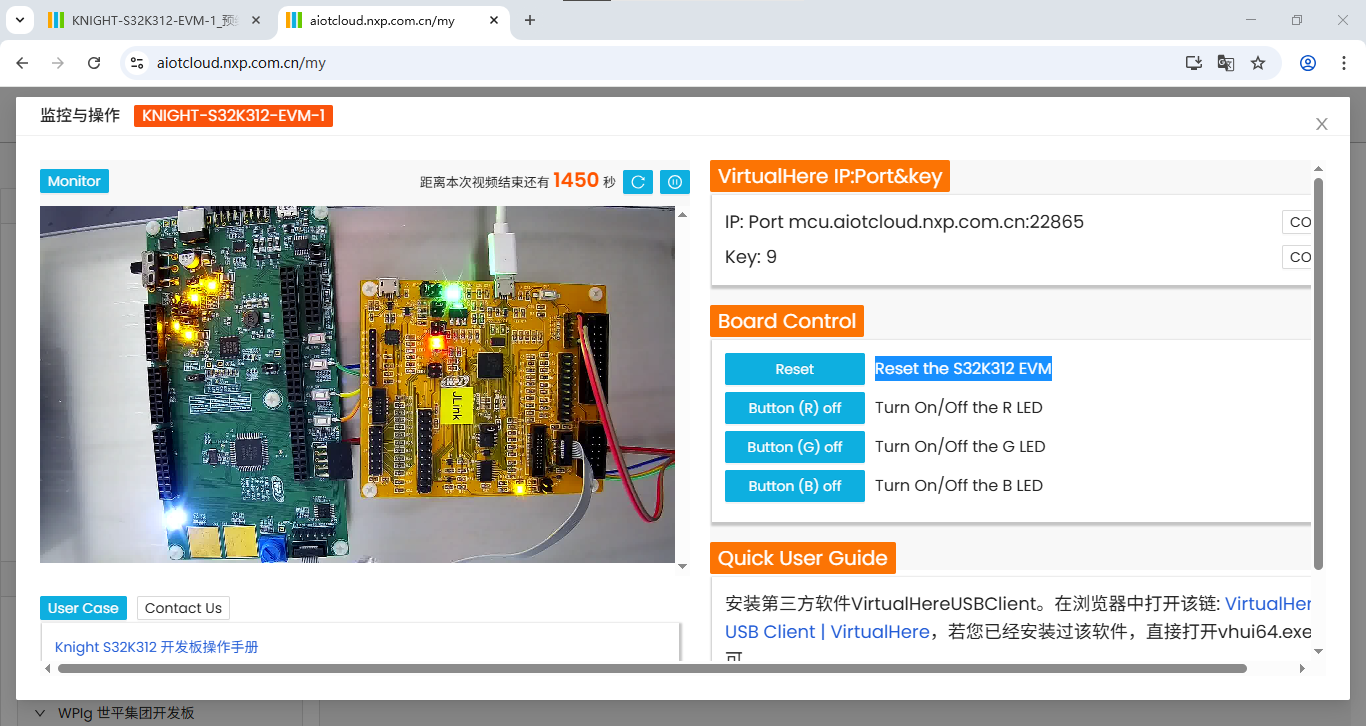
点击左侧“Reset Reset the S32K312 EVM”,若LED灯为白灯常亮则为成功。

智能硬件社区聚焦AI智能硬件技术生态,汇聚嵌入式AI、物联网硬件开发者,打造交流分享平台,同步全国赛事资讯、开展 OPC 核心人才招募,助力技术落地与开发者成长。
更多推荐

 14
14 0
0- 0


 已为社区贡献9条内容

所有评论(0)