uboot添加ping命令的响应处理
本篇主要内容:
一、前言
🔍在uboot里使用tftp和nfs来启动linux系统是常用的方式,在搭建好网络环境后,我们经常会使用ping命令测试开发板和虚拟机之间的网络,但是能够发现,虚拟机或其它对uboot是ping不通的,原因是uboot里对ping请求包没有进行响应处理。那么,勤奋好学的我们便自然而然会想这是为什么呢,该怎么在uboot里添加对ping请求包的响应,让外界也能ping通uboot呢?
🔍ping请求包的说法实际上并不合适,因为用ping命令来测试网络通断,实际上使用的是ICMP协议。
二、ICMP协议
🔍ICMP协议主要用于在网络中传递控制消息、错误报告和诊断信息,在OSI网络模型里属于网络层协议,是IP协议的辅助协议,不传输用户数据。它的报文分为两种:①差错报告、②查询报文;使用ping命令时,用wireshark抓包可以看到,常见的报文是Echo Reply、Echo Request和Destination Unreachable。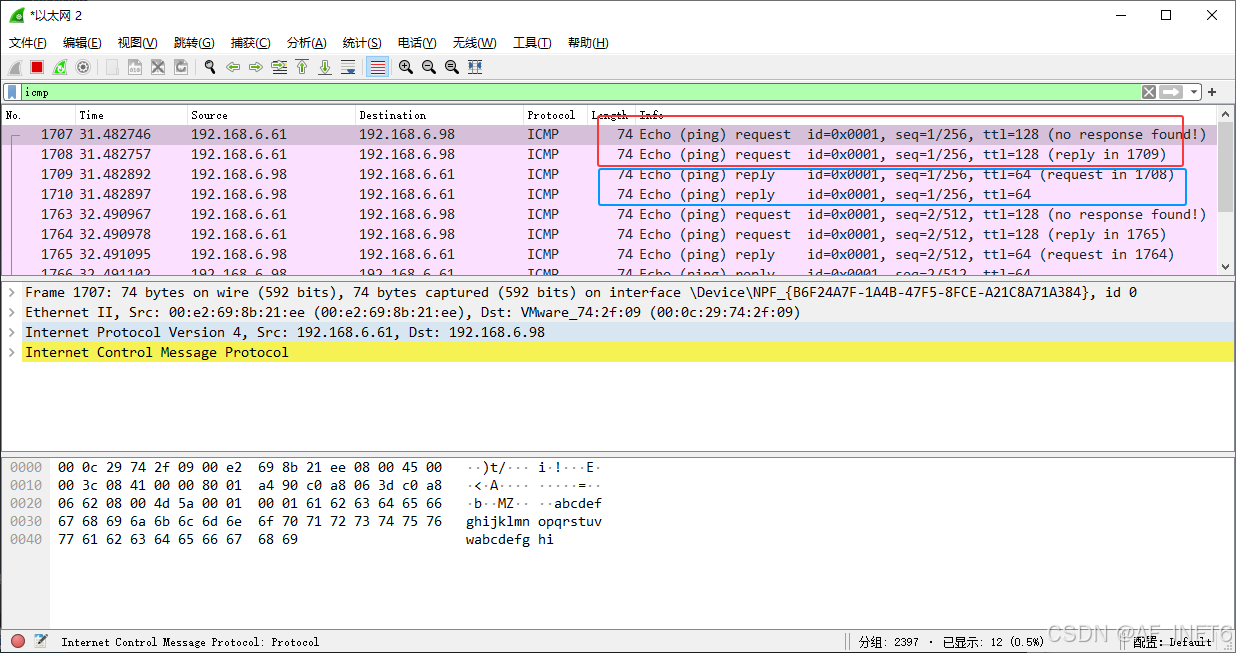
🔍Echo Request和Echo Reply:目标请求和响应报文,属于查询报文。在windows ping其它局域网下的用网设备,收到响应报文Echo Reply,一般我们才视为ping通。
C:\Users\Administrator.DESKTOP-O6LBFD9>ping 192.168.6.98
正在 Ping 192.168.6.98 具有 32 字节的数据:
来自 192.168.6.98 的回复: 字节=32 时间<1ms TTL=64
来自 192.168.6.98 的回复: 字节=32 时间<1ms TTL=64
来自 192.168.6.98 的回复: 字节=32 时间<1ms TTL=64
🔍在uboot中,一般都没有响应报文,也就是我们在虚拟机ping uboot的时候,看到ping不通,实际上网络是通的,通过抓包可以看到,Request报文是成功发送到uboot的,只是没有收到回复,超时之后就会收到Destination Unreachable。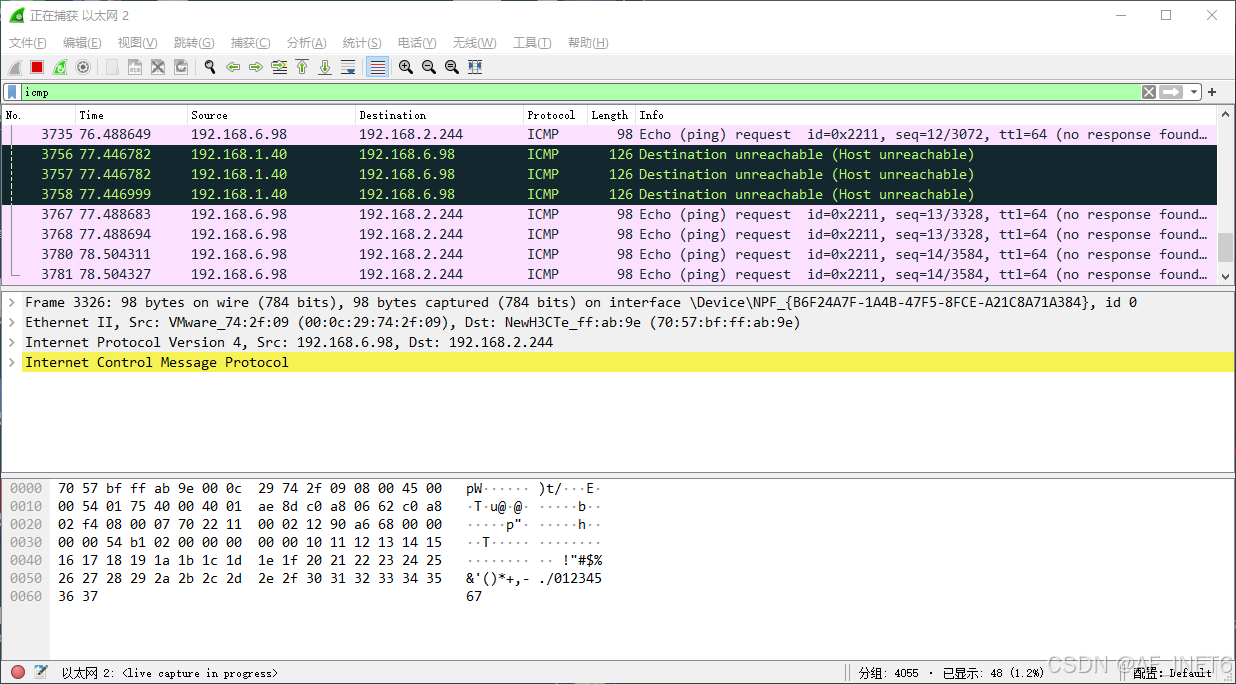
三、uboot里的ping命令
🔍了解完ICMP协议,就来简单看看uboot里是怎么实现ping命令的,以下源码阅读顺序自上而下,从最外层调用往里看的。
3.1 uboot的ping命令定义
⚡定义位置:cmd/net.c
⚡以下代码将ping命令注册uboot的命令行对应模块,主要通过U_BOOT_CMD( )这个宏来实现,其参数含义如下:
📌 命令名:ping
📌 参数个数:2个(包括命令本身,类似argc)
📌 是否可重复执行:1表示true
📌 调用函数:do_ping( )
📌 帮助信息
⚡调用的do_ping( )内容比较简单,核心就是net_loop( )这个函数,实现发送ICMP包核心都在这里。
#if defined(CONFIG_CMD_PING)
static int do_ping(cmd_tbl_t *cmdtp, int flag, int argc, char * const argv[])
{
	if (argc < 2)
		return CMD_RET_USAGE;

	net_ping_ip = string_to_ip(argv[1]);
	if (net_ping_ip.s_addr == 0)
		return CMD_RET_USAGE;

	if (net_loop(PING) < 0) {
		printf("ping failed; host %s is not alive\n", argv[1]);
		return CMD_RET_FAILURE;
	}

	printf("host %s is alive\n", argv[1]);

	return CMD_RET_SUCCESS;
}

U_BOOT_CMD(
	ping,	2,	1,	do_ping,
	"send ICMP ECHO_REQUEST to network host",
	"ipaddress"
);
3.2 uboot的net_loop( )部分内容的简单分析
⚡ 代码位置:net/net.c
⚡ 协议栈层面的初始化:net_init( )函数
📌 可以看到,net_init( )函数主要做的协议栈层面的初始化,前面设置了数据包缓存的大小,并对齐地址(官方注释翻译过来);net_pkt_buf是定义在net/net.h中的全局缓冲区,
📌net_pkt_buf缓存区大小设置:此处不深究具体原因了(从定义处来看,大致是由设备字节对齐要求(以满足CPU/DMA访问要求和性能,这里定义的是32字节)+以太网帧1536字节还需要X5个缓冲区确定的,最终大小是1536*5+32=7715字节`)
📌net_tx_packet是传输的数据包,其大小计算看不太懂,略过
📌接着arp_init()、net_clear_handlers()都是一些配置清零或复位
📌 最后,net_init_loop()只是获取了当前设备的MAC地址
可见,真正的实现代码还在net_loop( )里,接着往下看!
void net_init(void)
{
	static int first_call = 1;

	if (first_call) {
		/*
		 *	Setup packet buffers, aligned correctly.
		 */
		int i;

		net_tx_packet = &net_pkt_buf[0] + (PKTALIGN - 1);
		net_tx_packet -= (ulong)net_tx_packet % PKTALIGN;
		for (i = 0; i < PKTBUFSRX; i++) {
			net_rx_packets[i] = net_tx_packet +
				(i + 1) * PKTSIZE_ALIGN;
		}
		arp_init();
		net_clear_handlers();

		/* Only need to setup buffer pointers once. */
		first_call = 0;
	}

	net_init_loop();
}
⚡网卡的初始化:在net_init( )后,是对网络接口的初始化
📌 代码位置:net/net.c
📌 eth_is_on_demand_init() 这个条件来判断是否是按需初始化网卡,demand是n.按需、需要的意思。
true: 表示当前网卡还未被初始化,现在需要第一次使用它,因此必须初始化
📌 protocol != NETCONS:NETCONS是网络控制台的意思,也就是非网络控制台协议,就必须进行以下初始化
📌 eth_halt( )和eth_set_current( )都是重新设置网卡,类似复位的意思。
eth_halt( )重新设置网卡;eth_set_current( )会重新从环境变量中获取当前使用的网卡
📌 至此,网卡的初始化也完成了,接下去的代码是一段状态机,轮询各种协议并调用相应的start函数,是一个由接收到的数据包和定时器事件驱动的状态机。
📌 这些对应的start函数实现功能就不看了,只看到ping命令相关的,也就是#if defined(CONFIG_CMD_PING)处的ping_start( )
⚡到这里已经能看到ping命令的基本实现,也就是start_ping()函数。在net_loop()下还有其它更复杂的内容,此处不再继续了,先了解start_ping( )。
/**********************************************************************/
/*
 *	Main network processing loop.
 */

int net_loop(enum proto_t protocol)
{
	int ret = -EINVAL;
	net_restarted = 0;
	net_dev_exists = 0;
	net_try_count = 1;

	/* 调试信息 */
	debug_cond(DEBUG_INT_STATE, "--- net_loop Entry\n");
	/* uboot的启动性能分析模块,这里用于记录网卡启动的时间信息 */
	bootstage_mark_name(BOOTSTAGE_ID_ETH_START, "eth_start");
	/* 网络相关的初始化,包括硬件、协议栈等内容的初始化 */
	net_init();
	if (eth_is_on_demand_init() || protocol != NETCONS) {
		eth_halt();
		eth_set_current();
		ret = eth_init();
		if (ret < 0) {
			eth_halt();
			return ret;
		}
	} else {
		eth_init_state_only();
	}
restart:
#ifdef CONFIG_USB_KEYBOARD
	net_busy_flag = 0;
#endif
	net_set_state(NETLOOP_CONTINUE);

	/*
	 *	Start the ball rolling with the given start function.  From
	 *	here on, this code is a state machine driven by received
	 *	packets and timer events.
	 */
	debug_cond(DEBUG_INT_STATE, "--- net_loop Init\n");
	net_init_loop();

	switch (net_check_prereq(protocol)) {
	case 1:
		/* network not configured */
		eth_halt();
		return -ENODEV;

	case 2:
		/* network device not configured */
		break;

	case 0:
		net_dev_exists = 1;
		net_boot_file_size = 0;
		switch (protocol) {
		case TFTPGET:
#ifdef CONFIG_CMD_TFTPPUT
		case TFTPPUT:
#endif
			/* always use ARP to get server ethernet address */
			tftp_start(protocol);
			break;
#ifdef CONFIG_CMD_TFTPSRV
		case TFTPSRV:
			tftp_start_server();
			break;
#endif
#if defined(CONFIG_CMD_DHCP)
		case DHCP:
			bootp_reset();
			net_ip.s_addr = 0;
			dhcp_request();		/* Basically same as BOOTP */
			break;
#endif

		case BOOTP:
			bootp_reset();
			net_ip.s_addr = 0;
			bootp_request();
			break;

#if defined(CONFIG_CMD_RARP)
		case RARP:
			rarp_try = 0;
			net_ip.s_addr = 0;
			rarp_request();
			break;
#endif
#if defined(CONFIG_CMD_PING)
		case PING:
			ping_start();
			break;
#endif
#if defined(CONFIG_CMD_NFS)
		case NFS:
			nfs_start();
			break;
#endif
#if defined(CONFIG_CMD_CDP)
		case CDP:
			cdp_start();
			break;
#endif
#if defined(CONFIG_NETCONSOLE) && !(CONFIG_SPL_BUILD)
		case NETCONS:
			nc_start();
			break;
#endif
#if defined(CONFIG_CMD_SNTP)
		case SNTP:
			sntp_start();
			break;
#endif
#if defined(CONFIG_CMD_DNS)
		case DNS:
			dns_start();
			break;
#endif
#if defined(CONFIG_CMD_LINK_LOCAL)
		case LINKLOCAL:
			link_local_start();
			break;
#endif
		default:
			break;
		}

		break;
	}

#if defined(CONFIG_MII) || defined(CONFIG_CMD_MII)
#if	defined(CONFIG_SYS_FAULT_ECHO_LINK_DOWN)	&& \
	defined(CONFIG_STATUS_LED)			&& \
	defined(STATUS_LED_RED)
	/*
	 * Echo the inverted link state to the fault LED.
	 */
	if (miiphy_link(eth_get_dev()->name, CONFIG_SYS_FAULT_MII_ADDR))
		status_led_set(STATUS_LED_RED, STATUS_LED_OFF);
	else
		status_led_set(STATUS_LED_RED, STATUS_LED_ON);
#endif /* CONFIG_SYS_FAULT_ECHO_LINK_DOWN, ... */
#endif /* CONFIG_MII, ... */
#ifdef CONFIG_USB_KEYBOARD
	net_busy_flag = 1;
#endif

	/*
	 *	Main packet reception loop.  Loop receiving packets until
	 *	someone sets `net_state' to a state that terminates.
	 */
	for (;;) {
		WATCHDOG_RESET();
#ifdef CONFIG_SHOW_ACTIVITY
		show_activity(1);
#endif
		if (arp_timeout_check() > 0)
			time_start = get_timer(0);

		/*
		 *	Check the ethernet for a new packet.  The ethernet
		 *	receive routine will process it.
		 *	Most drivers return the most recent packet size, but not
		 *	errors that may have happened.
		 */
		eth_rx();

		/*
		 *	Abort if ctrl-c was pressed.
		 */
		if (ctrlc()) {
			/* cancel any ARP that may not have completed */
			net_arp_wait_packet_ip.s_addr = 0;

			net_cleanup_loop();
			eth_halt();
			/* Invalidate the last protocol */
			eth_set_last_protocol(BOOTP);

			puts("\nAbort\n");
			/* include a debug print as well incase the debug
			   messages are directed to stderr */
			debug_cond(DEBUG_INT_STATE, "--- net_loop Abort!\n");
			ret = -EINTR;
			goto done;
		}

		/*
		 *	Check for a timeout, and run the timeout handler
		 *	if we have one.
		 */
		if (time_handler &&
		    ((get_timer(0) - time_start) > time_delta)) {
			thand_f *x;

#if defined(CONFIG_MII) || defined(CONFIG_CMD_MII)
#if	defined(CONFIG_SYS_FAULT_ECHO_LINK_DOWN)	&& \
	defined(CONFIG_STATUS_LED)			&& \
	defined(STATUS_LED_RED)
			/*
			 * Echo the inverted link state to the fault LED.
			 */
			if (miiphy_link(eth_get_dev()->name,
					CONFIG_SYS_FAULT_MII_ADDR))
				status_led_set(STATUS_LED_RED, STATUS_LED_OFF);
			else
				status_led_set(STATUS_LED_RED, STATUS_LED_ON);
#endif /* CONFIG_SYS_FAULT_ECHO_LINK_DOWN, ... */
#endif /* CONFIG_MII, ... */
			debug_cond(DEBUG_INT_STATE, "--- net_loop timeout\n");
			x = time_handler;
			time_handler = (thand_f *)0;
			(*x)();
		}

		if (net_state == NETLOOP_FAIL)
			ret = net_start_again();

		switch (net_state) {
		case NETLOOP_RESTART:
			net_restarted = 1;
			goto restart;

		case NETLOOP_SUCCESS:
			net_cleanup_loop();
			if (net_boot_file_size > 0) {
				printf("Bytes transferred = %d (%x hex)\n",
				       net_boot_file_size, net_boot_file_size);
				setenv_hex("filesize", net_boot_file_size);
				setenv_hex("fileaddr", load_addr);
			}
			if (protocol != NETCONS)
				eth_halt();
			else
				eth_halt_state_only();

			eth_set_last_protocol(protocol);

			ret = net_boot_file_size;
			debug_cond(DEBUG_INT_STATE, "--- net_loop Success!\n");
			goto done;

		case NETLOOP_FAIL:
			net_cleanup_loop();
			/* Invalidate the last protocol */
			eth_set_last_protocol(BOOTP);
			debug_cond(DEBUG_INT_STATE, "--- net_loop Fail!\n");
			goto done;

		case NETLOOP_CONTINUE:
			continue;
		}
	}

done:
#ifdef CONFIG_USB_KEYBOARD
	net_busy_flag = 0;
#endif
#ifdef CONFIG_CMD_TFTPPUT
	/* Clear out the handlers */
	net_set_udp_handler(NULL);
	net_set_icmp_handler(NULL);
#endif
	return ret;
}
3.3 uboot中ping命令的实现ping_start( )
⚡ping_start( )实际上主要内容是在ping_send( )函数中
void ping_start(void)
{
	printf("Using %s device\n", eth_get_name());
	net_set_timeout_handler(10000UL, ping_timeout_handler);

	ping_send();
}
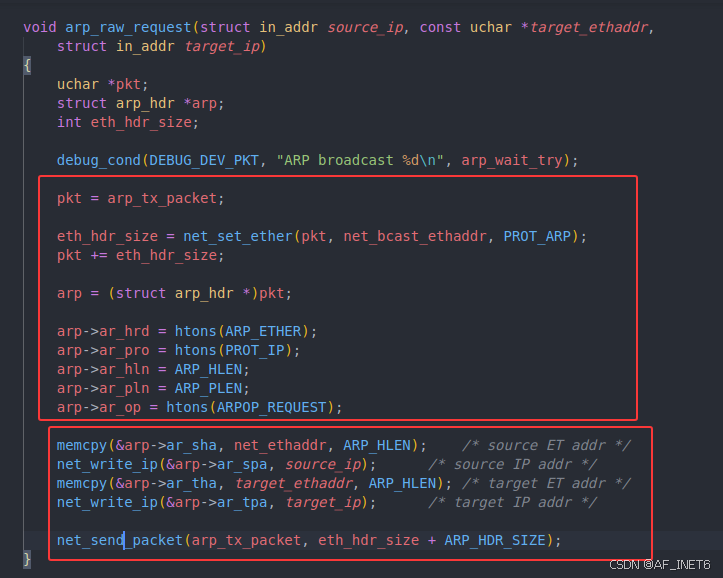
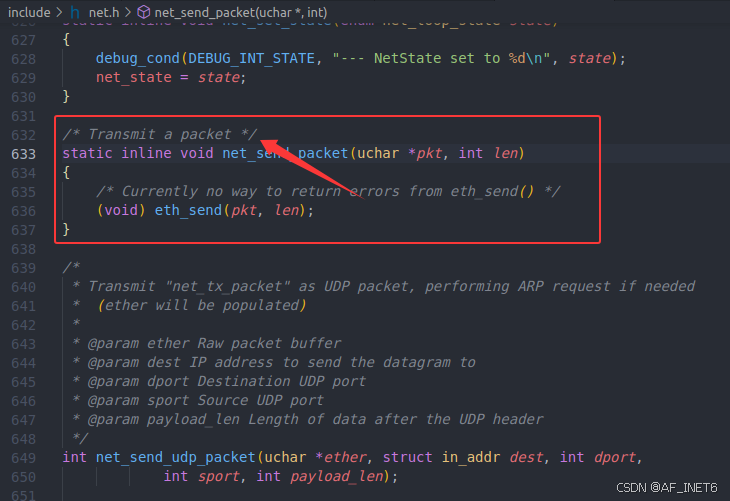
⚡ICMP请求报文发送:ping_send( ):主要做的是构造好icmp的Request报文数据,再调用arp_request()发送arp请求,整个函数完。到这里,实际上我们还看不到真正的ICMP请求包的发送。还需要在看到ARP相关的代码,因为真正的ICMP Echo Request报文是在ARP的响应处理中实现的。
📌 代码位置:net/ping.c
📌 构造请求体:set_icmp_header():以太网帧头+IP头+ICMP头+数据
📌 发送arp请求:arp_request( )
📌 arp响应处理才是真正的发送icmp请求包的实现。跳转到最后可以看到,最后的发包实现函数
static int ping_send(void)
{
	uchar *pkt;
	int eth_hdr_size;

	/* XXX always send arp request */
	/* 调试信息 */
	debug_cond(DEBUG_DEV_PKT, "sending ARP for %pI4\n", &net_ping_ip);


	/* 构建以太网帧头 */
	net_arp_wait_packet_ip = net_ping_ip;
	eth_hdr_size = net_set_ether(net_tx_packet, net_null_ethaddr, PROT_IP);
	pkt = (uchar *)net_tx_packet + eth_hdr_size;

	/* 构建icmp报文头 */
	set_icmp_header(pkt, net_ping_ip);

	/* size of the waiting packet */
	/* 待发送的报文大小:以太网帧头+IP头+ICMP头+数据 */
	arp_wait_tx_packet_size = eth_hdr_size + IP_ICMP_HDR_SIZE;

	/* and do the ARP request */
	/* ARP请求:请求对端IP地址对应的MAC */
	arp_wait_try = 1;
	arp_wait_timer_start = get_timer(0);
	arp_request();
	return 1;	/* waiting */
}
四、添加ping_echo命令
⚡大致阅读完上面的一点uboot源码,可以发现在net/ping.c中是有响应处理的函数的ping_receive( ),,实际上也就是将前面发送的Echo Request报文改成Echo Reply,再发送到对端。
⚡那么为什么实现了ping的响应处理,却不能ping通uboot呢?原因是uboot实际上只是一个裸机程序,并不能实现多线程多进程,所以并不能主动监听或响应来自网络的请求。所以,要实现这个uboot响应ping,我们大致有两种方式可选择,①是注册一个uboot命令,类似ping_echo,调用ping_receive( );②是修改原来的ping命令,让其在ping的同时能接受对端的请求响应,这里选择第一种方式,仿照ping命令,添加一个ping_echo命令。
4.1 uboot注册ping_echo命令
⚡在cmd/net.c中添加以下代码,并在net.h中的协议类型枚举中添加PING_ECHO,即net_loop()传入的参数,这里不用#ifndef。如果和前面的命令一样添加条件编译,需要到config/Kconfig使能该命令
static int do_ping_echo(struct cmd_tbl *cmdtp, int flag, int argc, char *const argv[]) {
    printf("Waiting for ICMP Echo Requests...\n");
    if (net_loop(PING_ECHO) < 0) {
        return CMD_RET_FAILURE;
    }
    printf("recving icmp request\n");
    return CMD_RET_SUCCESS;
}

U_BOOT_CMD(
    ping_echo, 1, 1, do_ping_echo,
    "Wait ICMP Echo Requests",
    ""
);
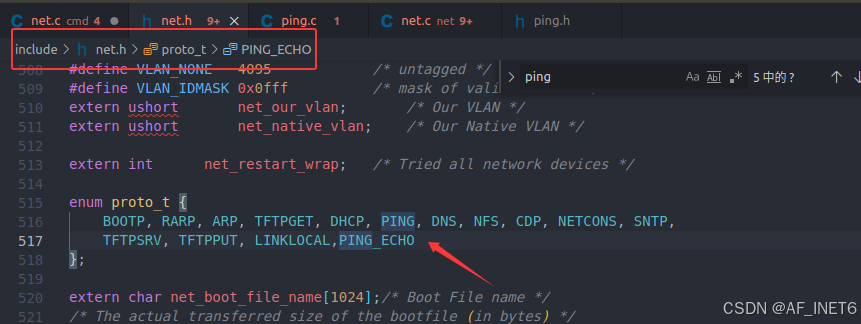
# Kconfig内容,不添加条件编译可省略
config CMD_PING_ECHO
    bool "ping_echo"
    help
      Respond to ICMP Echo Requests from hosts
4.2 net_loop()添加对应的case分支
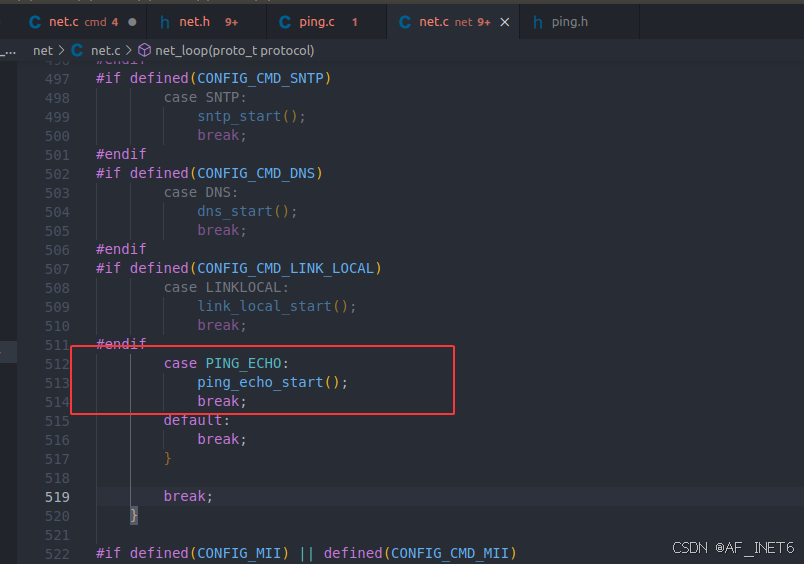
⚡ping_echo_start( )如下,net_set_timeout_handler( )绑定到ping_receive即可
void ping_echo_start(void)
{
	printf("%s waiting for icmp request...\n", eth_get_name());
	net_set_timeout_handler(0UL,ping_receive);
}
⚡调用关系:cmd/net.c中ping_echo命令调用do_ping_echo( ),do_ping_echo( )调用net_loop( ),net_loop( )调用ping_echo_start(),ping_echo_start()调用ping_receive( );
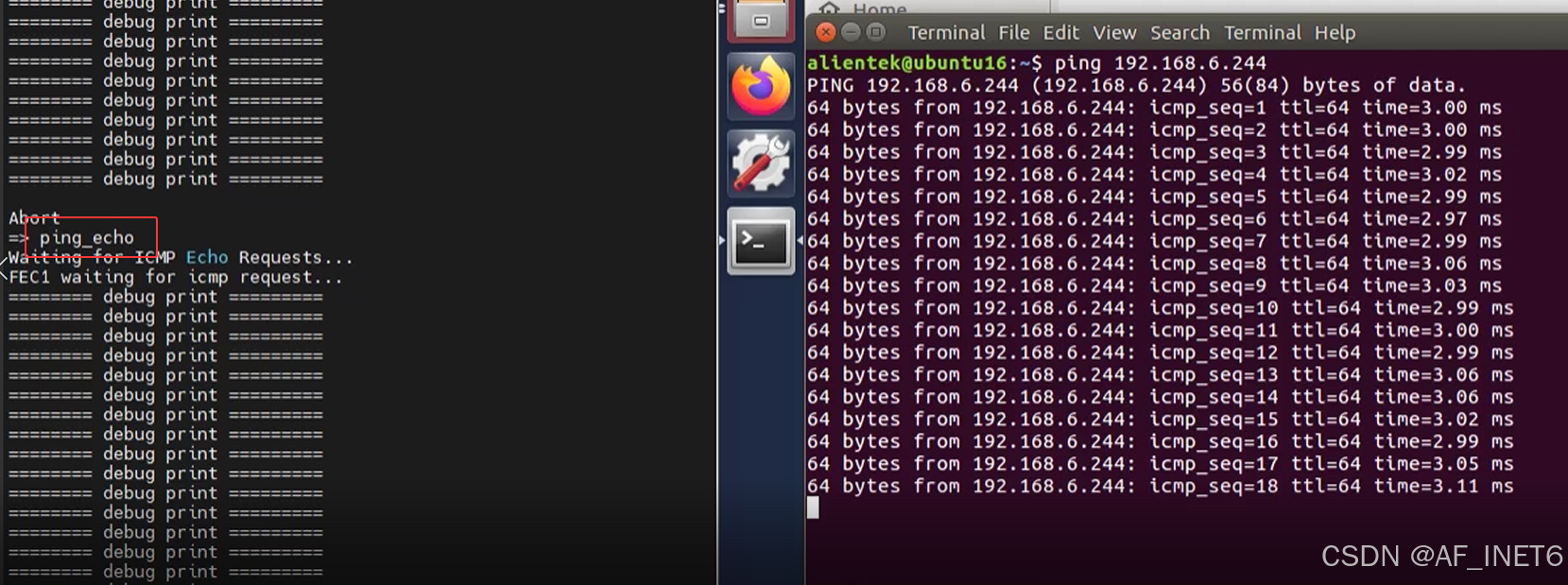
五、结果测试


智能硬件社区聚焦AI智能硬件技术生态,汇聚嵌入式AI、物联网硬件开发者,打造交流分享平台,同步全国赛事资讯、开展 OPC 核心人才招募,助力技术落地与开发者成长。
更多推荐
 21
21 0
0- 0


 已为社区贡献3条内容

所有评论(0)