ROS2下YOLO+Moveit+PCL机械臂自主避障抓取方案
整体运行架构
1.运行相机取像节点
source ./install/setup.bash
ros2 launch orbbec_camera gemini_330_series.launch.py depth_registration:=true
2.运行yolo_ros
source ./install/setup.bash
ros2 launch yolo_bringup yolo.launch.py input_image_topic:=/camera/color/image_raw device:=cpu
3.运行根据图像x,y获取z的service getZ, 订阅图像节点的彩色图/深度图,yolo节点的x,y, 输出x,y,z
这里要先source yolo_msg 所在目录
cd test_ws
source ./install/setup.bash
ros2 run test_python_topic sub_node_Test
4.运行点云crop节点:
source ./install/setup.bash
ros2 run crop_pointcloud crop_pointcloud_node
5.运行相机和机械臂相对位置tf
ros2 run tf2_ros static_transform_publisher -0.35 0 1.360 -1.5708 1.570 3.1416 base_link camera_link
6.运行瑞尔曼机械臂包
source ./install/setup.bash
export LD_LIBRARY_PATH=$LD_LIBRARY_PATH:/home/zc9527/ros2_ws/src/ros2_rm_robot/rm_driver/lib
ros2 launch rm_bringup rm_65_bringup.launch.py
- ros2 run tf2_ros static_transform_publisher 0 0 0 0 0 0 world base_link
- ros2 run tf2_ros static_transform_publisher 0 0 1.360 3.140 0 3.1415 base_link camera_link
8.在hello_moveit中调用服务getZ
source install/setup.sh
ros2 run hello_moveit hello_moveit
基本操作记录:
- 创建python包,在src目录下
ros2 pkg create test_python_topic --build-type ament_python --dependencies rclpy --license Apache-2.0
2.创建service
ros2 pkg create getzservice --dependencies sensor_msgs rosidl_default_generators --license Apache-2.0
source ~/test_ws/install/setup.bash
4.
ros2 interface show yolo_msgs/msg/DetectionArray
一、奥比中光Gemini335相机使用
https://www.orbbec.com.cn/index/Gemini330/info.html?cate=119&id=74
https://github.com/orbbec/OrbbecSDK_v2/releases
1.
cd ~/ros2_ws/
# 构建 Release 版本,默认为 Debug
colcon build --event-handlers  console_direct+  --cmake-args  -DCMAKE_BUILD_TYPE=Release
. ./install/setup.bash
ros2 launch orbbec_camera gemini_330_series.launch.py depth_registration:=true
话题是 /camera/depth_registered/points
得到的图像是sensor_msgs/msg/PointCloud2
ros2 interface show sensor_msgs/msg/PointCloud2 可以看到图像数据格式
. ./install/setup.bash
rviz2
写一个节点
二、YOLO ROS的使用
https://github.com/mgonzs13/yolo_ros/tree/main
终端1:
. ./install/setup.bash
ros2 launch orbbec_camera gemini_330_series.launch.py depth_registration:=true
终端2:
. ./install/setup.bash
ros2 launch yolo_bringup yolo.launch.py input_image_topic:=/camera/color/image_raw  device:=cpu
终端3:
. ./install/setup.bash
ros2 topic info /camera/color/image_raw
rviz2
三、睿尔曼RM65的使用
https://develop.realman-robotics.com/robot/quickUseManual/
快速启动:
colcon build
source ~/ros2_ws/install/setup.bash
ros2 launch rm_bringup rm_65_bringup.launch.py
一个一个启动:
export LD_LIBRARY_PATH=$LD_LIBRARY_PATH:/home/zc9527/ros2_ws/src/ros2_rm_robot/rm_driver/lib
ros2 launch rm_driver rm_65_driver.launch.py

ros2 launch rm_description rm_65_display.launch.py

ros2 launch rm_control rm_65_control.launch.py

ros2 launch rm_65_config real_moveit_demo.launch.py
joint_states代表机械臂当前的状态,我们的rm_driver功能包运行时会发布该话题,这样rviz中的模型就会根据实际的机械臂状态进行运动。
rm_control功能包为实现moveit2控制真实机械臂时所必须的一个功能包,该功能包的主要作用为将moveit2规划好的路径点进行进一步的细分,将细分后的路径点以透传的方式给到rm_driver,实现机械臂的规划运行。
rm_description功能包为显示机器人模型和TF变换的功能包,通过该功能包,我们可以实现电脑中的虚拟机械臂与现实中的实际机械臂的联动的效果
/robot_state_publisher
rm_moveit2_config是实现Moveit2控制真实机械臂的功能包,该功能包的主要作用为调用官方的Moveit2框架,结合我们机械臂本身的URDF生成适配于我们机械臂的moveit2的配置和启动文件,通过该功能包我们可以实现moveit2控制虚拟机械臂和控制真实机械臂。
/interactive_marker_display_99263946702096
/move_group
/move_group_private_105684501566768
/moveit_simple_controller_manager
/rviz
/rviz_ssp_robot_description
/transform_listener_impl_5a47b008a910
/transform_listener_impl_601e972d1ab0
ros2 run rqt_graph rqt_graph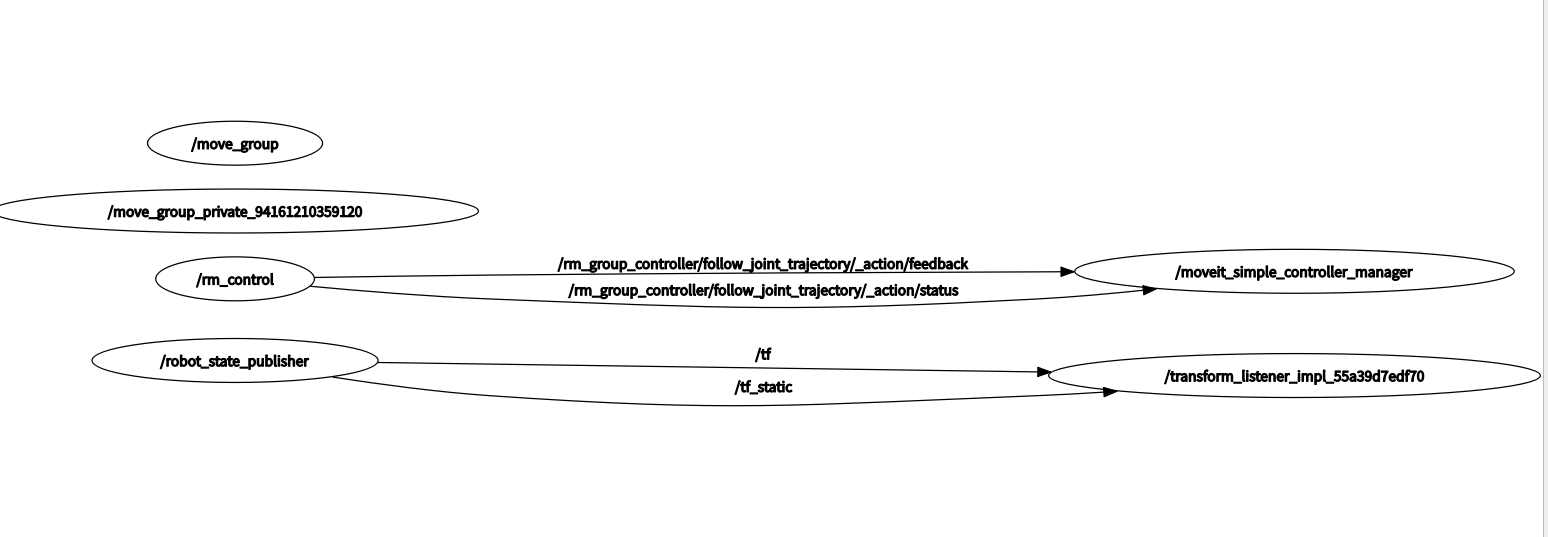
rm_control/rm_control
rm_description/robot_state_publisher
rm_65_config /moveit_simple_controller_manager
rm_65_config //transform_listener_impl
ompl_planning不会自动生成,需要自己添加文件内容如下:
planning_plugin: ompl_interface/OMPLPlanner
request_adapters: >-
  default_planner_request_adapters/AddTimeOptimalParameterization
  default_planner_request_adapters/ResolveConstraintFrames
  default_planner_request_adapters/FixWorkspaceBounds
  default_planner_request_adapters/FixStartStateBounds
  default_planner_request_adapters/FixStartStateCollision
  default_planner_request_adapters/FixStartStatePathConstraints
start_state_max_bounds_error: 0.1
planner_configs:
  SBLkConfigDefault:
    type: geometric::SBL
    range: 0.0  # Max motion added to tree. ==> maxDistance_ default: 0.0, if 0.0, set on setup()
  ESTkConfigDefault:
    type: geometric::EST
    range: 0.0  # Max motion added to tree. ==> maxDistance_ default: 0.0, if 0.0 setup()
    goal_bias: 0.05  # When close to goal select goal, with this probability. default: 0.05
  LBKPIECEkConfigDefault:
    type: geometric::LBKPIECE
    range: 0.0  # Max motion added to tree. ==> maxDistance_ default: 0.0, if 0.0, set on setup()
    border_fraction: 0.9  # Fraction of time focused on boarder default: 0.9
    min_valid_path_fraction: 0.5  # Accept partially valid moves above fraction. default: 0.5
  BKPIECEkConfigDefault:
    type: geometric::BKPIECE
    range: 0.0  # Max motion added to tree. ==> maxDistance_ default: 0.0, if 0.0, set on setup()
    border_fraction: 0.9  # Fraction of time focused on boarder default: 0.9
    failed_expansion_score_factor: 0.5  # When extending motion fails, scale score by factor. default: 0.5
    min_valid_path_fraction: 0.5  # Accept partially valid moves above fraction. default: 0.5
  KPIECEkConfigDefault:
    type: geometric::KPIECE
    range: 0.0  # Max motion added to tree. ==> maxDistance_ default: 0.0, if 0.0, set on setup()
    goal_bias: 0.05  # When close to goal select goal, with this probability. default: 0.05
    border_fraction: 0.9  # Fraction of time focused on boarder default: 0.9 (0.0,1.]
    failed_expansion_score_factor: 0.5  # When extending motion fails, scale score by factor. default: 0.5
    min_valid_path_fraction: 0.5  # Accept partially valid moves above fraction. default: 0.5
  RRTkConfigDefault:
    type: geometric::RRT
    range: 0.0  # Max motion added to tree. ==> maxDistance_ default: 0.0, if 0.0, set on setup()
    goal_bias: 0.05  # When close to goal select goal, with this probability? default: 0.05
  RRTConnectkConfigDefault:
    type: geometric::RRTConnect
    range: 0.0  # Max motion added to tree. ==> maxDistance_ default: 0.0, if 0.0, set on setup()
  RRTstarkConfigDefault:
    type: geometric::RRTstar
    range: 0.0  # Max motion added to tree. ==> maxDistance_ default: 0.0, if 0.0, set on setup()
    goal_bias: 0.05  # When close to goal select goal, with this probability? default: 0.05
    delay_collision_checking: 1  # Stop collision checking as soon as C-free parent found. default 1
  TRRTkConfigDefault:
    type: geometric::TRRT
    range: 0.0  # Max motion added to tree. ==> maxDistance_ default: 0.0, if 0.0, set on setup()
    goal_bias: 0.05  # When close to goal select goal, with this probability? default: 0.05
    max_states_failed: 10  # when to start increasing temp. default: 10
    temp_change_factor: 2.0  # how much to increase or decrease temp. default: 2.0
    min_temperature: 10e-10  # lower limit of temp change. default: 10e-10
    init_temperature: 10e-6  # initial temperature. default: 10e-6
    frountier_threshold: 0.0  # dist new state to nearest neighbor to disqualify as frontier. default: 0.0 set in setup()
    frountierNodeRatio: 0.1  # 1/10, or 1 nonfrontier for every 10 frontier. default: 0.1
    k_constant: 0.0  # value used to normalize expresssion. default: 0.0 set in setup()
  PRMkConfigDefault:
    type: geometric::PRM
    max_nearest_neighbors: 10  # use k nearest neighbors. default: 10
  PRMstarkConfigDefault:
    type: geometric::PRMstar
  FMTkConfigDefault:
    type: geometric::FMT
    num_samples: 1000  # number of states that the planner should sample. default: 1000
    radius_multiplier: 1.1  # multiplier used for the nearest neighbors search radius. default: 1.1
    nearest_k: 1  # use Knearest strategy. default: 1
    cache_cc: 1  # use collision checking cache. default: 1
    heuristics: 0  # activate cost to go heuristics. default: 0
    extended_fmt: 1  # activate the extended FMT*: adding new samples if planner does not finish successfully. default: 1
  BFMTkConfigDefault:
    type: geometric::BFMT
    num_samples: 1000  # number of states that the planner should sample. default: 1000
    radius_multiplier: 1.0  # multiplier used for the nearest neighbors search radius. default: 1.0
    nearest_k: 1  # use the Knearest strategy. default: 1
    balanced: 0  # exploration strategy: balanced true expands one tree every iteration. False will select the tree with lowest maximum cost to go. default: 1
    optimality: 1  # termination strategy: optimality true finishes when the best possible path is found. Otherwise, the algorithm will finish when the first feasible path is found. default: 1
    heuristics: 1  # activates cost to go heuristics. default: 1
    cache_cc: 1  # use the collision checking cache. default: 1
    extended_fmt: 1  # Activates the extended FMT*: adding new samples if planner does not finish successfully. default: 1
  PDSTkConfigDefault:
    type: geometric::PDST
  STRIDEkConfigDefault:
    type: geometric::STRIDE
    range: 0.0  # Max motion added to tree. ==> maxDistance_ default: 0.0, if 0.0, set on setup()
    goal_bias: 0.05  # When close to goal select goal, with this probability. default: 0.05
    use_projected_distance: 0  # whether nearest neighbors are computed based on distances in a projection of the state rather distances in the state space itself. default: 0
    degree: 16  # desired degree of a node in the Geometric Near-neightbor Access Tree (GNAT). default: 16
    max_degree: 18  # max degree of a node in the GNAT. default: 12
    min_degree: 12  # min degree of a node in the GNAT. default: 12
    max_pts_per_leaf: 6  # max points per leaf in the GNAT. default: 6
    estimated_dimension: 0.0  # estimated dimension of the free space. default: 0.0
    min_valid_path_fraction: 0.2  # Accept partially valid moves above fraction. default: 0.2
  BiTRRTkConfigDefault:
    type: geometric::BiTRRT
    range: 0.0  # Max motion added to tree. ==> maxDistance_ default: 0.0, if 0.0, set on setup()
    temp_change_factor: 0.1  # how much to increase or decrease temp. default: 0.1
    init_temperature: 100  # initial temperature. default: 100
    frountier_threshold: 0.0  # dist new state to nearest neighbor to disqualify as frontier. default: 0.0 set in setup()
    frountier_node_ratio: 0.1  # 1/10, or 1 nonfrontier for every 10 frontier. default: 0.1
    cost_threshold: 1e300  # the cost threshold. Any motion cost that is not better will not be expanded. default: inf
  LBTRRTkConfigDefault:
    type: geometric::LBTRRT
    range: 0.0  # Max motion added to tree. ==> maxDistance_ default: 0.0, if 0.0, set on setup()
    goal_bias: 0.05  # When close to goal select goal, with this probability. default: 0.05
    epsilon: 0.4  # optimality approximation factor. default: 0.4
  BiESTkConfigDefault:
    type: geometric::BiEST
    range: 0.0  # Max motion added to tree. ==> maxDistance_ default: 0.0, if 0.0, set on setup()
  ProjESTkConfigDefault:
    type: geometric::ProjEST
    range: 0.0  # Max motion added to tree. ==> maxDistance_ default: 0.0, if 0.0, set on setup()
    goal_bias: 0.05  # When close to goal select goal, with this probability. default: 0.05
  LazyPRMkConfigDefault:
    type: geometric::LazyPRM
    range: 0.0  # Max motion added to tree. ==> maxDistance_ default: 0.0, if 0.0, set on setup()
  LazyPRMstarkConfigDefault:
    type: geometric::LazyPRMstar
  SPARSkConfigDefault:
    type: geometric::SPARS
    stretch_factor: 3.0  # roadmap spanner stretch factor. multiplicative upper bound on path quality. It does not make sense to make this parameter more than 3. default: 3.0
    sparse_delta_fraction: 0.25  # delta fraction for connection distance. This value represents the visibility range of sparse samples. default: 0.25
    dense_delta_fraction: 0.001  # delta fraction for interface detection. default: 0.001
    max_failures: 1000  # maximum consecutive failure limit. default: 1000
  SPARStwokConfigDefault:
    type: geometric::SPARStwo
    stretch_factor: 3.0  # roadmap spanner stretch factor. multiplicative upper bound on path quality. It does not make sense to make this parameter more than 3. default: 3.0
    sparse_delta_fraction: 0.25  # delta fraction for connection distance. This value represents the visibility range of sparse samples. default: 0.25
    dense_delta_fraction: 0.001  # delta fraction for interface detection. default: 0.001
    max_failures: 5000  # maximum consecutive failure limit. default: 5000
  TrajOptDefault:
    type: geometric::TrajOpt

rm_group:
  planner_configs:
    - SBLkConfigDefault
    - ESTkConfigDefault
    - LBKPIECEkConfigDefault
    - BKPIECEkConfigDefault
    - KPIECEkConfigDefault
    - RRTkConfigDefault
    - RRTConnectkConfigDefault
    - RRTstarkConfigDefault
    - TRRTkConfigDefault
    - PRMkConfigDefault
    - PRMstarkConfigDefault
    - FMTkConfigDefault
    - BFMTkConfigDefault
    - PDSTkConfigDefault
    - STRIDEkConfigDefault
    - BiTRRTkConfigDefault
    - LBTRRTkConfigDefault
    - BiESTkConfigDefault
    - ProjESTkConfigDefault
    - LazyPRMkConfigDefault
    - LazyPRMstarkConfigDefault
    - SPARSkConfigDefault
    - SPARStwokConfigDefault
    - TrajOptDefault
moveL运动:
ros2 launch rm_driver rm_65_driver.launch.py
ros2 launch rm_example rm_6dof_movej.launch.py
四、moveit2的使用
https://github.com/moveit/moveit2_tutorials/tree/humble
https://blog.csdn.net/forever0007/article/details/143745333
https://zhuanlan.zhihu.com/p/616101551
五、moveit2和睿尔曼机器人的联合使用
ros2 pkg create \
 --build-type ament_cmake \
 --dependencies moveit_ros_planning_interface rclcpp \
 --node-name hello_moveit hello_moveit
source install/setup.bash
ros2 run hello_moveit hello_moveit
最简单使用
#include <memory>

#include <rclcpp/rclcpp.hpp>
#include <moveit/move_group_interface/move_group_interface.h>

int main(int argc, char* argv[])
{
  // Initialize ROS and create the Node
  rclcpp::init(argc, argv);
  auto const node = std::make_shared<rclcpp::Node>(
      "hello_moveit", rclcpp::NodeOptions().automatically_declare_parameters_from_overrides(true));

  // Create a ROS logger
  auto const logger = rclcpp::get_logger("hello_moveit");

  // Create the MoveIt MoveGroup Interface
  using moveit::planning_interface::MoveGroupInterface;
  auto move_group_interface = MoveGroupInterface(node, "rm_group");

  // Set a target Pose
  auto const target_pose = [] {
    geometry_msgs::msg::Pose msg;
    msg.orientation.w = 1.0;
    msg.position.x = 0.28;
    msg.position.y = -0.2;
    msg.position.z = 0.5;
    return msg;
  }();
  move_group_interface.setPoseTarget(target_pose);

  // Create a plan to that target pose
  auto const [success, plan] = [&move_group_interface] {
    moveit::planning_interface::MoveGroupInterface::Plan msg;
    auto const ok = static_cast<bool>(move_group_interface.plan(msg));
    return std::make_pair(ok, msg);
  }();


  // Execute the plan
  if (success)
  {
    move_group_interface.execute(plan);
  }
  else
  {
    RCLCPP_ERROR(logger, "Planing failed!");
  }

  // Shutdown ROS
  rclcpp::shutdown();
  return 0;
}
六、ROS2 PCL的使用
https://github.com/adrian-soch/pcl_tutorial?utm_source=chatgpt.com
1.新建c++包
ros2 pkg create --build-type ament_cmake crop_pointcloud --dependencies rclcpp sensor_msgs pcl_conversions
ros2 run crop_pointcloud crop_pointcloud_node
#include
#include “rclcpp/rclcpp.hpp”
#include “sensor_msgs/msg/point_cloud2.hpp”
#include <pcl/point_types.h>
#include <pcl/point_cloud.h>
#include <pcl/filters/crop_box.h>
#include <pcl/filters/voxel_grid.h>
#include <pcl/filters/statistical_outlier_removal.h>
#include <pcl_conversions/pcl_conversions.h>
class CropFilterPointCloudNode : public rclcpp::Node
{
public:
CropFilterPointCloudNode()
: Node(“crop_filter_pointcloud_node”)
{
pointcloud_sub_ = this->create_subscription<sensor_msgs::msg::PointCloud2>(
“/camera/depth_registered/points”, 10,
std::bind(&CropFilterPointCloudNode::pointCloudCallback, this, std::placeholders::_1));
filtered_pub_ = this->create_publisher<sensor_msgs::msg::PointCloud2>("/filtered_points", 10);

RCLCPP_INFO(this->get_logger(), "CropFilterPointCloudNode initialized.");
}
private:
void pointCloudCallback(const sensor_msgs::msg::PointCloud2::SharedPtr msg)
{
auto cloud = rosToPcl(msg);
auto cropped = cropPointCloud(cloud);
auto downsampled = voxelDownsample(cropped, 0.01f); // 1cm voxel
auto denoised = removeOutliers(downsampled, 50, 1.0); // 统计滤波
auto output_msg = pclToRos(denoised, msg->header);
filtered_pub_->publish(output_msg);
}
// ROS -> PCL
pcl::PointCloudpcl::PointXYZRGB::Ptr rosToPcl(const sensor_msgs::msg::PointCloud2::SharedPtr & ros_pc)
{
pcl::PCLPointCloud2 pcl_pc2;
pcl_conversions::toPCL(*ros_pc, pcl_pc2);
auto cloud = std::make_shared<pcl::PointCloudpcl::PointXYZRGB>();
pcl::fromPCLPointCloud2(pcl_pc2, *cloud);
return cloud;
}
// PCL -> ROS
sensor_msgs::msg::PointCloud2 pclToRos(const pcl::PointCloudpcl::PointXYZRGB::Ptr & cloud,
const std_msgs::msg::Header & header)
{
pcl::PCLPointCloud2 pcl_pc2;
sensor_msgs::msg::PointCloud2 ros_pc;
pcl::toPCLPointCloud2(*cloud, pcl_pc2);
pcl_conversions::fromPCL(pcl_pc2, ros_pc);
ros_pc.header = header;
return ros_pc;
}
// 裁剪
pcl::PointCloudpcl::PointXYZRGB::Ptr cropPointCloud(const pcl::PointCloudpcl::PointXYZRGB::Ptr & input)
{
Eigen::Vector4f min_pt(-0.5f, -0.5f, 0.0f, 1.0f);
Eigen::Vector4f max_pt( 0.5f, 0.5f, 1.5f, 1.0f);
pcl::CropBox<pcl::PointXYZRGB> crop_filter;
crop_filter.setInputCloud(input);
crop_filter.setMin(min_pt);
crop_filter.setMax(max_pt);

auto output = std::make_shared<pcl::PointCloud<pcl::PointXYZRGB>>();
crop_filter.filter(*output);
return output;
}
// 下采样
pcl::PointCloudpcl::PointXYZRGB::Ptr voxelDownsample(const pcl::PointCloudpcl::PointXYZRGB::Ptr & input, float leaf_size)
{
pcl::VoxelGridpcl::PointXYZRGB vg;
vg.setInputCloud(input);
vg.setLeafSize(leaf_size, leaf_size, leaf_size);
auto output = std::make_shared<pcl::PointCloudpcl::PointXYZRGB>();
vg.filter(*output);
return output;
}
// 统计离群点移除
pcl::PointCloudpcl::PointXYZRGB::Ptr removeOutliers(const pcl::PointCloudpcl::PointXYZRGB::Ptr & input,
int mean_k,
double stddev_mul)
{
pcl::StatisticalOutlierRemovalpcl::PointXYZRGB sor;
sor.setInputCloud(input);
sor.setMeanK(mean_k);
sor.setStddevMulThresh(stddev_mul);
auto output = std::make_shared<pcl::PointCloudpcl::PointXYZRGB>();
sor.filter(*output);
return output;
}
rclcpp::Subscription<sensor_msgs::msg::PointCloud2>::SharedPtr pointcloud_sub_;
rclcpp::Publisher<sensor_msgs::msg::PointCloud2>::SharedPtr filtered_pub_;
};
int main(int argc, char **argv)
{
rclcpp::init(argc, argv);
auto node = std::make_shared();
rclcpp::spin(node);
rclcpp::shutdown();
return 0;
}
2.运行相机点云节点
source ./install/setup.bash
ros2 launch orbbec_camera gemini_330_series.launch.py depth_registration:=true
3. rviz2可视化
七、乐白夹爪的使用
https://lebai-robotics.github.io/lebai-ros-sdk/humble/Execution.html#id4
显示模型
ros2 launch lebai_lm3_support display_lm3_l1_with_gripper.launch.py
八、octomap 的使用
1.安装
sudo apt install ros-humble-octomap ros-humble-octomap-msgs ros-humble-octomap-ros
sudo apt install ros- R O S D I S T R O − m o v e i t r o s − {ROS_DISTRO}-moveit ros- ROSDISTRO−moveitros−{ROS_DISTRO}-moveit-ros-perception
sudo apt install octovis liboctomap-dev
2.运行相机取像节点:
source ./install/setup.bash
ros2 launch orbbec_camera gemini_330_series.launch.py depth_registration:=true
ros2 topic list 查看有哪些话题
/camera/color/camera_info
/camera/color/image_raw
/camera/color/metadata
/camera/depth/camera_info
/camera/depth/image_raw
/camera/depth/metadata
/camera/depth/points
/camera/depth_filter_status
/camera/depth_registered/points
/camera/depth_to_color
/diagnostics
/joint_states
/parameter_events
/robot_description
/rosout
/tf
/tf_static
ros2 topic echo /camera/depth_registered/points 输出数据
- /home/zc9527/ros2_ws/src/ros2_rm_robot/rm_moveit2_config/rm_65_config 创建sensors_3d.ymal文件,文件内容如下
sensors:
- sensor_plugin: occupancy_map_monitor/PointCloudOctomapUpdater
point_cloud_topic: /camera/depth_registered/points # 相机点云话题
max_range: 2.0 # 感知距离
padding_offset: 0.1
padding_scale: 1.0
shape_padding: 0.05
shape_scale: 1.0
filtered_cloud_topic: filtered_cloud
-
/home/zc9527/ros2_ws/src/ros2_rm_robot/rm_moveit2_config/rm_65_config/launch/real_moveit_demo.launch.py 中添加
move_group_params = [
moveit_config.to_dict(),
move_group_configuration,
trajectory_execution,
{
“planning_scene_monitor”: {
“publish_planning_scene”: should_publish,
“publish_geometry_updates”: should_publish,
“publish_state_updates”: should_publish,
“publish_transforms_updates”: should_publish,
},
“sensors”: PathJoinSubstitution([
FindPackageShare(“rm_65_config”),
“config”, “sensors_3d.yaml”
])
}
]
5.重新编译 然后启动
source ./install/setup.bash
export LD_LIBRARY_PATH=$LD_LIBRARY_PATH:/home/zc9527/ros2_ws/src/ros2_rm_robot/rm_driver/lib
ros2 launch rm_bringup rm_65_bringup.launch.py -
相机从上方拍照
ros2 run tf2_ros static_transform_publisher -0.35 0 1.360 -1.5708 1.570 3.1416 base_link camera_link
ros2 run tf2_ros transform_publisher -0.35 0 0.912 -1.5708 1.570 3.1416 base_link camera_link
ros2 run tf2_ros static_transform_publisher 0 0 1.360 3.140 0 3.1415 base_link camera_link

智能硬件社区聚焦AI智能硬件技术生态,汇聚嵌入式AI、物联网硬件开发者,打造交流分享平台,同步全国赛事资讯、开展 OPC 核心人才招募,助力技术落地与开发者成长。
更多推荐

 22
22 0
0- 0


 已为社区贡献1条内容

所有评论(0)