嵌入式学习笔记-Linux系统编程阶段-DAY05进程间通信-管道
3、 open 以只读、 只写方式打开 FIFO 时会阻塞, 调用 read 函数从 FIFO 里读数据时 read 也会阻塞。4、 通信过程中, 读进程退出后,写进程向命名管道内写数据时, 写进程也会(收到 SIGPIPE 信号) 退出。、管道所传送的数据是无格式的,这要求管道 的读出方与写入方必须事先约定好数据的格式,如多少字节算一个消息等。在创建管道的时候,管道最好只要一个方向传递信息,不要
1.文件描述符的复制
函数原型:
#include <unistd.h>

int dup(int oldfd);
int dup2(int oldfd, int newfd);(推荐)- 功能:复制文件描述符
- 返回值:
- 成功:
- dup函数返回当前系统文件描述符表可用的最小整数值。
- dup2函数第二个参数的设置,分两种情况:
- 1. 如果newfd已经存在,则先将其自动关闭,再复制文件描述符;
- 2. 如果newfd等于oldfd,则dup2函数返回newfd,而不关闭它。
- 返回值:
- 成功:返回新的文件描述符
- 失败:dup和dup2函数均返回-1,并设置errno。
- 返回值:
- 成功:
代码案例:
    int new_fd = dup(1);
    write(1,"hello world\n",15);//打印到终端,文件描述符1
#include<stdio.h>
#include<unistd.h>
#include <sys/types.h>
#include <sys/stat.h>
#include <fcntl.h>
int main(int argc, char const *argv[])
{
int fd = open("a.txt",O_WRONLY |O_CREAT,0666);
printf("fd:%d\n",fd);
close(1);
dup(fd); //输出文件被关闭,所以fd被复制为一个系统最小可用文件描述符 即 1
write(1,"hello world",sizeof("hello world")-1); //所以写入 a.txt文件了
return 0;
}
代码案例:
2.进程间通信:管道
管道分为有名管道与无名管道,但是人们一般说的管道默认说的是无名管道
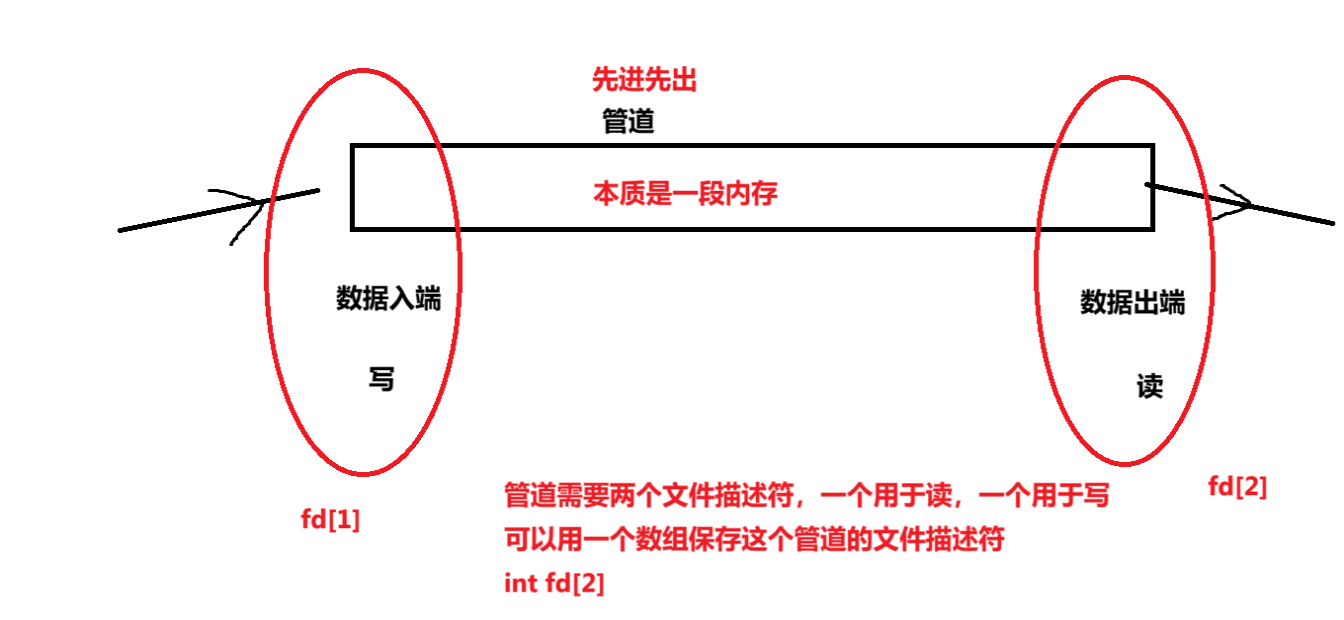
2.1无名管道
2.2.无名管道的创建和使用
pipe函数:
#include <unistd.h>
int pipe(int pipefd[2]);
/*
功能:经由参数 filedes 返回两个文件描述符
参数:
filedes 为 int 型数组的首元素首地址,其存放了管道的文件描述符 fd[0]、fd[1]。
filedes[0]为读而打开
filedes[1]为写而打开管道
filedes[0]的输出是 filedes[1]的输入。
返回值:
成功:返回 0
失败:返回-1
*/
无名管道用于进程间通信?那么先创建进程还是先创建管道?
答案是先创建管道。就好比两个人通信,得先有电话才能打。(其实是为了创建进程时能共享过去)
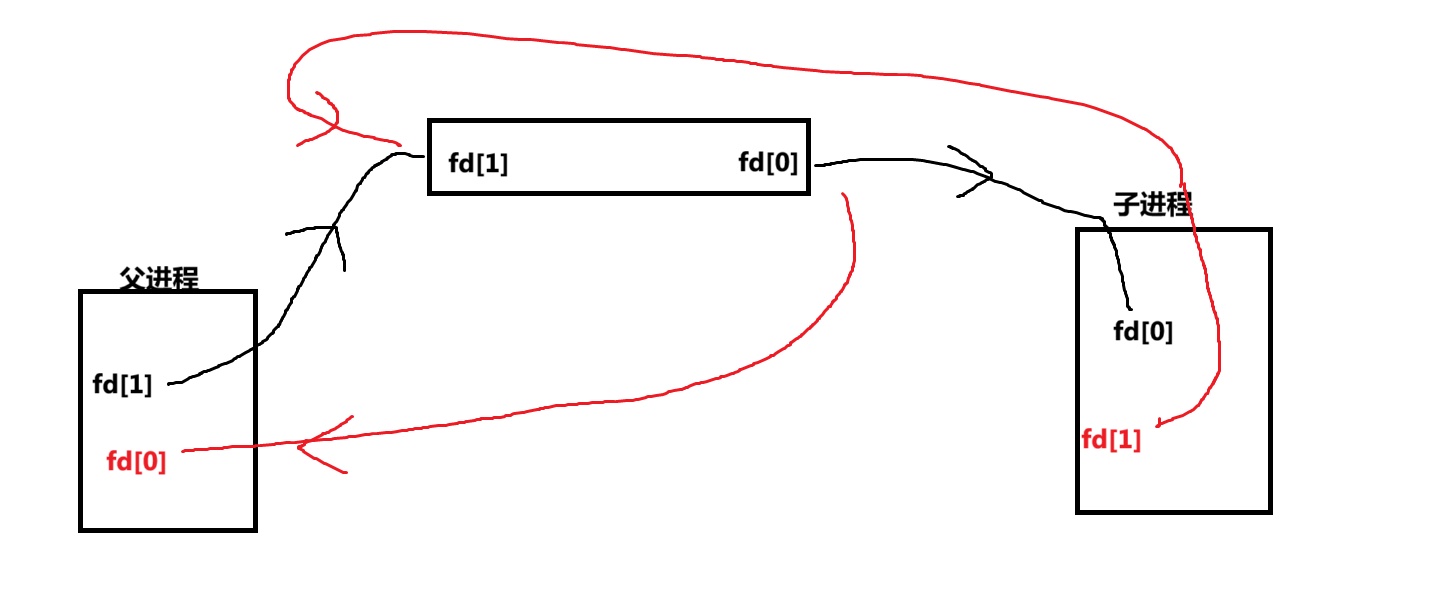
注意:进程复制的时候,会把父进程的fd[0]和fd[1]一起复制
在创建管道的时候,管道最好只要一个方向传递信息,不要让他双向传递,否则可能会自己写自己读
例如:父发子收的时候,可以让父进程的fd[0]关闭,子进程的fd[1]关闭
代码案例:
#include<stdio.h>
#include<unistd.h>
#include <sys/types.h>
#include <sys/stat.h>
#include <fcntl.h>


int main(int argc, char const *argv[])
{
   int fd[2];
   pipe(fd);//fd[0]为读,fd[1]为写
   pid_t pid = fork();

   if (pid == 0)
   {
    close(fd[1]);//写端无用,可以先关闭

    char buff[32]="";
    read(fd[0],buff,sizeof(buff));
    printf("子进程%u读取到数据%s\n",getpid(),buff);

    close(fd[1]);
   }

   else if (pid > 0)
   {
    close(fd[0]); //读端暂时不用,可以关闭
    printf("父进程%u发送数据:\n",getpid());
    write(fd[1],"hello pipe",10);
     //close的本质不是直接关闭文件,而是将打开的文件的文件描述符-1,
     //等最终为0时,系统回收
    close(fd[1]);

   }


    return 0;
}

2.3无名管道的读写特点
注意,这个读写特点不是说的是管道的特点,而是读写特点。
#include<stdio.h>
#include<unistd.h>
#include <sys/types.h>
#include <sys/stat.h>
#include <fcntl.h>


int main(int argc, char const *argv[])
{
   int fd[2];
   pipe(fd);//fd[0]为读,fd[1]为写
   pid_t pid = fork();

   if (pid == 0)
   {
    close(fd[1]);//写端无用,可以先关闭

    char buff[32]="";
    getchar();

   // read(fd[0],buff,sizeof(buff));
   // printf("子进程%u读取到数据%s\n",getpid(),buff);

    close(fd[1]);
   }

   else if (pid > 0)
   {
    close(fd[0]); //读端暂时不用,可以关闭
    char buff[128] = "";
    for (int i = 1; i <= 1000; i++)
    {
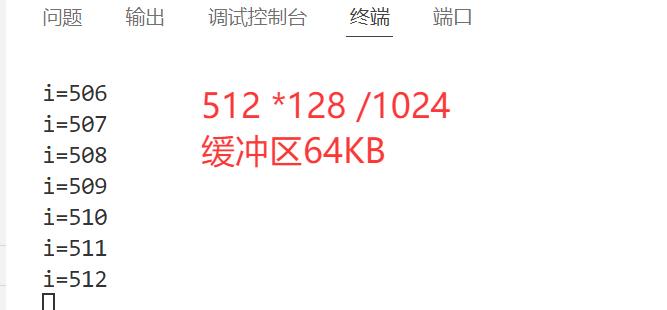
        write(fd[1],buff,128);  //只写不读,写满后就会阻塞
        printf("i=%d\n",i);
    }
     //close的本质不是直接关闭文件,而是将打开的文件的文件描述符-1,
     //等最终为0时,系统回收
    close(fd[1]);

   }

    return 0;
}
#include<stdio.h>
#include<unistd.h>
#include <sys/types.h>
#include <sys/stat.h>
#include <fcntl.h>


int main(int argc, char const *argv[])
{
   int fd[2];
   pipe(fd);//fd[0]为读,fd[1]为写
   pid_t pid = fork();

   if (pid == 0)
   {
    close(fd[1]);//写端无用,可以先关闭


    while (1)
    {
        char   buff[32]="";
        int len = read(fd[0],buff,32);
        printf("len=%d\n",len);
    }

    close(fd[1]);
   }

   else if (pid > 0)
   {
    close(fd[0]); //读端暂时不用,可以关闭
    char buff[128] = "";
    sleep(3);


     //close的本质不是直接关闭文件,而是将打开的文件的文件描述符-1,
     //等最终为0时,系统回收
    close(fd[1]);
    while (1)
    {
        /* code */
    }


   }


    return 0;
}
#include <stdio.h>
#include <unistd.h>
#include <sys/types.h>
#include <sys/stat.h>
#include <fcntl.h>
#include <sys/types.h>
#include <sys/wait.h>

int main(int argc, char const *argv[])
{
    int fd[2];
    pipe(fd); // fd[0]为读,fd[1]为写
    pid_t pid = fork();

    if (pid == 0)
    {
        close(fd[1]); // 写端无用,可以先关闭
        int i = 0;
        while (1)
        {

            char buff[32] = "";
            read(fd[0], buff, sizeof(buff));
            printf("子进程%d读取到数据%s\n", getpid(), buff);
            i++;
            if (i == 2)
            {
                break;
            }
        }
        close(fd[0]); // 读端关闭
    }

    else if (pid > 0)
    {
        close(fd[0]); // 读端暂时不用,可以关闭

        while (1)
        {
            printf("父进程%d写入数据%s\n", getpid(), "hello pipe");
            write(fd[1], "hello pipd", 10);
            sleep(1);
        }

        // close的本质不是直接关闭文件,而是将打开的文件的文件描述符-1,
        // 等最终为0时,系统回收
        close(fd[1]);
        wait(NULL);
    }

    return 0;
}
练习:无名管道的综合案例:完成 ps-A|grep bash
提示:dup2 exec函数族
3.有名管道(命名管道)
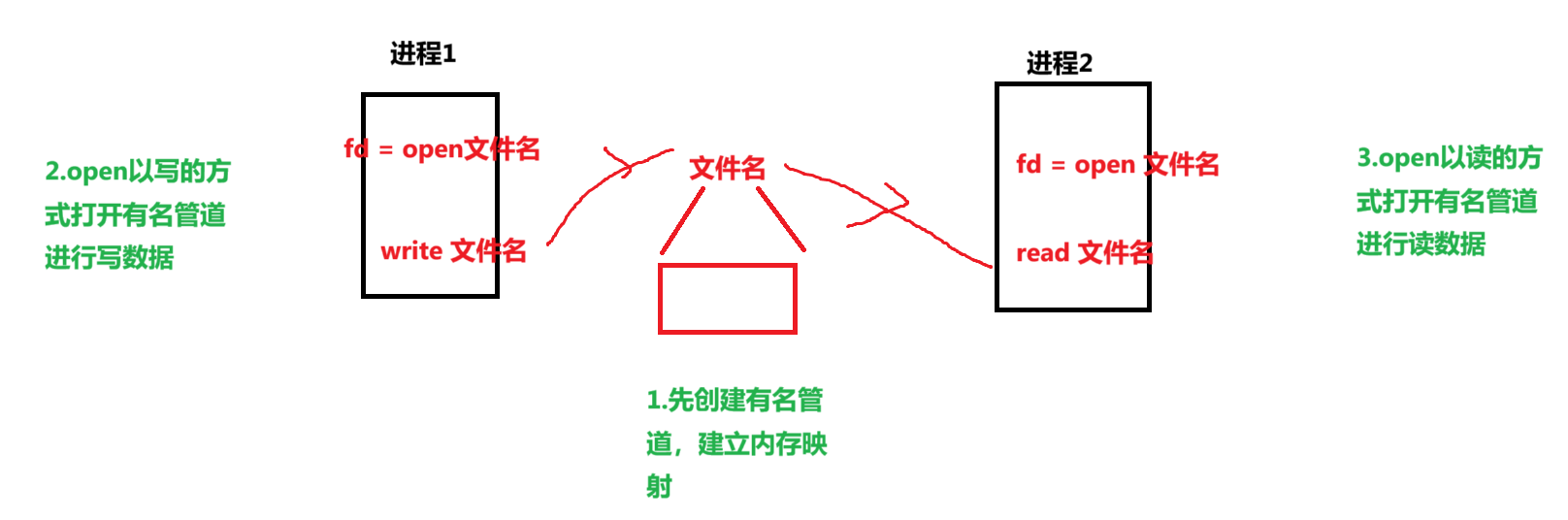
给管道起名字了,所以更多用于无血缘关系的进程间通信
3.1有名管道的特点
3.2有名管道的创建
mkfifo函数:
 //FIFO 文件的创建
#include <sys/types.h>
#include <sys/stat.h>
int mkfifo( const char *pathname, mode_t mode);
/*参数:
pathname: FIFO 的路径名+文件名。
mode: mode_t 类型的权限描述符。
返回值:
成功: 返回 0
失败: 如果文件已经存在, 则会出错且返回-1。*/
代码案例:不相关进程需要写两个代码文件
写进程:
#include <stdio.h>
#include <unistd.h>
#include <sys/types.h>
#include <sys/stat.h>
#include <fcntl.h>
#include <sys/types.h>
#include <sys/wait.h>

int main(int argc, char const *argv[])
{
    mkfifo("my_fifo",0666);
    //以写的方式打开

    //以写的方式打开会阻塞到以读的方式打开的程序执行
    int fd = open("my_fifo",O_WRONLY);

    if (fd < 0)
    {
        perror("open");
        return 0;
    }

    printf("进程 %d发出数据\n",getpid());
    char buff[32] = "hello fifo";
    write(fd,buff,32);
    close(fd);


    return 0;
}
读进程
#include <stdio.h>
#include <unistd.h>
#include <sys/types.h>
#include <sys/stat.h>
#include <fcntl.h>
#include <sys/types.h>
#include <sys/wait.h>

int main(int argc, char const *argv[])
{
    mkfifo("my_fifo",0666);
    //以 读 的方式打开会阻塞到以 写 的方式打开的程序执行
    int fd = open("my_fifo",O_RDONLY);

    if (fd < 0)
    {
        perror("open");
        return 0;
    }
    char buff[32] = "";
    read (fd,buff,32);
    printf("进程 %d收到数据 %s\n",getpid(),buff);
    close(fd);
    return 0;
}
3.3有名管道的读写特点
不指定 O_NONBLOCK(即 open 没有位或 O_NONBLOCK) --阻塞机制
1、 open 以只读方式打开 FIFO 时, 要阻塞到某个进程为写而打开此 FIFO
2、 open 以只写方式打开 FIFO 时, 要阻塞到某个进程为读而打开此 FIFO。
3、 open 以只读、 只写方式打开 FIFO 时会阻塞, 调用 read 函数从 FIFO 里读数据时 read 也会阻塞。
4、 通信过程中若写进程先退出了, 则调用 read 函数从 FIFO 里读数据时不阻塞; 若写进程又重新运行, 则调用 read 函数从 FIFO 里读数据时又恢复阻塞。
5、 通信过程中, 读进程退出后, 写进程向命名管道内写数据时, 写进程也会(收到 SIGPIPE 信号) 退出。
6、 调用 write 函数向 FIFO 里写数据, 当缓冲区已满时 write 也会阻塞。
代码案例:
发送进程结束时,收进程解阻塞,发进程再执行时,读进程又恢复阻塞
首进程结束时,发进程结束
写进程
#include <stdio.h>
#include <unistd.h>
#include <sys/types.h>
#include <sys/stat.h>
#include <fcntl.h>
#include <sys/types.h>
#include <sys/wait.h>

int main(int argc, char const *argv[])
{
    mkfifo("my_fifo", 0666);
    // 以写的方式打开

    // 以写的方式打开会阻塞到以读的方式打开的程序执行
    int fd = open("my_fifo", O_WRONLY);

    if (fd < 0)
    {
        perror("open");
        return 0;
    }

    printf("进程 %d发出数据\n", getpid());
    char buff[32] = "hello fifo";
    while (1)
    {
        write(fd, buff, 32);
        sleep(1);
    }

    close(fd);

    return 0;
}
读进程
#include <stdio.h>
#include <unistd.h>
#include <sys/types.h>
#include <sys/stat.h>
#include <fcntl.h>
#include <sys/types.h>
#include <sys/wait.h>

int main(int argc, char const *argv[])
{
    mkfifo("my_fifo", 0666);
    // 以 读 的方式打开会阻塞到以 写 的方式打开的程序执行
    int fd = open("my_fifo", O_RDONLY);

    if (fd < 0)
    {
        perror("open");
        return 0;
    }
    while (1)
    {
        char buff[32] = "";
        read(fd, buff, 32);
        printf("进程 %d收到数据 %s\n", getpid(), buff);
    }

    close(fd);
    return 0;
}
非阻塞机制:指定ONONBLOCK(即 open 位或 O_NONBLOCK)
1、 先以只读方式打开: 如果没有进程已经为写而打开一个 FIFO, 只读 open 成功, 并且 open 不阻塞。
2、 先以只写方式打开: 如果没有进程已经为读而打开一个 FIFO, 只写 open 将出错返回-1。
3、read、 write 读写命名管道中读数据时不阻塞。
4、 通信过程中, 读进程退出后,写进程向命名管道内写数据时, 写进程也会(收到 SIGPIPE 信号) 退出。
注意:open 函数以可读可写方式打开 FIFO 文件时的特点:
1、 open 不阻塞。
2、 调用 read 函数从 FIFO 里读数据时 read 会阻塞。
3、 调用 write 函数向 FIFO 里写数据, 当缓冲区已满时 write 也会阻塞。

智能硬件社区聚焦AI智能硬件技术生态,汇聚嵌入式AI、物联网硬件开发者,打造交流分享平台,同步全国赛事资讯、开展 OPC 核心人才招募,助力技术落地与开发者成长。
更多推荐



 29
29 0
0- 0


 已为社区贡献5条内容

所有评论(0)