串口调试助手uart assist V5.0.14 自动/手动 实时发送时间 的功能
·
串口手册
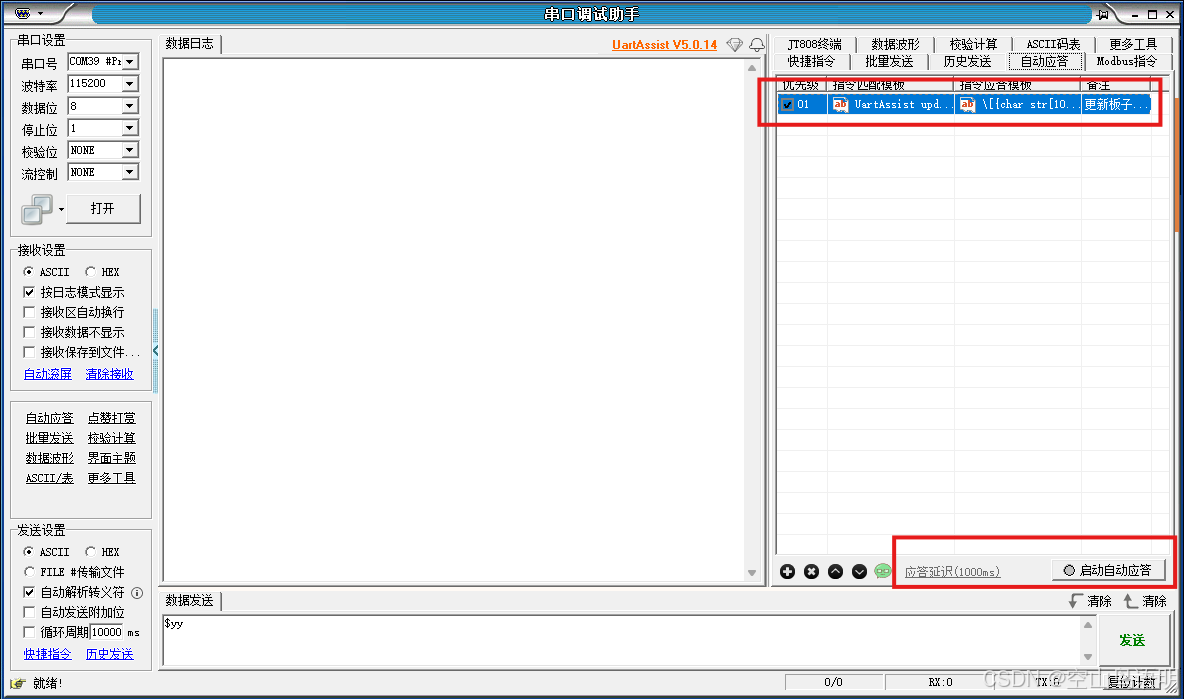
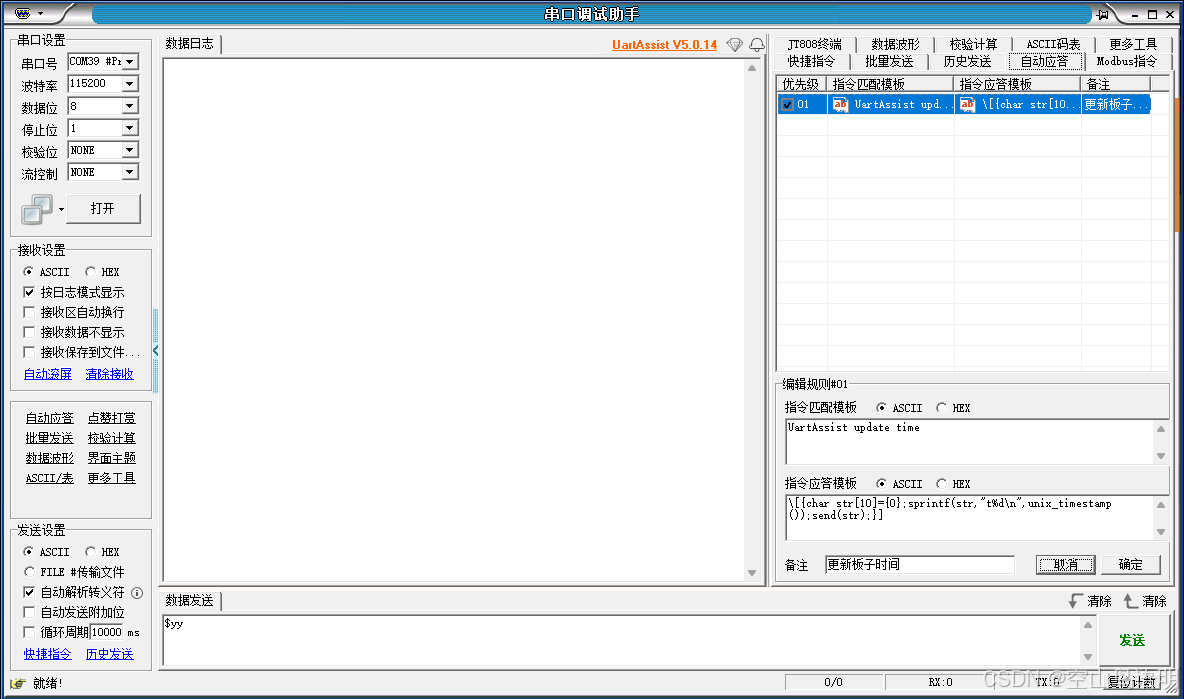
使用自动应答功能
//触发自动应答的字符串
UartAssist update time
//脚本 自动应答发送 t+时间戳
\[{char str[10]={0};sprintf(str,"t%d\n",unix_timestamp());send(str);}]//使用UartAssist 串口脚本函数 unix_timestamp(void)生成的时间戳。功能描述:生成32位unix时间戳,即从1970-1-1 00:00:00到当前的秒数。
int set_Timestamp_to_str(char *str)
{
time_t timestamp=0;
if(1 != sscanf(str, "%d", ×tamp))
return 0;
// 转换为本地时间结构
struct tm* tm = localtime(×tamp);
//转换为东8区时间
sprintf(str, "%d-%d-%d %d:%d:%d", tm->tm_year+1900, tm->tm_mon+1, tm->tm_mday, (tm->tm_hour+8)%24, tm->tm_min, tm->tm_sec);
//判断与板子时间是否一致
if((RTC_localTime.tm_year == tm->tm_year) && (RTC_localTime.tm_mon==tm->tm_mon)&&( RTC_localTime.tm_mday == tm->tm_mday)
&&(RTC_localTime.tm_hour == (tm->tm_hour+8)%24) && (RTC_localTime.tm_min == tm->tm_min))
{
printf("Time ture");
return 0;
}
else
{
printf("T%s",str);
}
return 1;
}
使用uart assist发送文件的功能
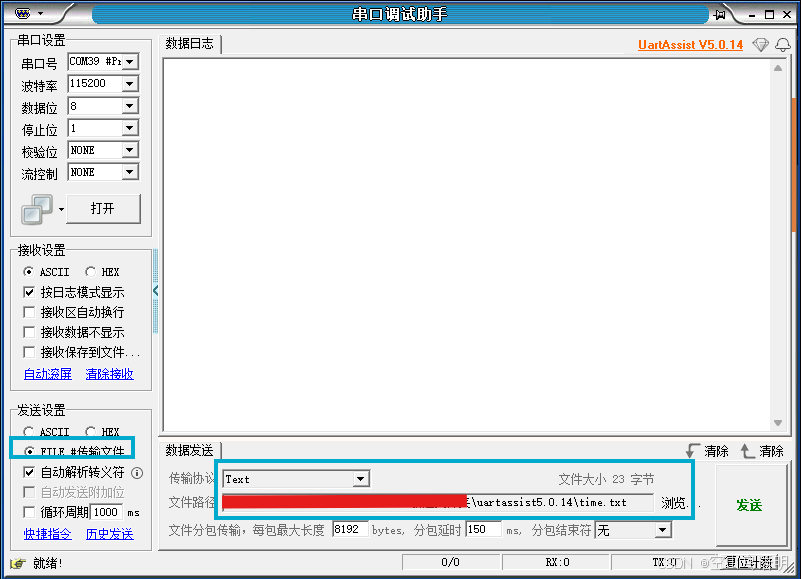
更新time.txt 文件的时间戳,使用bat文件更新时间
文件名:cmd_set_time_while.bat
功能:把时间按指定格式(T2025-09-09 13:08:05 ),60s一次,覆盖写入到time.txt文件
@echo off
chcp 65001 >nul
title Time Logger - Updates time.txt every minute

echo Starting time logging, updating every minute...
echo Press Ctrl+C to stop the script
echo.

:loop
for /f "tokens=2 delims==" %%I in ('wmic os get localdatetime /value') do set datetime=%%I
set datetime=T%datetime:~0,4%-%datetime:~4,2%-%datetime:~6,2% %datetime:~8,2%:%datetime:~10,2%:%datetime:~12,2%

:: Write time to file
echo %datetime% > time.txt

:: Display update information in console
echo [%time%] Updated time.txt content: %datetime%

:: Wait 60 seconds
timeout /t 60 /nobreak >nul
goto loop
备注:根据需要可以修改txt文件内容,实现发送其他字符串;
实时发送时间功能,可开启串口调试助手uart assist 循环周期1s 发送,txt文件更新周期设置为1s;
用途:通过串口 更新/初始化 单片机板子的时间

智能硬件社区聚焦AI智能硬件技术生态,汇聚嵌入式AI、物联网硬件开发者,打造交流分享平台,同步全国赛事资讯、开展 OPC 核心人才招募,助力技术落地与开发者成长。
更多推荐
 2
2 0
0- 0


 已为社区贡献2条内容

所有评论(0)