STM32 CUBEMX SPI读写SD卡并挂载FATFS(从0开始)
参考文章:STM32CubeMX HAL库 SPI模式 操作 SD卡 移植 FATFS文件系统_hal spi sd-CSDN博客
编者本来想在STM32端进行sd卡FAT32格式化,确实也成功了一部分,挂上了,但16GB的tf卡只显示2.56GB,研究了一下发现是数据在uint32处截断了,然后又到处改改改成64位,然后又面临着新的bug。于是想,我在电脑格式化完,stm32直接挂载不就行了。然后还真是这样。
测试条件,STM32F407VET6 SPI1 ;相关引脚可在SPI_SD_DRV_H文件修改
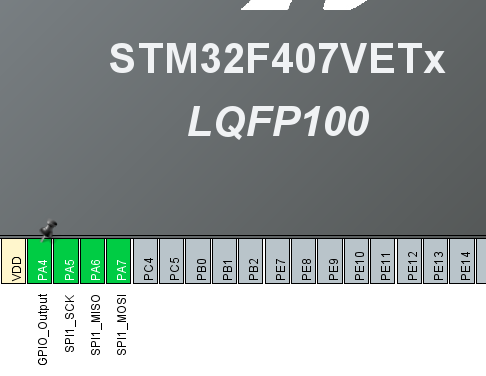
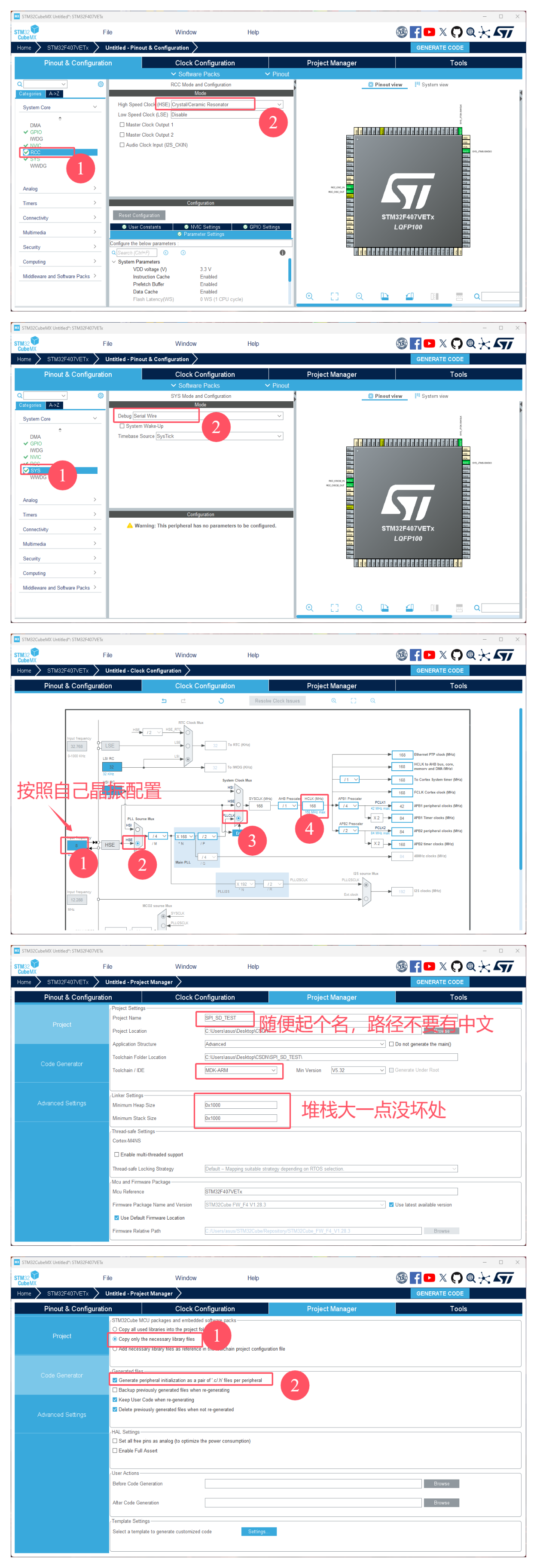
首先快速进行工程的前期配置
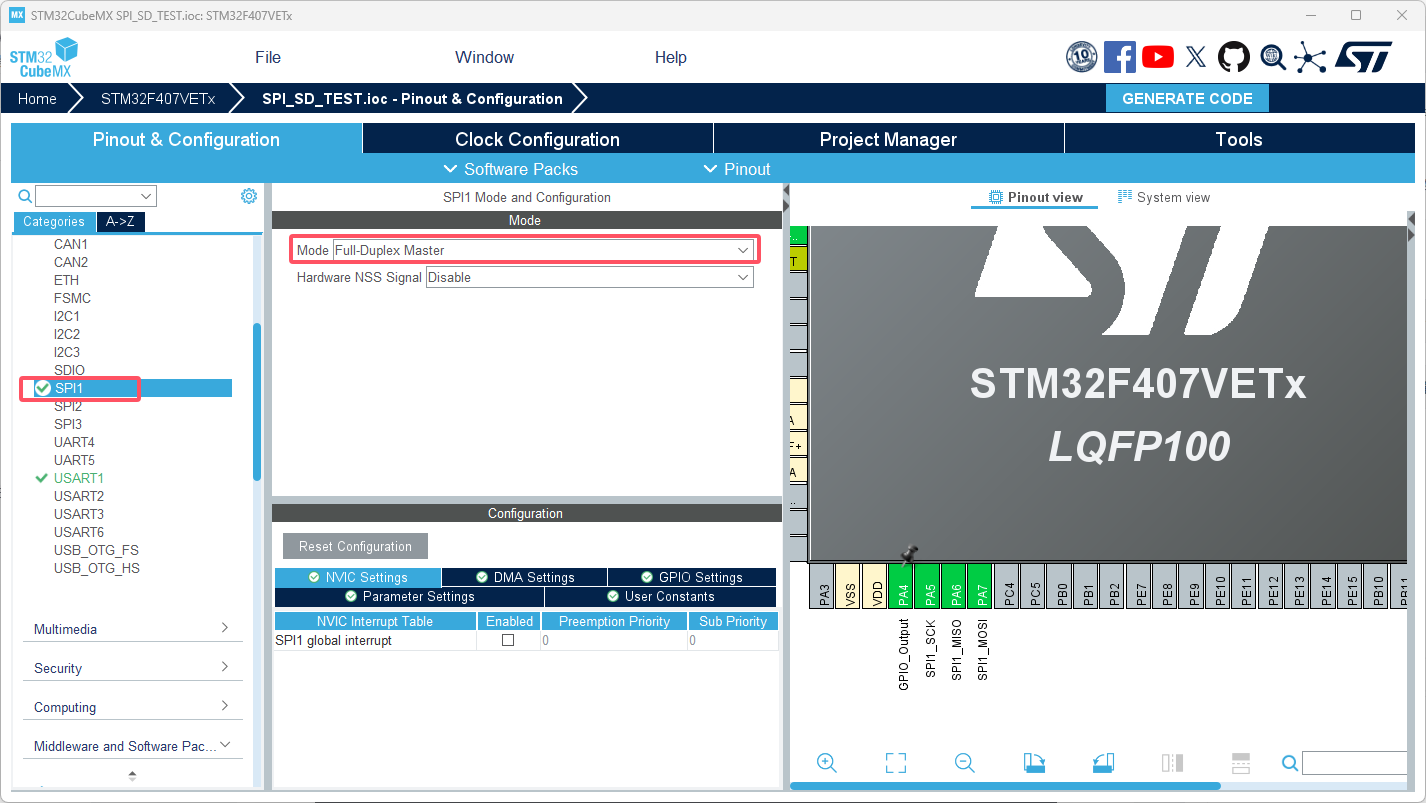
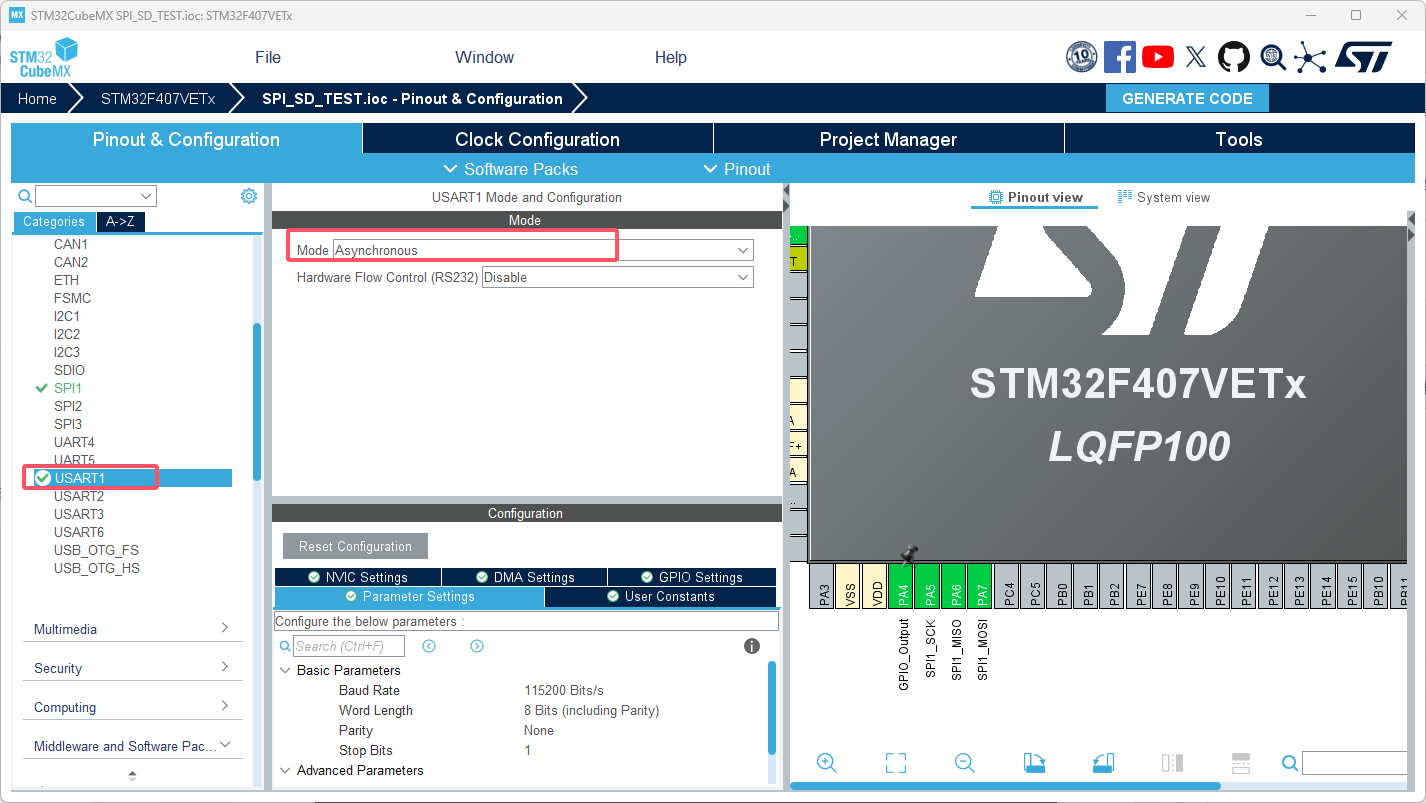
然后启用SPI,USART,配置默认
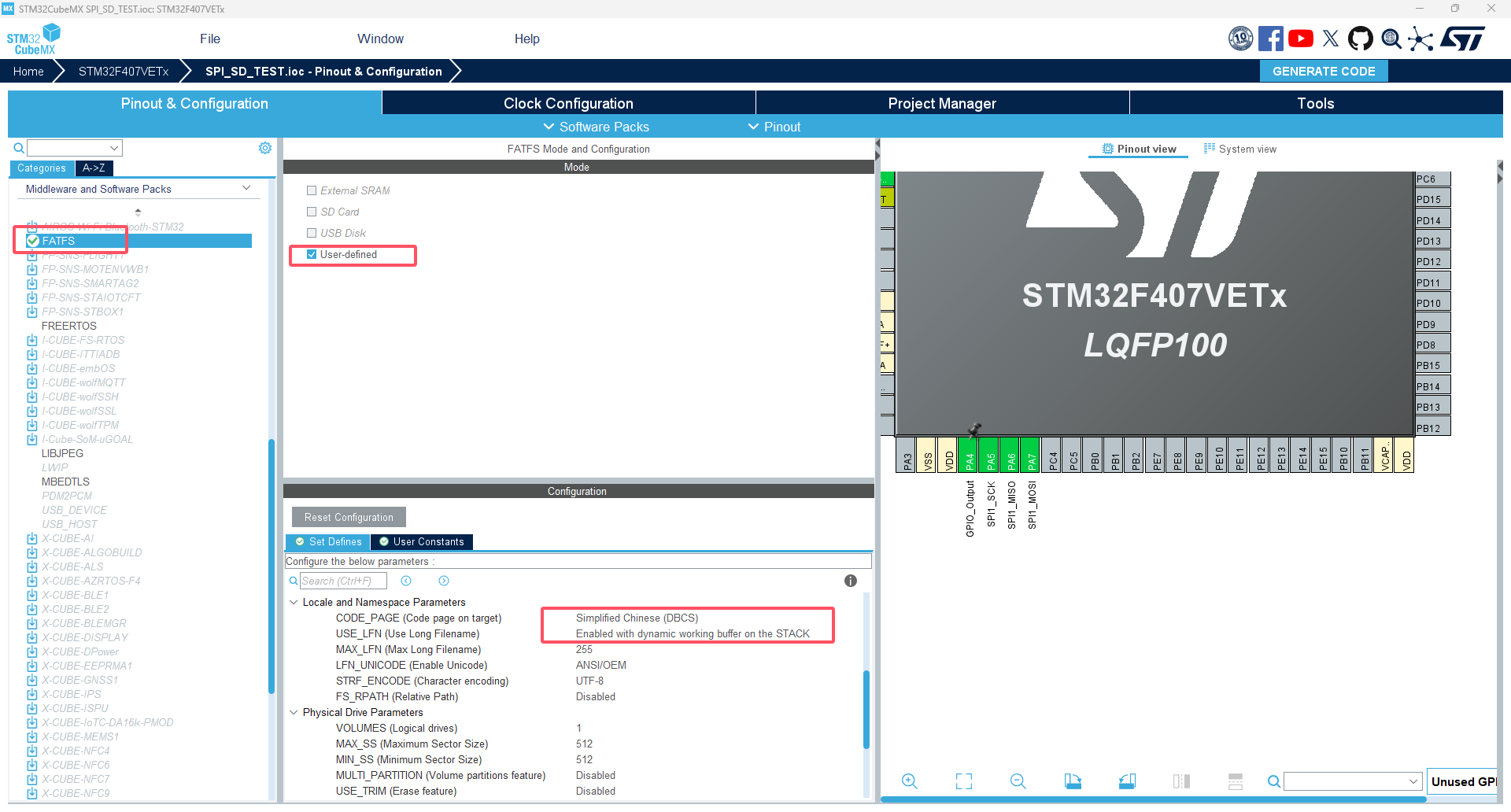
然后开启FATFS,需要改两处,中文和启用长文件名,然后就可以生成工程了。
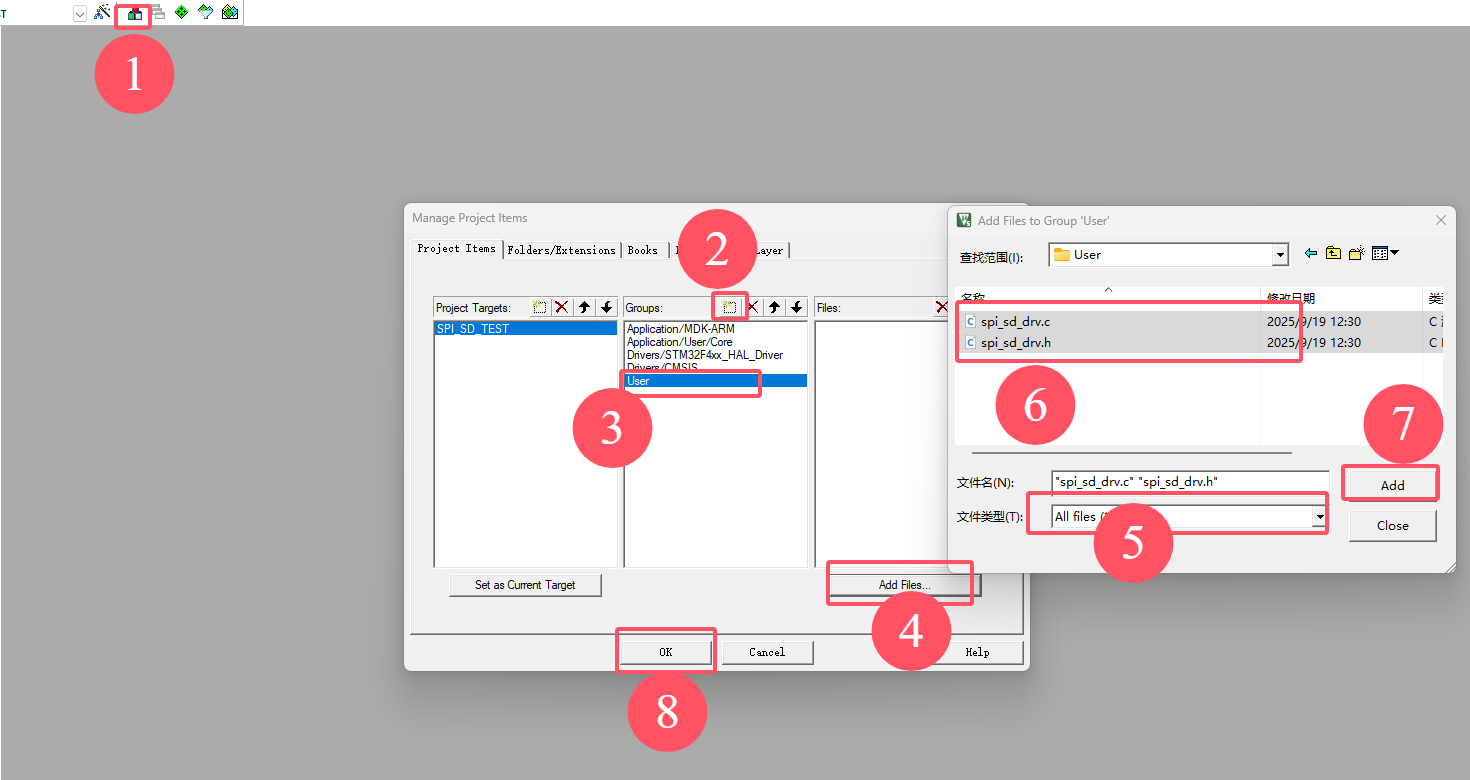
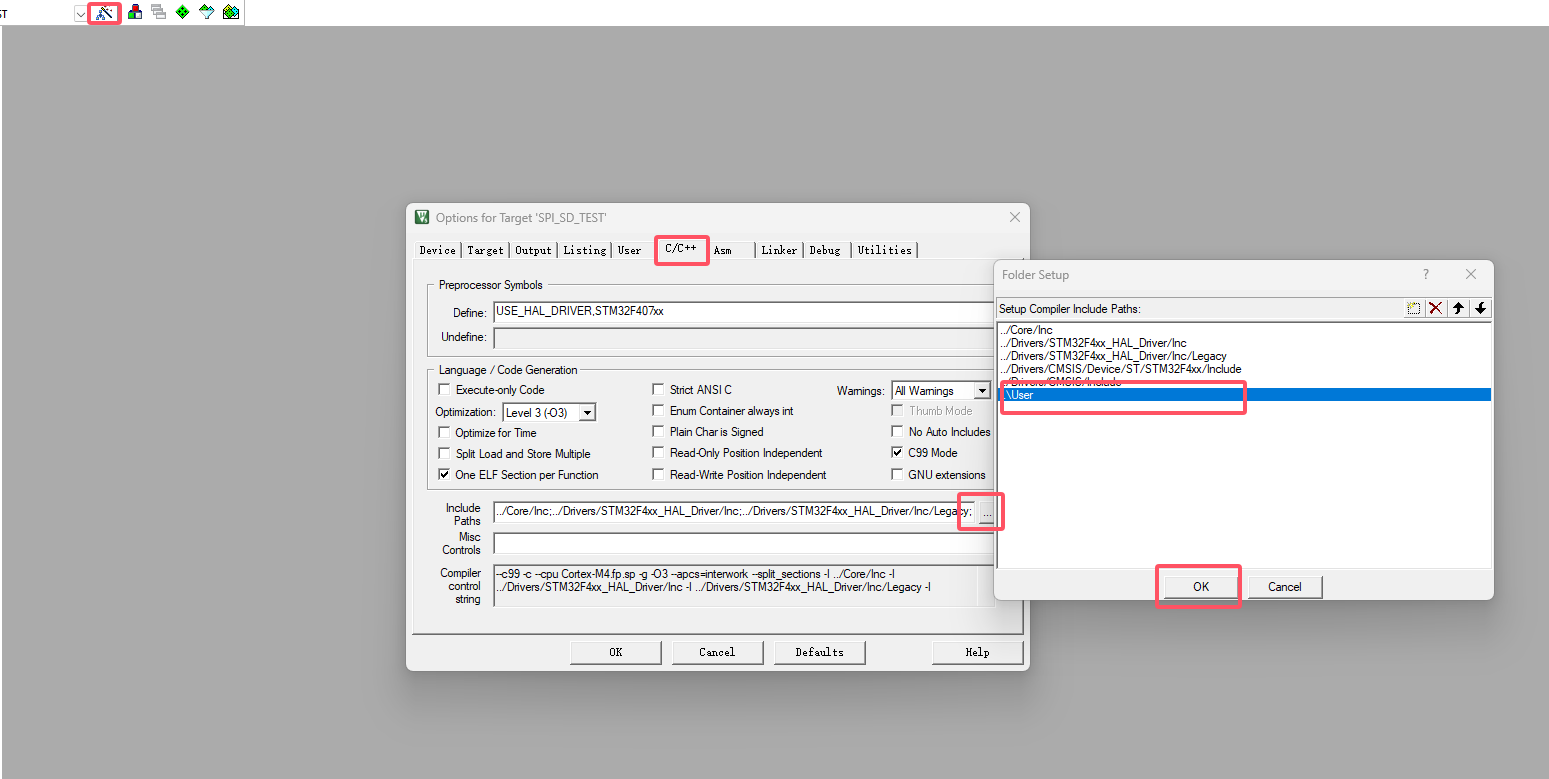
进入工程,添加USER文件夹(个人习惯),并加入对应的路径依赖
底层SD卡驱动函数
/* Define to prevent recursive inclusion -------------------------------------*/
#ifndef __SPI_SD_DRV_H
#define __SPI_SD_DRV_H
#ifdef __cplusplus
 extern "C" {
#endif

/* Includes ------------------------------------------------------------------*/
#include "main.h"

/* USER CODE BEGIN Includes */
/* 包含头文件 ----------------------------------------------------------------*/
#include "stm32f4xx_hal.h"
/* USER CODE END Includes */


/* 宏定义 --------------------------------------------------------------------*/
#define FLASH_SPIx                                 SPI1
#define FLASH_SPIx_RCC_CLK_ENABLE()                __HAL_RCC_SPI1_CLK_ENABLE()
#define FLASH_SPIx_RCC_CLK_DISABLE()               __HAL_RCC_SPI1_CLK_DISABLE()

#define FLASH_SPI_GPIO_ClK_ENABLE()                __HAL_RCC_GPIOA_CLK_ENABLE()
#define FLASH_SPI_GPIO_PORT                        GPIOA
#define FLASH_SPI_SCK_PIN                          GPIO_PIN_5
#define FLASH_SPI_MISO_PIN                         GPIO_PIN_6
#define FLASH_SPI_MOSI_PIN                         GPIO_PIN_7

#define FLASH_SPI_CS_CLK_ENABLE()                  __HAL_RCC_GPIOA_CLK_ENABLE()
#define FLASH_SPI_CS_PORT                          GPIOA
#define FLASH_SPI_CS_PIN                           GPIO_PIN_4

#define FLASH_SPI_CS_ENABLE()                      HAL_GPIO_WritePin(FLASH_SPI_CS_PORT, FLASH_SPI_CS_PIN, GPIO_PIN_RESET)
#define FLASH_SPI_CS_DISABLE()                     HAL_GPIO_WritePin(FLASH_SPI_CS_PORT, FLASH_SPI_CS_PIN, GPIO_PIN_SET)


/* USER CODE BEGIN Private defines */

/* USER CODE END Private defines */
#define u8  uint8_t
#define u16 uint16_t
#define u32 uint32_t
#define u64 uint64_t
 /* 扩展变量 ------------------------------------------------------------------*/
extern SPI_HandleTypeDef hspiflash;
extern u8 SD_Type;


/* Private define ------------------------------------------------------------*/
/* SD卡类型定义 */
#define SD_TYPE_MMC     0
#define SD_TYPE_V1      1
#define SD_TYPE_V2      2
#define SD_TYPE_V2HC    4

/* SPI总线速度设置*/
#define SPI_SPEED_LOW   0
#define SPI_SPEED_HIGH  1

/* SD传输数据结束后是否释放总线宏定义 */
#define NO_RELEASE      0
#define RELEASE         1

/* SD卡指令表 */
#define CMD0    0       //卡复位
#define CMD9    9       //命令9 ,读CSD数据
#define CMD10   10      //命令10,读CID数据
#define CMD12   12      //命令12,停止数据传输
#define CMD16   16      //命令16,设置SectorSize 应返回0x00
#define CMD17   17      //命令17,读sector
#define CMD18   18      //命令18,读Multi sector
#define ACMD23  23      //命令23,设置多sector写入前预先擦除N个block
#define CMD24   24      //命令24,写sector
#define CMD25   25      //命令25,写Multi sector
#define ACMD41  41      //命令41,应返回0x00
#define CMD55   55      //命令55,应返回0x01
#define CMD58   58      //命令58,读OCR信息
#define CMD59   59      //命令59,使能/禁止CRC,应返回0x00


/* Private macro -------------------------------------------------------------*/
//SD卡CS片选使能端操作:
#define SD_CS_ENABLE()      GPIO_ResetBits(GPIOA,GPIO_PIN_4)   //选中SD卡
#define SD_CS_DISABLE()     GPIO_SetBits(GPIOA,GPIO_PIN_4)     //不选中SD卡
//#define SD_PWR_ON()         GPIO_ResetBits(GPIOD,GPIO_Pin_10)  //SD卡上电
//#define SD_PWR_OFF()        GPIO_SetBits(GPIOD,GPIO_Pin_10)    //SD卡断电
//#define SD_DET()           !GPIO_ReadInputDataBit(GPIOA,GPIO_Pin_2) //检测有卡
                                                                    //1-有 0-无

/* Private function prototypes -----------------------------------------------*/
void SPI_Configuration(void);
void SPI_SetSpeed(u8 SpeedSet);
void sd_test(void);

u8 SPI_ReadWriteByte(u8 TxData);                //SPI总线读写一个字节
u8 SD_WaitReady(void);                          //等待SD卡就绪
u8 SD_SendCommand(u8 cmd, u32 arg, u8 crc);     //SD卡发送一个命令
u8 SD_SendCommand_NoDeassert(u8 cmd, u32 arg, u8 crc);
u8 SD_Init(void);                               //SD卡初始化
                                                //
u8 SD_ReceiveData(u8 *data, u16 len, u8 release);//SD卡读数据
u8 SD_GetCID(u8 *cid_data);                     //读SD卡CID
u8 SD_GetCSD(u8 *csd_data);                     //读SD卡CSD
u32 SD_GetCapacity(void);                       //取SD卡容量

u8 SD_ReadSingleBlock(u32 sector, u8 *buffer);  //读一个sector
u8 SD_WriteSingleBlock(u32 sector, const u8 *buffer); //写一个sector
u8 SD_ReadMultiBlock(u32 sector, u8 *buffer, u8 count); //读多个sector
u8 SD_WriteMultiBlock(u32 sector, const u8 *data, u8 count);  //写多个sector
/* USER CODE BEGIN Prototypes */

extern u8 SD_Init(void);

/* USER CODE END Prototypes */

#ifdef __cplusplus
}
#endif
#endif /*__ usart_H */
#include "main.h"
#include "spi_sd_drv.h"
#include <stdio.h>
#pragma diag_suppress 870
/* USER CODE BEGIN 0 */
/* USER CODE END 0 */
/* USART1 init function */
/**************************************************************************/
#define Dummy_Byte 0xFF
/* 私有变量 ------------------------------------------------------------------*/
SPI_HandleTypeDef hspiflash;
extern SPI_HandleTypeDef hspi1;
u8 SD_Type=0;
/* function ------------------------------------------------------------------*/
/**
* 函数功能: 从串行Flash读取一个字节数据
* 输入参数: 无
* 返 回 值: uint8_t:读取到的数据
* 说 明:This function must be used only if the Start_Read_Sequence
* function has been previously called.
*/
uint8_t SPI_FLASH_ReadByte(void)
{
uint8_t d_read,d_send=Dummy_Byte;
if(HAL_SPI_TransmitReceive(&hspiflash,&d_send,&d_read,1,0xFFFFFF)!=HAL_OK)
d_read=Dummy_Byte;
return d_read;
}
void SPI_I2S_SendData(SPI_TypeDef* SPIx, u16 Data)
{
/* Check the parameters */
assert_param(IS_SPI_ALL_PERIPH(SPIx));
/* Write in the DR register the data to be sent */
SPIx->DR = Data;
}
u16 SPI_I2S_ReceiveData(SPI_TypeDef* SPIx)
{
/* Check the parameters */
assert_param(IS_SPI_ALL_PERIPH(SPIx));
// assert_param(IS_SPI_DIRECTION_2LINES_OR_1LINE(hspi->Init.Direction));
/* Return the data in the DR register */
return SPIx->DR;
}
/**
* 函数功能: 往串行Flash读取写入一个字节数据并接收一个字节数据
* 输入参数: byte:待发送数据
* 返 回 值: uint8_t:接收到的数据
* 说 明:无
*/
uint8_t SPI_FLASH_SendByte(uint8_t byte)
{
uint8_t d_read,d_send=byte;
// if(HAL_SPI_TransmitReceive(&hspiflash,&d_send,&d_read,1,0xFFFFFF)!=HAL_OK)
// {
// d_read=Dummy_Byte;
// }
//等待发送缓冲区空
// while(__HAL_SPI_GET_FLAG(&hspi1, SPI_FLAG_TXE));
//发一个字节
// SPI_I2S_SendData(SPI1, d_send);
HAL_SPI_Transmit(&hspi1,&d_send,1,1000);
// HAL_SPI_Receive(&hspi1,&d_read,1,1000);
//等待数据接收
while(__HAL_SPI_GET_FLAG(&hspi1, SPI_FLAG_RXNE));
//取数据
d_read = SPI_I2S_ReceiveData(SPI1);
return d_read;
}
/*******************************************************************************
* Function Name : SD_WaitReady
* Description : 等待SD卡Ready
* Input : None
* Output : None
* Return : u8
* 0: 成功
* other:失败
*******************************************************************************/
u8 SD_WaitReady(void)
{
u8 r1;
u16 retry;
retry = 0;
do
{
r1 = SPI_FLASH_SendByte(0xFF);
if(retry==0xfffe)
{
return 1;
}
}while(r1!=0xFF);
return 0;
}
/*******************************************************************************
* Function Name : SD_SendCommand
* Description : 向SD卡发送一个命令
* Input : u8 cmd 命令
* u32 arg 命令参数
* u8 crc crc校验值
* Output : None
* Return : u8 r1 SD卡返回的响应
*******************************************************************************/
u8 SD_SendCommand(u8 cmd, u32 arg, u8 crc)
{
unsigned char r1;
unsigned char Retry = 0;
//????????
SPI_FLASH_SendByte(0xff);
//片选端置低,选中SD卡
FLASH_SPI_CS_ENABLE();
//发送
SPI_FLASH_SendByte(cmd | 0x40); //分别写入命令
SPI_FLASH_SendByte(arg >> 24);
SPI_FLASH_SendByte(arg >> 16);
SPI_FLASH_SendByte(arg >> 8);
SPI_FLASH_SendByte(arg);
SPI_FLASH_SendByte(crc);
//等待响应,或超时退出
while((r1 = SPI_FLASH_SendByte(0xFF))==0xFF)
{
Retry++;
if(Retry > 200)
{
break;
}
}
//关闭片选
FLASH_SPI_CS_DISABLE();
//在总线上额外增加8个时钟,让SD卡完成剩下的工作
SPI_FLASH_SendByte(0xFF);
//返回状态值
return r1;
}
/*******************************************************************************
* Function Name : SD_SendCommand_NoDeassert
* Description : 向SD卡发送一个命令(结束是不失能片选,还有后续数据传来)
* Input : u8 cmd 命令
* u32 arg 命令参数
* u8 crc crc校验值
* Output : None
* Return : u8 r1 SD卡返回的响应
*******************************************************************************/
u8 SD_SendCommand_NoDeassert(u8 cmd, u32 arg, u8 crc)
{
unsigned char r1;
unsigned char Retry = 0;
//????????
SPI_FLASH_SendByte(0xff);
//片选端置低,选中SD卡
FLASH_SPI_CS_ENABLE();
//发送
SPI_FLASH_SendByte(cmd | 0x40); //分别写入命令
SPI_FLASH_SendByte(arg >> 24);
SPI_FLASH_SendByte(arg >> 16);
SPI_FLASH_SendByte(arg >> 8);
SPI_FLASH_SendByte(arg);
SPI_FLASH_SendByte(crc);
//等待响应,或超时退出
while((r1 = SPI_FLASH_SendByte(0xFF))==0xFF)
{
Retry++;
if(Retry > 200)
{
break;
}
}
//返回响应值
return r1;
}
void SPI_SetSpeed(u8 SpeedSet)
{
hspi1.Instance = SPI1;
hspi1.Init.Mode = SPI_MODE_MASTER;
hspi1.Init.Direction = SPI_DIRECTION_2LINES;
hspi1.Init.DataSize = SPI_DATASIZE_8BIT;
hspi1.Init.CLKPolarity = SPI_POLARITY_LOW;
hspi1.Init.CLKPhase = SPI_PHASE_1EDGE;
hspi1.Init.NSS = SPI_NSS_HARD_OUTPUT;
//如果速度设置输入0,则低速模式,非0则高速模式
if(SpeedSet==SPI_SPEED_LOW)
{
hspi1.Init.BaudRatePrescaler = SPI_BAUDRATEPRESCALER_256;
}
else
{
hspi1.Init.BaudRatePrescaler = SPI_BAUDRATEPRESCALER_4;
}
hspi1.Init.FirstBit = SPI_FIRSTBIT_MSB;
hspi1.Init.TIMode = SPI_TIMODE_DISABLE;
hspi1.Init.CRCCalculation = SPI_CRCCALCULATION_DISABLE;
hspi1.Init.CRCPolynomial = 10;
if (HAL_SPI_Init(&hspi1) != HAL_OK)
{
Error_Handler();
}
//speed:实验测试数据,最大速度 392314 Byte/S,
//Prescaler_128, 59592 Byte/S
//Prescaler_64, 104617 Byte/S
//Prescaler_32, 168134 Byte/S 162337 Byte/S
//Prescaler_16, 261543 Byte/S 247777 Byte/S
//Prescaler_8, 313851 Byte/S 336269 Byte/S
//Prescaler_4, 392314 Byte/S 392314 Byte/S
//Prescaler_2, 392314 Byte/S
}
/*******************************************************************************
* Function Name : SD_Init
* Description : 初始化SD卡
* Input : None
* Output : None
* Return : u8
* 0:NO_ERR
* 1:TIME_OUT
* 99:NO_CARD
*******************************************************************************/
u8 SD_Init(void)
{
u16 i; // 用来循环计数
u8 r1; // 存放SD卡的返回值
u16 retry; // 用来进行超时计数
u8 buff[6];
//如果没有检测到卡插入,直接退出,返回错误标志
// if(!SD_DET())
// {
// //return 99;
// return STA_NODISK; // FatFS错误标志:没有插入磁盘
// }
//SD卡上电
//SD_PWR_ON();
// 纯延时,等待SD卡上电完成
//for(i=0;i<0xf00;i++);
/*******************************************************
//这个地方要加一句,设置SPI速度为低速。
//为什么有的卡可以呢?因为SPI初始化时是低速的,SD卡初始化
//完成后设置为高速,有的卡只要初始化一次就行,程序就ok;
//但有的卡需要多次复位,呵呵,这个地方差这一句,
//这种卡就用不成咯!
*******************************************************/
SPI_SetSpeed(0); //设置SPI速度为低速
//先产生>74个脉冲,让SD卡自己初始化完成
for(i=0;i<100;i++)
{
SPI_FLASH_SendByte(0xFF);
}
//-----------------SD卡复位到idle开始-----------------
//循环连续发送CMD0,直到SD卡返回0x01,进入IDLE状态
//超时则直接退出
retry = 0;
do
{
//发送CMD0,让SD卡进入IDLE状态
r1 = SD_SendCommand(CMD0, 0, 0x95);
retry++;
}while((r1 != 0x01) && (retry<200));
//跳出循环后,检查原因:初始化成功?or 重试超时?
if(retry==200)
{
return 1; //超时返回1
}
//-----------------SD卡复位到idle结束-----------------
//获取卡片的SD版本信息
r1 = SD_SendCommand_NoDeassert(8, 0x1aa, 0x87);
//如果卡片版本信息是v1.0版本的,即r1=0x05,则进行以下初始化
if(r1 == 0x05)
{
printf("\r\n SD卡版本信息:V1.0 \r\n");
//设置卡类型为SDV1.0,如果后面检测到为MMC卡,再修改为MMC
SD_Type = SD_TYPE_V1;
//如果是V1.0卡,CMD8指令后没有后续数据
//片选置高,结束本次命令
FLASH_SPI_CS_DISABLE();
//多发8个CLK,让SD结束后续操作
SPI_FLASH_SendByte(0xFF);
//-----------------SD卡、MMC卡初始化开始-----------------
//发卡初始化指令CMD55+ACMD41
// 如果有应答,说明是SD卡,且初始化完成
// 没有回应,说明是MMC卡,额外进行相应初始化
retry = 0;
do
{
//先发CMD55,应返回0x01;否则出错
r1 = SD_SendCommand(CMD55, 0, 0);
if(r1 != 0x01)
{
return r1;
}
//得到正确响应后,发ACMD41,应得到返回值0x00,否则重试200次
r1 = SD_SendCommand(ACMD41, 0, 0);
retry++;
}while((r1!=0x00) && (retry<400));
// 判断是超时还是得到正确回应
// 若有回应:是SD卡;没有回应:是MMC卡
//----------MMC卡额外初始化操作开始------------
if(retry==400)
{
printf("\r\n SD卡信息: MMC卡 \r\n");
retry = 0;
//发送MMC卡初始化命令(没有测试)
do
{
r1 = SD_SendCommand(1, 0, 0);
retry++;
}while((r1!=0x00)&& (retry<400));
if(retry==400)
{
return 1; //MMC卡初始化超时
}
//写入卡类型
SD_Type = SD_TYPE_MMC;
}
else
{
printf("\r\n SD卡信息: SD卡 \r\n");
}
//----------MMC卡额外初始化操作结束------------
//设置SPI为高速模式
SPI_SetSpeed(1);
SPI_FLASH_SendByte(0xFF);
//禁止CRC校验
/*
r1 = SD_SendCommand(CMD59, 0, 0x01);
if(r1 != 0x00)
{
return r1; //命令错误,返回r1
}
*/
//设置Sector Size
r1 = SD_SendCommand(CMD16, 512, 0xff);
if(r1 != 0x00)
{
return r1; //命令错误,返回r1
}
//-----------------SD卡、MMC卡初始化结束-----------------
}//SD卡为V1.0版本的初始化结束
//下面是V2.0卡的初始化
//其中需要读取OCR数据,判断是SD2.0还是SD2.0HC卡
else if(r1 == 0x01)
{
printf("\r\n SD卡版本信息:V2.0 \r\n");
//V2.0的卡,CMD8命令后会传回4字节的数据,要跳过再结束本命令
buff[0] = SPI_FLASH_SendByte(0xFF); //should be 0x00
buff[1] = SPI_FLASH_SendByte(0xFF); //should be 0x00
buff[2] = SPI_FLASH_SendByte(0xFF); //should be 0x01
buff[3] = SPI_FLASH_SendByte(0xFF); //should be 0xAA
FLASH_SPI_CS_DISABLE();
//the next 8 clocks
SPI_FLASH_SendByte(0xFF);
//判断该卡是否支持2.7V-3.6V的电压范围
if(buff[2]==0x01 && buff[3]==0xAA)
{
//支持电压范围,可以操作
retry = 0;
//发卡初始化指令CMD55+ACMD41
do
{
r1 = SD_SendCommand(CMD55, 0, 0);
if(r1!=0x01)
{
return r1;
}
r1 = SD_SendCommand(ACMD41, 0x40000000, 0);
if(retry>200)
{
return r1; //超时则返回r1状态
}
}while(r1!=0);
//初始化指令发送完成,接下来获取OCR信息
//-----------鉴别SD2.0卡版本开始-----------
r1 = SD_SendCommand_NoDeassert(CMD58, 0, 0);
if(r1!=0x00)
{
return r1; //如果命令没有返回正确应答,直接退出,返回应答
}
//读OCR指令发出后,紧接着是4字节的OCR信息
buff[0] = SPI_FLASH_SendByte(0xFF);
buff[1] = SPI_FLASH_SendByte(0xFF);
buff[2] = SPI_FLASH_SendByte(0xFF);
buff[3] = SPI_FLASH_SendByte(0xFF);
//OCR接收完成,片选置高
FLASH_SPI_CS_DISABLE();
SPI_FLASH_SendByte(0xFF);
//检查接收到的OCR中的bit30位(CCS),确定其为SD2.0还是SDHC
//如果CCS=1:SDHC CCS=0:SD2.0
if(buff[0]&0x40) //检查CCS
{
SD_Type = SD_TYPE_V2HC;
printf("\r\n SD卡信息: SDHC \r\n");
}
else
{
SD_Type = SD_TYPE_V2;
printf("\r\n SD卡信息: SD2.0 \r\n");
}
//-----------鉴别SD2.0卡版本结束-----------
//设置SPI为高速模式
SPI_SetSpeed(1);
}
}
return r1;
}
/*******************************************************************************
* Function Name : SD_ReceiveData
* Description : 从SD卡中读回指定长度的数据,放置在给定位置
* Input : u8 *data(存放读回数据的内存>len)
* u16 len(数据长度)
* u8 release(传输完成后是否释放总线CS置高 0:不释放 1:释放)
* Output : None
* Return : u8
* 0:NO_ERR
* other:错误信息
*******************************************************************************/
u8 SD_ReceiveData(u8 *data, u16 len, u8 release)
{
u16 retry;
u8 r1;
// 启动一次传输
FLASH_SPI_CS_ENABLE();
//等待SD卡发回数据起始令牌0xFE
retry = 0;
do
{
r1 = SPI_FLASH_SendByte(0xFF);
retry++;
if(retry>2000) //2000次等待后没有应答,退出报错
{
FLASH_SPI_CS_DISABLE();
return 1;
}
}while(r1 != 0xFE);
//开始接收数据
while(len--)
{
*data = SPI_FLASH_SendByte(0xFF);
data++;
}
//下面是2个伪CRC(dummy CRC)
SPI_FLASH_SendByte(0xFF);
SPI_FLASH_SendByte(0xFF);
//按需释放总线,将CS置高
if(release == RELEASE)
{
//传输结束
FLASH_SPI_CS_DISABLE();
SPI_FLASH_SendByte(0xFF);
}
return 0;
}
/*******************************************************************************
* Function Name : SD_GetCID
* Description : 获取SD卡的CID信息,包括制造商信息
* Input : u8 *cid_data(存放CID的内存,至少16Byte)
* Output : None
* Return : u8
* 0:NO_ERR
* 1:TIME_OUT
* other:错误信息
*******************************************************************************/
u8 SD_GetCID(u8 *cid_data)
{
u8 r1;
//发CMD10命令,读CID
r1 = SD_SendCommand(CMD10, 0, 0xFF);
if(r1 != 0x00)
{
return r1; //没返回正确应答,则退出,报错
}
//接收16个字节的数据
r1 = SD_ReceiveData(cid_data, 16, RELEASE);
if(r1 != 0)
{
return r1; //数据接收失败
}
return 0;
}
/*******************************************************************************
* Function Name : SD_GetCSD
* Description : 获取SD卡的CSD信息,包括容量和速度信息
* Input : u8 *cid_data(存放CID的内存,至少16Byte)
* Output : None
* Return : u8
* 0:NO_ERR
* 1:TIME_OUT
* other:错误信息
*******************************************************************************/
u8 SD_GetCSD(u8 *csd_data)
{
u8 r1;
//发CMD9命令,读CSD
r1 = SD_SendCommand(CMD9, 0, 0xFF);
if(r1 != 0x00)
{
return r1; //没返回正确应答,则退出,报错
}
//接收16个字节的数据
r1 = SD_ReceiveData(csd_data, 16, RELEASE);
if(r1 != 0)
{
return r1; //数据接收失败
}
return 0;
}
/*******************************************************************************
* Function Name : SD_GetCapacity
* Description : 获取SD卡的容量
* Input : None
* Output : None
* Return : u32 capacity
* 0: 取容量出错
*******************************************************************************/
u32 SD_GetCapacity(void)
{
u8 csd[16];
u32 Capacity = 0;
u8 r1;
u16 i;
u16 temp;
//取CSD信息,如果期间出错,返回0
if(SD_GetCSD(csd) != 0)
{
return 0;
}
// 检查CSD结构版本
u8 csd_structure = (csd[0] >> 6) & 0x03;
if(csd_structure == 1) // CSD版本2.0 (SDHC/SDXC)
{
// SD卡物理层规范版本2.0的容量计算
// 公式: memory capacity = (C_SIZE + 1) * 512K byte
// C_SIZE字段是22位:csd[7]的低6位 + csd[8]的8位 + csd[9]的8位
u32 c_size = ((u32)(csd[7] & 0x3F) << 16) |
((u32)csd[8] << 8) |
csd[9];
// 容量 = (C_SIZE + 1) * 512K字节
Capacity = (c_size + 1) * 512 * 1024;
}
else // CSD版本1.0 (普通SD卡)
{
// SD卡物理层规范版本1.0的容量计算
// 公式: memory capacity = BLOCKNR * BLOCK_LEN
// BLOCKNR = (C_SIZE + 1) * MULT
// MULT = 2^(C_SIZE_MULT + 2)
// BLOCK_LEN = 2^READ_BL_LEN
// 提取C_SIZE (12位)
i = csd[6] & 0x03; // 取csd[6]的低2位
i = (i << 8) + csd[7]; // 左移8位,加上csd[7]
i = (i << 2) + ((csd[8] & 0xC0) >> 6); // 左移2位,加上csd[8]的高2位
// 提取C_SIZE_MULT (3位)
r1 = csd[9] & 0x03; // 取csd[9]的低2位
r1 = (r1 << 1) + ((csd[10] & 0x80) >> 7); // 左移1位,加上csd[10]的最高位
// 计算MULT = 2^(C_SIZE_MULT + 2)
r1 += 2;
temp = 1;
while(r1 > 0)
{
temp *= 2;
r1--;
}
// 计算BLOCKNR = (C_SIZE + 1) * MULT
Capacity = ((u32)(i + 1)) * ((u32)temp);
// 提取READ_BL_LEN (4位)
i = csd[5] & 0x0F;
// 计算BLOCK_LEN = 2^READ_BL_LEN
temp = 1;
while(i > 0)
{
temp *= 2;
i--;
}
// 最终容量 = BLOCKNR * BLOCK_LEN
Capacity *= (u32)temp;
}
return Capacity;
}
/*******************************************************************************
* Function Name : SD_ReadSingleBlock
* Description : 读SD卡的一个block
* Input : u32 sector 取地址(sector值,非物理地址)
* u8 *buffer 数据存储地址(大小至少512byte)
* Output : None
* Return : u8 r1
* 0: 成功
* other:失败
*******************************************************************************/
u8 SD_ReadSingleBlock(u32 sector, u8 *buffer)
{
u8 r1;
//设置为高速模式
SPI_SetSpeed(SPI_SPEED_HIGH);
//如果不是SDHC,将sector地址转成byte地址
// sector = sector<<9;
r1 = SD_SendCommand(CMD17, sector, 0);//读命令
if(r1 != 0x00)
{
return r1;
}
r1 = SD_ReceiveData(buffer, 512, RELEASE);
if(r1 != 0)
{
return r1; //读数据出错!
}
else
{
return 0;
}
}
/*******************************************************************************
* Function Name : SD_WriteSingleBlock
* Description : 写入SD卡的一个block
* Input : u32 sector 扇区地址(sector值,非物理地址)
* u8 *buffer 数据存储地址(大小至少512byte)
* Output : None
* Return : u8 r1
* 0: 成功
* other:失败
*******************************************************************************/
u8 SD_WriteSingleBlock(u32 sector, const u8 *data)
{
u8 r1;
u16 i;
u16 retry;
//设置为高速模式
SPI_SetSpeed(SPI_SPEED_HIGH);
//如果不是SDHC,给定的是sector地址,将其转换成byte地址
// if(SD_Type!=SD_TYPE_V2HC)
// {
// sector = sector<<9;
// }
r1 = SD_SendCommand(CMD24, sector, 0x00);
if(r1 != 0x00)
{
return r1; //应答不正确,直接返回
}
//开始准备数据传输
FLASH_SPI_CS_ENABLE();
//先放3个空数据,等待SD卡准备好
SPI_FLASH_SendByte(0xff);
SPI_FLASH_SendByte(0xff);
SPI_FLASH_SendByte(0xff);
//放起始令牌0xFE
SPI_FLASH_SendByte(0xFE);
//放一个sector的数据
for(i=0;i<512;i++)
{
SPI_FLASH_SendByte(*data++);
}
//发2个Byte的dummy CRC
SPI_FLASH_SendByte(0xff);
SPI_FLASH_SendByte(0xff);
//等待SD卡应答
r1 = SPI_FLASH_SendByte(0xff);
if((r1&0x1F)!=0x05)
{
FLASH_SPI_CS_DISABLE();
return r1;
}
//等待操作完成
retry = 0;
while(!SPI_FLASH_SendByte(0xff))
{
retry++;
if(retry>0xfffe) //如果长时间写入没有完成,报错退出
{
FLASH_SPI_CS_DISABLE();
return 1; //写入超时返回1
}
}
//写入完成,片选置1
FLASH_SPI_CS_DISABLE();
SPI_FLASH_SendByte(0xff);
return 0;
}
/*******************************************************************************
* Function Name : SD_ReadMultiBlock
* Description : 读SD卡的多个block
* Input : u32 sector 取地址(sector值,非物理地址)
* u8 *buffer 数据存储地址(大小至少512byte)
* u8 count 连续读count个block
* Output : None
* Return : u8 r1
* 0: 成功
* other:失败
*******************************************************************************/
u8 SD_ReadMultiBlock(u32 sector, u8 *buffer, u8 count)
{
u8 r1;
//设置为高速模式
SPI_SetSpeed(SPI_SPEED_HIGH);
//如果不是SDHC,将sector地址转成byte地址
// sector = sector<<9;
//SD_WaitReady();
//发读多块命令
r1 = SD_SendCommand(CMD18, sector, 0);//读命令
if(r1 != 0x00)
{
return r1;
}
//开始接收数据
do
{
if(SD_ReceiveData(buffer, 512, NO_RELEASE) != 0x00)
{
break;
}
buffer += 512;
} while(--count);
//全部传输完毕,发送停止命令
SD_SendCommand(CMD12, 0, 0);
//释放总线
FLASH_SPI_CS_DISABLE();
SPI_FLASH_SendByte(0xFF);
if(count != 0)
{
return count; //如果没有传完,返回剩余个数
}
else
{
return 0;
}
}
/*******************************************************************************
* Function Name : SD_WriteMultiBlock
* Description : 写入SD卡的N个block
* Input : u32 sector 扇区地址(sector值,非物理地址)
* u8 *buffer 数据存储地址(大小至少512byte)
* u8 count 写入的block数目
* Output : None
* Return : u8 r1
* 0: 成功
* other:失败
*******************************************************************************/
u8 SD_WriteMultiBlock(u32 sector, const u8 *data, u8 count)
{
u8 r1;
u16 i;
//设置为高速模式
SPI_SetSpeed(SPI_SPEED_HIGH);
//如果不是SDHC,给定的是sector地址,将其转换成byte地址
// if(SD_Type != SD_TYPE_V2HC)
// {
// sector = sector<<9;
// }
//如果目标卡不是MMC卡,启用ACMD23指令使能预擦除
if(SD_Type != SD_TYPE_MMC)
{
r1 = SD_SendCommand(ACMD23, count, 0x00);
}
//发多块写入指令
r1 = SD_SendCommand(CMD25, sector, 0x00);
if(r1 != 0x00)
{
return r1; //应答不正确,直接返回
}
//开始准备数据传输
FLASH_SPI_CS_ENABLE();
//先放3个空数据,等待SD卡准备好
SPI_FLASH_SendByte(0xff);
SPI_FLASH_SendByte(0xff);
//--------下面是N个sector写入的循环部分
do
{
//放起始令牌0xFC 表明是多块写入
SPI_FLASH_SendByte(0xFC);
//放一个sector的数据
for(i=0;i<512;i++)
{
SPI_FLASH_SendByte(*data++);
}
//发2个Byte的dummy CRC
SPI_FLASH_SendByte(0xff);
SPI_FLASH_SendByte(0xff);
//等待SD卡应答
r1 = SPI_FLASH_SendByte(0xff);
if((r1&0x1F)!=0x05)
{
FLASH_SPI_CS_DISABLE(); //如果应答为报错,则带错误代码直接退出
return r1;
}
//等待SD卡写入完成
if(SD_WaitReady()==1)
{
FLASH_SPI_CS_DISABLE(); //等待SD卡写入完成超时,直接退出报错
return 1;
}
//本sector数据传输完成
}while(--count);
//发结束传输令牌0xFD
r1 = SPI_FLASH_SendByte(0xFD);
if(r1==0x00)
{
count = 0xfe;
}
if(SD_WaitReady())
{
while(1)
{
}
}
//写入完成,片选置1
FLASH_SPI_CS_DISABLE();
SPI_FLASH_SendByte(0xff);
return count; //返回count值,如果写完则count=0,否则count=1
}
/* USER CODE END 1 */
/**
* @brief SD卡测试函数
*/
// SD卡测试相关变量
uint8_t sd_test_buffer[512];
uint8_t sd_read_buffer[512];
uint32_t sd_capacity = 0;
uint8_t sd_cid[16];
uint8_t sd_csd[16];
void sd_test(void)
{
printf("\r\n=== SD卡测试 ===\r\n");
// 初始化
if(SD_Init() != 0)
{
printf("SD卡初始化失败!\r\n");
return;
}
printf("✓ 初始化成功\r\n");
// 读取CID信息
if(SD_GetCID(sd_cid) == 0)
{
printf("制造商: 0x%02X, 产品: ", sd_cid[0]);
for(int i = 3; i <= 8; i++) printf("%c", sd_cid[i]);
printf("\r\n");
}
// 读取CSD信息
if(SD_GetCSD(sd_csd) == 0)
{
uint8_t csd_structure = (sd_csd[0] >> 6) & 0x03;
uint8_t tran_speed = sd_csd[3] & 0x0F;
uint32_t c_size = ((uint32_t)(sd_csd[7] & 0x3F) << 16) |
((uint32_t)sd_csd[8] << 8) |
sd_csd[9];
printf("CSD版本: %d, 速度等级: %d, C_SIZE: %lu\r\n",
csd_structure, tran_speed, c_size);
// 根据CSD版本显示容量
if(csd_structure == 1) // CSD v2.0 (SDHC/SDXC)
{
float capacity_gb = (float)(c_size + 1) * 512.0f / (1024.0f * 1024.0f); // 转换为GB
printf("容量: %.2f GB\r\n", capacity_gb);
}
else // CSD v1.0 (普通SD卡)
{
// 使用V1公式计算容量
uint16_t c_size_v1 = ((sd_csd[6] & 0x03) << 10) |
(sd_csd[7] << 2) |
((sd_csd[8] & 0xC0) >> 6);
uint8_t c_size_mult = ((sd_csd[9] & 0x03) << 1) |
((sd_csd[10] & 0x80) >> 7);
uint8_t read_bl_len = sd_csd[5] & 0x0F;
uint32_t block_nr = (c_size_v1 + 1) * (1 << (c_size_mult + 2));
uint32_t block_len = 1 << read_bl_len;
uint32_t capacity_bytes = block_nr * block_len;
printf("容量: %.2f MB\r\n", (float)capacity_bytes / (1024 * 1024));
}
}
// 测试写入
for(int i = 0; i < 512; i++) sd_test_buffer[i] = (uint8_t)(i & 0xFF);
if(SD_WriteSingleBlock(0, sd_test_buffer) == 0)
{
printf("✓ 写入成功\r\n");
}
else
{
printf("✗ 写入失败\r\n");
return;
}
// 测试读取
for(int i = 0; i < 512; i++) sd_read_buffer[i] = 0;
if(SD_ReadSingleBlock(0, sd_read_buffer) == 0)
{
printf("✓ 读取成功\r\n");
// 验证数据
int errors = 0;
for(int i = 0; i < 512; i++)
{
if(sd_test_buffer[i] != sd_read_buffer[i]) errors++;
}
printf("数据验证: %s\r\n", errors == 0 ? "通过" : "失败");
}
else
{
printf("✗ 读取失败\r\n");
}
printf("=== 测试完成 ===\r\n");
}
在使用 FatFs 库通过 SPI 读写 SD 卡时,user_diskio.c 文件是 FatFs 与底层硬件(SD 卡)之间的适配层,需要实现以下 4 个核心函数:
-
disk_initialize:初始化 SD 卡。 -
disk_status:检查 SD 卡的状态。 -
disk_read:从 SD 卡读取数据。 -
disk_write:向 SD 卡写入数据。
还可以实现 disk_ioctl 函数,用于执行一些底层的控制操作,如获取 SD 卡的容量等
我们这里基于底层函数把这五个函数都实现了,感兴趣可以看一看,也可以直接复制。
/* USER CODE BEGIN Header */
/**
 ******************************************************************************
  * @file    user_diskio.c
  * @brief   This file includes a diskio driver skeleton to be completed by the user.
  ******************************************************************************
  * @attention
  *
  * Copyright (c) 2025 STMicroelectronics.
  * All rights reserved.
  *
  * This software is licensed under terms that can be found in the LICENSE file
  * in the root directory of this software component.
  * If no LICENSE file comes with this software, it is provided AS-IS.
  *
  ******************************************************************************
  */
 /* USER CODE END Header */

#ifdef USE_OBSOLETE_USER_CODE_SECTION_0
/*
 * Warning: the user section 0 is no more in use (starting from CubeMx version 4.16.0)
 * To be suppressed in the future.
 * Kept to ensure backward compatibility with previous CubeMx versions when
 * migrating projects.
 * User code previously added there should be copied in the new user sections before
 * the section contents can be deleted.
 */
/* USER CODE BEGIN 0 */
/* USER CODE END 0 */
#endif

/* USER CODE BEGIN DECL */

/* Includes ------------------------------------------------------------------*/
#include <string.h>
#include "ff_gen_drv.h"
#include "spi_sd_drv.h"

/* Private typedef -----------------------------------------------------------*/
/* Private define ------------------------------------------------------------*/

/* Private variables ---------------------------------------------------------*/
/* Disk status */
static volatile DSTATUS Stat = STA_NOINIT;

/* USER CODE END DECL */

/* Private function prototypes -----------------------------------------------*/
DSTATUS USER_initialize (BYTE pdrv);
DSTATUS USER_status (BYTE pdrv);
DRESULT USER_read (BYTE pdrv, BYTE *buff, DWORD sector, UINT count);
#if _USE_WRITE == 1
  DRESULT USER_write (BYTE pdrv, const BYTE *buff, DWORD sector, UINT count);
#endif /* _USE_WRITE == 1 */
#if _USE_IOCTL == 1
  DRESULT USER_ioctl (BYTE pdrv, BYTE cmd, void *buff);
#endif /* _USE_IOCTL == 1 */

Diskio_drvTypeDef  USER_Driver =
{
  USER_initialize,
  USER_status,
  USER_read,
#if  _USE_WRITE
  USER_write,
#endif  /* _USE_WRITE == 1 */
#if  _USE_IOCTL == 1
  USER_ioctl,
#endif /* _USE_IOCTL == 1 */
};

/* Private functions ---------------------------------------------------------*/

/**
  * @brief  Initializes a Drive
  * @param  pdrv: Physical drive number (0..)
  * @retval DSTATUS: Operation status
  */
DSTATUS USER_initialize (
	BYTE pdrv           /* Physical drive nmuber to identify the drive */
)
{
  /* USER CODE BEGIN INIT */
    u8 result;

    // 检查驱动器号是否有效
    if(pdrv != 0)
    {
        return STA_NOINIT;
    }

    // 调用 SD 卡初始化函数
    result = SD_Init();

    if(result == 0)
    {
        // 初始化成功,清除 STA_NOINIT 标志
        Stat = 0;
        return Stat;
    }
    else
    {
        // 初始化失败,设置 STA_NOINIT 标志
        Stat = STA_NOINIT;
        return Stat;
    }
  /* USER CODE END INIT */
}

/**
  * @brief  Gets Disk Status
  * @param  pdrv: Physical drive number (0..)
  * @retval DSTATUS: Operation status
  */
DSTATUS USER_status (
	BYTE pdrv       /* Physical drive number to identify the drive */
)
{
  /* USER CODE BEGIN STATUS */
    // 检查驱动器号是否有效
    if(pdrv != 0)
    {
        return STA_NOINIT;
    }

    // 返回当前磁盘状态
    // Stat 变量在 disk_initialize 中设置
    return Stat;
  /* USER CODE END STATUS */
}

/**
  * @brief  Reads Sector(s)
  * @param  pdrv: Physical drive number (0..)
  * @param  *buff: Data buffer to store read data
  * @param  sector: Sector address (LBA)
  * @param  count: Number of sectors to read (1..128)
  * @retval DRESULT: Operation result
  */
DRESULT USER_read (
	BYTE pdrv,      /* Physical drive nmuber to identify the drive */
	BYTE *buff,     /* Data buffer to store read data */
	DWORD sector,   /* Sector address in LBA */
	UINT count      /* Number of sectors to read */
)
{
  /* USER CODE BEGIN READ */
    u8 result;

    // 检查驱动器号是否有效
    if(pdrv != 0)
    {
        return RES_PARERR;
    }

    // 检查磁盘是否已初始化
    if(Stat & STA_NOINIT)
    {
        return RES_NOTRDY;
    }

    // 检查参数有效性
    if(buff == NULL || count == 0)
    {
        return RES_PARERR;
    }

    // 根据读取扇区数量选择不同的读取函数
    if(count == 1)
    {
        // 读取单个扇区
        result = SD_ReadSingleBlock(sector, buff);
    }
    else
    {
        // 读取多个扇区
        result = SD_ReadMultiBlock(sector, buff, count);
    }

    // 检查读取结果
    if(result == 0)
    {
        return RES_OK;
    }
    else
    {
        return RES_ERROR;
    }
  /* USER CODE END READ */
}

/**
  * @brief  Writes Sector(s)
  * @param  pdrv: Physical drive number (0..)
  * @param  *buff: Data to be written
  * @param  sector: Sector address (LBA)
  * @param  count: Number of sectors to write (1..128)
  * @retval DRESULT: Operation result
  */
#if _USE_WRITE == 1
DRESULT USER_write (
	BYTE pdrv,          /* Physical drive nmuber to identify the drive */
	const BYTE *buff,   /* Data to be written */
	DWORD sector,       /* Sector address in LBA */
	UINT count          /* Number of sectors to write */
)
{
  /* USER CODE BEGIN WRITE */
    u8 result;

    // 检查驱动器号是否有效
    if(pdrv != 0)
    {
        return RES_PARERR;
    }

    // 检查磁盘是否已初始化
    if(Stat & STA_NOINIT)
    {
        return RES_NOTRDY;
    }

    // 检查磁盘是否为只读
    if(Stat & STA_PROTECT)
    {
        return RES_WRPRT;
    }

    // 检查参数有效性
    if(buff == NULL || count == 0)
    {
        return RES_PARERR;
    }

    // 根据写入扇区数量选择不同的写入函数
    if(count == 1)
    {
        // 写入单个扇区
        result = SD_WriteSingleBlock(sector, buff);
    }
    else
    {
        // 写入多个扇区
        result = SD_WriteMultiBlock(sector, buff, count);
    }

    // 检查写入结果
    if(result == 0)
    {
        return RES_OK;
    }
    else
    {
        return RES_ERROR;
    }
  /* USER CODE END WRITE */
}
#endif /* _USE_WRITE == 1 */

/**
  * @brief  I/O control operation
  * @param  pdrv: Physical drive number (0..)
  * @param  cmd: Control code
  * @param  *buff: Buffer to send/receive control data
  * @retval DRESULT: Operation result
  */
#if _USE_IOCTL == 1
DRESULT USER_ioctl (
	BYTE pdrv,      /* Physical drive nmuber (0..) */
	BYTE cmd,       /* Control code */
	void *buff      /* Buffer to send/receive control data */
)
{
  /* USER CODE BEGIN IOCTL */
    DRESULT res = RES_ERROR;

    // 检查驱动器号是否有效
    if(pdrv != 0)
    {
        return RES_PARERR;
    }

    // 检查磁盘是否已初始化
    if(Stat & STA_NOINIT)
    {
        return RES_NOTRDY;
    }

    switch(cmd)
    {
        case CTRL_SYNC:
            // 同步操作,确保所有待处理的操作完成
            res = RES_OK;
            break;

        case GET_SECTOR_COUNT:
            // 获取扇区总数
            if(buff != NULL)
            {
                u32 capacity = SD_GetCapacity();
                if(capacity > 0)
                {
                    *(DWORD*)buff = capacity / 512;  // 转换为扇区数
                    res = RES_OK;
                }
                else
                {
                    res = RES_ERROR;
                }
            }
            else
            {
                res = RES_PARERR;
            }
            break;

        case GET_SECTOR_SIZE:
            // 获取扇区大小
            if(buff != NULL)
            {
                *(WORD*)buff = 512;  // SD卡扇区大小固定为512字节
                res = RES_OK;
            }
            else
            {
                res = RES_PARERR;
            }
            break;

        case GET_BLOCK_SIZE:
            // 获取块大小(擦除单位)
            if(buff != NULL)
            {
                *(DWORD*)buff = 1;  // 对于SD卡,擦除单位通常为1个扇区
                res = RES_OK;
            }
            else
            {
                res = RES_PARERR;
            }
            break;

        case CTRL_TRIM:
            // 擦除操作(可选实现)
            res = RES_OK;
            break;

        default:
            res = RES_PARERR;
            break;
    }

    return res;
  /* USER CODE END IOCTL */
}
#endif /* _USE_IOCTL == 1 */
下面是main.c的修改
/* Private includes ----------------------------------------------------------*/
/* USER CODE BEGIN Includes */
#include "spi_sd_drv.h"
#include <stdio.h>
#include <string.h>
#include "ff.h"
#pragma diag_suppress 870
/* USER CODE END Includes */
/* USER CODE BEGIN PV */
FATFS fs; // 文件系统对象
FIL fil; // 文件对象
FRESULT res; // FatFs 函数返回值
UINT bw; // 写入字节数
UINT br; // 读取字节数
/* USER CODE END PV *//* USER CODE BEGIN 0 */
/**
* @brief 打印FatFS错误信息
* @param res FatFS函数返回值
*/
void print_fatfs_error(FRESULT res)
{
switch (res) {
case FR_OK: printf("FR_OK (0)\r\n"); break;
case FR_DISK_ERR: printf("FR_DISK_ERR (1)\r\n"); break;
case FR_INT_ERR: printf("FR_INT_ERR (2)\r\n"); break;
case FR_NOT_READY: printf("FR_NOT_READY (3)\r\n"); break;
case FR_NO_FILE: printf("FR_NO_FILE (4)\r\n"); break;
case FR_NO_PATH: printf("FR_NO_PATH (5)\r\n"); break;
case FR_INVALID_NAME: printf("FR_INVALID_NAME (6)\r\n"); break;
case FR_DENIED: printf("FR_DENIED (7)\r\n"); break;
case FR_EXIST: printf("FR_EXIST (8)\r\n"); break;
case FR_INVALID_OBJECT: printf("FR_INVALID_OBJECT (9)\r\n"); break;
case FR_WRITE_PROTECTED: printf("FR_WRITE_PROTECTED (10)\r\n"); break;
case FR_INVALID_DRIVE: printf("FR_INVALID_DRIVE (11)\r\n"); break;
case FR_NOT_ENABLED: printf("FR_NOT_ENABLED (12)\r\n"); break;
case FR_NO_FILESYSTEM: printf("FR_NO_FILESYSTEM (13)\r\n"); break;
case FR_MKFS_ABORTED: printf("FR_MKFS_ABORTED (14)\r\n"); break;
case FR_TIMEOUT: printf("FR_TIMEOUT (15)\r\n"); break;
case FR_LOCKED: printf("FR_LOCKED (16)\r\n"); break;
case FR_NOT_ENOUGH_CORE: printf("FR_NOT_ENOUGH_CORE (17)\r\n"); break;
case FR_TOO_MANY_OPEN_FILES: printf("FR_TOO_MANY_OPEN_FILES (18)\r\n"); break;
case FR_INVALID_PARAMETER: printf("FR_INVALID_PARAMETER (19)\r\n"); break;
default: printf("未知错误 (%d)\r\n", res); break;
}
}
/**
* @brief 测试磁盘信息
*/
void test_disk_info(void)
{
printf("\r\n--- 测试磁盘信息 ---\r\n");
DWORD free_clusters, free_sectors, total_sectors;
FATFS* fs_ptr;
// 获取磁盘空间信息
res = f_getfree("0:", &free_clusters, &fs_ptr);
if (res == FR_OK) {
total_sectors = (fs_ptr->n_fatent - 2) * fs_ptr->csize;
free_sectors = free_clusters * fs_ptr->csize;
printf("磁盘总容量: %lu KB\r\n", total_sectors / 2);
printf("可用空间: %lu KB\r\n", free_sectors / 2);
printf("已用空间: %lu KB\r\n", (total_sectors - free_sectors) / 2);
} else {
printf("获取磁盘信息失败: ");
print_fatfs_error(res);
}
}
/**
* @brief 测试目录操作
*/
void test_directory_operations(void)
{
printf("\r\n--- 测试目录操作 ---\r\n");
// 创建测试目录
res = f_mkdir("0:/test_dir");
if (res == FR_OK) {
printf("创建目录 'test_dir' 成功\r\n");
} else if (res == FR_EXIST) {
printf("目录 'test_dir' 已存在\r\n");
} else {
printf("创建目录失败: ");
print_fatfs_error(res);
}
// 创建子目录
res = f_mkdir("0:/test_dir/sub_dir");
if (res == FR_OK) {
printf("创建子目录 'sub_dir' 成功\r\n");
} else if (res == FR_EXIST) {
printf("子目录 'sub_dir' 已存在\r\n");
} else {
printf("创建子目录失败: ");
print_fatfs_error(res);
}
}
/**
* @brief 测试文件操作
*/
void test_file_operations(void)
{
printf("\r\n--- 测试文件操作 ---\r\n");
char write_buffer[] = "Hello, FatFS! 这是STM32F4的SD卡测试文件。\r\n测试时间: ";
char read_buffer[256];
char filename[] = "0:/test_dir/test.txt";
char filename2[] = "0:/test_dir/sub_dir/test2.txt";
// 测试1: 写入文件
printf("测试1: 写入文件...\r\n");
res = f_open(&fil, filename, FA_CREATE_ALWAYS | FA_WRITE);
if (res == FR_OK) {
printf("打开文件成功\r\n");
// 写入数据
res = f_write(&fil, write_buffer, strlen(write_buffer), &bw);
if (res == FR_OK) {
printf("写入 %d 字节数据成功\r\n", bw);
} else {
printf("写入数据失败: ");
print_fatfs_error(res);
}
// 写入时间戳
char time_str[50];
sprintf(time_str, "%lu\r\n", HAL_GetTick());
f_write(&fil, time_str, strlen(time_str), &bw);
f_close(&fil);
printf("文件关闭成功\r\n");
} else {
printf("打开文件失败: ");
print_fatfs_error(res);
}
// 测试2: 读取文件
printf("\r\n测试2: 读取文件...\r\n");
res = f_open(&fil, filename, FA_READ);
if (res == FR_OK) {
printf("打开文件成功\r\n");
res = f_read(&fil, read_buffer, sizeof(read_buffer) - 1, &br);
if (res == FR_OK) {
read_buffer[br] = '\0'; // 添加字符串结束符
printf("读取 %d 字节数据:\r\n%s\r\n", br, read_buffer);
} else {
printf("读取数据失败: ");
print_fatfs_error(res);
}
f_close(&fil);
} else {
printf("打开文件失败: ");
print_fatfs_error(res);
}
// 测试3: 文件追加写入
printf("\r\n测试3: 文件追加写入...\r\n");
res = f_open(&fil, filename, FA_OPEN_APPEND | FA_WRITE);
if (res == FR_OK) {
char append_data[] = "这是追加的数据。\r\n";
res = f_write(&fil, append_data, strlen(append_data), &bw);
if (res == FR_OK) {
printf("追加写入 %d 字节成功\r\n", bw);
} else {
printf("追加写入失败: ");
print_fatfs_error(res);
}
f_close(&fil);
} else {
printf("打开文件失败: ");
print_fatfs_error(res);
}
// 测试4: 创建第二个文件
printf("\r\n测试4: 创建第二个文件...\r\n");
res = f_open(&fil, filename2, FA_CREATE_ALWAYS | FA_WRITE);
if (res == FR_OK) {
char data2[] = "这是第二个测试文件。\r\n存储在子目录中。\r\n";
res = f_write(&fil, data2, strlen(data2), &bw);
if (res == FR_OK) {
printf("创建第二个文件成功,写入 %d 字节\r\n", bw);
} else {
printf("写入第二个文件失败: ");
print_fatfs_error(res);
}
f_close(&fil);
} else {
printf("创建第二个文件失败: ");
print_fatfs_error(res);
}
// 测试5: 文件信息查询
printf("\r\n测试5: 文件信息查询...\r\n");
FILINFO fno;
res = f_stat(filename, &fno);
if (res == FR_OK) {
printf("文件信息:\r\n");
printf(" 文件名: %s\r\n", fno.fname);
printf(" 文件大小: %lu 字节\r\n", fno.fsize);
printf(" 文件属性: %c%c%c%c\r\n",
(fno.fattrib & AM_RDO) ? 'R' : '-',
(fno.fattrib & AM_HID) ? 'H' : '-',
(fno.fattrib & AM_SYS) ? 'S' : '-',
(fno.fattrib & AM_DIR) ? 'D' : '-');
} else {
printf("获取文件信息失败: ");
print_fatfs_error(res);
}
// 测试6: 目录列表
printf("\r\n测试6: 目录列表...\r\n");
DIR dir;
res = f_opendir(&dir, "0:/test_dir");
if (res == FR_OK) {
printf("test_dir 目录内容:\r\n");
while (1) {
res = f_readdir(&dir, &fno);
if (res != FR_OK || fno.fname[0] == 0) break;
printf(" %s (%lu 字节)\r\n", fno.fname, fno.fsize);
}
f_closedir(&dir);
} else {
printf("打开目录失败: ");
print_fatfs_error(res);
}
}
/**
* @brief FatFS文件系统测试主函数
*/
void fatfs_test(void)
{
printf("\r\n开始FatFS文件系统测试...\r\n");
// 0. 挂载文件系统
printf("\r\n--- 挂载文件系统 ---\r\n");
res = f_mount(&fs, "0:", 1); // 挂载到逻辑驱动器0,立即挂载
if (res == FR_OK) {
printf("文件系统挂载成功!\r\n");
} else {
printf("文件系统挂载失败: ");
print_fatfs_error(res);
printf("测试终止。\r\n");
return;
}
// 1. 测试磁盘信息
test_disk_info();
// 2. 测试目录操作
test_directory_operations();
// 3. 测试文件操作
test_file_operations();
printf("\r\nFatFS文件系统测试完成!\r\n");
}
/* USER CODE END 0 */ /* USER CODE BEGIN 2 */
printf("\r\n=== STM32F4 SD卡驱动测试程序 ===\r\n");
// 执行FatFs文件系统测试
fatfs_test();
printf("\r\n=== FatFs文件系统测试完成 ===\r\n");
/* USER CODE END 2 *//* USER CODE BEGIN 4 */
#pragma import(__use_no_semihosting)
struct __FILE
{
int handle;
}; // 标准库需要的支持函数
FILE __stdout; // FILE 在stdio.h文件
void _sys_exit(int x)
{
x = x; // 定义_sys_exit()以避免使用半主机模式
}
int fputc(int ch, FILE *f) // 重写fputc函数,使printf的输出由UART1实现, 这里使用USART1
{
// 注意,不能使用HAL_UART_Transmit_IT(), 机制上会冲突; 因为调用中断发送函数后,如果上次发送还在进行,就会直接返回!它不会继续等待,也不会数据填入队列排队发送
HAL_UART_Transmit(&huart1, (uint8_t *)&ch, 1, 0x02); // 使用HAL_UART_Transmit,相等于USART1->DR = ch, 函数内部加了简单的超时判断(ms),防止卡死
return ch;
}
/* USER CODE END 4 */0 ERROR 0 WARNING
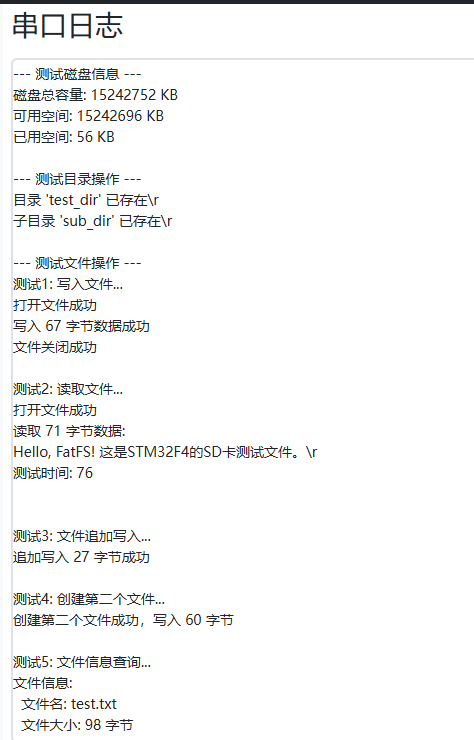
实验现象(用电脑打开也能正常显示)

智能硬件社区聚焦AI智能硬件技术生态,汇聚嵌入式AI、物联网硬件开发者,打造交流分享平台,同步全国赛事资讯、开展 OPC 核心人才招募,助力技术落地与开发者成长。
更多推荐
 8
8 0
0- 0


 已为社区贡献10条内容

所有评论(0)