星闪开发入门:5分钟学会WS63 SDK Demo开发全流程
Hello World Demo 课程指南
概述
这是一个完整的Hello World demo示例,展示了如何在WS63 SDK中创建基本的demo程序。本教程包含从文件创建、代码编写、配置修改到编译运行的完整流程,通过这个简单的例子,初学者可以快速理解SDK demo的基本结构和核心概念。
学习目标
通过这个demo,你将学会:
- 如何创建工程的基本文件结构
- 如何编写CMakeLists.txt和Kconfig配置文件
- 如何修改上层配置文件将demo集成到编译系统
- 如何使用app_run()注册demo
- 如何创建和管理任务
- 如何使用osal_printk进行调试输出
- 理解SDK中关键API的使用方法
- 掌握完整的demo开发流程
文件结构
hello_world/
├── CMakeLists.txt          # CMake构建配置
├── Kconfig                 # 配置选项定义
├── hello_world_demo.c      # 主要源代码
└── README.md               # 本说明文档
关键概念
1. app_run() 宏
| 定义: | app_run(func) |
|---|---|
| 功能: | 将demo函数注册到应用启动系统 |
| 参数: | func:demo入口函数指针 |
| 返回值: | 无 |
| 依赖: | include\app_init.h |
2. osal_kthread_create()
| 定义: | osal_kthread_create(handler, arg, name, stack_size) |
|---|---|
| 功能: | 创建新的内核线程 |
| 参数: | handler:任务函数指针 arg:传递给任务的参数 name:任务名称 stack_size:任务栈大小 |
| 返回值: | osal_task*:成功返回任务句柄 NULL:失败 |
| 依赖: | include\soc_osal.h |
2.1. osal_kthread_set_priority()
| 定义: | osal_kthread_set_priority(task, priority) |
|---|---|
| 功能: | 设置任务优先级 |
| 参数: | task:任务句柄 priority:优先级(0-31) |
| 返回值: | OSAL_SUCCESS:成功 OSAL_FAILURE:失败 |
| 依赖: | include\soc_osal.h |
| 注意: | 优先级范围0-31,数值越小优先级越高(0=最高,31=最低) |
3. osal_kthread_lock() / osal_kthread_unlock()
| 定义: | osal_kthread_lock() / osal_kthread_unlock() |
|---|---|
| 功能: | 获取/释放任务创建锁,确保线程安全 |
| 参数: | 无 |
| 返回值: | 无 |
| 依赖: | include\soc_osal.h |
4. osal_printk()
| 定义: | osal_printk(format, …) |
|---|---|
| 功能: | 格式化输出调试信息到串口 |
| 参数: | format:格式化字符串 …:可变参数 |
| 返回值: | 无 |
| 依赖: | include\soc_osal.h |
5. osal_msleep()
| 定义: | osal_msleep(ms) |
|---|---|
| 功能: | 毫秒级延时,让出CPU给其他任务 |
| 参数: | ms:延时毫秒数 |
| 返回值: | 无 |
| 依赖: | include\soc_osal.h |
6. unused()
| 定义: | unused(var) |
|---|---|
| 功能: | 标记未使用的参数,避免编译器警告 |
| 参数: | var:未使用的变量 |
| 返回值: | 无 |
| 依赖: | include\common_def.h |
代码讲解
核心代码结构
本demo的核心代码主要分为三个部分:
1. 任务函数 (hello_world_task)
static int hello_world_task(const char *arg)
{
    unused(arg);  // 标记未使用参数

    // 初始化输出
    osal_printk("========================================\r\n");
    osal_printk("    Welcome to Hello World Demo!       \r\n");
    // ... 更多输出

    uint32_t counter = 0;

    while (1) {  // 无限循环
        counter++;
        osal_printk("Hello World! Counter: %d\r\n", counter);
        osal_msleep(HELLO_DELAY_MS);  // 延时2秒,可使用#define或者kconfig进行定义
    }

    return 0;  // 理论上不会执行到这里
}
为什么这么写:
- 使用
static限制函数作用域,避免命名冲突 unused(arg)处理未使用参数,符合代码规范while(1)创建持续运行的任务osal_msleep()避免CPU占用过高,让出执行权
2. 入口函数 (hello_world_entry)
static void hello_world_entry(void)
{
    // 声明任务句柄变量,用于存储创建的任务
    osal_task *task_handle = NULL;

    // 输出初始化信息,让用户知道demo开始启动
    osal_printk("Initializing Hello World Demo...\r\n");

    // 获取任务创建锁,确保在多线程环境下的安全性
    // 防止多个线程同时创建任务导致的问题
    osal_kthread_lock();

    // 创建Hello World任务
    // 参数1: (osal_kthread_handler)hello_world_task - 任务函数指针,需要强制类型转换
    // 参数2: 0 - 传递给任务函数的参数,这里不需要参数所以传0
    // 参数3: "HelloWorldTask" - 任务名称,用于调试和识别
    // 参数4: HELLO_TASK_STACK_SIZE - 任务栈大小,定义在宏中
    task_handle = osal_kthread_create((osal_kthread_handler)hello_world_task,
                                     0,
                                     "HelloWorldTask",
                                     HELLO_TASK_STACK_SIZE);

    // 检查任务是否创建成功
    if (task_handle != NULL) {
        // 任务创建成功,设置任务优先级
        // 优先级越高(数值越大),任务越容易被调度执行
        osal_kthread_set_priority(task_handle, HELLO_TASK_PRIO);

        // 输出成功信息
        osal_printk("Hello World task created successfully!\r\n");
    } else {
        // 任务创建失败,输出错误信息
        // 可能的原因:内存不足、系统资源耗尽等
        osal_printk("Failed to create Hello World task!\r\n");
    }

    // 释放任务创建锁,允许其他线程创建任务
    osal_kthread_unlock();
}
为什么这么写:
- 分离任务创建和任务执行逻辑,提高代码可读性
- 使用锁机制确保任务创建的线程安全
- 检查任务创建结果,提供错误处理
- 设置任务优先级,控制调度顺序
3. 系统注册 (app_run)
app_run(hello_world_entry);
为什么这么写:
- 这是SDK的标准模式,所有demo都必须这样注册
- 系统启动时会自动调用所有注册的入口函数
- 位置通常在文件末尾,确保所有函数都已定义
宏定义的作用
#define HELLO_TASK_PRIO          24
#define HELLO_TASK_STACK_SIZE    0x1000
#define HELLO_DELAY_MS           2000
为什么使用宏定义:
- 集中管理配置参数,便于修改
- 提高代码可读性
- 避免魔法数字,提高代码质量
- 后续可以通过Kconfig让用户配置这些参数
任务优先级说明:
- 范围: 0-31
- 规则: 数值越小优先级越高
- 0: 最高优先级(系统关键任务)
- 31: 最低优先级(空闲任务)
- 24: 普通应用任务优先级
- 建议: 一般应用任务使用20-30之间的优先级
头文件包含
#include "soc_osal.h"    // 操作系统抽象层
#include "app_init.h"    // 应用初始化
#include "tcxo.h"        // 时钟相关
#include "common_def.h"  // 通用定义(包含unused宏)
为什么包含这些头文件:
soc_osal.h: 提供任务创建、延时等OS功能app_init.h: 提供app_run宏定义common_def.h: 提供unused等通用宏定义- 按需包含,避免不必要的依赖
配置文件的作用
CMakeLists.txt配置
# 在 application/samples/peripheral/CMakeLists.txt 中最下方添加
if(DEFINED CONFIG_SAMPLE_SUPPORT_HELLO_WORLD)
    add_subdirectory_if_exist(hello_world)
endif()
为什么需要这个配置:
- 告诉CMake系统在什么条件下编译hello_world目录
CONFIG_SAMPLE_SUPPORT_HELLO_WORLD是Kconfig生成的宏add_subdirectory_if_exist确保目录存在时才添加
Kconfig配置
# 在 application/samples/peripheral/Kconfig 中最下方添加
config SAMPLE_SUPPORT_HELLO_WORLD
    bool
    prompt "Support HELLO_WORLD Sample."
    default n
    depends on ENABLE_PERIPHERAL_SAMPLE
    help
        This option means support HELLO_WORLD Sample.
        A simple demo showing basic demo structure and task creation.

# 目的是把 hello_world 下的 kconfig 同样选中
if SAMPLE_SUPPORT_HELLO_WORLD
menu "HELLO_WORLD Sample Configuration"
    osource "application/samples/peripheral/hello_world/Kconfig"
endmenu
endif
为什么需要这个配置:
- 在menuconfig中显示配置选项
depends on ENABLE_PERIPHERAL_SAMPLE确保先启用外设示例default n默认不启用,用户需要手动选择- 生成
CONFIG_SAMPLE_SUPPORT_HELLO_WORLD宏供CMake使用
编译和运行
步骤1:修改上层配置文件
1.1 修改 application/samples/peripheral/CMakeLists.txt
在文件末尾添加以下内容:
if(DEFINED CONFIG_SAMPLE_SUPPORT_HELLO_WORLD)
    add_subdirectory_if_exist(hello_world)
endif()
修改位置: 在 set(SOURCES "${SOURCES}" PARENT_SCOPE) 之前添加
1.2 修改 application/samples/peripheral/Kconfig
在文件末尾添加以下内容:
config SAMPLE_SUPPORT_HELLO_WORLD
    bool
    prompt "Support HELLO_WORLD Sample."
    default n
    depends on ENABLE_PERIPHERAL_SAMPLE
    help
        This option means support HELLO_WORLD Sample.
        A simple demo showing basic demo structure and task creation.

if SAMPLE_SUPPORT_HELLO_WORLD
menu "HELLO_WORLD Sample Configuration"
    osource "application/samples/peripheral/hello_world/Kconfig"
endmenu
endif
修改位置: 在文件最后添加
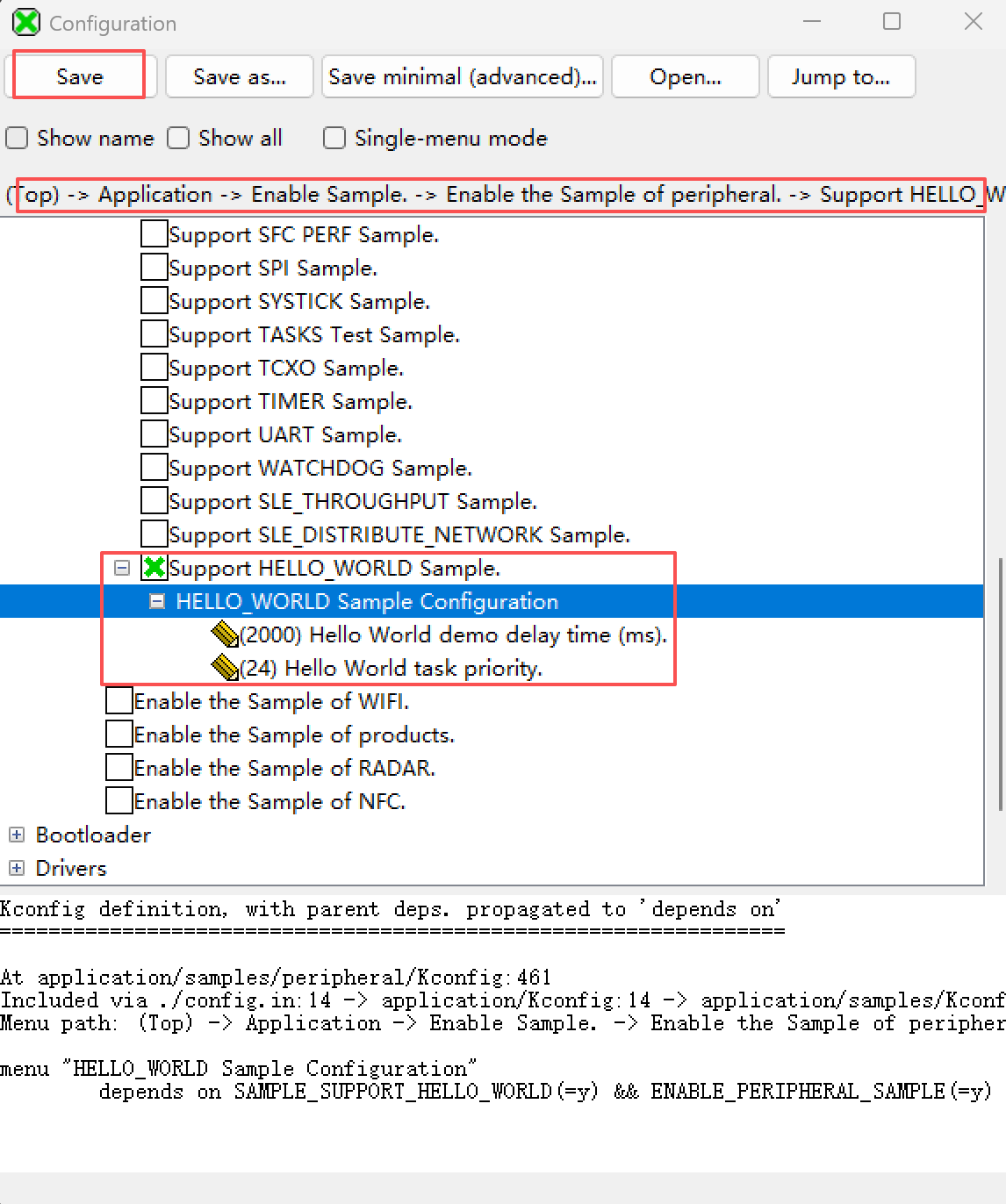
步骤2:配置编译选项
在menuconfig中:
- 启用
ENABLE_PERIPHERAL_SAMPLE - 启用
SAMPLE_SUPPORT_HELLO_WORLD - 配置Hello World参数(可选)
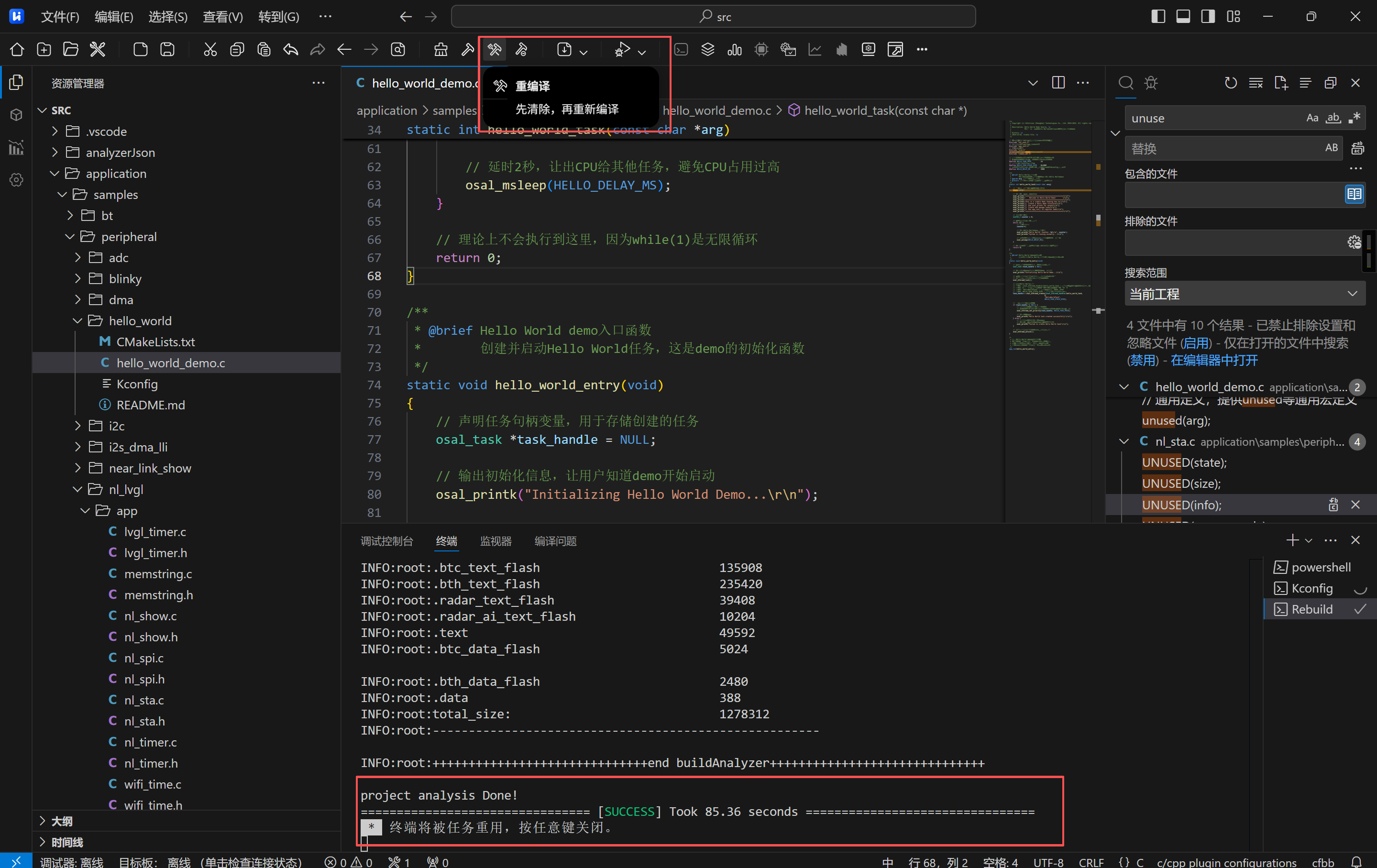
步骤3:编译
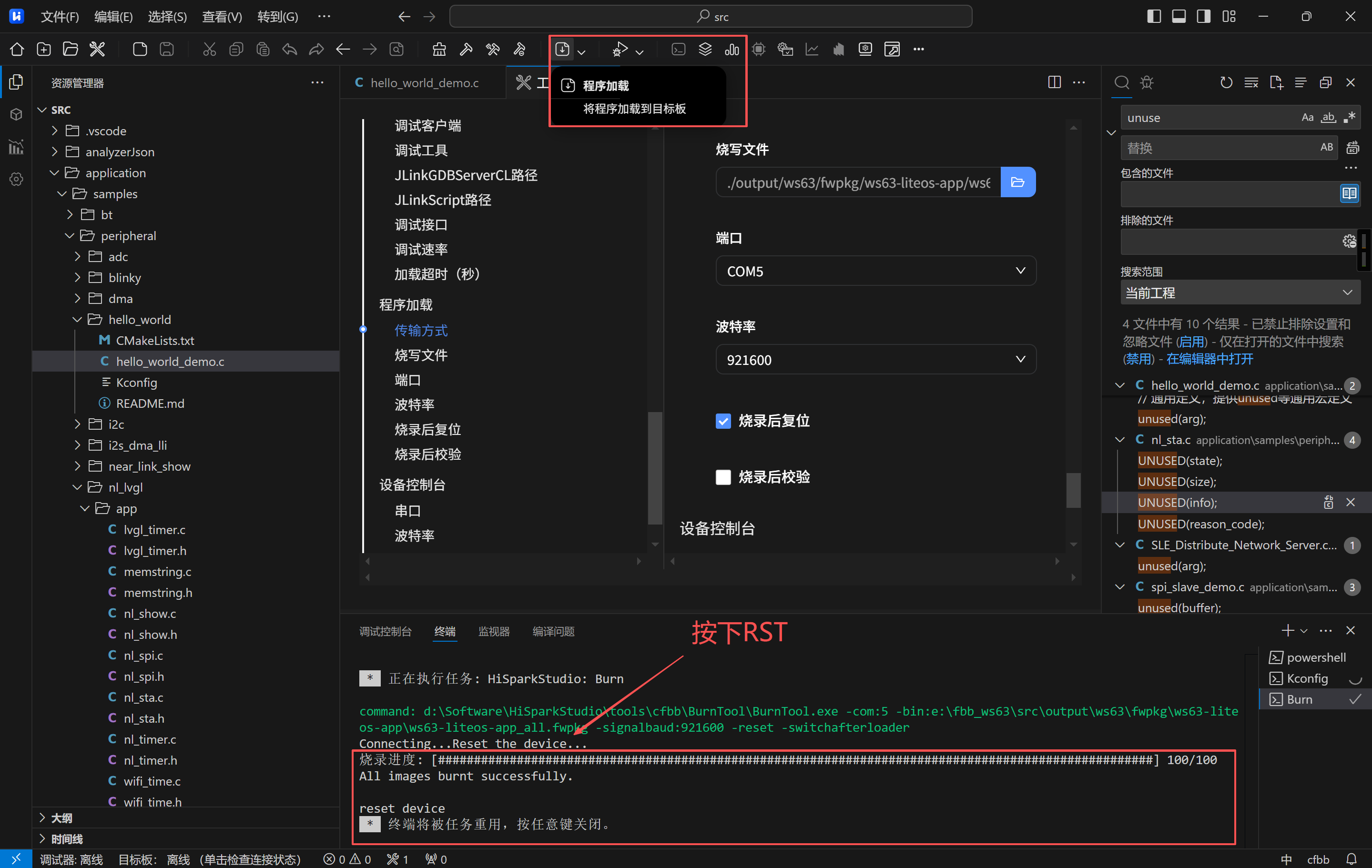
步骤4:运行
- 将编译好的固件烧录到开发板
- 通过串口工具查看输出
预期输出
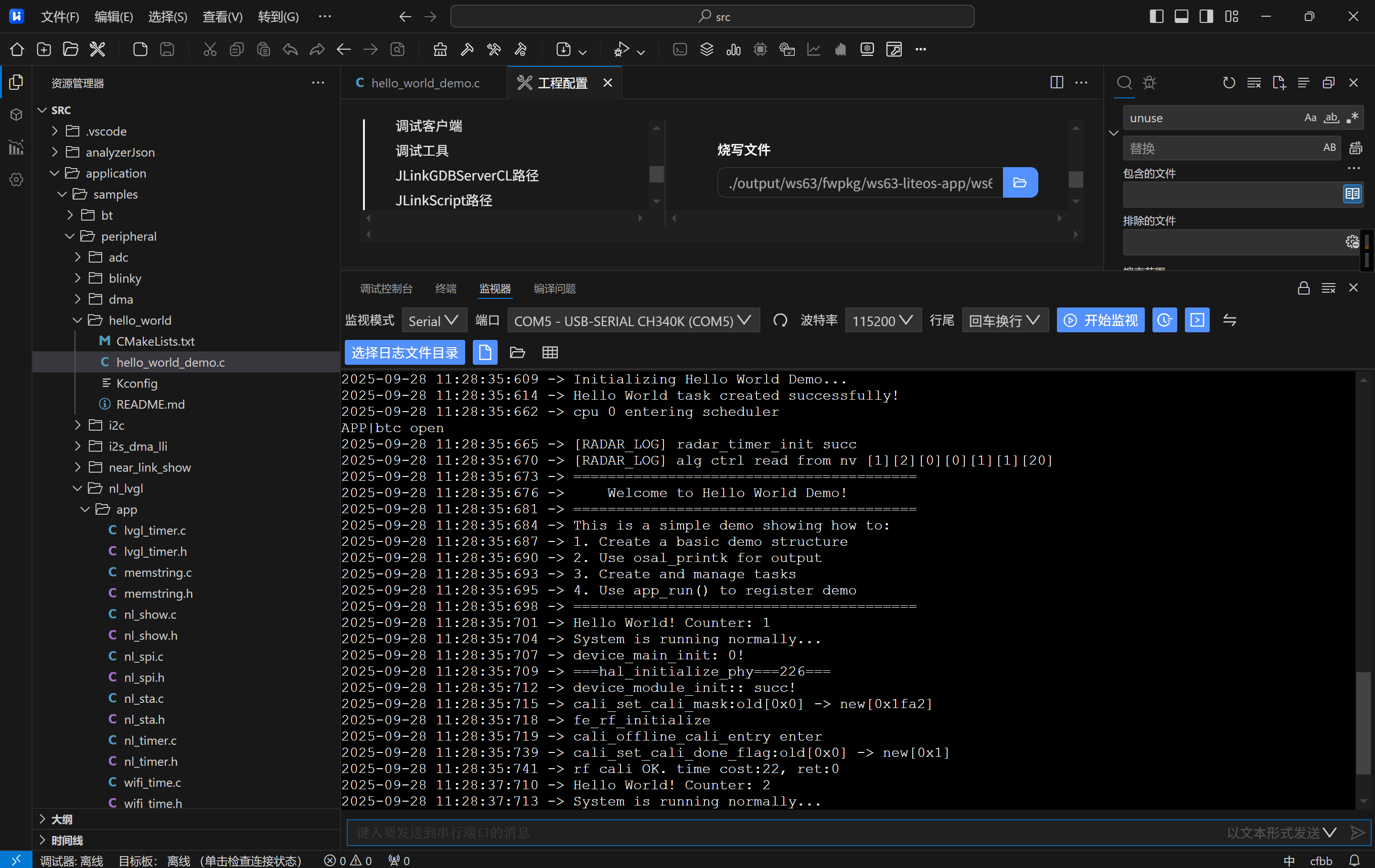
========================================
    Welcome to Hello World Demo!
========================================
This is a simple demo showing how to:
1. Create a basic demo structure
2. Use osal_printk for output
3. Create and manage tasks
4. Use app_run() to register demo
========================================
Hello World! Counter: 1
System is running normally...
Hello World! Counter: 2
System is running normally...
...
扩展练习
练习1:修改输出内容
- 修改hello_world_task()函数中的输出内容
- 添加更多信息输出
练习2:调整延时时间
- 通过Kconfig配置修改延时时间
- 观察输出频率的变化
练习3:添加LED控制
- 添加GPIO控制代码
- 让LED按照Hello World的节奏闪烁
初学者常见疑问
Q1: 什么是任务(Task)?
A: 任务就像程序中的一个独立工作单元,可以同时运行多个任务。比如一个任务负责打印信息,另一个任务负责控制LED。
Q2: 为什么要用锁(lock)?
A: 锁就像厕所的门锁,确保同一时间只有一个线程能创建任务,避免冲突。
Q3: 为什么用宏定义而不是直接写数字?
A: 宏定义让代码更易读,比如HELLO_TASK_PRIO比直接写24更容易理解含义。
Q4: 为什么需要CMakeLists.txt和Kconfig?
A: CMakeLists.txt告诉编译器要编译哪些文件,Kconfig让用户可以选择是否启用这个demo。
Q5: app_run()是做什么的?
A: 就像在系统启动时"报名",告诉系统"我要运行这个demo"。
Q6: 任务优先级是怎么设置的?
A: 优先级范围是0-31,数值越小优先级越高。0是最高优先级,31是最低优先级。我们设置的24是普通优先级。
Q7: 为什么要修改上层的CMakeLists.txt和Kconfig?
A: 就像在图书馆登记新书一样,需要告诉系统"我添加了一个新的demo",这样系统才知道要编译它。
Q8: CMakeLists.txt和Kconfig有什么区别?
A: CMakeLists.txt告诉编译器"怎么编译",Kconfig告诉用户"要不要编译"。用户通过menuconfig选择后,Kconfig生成宏,CMakeLists.txt根据宏决定是否编译。
常见问题
Q: 为什么看不到输出?
A: 检查串口配置和波特率设置,确保串口工具正确连接。
Q: 如何修改任务优先级?
A: 在Kconfig中配置HELLO_WORLD_TASK_PRIORITY,或在代码中直接修改HELLO_TASK_PRIO。
Q: 如何停止demo?
A: 重启开发板或烧录其他固件。
下一步学习
完成这个demo后,建议学习:
- GPIO控制demo (blinky)
- PWM输出demo
- UART通信demo
- I2C通信demo
附源码:
application\samples\peripheral\hello_world\hello_world_demo.c
// 操作系统抽象层,提供任务创建、延时等OS功能
#include "soc_osal.h"
// 应用初始化,提供app_run宏定义
#include "app_init.h"
// 时钟相关功能
#include "tcxo.h"
// 通用定义,提供unused等通用宏定义
#include "common_def.h"

// 任务优先级定义,范围0-31,数值越小优先级越高
// 0=最高优先级,31=最低优先级,24=普通优先级
#define HELLO_TASK_PRIO          24
// 任务栈大小定义,单位字节
#define HELLO_TASK_STACK_SIZE    0x1000
// 延时时间定义,单位毫秒,可使用#define或者kconfig进行定义
#define HELLO_DELAY_MS           2000

/**
 * @brief Hello World任务函数
 *        这是demo的核心任务,负责持续输出Hello World信息
 * @param arg 任务参数(未使用)
 * @return 任务返回值(理论上不会执行到这里)
 */
static int hello_world_task(const char *arg)
{
    // 标记未使用参数,避免编译器警告
    unused(arg);

    // 输出欢迎信息和demo说明
    osal_printk("========================================\r\n");
    osal_printk("    Welcome to Hello World Demo!       \r\n");
    osal_printk("========================================\r\n");
    osal_printk("This is a simple demo showing how to:\r\n");
    osal_printk("1. Create a basic demo structure\r\n");
    osal_printk("2. Use osal_printk for output\r\n");
    osal_printk("3. Create and manage tasks\r\n");
    osal_printk("4. Use app_run() to register demo\r\n");
    osal_printk("========================================\r\n");

    // 初始化计数器
    uint32_t counter = 0;

    // 无限循环,持续运行任务
    while (1) {
        // 计数器递增
        counter++;

        // 输出Hello World信息和计数器
        osal_printk("Hello World! Counter: %d\r\n", counter);
        osal_printk("System is running normally...\r\n");

        // 延时2秒,让出CPU给其他任务,避免CPU占用过高
        osal_msleep(HELLO_DELAY_MS);
    }

    // 理论上不会执行到这里,因为while(1)是无限循环
    return 0;
}

/**
 * @brief Hello World demo入口函数
 *        创建并启动Hello World任务,这是demo的初始化函数
 */
static void hello_world_entry(void)
{
    // 声明任务句柄变量,用于存储创建的任务
    osal_task *task_handle = NULL;

    // 输出初始化信息,让用户知道demo开始启动
    osal_printk("Initializing Hello World Demo...\r\n");

    // 获取任务创建锁,确保在多线程环境下的安全性
    // 防止多个线程同时创建任务导致的问题
    osal_kthread_lock();

    // 创建Hello World任务
    // 参数1: (osal_kthread_handler)hello_world_task - 任务函数指针,需要强制类型转换
    // 参数2: 0 - 传递给任务函数的参数,这里不需要参数所以传0
    // 参数3: "HelloWorldTask" - 任务名称,用于调试和识别
    // 参数4: HELLO_TASK_STACK_SIZE - 任务栈大小,定义在宏中
    task_handle = osal_kthread_create((osal_kthread_handler)hello_world_task,
                                     0,
                                     "HelloWorldTask",
                                     HELLO_TASK_STACK_SIZE);

    // 检查任务是否创建成功
    if (task_handle != NULL) {
        // 任务创建成功,设置任务优先级
        // 优先级范围0-31,数值越小优先级越高(0=最高,31=最低)
        osal_kthread_set_priority(task_handle, HELLO_TASK_PRIO);

        // 输出成功信息
        osal_printk("Hello World task created successfully!\r\n");
    } else {
        // 任务创建失败,输出错误信息
        // 可能的原因:内存不足、系统资源耗尽等
        osal_printk("Failed to create Hello World task!\r\n");
    }

    // 释放任务创建锁,允许其他线程创建任务
    osal_kthread_unlock();
}

/*
 * 注册Hello World demo到应用系统
 * 这是SDK的标准模式,所有demo都必须这样注册
 * 系统启动时会自动调用所有注册的入口函数
 * 位置通常在文件末尾,确保所有函数都已定义
 */
app_run(hello_world_entry);
application\samples\peripheral\hello_world\CMakeLists.txt
# 将hello_world_demo.c添加到源文件列表
set(SOURCES "${SOURCES}" "${CMAKE_CURRENT_SOURCE_DIR}/hello_world_demo.c" PARENT_SCOPE)
application\samples\peripheral\hello_world\Kconfig
config HELLO_WORLD_DELAY_MS
    int
    prompt "Hello World demo delay time (ms)."
    depends on SAMPLE_SUPPORT_HELLO_WORLD
    default 2000
    help
        Set the delay time between Hello World messages in milliseconds.
        Default is 2000ms (2 seconds).

config HELLO_WORLD_TASK_PRIORITY
    int
    prompt "Hello World task priority."
    depends on SAMPLE_SUPPORT_HELLO_WORLD
    default 24
    help
        Set the priority of Hello World task.
        Higher numbers indicate higher priority.

智能硬件社区聚焦AI智能硬件技术生态,汇聚嵌入式AI、物联网硬件开发者,打造交流分享平台,同步全国赛事资讯、开展 OPC 核心人才招募,助力技术落地与开发者成长。
更多推荐

 22
22 0
0- 0


 已为社区贡献2条内容

所有评论(0)