细说STM32单片机USBD_MSC_SD_FATFS项目创建及编程方法
但是,不是没有办法,IDE在usbd_storage_if.h里声明了一个接口操作函数fops,如此,通过在其他.c文件里包含usbd_storage_if.h,就可以通过调用。在其他的位置,比如在main.c无法直接调用这些函数,因为,对应的usbd_storage_if.h里没有声明这些函数,因此main.c无法通过include包含这些函数。下载后,在电脑端自动识别和驱动U盘,通过鼠标操作该
目录
3、接口操作函数USBD_Storage_Interface_fops_FS
USBD_MSC一般是指把单片机上的片内FLASH、片外FLASH、EMMC、闪盘、SD卡等存储器资源通过USB Device编程为一个U盘设备。在电脑端会把单片机资源识别为一个U盘。这个U盘可进行读、写、格式化、查询等常规操作。
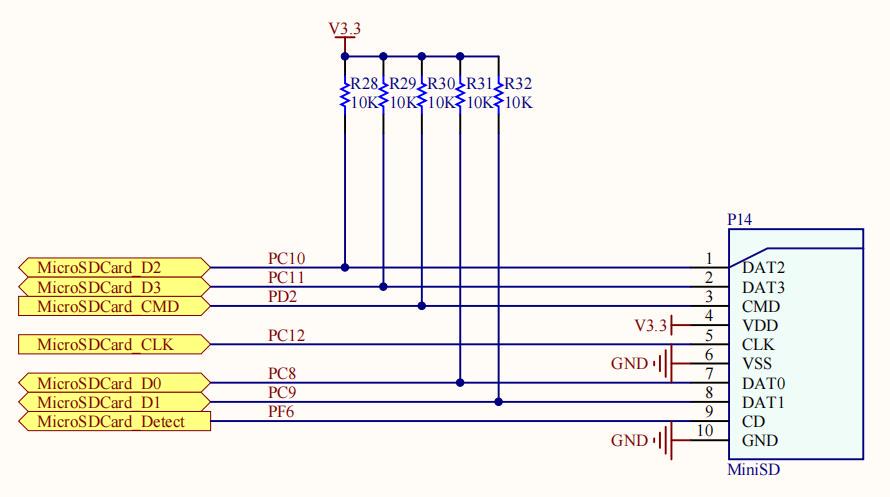
继续使用旺宝红龙开发板STM32F407ZGT6 KIT V1.0,使用STM32CubeIDE开发环境。相同内容的配置可以参考本文作者发布的其他文章,不再重新描述。
参考文章:细说STM32单片机USBD_HID项目创建及编程方法-CSDN博客 https://wenchm.blog.csdn.net/article/details/152002392?spm=1011.2415.3001.5331
一、项目的目的
USB虚拟U盘的接口有很多应用,比如,可以通过USB接口直接SD卡内的导出文件。也可以利用该功能实现IAP功能,将bin文件拷贝到SD卡,Boot程序读取SD卡进行程序升级。本示例的目的:
- 使用开发板上的SD卡当做USB Device的MSC设备,创建一个USBD_MSC_SD项目;
- 了解私有函数编程入口usbd_storage_if,在其中写入私有代码;
- 良好的人机互动效果;
- 电脑端自动识别出新增加的U盘设备,对U盘进行操作;
- 通过程序代码对U盘进行操作;
二、硬件配置
1、RCC、SYS、USART6、USB_OTG_FS
与参考文章设置相同。
2、中间件/USB_DEVICE
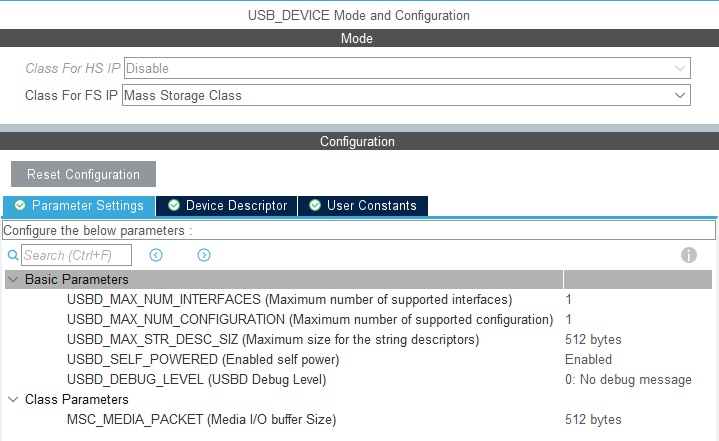
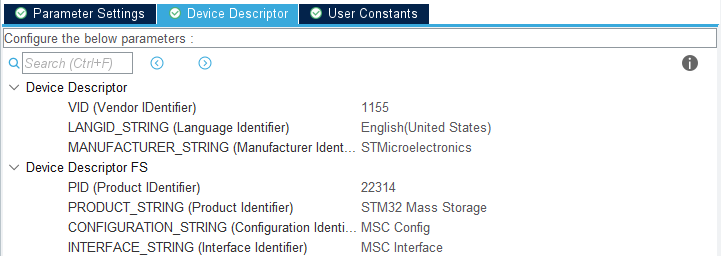
Class For FS IP选择为:MSC。
3、SDIO
选择SDIO接口为4bits模式。
需要注意,如果不启用FATFS,那么配置完后STM32CubeIDE会自动生成SD 4bits模式的驱动代码。但是,当启用FATFS后,比如本例的USBD_MSC_SD后,已经生成的SD 4bits模式的驱动代码会消失的无影无踪,此时,没有必要手动添加4bits模式的驱动到初始化函数的沙箱2里。因为ST做的并没有错,实际上,当FATFS后,有关4bits模式的驱动代码被挪到了bsp_driver_sd.c 的BSP_SD_Init中。
//bsp_driver_sd.c
/**
  * @brief  Initializes the SD card device.
  * @retval SD status
  */
__weak uint8_t BSP_SD_Init(void)
{
  uint8_t sd_state = MSD_OK;
  /* Check if the SD card is plugged in the slot */
  if (BSP_SD_IsDetected() != SD_PRESENT)
  {
    return MSD_ERROR;
  }
  /* HAL SD initialization */
  sd_state = HAL_SD_Init(&hsd);
  /* Configure SD Bus width (4 bits mode selected) */
  if (sd_state == MSD_OK)
  {
    /* Enable wide operation */
    if (HAL_SD_ConfigWideBusOperation(&hsd, SDIO_BUS_WIDE_4B) != HAL_OK)
    {
      sd_state = MSD_ERROR;
    }
  }

  return sd_state;
}而其中的HAL_SD_ConfigWideBusOperation(&hsd, SDIO_BUS_WIDE_4B),正是STM32官方里stm32f4xx_hal_sd.h的库函数.
//stm32f4xx_hal_sd.c
/**
  * @brief  Enables wide bus operation for the requested card if supported by
  *         card.
  * @param  hsd: Pointer to SD handle
  * @param  WideMode: Specifies the SD card wide bus mode
  *          This parameter can be one of the following values:
  *            @arg SDIO_BUS_WIDE_8B: 8-bit data transfer
  *            @arg SDIO_BUS_WIDE_4B: 4-bit data transfer
  *            @arg SDIO_BUS_WIDE_1B: 1-bit data transfer
  * @retval HAL status
  */
HAL_StatusTypeDef HAL_SD_ConfigWideBusOperation(SD_HandleTypeDef *hsd, uint32_t WideMode)
{
  SDIO_InitTypeDef Init;
  uint32_t errorstate;
  HAL_StatusTypeDef status = HAL_OK;

  /* Check the parameters */
  assert_param(IS_SDIO_BUS_WIDE(WideMode));

  /* Change State */
  hsd->State = HAL_SD_STATE_BUSY;

  if(hsd->SdCard.CardType != CARD_SECURED)
  {
    if(WideMode == SDIO_BUS_WIDE_8B)
    {
      hsd->ErrorCode |= HAL_SD_ERROR_UNSUPPORTED_FEATURE;
    }
    else if(WideMode == SDIO_BUS_WIDE_4B)
    {
      errorstate = SD_WideBus_Enable(hsd);

      hsd->ErrorCode |= errorstate;
    }
    else if(WideMode == SDIO_BUS_WIDE_1B)
    {
      errorstate = SD_WideBus_Disable(hsd);

      hsd->ErrorCode |= errorstate;
    }
    else
    {
      /* WideMode is not a valid argument*/
      hsd->ErrorCode |= HAL_SD_ERROR_PARAM;
    }
  }
  else
  {
    /* MMC Card does not support this feature */
    hsd->ErrorCode |= HAL_SD_ERROR_UNSUPPORTED_FEATURE;
  }

  if(hsd->ErrorCode != HAL_SD_ERROR_NONE)
  {
    /* Clear all the static flags */
    __HAL_SD_CLEAR_FLAG(hsd, SDIO_STATIC_FLAGS);
    hsd->State = HAL_SD_STATE_READY;
    status = HAL_ERROR;
  }
  else
  {
    /* Configure the SDIO peripheral */
    Init.ClockEdge           = hsd->Init.ClockEdge;
    Init.ClockBypass         = hsd->Init.ClockBypass;
    Init.ClockPowerSave      = hsd->Init.ClockPowerSave;
    Init.BusWide             = WideMode;
    Init.HardwareFlowControl = hsd->Init.HardwareFlowControl;
    Init.ClockDiv            = hsd->Init.ClockDiv;
    (void)SDIO_Init(hsd->Instance, Init);
  }

  /* Set Block Size for Card */
  errorstate = SDMMC_CmdBlockLength(hsd->Instance, BLOCKSIZE);
  if(errorstate != HAL_SD_ERROR_NONE)
  {
    /* Clear all the static flags */
    __HAL_SD_CLEAR_FLAG(hsd, SDIO_STATIC_FLAGS);
    hsd->ErrorCode |= errorstate;
    status = HAL_ERROR;
  }

  /* Change State */
  hsd->State = HAL_SD_STATE_READY;

  return status;
}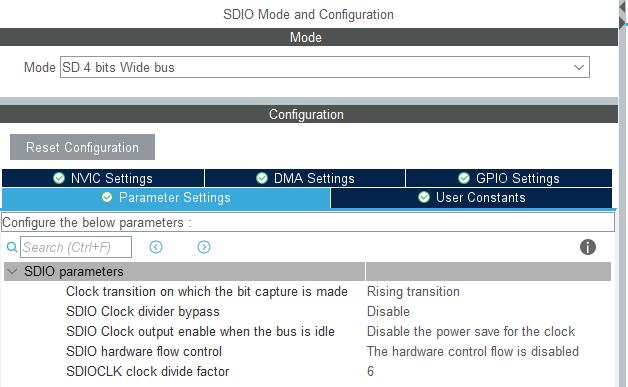
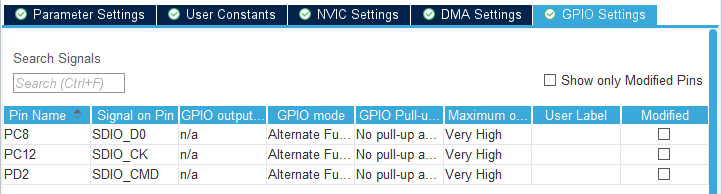
SDIO 添加收发DMA,其他为默认不作修改。
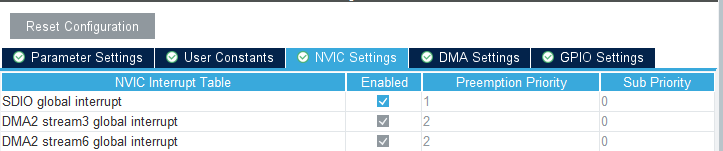
开启SDIO中断,必须开启SDIO中断,SDIO的DMA才能正常工作,而且SDIO中断优先级要比DMA中断要高,且比USB中断高。

4、FATFS
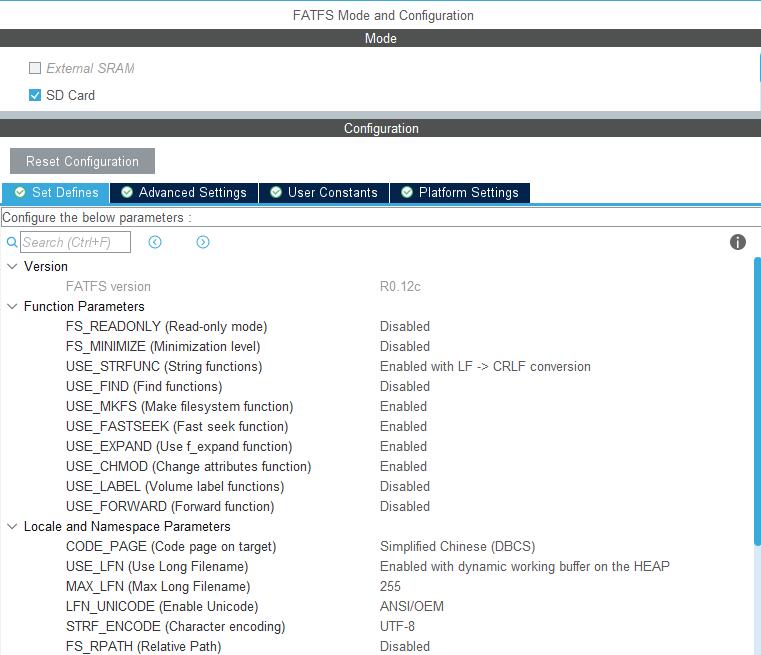
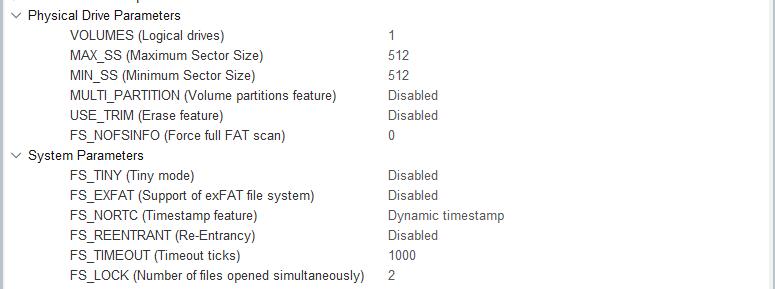
启用FATFS是为了提供电脑端的U盘接口操作,和代码里程序操作U盘的功能。
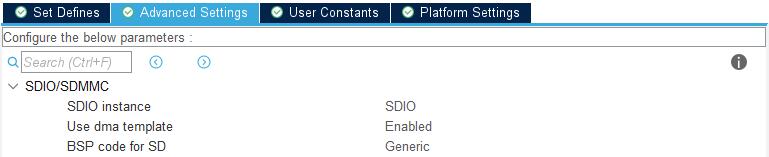

5、NVIC
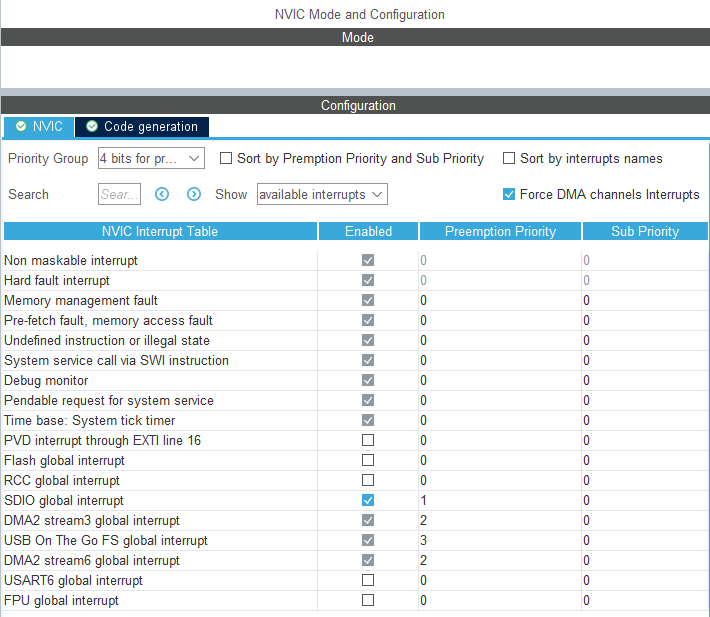
6、Linker Settings
增加硬件堆栈空间大小,否则会触发硬件错误中断HardFault。

三、软件设计
1、文件架构
编译后,生成代码和初始化文件,自动生成的USBD_MSC文件架构如图。
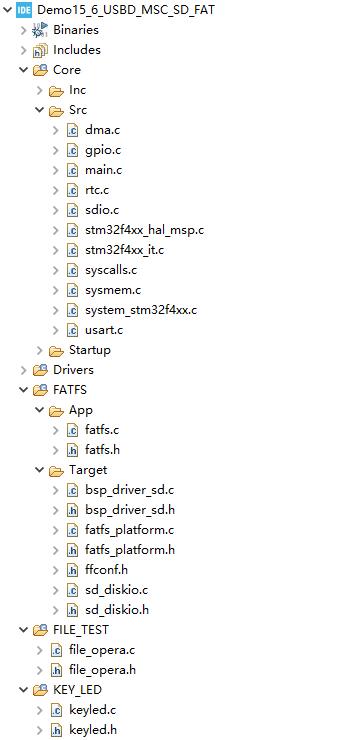
折叠部分展不开后
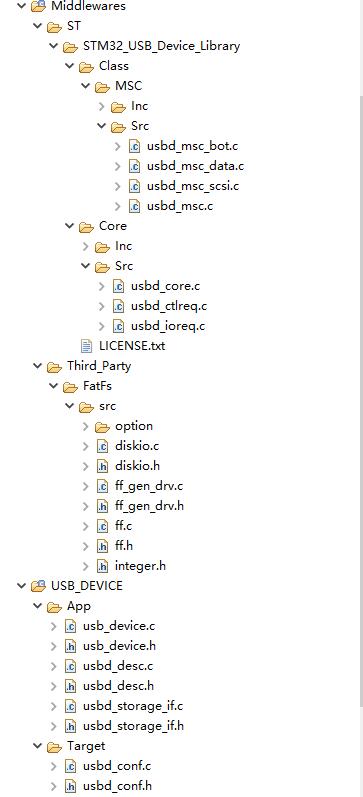
其中usbd_storage_if为应用层文件,里面为USB大容量存储设备类底层操作,包括获取存储器容量,块读写等操作。实际上 usbd_storage_if就是USBD_MSC类设备的私有函数编程入口。但里usbd_storage_if文件里的函数只是一个框架,具体的操作还需要因地制宜地去移植底层。
2、重写usbd_storage_if.c
SD的操作是由电脑通过USB镜像操作的,只需在usbd_storage_if.c文件中把下面的函数根据需要因地制宜地写入私有代码(重写),完成底层移植就可以底层函数的操作。
/** @defgroup USBD_STORAGE_Private_FunctionPrototypes
  * @brief Private functions declaration.
  * @{
  */

static int8_t STORAGE_Init_FS(uint8_t lun);
static int8_t STORAGE_GetCapacity_FS(uint8_t lun, uint32_t *block_num, uint16_t *block_size);
static int8_t STORAGE_IsReady_FS(uint8_t lun);
static int8_t STORAGE_IsWriteProtected_FS(uint8_t lun);
static int8_t STORAGE_Read_FS(uint8_t lun, uint8_t *buf, uint32_t blk_addr, uint16_t blk_len);
static int8_t STORAGE_Write_FS(uint8_t lun, uint8_t *buf, uint32_t blk_addr, uint16_t blk_len);
static int8_t STORAGE_GetMaxLun_FS(void);
/**
  * @}
*/上面的这些函数,要在usbd_storage_if.c里重写。这些函数不可以用在其他的位置,比如在main.c无法直接调用这些函数,因为,对应的usbd_storage_if.h里没有声明这些函数,因此main.c无法通过include包含这些函数。
usbd_storage_if.c仅仅是为了实现电脑端U盘接口操作的关键函数,在USBD初始化的时候调用。重写usbd_storage_if.c的目的是实现在上电脑端自动识别、自动驱动一个虚拟的U盘。然后在电脑端U盘接口里操作U盘(如,属性、读、写等)。
通过程序操作U盘的私有函数一定不要写在usbd_storage_if.c里,也不要调用usbd_storage_if.c里的函数,因为这样的操作很难解决程序操作和接口操作U盘的竞争矛盾。
3、接口操作函数USBD_Storage_Interface_fops_FS
USBD_Storage_Interface_fops_FS是一个结构体,它定义了一组函数指针,用于实现USB存储设备的功能。
USBD_StorageTypeDef USBD_Storage_Interface_fops_FS =
{
  STORAGE_Init_FS,
  STORAGE_GetCapacity_FS,
  STORAGE_IsReady_FS,
  STORAGE_IsWriteProtected_FS,
  STORAGE_Read_FS,
  STORAGE_Write_FS,
  STORAGE_GetMaxLun_FS,
  (int8_t *)STORAGE_Inquirydata_FS
};
{ }里的,都是函数的指针,通过结构体USBD_StorageTypeDef的定义,分别指向对应的函数:
typedef struct _USBD_STORAGE
{
  int8_t (* Init)(uint8_t lun);    //int8_t函数的返回值,(* Init)函数名指针,(uint8_t lun)形参
  int8_t (* GetCapacity)(uint8_t lun, uint32_t *block_num, uint16_t *block_size);
  int8_t (* IsReady)(uint8_t lun);
  int8_t (* IsWriteProtected)(uint8_t lun);
  int8_t (* Read)(uint8_t lun, uint8_t *buf, uint32_t blk_addr, uint16_t blk_len);
  int8_t (* Write)(uint8_t lun, uint8_t *buf, uint32_t blk_addr, uint16_t blk_len);
  int8_t (* GetMaxLun)(void);
  int8_t *pInquiry;

} USBD_StorageTypeDef;进一步地,可以查看函数的框架,比如:(* Init)、(* GetCapacity)、(* IsReady)、(* Read)、
(* Write),等,一般情况下,工程师只是需要重写这些函数原型(还有很多可操作的沙箱):
/* Private functions ---------------------------------------------------------*/
/**
  * @brief  Initializes the storage unit (medium) over USB FS IP
  * @param  lun: Logical unit number.
  * @retval USBD_OK if all operations are OK else USBD_FAIL
  */
int8_t STORAGE_Init_FS(uint8_t lun)
{
  /* USER CODE BEGIN 2 */
  UNUSED(lun);

  return (USBD_OK);
  /* USER CODE END 2 */
}

/**
  * @brief  Returns the medium capacity.
  * @param  lun: Logical unit number.
  * @param  block_num: Number of total block number.
  * @param  block_size: Block size.
  * @retval USBD_OK if all operations are OK else USBD_FAIL
  */
int8_t STORAGE_GetCapacity_FS(uint8_t lun, uint32_t *block_num, uint16_t *block_size)
{
  /* USER CODE BEGIN 3 */
  UNUSED(lun);

  *block_num  = STORAGE_BLK_NBR;
  *block_size = STORAGE_BLK_SIZ;
  return (USBD_OK);
  /* USER CODE END 3 */
}

/**
  * @brief   Checks whether the medium is ready.
  * @param  lun:  Logical unit number.
  * @retval USBD_OK if all operations are OK else USBD_FAIL
  */
int8_t STORAGE_IsReady_FS(uint8_t lun)
{
  /* USER CODE BEGIN 4 */
  UNUSED(lun);

  return (USBD_OK);
  /* USER CODE END 4 */
}

/**
  * @brief  Checks whether the medium is write protected.
  * @param  lun: Logical unit number.
  * @retval USBD_OK if all operations are OK else USBD_FAIL
  */
int8_t STORAGE_IsWriteProtected_FS(uint8_t lun)
{
  /* USER CODE BEGIN 5 */
  UNUSED(lun);

  return (USBD_OK);
  /* USER CODE END 5 */
}

/**
  * @brief  Reads data from the medium.
  * @param  lun: Logical unit number.
  * @param  buf: data buffer.
  * @param  blk_addr: Logical block address.
  * @param  blk_len: Blocks number.
  * @retval USBD_OK if all operations are OK else USBD_FAIL
  */
int8_t STORAGE_Read_FS(uint8_t lun, uint8_t *buf, uint32_t blk_addr, uint16_t blk_len)
{
  /* USER CODE BEGIN 6 */
  UNUSED(lun);
  UNUSED(buf);
  UNUSED(blk_addr);
  UNUSED(blk_len);

  return (USBD_OK);
  /* USER CODE END 6 */
}

/**
  * @brief  Writes data into the medium.
  * @param  lun: Logical unit number.
  * @param  buf: data buffer.
  * @param  blk_addr: Logical block address.
  * @param  blk_len: Blocks number.
  * @retval USBD_OK if all operations are OK else USBD_FAIL
  */
int8_t STORAGE_Write_FS(uint8_t lun, uint8_t *buf, uint32_t blk_addr, uint16_t blk_len)
{
  /* USER CODE BEGIN 7 */
  UNUSED(lun);
  UNUSED(buf);
  UNUSED(blk_addr);
  UNUSED(blk_len);

  return (USBD_OK);
  /* USER CODE END 7 */
}

/**
  * @brief  Returns the Max Supported LUNs.
  * @param  None
  * @retval Lun(s) number.
  */
int8_t STORAGE_GetMaxLun_FS(void)
{
  /* USER CODE BEGIN 8 */
  return (STORAGE_LUN_NBR - 1);
  /* USER CODE END 8 */
}
接口函数USBD_Storage_Interface_fops_FS很重要,但并不经常出现,它正式出现在初始化MX_USB_DEVICE_Init()的过程里,MX_USB_DEVICE_Init()定义在usb_device.c里,其实现里正式调用了接口函数:
/**
  * Init USB device Library, add supported class and start the library
  * @retval None
  */
void MX_USB_DEVICE_Init(void)
{
  /* USER CODE BEGIN USB_DEVICE_Init_PreTreatment */

  /* USER CODE END USB_DEVICE_Init_PreTreatment */

  /* Init Device Library, add supported class and start the library. */
  if (USBD_Init(&hUsbDeviceFS, &FS_Desc, DEVICE_FS) != USBD_OK)
  {
    Error_Handler();
  }
  if (USBD_RegisterClass(&hUsbDeviceFS, &USBD_MSC) != USBD_OK)
  {
    Error_Handler();
  }
  if (USBD_MSC_RegisterStorage(&hUsbDeviceFS, &USBD_Storage_Interface_fops_FS) != USBD_OK)
  {
    Error_Handler();
  }
  if (USBD_Start(&hUsbDeviceFS) != USBD_OK)
  {
    Error_Handler();
  }
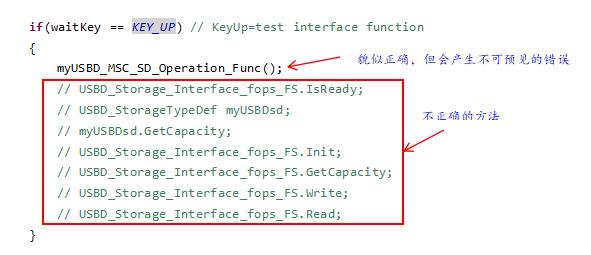
不可以在其它的函数里直接或间接调用接口函数,即使完整地包含了.h也不行,下面的调用方法,无论哪种,编译器都会提出警告,提示“warning: statement with no effect [-Wunused-value]”。并且还会产生不可遇见的错误,比如U盘驱动错误,偶尔能驱动却不能读写,程序读写U盘失败等。
4、与本例相关的软件设计
(1)公共部分的代码
-
main.c
公共部分集中在外设和文件系统的初始化部分,可以在main.c里实现。
检测CD→f_mount→if FR_NO_FILESYSTEM则f_mkfs进行格式化,if(res == FR_OK)→先卸载,再装载,否则→mounted, Failure。
/* USER CODE BEGIN Header */
/**
  ******************************************************************************
  * @file           : main.c
  * @brief          : Main program body
  ******************************************************************************
  */
/* USER CODE END Header */
/* Includes ------------------------------------------------------------------*/
#include "main.h"
#include "dma.h"
#include "fatfs.h"
#include "rtc.h"
#include "sdio.h"
#include "usart.h"
#include "usb_device.h"
#include "gpio.h"

/* Private includes ----------------------------------------------------------*/
/* USER CODE BEGIN Includes */
#include <stdio.h>
#include "file_opera.h"		//FILE_TEST DIR
#include "keyled.h"			//KEY_LED DIR
/* USER CODE END Includes */

/* Private macro -------------------------------------------------------------*/
/* USER CODE BEGIN PM */
uint8_t status = SD_PRESENT;
/* USER CODE END PM */

/* Private variables ---------------------------------------------------------*/

/* USER CODE BEGIN PV */

 UINT bw = 0;					// [out]The actual number of bytes written.
 BYTE workBuffer[4*BLOCKSIZE];	// Working cache area
 FRESULT res = FR_OK;			// (0) Succeeded

 USBD_StatusTypeDef ret = USBD_OK;
/* USER CODE END PV */

/* Private function prototypes -----------------------------------------------*/
void SystemClock_Config(void);

/**
  * @brief  The application entry point.
  * @retval int
  */
int main(void)
{
  /* Reset of all peripherals, Initializes the Flash interface and the Systick. */
  HAL_Init();

  /* Configure the system clock */
  SystemClock_Config();

  /* Initialize all configured peripherals */
  MX_GPIO_Init();
  MX_DMA_Init();
  MX_RTC_Init();
  MX_USART6_UART_Init();
  MX_SDIO_SD_Init();
  MX_USB_DEVICE_Init();
  MX_FATFS_Init();
  /* USER CODE BEGIN 2 */
  uint8_t startstr[] = "Demo15_6:Test usbd_msc_sd with FATFS。\r\n";
  HAL_UART_Transmit(&huart6,startstr,sizeof(startstr),0xFFFF);

  /**
   * @brief SD detect
   * @{
   */
  status = BSP_SD_IsDetected();
  if(status == SD_PRESENT)
  	printf("SD has been present.\r\n");
  else
  	printf("SD has been absent.\r\n");
  /**
   * @}
   */

  /**
   * @brief Mount the file system,register a volume.
   *
   * @brief Format	f_mkfs("0:",FM_FAT32,0,workBuffer,4*BLOCKSIZE)
   * @param path	"0:" first volume;"1:" second volume;""  default volume;
   * @param opt 	FM_FAT 0x01,FM_FAT32 0x02,FM_EXFAT 0x04,FM_ANY 0x07,FM_SFD 0x08
   * @param au 		The size of the cluster.Byte,Volumes are managed in clusters,
   * 				and clusters contain sectors, which are the smallest storage units.
   * @param work	work buffer,is a multiple of the cluster,pointer。
   * @param len		The size of	work buffer,Byte.
   * @{
   */
  res = f_mount(&SDFatFS,SDPath,0);	// Mount the SD card file system
  if(res == FR_NO_FILESYSTEM)
  {
	  res=f_mkfs(SDPath,FM_FAT32,0,workBuffer,4*BLOCKSIZE);
	  if(res == FR_OK)
	  {
		  res = f_mount(NULL,SDPath,0);		// Unmount the drive first
		  res = f_mount(&SDFatFS,SDPath,0);	// Mount the SD card file system
	  }
  }

  // If Mounted Failure
  if(res == FR_OK)
	  printf("mounted, ok.\r\n\r\n");
  else
	  printf("mounted, failure.\r\n\r\n");
  /**
   * @}
   */

  /**************************************************************************************/
  /* The following code is used for USBD_MSC operation.
   * Test Query function,call HAL_。
   */
  myUSBD_Capacity();    //test
  SDCard_ShowInfo();    //test
  HAL_Delay(10);        //test

/**************************************************************************************/

  /**
   * @brief test function in ff.c: open file\write file\close file
   * @{
   */
  retSD = f_open(&SDFile,(const TCHAR*)"test.txt",FA_CREATE_ALWAYS|FA_WRITE);
  if(retSD == FR_OK)
  {
  	printf("f_open file OK.\r\n\r\n");		//TEST

  	TCHAR str[]="Line1: Hello, FatFS\n";
  	f_puts(str, &SDFile);

  	TCHAR str2[]="Line2: UPC, AnHui Hefei\n";
  	f_puts(str2, &SDFile);

    if(retSD != FR_OK)
    	printf("f_puts failure.\r\n\r\n");	//TEST
    retSD = f_close(&SDFile);
  }
  else
  	printf("f_open file failure.\r\n\r\n");	//TEST

  printf(" the test of the func in ff.c are success.\r\n\r\n");	//TEST
  /**
   * @}
   */

  //Menu Item 1
  //format/SD info/disk info
  printf("[S2]KeyUp   =Format SD card. \r\n");
  printf("[S1]KeyRight=SD card info. \r\n");
  printf("[S4]KeyLeft =FAT disk info. \r\n");
  printf("[S3]KeyDown =Next menu page. \r\n\r\n");

  KEYS waitKey;
  while(1)
  {
	  waitKey=ScanPressedKey(KEY_WAIT_ALWAYS); 	// Waiting for the button pressed

	  if(waitKey == KEY_UP) 					// KeyUp=Format SD card
	  {
		  BYTE workBuffer[4*BLOCKSIZE];   		// Working cache area
		  DWORD clusterSize=0;	 				// The cluster size must be greater than or equal to 1 sector, 0 is automatically set.
		  printf("\r\nFormating (10secs)...\r\n");
		  FRESULT res=f_mkfs("0:", FM_FAT32, clusterSize, workBuffer, 4*BLOCKSIZE); //FM_FAT32
		  if (res == FR_OK)
			  printf("Format OK, to reset.\r\n");
		  else
			  printf("Format fail, to reset.\r\n");
	  }
	  else if(waitKey == KEY_LEFT)  			//KeyLeft =FAT disk info
		  fatTest_GetDiskInfo();
	  else if (waitKey == KEY_RIGHT)  			//KeyRight=SD card info"
		  SDCard_ShowInfo();
	  else
		  break;								//turn into the next menu2

	  printf("Reselect menu item or reset.\r\n\r\n");
	  HAL_Delay(500);							//Delay, eliminate the impact of key jitter
  }

  printf("\r\n");
  //Menu Item 2
  //test read/write SD with FATFS universal function
  printf("test read/write SD with FATFS universal function.\r\n");
  printf("[S2]KeyUp   =Write files.\r\n");
  printf("[S3]KeyDown =Get a file info.\r\n");
  printf("[S4]KeyLeft =Read a TXT file and a BIN file.\r\n");
  printf("[S1]KeyRight=Next menu page.\r\n\r\n");

  HAL_Delay(500);

  /* Menu2,use FATFS function operates files,such as 'f_'.
   * For example, These functions with "f_" as prefix,
   * are located under the \Middlewares\Third_Party\FatFs\src\.
   * These functions exist as long as FATFS is turned on,
   * but they have nothing to do with DMA.
   * Whether DMA is enabled or not, these functions are implemented the same way.
   *
   */
  while(2)
  {
	  waitKey=ScanPressedKey(KEY_WAIT_ALWAYS);

	  //Create a file with the following text and name it.
	  if (waitKey==KEY_UP )
	  {
		  fatTest_WriteTXTFile("DMA_readme.txt",2025,07,14);
		  fatTest_WriteTXTFile("DMA_help.txt",  2025,07,14);
		  fatTest_WriteBinFile("DMA_ADC2000.dat",30, 2000);
		  fatTest_WriteBinFile("DMA_ADC1000.dat",100,1000);
		  f_mkdir("0:/SubDirectory");
		  f_mkdir("0:/Documents");
	  }
	  else if (waitKey==KEY_DOWN)
	  {
	  	  fatTest_GetFileInfo("DMA_ADC1000.dat");
	  }
	  else if (waitKey==KEY_LEFT )
	  {
		  printf("Read a TXT file:\r\n");
		  fatTest_ReadTXTFile("DMA_readme.txt");
		  printf("Read a BIN file:\r\n");
	  	  fatTest_ReadBinFile("DMA_ADC2000.dat");
	  }
	  else if (waitKey==KEY_RIGHT)
		  break;		//turn into the next menu3

	  printf("Reselect menu item or reset.\r\n\r\n");

	  HAL_Delay(500);
  }


  printf("\r\n");
  //Menu Item 3
  //test erase/sd info/read/write with specialized SD_Function
  printf("test erase/SD info/read/write with specialized SD_Function.\r\n");
  printf("[S2]KeyUp   =My USBD Capacity. \r\n");
  printf("[S3]KeyDown =Erase 0-10 blocks. \r\n");
  printf("[S4]KeyLeft =Write block. \r\n");
  printf("[S1]KeyRight=Read block. \r\n\r\n");

  HAL_Delay(500);

  /* Menu 3,use FATFS function operates files,such as 'SD_'.
   * For example, These functions with "SD_" as prefix,
   * are located under the \FATFS\Target\.
   * These functions exist as long as FATFS is turned on,
   * but they are related to DMA.
   * Whether DMA is enabled or not, these functions are implemented different way.
   *
   */
  while(3)
  {
	  waitKey=ScanPressedKey(KEY_WAIT_ALWAYS);

	  if (waitKey==KEY_UP)
	  {
		  myUSBD_Capacity();
		  //printf("Reselect menu item or reset. \r\n");
	  }
	  else if (waitKey== KEY_DOWN)
	  {
		  SDCard_EraseBlocks();			//EraseBlocks 0-10
		  //printf("Reselect menu item or reset. \r\n");
	  }
	  else if (waitKey== KEY_LEFT)
		  SDCard_TestWrite_DMA();
	  else if (waitKey== KEY_RIGHT)
		  SDCard_TestRead_DMA();

	  HAL_Delay(500);
	  printf("Reselect menu item or reset.\r\n\r\n");
  }
  /* USER CODE END 2 */

  /* Infinite loop */
  /* USER CODE BEGIN WHILE */
  while (1)
  {
    /* USER CODE END WHILE */

    /* USER CODE BEGIN 3 */
  }
  /* USER CODE END 3 */
}

//省略此处IDE自动生成的代码

/* USER CODE BEGIN 4 */
int __io_putchar(int ch)
{
	HAL_UART_Transmit(&huart6,(uint8_t*)&ch,1,0xFFFF);
	return ch;
}

//SD card detect
//Low level indicates that a card is inserted
uint8_t BSP_SD_IsDetected(void)	//rewrite BSP_SD_IsDetected()
{
  if(HAL_GPIO_ReadPin(SD_DETECT_GPIO_PORT, SD_DETECT_PIN) == GPIO_PIN_RESET)
	status = SD_PRESENT;
  else
  {
	status = SD_NOT_PRESENT;
  }
  return status;
}

/* Show SD Information */
void SDCard_ShowInfo(void)
{
	HAL_SD_CardInfoTypeDef cardInfo;
	HAL_StatusTypeDef res=HAL_SD_GetCardInfo(&hsd,&cardInfo);

	if (res!=HAL_OK)
	{
		printf("HAL_SD_GetCardInfo() error. \r\n");
		return;
	}

	printf("\r\n*** SD card info *** \r\n\r\n");

	printf("Card Type= %ld \r\n", cardInfo.CardType);
	printf("Card Version= %ld \r\n", cardInfo.CardVersion);
	printf("Card Class= %ld \r\n", cardInfo.Class);
	printf("Relative Card Address= %ld \r\n", cardInfo.RelCardAdd);
	printf("Block Count= %ld \r\n", cardInfo.BlockNbr);
	printf("Block Size(Bytes)= %ld \r\n", cardInfo.BlockSize);
	printf("LogiBlockCount= %ld \r\n", cardInfo.LogBlockNbr);
	printf("LogiBlockSize(Bytes)= %ld \r\n", cardInfo.LogBlockSize);

	uint32_t cap = cardInfo.BlockNbr/1024;	//KB
	cap	= cap*cardInfo.BlockSize;			//KB
	cap = cap/1024;							//MB

	printf("SD Card Capacity(MB)= %ld \r\n\r\n", cap);
	//return HAL_OK;
}

void myUSBD_Capacity(void)
{
	HAL_StatusTypeDef res = HAL_SD_GetCardInfo(&hsd, &hsd.SdCard);
	if(res == HAL_OK){
		uint32_t Block_num = hsd.SdCard.BlockNbr;	//Block Number
		uint16_t Block_size = hsd.SdCard.BlockSize;	//Block size

		uint32_t cap = Block_num/1024;	//KB
		cap = cap * Block_size;			//KB
		cap = cap/1024;					//MB
		printf("My Usb Capacity(MB)= %ld \r\n\r\n", cap);
	}
}
/* USER CODE END 4 */

//省略以下IDE自动生成的代码-
main.h
/* USER CODE BEGIN Header */
/**
  ******************************************************************************
  * @file           : main.h
  * @brief          : Header for main.c file.
  *                   This file contains the common defines of the application.
  ******************************************************************************
  */
//省略此处IDE自动生成的代码

/* USER CODE BEGIN EFP */
void myUSBD_Capacity(void);
void SDCard_ShowInfo();
void SDCard_EraseBlocks();
void SDCard_TestWrite_DMA();
void SDCard_TestRead_DMA();
/* USER CODE END EFP */

//省略此处IDE自动生成的代码
-
重写stdio.c实现4bits模式
如果不使用FATFS,SD卡的4bits模式是自动生成代码的。当项目中同时设置了FATFS后,自动生成的4bits代码消失了。此时可以重写实现4bits的方法,并写进初始化函数的沙箱里。用于完成USBD_MSC设备接口的注册工作。
这一步,不是必须的,因为关于实现4bits的方法,ST有自己的办法,详见本文后面的内容。
/**
  ******************************************************************************
  * @file    sdio.c
  * @brief   This file provides code for the configuration
  *          of the SDIO instances.
  ******************************************************************************
  */

/* Includes ------------------------------------------------------------------*/
#include "sdio.h"

SD_HandleTypeDef hsd;
DMA_HandleTypeDef hdma_sdio_rx;
DMA_HandleTypeDef hdma_sdio_tx;

/* SDIO init function */

void MX_SDIO_SD_Init(void)
{
  hsd.Instance = SDIO;
  hsd.Init.ClockEdge = SDIO_CLOCK_EDGE_RISING;
  hsd.Init.ClockBypass = SDIO_CLOCK_BYPASS_DISABLE;
  hsd.Init.ClockPowerSave = SDIO_CLOCK_POWER_SAVE_DISABLE;
  hsd.Init.BusWide = SDIO_BUS_WIDE_1B;
  hsd.Init.HardwareFlowControl = SDIO_HARDWARE_FLOW_CONTROL_DISABLE;
  hsd.Init.ClockDiv = 6;
  /* USER CODE BEGIN SDIO_Init 2 */
  /**
   * @brief private code.
   * 		Whether you choose 1bit or 4bits,
   * 		the IDE will not set 4bits for the SD directly after FATFS.
   * 		This may be a bug in the IDE.
   * 		When FATFS is set, the 4bits SDIO setting disappears.
   */
  if (HAL_SD_Init(&hsd) != HAL_OK)
  {
    Error_Handler();
  }
  if (HAL_SD_ConfigWideBusOperation(&hsd, SDIO_BUS_WIDE_4B) != HAL_OK)
  {
    Error_Handler();
  }
  /* USER CODE END SDIO_Init 2 */

}

//省略以下IDE自动生成的代码-
KEY_LED和FILE_TEST
这两个文件夹中.c/.h文件为项目所共享,不再重复发布,如有需要请看本文作者发布的其他文章。
(2)实现接口操作U盘的代码
在电脑端,对识别和驱动成功的U盘进行操作,就是通过接口操作U盘。实现通过接口操作U盘,主要通过重写usbd_storage_if.c实现。usbd_storage_if.c里有大量的沙箱,可供用户重写函数。只要用户按照本文提供的代码重写此文件,下载后,就会在电脑端自动识别和驱动一个新增的U盘,可以像操作其他的U盘一样,对此U盘进行操作(格式化、创建文件、读写文件)。
-
重写usbd_storage_if.c
/* USER CODE BEGIN Header */
/**
  ******************************************************************************
  * @file           : usbd_storage_if.c
  * @version        : v1.0_Cube
  * @brief          : Memory management layer.
  ******************************************************************************
  */

/* Includes ------------------------------------------------------------------*/
#include "usbd_storage_if.h"

/* USER CODE BEGIN INCLUDE */
#include "sdio.h"
/* USER CODE END INCLUDE */

/** @defgroup USBD_STORAGE_Private_Defines
  * @brief Private defines.
  * @{
  */

#define STORAGE_LUN_NBR                  1
#define STORAGE_BLK_NBR                  0x10000
#define STORAGE_BLK_SIZ                  0x200

/**
  * @}
  */

/** @defgroup USBD_STORAGE_Private_Variables
  * @brief Private variables.
  * @{
  */

/* USER CODE BEGIN INQUIRY_DATA_FS */
/** USB Mass storage Standard Inquiry Data. */
const int8_t STORAGE_Inquirydata_FS[] = {/* 36 */

  /* LUN 0 */
  0x00,
  0x80,
  0x02,
  0x02,
  (STANDARD_INQUIRY_DATA_LEN - 5),
  0x00,
  0x00,
  0x00,
  'S', 'T', 'M', ' ', ' ', ' ', ' ', ' ', /* Manufacturer : 8 bytes */
  'P', 'r', 'o', 'd', 'u', 'c', 't', ' ', /* Product      : 16 Bytes */
  ' ', ' ', ' ', ' ', ' ', ' ', ' ', ' ',
  '0', '.', '0' ,'1'                      /* Version      : 4 Bytes */
};
/* USER CODE END INQUIRY_DATA_FS */

/**
  * @}
  */

/** @defgroup USBD_STORAGE_Exported_Variables
  * @brief Public variables.
  * @{
  */

extern USBD_HandleTypeDef hUsbDeviceFS;

/**
  * @}
  */

/** @defgroup USBD_STORAGE_Private_FunctionPrototypes
  * @brief Private functions declaration.
  * @{
  */

static int8_t STORAGE_Init_FS(uint8_t lun);
static int8_t STORAGE_GetCapacity_FS(uint8_t lun, uint32_t *block_num, uint16_t *block_size);
static int8_t STORAGE_IsReady_FS(uint8_t lun);
static int8_t STORAGE_IsWriteProtected_FS(uint8_t lun);
static int8_t STORAGE_Read_FS(uint8_t lun, uint8_t *buf, uint32_t blk_addr, uint16_t blk_len);
static int8_t STORAGE_Write_FS(uint8_t lun, uint8_t *buf, uint32_t blk_addr, uint16_t blk_len);
static int8_t STORAGE_GetMaxLun_FS(void);

/**
  * @}
  */

USBD_StorageTypeDef USBD_Storage_Interface_fops_FS =
{
  STORAGE_Init_FS,
  STORAGE_GetCapacity_FS,
  STORAGE_IsReady_FS,
  STORAGE_IsWriteProtected_FS,
  STORAGE_Read_FS,
  STORAGE_Write_FS,
  STORAGE_GetMaxLun_FS,
  (int8_t *)STORAGE_Inquirydata_FS
};

/* Private functions ---------------------------------------------------------*/
/**
  * @brief  Initializes the storage unit (medium) over USB FS IP
  * @param  lun: Logical unit number.
  * @retval USBD_OK if all operations are OK else USBD_FAIL
  */
int8_t STORAGE_Init_FS(uint8_t lun)
{
  /* USER CODE BEGIN 2 */
// UNUSED(lun);

  return (USBD_OK);
  /* USER CODE END 2 */
}

/**
  * @brief  Returns the medium capacity.
  * @param  lun: Logical unit number.
  * @param  block_num: Number of total block number.
  * @param  block_size: Block size.
  * @retval USBD_OK if all operations are OK else USBD_FAIL
  */
int8_t STORAGE_GetCapacity_FS(uint8_t lun, uint32_t *block_num, uint16_t *block_size)
{
  /* USER CODE BEGIN 3 */
//  UNUSED(lun);

//  *block_num  = STORAGE_BLK_NBR;
//  *block_size = STORAGE_BLK_SIZ;

  /* use SDIO HAL */
//	HAL_SD_CardInfoTypeDef cardInfo;	//cardInfo = &hsd.SdCard
//  HAL_StatusTypeDef res = HAL_SD_GetCardInfo(&hsd, &hsd.SdCard);
//  if(res == HAL_OK){
  	*block_num  = hsd.SdCard.BlockNbr;	//Block Number
  	*block_size = hsd.SdCard.BlockSize;	//Block size

//  }
//  else{
//    *block_num  = STORAGE_BLK_NBR;      //0x10000
//    *block_size = STORAGE_BLK_SIZ;      //Block size = 512B
//  }

//  Block_num = *block_num;
//  Block_size= *block_size;
  return (USBD_OK);
  /* USER CODE END 3 */
}

/**
  * @brief   Checks whether the medium is ready.
  * @param  lun:  Logical unit number.
  * @retval USBD_OK if all operations are OK else USBD_FAIL
  */
int8_t STORAGE_IsReady_FS(uint8_t lun)
{
  /* USER CODE BEGIN 4 */
//	UNUSED(lun);
	uint8_t state = 0;
	state = HAL_SD_GetState(&hsd) ;
	if(HAL_SD_STATE_READY != state)
	{
		return USBD_FAIL ;
	}
	return (USBD_OK);
  /* USER CODE END 4 */
}

/**
  * @brief  Checks whether the medium is write protected.
  * @param  lun: Logical unit number.
  * @retval USBD_OK if all operations are OK else USBD_FAIL
  */
int8_t STORAGE_IsWriteProtected_FS(uint8_t lun)
{
  /* USER CODE BEGIN 5 */
//	UNUSED(lun);

	return (USBD_OK);
  /* USER CODE END 5 */
}

/**
  * @brief  Reads data from the medium.
  * @param  lun: Logical unit number.
  * @param  buf: data buffer.
  * @param  blk_addr: Logical block address.
  * @param  blk_len: Blocks number.
  * @retval USBD_OK if all operations are OK else USBD_FAIL
  */
int8_t STORAGE_Read_FS(uint8_t lun, uint8_t *buf, uint32_t blk_addr, uint16_t blk_len)
{
  /* USER CODE BEGIN 6 */
//  UNUSED(lun);
//  UNUSED(buf);
//  UNUSED(blk_addr);
//  UNUSED(blk_len);
  if(HAL_OK != HAL_SD_ReadBlocks(&hsd,(uint8_t *)buf, blk_addr , blk_len, 1000))
  {
     return USBD_FAIL ;
  }
  return (USBD_OK);
  /* USER CODE END 6 */
}

/**
  * @brief  Writes data into the medium.
  * @param  lun: Logical unit number.
  * @param  buf: data buffer.
  * @param  blk_addr: Logical block address.
  * @param  blk_len: Blocks number.
  * @retval USBD_OK if all operations are OK else USBD_FAIL
  */
int8_t STORAGE_Write_FS(uint8_t lun, uint8_t *buf, uint32_t blk_addr, uint16_t blk_len)
{
  /* USER CODE BEGIN 7 */
//  UNUSED(lun);
//  UNUSED(buf);
//  UNUSED(blk_addr);
//  UNUSED(blk_len);

  if(HAL_OK != HAL_SD_WriteBlocks(&hsd, (uint8_t *)buf, blk_addr , blk_len, 1000))
  {
     return USBD_FAIL ;
  }
  return (USBD_OK);
  /* USER CODE END 7 */
}

/**
  * @brief  Returns the Max Supported LUNs.
  * @param  None
  * @retval Lun(s) number.
  */
int8_t STORAGE_GetMaxLun_FS(void)
{
  /* USER CODE BEGIN 8 */
  return (STORAGE_LUN_NBR - 1);
  /* USER CODE END 8 */
}
(3)实现程序操作U盘的代码
可以通过编写程序,通过程序访问U盘,比如:查询、读、写等。
有4种方法可以通过程序操作U盘,私有代码可以在任意位置,比如写在私有文件*.c/.h里、main.c 。
- 通过调用STM32提供的HAL_前缀的库函数;
- 通过调用FATFS第三方提供的通用函数ff.c里的函数,f_前缀,如f_open、f_close、f_write、f_read、f_mount、f_mkfs等;
- 通过调用FATFS第三方提供的专门用于SD的函数,disk_前缀共6个函数,比如disk_read、disk_write、disk_staus、disk_ioctl、disk_initialize、get_fattime。
- 通过调用FATFS ST提供的专用函数,一般USBD_前缀(也包括SCSI_、MSC_前缀),函数很多、功能很多。
- 通过调用IDE自动生成的USB_DEVICE里的驱动函数,USBD_或HAL_前缀,这里的函数偏底层操作,特别地还有USBD_LL_。重要的,不可以调用或写入usbd_storage_if.c里的函数。
-
main.c
main.c里的通过程序访问U盘的代码详见已经贴的main.c。
-
sd_diskio.c
/* USER CODE BEGIN Header */
/**
  ******************************************************************************
  * @file    sd_diskio.c
  * @brief   SD Disk I/O driver
  ******************************************************************************
  */
/* USER CODE BEGIN firstSection */
/* can be used to modify / undefine following code or add new definitions */

//these private includes used to be private function
#include "main.h"
#include <stdio.h>
#include "usart.h"

#include "sdio.h"
/* USER CODE END firstSection*/

/* Includes ------------------------------------------------------------------*/
#include "ff_gen_drv.h"
#include "sd_diskio.h"

#include <string.h>

 /*
 * the following Timeout is useful to give the control back to the applications
 * in case of errors in either BSP_SD_ReadCpltCallback() or BSP_SD_WriteCpltCallback()
 * the value by default is as defined in the BSP platform driver otherwise 30 secs
 */
#define SD_TIMEOUT 30 * 1000
#define SD_DEFAULT_BLOCK_SIZE 512

//省略此处IDE自动生成的代码

/* USER CODE BEGIN lastSection */
/* can be used to modify / undefine previous code or add new code */

/* BSP_SD_Erase(), Erase SD card Blocks
 * can replace with HAL_SD_Erase()
 * */

void SDCard_EraseBlocks()
{
	uint32_t BlockAddrStart=0; 	// Block 0 start Addresses using block number
	uint32_t BlockAddrEnd=10; 	// Block 10

	printf("\r\n*** Erasing blocks *** \r\n\r\n");

	if (BSP_SD_Erase(BlockAddrStart, BlockAddrEnd) == HAL_OK)
	{
		printf("Erasing blocks,OK. \r\n");
		printf("Blocks 0-10 is erased. \r\n");
	}
	else
		printf("Erasing blocks,fail. \r\n");

	HAL_SD_CardStateTypeDef cardState = BSP_SD_GetCardState();
	printf("GetCardState()= %ld \r\n", cardState);

	// The following code has nothing to do with erasure and can be deleted.[wen]
	while(cardState != HAL_SD_CARD_TRANSFER)   //Wait for return to transmission status
	{
		HAL_Delay(1);
		cardState = BSP_SD_GetCardState();
		return;			//Otherwise, it will not come out after entering the loop
	}
}


/* SD_write(), Write SD card */
void SDCard_TestWrite_DMA()	//DMA mode, test write
{
	printf("\r\n*** DMA Writing blocks *** \r\n\r\n");

	for(uint16_t i=0;i<BLOCKSIZE; i++)
		SDBuf_TX[i]=i; 						//generate data

	printf("Writing block 6. \r\n");
	printf("Data in [10:15] is: %d ",SDBuf_TX[10]);

	for (uint16_t j=11; j<=15;j++)
	{
		printf(", %d", SDBuf_TX[j]);
	}
	printf("\r\n SD_write() is to be called. \r\n");

	uint32_t BlockAddr=6;		//Block Address
	uint32_t BlockCount=1;		//Block Count
	BYTE lun={};

	if(SD_write(lun,SDBuf_TX,BlockAddr,BlockCount) == RES_OK)  //can erase block automatically
	//SD_write(lun,SDBuf_TX,BlockAddr,BlockCount);
	{
		printf("DMA write complete. \r\n");
		printf("SD_write() DMA Callback is called. \r\n");
	}
}

/* SD_read(), Read SD card */
void SDCard_TestRead_DMA()  	//test read
{
	printf("\r\n*** DMA Reading blocks *** \r\n\r\n");
	printf("\r\nHAL_SD_ReadBlocks_DMA() is to be called. \r\n");

	uint32_t BlockAddr=6;		//Block Address
	uint32_t BlockCount=1;		//Block Count
	BYTE lun={};

	if(SD_read(lun,SDBuf_RX,BlockAddr,BlockCount) == RES_OK)
	{
		printf("DMA read complete. \r\n");
		printf("SD_read() DMA Callback is called. \r\n");
		printf("Data in [10:15] is: %d",SDBuf_RX[10]);

		for (uint16_t j=11; j<=15;j++)
		{
			printf(", %d", SDBuf_RX[j]);
		}
		printf("\r\n");
	}
}
/* USER CODE END lastSection */
四、运行与调试
1、通过接口操作U盘
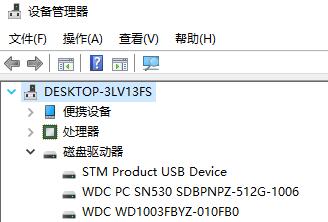
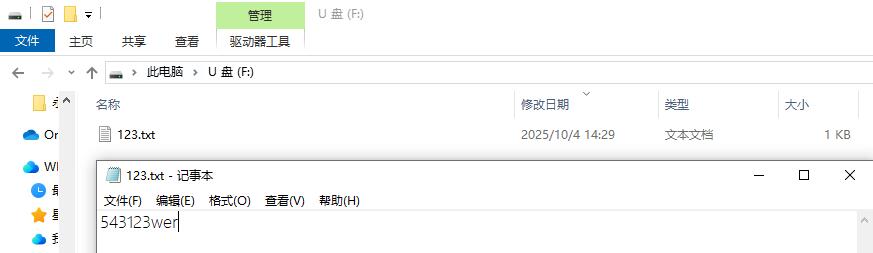
下载后,在电脑端自动识别和驱动U盘,通过鼠标操作该U盘,比如创建1个123.txt的文件,打开这个文件,在其内写入文字,存盘。再次打开并查看文件内容。

2、通过程序操作U盘
通过程序操作U盘的测试结果,均显示在串口助手上。测试结果存储为TXT文件,复制如下:
Demo15_6:Test usbd_msc_sd with FATFS。
 SD has been present.
mounted, ok.

My Usb Capacity(MB)= 7386


*** SD card info ***

Card Type= 1
Card Version= 1
Card Class= 1461
Relative Card Address= 4660
Block Count= 15126528
Block Size(Bytes)= 512
LogiBlockCount= 15126528
LogiBlockSize(Bytes)= 512
SD Card Capacity(MB)= 7386

f_open file OK.

 the test of the func in ff.c are success.

[S2]KeyUp   =Format SD card.
[S1]KeyRight=SD card info.
[S4]KeyLeft =FAT disk info.
[S3]KeyDown =Next menu page.


Formating (10secs)...
Format OK, to reset.
Reselect menu item or reset.


*** SD card info ***

Card Type= 1
Card Version= 1
Card Class= 1461
Relative Card Address= 4660
Block Count= 15126528
Block Size(Bytes)= 512
LogiBlockCount= 15126528
LogiBlockSize(Bytes)= 512
SD Card Capacity(MB)= 7386

Reselect menu item or reset.


*** FAT disk info ***.

FAT type=  3
[1=FAT12,2=FAT16,3=FAT32,4=exFAT]
Sector size(bytes)=  512
Cluster size(sectors)=  64
Total cluster count=  236321
Total sector count=  15124544
Total space(MB)=  7385
Free cluster count=  236320
Free sector count=  15124480
Free space(MB)=  7385
Get FAT disk info OK.
Reselect menu item or reset.


test read/write SD with FATFS universal function.
[S2]KeyUp   =Write files.
[S3]KeyDown =Get a file info.
[S4]KeyLeft =Read a TXT file and a BIN file.
[S1]KeyRight=Next menu page.

Write file OK: DMA_readme.txt
Write file OK: DMA_help.txt
Write file OK: DMA_ADC2000.dat
Write file OK: DMA_ADC1000.dat
Reselect menu item or reset.

Test File info of:  DMA_ADC1000.dat
File size(bytes)= 418
File attribute=  32
File Name=  DMA_ADC1000.dat
File Date= 2236- 0- 0
File Time=  0: 0: 0
Reselect menu item or reset.

Read a TXT file:
Reading TXT file: Line1: Hello, FatFS
Reading TXT file: Line2: UPC, AnHui Hefei
Reading TXT file: Line3: Date: 2025-7-14
Read a BIN file:
Reading BIN file: ADC1-IN5
Sampling freq: 2000
Point count: 30
Reselect menu item or reset.


test erase/SD info/read/write with specialized SD_Function.
[S2]KeyUp   =My USBD Capacity.
[S3]KeyDown =Erase 0-10 blocks.
[S4]KeyLeft =Write block.
[S1]KeyRight=Read block.

My Usb Capacity(MB)= 7386

Reselect menu item or reset.


*** Erasing blocks ***

Erasing blocks,OK.
Blocks 0-10 is erased.
GetCardState()= 0
Reselect menu item or reset.


*** DMA Writing blocks ***

Writing block 6.
Data in [10:15] is: 10 , 11, 12, 13, 14, 15
 SD_write() is to be called.
DMA write complete.
SD_write() DMA Callback is called.
Reselect menu item or reset.


*** DMA Reading blocks ***


HAL_SD_ReadBlocks_DMA() is to be called.
DMA read complete.
SD_read() DMA Callback is called.
Data in [10:15] is: 10, 11, 12, 13, 14, 15
Reselect menu item or reset.
3、注意
- 通过接口操作U盘和通过程序操作U盘,不可以同时操作,否则会引起竞争。
- SD卡这种设备已经是昨日的黄花,ST对它的驱动现在很少更新。它迟早会淡出这个世界。所以就是大伙研究一下吧,新的设计尽量不要选择这种外设,因为用起来是真的不爽,步步是坑。
- 所贴的代码中有很多printf语句,这都不是必须的,是为了调试所用,是可以注释掉的。
- 本文的代码和结果里还存在一个BUG,不过并不致命,是有关FATFS的,我就不修改了,倘若有的网友已经发现,可以尝试修改。哈,我也留个坑。

智能硬件社区聚焦AI智能硬件技术生态,汇聚嵌入式AI、物联网硬件开发者,打造交流分享平台,同步全国赛事资讯、开展 OPC 核心人才招募,助力技术落地与开发者成长。
更多推荐



 23
23 0
0- 0


 已为社区贡献41条内容

所有评论(0)