基于PIXhawk 4 飞控无人机与上位机之间的通信(六)
系列
基于匿名无人机组装历程(一)
基于匿名无人机组装历程(二)
基于匿名无人机组装历程(三)
基于匿名无人机组装历程(四)
基于匿名无人机组装历程(五)
文章目录
前言
应用匿名飞控将近大半年后,同时编写上下位机的代码已经有些力不从心了,从这篇开始便更换了飞控,使用PIXhawk 4 飞控进行下位机的控制。这篇主要讲解在windows系统中使用QGC 4.1版本来配置PIXhawk飞控使用mavlink2与jetson进行通讯,并在上位机中编写代码使用mavros2进行接收消息。
注:以下所有修改均不要出现中文路径或中文
一、硬件、软件准备
- 开发板:Jetson Orin Nano Super
- 系统:ubuntu22.04 humble ros2
- 飞控:PIXhawk 4
- 飞控固件:1.16.0.
- .QGC版本:最新版本即可
二、在QGC中配置mavlink2
如果身边没有无线数传的话可以是用一根T口USB线接在PIX4侧边的接口并将其接到电脑上。
在QGC界面点击右上角“Q”图标,选择Vehicle Configuration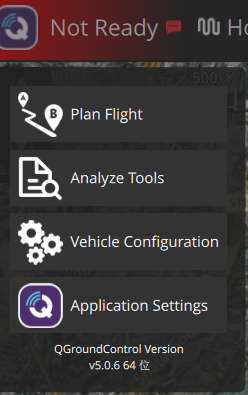
点击倒数第二个参数,在搜索栏中搜索mavlink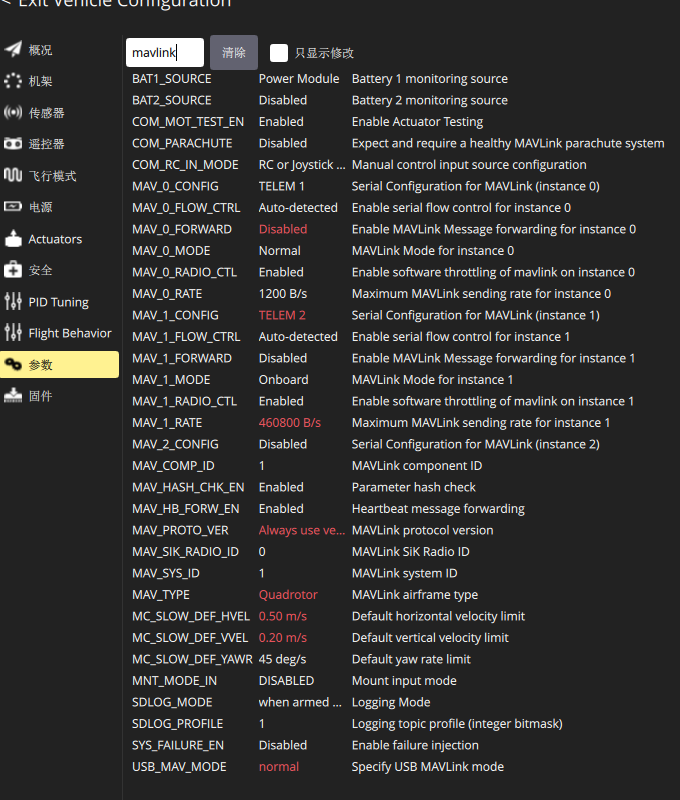
一般是将MAV_1_CONFIG配置为上位机的接收引脚,具体配置可以参考上图所有有关**MAV_1_…**的配置。
下图是PIX4上部分接口引脚图,我使用的是串口转USB CH343G与上位机进行连接。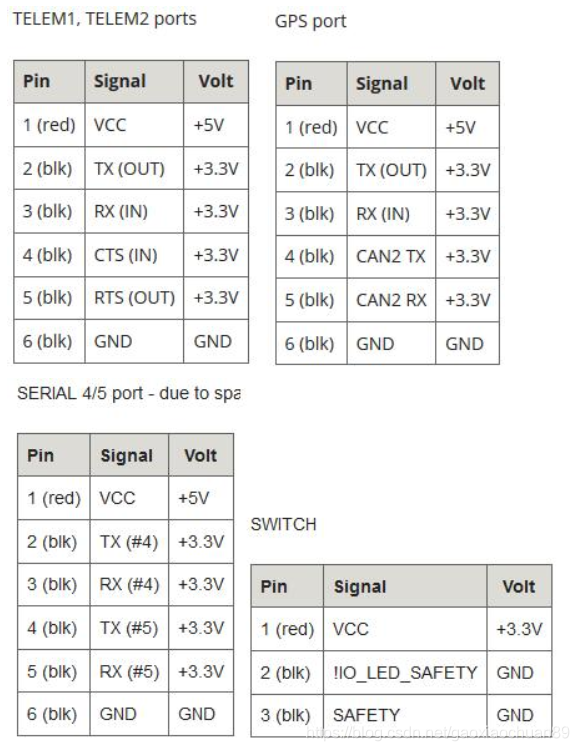
如此,便将PX4下位机的通讯给配置好了,可以现在电脑上使用串口调试助手进行测试。
三、在上位机中编写代码进行通信
安装相应ros包
sudo apt-get install ros-humble-mavros ros-humble-mavros-extras -y
cd ~/Documents
sudo apt install geographiclib-tools
wget https://raw.githubusercontent.com/mavlink/mavros/master/mavros/scripts/install_geographiclib_datasets.sh
sudo bash install_geographiclib_datasets.sh
安装好之后配置创建一个mavros功能包,在功能包下创建config、launch两个文件夹
1. 将以下两个文件放进config文件夹中
# Common configuration for PX4 autopilot
#px4_config.yaml
/**:
  ros__parameters:
    startup_px4_usb_quirk: false

# --- system plugins ---

# sys_status
/**/sys:
  ros__parameters:
    min_voltage: [10.0]   # diagnostics min voltage, use a vector i.e. [16.2, 16.0] for multiple batteries, up-to 10 are supported
                          # to achieve the same on a ROS launch file do: <rosparam param="sys/min_voltage">[16.2, 16.0]</rosparam>
    disable_diag: false   # disable all sys_status diagnostics, except heartbeat
    heartbeat_rate: 1.0   # send heartbeat rate in Hertz
    conn_timeout: 10.0    # heartbeat timeout in seconds

# sys_time
/**/time:
  ros__parameters:
    time_ref_source: "fcu"    # time_reference source
    timesync_mode: MAVLINK
    timesync_avg_alpha: 0.6   # timesync averaging factor
    timesync_rate: 10.0       # TIMESYNC rate in Hertz (feature disabled if 0.0)
    system_time_rate: 1.0     # send system time to FCU rate in Hertz (disabled if 0.0)

# --- mavros plugins (alphabetical order) ---

# 3dr_radio
/**/tdr_radio:
  ros__parameters:
    low_rssi: 40  # raw rssi lower level for diagnostics

# actuator_control
# None

# command
/**/cmd:
  ros__parameters:
    use_comp_id_system_control: false   # quirk for some old FCUs

# dummy
# None

# ftp
# None

# global_position
/**/global_position:
  ros__parameters:
    frame_id: "map"
    child_frame_id: "base_link"
    rot_covariance: 99999.0
    gps_uere: 1.0
    use_relative_alt: true
    tf:
      send: true                # 启用 map -> odom(如果你希望 PX4 发布 map->odom)
      frame_id: "map"
      global_frame_id: "earth"
      child_frame_id: "odom"
      send_rate: 10.0

# imu_pub
/**/imu:
  ros__parameters:
    frame_id: "base_link"
    # need find actual values
    linear_acceleration_stdev: 0.0003
    angular_velocity_stdev: 0.0003490659  # 0.02 degrees
    orientation_stdev: 1.0
    magnetic_stdev: 0.0

# local_position
/**/local_position:
  ros__parameters:
    frame_id: "map"
    tf:
      send: true                # 启用动态 TF 发布(odom -> base_link)
      frame_id: "odom"          # TF 父帧(里程计)
      child_frame_id: "base_link"
      send_fcu: false
      send_rate: 50.0           # 发布频率(Hz)

# param
# None, used for FCU params

# rc_io
# None

# setpoint_accel
/**/setpoint_accel:
  ros__parameters:
    send_force: false

# setpoint_attitude
/**/setpoint_attitude:
  ros__parameters:
    reverse_thrust: false       # allow reversed thrust
    use_quaternion: false       # enable PoseStamped topic subscriber
    tf.listen: false            # enable tf listener (disable topic subscribers)
    tf.frame_id: "map"
    tf.child_frame_id: "target_attitude"
    tf.rate_limit: 50.0

# setpoint_raw
/**/setpoint_raw:
  ros__parameters:
    thrust_scaling: 1.0       # used in setpoint_raw attitude callback.
    # Note: PX4 expects normalized thrust values between 0 and 1, which means that
    # the scaling needs to be unitary and the inputs should be 0..1 as well.

# setpoint_position
/**/setpoint_position:
  ros__parameters:
    tf.listen: false            # enable tf listener (disable topic subscribers)
    tf.frame_id: "map"
    tf.child_frame_id: "target_position"
    tf.rate_limit: 50.0
    mav_frame: LOCAL_NED

# guided_target
/**/guided_target:
  ros__parameters:
    tf.listen: false           # enable tf listener (disable topic subscribers)
    tf.frame_id: "map"
    tf.child_frame_id: "target_position"
    tf.rate_limit: 50.0

# setpoint_velocity
/**/setpoint_velocity:
  ros__parameters:
    mav_frame: LOCAL_NED

# vfr_hud
# None

# waypoint
/**/mission:
  ros__parameters:
    pull_after_gcs: true        # update mission if gcs updates
    use_mission_item_int: true  # use the MISSION_ITEM_INT message instead of MISSION_ITEM
                                # for uploading waypoints to FCU

# --- mavros extras plugins (same order) ---

# adsb
# None

# debug_value
# None

# distance_sensor
## Currently available orientations:
#    Check http://wiki.ros.org/mavros/Enumerations
##
/**/distance_sensor:
  ros__parameters:
    config: |
      hrlv_ez4_pub:
        id: 0
        frame_id: "hrlv_ez4_sonar"
        orientation: PITCH_270 # RPY:{0.0, 270.0, 0.0} - downward-facing
        field_of_view: 0.0  # XXX TODO
        send_tf: true
        sensor_position: {x:  0.0, y:  0.0, z:  -0.1}
      lidarlite_pub:
        id: 1
        frame_id: "lidarlite_laser"
        orientation: PITCH_270
        field_of_view: 0.0  # XXX TODO
        send_tf: true
        sensor_position: {x:  0.0, y:  0.0, z:  -0.1}
      sonar_1_sub:
        subscriber: true
        id: 2
        orientation: PITCH_270
        horizontal_fov_ratio: 1.0   # horizontal_fov = horizontal_fov_ratio * msg.field_of_view
        vertical_fov_ratio: 1.0     # vertical_fov = vertical_fov_ratio * msg.field_of_view
        # custom_orientation:       # Used for orientation == CUSTOM
        #   roll: 0
        #   pitch: 270
        #   yaw: 0
      laser_1_sub:
        subscriber: true
        id: 3
        orientation: PITCH_270

# image_pub
/**/image:
  ros__parameters:
    frame_id: "px4flow"

# fake_gps
/**/fake_gps:
  ros__parameters:
    # select data source
    use_mocap: true         # ~mocap/pose
    mocap_transform: true   # ~mocap/tf instead of pose
    use_vision: false       # ~vision (pose)
    # origin (default: Zürich)
    geo_origin.lat: 47.3667       # latitude [degrees]
    geo_origin.lon: 8.5500        # longitude [degrees]
    geo_origin.alt: 408.0         # altitude (height over the WGS-84 ellipsoid) [meters]
    eph: 2.0
    epv: 2.0
    satellites_visible: 5   # virtual number of visible satellites
    fix_type: 3             # type of GPS fix (default: 3D)
    tf.listen: false
    tf.send: false           # send TF?
    tf.frame_id: "map"       # TF frame_id
    tf.child_frame_id: "fix" # TF child_frame_id
    tf.rate_limit: 10.0      # TF rate
    gps_rate: 5.0           # GPS data publishing rate

# landing_target
/**/landing_target:
  ros__parameters:
    listen_lt: false
    mav_frame: "LOCAL_NED"
    land_target_type: "VISION_FIDUCIAL"
    image.width: 640              # [pixels]
    image.height: 480
    camera.fov_x: 2.0071286398    # default: 115 [degrees]
    camera.fov_y: 2.0071286398
    tf.send: true
    tf.listen: false
    tf.frame_id: "landing_target"
    tf.child_frame_id: "camera_center"
    tf.rate_limit: 10.0
    target_size: {x: 0.3, y: 0.3}

# mocap_pose_estimate
/**/mocap:
  ros__parameters:
    # select mocap source
    use_tf: false   # ~mocap/tf
    use_pose: true  # ~mocap/pose

# mount_control
/**/mount:
  ros__parameters:
    debounce_s: 4.0
    err_threshold_deg: 10.0
    negate_measured_roll: false
    negate_measured_pitch: false
    negate_measured_yaw: false

# odom
/**/odometry:
  ros__parameters:
    fcu.odom_parent_id_des: "odom"        # desired parent frame rotation of the FCU's odometry
    fcu.odom_child_id_des: "base_link"    # desired child frame rotation of the FCU's odometry
    fcu.map_id_des: "map"

# px4flow
/**/px4flow:
  ros__parameters:
    frame_id: "px4flow"
    ranger_fov: 0.118682      # 6.8 degrees at 5 meters, 31 degrees at 1 meter
    ranger_min_range: 0.3     # meters
    ranger_max_range: 5.0     # meters

# vision_pose_estimate
/**/vision_pose:
  ros__parameters:
    tf.listen: false           # enable tf listener (disable topic subscribers)
    tf.frame_id: "odom"
    tf.child_frame_id: "vision_estimate"
    tf.rate_limit: 10.0

# vision_speed_estimate
/**/vision_speed:
  ros__parameters:
    listen_twist: true    # enable listen to twist topic, else listen to vec3d topic
    twist_cov: true       # enable listen to twist with covariance topic

# vibration
/**/vibration:
  ros__parameters:
    frame_id: "base_link"

# wheel_odometry
/**/wheel_odometry:
  ros__parameters:
    count: 2                      # number of wheels to compute odometry
    use_rpm: false                # use wheel's RPM instead of cumulative distance to compute odometry
    wheel0: {x: 0.0, y: -0.15, radius: 0.05}  # x-, y-offset (m,NED) and radius (m)
    wheel1: {x: 0.0, y:  0.15, radius: 0.05}  # x-, y-offset (m,NED) and radius (m)
    send_raw: true                # send wheel's RPM and cumulative distance (~/wheel_odometry/rpm, ~/wheel_odometry/distance)
    send_twist: false             # send geometry_msgs/TwistWithCovarianceStamped instead of nav_msgs/Odometry
    frame_id: "odom"              # origin frame
    child_frame_id: "base_link"   # body-fixed frame
    vel_error: 0.1                # wheel velocity measurement error 1-std (m/s)
    tf.send: false
    tf.frame_id: "odom"
    tf.child_frame_id: "base_link"

# camera
/**/camera:
  ros__parameters:
    frame_id: "base_link"
#px4_pluginlists.yaml
/**:
  ros__parameters:
    plugin_denylist:
      # common

      # extras
      - image_pub
      - vibration
      - distance_sensor
      - rangefinder
      - wheel_odometry

    #plugin_allowlist:
     #  - 'sys_*'
     #  - 'local_position'
     #  - 'imu'
     #  - 'global_position'
     #  - 'odometry'
2. 将以下两个文件放进launch文件夹中
- node.launch
<launch>
	<!-- vim: set ft=xml noet : -->
	<!-- base node launch file-->

	<arg name="fcu_url" />
	<arg name="gcs_url" />
	<arg name="tgt_system" />
	<arg name="tgt_component" />
	<arg name="pluginlists_yaml" />
	<arg name="config_yaml" />
	<arg name="log_output" default="screen" />
	<arg name="fcu_protocol" default="v2.0" />
	<arg name="respawn_mavros" default="false" />
	<arg name="namespace" default="mavros"/>

	<node pkg="mavros" exec="mavros_node" namespace="$(var namespace)" output="screen">
		<param name="fcu_url" value="$(var fcu_url)" />
		<param name="gcs_url" value="$(var gcs_url)" />
		<param name="tgt_system" value="$(var tgt_system)" />
		<param name="tgt_component" value="$(var tgt_component)" />
		<param name="fcu_protocol" value="$(var fcu_protocol)" />
		<!-- load blacklist, config -->
		<param from="$(var pluginlists_yaml)" />
		<param from="$(var config_yaml)" />
	</node>
</launch>
- px4.launch
<launch>
	<arg name="fcu_url" default="/dev/ttyCH343USB0:460800" /> # 注:这里需要修改问自己的串口以及波特波特率
	<arg name="gcs_url" default="" />
	<arg name="tgt_system" default="1" />
	<arg name="tgt_component" default="1" />
	<arg name="log_output" default="screen" />
	<arg name="fcu_protocol" default="v2.0" />
	<arg name="respawn_mavros" default="false" />
	<arg name="namespace" default="mavros"/>

	<include file="$(find-pkg-share mavros)/launch/node.launch">
		<arg name="pluginlists_yaml" value="(自定义的功能包路径)/px4_pluginlists.yaml" />
		<arg name="config_yaml" value="(自定义的功能包路径)/px4_config.yaml" />
		<arg name="fcu_url" value="$(var fcu_url)" />
		<arg name="gcs_url" value="$(var gcs_url)" />
		<arg name="tgt_system" value="$(var tgt_system)" />
		<arg name="tgt_component" value="$(var tgt_component)" />
		<arg name="log_output" value="$(var log_output)" />
		<arg name="fcu_protocol" value="$(var fcu_protocol)" />
		<arg name="respawn_mavros" value="$(var respawn_mavros)" />
		<arg name="namespace" value="$(var namespace)"/>
	</include>
</launch>
3. 随后
colon build
source install/setup.bash
ros2 launch 功能包名称 px4.launch
如果出现大概与下述内容相似,便是通讯成功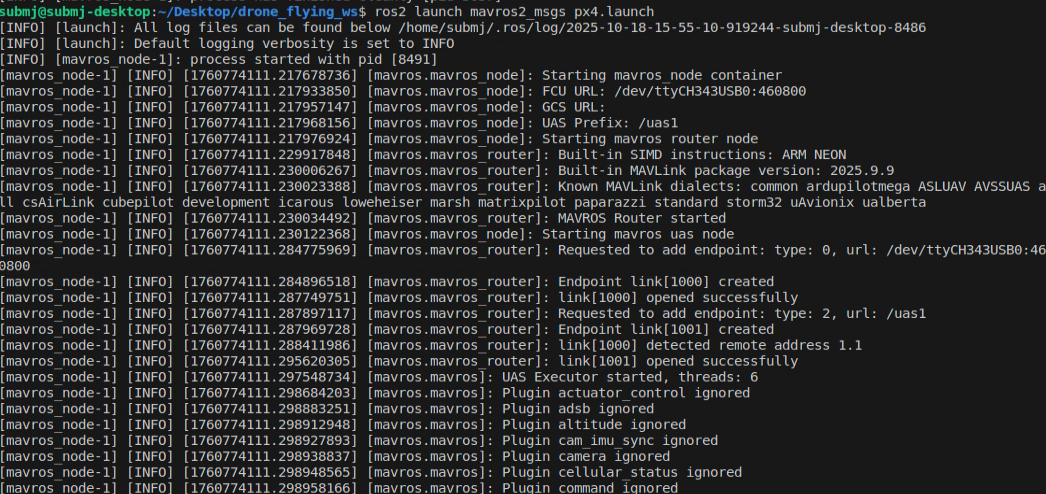
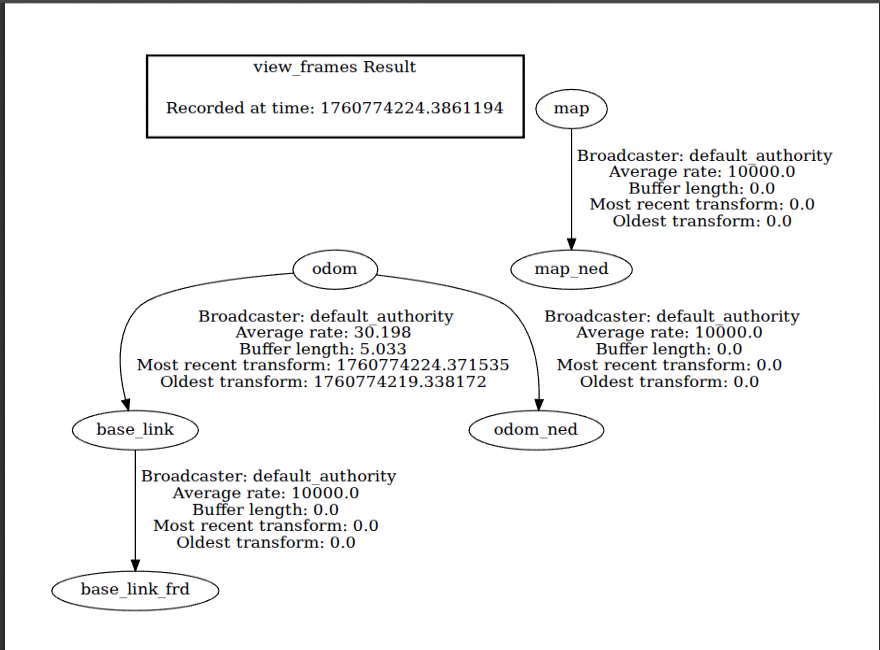
可以看一下tf树
ros2 run tf2_tools view_frames
总结
嗯,大致没有什么问题,当然还是有的,不知道为什么map与odom没有接上,而且稍微移动无人机,在rviz2中便会有很大的漂移,暂时还没有找到原因。

智能硬件社区聚焦AI智能硬件技术生态,汇聚嵌入式AI、物联网硬件开发者,打造交流分享平台,同步全国赛事资讯、开展 OPC 核心人才招募,助力技术落地与开发者成长。
更多推荐


 37
37 0
0- 0


 已为社区贡献2条内容

所有评论(0)