海康威视webSDK语音对讲、云台控制功能记录
·
先从官网下载webSDKdemo文件,将以下文件放入public文件夹下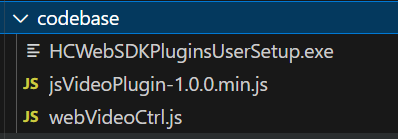
还需要一个jq文件,这里我放在public文件夹下的

index.html文件中引入
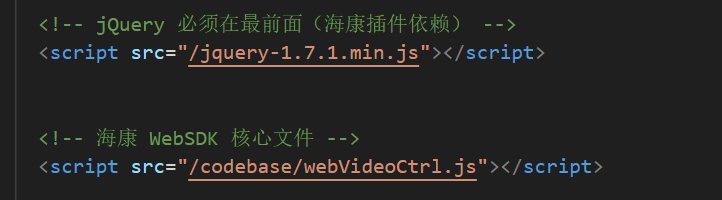
我的项目有两种播放实时监控的方式,一种是RTSP,一种是webSDK. RTSP很简单,最后再讲。下面是组件的代码
<template>
<div id="video-container" class="video-container">
<!-- WebRTC 方式播放 RTSP -->
<video
class="video"
ref="video"
preload="auto"
autoplay="autoplay"
muted
width="100%"
height="100%"
v-if="!useSdk"
/>
<!-- 海康 SDK 播放容器 -->
<div v-else id="divPlugin" class="plugin-container"></div>
<!-- 点击遮罩层,仅用于选择视频(无双击全屏功能) -->
<div class="mask" @click="handleClickVideo" :class="{ 'active-video-border': selectStatus }"></div>
</div>
</template>
<script>
import WebRtcStreamer from '../../../../public/webrtcstreamer'
export default {
name: 'videoCom',
props: {
rtsp: {
type: String,
required: true
},
isOn: {
type: Boolean,
default: false
},
spareId: {
type: Number
},
selectStatus: {
type: Boolean,
default: false
},
deviceInfo: {
type: Object,
default: function() {
return {
netWork: '',
port: '',
account: '',
password: ''
}
}
},
useSdk: {
type: Boolean,
default: false
},
useProxy: {
type: Boolean,
default: false
}
},
data: function() {
return {
webRtcServer: null,
g_iWndIndex: 0,
sdkReady: false,
isLoggedIn: false,
isPlaying: false,
deviceIdentify: '',
channelId: 1,
rtspPort: null,
g_szRecordType: '',
audioChannels: [],
selectedAudioChannel: 1,
pendingOperations: [],
loginRetryCount: 0,
szIP: '',
szPort: '',
szUsername: '',
szPassword: '',
szDeviceIdentify: '',
pluginInserted: false,
initRetryCount: 0,
currentRecordPath: ''
}
},
watch: {
rtsp: {
handler: function(newVal, oldVal) {
if (newVal && newVal !== oldVal && this.useSdk && this.isPlaying) {
this.switchChannel()
}
}
},
useSdk: {
handler: function(newVal) {
if (newVal) {
this.destroyWebRTC()
this.$nextTick(() => {
this.initSDK()
})
} else {
this.destroySDK()
this.$nextTick(() => {
this.initWebRTC()
})
}
}
}
},
mounted: function() {
if (this.useSdk) {
this.initSDK()
} else {
this.initWebRTC()
}
},
beforeDestroy: function() {
if (this.useSdk) {
this.destroySDK()
} else {
this.destroyWebRTC()
}
},
methods: {
openSound: function() {
var self = this
return new Promise(function(resolve, reject) {
WebVideoCtrl.I_OpenSound()
.then(function() {
console.log('打开声音成功')
resolve()
})
.catch(function(e) {
console.error('打开声音失败:', e)
reject(new Error('打开声音失败'))
})
})
},
closeSound: function() {
var self = this
return new Promise(function(resolve, reject) {
WebVideoCtrl.I_CloseSound()
.then(function() {
console.log('关闭声音成功')
resolve()
})
.catch(function(e) {
console.error('关闭声音失败:', e)
reject(new Error('关闭声音失败'))
})
})
},
initWebRTC: function() {
if (!this.rtsp) return
try {
this.webRtcServer = new WebRtcStreamer(
this.$refs.video,
window.location.protocol + '//' + window.location.hostname + ':8000'
)
this.webRtcServer.connect(this.rtsp)
console.log('WebRTC 初始化成功')
} catch (error) {
console.error('WebRTC 初始化失败:', error)
this.$emit('error', 'WebRTC 初始化失败')
}
},
destroyWebRTC: function() {
if (this.webRtcServer) {
this.webRtcServer.disconnect()
this.webRtcServer = null
}
},
initSDK: function() {
var self = this
if (typeof WebVideoCtrl === 'undefined') {
console.log('等待 WebVideoCtrl 加载...')
setTimeout(function() {
self.initSDK()
}, 500)
return
}
var container = document.getElementById('divPlugin')
if (!container) {
console.log('等待 divPlugin 容器...')
setTimeout(function() {
self.initSDK()
}, 200)
return
}
// 保存设备信息
this.szIP = this.deviceInfo.netWork
this.szPort = this.deviceInfo.port || '80'
this.szUsername = this.deviceInfo.account || 'admin'
this.szPassword = this.deviceInfo.password || ''
this.szDeviceIdentify = this.szIP + '_' + this.szPort
console.log('设备信息:', {
ip: this.szIP,
port: this.szPort,
username: this.szUsername,
identify: this.szDeviceIdentify
})
WebVideoCtrl.I_InitPlugin({
bWndFull: true,
iWndowType: 1,
cbSelWnd: function(xmlDoc) {
self.g_iWndIndex = parseInt($(xmlDoc).find('SelectWnd').eq(0).text(), 10)
console.log('当前选择的窗口编号:', self.g_iWndIndex)
self.$emit('window-selected', self.g_iWndIndex)
},
cbDoubleClickWnd: function(iWndIndex, bFullScreen) {
console.log('双击窗口:', iWndIndex, '全屏:', bFullScreen)
},
cbEvent: function(iEventType, iParam1, iParam2) {
console.log('插件事件:', iEventType, iParam1, iParam2)
if (3002 === iEventType) {
self.$emit('error', '回放异常')
} else if (3003 === iEventType) {
console.log('回放停止')
} else if (3004 === iEventType) {
self.$emit('error', '硬盘空间不足')
} else if (5000 === iEventType) {
self.$emit('error', '语音对讲失败')
}
},
cbInitPluginComplete: function() {
console.log('插件初始化完成')
WebVideoCtrl.I_InsertOBJECTPlugin('divPlugin').then(function() {
console.log('插件插入成功')
self.pluginInserted = true
self.getDevicePortAndLogin()
}, function(err) {
console.error('插件插入失败:', err)
self.pluginInserted = false
self.$emit('error', '插件插入失败,请确认已安装HCWebSDK插件')
})
}
})
},
getDevicePortAndLogin: function() {
var self = this
try {
var oPort = WebVideoCtrl.I_GetDevicePort(this.szDeviceIdentify)
if (oPort) {
self.rtspPort = oPort.iRtspPort
console.log('获取端口成功:', oPort)
} else {
console.warn('获取端口返回空,使用默认端口 554')
self.rtspPort = 554
}
} catch(e) {
console.error('获取端口异常:', e)
self.rtspPort = 554
}
self.loginDevice()
},
loginDevice: function() {
var self = this
if (!this.szIP) {
this.$emit('error', '设备IP为空')
return
}
console.log('开始登录设备:', this.szIP, this.szPort, this.szUsername)
WebVideoCtrl.I_Login(this.szIP, 1, this.szPort, this.szUsername, this.szPassword, {
timeout: 30000,
success: function(xmlDoc) {
console.log('登录成功:', self.szIP)
self.isLoggedIn = true
self.loginRetryCount = 0
self.$emit('login-success')
self.getChannelInfo()
self.getAudioInfo()
},
error: function(status, xmlDoc) {
console.error('登录失败:', status, xmlDoc)
if (status === 2001) {
console.log('设备已登录')
self.isLoggedIn = true
self.getChannelInfo()
self.getAudioInfo()
} else if (self.loginRetryCount < 3) {
self.loginRetryCount++
setTimeout(function() {
self.loginDevice()
}, 2000)
} else {
self.$emit('error', '登录失败:请检查设备IP、端口、用户名和密码')
}
}
})
},
getChannelInfo: function() {
var self = this
var szDeviceIdentify = this.szDeviceIdentify
WebVideoCtrl.I_GetAnalogChannelInfo(szDeviceIdentify, {
success: function(xmlDoc) {
var channels = $(xmlDoc).find('VideoInputChannel')
if (channels.length > 0) {
self.channelId = parseInt($(channels[0]).find('id').eq(0).text(), 10)
console.log('使用模拟通道:', self.channelId)
self.startPreview()
return
}
},
error: function() {
WebVideoCtrl.I_GetDigitalChannelInfo(szDeviceIdentify, {
success: function(xmlDoc) {
var channels = $(xmlDoc).find('InputProxyChannelStatus')
if (channels.length > 0) {
self.channelId = parseInt($(channels[0]).find('id').eq(0).text(), 10)
console.log('使用数字通道:', self.channelId)
}
self.startPreview()
},
error: function() {
self.channelId = 1
self.startPreview()
}
})
}
})
},
getAudioInfo: function() {
var self = this
WebVideoCtrl.I_GetAudioInfo(this.szDeviceIdentify, {
success: function(xmlDoc) {
var oAudioChannels = $(xmlDoc).find('TwoWayAudioChannel')
var channels = []
$.each(oAudioChannels, function() {
var id = $(this).find('id').eq(0).text()
channels.push({ id: parseInt(id, 10) })
})
self.audioChannels = channels
if (channels.length > 0) {
self.selectedAudioChannel = channels[0].id
}
console.log('获取对讲通道成功:', channels)
self.$emit('audio-channels-loaded', channels)
},
error: function(oError) {
console.error('获取对讲通道失败:', oError)
}
})
},
startPreview: function() {
var self = this
if (!this.isLoggedIn) {
console.warn('设备未登录,等待登录...')
setTimeout(function() {
if (self.isLoggedIn) {
self.startPreview()
}
}, 1000)
return
}
console.log('========== 开始预览 ==========')
console.log('设备标识:', this.szDeviceIdentify)
console.log('窗口索引:', this.g_iWndIndex)
console.log('通道ID:', this.channelId)
console.log('RTSP端口:', this.rtspPort)
console.log('useProxy:', this.useProxy)
var startRealPlay = function() {
var streamType = 1
var playParams = {
iWndIndex: self.g_iWndIndex,
iStreamType: streamType,
iChannelID: self.channelId,
bZeroChannel: false,
iPort: self.rtspPort,
success: function() {
console.log('========== 开始预览成功! ==========')
self.isPlaying = true
self.sdkReady = true
self.$emit('play-start')
self.processPendingOperations()
},
error: function(status, xmlDoc) {
console.error('开始预览失败:', status, xmlDoc)
if (streamType === 1) {
console.log('主码流失败,尝试子码流...')
streamType = 2
playParams.iStreamType = streamType
WebVideoCtrl.I_StartRealPlay(self.szDeviceIdentify, playParams)
} else {
self.$emit('error', '预览失败,请检查设备是否支持WebSocket取流')
}
}
}
WebVideoCtrl.I_StartRealPlay(self.szDeviceIdentify, playParams)
}
var oWndInfo = WebVideoCtrl.I_GetWindowStatus(this.g_iWndIndex)
if (oWndInfo && oWndInfo.bIsPlay) {
console.log('窗口已在播放,先停止')
WebVideoCtrl.I_Stop({
iWndIndex: this.g_iWndIndex,
success: startRealPlay,
error: startRealPlay
})
} else {
startRealPlay()
}
},
stopPreview: function() {
if (this.isPlaying) {
WebVideoCtrl.I_Stop({
iWndIndex: this.g_iWndIndex,
success: function() {
console.log('停止预览成功')
this.isPlaying = false
}.bind(this)
})
}
},
switchChannel: function() {
var match = this.rtsp.match(/Channels\/(\d+)/)
if (match) {
var newChannelId = parseInt(match[1].toString().slice(0, -1), 10)
if (newChannelId && newChannelId !== this.channelId) {
this.channelId = newChannelId
if (this.isPlaying) {
this.startPreview()
}
}
}
},
destroySDK: function() {
this.stopPreview()
if (this.isLoggedIn && this.szDeviceIdentify) {
try {
WebVideoCtrl.I_Logout(this.szDeviceIdentify)
} catch (e) {}
this.isLoggedIn = false
}
try {
WebVideoCtrl.I_DestroyPlugin()
} catch(e) {}
this.sdkReady = false
this.pendingOperations = []
this.pluginInserted = false
},
addPendingOperation: function(operation) {
var self = this
return new Promise(function(resolve, reject) {
if (self.sdkReady && self.isPlaying) {
operation()
.then(resolve)
.catch(reject)
} else {
self.pendingOperations.push({ operation: operation, resolve: resolve, reject: reject })
}
})
},
processPendingOperations: function() {
while (this.pendingOperations.length > 0) {
var pending = this.pendingOperations.shift()
pending
.operation()
.then(pending.resolve)
.catch(pending.reject)
}
},
capturePic: function() {
var self = this
return this.addPendingOperation(function() {
return new Promise(function(resolve, reject) {
var deviceName = self.deviceInfo.name || 'camera'
var now = new Date()
var formattedTime = now.getFullYear() + '-' +
String(now.getMonth() + 1).padStart(2, '0') + '-' +
String(now.getDate()).padStart(2, '0') + '_' +
String(now.getHours()).padStart(2, '0') + '.' +
String(now.getMinutes()).padStart(2, '0') + '.' +
String(now.getSeconds()).padStart(2, '0')
var szPicName = deviceName + '_' + formattedTime + '.jpg'
WebVideoCtrl.I_CapturePic(szPicName, {})
.then(function() {
console.log('截图成功:', szPicName)
resolve({ name: szPicName, path: '桌面' })
})
.catch(function(oError) {
console.error('抓图失败:', oError)
reject(new Error('抓图失败:' + (oError.errorMsg || JSON.stringify(oError))))
})
})
})
},
startRecord: function() {
var self = this
return this.addPendingOperation(function() {
return new Promise(function(resolve, reject) {
var deviceName = self.deviceInfo.name || 'camera'
var now = new Date()
var formattedTime = now.getFullYear() + '-' +
String(now.getMonth() + 1).padStart(2, '0') + '-' +
String(now.getDate()).padStart(2, '0')
var szFileName = deviceName + '_' + formattedTime
WebVideoCtrl.I_StartRecord(szFileName, {
iWndIndex: self.g_iWndIndex,
success: function() {
console.log('开始录像成功')
self.g_szRecordType = 'realplay'
resolve()
},
error: function(error) {
console.error('开始录像失败:', error)
reject(new Error('开始录像失败'))
}
})
})
})
},
stopRecord: function() {
var self = this
return this.addPendingOperation(function() {
return new Promise(function(resolve, reject) {
WebVideoCtrl.I_StopRecord({
iWndIndex: self.g_iWndIndex,
success: function() {
console.log('停止录像成功')
resolve({ path: '当前配置路径' })
},
error: function(error) {
console.error('停止录像失败:', error)
reject(new Error('停止录像失败'))
}
})
})
})
},
startZoomIn: function() {
if (!this.sdkReady || !this.isPlaying) {
console.warn('SDK未就绪或未播放')
return
}
WebVideoCtrl.I_PTZControl(10, false, {
iWndIndex: this.g_iWndIndex,
iPTZSpeed: 4,
success: function() {
console.log('调焦+成功')
},
error: function(status) {
console.error('调焦+失败:', status)
}
})
},
startZoomOut: function() {
if (!this.sdkReady || !this.isPlaying) {
console.warn('SDK未就绪或未播放')
return
}
WebVideoCtrl.I_PTZControl(11, false, {
iWndIndex: this.g_iWndIndex,
iPTZSpeed: 4,
success: function() {
console.log('调焦-成功')
},
error: function(status) {
console.error('调焦-失败:', status)
}
})
},
stopPTZ: function() {
if (!this.sdkReady) return
WebVideoCtrl.I_PTZControl(11, true, {
iWndIndex: this.g_iWndIndex,
success: function() {
console.log('调焦停止成功')
},
error: function(status) {
console.error('调焦停止失败:', status)
}
})
},
ptzZoom: function(action, continuous) {
if (action === 'in') {
this.startZoomIn()
if (!continuous) {
setTimeout(this.stopPTZ.bind(this), 300)
}
} else if (action === 'out') {
this.startZoomOut()
if (!continuous) {
setTimeout(this.stopPTZ.bind(this), 300)
}
}
},
startVoiceTalk: function(audioChannel) {
var self = this
var channel = audioChannel || this.selectedAudioChannel || 1
if (!this.isLoggedIn) {
return Promise.reject(new Error('未登录'))
}
console.log('开始对讲,设备:', this.szDeviceIdentify, '通道:', channel)
return new Promise(function(resolve, reject) {
WebVideoCtrl.I_StartVoiceTalk(self.szDeviceIdentify, channel)
.then(function() {
console.log('开始对讲成功')
resolve()
})
.catch(function(error) {
console.error('开始对讲失败:', error)
reject(new Error('开始对讲失败'))
})
})
},
stopVoiceTalk: function() {
var self = this
return new Promise(function(resolve, reject) {
WebVideoCtrl.I_StopVoiceTalk()
.then(function() {
console.log('停止对讲成功')
resolve()
})
.catch(function(error) {
console.error('停止对讲失败:', error)
reject(new Error('停止对讲失败'))
})
})
},
getControlStatus: function() {
return {
ready: this.sdkReady,
playing: this.isPlaying,
loggedIn: this.isLoggedIn,
windowIndex: this.g_iWndIndex
}
},
handleClickVideo: function() {
if (this.isOn) {
this.$emit('selectVideo', this.spareId)
}
}
}
}
</script>
<style scoped lang="scss">
.video-container {
position: relative;
width: 100%;
height: 100%;
.video {
width: 100%;
height: 100%;
object-fit: fill;
}
.plugin-container {
width: 100%;
height: 100%;
:deep(object) {
width: 100%;
height: 100%;
}
}
.mask {
position: absolute;
top: 0;
left: 0;
width: 100%;
height: 100%;
cursor: pointer;
}
.active-video-border {
border: 2px solid salmon;
box-sizing: border-box;
}
}
</style>下面是使用示例,loadSpeakCapabilities调的后端的接口,不用也可以运行。代码中已注释
<template>
<div class="ai-monitor-modal" v-if="visible">
<div class="modal-overlay" @click="handleClose"></div>
<div class="modal-container" ref="modalContainer">
<!-- 标题栏 -->
<div class="modal-header">
<div class="header-left">
<div class="status-tag">
<span class="pulse-dot"></span>
实时监控
</div>
<div class="title-group">
<div class="title-text">
<span class="main-title">
<a-icon class="camera-icon" type="video-camera" theme="filled" />
{{ cameraData.name || '监控设备' }}
</span>
<span class="sub-title">设备编号:{{ cameraData.serialNumber || '--' }} | 所属部门:{{ cameraData.sysOrgCodeStr || '--' }}</span>
</div>
</div>
</div>
<div class="header-right">
<button class="header-btn" @click="toggleFullscreen" :title="isFullscreen ? '退出全屏' : '全屏'">
<a-icon class="icon" v-if="!isFullscreen" type="fullscreen" />
<a-icon class="icon" v-else type="fullscreen-exit" />
</button>
<button class="header-btn close-btn" @click="handleClose" title="关闭">
<a-icon class="icon" type="close" />
</button>
</div>
</div>
<!-- 主内容区 -->
<div class="modal-content">
<!-- 左侧视频区 -->
<div class="video-left">
<!-- 视频插件容器 -->
<div class="video-wrapper">
<Video
ref="videoComponent"
:rtsp="rtspUrl"
:selectStatus="false"
:deviceInfo="cameraData"
:useSdk="true"
:useProxy="false"
@play-start="onPlayStart"
@error="onVideoError"
@login-success="onLoginSuccess"
@audio-channels-loaded="onAudioChannelsLoaded"
@window-selected="onWindowSelected"
/>
<div id="divPlugin" class="plugin-container"></div>
</div>
<!-- 视频控制栏(放在视频插件下方) -->
<div class="video-control-bar">
<!-- 左侧状态信息 -->
<div class="control-left">
<div class="recording-indicator" v-if="isRecording">
<span class="rec-dot"></span>
<span class="rec-text">正在录像</span>
<span class="rec-time">{{ recordingTime }}</span>
</div>
<div class="control-status" v-if="!controlReady && controlLoading">
<a-icon type="loading" />
<span class="status-text">正在连接设备控制...</span>
</div>
<div class="audio-debug" v-if="audioDebugInfo">
<span class="debug-text">{{ audioDebugInfo }}</span>
</div>
</div>
<!-- 右侧控制按钮 -->
<div class="control-right">
<div class="video-controls">
<button class="control-btn" @click="handleScreenshot" title="截图" :disabled="!controlReady">
<a-icon type="picture" />
<span>截图</span>
</button>
<button class="control-btn" @click="toggleRecording" :title="isRecording ? '停止录像' : '开始录像'" :disabled="!controlReady">
<a-icon v-if="isRecording" type="video-camera" theme="twoTone" twoToneColor="#ff4d4f" />
<a-icon v-else type="video-camera" />
<span>{{ isRecording ? '停止录像' : '开始录像' }}</span>
</button>
<button
class="control-btn"
@mousedown="startZoomIn"
@mouseup="stopZoom"
@mouseleave="stopZoom"
title="按住放大"
:disabled="!controlReady"
>
<a-icon type="plus" />
<span>放大</span>
</button>
<button
class="control-btn"
@mousedown="startZoomOut"
@mouseup="stopZoom"
@mouseleave="stopZoom"
title="按住缩小"
:disabled="!controlReady"
>
<a-icon type="minus" />
<span>缩小</span>
</button>
<button
class="control-btn"
@click="toggleSound"
:title="isSoundOpen ? '关闭声音' : '打开声音'"
:disabled="!controlReady"
>
<a-icon v-if="isSoundOpen" type="sound" theme="twoTone" twoToneColor="#00d4ff" />
<a-icon v-else type="sound" />
<span>{{ isSoundOpen ? '静音' : '声音' }}</span>
</button>
</div>
</div>
</div>
</div>
<!-- 右侧边栏 -->
<div class="sidebar-right">
<!-- 现场喊话 -->
<div class="sidebar-section intercom-section">
<div class="section-header">
<a-icon class="section-icon" type="audio" theme="filled" />
<span>现场喊话</span>
</div>
<div class="intercom-content">
<button
class="intercom-btn push-to-talk-btn"
:class="{ 'recording': isSpeaking }"
@click="toggleSpeaking()"
:disabled="!controlReady || !speakCapable"
>
<a-icon class="mic-icon" type="audio" />
<span class="btn-text">{{ isSpeaking ? '点击停止讲话' : '点击开始讲话' }}</span>
</button>
<select v-if="audioChannels.length > 0" v-model="selectedAudioChannelId" class="audio-channel-select" @change="onAudioChannelChange">
<option v-for="ch in audioChannels" :key="ch.id" :value="ch.id">对讲通道 {{ ch.id }}</option>
</select>
<div class="device-status">
<div class="status-indicator" :class="{ 'ready': controlReady && speakCapable }"></div>
<span>{{ getControlStatusText() }}</span>
</div>
</div>
</div>
<!-- 设备信息 -->
<div class="sidebar-section device-section">
<div class="section-header">
<a-icon class="section-icon" type="desktop" />
<span>设备信息</span>
</div>
<div class="device-info-list">
<!-- <div class="info-item">
<span class="info-label">设备ID</span>
<span class="info-value device-id">{{ cameraData.id || '--' }}</span>
</div> -->
<div class="info-item">
<span class="info-label">设备名称</span>
<span class="info-value">{{ cameraData.name || '--' }}</span>
</div>
<div class="info-item">
<span class="info-label">设备编号</span>
<span class="info-value">{{ cameraData.serialNumber || '--' }}</span>
</div>
<div class="info-item">
<span class="info-label">IP地址</span>
<span class="info-value">{{ cameraData.netWork || '--' }}</span>
</div>
<!-- <div class="info-item">
<span class="info-label">端口</span>
<span class="info-value">{{ cameraData.port || '80' }}</span>
</div> -->
<div class="info-item">
<span class="info-label">播放状态</span>
<span class="info-value">{{ isPlaying ? '播放中' : '未播放' }}</span>
</div>
<div class="info-item">
<span class="info-label">声音状态</span>
<span class="info-value" :class="{ 'ready-text': isSoundOpen }">{{ isSoundOpen ? '已开启' : '已关闭' }}</span>
</div>
<div class="info-item">
<span class="info-label">控制状态</span>
<span class="info-value" :class="{ 'ready-text': controlReady }">{{ controlReady ? '已连接' : (controlLoading ? '连接中' : '未连接') }}</span>
</div>
<div class="info-item">
<span class="info-label">对讲能力</span>
<span class="info-value" :class="{ 'ready-text': speakCapable }">{{ speakCapable ? '支持' : '不支持' }}</span>
</div>
</div>
</div>
</div>
</div>
</div>
<!-- 插件未安装弹窗 -->
<a-modal
title="插件未安装"
:visible="pluginNotInstalledVisible"
:footer="null"
@cancel="pluginNotInstalledVisible = false"
width="400px"
>
<div style="text-align: center; padding: 20px;">
<a-icon type="warning" style="font-size: 48px; color: #ff9800; margin-bottom: 16px;" />
<p style="margin-bottom: 16px; font-size: 14px;">未检测到海康Web插件,请先安装插件后再使用视频监控功能。</p>
<a-button type="primary" @click="downloadPlugin" style="margin-right: 12px;">
<a-icon type="download" /> 立即下载
</a-button>
<a-button @click="pluginNotInstalledVisible = false">
取消
</a-button>
</div>
</a-modal>
<!-- 安装完成提示弹窗 -->
<a-modal
title="提示"
:visible="installCompleteVisible"
:footer="null"
@cancel="installCompleteVisible = false"
width="400px"
>
<div style="text-align: center; padding: 20px;">
<a-icon type="check-circle" style="font-size: 48px; color: #52c41a; margin-bottom: 16px;" />
<p style="margin-bottom: 16px; font-size: 14px;">插件下载成功!</p>
<p style="margin-bottom: 16px; font-size: 12px; color: #666;">请双击运行安装程序,安装完成后点击下方按钮刷新页面。</p>
<a-button type="primary" @click="refreshPage">
<a-icon type="reload" /> 安装完成,刷新页面
</a-button>
</div>
</a-modal>
</div>
</template>
<script>
import Video from './video.vue'
import { getTwoWayAudioCapabilities } from '@/api/hikvision'
export default {
name: 'AiMonitorModal',
components: {
Video
},
props: {
visible: {
type: Boolean,
default: false
},
cameraData: {
type: Object,
default: function() {
return {}
}
}
},
computed: {
rtspUrl: function() {
var camera = this.cameraData
if (!camera.netWork || !camera.account) {
return ''
}
return 'rtsp://' + camera.account + ':' + camera.password + '@' + camera.netWork + ':554/Streaming/Channels/101'
}
},
data: function() {
return {
// 视频控制相关
isFullscreen: false,
isPlaying: false,
isRecording: false,
isSoundOpen: false,
recordingTime: '00:00:00',
recordingInterval: null,
controlReady: false,
controlLoading: false,
// 对讲相关
isSpeaking: false,
audioChannels: [],
selectedAudioChannelId: null,
speakCapable: false,
// 窗口相关
currentWindowIndex: 0,
// 调试信息
audioDebugInfo: '',
lastDebugTime: 0,
// 弹窗状态
pluginNotInstalledVisible: false,
installCompleteVisible: false
}
},
watch: {
visible: {
handler: function(val) {
if (val) {
this.$nextTick(() => {
this.initModal()
})
} else {
this.cleanupAll()
}
},
immediate: false
}
},
mounted() {
document.addEventListener('fullscreenchange', this.handleFullscreenChange)
document.addEventListener('webkitfullscreenchange', this.handleFullscreenChange)
document.addEventListener('mozfullscreenchange', this.handleFullscreenChange)
document.addEventListener('MSFullscreenChange', this.handleFullscreenChange)
},
beforeDestroy: function() {
document.removeEventListener('fullscreenchange', this.handleFullscreenChange)
document.removeEventListener('webkitfullscreenchange', this.handleFullscreenChange)
document.removeEventListener('mozfullscreenchange', this.handleFullscreenChange)
document.removeEventListener('MSFullscreenChange', this.handleFullscreenChange)
this.cleanupAll()
},
methods: {
toggleSpeaking(){
this.isSpeaking? this.stopSpeaking() : this.startSpeaking()
},
handleFullscreenChange() {
const isFull = !!(document.fullscreenElement ||
document.webkitFullscreenElement ||
document.mozFullScreenElement ||
document.msFullscreenElement)
this.isFullscreen = isFull
},
getDeviceId: function() {
return this.cameraData.id || this.cameraData.serialNumber || this.cameraData.serialNo
},
getVideoComp: function() {
return this.$refs.videoComponent
},
updateAudioDebug: function(msg) {
var now = Date.now()
if (now - this.lastDebugTime > 500 || msg.includes('失败') || msg.includes('完成') || msg.includes('成功')) {
this.audioDebugInfo = msg
this.lastDebugTime = now
var self = this
setTimeout(function() {
if (self.audioDebugInfo === msg) {
self.audioDebugInfo = ''
}
}, 3000)
}
console.log('[调试]', msg)
},
// ==================== 初始化 ====================
initModal: function() {
this.controlLoading = true
this.controlReady = false
this.isSoundOpen = false
this.speakCapable = false
this.audioChannels = []
this.selectedAudioChannelId = null
this.audioDebugInfo = ''
this.isPlaying = false
this.pluginNotInstalledVisible = false
this.installCompleteVisible = false
},
downloadPlugin: function() {
this.pluginNotInstalledVisible = false
var pluginUrl = '/codebase/HCWebSDKPluginsUserSetup.exe'
var link = document.createElement('a')
link.href = pluginUrl
link.download = 'HCWebSDKPluginsUserSetup.exe'
document.body.appendChild(link)
link.click()
document.body.removeChild(link)
this.installCompleteVisible = true
},
refreshPage: function() {
window.location.reload()
},
// ==================== 语音对讲能力获取 ====================
loadSpeakCapabilities: function() {
var self = this
var deviceId = this.getDeviceId()
if (!deviceId) return
getTwoWayAudioCapabilities(deviceId).then(function(response) {
var capable = false
if (response && response.success === true && response.result) {
capable = response.result.supported === true
}
self.speakCapable = capable
console.log('语音对讲能力:', capable)
}).catch(function(error) {
console.error('获取语音对讲能力失败:', error)
self.speakCapable = false
})
},
onAudioChannelsLoaded: function(channels) {
this.audioChannels = channels
if (channels.length > 0) {
this.selectedAudioChannelId = channels[0].id
}
this.speakCapable = true
console.log('音频通道加载成功:', channels)
},
onWindowSelected: function(windowIndex) {
this.currentWindowIndex = windowIndex
console.log('窗口选中:', windowIndex)
},
getControlStatusText: function() {
if (this.controlReady && this.speakCapable) return '设备就绪'
if (this.controlLoading) return '连接中...'
if (!this.speakCapable) return '不支持对讲'
return '设备离线'
},
// ==================== 对讲功能 ====================
startSpeaking: function() {
if (this.isSpeaking) return
if (!this.controlReady || !this.speakCapable) {
this.$message && this.$message.warning('设备未就绪')
return
}
var channelId = this.selectedAudioChannelId
if (!channelId) {
this.$message && this.$message.warning('未找到对讲通道')
return
}
var videoComp = this.getVideoComp()
if (!videoComp) {
this.$message && this.$message.warning('视频组件未就绪')
return
}
console.log('开始对讲,通道:', channelId)
this.updateAudioDebug('正在开启对讲...')
videoComp.startVoiceTalk(channelId).then(() => {
console.log('对讲开启成功')
this.updateAudioDebug('对讲已开启,请讲话...')
this.isSpeaking = true
}).catch((error) => {
console.error('开启对讲失败:', error)
this.updateAudioDebug('开启对讲失败')
this.$message && this.$message.error('开启对讲失败')
})
},
stopSpeaking: function() {
if (!this.isSpeaking) return
console.log('停止对讲')
this.updateAudioDebug('正在关闭对讲...')
var videoComp = this.getVideoComp()
if (videoComp) {
videoComp.stopVoiceTalk().then(() => {
console.log('对讲关闭成功')
this.updateAudioDebug('对讲已关闭')
this.isSpeaking = false
}).catch((error) => {
console.error('关闭对讲失败:', error)
this.updateAudioDebug('关闭对讲失败')
this.isSpeaking = false
})
} else {
this.isSpeaking = false
}
},
onAudioChannelChange: function() {
var newChannelId = this.selectedAudioChannelId
if (!newChannelId) return
console.log('切换对讲通道:', newChannelId)
},
// ==================== 截图 ====================
handleScreenshot: function() {
var videoComp = this.getVideoComp()
if (!videoComp) {
this.$message && this.$message.error('视频组件未就绪')
return
}
videoComp.capturePic().then(function(result) {
var msg = result.name ? '截图成功: ' + result.name : '截图成功'
if (result.path) {
msg += ' (保存路径: ' + result.path + ')'
}
console.log(msg)
if (this.$message) this.$message.success('截图已保存至桌面'+this.getCurrentDateFolder() +'文件夹')
}.bind(this)).catch(function(error) {
console.error('截图失败:', error)
if (this.$message) this.$message.error('截图失败')
}.bind(this))
},
// ==================== 录像 ====================
// 获取当前年月日字符串
getCurrentDateFolder: function() {
var now = new Date()
var year = now.getFullYear()
var month = String(now.getMonth() + 1).padStart(2, '0')
var day = String(now.getDate()).padStart(2, '0')
return year + '-' + month + '-' + day
},
toggleRecording: function() {
var videoComp = this.getVideoComp()
var self = this
if (!videoComp) return
if (this.isRecording) {
videoComp.stopRecord().then(function(result) {
self.isRecording = false
if (self.recordingInterval) clearInterval(self.recordingInterval)
self.recordingTime = '00:00:00'
var msg = result.path ? '录像已保存到: ' + self.getCurrentDateFolder() : '录像已保存'
console.log(msg)
if (self.$message) self.$message.success('录像已保存至桌面'+self.getCurrentDateFolder() +'文件夹')
}).catch(function(error) {
console.error('停止录像失败:', error)
if (self.$message) self.$message.error('停止录像失败')
})
} else {
videoComp.startRecord().then(function() {
self.isRecording = true
self.startRecordingTimer()
if (self.$message) self.$message.success('开始录像')
}).catch(function(error) {
console.error('开始录像失败:', error)
if (self.$message) self.$message.error('开始录像失败')
})
}
},
startRecordingTimer: function() {
var seconds = 0
var self = this
this.recordingInterval = setInterval(function() {
seconds++
var hrs = String(Math.floor(seconds / 3600)).padStart(2, '0')
var mins = String(Math.floor((seconds % 3600) / 60)).padStart(2, '0')
var secs = String(seconds % 60).padStart(2, '0')
self.recordingTime = hrs + ':' + mins + ':' + secs
}, 1000)
},
// ==================== 变倍控制 ====================
startZoomIn: function() {
var videoComp = this.getVideoComp()
if (videoComp) videoComp.startZoomIn()
},
startZoomOut: function() {
var videoComp = this.getVideoComp()
if (videoComp) videoComp.startZoomOut()
},
stopZoom: function() {
var videoComp = this.getVideoComp()
if (videoComp) videoComp.stopPTZ()
},
// ==================== 声音控制 ====================
openSound: function() {
var videoComp = this.getVideoComp()
var self = this
if (!videoComp) {
this.$message && this.$message.warning('视频组件未就绪')
return
}
videoComp.openSound().then(function() {
self.isSoundOpen = true
console.log('打开声音成功')
if (self.$message) self.$message.success('打开声音成功')
}).catch(function(error) {
console.error('打开声音失败:', error)
if (self.$message) self.$message.error('打开声音失败')
})
},
closeSound: function() {
var videoComp = this.getVideoComp()
var self = this
if (!videoComp) {
this.$message && this.$message.warning('视频组件未就绪')
return
}
videoComp.closeSound().then(function() {
self.isSoundOpen = false
console.log('关闭声音成功')
if (self.$message) self.$message.success('关闭声音成功')
}).catch(function(error) {
console.error('关闭声音失败:', error)
if (self.$message) self.$message.error('关闭声音失败')
})
},
toggleSound: function() {
if (this.isSoundOpen) {
this.closeSound()
} else {
this.openSound()
}
},
// ==================== 回调事件 ====================
onPlayStart: function() {
this.isPlaying = true
this.controlReady = true
this.controlLoading = false
console.log('视频开始播放,控制就绪')
// this.loadSpeakCapabilities()
},
onVideoError: function(error) {
console.error('视频错误:', error)
this.controlReady = false
this.controlLoading = false
if (error && typeof error === 'string' && error.indexOf('插件插入失败') !== -1) {
this.pluginNotInstalledVisible = true
} else if (error && typeof error === 'string') {
this.$message && this.$message.error('视频错误: ' + error)
}
},
onLoginSuccess: function() {
console.log('设备登录成功')
},
// ==================== 全屏 ====================
toggleFullscreen: function() {
var container = this.$refs.modalContainer
var self = this
if (!document.fullscreenElement) {
container.requestFullscreen().then(function() {
self.isFullscreen = true
}).catch(function() {
self.isFullscreen = true
})
} else {
document.exitFullscreen().then(function() {
self.isFullscreen = false
}).catch(function() {
self.isFullscreen = false
})
}
},
// ==================== 关闭和清理 ====================
handleClose: function() {
this.cleanupAll()
this.$emit('close')
},
cleanupAll: function() {
if (this.isSpeaking) {
var videoComp = this.getVideoComp()
if (videoComp) {
videoComp.stopVoiceTalk().catch(function() {})
}
this.isSpeaking = false
}
if (this.isRecording) {
var videoComp = this.getVideoComp()
if (videoComp) {
videoComp.stopRecord().catch(function() {})
}
}
if (this.recordingInterval) clearInterval(this.recordingInterval)
if (this.isSoundOpen) {
var videoComp = this.getVideoComp()
if (videoComp) {
videoComp.closeSound().catch(function() {})
}
}
this.isRecording = false
this.controlReady = false
this.controlLoading = false
this.audioChannels = []
this.selectedAudioChannelId = null
this.speakCapable = false
this.isSpeaking = false
this.audioDebugInfo = ''
this.isPlaying = false
this.isSoundOpen = false
this.pluginNotInstalledVisible = false
this.installCompleteVisible = false
}
}
}
</script>
<style lang="less" scoped>
@primary-color: #00d4ff;
@success-color: #52c41a;
@danger-color: #f87171;
@border-color: rgba(13, 124, 149, 0.4);
@text-primary: #ffffff;
@text-secondary: #a5b8d0;
@text-dim: #6a8aa0;
.ai-monitor-modal {
position: fixed;
top: 0;
left: 0;
right: 0;
bottom: 0;
z-index: 1000;
display: flex;
align-items: center;
justify-content: center;
}
.modal-overlay {
position: absolute;
top: 0;
left: 0;
right: 0;
bottom: 0;
background: rgba(0, 0, 0, 0.7);
}
.modal-container {
position: relative;
width: 56vw;
height: 65vh;
background: linear-gradient(180deg, #0a1e3d 0%, #061223 100%);
border: 0.052vw solid @border-color;
border-radius: 0.625vw;
display: flex;
flex-direction: column;
overflow: hidden;
box-shadow: 0 0 1.563vw rgba(0, 212, 255, 0.2);
}
.modal-header {
display: flex;
justify-content: space-between;
align-items: center;
padding: 0.833vw 1.042vw;
background: linear-gradient(180deg, rgba(0, 212, 255, 0.1) 0%, transparent 100%);
border-bottom: 0.052vw solid @border-color;
flex-shrink: 0;
z-index: 10;
}
.header-left {
display: flex;
align-items: center;
gap: 0.833vw;
}
.status-tag {
display: flex;
align-items: center;
gap: 0.3125vw;
padding: 0.2vw 0.625vw;
background: rgba(82, 196, 26, 0.2);
border: 0.052vw solid rgba(82, 196, 26, 0.4);
border-radius: 1.042vw;
font-size: 0.625vw;
color: @success-color;
}
.pulse-dot {
width: 0.417vw;
height: 0.417vw;
border-radius: 50%;
background: @success-color;
animation: pulse 1.5s ease-in-out infinite;
}
@keyframes pulse {
0%, 100% { opacity: 1; }
50% { opacity: 0.4; }
}
.title-group {
display: flex;
align-items: center;
gap: 0.521vw;
}
.camera-icon {
font-size: 1vw;
color: @primary-color;
}
.title-text {
display: flex;
flex-direction: column;
}
.main-title {
font-size: 0.833vw;
font-weight: 600;
color: #ffffff;
display: flex;
align-items: center;
gap: 0.4vw;
}
.sub-title {
font-size: 0.625vw;
color: @text-secondary;
}
.header-right {
display: flex;
align-items: center;
gap: 0.417vw;
}
.header-btn {
width: 1.875vw;
height: 1.875vw;
display: flex;
align-items: center;
justify-content: center;
background: rgba(255, 255, 255, 0.05);
border: 0.052vw solid @border-color;
border-radius: 0.417vw;
cursor: pointer;
transition: all 0.2s ease;
.icon {
font-size: 1vw;
color: @text-secondary;
}
&:hover {
background: rgba(0, 212, 255, 0.2);
border-color: @primary-color;
.icon { color: @primary-color; }
}
}
.close-btn:hover {
background: rgba(248, 113, 113, 0.2);
border-color: @danger-color;
.icon { color: @danger-color; }
}
.modal-content {
flex: 1;
display: flex;
min-height: 0;
position: relative;
gap: 0.052vw;
padding: 0.052vw;
}
.video-left {
flex: 1;
min-width: 40vw;
display: flex;
flex-direction: column;
}
.video-wrapper {
flex: 1;
background: #1a1a2e;
border-radius: 0.3125vw;
overflow: hidden;
position: relative;
}
.plugin-container {
width: 100%;
height: 100%;
:deep(object) {
width: 100%;
height: 100%;
}
}
.video-control-bar {
flex-shrink: 0;
display: flex;
align-items: center;
justify-content: space-between;
padding: 0.521vw 0.625vw;
background: rgba(0, 0, 0, 0.7);
border-radius: 0.3125vw;
gap: 0.625vw;
}
.control-left {
display: flex;
align-items: center;
gap: 0.625vw;
flex-wrap: wrap;
}
.recording-indicator {
display: flex;
align-items: center;
gap: 0.3125vw;
padding: 0.208vw 0.521vw;
background: rgba(248, 113, 113, 0.9);
border-radius: 0.208vw;
font-size: 0.625vw;
color: white;
}
.rec-dot {
width: 0.417vw;
height: 0.417vw;
border-radius: 50%;
background: white;
animation: pulse 1s ease-in-out infinite;
}
.control-status {
display: flex;
align-items: center;
gap: 0.3125vw;
padding: 0.208vw 0.521vw;
background: rgba(0, 212, 255, 0.3);
border-radius: 0.208vw;
font-size: 0.625vw;
color: @primary-color;
}
.audio-debug {
display: flex;
align-items: center;
gap: 0.3125vw;
padding: 0.208vw 0.521vw;
background: rgba(0, 0, 0, 0.7);
border-radius: 0.208vw;
font-size: 0.625vw;
color: #ffaa00;
}
.debug-text {
font-family: monospace;
}
.control-right {
flex-shrink: 0;
}
.video-controls {
display: flex;
gap: 0.417vw;
}
.control-btn {
min-width: 2.5vw;
padding: 0.313vw 0.521vw;
display: flex;
align-items: center;
justify-content: center;
gap: 0.208vw;
background: rgba(255, 255, 255, 0.08);
border: 0.052vw solid @border-color;
border-radius: 0.3125vw;
cursor: pointer;
color: @text-primary;
font-size: 0.625vw;
transition: all 0.2s ease;
&:hover:not(:disabled) {
background: rgba(0, 212, 255, 0.2);
border-color: @primary-color;
color: @primary-color;
}
&:active:not(:disabled) {
transform: scale(0.95);
}
&:disabled {
opacity: 0.5;
cursor: not-allowed;
}
span {
font-size: 0.625vw;
}
}
.sidebar-right {
width: 14.583vw;
background: rgba(11, 30, 61, 0.5);
border-left: 0.052vw solid @border-color;
display: flex;
flex-direction: column;
flex-shrink: 0;
border-radius: 0.3125vw;
overflow: hidden;
}
.sidebar-section {
padding: 0.833vw;
border-bottom: 0.052vw solid @border-color;
&:last-child { border-bottom: none; }
}
.section-header {
display: flex;
align-items: center;
gap: 0.417vw;
margin-bottom: 0.833vw;
font-size: 0.729vw;
font-weight: 500;
color: @text-primary;
}
.section-icon {
font-size: 0.8vw;
color: @primary-color;
}
.intercom-section {
flex-shrink: 0;
}
.intercom-content {
display: flex;
flex-direction: column;
align-items: center;
gap: 0.833vw;
}
.audio-channel-select {
width: 100%;
padding: 0.417vw;
background: rgba(255, 255, 255, 0.08);
border: 0.052vw solid @border-color;
border-radius: 0.3125vw;
color: @text-primary;
font-size: 0.625vw;
option {
background: #0a1e3d;
}
}
.push-to-talk-btn {
width: 100%;
height: 2.333vw;
display: flex;
align-items: center;
justify-content: center;
gap: 0.208vw;
background: linear-gradient(180deg, #ff8c00 0%, #ff6600 100%);
border: none;
border-radius: 0.625vw;
cursor: pointer;
transition: all 0.1s ease;
user-select: none;
&:hover:not(:disabled) {
transform: scale(1.02);
}
&:active:not(:disabled), &.recording {
transform: scale(0.98);
background: linear-gradient(180deg, #ff6600 0%, #ff4400 100%);
}
&:disabled {
background: linear-gradient(180deg, #666 0%, #444 100%);
cursor: not-allowed;
transform: none;
}
}
.mic-icon {
font-size: 1vw;
color: white;
}
.push-to-talk-btn .btn-text {
font-size: 0.729vw;
font-weight: 600;
color: white;
}
.device-status {
display: flex;
align-items: center;
gap: 0.417vw;
font-size: 0.625vw;
color: @text-secondary;
}
.status-indicator {
width: 0.417vw;
height: 0.417vw;
border-radius: 50%;
background: @text-dim;
&.ready {
background: @success-color;
box-shadow: 0 0 0.417vw rgba(82, 196, 26, 0.5);
}
}
.device-section {
flex: 1;
overflow-y: auto;
&::-webkit-scrollbar {
width: 0.11vw;
}
&::-webkit-scrollbar-track {
background: rgba(13, 124, 149, 0.1);
}
&::-webkit-scrollbar-thumb {
background: @border-color;
border-radius: 0.052vw;
}
}
.device-info-list {
display: flex;
flex-direction: column;
}
.info-item {
display: flex;
justify-content: space-between;
align-items: center;
padding: 0.521vw 0.625vw;
background: rgba(255, 255, 255, 0.03);
}
.info-label {
font-size: 0.625vw;
color: @text-dim;
}
.info-value {
font-size: 0.625vw;
color: @text-primary;
&.device-id {
color: @primary-color;
font-weight: 600;
}
&.ready-text {
color: @success-color;
}
}
</style>以上包含了截图、录像、变倍+-、语音监听、语音对讲功能,如果需要其他功能,可以去海康威视官网查看文档
RTSP实时视频流,生产环境中只需要服务器端运行一个程序,开发环境可以在本地运行一个程序,前端只需要拼接地址。具体可以看这个大佬的文章,我就懒得写了。vue2使用rtsp视频流接入海康威视摄像头(纯前端)-CSDN博客

智能硬件社区聚焦AI智能硬件技术生态,汇聚嵌入式AI、物联网硬件开发者,打造交流分享平台,同步全国赛事资讯、开展 OPC 核心人才招募,助力技术落地与开发者成长。
更多推荐
 4
4 0
0- 0


 已为社区贡献1条内容

所有评论(0)