Tomcat源码笔记2——Servlet容器
概述
* 处理http协议的过程
- 连接器Connector创建request和response对象
连接器调用StandardContext实例的invoke()方法
- 接着,StandardContext实例的invoke()方能调用其管道对象的invoke()方法,StandardContext中管道对象的基础阀是StandardContextValve类的实例,
因此, StandardContext的管道对象会调用StandardContextValve实例的invoke()方法
StandardContextValve实例的invoke()方法获取相应的Wrapper实例处理HTTP请求,调用Wrapper实例的invoke()方法
StandardWrapper类是Wrapper接口的标准实现,StandardWrapper实例的invoke()方法会调用其管道对象的invoke()方法
Standard Wrapper的管道对象中的基础阀是StandardWrapperValve类的实例, 因此, 会调用StandardWrapperValve的invoke()方法,
- 最终StandardWrapperValve的invoke()方法调用Wrapper实例的allocate()方法获取servlet实例
allocate()方法调用load()方法载人相应的servlet类, 若已经载人, 则无需重复载入
load()方法调用servlet实例的init()方法
StandardWrapperValve调用servlet实例的service()方法
Container
概述
对于Catalina中的servlet容器, 首先需要注意的是,共有4种类型的容器, 分别对应不同的概念层次。一次为一对多的关系
• Engine: 表示整个Catalina servlet引擎;
• Host: 表示包含有一个或多个Context容器的虚拟主机;
• Context: 表示一个Web 应用程序。一个Context可以有多个Wrapper:
• Wrapper: 表示一个独立的servlet。
上述的每个概念层级都由org. apache.catalina包内的一个接口表示, 这些接口分别是Engine、Host、Context和Wrapper , 它们都继承自Container接口。
这4个接口的标准实现分别是StandardEngine类、StandardHost类、StandardContext类和StandardWrapper类, 它们都在apacbe.catalina.core包内。
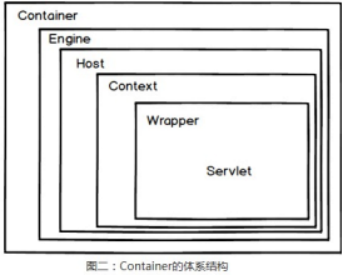
* 容器的组件关系
<?xml version='1.0' encoding='utf-8'?>
<Server port="8005" shutdown="SHUTDOWN">
<Service name="Catalina">
<Connector port="8080" protocol="HTTP/1.1" connectionTimeout="20000" redirectPort="8443" URIEncoding="UTF-8"/>
<Engine name="Catalina" defaultHost="localhost">
<Host name="localhost" appBase="webapps" unpackWARs="true" autoDeploy="true" >
<Context path="" docBase="WORKDIR" reloadable="true"/>
</Host>
</Engine>
</Service>
</Server>
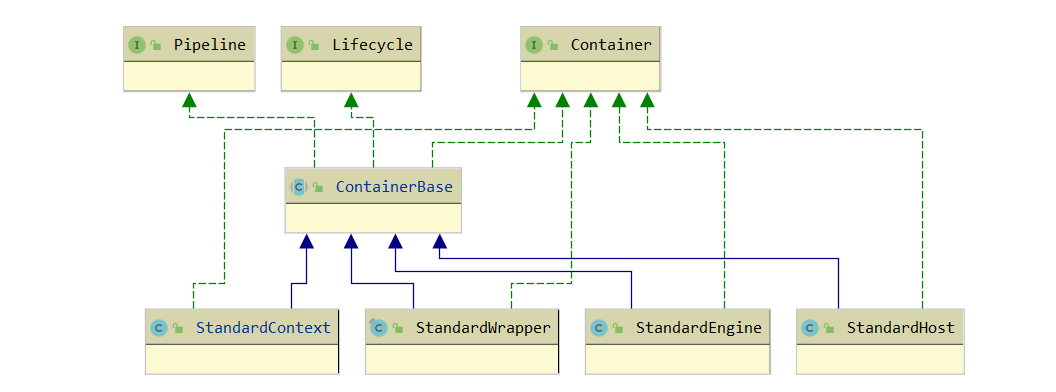
Container接口
public interface Container {
//基本信息
public String getInfo();
public String getName();
public void setName(String name);
//关联组件
public Loader getLoader();
public void setLoader(Loader loader);
public void setLogger(Logger logger);
public Manager getManager();
public void setManager(Manager manager);
public Cluster getCluster();
public void setCluster(Cluster cluster);
public ClassLoader getParentClassLoader();
public void setParentClassLoader(ClassLoader parent);
public Realm getRealm();
public void setRealm(Realm realm);
public DirContext getResources();
public void setResources(DirContext resources);
//Mappe相关
public void addMapper(Mapper mapper);
public void removeMapper(Mapper mapper);
public Mapper findMapper(String protocol);
public Mapper[] findMappers();
//子父容器相关
public Container getParent();
public void setParent(Container container);
public void addChild(Container child);
public Container findChild(String name);
public Container[] findChildren();
public void removeChild(Container child);
//核心方法
public void invoke(Request request, Response response) throws IOException, ServletException;
public Container map(Request request, boolean update);
//监听器
public void addContainerListener(ContainerListener listener);
public void addPropertyChangeListener(PropertyChangeListener listener);
public ContainerListener[] findContainerListeners();
public void removeContainerListener(ContainerListener listener);
public void removePropertyChangeListener(PropertyChangeListener listener);
//事件常量
public static final String ADD_CHILD_EVENT = "addChild";
public static final String ADD_MAPPER_EVENT = "addMapper";
public static final String ADD_VALVE_EVENT = "addValve";
public static final String REMOVE_CHILD_EVENT = "removeChild";
public static final String REMOVE_MAPPER_EVENT = "removeMapper";
public static final String REMOVE_VALVE_EVENT = "removeValve";
}
ContainerBase抽象类
此抽象父类基本实现接口的方法
* 提供了一些属性变量的公共功能,如Loader、Mapper、Child、Listener的添加和移除
- docBase应用目录上下文DirContext的设置:属于JNDI的标志接口,提供通过某些字符串就可以获取文件资源,例如war包对应的就是WARDirContext
lookup(Name name)就会返回一个org.apache.naming.resources.Resource类型的对象表示资源,可获取文件流或者自己数组
- Mapper请求的协议对应的处理
* 主要是提供了Pipeline与Valve相关的处理,基于Pipeline实现invoke方法
* 主要提供了Lifecycle接口的start方法和stop方法的实现
public abstract class ContainerBase implements Container, Lifecycle, Pipeline {
protected HashMap children = new HashMap();
protected Container parent = null;
protected ArrayList listeners = new ArrayList();
protected Loader loader = null;
protected ClassLoader parentClassLoader = null;
protected Logger logger = null;
protected Manager manager = null;
protected Cluster cluster = null;
protected Mapper mapper = null;
protected HashMap mappers = new HashMap();//与此url协议关联的Mapper表
protected String mapperClass = null;
protected String name = null;
protected Pipeline pipeline = new StandardPipeline(this);
protected Realm realm = null;
protected DirContext resources = null; //容器对应文档路径的上下文资源
protected static StringManager sm = StringManager.getManager(Constants.Package);
protected boolean started = false;
protected LifecycleSupport lifecycle = new LifecycleSupport(this);
protected PropertyChangeSupport support = new PropertyChangeSupport(this);
// ------------------------------------------------------------- Properties
//属性的setter和getter
public int get/setDebug/XXXX() {
//....
}
//设置容器对应文档路径的上下文资源,返回类型DirContext时一个基于JNDI实现的,可以查到一个目录下的文件和属性
public synchronized void setResources(DirContext resources) {
DirContext oldResources = this.resources;
if (oldResources == resources) return;
Hashtable env = new Hashtable();
if (getParent() != null) env.put(ProxyDirContext.HOST, getParent().getName());
env.put(ProxyDirContext.CONTEXT, getName()); //getName()为context对应的根目录
this.resources = new ProxyDirContext(env, resources);
support.firePropertyChange("resources", oldResources, this.resources);
}
//基于pipeline.invoke实现,责任链模式
public void invoke(Request request, Response response)
throws IOException, ServletException {
pipeline.invoke(request, response);
}
// ---------Lifecycle生命周期方法-------------------------
//start方法,主要去触发相关对象的start()方法
public synchronized void start() throws LifecycleException {
//触发事件
lifecycle.fireLifecycleEvent(BEFORE_START_EVENT, null);
addDefaultMapper(this.mapperClass);
started = true;
//触发内部关联组件的start()
if ((loader != null) && (loader instanceof Lifecycle))
((Lifecycle) loader).start();
if ((logger != null) && (logger instanceof Lifecycle))
((Lifecycle) logger).start();
if ((manager != null) && (manager instanceof Lifecycle))
((Lifecycle) manager).start();
if ((cluster != null) && (cluster instanceof Lifecycle))
((Lifecycle) cluster).start();
if ((realm != null) && (realm instanceof Lifecycle))
((Lifecycle) realm).start();
if ((resources != null) && (resources instanceof Lifecycle))
((Lifecycle) resources).start();
Mapper mappers[] = findMappers();
for (int i = 0; i < mappers.length; i++) {
if (mappers[i] instanceof Lifecycle)
((Lifecycle) mappers[i]).start();
}
////触发子容器的start()
Container children[] = findChildren();
for (int i = 0; i < children.length; i++) {
if (children[i] instanceof Lifecycle)
((Lifecycle) children[i]).start();
}
//触发pipeline的start()
if (pipeline instanceof Lifecycle)
((Lifecycle) pipeline).start();
//触发事件
lifecycle.fireLifecycleEvent(START_EVENT, null);
lifecycle.fireLifecycleEvent(AFTER_START_EVENT, null);
}
}
Pipeline与Valve
概述
管道包含该servlet容器(4种类型的容器)将要调用的任务。每一种每一个容器都有自己的Pipeline
一个阀表示一个具体的执行任务。在servlet容器的管道中, 有一个基础阀, 但是, 可以添加任意数量的阀。阀的数量指的是额外添加的阀数量,即, 不包括基础阀。
可以通过编辑Tomcat的配置文件(server.xrnl)来动态地添加阀。图5-2显示了一条管道及其阀。
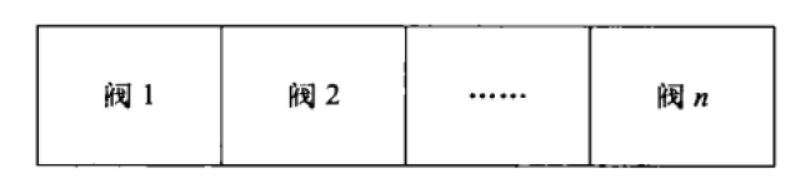
Pipeline
* Pipeline接口:
对了基于Valve关联对象的增删改查方法。分为普通Valve和最基础的Valve(用于获取下一层的容器)
核心方法invoke(Request request, Response response),用于执行管道上的Valve
public interface Pipeline {
//设置基础阀
public Valve getBasic();
public void setBasic(Valve valve);
public void addValve(Valve valve);
public Valve[] getValves();
public void removeValve(Valve valve);
//触发
public void invoke(Request request, Response response) throws IOException, ServletException;
}
I* 实现类SimplePipeline
- 基于Valve valves[]数组处理增删改查
如果添加进来Valve实现了Contained接口,说明是用于获取下一层的容器的基础的Valve,这就需要把Pileline所属的Container container对象传递过去给此基础Valve
- invoke方法:调用一个内部实现类对象ValveContext.invokeNext。这个方法可以执行当前下一个位置的Valve。
public class SimplePipeline implements Pipeline {
public SimplePipeline(Container container) {
setContainer(container);
}
protected Valve basic = null;
protected Container container = null;
protected Valve valves[] = new Valve[0];
public void setContainer(Container container) { this.container = container;}
public Valve getBasic() { return basic;}
public void setBasic(Valve valve) {
this.basic = valve;
((Contained) valve).setContainer(container);
}
public void addValve(Valve valve) {
if (valve instanceof Contained)//处理容器关系的Valve
((Contained) valve).setContainer(this.container);
synchronized (valves) {
Valve results[] = new Valve[valves.length +1];
System.arraycopy(valves, 0, results, 0, valves.length);
results[valves.length] = valve;
valves = results;
}
}
public Valve[] getValves() { return valves;}
public void removeValve(Valve valve) {}
public void invoke(Request request, Response response)
throws IOException, ServletException {
(new SimplePipelineValveContext()).invokeNext(request, response);
}
//责任链处理
protected class SimplePipelineValveContext implements ValveContext {
protected int stage = 0;
public String getInfo() {return null;}
public void invokeNext(Request request, Response response)throws IOException, ServletException {
int subscript = stage;
stage = stage + 1;
if (subscript < valves.length) {
valves[subscript].invoke(request, response, this);
}
else if ((subscript == valves.length) && (basic != null)) {
basic.invoke(request, response, this);
}
else {
throw new ServletException("No valve");
}
}
}
}
Valve
* Valve接口
只有一个主要方法invoke(Request request, Response response,ValveContext context)以处理请求和响应对象
需要传递多一个ValveContext 代表Valve链,可调用下一个Valve
public interface Valve {
public String getInfo();
public void invoke(Request request, Response response,ValveContext context)throws IOException, ServletException;
}
* 实现类(举例)
Container container用于调用当前容器对象的一些方法,一般处理子容器的获取
//自己实现一个有基础阀功能的Valve
public class SimpleContextValve implements Valve, Contained {
protected Container container;
public Container set/getContainer() { return container;}
public void invoke(Request request, Response response, ValveContext valveContext)
throws IOException, ServletException {
if (!(request.getRequest() instanceof HttpServletRequest) ||
!(response.getResponse() instanceof HttpServletResponse)) {
return; // NOTE - Not much else we can do generically
}
//调用容器提供的方法获取wrapper(servlet)
Context context = (Context) getContainer();
Wrapper wrapper = null;
try {
wrapper = (Wrapper) context.map(request, true);
}
catch (IllegalArgumentException e) {
//异常处理,如servlet找不到,包404
response.sendError(HttpServletResponse.SC_BAD_REQUEST/SC_NOT_FOUND, requestURI);
}
response.setContext(context);
//调用下个容器的invoke方法
wrapper.invoke(request, response);
}
}
Engine
概述
* 如果使用了Engine容器, 那么它总是处于容器层级的最顶层。
* 添加到Engine容器中的子容器通常是Host的实现或者Context的实现
还可以与一个服务实例(Service类)对象相关联,这是上层抽象,Service不是容器
* 默认情况下, Tomcat 会使用Engine容器的, 并且有一个Host容器作为其子容器。
Engine接口
public interface Engine extends Container {
//关联的子容器相关:Host和Context
public String getDefaultHost();
public void setDefaultHost(String defaultHost);
public void addDefaultContext(DefaultContext defaultContext);
public DefaultContext getDefaultContext();
public void importDefaultContext(Context context);
//集群HOST的JvmRouteId
public String getJvmRoute();
public void setJvmRoute(String jvmRouteId);
//服务实例
public Service getService();
public void setService(Service service);
}
StandardEngine
主要处理:
* 关联的子容器属性defaultHost、DefaultContext 变量的setter和getter
* 构造方法里设置了一个基础阀StandardEngineValve
* start方法只是简单的调用了基类的start方法
* 添加默认的mapper,即StandardEngineMapper
* invoke方法直接继承父类的,即会依次调用自己的Piple的所有任务
public void invoke(Request request, Response response) throws IOException, ServletException {
pipeline.invoke(request, response);
}
StandardEngineValve
主要作用:
* 校验下当前的请求:如HTTP/1.1的话必须包含key为"host"的请求头,否则报错
* 找到url匹配的Host,调用host的invoke处理请求
在基类保存的Mappers中找到当前请求的协议对应的Mapper对象,StandardEngine里默认设置了StandardEngineMapper作为HTTP协议的Mapper对象
final class StandardEngineValve extends ValveBase {
private static final String info = "org.apache.catalina.core.StandardEngineValve/1.0";
private static final StringManager sm = StringManager.getManager(Constants.Package);
public String getInfo() { return (info); }
// -------------------核心方法invoke--------------------------------------
public void invoke(Request request, Response response,ValveContext valveContext)
throws IOException, ServletException {
//只处理HttpServletRequest和HttpServletResponse
if (!(request.getRequest() instanceof HttpServletRequest) ||
!(response.getResponse() instanceof HttpServletResponse)) {
return; // NOTE - Not much else we can do generically
}
//HTTP/1.1的话必须包含key为"host"的请求头,否则错
HttpServletRequest hrequest = (HttpServletRequest) request;
if ("HTTP/1.1".equals(hrequest.getProtocol()) &&
(hrequest.getServerName() == null)) {
((HttpServletResponse) response.getResponse()).sendError(XX));
return;
}
//找到url匹配的Host
StandardEngine engine = (StandardEngine) getContainer();
//在基类保存的Mappers中找到当前请求的协议对应的Mapper对象,StandardEngine里默认设置了StandardEngineMapper作为HTTP协议的Mapper对象
//Mapper mapper = findMapper(request.getRequest().getProtocol());(mapper.map(request, update));
Host host = (Host) engine.map(request, true);
if (host == null) {
(HttpServletResponse) response.getResponse()).sendExx)
}
//调用host的invoke处理请求
host.invoke(request, response);
}
}
//StandardEngineMapper
public Container map(Request request, boolean update) {
//1、如果请求头host没有指定目标服务器名,则使用默认的Host名作为的request的ServerName
String server = request.getRequest().getServerName();
if (server == null) {
server = engine.getDefaultHost();
if (update) request.setServerName(server);
}
if (server == null) return (null);
server = server.toLowerCase();
//2、找到匹配server名的Host
Host host = (Host) engine.findChild(server);
//3、如果找不到,尝试使用HOST设置的别名来匹配
if (host == null) {
Container children[] = engine.findChildren();
for (int i = 0; i < children.length; i++) {
String aliases[] = ((Host) children[i]).findAliases();
for (int j = 0; j < aliases.length; j++) {
if (server.equals(aliases[j])) {
host = (Host) children[i];
break;
}
}
if (host != null) break;
}
}
// 4、使用默认HOST
if (host == null) {
host = (Host) engine.findChild(engine.getDefaultHost());
}
return (host);
}
Host
概述
* 如果你想在同一个Tomcat部署上运行多个Context容器的话, 你就需要使用Host容器。理论上, 当你只有一个Context实例时, 不需要使用Host实例。
但是在Tomcat的实际部署中, 总是会使用一个Host容器。
* 为什么必须要有一个Host 容器 在Tomcat 4和5的实际部署中, 若一个Context实例使用ContextConfig对象进行设置, 就 必须使用一个Host对象。
原因如下:使用ContextConfig对象需要知道应用程序web.xml文件的位置时必须有一个Host实例作为其父容器
Host接口
主要几部分:
- 当前Host的路径及名称
- 自动部署Context的标志
- 默认的Context设置
- 根据请求的URI匹配对应的Context方法,即map
public interface Host extends Container {
//容器的 根路径,它可以是 绝对路径、相对路径、或者URL
public String getAppBase();
public void setAppBase(String appBase);
//返回此容器表示的虚拟主机的规范、完全限定的名称
public String getName();
public void setName(String name);
//别名修改相关的时机
public static final String ADD_ALIAS_EVENT = "addAlias";
public static final String REMOVE_ALIAS_EVENT = "removeAlias";
//添加应该映射到同一主机的别名
public void addAlias(String alias);
public String[] findAliases();
public void removeAlias(String alias);
//自动部署标志,为true表示当前Host下的Context会被发现且自动部署
public boolean getAutoDeploy();
public void setAutoDeploy(boolean autoDeploy);
//DefaultContext相关
public void addDefaultContext(DefaultContext defaultContext);
public DefaultContext getDefaultContext();
public void importDefaultContext(Context context);
//根据请求的URI匹配对应的Context
public Context map(String uri);
}
StandardHost
主要实现如下
- 映射方法map:根据url返回对应的context,这个方法会被StandardHostValve的invoke使用StandardHostMapper中的map方法调用
- start方法:设置两个阀errorreportvalve和errordispatchervalve、调用通用的start方法
调用通用的start方法,主要调用mappers、children(Context)和pipeline的start
- 部署器的相关方法:委托为StandardHostDeployer去实现,例如
public void install(String contextPath, URL war) throws IOException {
deployer.install(contextPath, war);
}
public class StandardHost extends ContainerBase implements Deployer, Host {
// Host目录
private String appBase = ".";//代表主机的根目录,此目录下的子目录将自动作为APP应用程序部署,例如webapps
private static final String info = "org.apache.catalina.core.StandardHost/1.0";
//默认的类
private String configClass = "org.apache.catalina.startup.ContextConfig";
private String contextClass = "org.apache.catalina.core.StandardContext";
private DefaultContext defaultContext;
private String errorReportValveClass = "org.apache.catalina.valves.ErrorReportValve";
private String mapperClass = "org.apache.catalina.core.StandardHostMapper";
//部署相关
private boolean autoDeploy = true;
private Deployer deployer = new StandardHostDeployer(this);
private boolean deployXML = true;
private boolean liveDeploy = true;
//其他
private String[] aliases = new String[0];
private boolean unpackWARs = true;
private String workDir = null;
//==========================构造方法==========================
//设置基础阀
public StandardHost() {
super();
pipeline.setBasic(new StandardHostValve());
}
//==========================属性setter、getter方法==========================
public void get/setAppBase/AutoDeploy/ConfigClass/DefaultContext/ContextClass/...(String appBase) {
String oldAppBase = this.appBase;
this.appBase = appBase;
support.firePropertyChange("appBase", oldAppBase, this.appBase);
}
public void importDefaultContext(Context context) {
if( this.defaultContext != null )
this.defaultContext.importDefaultContext(context);
}
public void addChild(Container child) {
if (!(child instanceof Context)) {
throw new IllegalArgumentException
(sm.getString("standardHost.notContext"));
}
super.addChild(child);
}
//==========================map方法==========================
//根据url返回对应的context
public Context map(String uri) {
if (uri == null) return (null);
//对url从左往右进行一次匹配,最长匹配原则
Context context = null;
String mapuri = uri;
while (true) {
context = (Context) findChild(mapuri);
if (context != null)
break;
int slash = mapuri.lastIndexOf('/');
if (slash < 0)
break;
mapuri = mapuri.substring(0, slash);
}
// 选择默认的Context
if (context == null) {
context = (Context) findChild("");
}
// 返回null
if (context == null) {
return (null);
}
return (context);
}
//==========================start方法==========================
public synchronized void start() throws LifecycleException {
//设置两个阀errorreportvalve和errordispatchervalve
if ((errorReportValveClass != null)
&& (!errorReportValveClass.equals(""))) {
try {
Valve valve = (Valve) Class.forName(errorReportValveClass)
.newInstance();
addValve(valve);
} catch (Throwable t) {
}
}
addValve(new ErrorDispatcherValve());
//调用通用的start方法,主要调用mappers、children(Context)和pipeline的start
super.start();
}
//==========================部署器的相关方法==========================
//委托为StandardHostDeployer去实现
public void install(String contextPath, URL war) throws IOException {
deployer.install(contextPath, war);
}
public synchronized void install(URL config, URL war) throws IOException {
deployer.install(config, war);
}
public Context findDeployedApp(String contextPath) {
return (deployer.findDeployedApp(contextPath));
}
public String[] findDeployedApps() {
return (deployer.findDeployedApps());
}
public void remove(String contextPath) throws IOException {
deployer.remove(contextPath);
}
public void start(String contextPath) throws IOException {
deployer.start(contextPath);
}
public void stop(String contextPath) throws IOException {
deployer.stop(contextPath);
}
}
StandardHostValve
invoke主要作用:
- 借助StandardHost的map方法来找到url匹配的Context
是直接继承父类的map方法:在保存的Mappers中找到当前请求的协议对应的Mapper对象,StandardHost里默认设置了StandardHostMapper作为HTTP协议的Mapper对象
StandardHostMapper的map方法主要借助了StandardHost中map方法实现的:请求url从左到右匹配此Host里设置的Context对应的Path值
- 把当前的线程类加载器修改为Context的加载器,即WebappClassLoader
- 调用context.invoke处理请求
final class StandardHostValve extends ValveBase {
private static final String info = "org.apache.catalina.core.StandardHostValve/1.0";
private static final StringManager sm = StringManager.getManager(Constants.Package);
public String getInfo() {return (info); }
// --------------------------------------------------------- Public Methods/
public void invoke(Request request, Response response, ValveContext valveContext)
throws IOException, ServletException {
// Validate the request and response object types
if (!(request.getRequest() instanceof HttpServletRequest) ||
!(response.getResponse() instanceof HttpServletResponse)) {
return; // NOTE - Not much else we can do generically
}
//借助Host的map来找到匹配的Context
StandardHost host = (StandardHost) getContainer();
Context context = (Context) host.map(request, true);
if (context == null) {
(HttpServletResponse) response.getResponse()).sendError(XX);
return;
}
//把当前的线程类加载器修改为Context的加载器
Thread.currentThread().setContextClassLoader(context.getLoader().getClassLoader());
//会话处理
HttpServletRequest hreq = (HttpServletRequest) request.getRequest();
String sessionId = hreq.getRequestedSessionId();
if (sessionId != null) {
Manager manager = context.getManager();
if (manager != null) {
Session session = manager.findSession(sessionId);
if ((session != null) && session.isValid())
session.access();
}
}
//调用context.invoke处理请求
context.invoke(request, response);
}
}
//StandardHostMapper的map方法,有回调了StandardHos自己自定义的map(url)找到最终的Context
public Container map(Request request, boolean update) {
// Has this request already been mapped?
if (update && (request.getContext() != null))
return (request.getContext());
// Perform mapping on our request URI
String uri = ((HttpRequest) request).getDecodedRequestURI();
Context context = host.map(uri);
// Update the request (if requested) and return the selected Context
if (update) {
request.setContext(context);
if (context != null)
((HttpRequest) request).setContextPath(context.getPath());
else
((HttpRequest) request).setContextPath(null);
}
return (context);
}
HOST默认配置
<Host name="localhost" appBase="webapps"
unpackWARs="true" autoDeploy="true"
xmlValidation="false" xmlNamespaceAware="false">
</Host>
name:代表主机的域名
appBase :代表主机的根目录,此目录下的子目录将自动作为APP应用程序部署,war文件将自动解压缩并作为APP应用程序部署。 默认值为tomcat下的webapps目录。 如果您不想访问默认根目录,请更改此处。 同样,如果配置目录下的APP应用程序是默认APP应用程序,请在此目录下添加根目录文件夹。
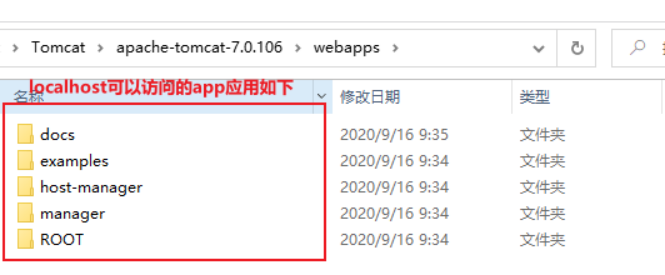
Context
概述
* 一个Context表示了一个Web应用程序application运行在特定的虚拟主机中。
* 什么是Web应用程序呢?在Sun公司发布的Java Servlet规范中,对Web应用程序做出了如下的定义:
一个Web应用程序是由一组Servlet、HTML页面、类,以及其他的资源组成的运行在Web服务器上的完整的应用程序。
它可以在多个供应商提供的实现了Servlet规范的Web容器中运行”。一个Host可以包含多个Context(代表Web应用程序),每一个Context都有一个唯一的路径。
用户通常不需要创建自定义的Context,因为Tomcat给出的Context接口的实现(类StandardContext)提供了重要的附加功能。
* Context 代表 Servlet 的 Context,它具备了 Servlet 运行的基本环境,理论上只要有 Context 就能运行 Servlet 了。简单的 Tomcat 可以没有 Engine 和 Host。
Context 最重要的功能就是管理它里面的 Servlet 实例,Servlet 实例在 Context 中是以 Wrapper 出现的,还有一点就是 Context 如何才能找到正确的 Servlet 来执行它呢?
Tomcat5 以前是通过一个 Mapper 类来管理的,Tomcat5 以后这个功能被移到了 request 中
* 不同Web应用程序的类加载是相互隔离的
* Context文件描述符
<Context>
<WatchedResource>WEB-INF/web.xml</WatchedResource>
<Manager pathname="" />
<Valve className="org.apache.catalina.valves.CometConnectionManagerValve" />
。。。
</Context>
Context接口
public interface Context extends Container {
public static final String RELOAD_EVENT = "reload";//生命周期事件
//一些Application Context的标识
public void get/setAvailable(boolean available);//是否可用
public void get/setCharsetMapper(CharsetMapper mapper);
public void get/setConfigured(boolean configured);//是否正确配置了
public void get/setCookies(boolean cookies);//使用cookies作为会话id
public void get/setCrossContext(boolean crossContext);//是否允许传递contexts
public void get/setDisplayName(String displayName);//展示名称
public void get/setDistributable(boolean distributable);//是否为分布式
public void get/setReloadable(boolean reloadable);//是否支持组件的重新加载
public void get/setOverride(boolean override);
public void get/setPrivileged(boolean privileged);
//application初始化监听器
public void get/setApplicationListeners(Object listeners[]);
public void addApplicationListener(String listener);
//参数相关
public void addApplicationParameter(ApplicationParameter parameter);
public void addEnvironment(ContextEnvironment environment);
public void addParameter(String name, String value);
//安全相关
public LoginConfig get/setLoginConfig(LoginConfig config);//登录配置
public void setPublicId(String publicId);
public void addConstraint(SecurityConstraint constraint);//安全对象
public void addRoleMapping(String role, String link);
public void addSecurityRole(String role);
//Wrapper相关
public void addWrapperListener(String listener);//监听Wrapper
public void addInstanceListener(String listener);//监听Wrapper
public void addServletMapping(String pattern, String name);
public Wrapper createWrapper();//创建或返回一个新的Wrapper实例
public void addWrapperLifecycle(String listener);
public void setWrapperClass(String wrapperClass);//指定servlet的包装类
//Resources相
public void setNamingResources(NamingResources namingResources);//JNDI Resources配置
public void addResource(ContextResource resource);
public void addResourceEnvRef(String name, String type);
public void addResourceLink(ContextResourceLink resourceLink);//安全
//其他
public void setPath(String path);//application路径
public ServletContext getServletContext();//本对象的facade
public void setSessionTimeout(int timeout);
public void addEjb/LocalEjb(ContextEjb ejb);//添加关联的EJB resource
public void addErrorPage(ErrorPage errorPage);
public void addWelcomeFile(String name);
public void addFilterDef(FilterDef filterDef);
public void addFilterMap(FilterMap filterMap);
public void addTaglib(String uri, String location);//对指定url添加JSP tag
public void get/setDocBase(String docBase);//文档路径
public void addMimeMapping(String extension, String mimeType);
//对应的find/removeXXX(XXX);
//..
}
StandardContext
概述
* 若要是start()方法正确执行,则会设置available为true, 表明StandardContext对象配置正确。在Tomcat的实际部署中, 配置StandardContext对象需要一系列操作。
正确设置后, StandardContext对象才能读取并解析默认的web.xml文件, 该文件位于%CATALINA_ HOME%/conf目录下, 该文件的内容会应用到所有部署到Tomcat中的应用程序中。
这也保证了StandardContext实例可以处理应用程序级的web.xml文件。此外, 还会配置验证器阀和许可阀。
* StandardContext类的configured属性是一个布尔变量, 表明StandardContext实例是否正确设置
StandardContext类使用一个事件监听器作为其配置器。当调用StandardContext实例的start()方法时, 其中要做的一件事是, 触发一个生命周期事件。
该事件调用监昕器, 对StandardContext实例进行配置。若配置成功, 监听器会将configured属性设置为true。
否则, StandardContext实例会拒绝启动, 也就无法为HTTP请求提供服务。
* 设置Context的名称和文档根目录
- context.setPath("/app1");//Context对应的名称,
- getName context.setDocBase("app1");//Context对应文件系统下的根目录目录(父目录为HOST的appBase指定的)
* 使用ApplicationContext封装当前this以实现
主要流程实现
* start()方法需要完成以下工作
- 触发BEFORE_START事件
- 将availability属性设置为false
- 将configured属性设置为false
- 配置资源
如果context对应的目录上下文DirContext不存在,就新建一个WARDirContext或者FileDirContext
- 为空就设置载入器WebappLoader
- 设置Session 管理器
- 初始化字符集映射器
- 创建工作目录
默认使用hostName、engineName、hostWorkDir拼接为一个目录在环境变量catalina.base指定目录下创建一个工作目录
设置到ApplicationContext context中setAttribute(Globals.WORK_DIR_ATTR, dir);
其作用是缓存编译后的jsp对应的class文件
- 添加一个NamingContextListener
- 绑定线程
先Thread.currentThread().setContextClassLoader (getLoader().getClassLoader());
再把getLoader().getClassLoader()作为key,value为当前DirContext(当前应用目录的上下文)插入到DirContextURLStreamHandler的clBindings表中,
这样通过URL对象(jndi协议时)可以获取到这个当前DirContext作为目标资源,URL对象相关的内容见其他文档(D:\Notes\Java\源码\URL)
同样当前线程作为key,当前DirContext作为value绑定到JNDI ContextBindings,让让其他地方get到
- 启动与该Context容器相关联的组件,调用start方法
Loader、cluster、DirContext 、resources、Mapper、子容器children、管道对象pipeline、
- 触发START事件, 在这里监听器( ContextConfig实例), 若设置成功, ContextConflg实例会将configured变量设置为true
- 启动Session管理器
- 实例化监听器、过滤器
- 检查configured属性的值,若为true,则调用postWelcomePages()方法,载人那些需要在启动时loadOnStartup就载人的子容器,即调用Wrapper实例的load方法,
将availability属性设置为true。若configured变量为false, 则调用stop()方法
- 触发AFTER_START事件
* invoke()方法
在Tomcat 4中, StandardConte类的invoke方法由与其相关联的连接器调用, 或者当StandardContext实例是Host容器的一个子容器时, 由Host实例的invoke()方法调用。 StandardContext 类的invoke()方法首先会检查应用程序是否正在重载过程中, 若是, 则等待应用程序重载完成。 然后, 立调用其父类ConatinerBase的invoke方法。
* 在Webapploader类中有/一个后台线程不断循环的监听classLoader.modified(),
如果返回true,就新起线程调用容器的reload()方法,即如下的操作:stop一些组件、然后再重启start一些组件
public class StandardContext extends ContainerBase implements Context {
public StandardContext() {
super();
pipeline.setBasic(new StandardContextValve());
namingResources.setContainer(this);
}
// 监听器,生命周期
private String applicationListeners[] = new String[0];
private Object applicationListenersObjects[] = new Object[0];
private String instanceListeners[] = new String[0];//作用于创建新的wrapper,createWrapper()
private String wrapperLifecycles[] = new String[0];
private String wrapperListeners[] = new String[0];
//过滤器
private HashMap filterConfigs = new HashMap();//keyed by filter name
private HashMap filterDefs = new HashMap();
private FilterMap filterMaps[] = new FilterMap[0];
//对应资源
private ApplicationContext context = null;
private String docBase = null;//此Context对应项目在主机存放的路径
private String workDir = null;
private NamingContextListener namingContextListener = null;
private NamingResources namingResources = new NamingResources();
private String namingContextName = null;
//映射
private CharsetMapper charsetMapper = null; //默认为charsetMapperClass指定的类
private String charsetMapperClass = "org.apache.catalina.util.CharsetMapper";
private String mapperClass = "org.apache.catalina.core.StandardContextMapper";
private HashMap mimeMappings = new HashMap();
private String wrapperClass = "org.apache.catalina.core.StandardWrapper";
private HashMap servletMappings = new HashMap();
private HashMap taglibs = new HashMap();//jsp标签库
//标识
private boolean available = false;
private boolean configured = false;
private boolean cookies = true;
private boolean crossContext = false;//其他web应用是否可以通过ServletContext.getContext()获取到这个context
private boolean distributable = false;
private boolean paused = false;
private boolean reloadable = false;
private boolean override = false;
private boolean privileged = false;
private boolean replaceWelcomeFiles = false;
private boolean swallowOutput = false;//重定向system.out and system.err
private boolean useNaming = true;
private boolean filesystemBased = false;
protected boolean cachingAllowed = true;
//其他
private ApplicationParameter applicationParameters[] = new ApplicationParameter[0];
private HashMap parameters = new HashMap();
private String displayName = null;
private static final String info = "org.apache.catalina.core.StandardContext/1.0";
private SecurityConstraint constraints[] = new SecurityConstraint[0];
private LoginConfig loginConfig = null;
private HashMap roleMappings = new HashMap();
private String securityRoles[] = new String[0];
private String publicId = null; //由于判断开发版本version 2.2
private int sessionTimeout = 30;
private String welcomeFiles[] = new String[0];
private HashMap exceptionPages = new HashMap();
private HashMap statusPages = new HashMap();
//单纯的getter/setter
public void setCachingAllowed/UseNaming/ApplicationListener/available/DocBase/Info/WrapperClass
/ApplicationListener/ApplicationParamete(boolean cachingAllowed) {
this.cachingAllowed = cachingAllowed;
}
//修改后需要触发事件
public void setAvailable/CharsetMapper/Configured/Cookies/CrossContext/DisplayName/Distributable
/loginConfig/NamingResources/PublicId/Privileged/Reloadable/Override/ReplaceWelcomeFiles
/SessionTimeout/SwallowOutput/CharsetMapperClass/MapperClass(boolean available) {
boolean oldAvailable = this.available;
this.available = available;
support.firePropertyChange("available",
new Boolean(oldAvailable),
new Boolean(this.available));
}
//Path对于Name
public String getPath() { return (getName()); }
//使用ApplicationContext封装当前this
public ServletContext getServletContext() {
if (context == null)
context = new ApplicationContext(getBasePath(), this);
return (context);
}
//设置当前context对于的目录上下文,配置中指定设置或者start()中
//通过父类的super.setResources(resources);进行设置,最终都是DirContext,是一种目录上下文
public synchronized void setResources(DirContext resources) {
if (resources instanceof BaseDirContext) {
((BaseDirContext) resources).setCached(isCachingAllowed());
}
if (resources instanceof FileDirContext) {
filesystemBased = true;
}
super.setResources(resources);
if (started)
postResources(); // As a servlet context attribute
}
// getResources()优先自己的resources,否则返回父类的
private void postResources() {
getServletContext().setAttribute(Globals.RESOURCES_ATTR, getResources());
}
//设置工作目录
public void setWorkDir(String workDir) {
this.workDir = workDir;
if (started)
postWorkDirectory();
}
//生成正确的工作目录
private void postWorkDirectory() {
String workDir = getWorkDir();
if (workDir == null) {
// Retrieve our parent (normally a host) name
String hostName = null;
String engineName = null;
String hostWorkDir = null;
Container parentHost = getParent();
if (parentHost != null) {
hostName = parentHost.getName();
if (parentHost instanceof StandardHost) {
hostWorkDir = ((StandardHost)parentHost).getWorkDir();
}
Container parentEngine = parentHost.getParent();
if (parentEngine != null) {
engineName = parentEngine.getName();
}
}
if ((hostName == null) || (hostName.length() < 1))
hostName = "_";
if ((engineName == null) || (engineName.length() < 1))
engineName = "_";
String temp = getPath();//如context.setPath("/myApp");
if (temp.startsWith("/"))
temp = temp.substring(1);
temp = temp.replace('/', '_');
temp = temp.replace('\\', '_');
if (temp.length() < 1)
temp = "_";
if (hostWorkDir != null ) {
workDir = hostWorkDir + File.separator + temp;
} else {
workDir = "work" + File.separator + engineName +
File.separator + hostName + File.separator + temp;
}
setWorkDir(workDir);
}
//创建对应的work目录
File dir = new File(workDir);
if (!dir.isAbsolute()) {
File catalinaHome = new File(System.getProperty("catalina.base"));
String catalinaHomePath = null;
try {
catalinaHomePath = catalinaHome.getCanonicalPath();
dir = new File(catalinaHomePath, workDir);
} catch (IOException e) {
}
}
dir.mkdirs();
//设置属性
getServletContext().setAttribute(Globals.WORK_DIR_ATTR, dir);
if (getServletContext() instanceof ApplicationContext)
((ApplicationContext) getServletContext()).setAttributeReadOnly
(Globals.WORK_DIR_ATTR);
}
//namingResources
public void addEjb/Environment/ResourceParams/LocalEjb/Resource/ResourceEnvRef/ResourceLink(ContextEjb ejb) {
namingResources.addEjb(ejb);
fireContainerEvent("addEjb", ejb.getName());
}
protected File engineBase() {
return (new File(System.getProperty("catalina.base")));
}
//======================创建Wrapper对象,并对此对象设置监听器==============================
public Wrapper createWrapper() {
Wrapper wrapper = new StandardWrapper();
//为每个新建的Wrapper添加instanceListeners中所有实例相关的事件监听器
//和wrapperLifecycles中所有生命周期相关的监听器
//和wrapperListeners中的所有容器相关的监听器
synchronized (instanceListeners) {
for (int i = 0; i < instanceListeners.length; i++) {
try {
Class clazz = Class.forName(instanceListeners[i]);
InstanceListener listener =(InstanceListener) clazz.newInstance();
wrapper.addInstanceListener(listener);
} catch (Throwable t) {
log("createWrapper", t);
return (null);
}
}
}
synchronized (wrapperLifecycles) {
for (int i = 0; i < wrapperLifecycles.length; i++) {
try {
Class clazz = Class.forName(wrapperLifecycles[i]);
LifecycleListener listener =(LifecycleListener) clazz.newInstance();
if (wrapper instanceof Lifecycle)
((Lifecycle) wrapper).addLifecycleListener(listener);
} catch (Throwable t) {
log("createWrapper", t);
return (null);
}
}
}
synchronized (wrapperListeners) {
for (int i = 0; i < wrapperListeners.length; i++) {
try {
Class clazz = Class.forName(wrapperListeners[i]);
ContainerListener listener =
(ContainerListener) clazz.newInstance();
wrapper.addContainerListener(listener);
} catch (Throwable t) {
log("createWrapper", t);
return (null);
}
}
}
return (wrapper);
}
// ==============================invoke方法=================================
//判断Paused状态,再调用父类的super.invoke
public void invoke(Request request, Response response)throws IOException, ServletException {
// Wait if we are reloading
while (getPaused()) {
try {
Thread.sleep(1000);
} catch (InterruptedException e) {
;
}
}
// Normal request processing
if (swallowOutput) {
try {
SystemLogHandler.startCapture();
super.invoke(request, response);
} finally {
String log = SystemLogHandler.stopCapture();
if (log != null && log.length() > 0) {
log(log);
}
}
} else {
super.invoke(request, response);
}
}
// ====================容器的start、stop、reload==================================
//启动器职代会调用此start()
public synchronized void start() throws LifecycleException {
if (started) throw new LifecycleException();
//初始before_start事件
lifecycle.fireLifecycleEvent(BEFORE_START_EVENT, null);
setAvailable(false);
setConfigured(false);
boolean ok = true;
//如果context对应的目录上下文DirContext不存在,则新建一个
if (getResources() == null) {
try {
if ((docBase != null) && (docBase.endsWith(".war")))
setResources(new WARDirContext());
else
setResources(new FileDirContext());
} catch (IllegalArgumentException e) {
log("Error initializing resources: " + e.getMessage());
ok = false;
}
}
if (ok && (resources instanceof ProxyDirContext)) {
DirContext dirContext =
((ProxyDirContext) resources).getDirContext();
if ((dirContext != null)
&& (dirContext instanceof BaseDirContext)) {
((BaseDirContext) dirContext).setDocBase(getBasePath());
((BaseDirContext) dirContext).allocate();
}
}
//类加载器为空时,就需要创建WebappLoader加载器辅助类,此时通过当前context是否有权限会指定一个父加载器
if (getLoader() == null) {
if (getPrivileged()) {
setLoader(new WebappLoader(this.getClass().getClassLoader()));
} else {
setLoader(new WebappLoader(getParentClassLoader()));
}
}
//会话管理器的设置
if (getManager() == null) {
setManager(new StandardManager());
}
//获取字符编码
getCharsetMapper();
//生成正确的工作work目录
postWorkDirectory();
// 通过变量catalina.useNaming设置下useNaming值
String useNamingProperty = System.getProperty("catalina.useNaming");
if ((useNamingProperty != null)
&& (useNamingProperty.equals("false"))) {
useNaming = false;
}
if (ok && isUseNaming()) {
if (namingContextListener == null) {
namingContextListener = new NamingContextListener();
namingContextListener.setDebug(getDebug());
namingContextListener.setName(getNamingContextName());//conetxt的全路径
addLifecycleListener(namingContextListener);
}
}
//JNDI绑定线程
//会把getLoader().getClassLoader()作为key,value为当前DirContext(当前应用目录的上下文)插入到DirContextURLStreamHandler的clBindings表中
//这样通过URL(jndi协议时)可以获取到这个当前DirContext作为目标资源
ClassLoader oldCCL = bindThread();
if (ok) {
try {
//生成默认的Mapper实例
addDefaultMapper(this.mapperClass);
started = true;
//调用相关组件的start方法
// 顺序为loader、logger、cluster、realm、resources、mappers、子容器、pipeline
if ((loader != null) && (loader instanceof Lifecycle))
((Lifecycle) loader).start();
if ((logger != null) && (logger instanceof Lifecycle))
((Lifecycle) logger).start();
// Unbinding thread
unbindThread(oldCCL);
// Binding thread
oldCCL = bindThread();
if ((cluster != null) && (cluster instanceof Lifecycle))
((Lifecycle) cluster).start();
if ((realm != null) && (realm instanceof Lifecycle))
((Lifecycle) realm).start();
if ((resources != null) && (resources instanceof Lifecycle))
((Lifecycle) resources).start();
Mapper mappers[] = findMappers();
for (int i = 0; i < mappers.length; i++) {
if (mappers[i] instanceof Lifecycle)
((Lifecycle) mappers[i]).start();
}
Container children[] = findChildren();
for (int i = 0; i < children.length; i++) {
if (children[i] instanceof Lifecycle)
((Lifecycle) children[i]).start();
}
if (pipeline instanceof Lifecycle)
((Lifecycle) pipeline).start();
// 触发start事件,使得ContextConfig监听器开始进行配置处理
lifecycle.fireLifecycleEvent(START_EVENT, null);
//调用manager组件的start方法
if ((manager != null) && (manager instanceof Lifecycle))
((Lifecycle) manager).start();
} finally {
// Unbinding thread
unbindThread(oldCCL);
}
}
if (!getConfigured())
ok = false;
// 做好目录上下文准备好的标志
if (ok)
getServletContext().setAttribute(Globals.RESOURCES_ATTR, getResources());
// Binding thread
oldCCL = bindThread();
//保存欢迎页面属性
if (ok) {
postWelcomeFiles(); //getServletContext().setAttribute("org.apache.catalina.WELCOME_FILES", welcomeFiles);
}
//实力化applicationListeners里的监听对象,并调用其初始化方法
if (ok) {
if (!listenerStart())
ok = false;
}
//把所有的FilterDef封装为ApplicationFilterConfig,使用key为过滤器名称,put进去filterConfigs
if (ok) {
if (!filterStart())
ok = false;
}
//TreeMap对所有children进行排序,再一一加载wrapper.load()
if (ok)
loadOnStartup(findChildren());
// Unbinding thread
unbindThread(oldCCL);
//设置当前context的可用状态
if (ok) {
setAvailable(true);
} else {
try {
stop();
} catch (Throwable t) {
log(sm.getString("standardContext.startCleanup"), t);
}
setAvailable(false);
}
//触发启动成功后AFTER_START_EVENT事件
lifecycle.fireLifecycleEvent(AFTER_START_EVENT, null);
}
//stop相关的组件和触发相关的触发器,其stop的顺序不是和start相反的
public synchronized void stop() throws LifecycleException {
if (!started)
throw new LifecycleException();
// Notify our interested LifecycleListeners
lifecycle.fireLifecycleEvent(BEFORE_STOP_EVENT, null);
// Mark this application as unavailable while we shut down
setAvailable(false);
// Binding thread
ClassLoader oldCCL = bindThread();
// Stop our filters
filterStop();
// Finalize our character set mapper
setCharsetMapper(null);
if ((manager != null) && (manager instanceof Lifecycle)) {
((Lifecycle) manager).stop();
}
// Notify our interested LifecycleListeners
lifecycle.fireLifecycleEvent(STOP_EVENT, null);
started = false;
try {
// Stop the Valves in our pipeline (including the basic), if any
if (pipeline instanceof Lifecycle) {
((Lifecycle) pipeline).stop();
}
// Stop our child containers, if any
Container children[] = findChildren();
for (int i = 0; i < children.length; i++) {
if (children[i] instanceof Lifecycle)
((Lifecycle) children[i]).stop();
}
// Stop our Mappers, if any
Mapper mappers[] = findMappers();
for (int i = 0; i < mappers.length; i++) {
if (mappers[(mappers.length-1)-i] instanceof Lifecycle)
((Lifecycle) mappers[(mappers.length-1)-i]).stop();
}
// Stop our application listeners
listenerStop();
// Stop our subordinate components, if any
if (resources != null) {
if (resources instanceof Lifecycle) {
((Lifecycle) resources).stop();
} else if (resources instanceof ProxyDirContext) {
DirContext dirContext =
((ProxyDirContext) resources).getDirContext();
if (dirContext != null) {
if (debug >= 1) {
log("Releasing document base " + docBase);
}
if (dirContext instanceof BaseDirContext) {
((BaseDirContext) dirContext).release();
if ((dirContext instanceof WARDirContext)
|| (dirContext instanceof FileDirContext)) {
resources = null;
}
} else {
log("Cannot release " + resources);
}
}
}
}
if ((realm != null) && (realm instanceof Lifecycle)) {
((Lifecycle) realm).stop();
}
if ((cluster != null) && (cluster instanceof Lifecycle)) {
((Lifecycle) cluster).stop();
}
if ((logger != null) && (logger instanceof Lifecycle)) {
((Lifecycle) logger).stop();
}
if ((loader != null) && (loader instanceof Lifecycle)) {
((Lifecycle) loader).stop();
}
} finally {
// Unbinding thread
unbindThread(oldCCL);
}
// Reset application context
context = null;
// Notify our interested LifecycleListeners
lifecycle.fireLifecycleEvent(AFTER_STOP_EVENT, null);
if (debug >= 1)
log("Stopping complete");
}
private ClassLoader bindThread() {
ClassLoader oldContextClassLoader =
Thread.currentThread().getContextClassLoader();
if (getResources() == null)
return oldContextClassLoader;
Thread.currentThread().setContextClassLoader
(getLoader().getClassLoader());
//把当前线程加载器和目录上下文绑定
DirContextURLStreamHandler.bind(getResources());
if (isUseNaming()) {
try {
ContextBindings.bindThread(this, this);
} catch (NamingException e) {
// Silent catch, as this is a normal case during the early
// startup stages
}
}
return oldContextClassLoader;
}
private void unbindThread(ClassLoader oldContextClassLoader) {
Thread.currentThread().setContextClassLoader(oldContextClassLoader);
oldContextClassLoader = null;
if (isUseNaming()) {
ContextBindings.unbindThread(this, this);
}
DirContextURLStreamHandler.unbind();
}
/**
* Get base path.
*/
private String getBasePath() {
String docBase = null;
Container container = this;
while (container != null) {
if (container instanceof Host)
break;
container = container.getParent();
}
if (container == null) {
docBase = (new File(engineBase(), getDocBase())).getPath();
} else {
File file = new File(getDocBase());
if (!file.isAbsolute()) {
// Use the "appBase" property of this container
String appBase = ((Host) container).getAppBase();
file = new File(appBase);
if (!file.isAbsolute())
file = new File(engineBase(), appBase);
docBase = (new File(file, getDocBase())).getPath();
} else {
docBase = file.getPath();
}
}
return docBase;
}
//获取从Engine到Context的全目录路径
private String getNamingContextName() {
if (namingContextName == null) {
Container parent = getParent();
if (parent == null) {
namingContextName = getName();
} else {
Stack stk = new Stack();
StringBuffer buff = new StringBuffer();
while (parent != null) {
stk.push(parent.getName());
parent = parent.getParent();
}
while (!stk.empty()) {
buff.append("/" + stk.pop());
}
buff.append(getName());
namingContextName = buff.toString();
}
}
return namingContextName;
}
//stop一下午组件,然后重新start一些组件
public synchronized void reload() {
// Validate our current component state
if (!started)
throw new IllegalStateException
(sm.getString("containerBase.notStarted", logName()));
// Make sure reloading is enabled
// if (!reloadable)
// throw new IllegalStateException
// (sm.getString("standardContext.notReloadable"));
log(sm.getString("standardContext.reloadingStarted"));
// Stop accepting requests temporarily
setPaused(true);
// Binding thread
ClassLoader oldCCL = bindThread();
// Shut down our session manager
if ((manager != null) && (manager instanceof Lifecycle)) {
try {
((Lifecycle) manager).stop();
} catch (LifecycleException e) {
log(sm.getString("standardContext.stoppingManager"), e);
}
}
// Shut down the current version of all active servlets
Container children[] = findChildren();
for (int i = 0; i < children.length; i++) {
Wrapper wrapper = (Wrapper) children[i];
if (wrapper instanceof Lifecycle) {
try {
((Lifecycle) wrapper).stop();
} catch (LifecycleException e) {
log(sm.getString("standardContext.stoppingWrapper",
wrapper.getName()),
e);
}
}
}
// Shut down application event listeners
listenerStop();
// Clear all application-originated servlet context attributes
if (context != null)
context.clearAttributes();
// Shut down filters
filterStop();
if (isUseNaming()) {
// Start
namingContextListener.lifecycleEvent
(new LifecycleEvent(this, Lifecycle.STOP_EVENT));
}
// Binding thread
unbindThread(oldCCL);
// Shut down our application class loader
if ((loader != null) && (loader instanceof Lifecycle)) {
try {
((Lifecycle) loader).stop();
} catch (LifecycleException e) {
log(sm.getString("standardContext.stoppingLoader"), e);
}
}
// Binding thread
oldCCL = bindThread();
// Restart our application class loader
if ((loader != null) && (loader instanceof Lifecycle)) {
try {
((Lifecycle) loader).start();
} catch (LifecycleException e) {
log(sm.getString("standardContext.startingLoader"), e);
}
}
// Binding thread
unbindThread(oldCCL);
// Create and register the associated naming context, if internal
// naming is used
boolean ok = true;
if (isUseNaming()) {
// Start
namingContextListener.lifecycleEvent
(new LifecycleEvent(this, Lifecycle.START_EVENT));
}
// Binding thread
oldCCL = bindThread();
// Restart our application event listeners and filters
if (ok) {
if (!listenerStart()) {
log(sm.getString("standardContext.listenerStartFailed"));
ok = false;
}
}
if (ok) {
if (!filterStart()) {
log(sm.getString("standardContext.filterStartFailed"));
ok = false;
}
}
// Restore the "Welcome Files" and "Resources" context attributes
postResources();
postWelcomeFiles();
// Restart our currently defined servlets
for (int i = 0; i < children.length; i++) {
if (!ok)
break;
Wrapper wrapper = (Wrapper) children[i];
if (wrapper instanceof Lifecycle) {
try {
((Lifecycle) wrapper).start();
} catch (LifecycleException e) {
log(sm.getString("standardContext.startingWrapper",
wrapper.getName()),
e);
ok = false;
}
}
}
// Reinitialize all load on startup servlets
loadOnStartup(children);
// Restart our session manager (AFTER naming context recreated/bound)
if ((manager != null) && (manager instanceof Lifecycle)) {
try {
((Lifecycle) manager).start();
} catch (LifecycleException e) {
log(sm.getString("standardContext.startingManager"), e);
}
}
// Unbinding thread
unbindThread(oldCCL);
// Start accepting requests again
if (ok) {
log(sm.getString("standardContext.reloadingCompleted"));
} else {
setAvailable(false);
log(sm.getString("standardContext.reloadingFailed"));
}
setPaused(false);
// Notify our interested LifecycleListeners
lifecycle.fireLifecycleEvent(Context.RELOAD_EVENT, null);
}
//把所有的FilterDef封装为ApplicationFilterConfig,使用key为过滤器名称,put进去filterConfigs
public boolean filterStart() {}
//调用filterConfigs中所有ApplicationFilterConfi的release();
public boolean filterStop() { }
//实力化applicationListeners里的监听对象,并调用其初始化方法
public boolean listenerStart() {}
///置空applicationListeners里的监听对象,并调用其Destroyed方法
public boolean listenerStop() {}
//TreeMap对所有children进行排序,再一一加载wrapper.load()
public void loadOnStartup(Container children[]) { }
}
NamingResources JNDI
概述
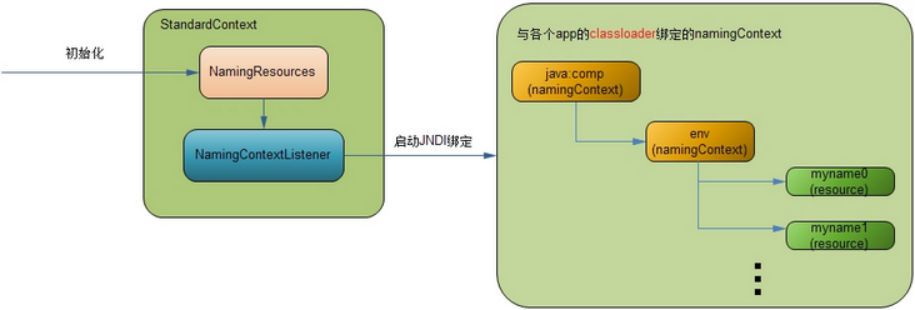
* JNDI体系分为三个部分;
- 在tomcat架构分析 (容器类)中介绍了StandardContext类,它是每个app的一个逻辑封装。当tomcat初始化时,将根据配置文件,对StandardContext中的NamingResources对象进行
赋值,同时,将实例化一个NamingContextListener对象作为这个context作用域内的事件监听器,它会响应一些例如系统启动,系统关闭等事件,作出相应的操作;
- 初始化完成后,tomcat启动,完成启动逻辑,抛出一个系统启动event,由那个NamingContextListener捕获,进行处理,将初始化时的NamingResources对象中的数据,
绑定到相应的JNDI对象树(namingContext)上,即java:comp/env分支,然后将这个根namingContext与这个app的classloader进行绑定,这样每个app只有在自己的JNDI对象树上调用,
互不影响;
- 每个app中的类都由自己app的classloader加载,如果需要用到JNDI绑定对象,也是从自己classloader对应的JNDI对象树上获取资源对象
各个Resource对象则是JNDI对象树上的叶子节点,类似文件系统的具体文件,通过NamingContext对象将整个JNDI对象树组织起来,每个Resource对象才是真正存储数据的地方。
这里需要说明的是,在后面会经常涉及到两类context,一个是作为tomcat内部实现逻辑的容器StandardContext;一个是作为JNDI内部分支对象NamingContext;它们实现不同接口,互相没有任何关系,不要混淆。 开始看看每个部分详细情况吧。
初始化NamingResources
StandardContext默认会创建,然后再解析配置文件时,会解析ResourceWeb ServiceEJB对象等,这里就是拿数据库连接的Resource对象举例。 Resource会被封装为ContextResource,
然后添加进NamingResources对应的Map中
先看看/conf/server.xml 配置
<Server port="8005">
<Service>
<Engine>
<Host>
<Context>
<Resource
name="jdbc/mysql"
type="javax.sql.DataSource"
username="root"
password="root"
driverClassName="com.mysql.jdbc.Driver"
maxIdle="200"
maxWait="5000"
url="……"
maxActive="100"/>
</Context>
</Host>
</Engine>
</Service>
……
</Server>
* Context标签使用ContextResource进行封装
上面例子中Resource节点配置的所有属性会以键值对的方式存入ContextResource的一个HashMap对象中,这一步只是初始化,不会用到每个属性,它只是为了每个真正处理的资源对象
用到,例如后面会说的缺省的tomcat的数据库连接池对象BasicDataSourceFactory,如果用其他的数据库连接池,例如c3p0,那么其配置的属性对象就应该按照c3p0中需要的属性名称来
配。 但是属性中的name和type是ContextResource必须需要的
* name是JNDI对象树的分支节点,上面配的“jdbc/mysql”,那么这个数据库连接池对象就对在“java:comp/env/jdbc/mysql”的位置,“java:comp”是创建的JNDI上下文分支。
type是这个对象的类型,如果是“javax.sql.DataSource”,tomcat会有一些特殊的逻辑处理。
* 当tomcat初始化时,StandardContext对象内部会生成一个NamingResources对象,这个对象就是做一些预处理,存储一些Resource对象,
看一下NamingResources存储Resource对象的逻辑;
ContextResource [] resources = findResources();
for( int i = 0; i < resources.length; i++ ) {
context.addResource(resources[i]);
}
public void addResource(ContextResource resource) {
//确保每一个资源对象的name都是唯一的
//不仅是Resource对象之间,包括Service等所有的资源对象
if (entries.containsKey(resource.getName())) {
return;
} else {
entries.put(resource.getName(), resource.getType());
}
//建立一个name和资源对象的mapping
synchronized (resources) {
resource.setNamingResources(this);
resources.put(resource.getName(), resource);
}
support.firePropertyChange("resource", null, resource);
}
* 启动JNDI绑定
当tomcat启动时,会创建会抛出一个start event,由StandardContext的NamingContextListener监听对象捕捉到,响应start event。 主流程如下:
- 先赋值下NamingContextListener里的namingResources属性为关联的StandardContext里的namingResources
生成这个StandardContext域的JNDI对象树根NamingContext对象,即JNDI上下文的根目录为getName()值为从Engine到Context的全目录路径
namingContext = new NamingContext(StandardContext, getName());
- 将此StandardContext对象(key)与JNDI对象树根NamingContext对象绑定(value),在ContextBindings中有需要静态的Map对象,存储这个各自映射关系
Hashtable contextNameBindings.put(getName()值,NamingContext)
- 将初始化时的资源对象namingResources里面的资源绑定JNDI对象树NamingContext--重要
例如会在NamingContext上创建子路径,javax.naming.Context envCtx,生成好各个资源对象后bind到此envCtx, envCtx.bind(resource.getName(), value);
- 将此app的classloader(key)与此JNDI对象树根NamingContext对象绑定(value),在ContextBindings中有需要静态的Map对象
clBindings.put(classLoader, context);
public void lifecycleEvent(LifecycleEvent event) {
container = event.getLifecycle();
//1、先赋值下NamingContextListener里的namingResources为关联的StandardContext里的namingResources
if (container instanceof Context) {
namingResources = ((Context) container).getNamingResources();
} else if (container instanceof Server) {
namingResources = ((Server) container).getGlobalNamingResources();
} else {
return;
}
//响应start event
if (event.getType() == Lifecycle.START_EVENT) {
if (initialized) return;
Hashtable contextEnv = new Hashtable();
try {
//2、生成这个StandardContext域的JNDI对象树根NamingContext对象
// getName()值为从Engine到Context的全目录路径
namingContext = new NamingContext(contextEnv, getName());
} catch (NamingException e) {}
//3、将此StandardContext对象(key)与JNDI对象树根NamingContext对象绑定(value)
ContextBindings.bindContext(container, namingContext, container);
// Setting the context in read/write mode
ContextAccessController.setWritable(getName(), container);
try {
//4、将初始化时的资源对象绑定JNDI对象树
createNamingContext();
} catch (NamingException e) {
logger.error();
}
// 针对Context下配置Resource对象而言
if (container instanceof Context) {
// Setting the context in read only mode
ContextAccessController.setReadOnly(getName());
try {
//同时将此app的classloader(key)与此JNDI对象树根NamingContext对象绑定(value)
ContextBindings.bindClassLoader
(container, container,
((Container) container).getLoader().getClassLoader());
} catch (NamingException e) {
logger.error(sm.getString("naming.bindFailed", e));
}
}
// 针对global资源而言,这里不用关注
if (container instanceof Server) {
//...
}
initialized = true;
}
//响应stop event
else if (event.getType() == Lifecycle.STOP_EVENT) {
......
}
}
namingContext的创建
namingContext是实现了Context接口,提供JNID规范的方法,如可以通过lookup找到对象
主要看一下将初始化时的资源对象绑定JNDI对象树的createNamingContext()方法;:在namingContext更上下文中创建comp和env子上下文分支(Context类对象)
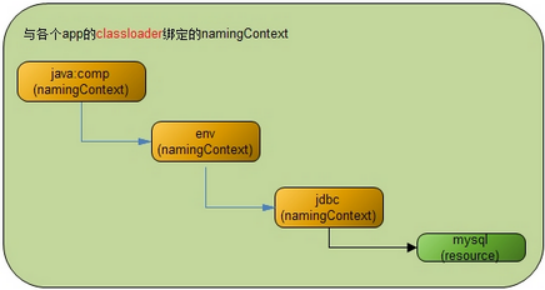
private void createNamingContext() throws NamingException {
// Creating the comp subcontext
if (container instanceof Server) {
compCtx = namingContext;
envCtx = namingContext;
} else {
//对于StandardContext而言,在JNDI对象树的根namingContext对象上
//建立comp树枝,以及在comp树枝上建立env树枝namingContext对象
compCtx = namingContext.createSubcontext("comp");
envCtx = compCtx.createSubcontext("env");
}
......
// 从初始化的NamingResources对象中获取Resource对象加载到JNDI对象树上
ContextResource[] resources = namingResources.findResources();
for (i = 0; i < resources.length; i++) {
addResource(resources[i]);
}
//addResourceLink(resourceLinks[i])、addEnvironment(contextEnvironments[i]);等
......
}
看一下NamingContextListener->createNamingContext->addResource的具体加载逻辑;
public void addResource(ContextResource resource) {
//Reference ref封装了resource参数、类型等信息
try {
// 很类似bean定义
Reference ref = new ResourceRef
(resource.getType(), resource.getDescription(),
resource.getScope(), resource.getAuth());
// Adding the additional parameters, if any
addAdditionalParameters(resource.getNamingResources(), ref,
resource.getName());
//在上面创建的comp/env树枝节点上,根据Resource配置的name继续创建新的节点
//例如配置的name=”jdbc/mysql”,则在comp/env树枝节点下再创建一个jdbc树枝节点
createSubcontexts(envCtx, resource.getName());
//绑定叶子节点,会创建惹搜对应的类型对象,通过name进行映射
envCtx.bind(resource.getName(), ref);
} catch (NamingException e) {logger.error(sm.getString("naming.bindFailed", e)); }
//这就是上面说的对于配置type="javax.sql.DataSource"时的特殊逻辑
//将数据库连接池类型的资源对象注册到tomcat全局的JMX中,方便管理及调试
if ("javax.sql.DataSource".equals(ref.getClassName())) {
//...
}
}
StandardContextValve
invoke方法实现
* ValveBase 实现了Contained, Valve接口
- 实现一些通用的方法getContainer/Debug/Info
- 提供一个抽象子类 invoke(Request request, Response response,ValveContext context)
* invoke方法实现流程
- 只处理HttpServletRequest和HttpServletResponse类型
- "/META-INF"和"/WEB-INF"下的资源不可以访问
- 在Context中通过StandardContextMapper的map方法获取到url对应的warpper
- 调用对应的子容器wrapper的invoke方法已处理请求
final class StandardContextValve extends ValveBase {
//其他略,核心方法invoke
public void invoke(Request request, Response response,ValveContext valveContext)
throws IOException, ServletException {
//只处理HttpServletRequest和HttpServletResponse类型
if (!(request.getRequest() instanceof HttpServletRequest) ||
!(response.getResponse() instanceof HttpServletResponse)) {
return; // NOTE - Not much else we can do generically
}
//"/META-INF"和"/WEB-INF"下的资源不可以访问
HttpServletRequest hreq = (HttpServletRequest) request.getRequest();
String contextPath = hreq.getContextPath();
String requestURI = ((HttpRequest) request).getDecodedRequestURI();
String relativeURI = requestURI.substring(contextPath.length()).toUpperCase();
if (relativeURI.equals("/META-INF") ||
relativeURI.equals("/WEB-INF") ||
relativeURI.startsWith("/META-INF/") ||
relativeURI.startsWith("/WEB-INF/")) {
notFound(requestURI, (HttpServletResponse) response.getResponse());
return;
}
//在Context中通过StandardContextMapper的map方法获取到url对应的warpper,
Context context = (Context) getContainer();
Wrapper wrapper = null;
try {
wrapper = (Wrapper) context.map(request, true);
} catch (IllegalArgumentException e) {
response.sendError(HttpServletResponse.SC_BAD_REQUEST, requestURI);
return;
}
if (wrapper == null) {
response.sendError(HttpServletResponse.SC_NOT_FOUND, requestURI);
return;
}
//调用对应的子容器wrapper的invoke方法已处理请求
response.setContext(context);
wrapper.invoke(request, response);
}
StandardContextMapper
核心方法为通过路径匹配到对应的wapper,即map方法,匹配的规则,如下顺序
- 完整路径匹配;
- 根据路径前缀,进行最长匹配,使用'/'作为路径分隔符;即对路径从右往左依次替换一个路径为*进行匹配
- 使用请求路径中的后缀进行匹配,比如'.jsp';
- 如果以上都没有匹配到合适的Servlet,将使用默认(default)Servlet来处理请求;
注意:路径匹配过程中,区分大小写;
public final class StandardContextMapper
implements Mapper {
//其他略
//核心方法
public Container map(Request request, boolean update) {
// Has this request already been mapped?
if (update && (request.getWrapper() != null))
return (request.getWrapper());
// Identify the context-relative URI to be mapped
String contextPath =
((HttpServletRequest) request.getRequest()).getContextPath();
String requestURI = ((HttpRequest) request).getDecodedRequestURI();
String relativeURI = requestURI.substring(contextPath.length());
// Apply the standard request URI mapping rules from the specification
Wrapper wrapper = null;
String servletPath = relativeURI;
String pathInfo = null;
String name = null;
// Rule 1 -- 完整路径匹配
if (wrapper == null) {
if (!(relativeURI.equals("/")))
name = context.findServletMapping(relativeURI);
if (name != null)
wrapper = (Wrapper) context.findChild(name);
if (wrapper != null) {
servletPath = relativeURI;
pathInfo = null;
}
}
// Rule 2 --根据路径前缀,进行最长匹配,使用'/'作为路径分隔符;即对路径从右往左依次替换一个路径为*进行匹配,如 /a/b/c/d ==>/a/b/c/*
if (wrapper == null) {
servletPath = relativeURI;
while (true) {
name = context.findServletMapping(servletPath + "/*");
if (name != null)
wrapper = (Wrapper) context.findChild(name);
if (wrapper != null) {
pathInfo = relativeURI.substring(servletPath.length());
if (pathInfo.length() == 0)
pathInfo = null;
break;
}
int slash = servletPath.lastIndexOf('/');
if (slash < 0)
break;
servletPath = servletPath.substring(0, slash);
}
}
// Rule 3 -- 使用请求路径中的后缀进行匹配,比如'.jsp';
if (wrapper == null) {
int slash = relativeURI.lastIndexOf('/');
if (slash >= 0) {
String last = relativeURI.substring(slash);
int period = last.lastIndexOf('.');
if (period >= 0) {
String pattern = "*" + last.substring(period);
name = context.findServletMapping(pattern);
if (name != null)
wrapper = (Wrapper) context.findChild(name);
if (wrapper != null) {
servletPath = relativeURI;
pathInfo = null;
}
}
}
}
// Rule 4 -- 将使用默认(default)Servlet来处理请求
if (wrapper == null) {
name = context.findServletMapping("/");
if (name != null)
wrapper = (Wrapper) context.findChild(name);
if (wrapper != null) {
servletPath = relativeURI;
pathInfo = null;
}
}
if (update) {
request.setWrapper(wrapper);
((HttpRequest) request).setServletPath(servletPath);
((HttpRequest) request).setPathInfo(pathInfo);
}
return (wrapper);
}
}
ContextConfig监听器
//使用
Context context = new StandardContext();
// StandardContext's start method adds a default mapper
context.setPath("/app1");
context.setDocBase("app1");
LifecycleListener listener = new ContextConfig();
((Lifecycle) context).addLifecycleListener(listener);
* 作用:把context相关属性的设置交于ContextConfig,对创建的StandarContext进行配置(使用web.xml进行配置)
* 核心方法在start,即监听到StandarContext发出的START_EVENT事件后:
- 把当前Context设置为对应Host和Engine的DefaultContext
- 借助Digester处理默认的web.xml文件(conf/web.xml)和当前应用的web.xml文件(/WEB-INF/web.xml),会读取配置文件的内容,然后调用Context对应的方法,
解析读取和设置的顺序如下:
setPublicId、addParameter、setDisplayName、setDistributable、addLocalEjb、addEjb、addEnvironment、addErrorPage、
addFilterDef(<filter>)、addFilterMap(<filter-mapping>)、addApplicationListener(处理<listener>)、
setLoginConfig、addMimeMapping、addResourceEnvRef、addResource、addCollection、addSecurityRole、
addChild(<servlet>)、addServletMapping(<servlet-mapping>>)、setSessionTimeout、addTaglib、addWelcomeFile
- 处理Context的jsp tld文件、/WEB-INF的tld文件、/WEB-INF/lib/下jar文件下作用tld文件
- 安全相关的配置处理
public final class ContextConfig implements LifecycleListener {
private Context context = null;
private boolean ok = false;
//认证相关
private static ResourceBundle authenticators = null;
//处理库文件
private static Digester tldDigester = createTldDigester();
//处理web.xml
private static Digester webDigester = createWebDigester();
private int debug = 0;
private static final StringManager sm = StringManager.getManager(Constants.Package);
// ------------------------------------------------------------- Properties
//
public int getDebug() {
return (this.debug);
}
// --------------------------------------------------------- Public Methods
//只接收处理START_EVENT和STOP_EVENT事件
public void lifecycleEvent(LifecycleEvent event) {
try {
context = (Context) event.getLifecycle();
} catch (ClassCastException e) {
return;
}
if (event.getType().equals(Lifecycle.START_EVENT))
start();
else if (event.getType().equals(Lifecycle.STOP_EVENT))
stop();
}
//
private synchronized void start() {
context.setConfigured(false);
ok = true;
//把当前Context设置为对应父容器Host和Engine的DefaultContext
Container container = context.getParent();
if( !context.getOverride() ) {
if( container instanceof Host ) {
((Host)container).importDefaultContext(context);
container = container.getParent();
}
if( container instanceof Engine ) {
((Engine)container).importDefaultContext(context);
}
}
//处理默认的conf/web.xml的文件流,然后交给webDigester去处理,webDigester.parse(is);
defaultConfig();
//处理当前应用的web.xml文件
applicationConfig();
if (ok) {
//补充加入的角色,context.addSecurityRole
validateSecurityRoles();
}
//处理Context的jsp tld文件、/WEB-INF的tld文件、/WEB-INF/lib/下jar文件下作用tld文件,
//获取这些tld文件,交给tldDigester处理
if (ok) {
try {
tldScan();
} catch (Exception e) {
ok = false;
}
}
// 添加一个CertificatesValve,如果此阀不可创建则,ok=false
if (ok)
certificatesConfig();
// 如果当前context没有配置Authenticator,则新建一个处理authenticator的阀,如果如果此阀不可创建则,ok=false
if (ok)
authenticatorConfig();
// Make our application available if no problems were encountered
if (ok)
context.setConfigured(true);
else {
context.setConfigured(false);
}
}
//创建webDigester
private static Digester createWebDigester() {
URL url = null;
Digester webDigester = new Digester();
webDigester.setValidating(true);
//XML校验文件
url = ContextConfig.class.getResource(Constants.WebDtdResourcePath_22);
webDigester.register(Constants.WebDtdPublicId_22,
url.toString());
url = ContextConfig.class.getResource(Constants.WebDtdResourcePath_23);
webDigester.register(Constants.WebDtdPublicId_23,
url.toString());
webDigester.addRuleSet(new WebRuleSet());
return (webDigester);
}
//context移除子容器、ApplicationListener、ApplicationParameter、Parameter、Constraint、ErrorPage
//FilterDef/Map、InstanceListener、MimeMapping等等
private synchronized void stop() {
int i;
// Removing children
Container[] children = context.findChildren();
for (i = 0; i < children.length; i++) {
context.removeChild(children[i]);
}
//....
ok = true;
}
}
ServletContext(ApplicationContext)
ServletContext是Servlet规范中规定的ServletContext接口,一般servlet都要实现这个接口
大概就是规定了如果要实现一个WEB容器,他的Context里面要有这些东西:获取路径,获取参数,获取当前的filter,获取当前的servlet等
ApplicationContext所实现的方法其实都是调用的this.context中的方法
可以把ServletContext等同于StandardContext
//使用ApplicationContext封装当前this
public ServletContext getServletContext() {
if (context == null)
context = new ApplicationContext(getBasePath(), this);
return (context);
}
Wrapper
概述
* Wrapper 代表一个 Servlet,它负责管理一个 Servlet,包括的 Servlet 的装载、初始化、执行以及资源回收
* Wrapper 是最底层的容器,它没有子容器了,所以调用它的 addChild 将会报错。
* Wrapper 的实现类是 StandardWrapper,StandardWrapper 还实现了拥有一个 Servlet 初始化信息的 ServletConfig,由此看出 StandardWrapper 将直接和 Servlet 的各种信息打交道。
Wrapper接口
public interface Wrapper extends Container {
//时间,Wrapper 是否可用
public void setAvailable(long available);
public boolean isUnavailable();
public void unavailable(UnavailableException unavailable);
//设置Servlet类和JSP文件
public void setServletClass(String servletClass);
public void setJspFile(String jspFile);
//添加Servlet 初始化参数
public void addInitParameter(String name, String value);
public String findInitParameter(String name);
public void removeInitParameter(String name);
//Servlet实例加载相关
//分配servlet实例,然后处理请求,需要判断SingleThreadModel(有实例池)
// 如果一个servlet实现了SingleThreadModel接口(这种模式我觉得应该叫一个线程对一个servlet模式),
// 那么当多线程访问(一个request一个线程)的路径对应到同一个servlet时会创建多个servlet实例,也就是一个线程一个servlet实例,
// 这样就没有多线程安全问题(不是完全线程安全的,如果多个servlet实例需要访问静态类变量或类外的某些资源的话, 就有可能引起同步问题。),
// 但也有数量限制,在tomcat7中是20个,如果这20个在用,再有线程访问时会停住, 知道其他线程用完释放。
// 如果没实现SingleThreadModel,多线程只能访问同一个servlet实例,这就会有多线程安全问题。
public Servlet allocate() throws ServletException;
//归还servlet实例
public void deallocate(Servlet servlet) throws ServletException;
//返回一个servlet实例,然后处理请求
public void load() throws ServletException;
//销毁所有创建的实例,调用destroy方法
public void unload() throws ServletException;
//当为正整数是,表示加载,且数字越小代表优先级越高;若为负数,则容器启动时不加载,只有该servlet被选中才加载
public void setLoadOnStartup(int value);
//监听器
public void addInstanceListener(InstanceListener listener);
public void removeInstanceListener(InstanceListener listener);
//安全相关
public void setRunAs(String runAs);//允许运行的身份
public void addSecurityReference(String name, String link);
public String[] findSecurityReferences();
public void removeSecurityReference(String name);
}
StandardWrapper
* StandardWrapper对象的主要任务是提供载入它所代表的servlet类的方法, 并进行实例化。
但是,StandardWrapper类并不调用servlet的service方法。该任务由StandardWrapperValve对象(其管道对象中的基础阀)完成。
* StandardWrapperValve对象通过调用allocate方法从StandardWrapper实例中获取servlet实例。在得到servlet实例后,StandardWrapperValve实例就会调用servlet实例的service()方法
* 当第一次请求某个servlet类时, StandardWrapper载入servlet类。由于StandardWrapper实例会动态地载入该servlet类, 因此,它必须知道该servlet类的完全限定名。
- 可以调用StandardWrapper的setServlet Class()方法并指定该servlet类的完全限定名, 也可以调用其setName())方法为该servlet类指定一个名字。
- 使用Loader loader = getLoader();配置的加载器(一般为webAppClassLoader)进加载
- 多实例模式下,每一个请求创建一个实例,但是有最大个数限制,超过进行await阻塞,等待其他线程处理完成之后归还
* 至于当StandardWrapperValve实例请求servlet实例时, StandardWrapper实例必须考虑到该servlet类是否实现了SingleThreadModel接口。
对于那些没有实现SingleThreadModel接口的servlet类, StandardWrapper只会载入该servlet类一次, 并对随后的请求都返回该servlet类的同一个实例。
StandardWrapper实倒不需要多个servlet实例, 因为它假设该servlet类的service()方法在多线程环境中是线程安全的。如果必要的话, 由servlet程序员来负责同步对共享资源的访问。
* 而对于一个STM servlet类, 事情有些不同。StandardWrapper实例必须保证每个时刻只能在一个线程在执行STM servlet类的service()方法。即一个请求线程对应一个servlet实例。但是又是回了性能,会创建一个servlet实例,这样多个请求线程可以同时并发的访问多个不同的实例。这时线程不安全的,如果多个servlet实例需要访问静态类变量或类外的某些资源的话, 就有可能引起同步问题。
public final class StandardWrapper extends ContainerBase implements ServletConfig, Wrapper {
//基本属性
private int loadOnStartup = -1;
private long available = 0L;
private int debug = 0;
private StandardWrapperFacade facade = new StandardWrapperFacade(this);
private static final String info = "org.apache.catalina.core.StandardWrapper/1.0";
//servlet实例相关
private String servletClass = null;
private int countAllocated = 0;//已经分配出去的servlet实例个数
private Servlet instance = null;
private boolean singleThreadModel = false;
private int maxInstances = 20;
//Number of instances currently loaded for a STM servlet.
private int nInstances = 0;
private Stack instancePool = null;
private InstanceSupport instanceSupport = new InstanceSupport(this);
private boolean unloading = false;
private HashMap parameters = new HashMap();
private String jspFile = null;
//安全相关
private HashMap references = new HashMap();
private String runAs = null;
//-------------------------构造方法-----------------------------------------------
//设置基础阀StandardWrapperValve
public StandardWrapper() {
super();
pipeline.setBasic(new StandardWrapperValve());
}
//-------------------------gettet/setter方法-----------------------------------------------
//修改本类的的自己属性:会触发对应的属性修改监听器
public void set/getxxx(String xxxx) {
String xxx = this.xxxx;
this.servletClass = servletClass;
support.firePropertyChange("servletClass", oldServletClass,
this.servletClass);
}
//修改从父类基础的属性
public void setParent(Container container) {
if ((container != null) &&
!(container instanceof Context))
throw new IllegalArgumentException
(sm.getString("standardWrapper.notContext"));
super.setParent(container);
}
//ServletName就是基类的name属性
public void setServletName(String name) {
setName(name);
}
//父类Context的,即new ApplicationContext(getBasePath(), StandardContext);
public ServletContext getServletContext() {
if (parent == null)
return (null);
else if (!(parent instanceof Context))
return (null);
else
return (((Context) parent).getServletContext());
}
//-------------------------servlet实施修改方法-----------------------------------------------
//基础阀会调用servlet = allocate()回去servlet实施
public Servlet allocate() throws ServletException {
//如果正在调用upload就抛出异常
if (unloading) throw new ServletException();
//非单线程模式,即为单例模式,默认是flase,即默认为单例模式
//在首次创建实例时,会通过loadServlet()方法哪里获取singleThreadModel = servlet instanceof SingleThreadModel;
if (!singleThreadModel) {
if (instance == null) {
synchronized (this) {
if (instance == null) {
try {
instance = loadServlet();
} catch (ServletException e) {
throw e;
} catch (Throwable e) {
throw new ServletException(sm.getString("standardWrapper.allocate"), e);
}
}
}
}
//这里可以能会变动singleThreadModel
if (!singleThreadModel) {
countAllocated++;
return (instance);
}
}
//多实例模式,在实例池中获取,不够就进行创建的处理
synchronized (instancePool) {
//如果已经分配的>=已经加载的实例数量,说明池不够了
while (countAllocated >= nInstances) {
//池不够了就需要重新加载实例,但是需要做上限maxInstances判断
if (nInstances < maxInstances) {
try {
instancePool.push(loadServlet());
nInstances++;
} catch (ServletException e) {
throw e;
} catch (Throwable e) {
throw new ServletException
(sm.getString("standardWrapper.allocate"), e);
}
} else {
try {
//查过上限就进行阻塞
instancePool.wait();
} catch (InterruptedException e) {
;
}
}
}
countAllocated++;
return (Servlet) instancePool.pop();
}
}
//回收已经分配的实例,countAllocated--
public void deallocate(Servlet servlet) throws ServletException {
if (!singleThreadModel) {
countAllocated--;
return;
}
//单线程实例模式下,需要push进实例池,且唤醒阻塞的线程
synchronized (instancePool) {
countAllocated--;
instancePool.push(servlet);
instancePool.notify();
}
}
public synchronized void load() throws ServletException {
instance = loadServlet();
}
//加载类并创建实例,对于单线程模式来说,这里每次调用都会返回一个新的实例
public synchronized Servlet loadServlet() throws ServletException {
//单例模式下且实例已经创建,直接返回
if (!singleThreadModel && (instance != null)) return instance;
Servlet servlet = null;
try {
//获取servlet对于的类名
/*
* wrapper1.setName("Primitive");
wrapper1.setServletClass("PrimitiveServlet");
* */
String actualClass = servletClass;
if ((actualClass == null) && (jspFile != null)) {
Wrapper jspWrapper = (Wrapper)
((Context) getParent()).findChild(Constants.JSP_SERVLET_NAME);
if (jspWrapper != null)
actualClass = jspWrapper.getServletClass();
}
// Complain if no servlet class has been specified
if (actualClass == null) {
unavailable(null);
throw new ServletException();
}
// Acquire an instance of the class loader to be used
Loader loader = getLoader();
if (loader == null) {
unavailable(null);
throw new ServletException();
}
ClassLoader classLoader = loader.getClassLoader();
//如果是容器内使用的servlet,就使用系统加载器进行加载
if (isContainerProvidedServlet(actualClass)) {
classLoader = this.getClass().getClassLoader();
}
//开始加载类对象
Class classClass = null;
try {
if (classLoader != null) {
classClass = classLoader.loadClass(actualClass);
} else {
//没有加载器,就使用反射加载,那么此时的加载器就调用者使用的加载器
classClass = Class.forName(actualClass);
}
} catch (ClassNotFoundException e) {
unavailable(null);
throw new ServletException();
}
if (classClass == null) {
unavailable(null);
throw new ServletException ();
}
//加载成功就进行创建实例
try {
servlet = (Servlet) classClass.newInstance();
} catch (ClassCastException e) {
unavailable(null);
throw new ServletException();
} catch (Throwable e) {
unavailable(null);
throw new ServletException(e);
}
//检查是否被允许载入
//自定义的否默认允许,内部的servlet需要判断父类的privileged的表示或者InvokerServlet
if (!isServletAllowed(servlet)) {
throw new SecurityException();
}
//如果是容器内部的servlet,可以把当前Wrapper传递过去
if ((servlet instanceof ContainerServlet) && isContainerProvidedServlet(actualClass)) {
((ContainerServlet) servlet).setWrapper(this);
}
//事件的触发已经调用servlet.init
try {
instanceSupport.fireInstanceEvent(InstanceEvent.BEFORE_INIT_EVENT,servlet);
servlet.init(facade);
// 如果是jsp页面,那么只在调用servlet.service响应即可
if ((loadOnStartup > 0) && (jspFile != null)) {
// Invoking jspInit
HttpRequestBase req = new HttpRequestBase();
HttpResponseBase res = new HttpResponseBase();
req.setServletPath(jspFile);
req.setQueryString("jsp_precompile=true");
servlet.service(req, res);
}
instanceSupport.fireInstanceEvent(InstanceEvent.AFTER_INIT_EVENT,servlet);
} catch (UnavailableException f) {
instanceSupport.fireInstanceEvent(InstanceEvent.AFTER_INIT_EVENT,servlet, f);
unavailable(f);
throw f;
} catch (ServletException f) {
instanceSupport.fireInstanceEvent(InstanceEvent.AFTER_INIT_EVENT,servlet, f);
throw f;
} catch (Throwable f) {
instanceSupport.fireInstanceEvent(InstanceEvent.AFTER_INIT_EVENT,servlet, f);
throw new ServletException();
}
//通过实例类是否实现了SingleThreadModel来重置singleThreadModel变量
singleThreadModel = servlet instanceof SingleThreadModel;
if (singleThreadModel) {
if (instancePool == null) instancePool = new Stack();
}
fireContainerEvent("load", this);
} finally {
//日志log输出处理
}
return servlet;
}
//通过isAssignableFrom判断类是否实现了ContainerServlet接口,有即为容器内部的servlet
private boolean isContainerProvidedServlet(String classname) {
if (classname.startsWith("org.apache.catalina.")) {
return (true);
}
try {
Class clazz = this.getClass().getClassLoader().loadClass(classname);
return (ContainerServlet.class.isAssignableFrom(clazz));
} catch (Throwable t) {
return (false);
}
}
//unload需要调用实例的destroy()方法,这里有线程中的加载器置为加载了本类文件的加载器,在调用destroy()之后又重置为原线程加载器
public synchronized void unload() throws ServletException {
// 如果是单例模式,直接返回
if (!singleThreadModel && (instance == null)) return;
//做个标志
unloading = true;
// 如果还有已经分配的实例在运行,就进行的等待一段时间
if (countAllocated > 0) {
int nRetries = 0;
while (nRetries < 10) {
try {
Thread.sleep(50);
} catch (InterruptedException e) {
;
}
nRetries++;
}
}
ClassLoader oldCtxClassLoader = Thread.currentThread().getContextClassLoader();
ClassLoader classLoader = instance.getClass().getClassLoader();
// Call the servlet destroy() method
try {
instanceSupport.fireInstanceEvent(InstanceEvent.BEFORE_DESTROY_EVENT, instance);
Thread.currentThread().setContextClassLoader(classLoader);
instance.destroy();
instanceSupport.fireInstanceEvent(InstanceEvent.AFTER_DESTROY_EVENT, instance);
} catch (Throwable t) {
instanceSupport.fireInstanceEvent(InstanceEvent.AFTER_DESTROY_EVENT, instance, t);
instance = null;
instancePool = null;
nInstances = 0;
fireContainerEvent("unload", this);
unloading = false;
throw new ServletException();
} finally {
// restore the context ClassLoader
Thread.currentThread().setContextClassLoader(oldCtxClassLoader);
//log记录
}
// Deregister the destroyed instance
instance = null;
if (singleThreadModel && (instancePool != null)) {
try {
Thread.currentThread().setContextClassLoader(classLoader);
while (!instancePool.isEmpty()) {
((Servlet) instancePool.pop()).destroy();
}
} catch (Throwable t) {
instancePool = null;
nInstances = 0;
unloading = false;
fireContainerEvent("unload", this);
throw new ServletException();
} finally {
// restore the context ClassLoader
Thread.currentThread().setContextClassLoader (oldCtxClassLoader);
}
instancePool = null;
nInstances = 0;
}
unloading = false;
fireContainerEvent("unload", this);
}
//-------------------------start和stop方法-----------------------------------------------
public void start() throws LifecycleException {
super.start();
}
public void stop() throws LifecycleException {
try {
unload();
} catch (ServletException e) {
log(sm.getString("standardWrapper.unloadException", getName()), e);
}
super.stop();
}
}
StandardWrapperFacade(实现ServletConfig接口)
Standard Wrapper实例会调用它所载人的servlet类的实例的init()方法。该方法需要一个javax.servlet.ServletConfig实例, 而StandardWrapper类本身实现了javax.servlet.ServletConfig接口, 所以, 理论上StandardWrapper对象可以将自己传入init()方法。但是, StandardWrapper需要将其大部分公共方法对servlet程序员隐藏起来。为了实现在这个目的, StandardWraper类将自身实例包装成StandardWrapperFacade类的一个实例。
//StandardWrapper中对应的属性
private StandardWrapperFacade facade = new StandardWrapperFacade(this);
public final class StandardWrapperFacade implements ServletConfig {
private ServletConfig config = null;
public StandardWrapperFacade(StandardWrapper config) {
super();
this.config = (ServletConfig) config;
}
public String getServletName() {
return config.getServletName();
}
public ServletContext getServletContext() {
ServletContext theContext = config.getServletContext();
if ((theContext != null) &&
(theContext instanceof ApplicationContext))
theContext = ((ApplicationContext) theContext).getFacade();
return (theContext);
}
public String getInitParameter(String name) {
return config.getInitParameter(name);
}
public Enumeration getInitParameterNames() {
return config.getInitParameterNames();
}
}
StandardWrapperValve
StandardWrapperValve类是StandardWrapperr实例中的基础阀, 要完成两个操作
- 执行与该servlet实例关联的全部过滤器
- 调用servlet实例的service()方法。
过滤器链
* 过滤器编写举例
<filter>
<filter-name>f1</filter-name>
<filter-class>xxx.filter.fi</filter-class>
</filter>
<filter-mapping>
<filter-name>f1</filter-name>
<servlet-name>myServlet</<servlet-name>
</filter-mapping>
<filter-mapping>
<filter-name>f1</filter-name>
<url-pattern>/kaka*</url-pattern>
</filter-mapping>
public class kakaFilter implements Filter {
//构造器
public kakaFilter() {}
//在初始化时调用,通过FilterConfig可获取过滤器名字、初始化参数、servletContext
public void init(FilterConfig fConfig) throws ServletException {
//...
}
//程序关闭时调用
public void destroy() {}
//请求匹配正确,进入过滤器时会调用
public void doFilter(ServletRequest request, ServletResponse response, FilterChain chain) throws IOException, ServletException {
//预处理:处理request和response对象,可修改请求和响应
chain.doFilter(request, response);//可放行或拒绝访问jsp、sevlet或其他 资源
//后处理:一般处理response对象,可修改响应
}
}
* 过滤器链ApplicationFilterChain--责任链模式
- 底层封装了private ArrayList filters = new ArrayList();串联过滤器链,提供了addFilter方法进行添加
- doFilter方法触发过滤器
以责任链模式依序触发过滤器链的doFilter方法,如果过滤器链没有过滤器了,那么就执行对应的servlet.service
final class ApplicationFilterChain implements FilterChain {
public ApplicationFilterChain() { super(); }
private ArrayList filters = new ArrayList();
private Iterator iterator = null;
private Servlet servlet = null;
void addFilter(ApplicationFilterConfig filterConfig) {
this.filters.add(filterConfig);
}
void release() {
this.filters.clear();
this.iterator = iterator;
this.servlet = null;
}
//核心方法,触发过滤器
public void doFilter(ServletRequest request, ServletResponse response)
throws IOException, ServletException {
//其他处理
internalDoFilter(request,response);
}
private void internalDoFilter(ServletRequest request, ServletResponse response)
throws IOException, ServletException {
//生成迭代器
if (this.iterator == null)
this.iterator = filters.iterator();
//如果过滤器链有值这调用元素的getFilter().doFilter
//调用具体定义的doFilter方法,其内部方法还会调用过滤器链的doFilter,则又会接着调用下一个过滤器
if (this.iterator.hasNext()) {
ApplicationFilterConfig filterConfig =
(ApplicationFilterConfig) iterator.next();
Filter filter = null;
filter = filterConfig.getFilter();
support.fireInstanceEvent(InstanceEvent.BEFORE_FILTER_EVENT,
filter, request, response);
filter.doFilter(request, response, this);
//异常捕捉和事件触发
return;
}
//如果过滤器链没有过滤器了,那么就执行对应的servlet.service
if ((request instanceof HttpServletRequest) &&
(response instanceof HttpServletResponse)) {
servlet.service((HttpServletRequest) request,
(HttpServletResponse) response);
} else {
servlet.service(request, response);
}
//异常捕捉和事件触发
}
}
* ApplicationFilterConfig
封装了对应<filter>标签里的信息,FilterName、InitParameter、Context容器,
FilterDef为过滤器的定义,主要封装了filterClass、filterName、以及一些描述信息,会基于此创建过滤器对象
提供了getFilter()创建一个单例的过滤器对象
final class ApplicationFilterConfig implements FilterConfig {
//保存好context和对应的过滤器描述
public ApplicationFilterConfig(Context context, FilterDef filterDef)
throws ClassCastException, ClassNotFoundException,
IllegalAccessException, InstantiationException,
ServletException {
super();
this.context = context;
setFilterDef(filterDef);//当修改filterDef属性时,需要重新生成下 filter = getFilter()
}
private Context context = null;
private Filter filter = null;
private FilterDef filterDef = null;
public String getFilterName/InitParameter/InitParameterNames() {
//基于filterDef获取
return (filterDef.getFilterName());
}
public ServletContext getServletContext() {return (this.context.getServletContext());}
//创建一个单例的过滤器对象
Filter getFilter() throws ClassCastException, ClassNotFoundException,
IllegalAccessException, InstantiationException, ServletException {
//以及存在,就返回
if (this.filter != null) return (this.filter);
//使用合适的加载器进行加载过期对象
String filterClass = filterDef.getFilterClass();
ClassLoader classLoader = null;
if (filterClass.startsWith("org.apache.catalina."))
classLoader = this.getClass().getClassLoader();
else
classLoader = context.getLoader().getClassLoader();
Class clazz = classLoader.loadClass(filterClass);
this.filter = (Filter) clazz.newInstance();
filter.init(this);
return (this.filter);
}
void release() {
if (this.filter != null)
filter.destroy();
this.filter = null;
}
}
核心方法invoke
* 调用StandardWrapper实例的allocate()方法获取该StandardWrapper实例所表示的servlet实例
* 调用私有方法createFilterChain()创建过滤器链,每次请求都重新实时动态的创建
* 调用过滤器链的doFilter()方法,其中包括调用servlet实例的service()方法
* 释放过滤器链
* 调用Wrapper实例的deallocate()方法
* 若该servlet类再也不会被使用到,则调用Wrapper实例的unload()方法。
* 各个操作如有异常,只需在response设置异常即可,当回到HttpCnnector时会进行异常码的处理
final class StandardWrapperValve extends ValveBase {
private FilterDef filterDef = null;
//核心方法
public void invoke(Request request, Response response,
ValveContext valveContext)
throws IOException, ServletException {
boolean unavailable = false;
Throwable throwable = null;
StandardWrapper wrapper = (StandardWrapper) getContainer();
ServletRequest sreq = request.getRequest();
ServletResponse sres = response.getResponse();
Servlet servlet = null;
HttpServletRequest hreq = null;
if (sreq instanceof HttpServletRequest) hreq = (HttpServletRequest) sreq;
HttpServletResponse hres = null;
if (sres instanceof HttpServletResponse) hres = (HttpServletResponse) sres;
// 检查父容器context是否可用
if (!((Context) wrapper.getParent()).getAvailable()) {
hres.sendError("503");
unavailable = true;
}
// 检查本wrapper是否可用
if (!unavailable && wrapper.isUnavailable()) {
if (hres == null) {
} else {
long available = wrapper.getAvailable();
if ((available > 0L) && (available < Long.MAX_VALUE))
hres.setDateHeader("Retry-After", available);
hres.sendError("503");
}
unavailable = true;
}
//可用的,获取servlets实例。异常的话在response里设置异常
try {
if (!unavailable) {
servlet = wrapper.allocate();
}
} catch (ServletException\Throwable e) {
throwable = e;
exception(request, response, e);
servlet = null;
}
// 对request做承认标志
try {
response.sendAcknowledgement();
} catch (IOException e) {
sreq.removeAttribute(Globals.JSP_FILE_ATTR);
throwable = e;
exception(request, response, e);
} catch (Throwable e) {
throwable = e;
exception(request, response, e);
servlet = null;
}
// 创建过滤器链(此时只是收集request相关的过滤器定义集合)
ApplicationFilterChain filterChain = createFilterChain(request, servlet);
//设置对应jsp文件路径、执行过滤器链(最后会执行servlet的service方法)
try {
String jspFile = wrapper.getJspFile();
if (jspFile != null)
sreq.setAttribute(Globals.JSP_FILE_ATTR, jspFile);
else
sreq.removeAttribute(Globals.JSP_FILE_ATTR);
if ((servlet != null) && (filterChain != null)) {
filterChain.doFilter(sreq, sres);
}
sreq.removeAttribute(Globals.JSP_FILE_ATTR);
} catch (IOException e) {
sreq.removeAttribute(Globals.JSP_FILE_ATTR);
throwable = e;
exception(request, response, e);
} catch (UnavailableException e) {
sreq.removeAttribute(Globals.JSP_FILE_ATTR);
wrapper.unavailable(e);
long available = wrapper.getAvailable();
if ((available > 0L) && (available < Long.MAX_VALUE))
hres.setDateHeader("Retry-After", available);
hres.sendError("503");
} catch (ServletException\Throwable e) {
sreq.removeAttribute(Globals.JSP_FILE_ATTR);
throwable = e;
exception(request, response, e);
}
// 过滤器链需要释放
try {
if (filterChain != null)
filterChain.release();
} catch (Throwable e) {
if (throwable == null) {
throwable = e;
exception(request, response, e);
}
}
// 归还servlets实例
try {
if (servlet != null) {
wrapper.deallocate(servlet);
}
} catch (Throwable e) {
if (throwable == null) {
throwable = e;
exception(request, response, e);
}
}
// 如果当前servlet用不可用,就需要对wrapper.unload()
try {
if ((servlet != null) &&
(wrapper.getAvailable() == Long.MAX_VALUE)) {
wrapper.unload();
}
} catch (Throwable e) {
if (throwable == null) {
throwable = e;
exception(request, response, e);
}
}
}
//抛出500异常
private void exception(Request request, Response response,
Throwable exception) {
ServletRequest sreq = request.getRequest();
sreq.setAttribute(Globals.EXCEPTION_ATTR, exception);
ServletResponse sresponse = response.getResponse();
if (sresponse instanceof HttpServletResponse)
((HttpServletResponse) sresponse).setStatus
(HttpServletResponse.SC_INTERNAL_SERVER_ERROR);
}
//创建过滤器链集合
private ApplicationFilterChain createFilterChain(Request request,Servlet servlet) {
if (servlet == null) return (null);
//创建过滤器链并添加关联的过滤器
ApplicationFilterChain filterChain = new ApplicationFilterChain();
filterChain.setServlet(servlet);
StandardWrapper wrapper = (StandardWrapper) getContainer();
filterChain.setSupport(wrapper.getInstanceSupport());
//在contex中找到所有的filter-mapping
StandardContext context = (StandardContext) wrapper.getParent();
FilterMap filterMaps[] = context.findFilterMaps();//对应web.xml文件的filter-mapping标签
if ((filterMaps == null) || (filterMaps.length == 0))
return (filterChain);
String requestPath = null;
if (request instanceof HttpRequest) {
HttpServletRequest hreq =
(HttpServletRequest) request.getRequest();
String contextPath = hreq.getContextPath();//项目名称
if (contextPath == null)
contextPath = "";
String requestURI = ((HttpRequest) request).getDecodedRequestURI();//除了域名外的请求数据
if (requestURI.length() >= contextPath.length())
requestPath = requestURI.substring(contextPath.length());//除了域名/项目名的的路径
}
String servletName = wrapper.getName();
int n = 0;
//找到所有匹配的ApplicationFilterConfig
for (int i = 0; i < filterMaps.length; i++) {
if (!matchFiltersURL(filterMaps[i], requestPath))
continue;
ApplicationFilterConfig filterConfig = (ApplicationFilterConfig)
context.findFilterConfig(filterMaps[i].getFilterName());
if (filterConfig == null) {
continue;
}
filterChain.addFilter(filterConfig);
n++;
}
// Add filters that match on servlet name second
for (int i = 0; i < filterMaps.length; i++) {
if (!matchFiltersServlet(filterMaps[i], servletName))
continue;
ApplicationFilterConfig filterConfig = (ApplicationFilterConfig)
context.findFilterConfig(filterMaps[i].getFilterName());
if (filterConfig == null) {
continue;
}
filterChain.addFilter(filterConfig);
n++;
}
return (filterChain);
}
}
Servlet接口
Serlvet实例可以动态的http情况,通过把http请求对象传递给Serlvet实例,以处理具体的业务,最后返回响应结果
* 主要作用
- init():当第一次调用某个servlet肘, 要载入该servlet类, 并调用其init()方法(仅此一次),以做一些预备工作,如配置数据库连接
- service():用于处理具体的业务逻辑,会传入封装好的ServletRequest、ServletResponse
- destroy():一般当servlet容器关闭或servlet容器要释放内存时,才会将servlet实例移除,而且只有当servtet实例的service()中的所有线程都退出或执行超时后,才会调用destroy()。
让servlet对象有机会去清理自身持有的资源,如内存、文件句柄和线程等
- getServletConfig()/getServletInfo():获取当前servlet的配置信息和上下文
public interface Servlet {
void init(ServletConfig var1) throws ServletException;
void service(ServletRequest var1, ServletResponse var2) throws ServletException, IOException;
void destroy();
ServletConfig getServletConfig();
String getServletInfo();
}
public interface ServletConfig {
public String getServletName();
public ServletContext getServletContext();
public String getInitParameter(String name);
public Enumeration<String> getInitParameterNames();
}
* 实现类
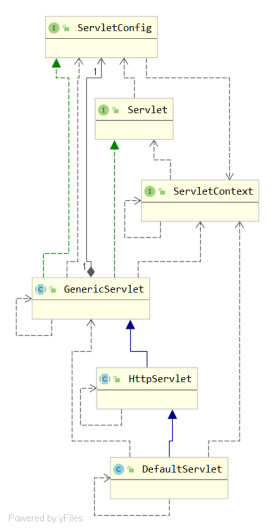
- GenericServlet抽象类类
主要实现了init(ServletConfig config)接口方法以接受上层传递过来的ServletConfig对象,进而实现getServletConfig()方法
其余方法均交给子类去实现,包括一个无参的init()
基本没具体的的实现,主要时整合了Servlet和ServletConfig接口
- HttpServlet
是用HTTP协议实现的Servlet的基类,主要重写了service方法。在service方法之中首先将ServletRequest和ServletResponse转换为HttpServletRequest和HttpServletResponse,
然后根据Http请求的类型不同将请求路由到不同的处理方法
public abstract class HttpServlet extends GenericServlet implements Serializable {
//...
public HttpServlet() {
}
//一般交于子类去覆盖
protected void doPost(HttpServletRequest req, HttpServletResponse resp) throws ServletException, IOException {
String protocol = req.getProtocol();
String msg = lStrings.getString("http.method_post_not_supported");
if (protocol.endsWith("1.1")) {
resp.sendError(405, msg);
} else {
resp.sendError(400, msg);
}
}
protected void service(HttpServletRequest req, HttpServletResponse resp) throws ServletException, IOException {
String method = req.getMethod();
long lastModified;
if (method.equals("POST")) {
this.doPost(req, resp);
} else if (method.equals("PUT")) {
this.doPut(req, resp);
} else if (method.equals("DELETE")) {
this.doDelete(req, resp);
} else if (method.equals("OPTIONS")) {
//...
}
}
public void service(ServletRequest req, ServletResponse res) throws ServletException, IOException {
HttpServletRequest request;
HttpServletResponse response;
try {
request = (HttpServletRequest)req;
response = (HttpServletResponse)res;
} catch (ClassCastException var6) {
throw new ServletException("non-HTTP request or response");
}
this.service(request, response);
}
}

智能硬件社区聚焦AI智能硬件技术生态,汇聚嵌入式AI、物联网硬件开发者,打造交流分享平台,同步全国赛事资讯、开展 OPC 核心人才招募,助力技术落地与开发者成长。
更多推荐
 16
16 0
0- 0


 已为社区贡献2条内容

所有评论(0)