esp32开发与应用(蓝牙测试)
·
【 声明:版权所有,欢迎转载,请勿用于商业用途。 联系信箱:feixiaoxing @163.com】
现在蓝牙的设备还是很多的,最常见的可能就是蓝牙耳机、蓝牙键盘、蓝牙鼠标。对于没有wifi的场景,或者是需要定期上报数据的场景,蓝牙还是很方便的。正好esp32支持wifi和bt,这部分本来也是它的特色,用起来不算复杂,正好可以试试。
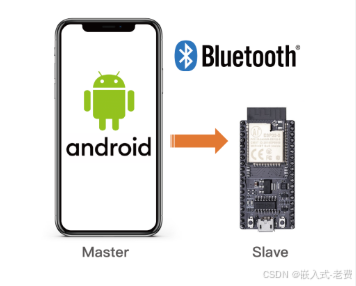
1、准备手机测试app
一般蓝牙设备都是server,需要pc或者手机去连接。这个时候,我们需要提前准备一下测试工具,比如手机下载一个蓝牙的测试app。我自己用的是“蓝牙BLE调试”,其他类似的app其实都可以。
2、menuconfig打开Bluetooth
默认蓝牙是没有打开的,所以需要配置打开一下。另外,可以直接选中NimBLE-BLE only。很多时候,这种方式最简单。
3、调整CMakeLists.txt
除了menuconfig,编译也要调整下,主要是增加一下bt和nvs_flash这两个第三方库。
idf_component_register(SRCS "main.c"
                    INCLUDE_DIRS "."
                    REQUIRES bt nvs_flash)
4、代码部分直接问ai
这部分没有什么好说的,直接让ai写即可。告诉ai,我们用的是esp32,idf版本是6.0.1,写一个bt的收发demo。不出意外就可以看到这样的代码,
#include <stdio.h>
#include <string.h>

#include "freertos/FreeRTOS.h"
#include "freertos/task.h"

#include "esp_log.h"
#include "nvs_flash.h"

#include "nimble/nimble_port.h"
#include "nimble/nimble_port_freertos.h"

#include "host/ble_hs.h"
#include "host/ble_gap.h"
#include "host/ble_gatt.h"

#include "services/gap/ble_svc_gap.h"
#include "services/gatt/ble_svc_gatt.h"

static const char *TAG = "ESP32_UART";

/* ===================== BLE state ===================== */
static uint16_t conn_handle = BLE_HS_CONN_HANDLE_NONE;
static uint16_t chr_handle = 0;
static uint8_t own_addr_type;

/* ===================== UUID definition ===================== */
static const ble_uuid16_t svc_uuid =
    BLE_UUID16_INIT(0xFFF0);

static const ble_uuid16_t chr_uuid =
    BLE_UUID16_INIT(0xFFF1);

/* ===================== RX callback ===================== */
static int ble_write_cb(
        uint16_t conn_handle,
        uint16_t attr_handle,
        struct ble_gatt_access_ctxt *ctxt,
        void *arg)
{
    char buf[128] = {0};

    int len = OS_MBUF_PKTLEN(ctxt->om);
    if (len >= sizeof(buf)) len = sizeof(buf) - 1;

    ble_hs_mbuf_to_flat(ctxt->om, buf, len, NULL);

    ESP_LOGI(TAG, "RX: %s", buf);

    return 0;
}

/* ===================== GATT service table ===================== */
static const struct ble_gatt_svc_def gatt_svcs[] = {
    {
        .type = BLE_GATT_SVC_TYPE_PRIMARY,
        .uuid = &svc_uuid.u,

        .characteristics = (struct ble_gatt_chr_def[]) {
            {
                .uuid = &chr_uuid.u,

                /* Characteristic access callback */
                .access_cb = ble_write_cb,

                .flags =
                    BLE_GATT_CHR_F_WRITE |
                    BLE_GATT_CHR_F_READ |
                    BLE_GATT_CHR_F_NOTIFY,

                .val_handle = &chr_handle,
            },
            {0}
        }
    },
    {0}
};

/* ===================== GAP event handler ===================== */
static int gap_event(struct ble_gap_event *event, void *arg)
{
    switch (event->type)
    {
        case BLE_GAP_EVENT_CONNECT:
            if (event->connect.status == 0)
            {
                conn_handle = event->connect.conn_handle;
                ESP_LOGI(TAG, "CONNECTED");
            }
            else
            {
                ESP_LOGI(TAG, "CONNECT FAILED");
            }
            break;

        case BLE_GAP_EVENT_DISCONNECT:
            ESP_LOGI(TAG, "DISCONNECTED");
            conn_handle = BLE_HS_CONN_HANDLE_NONE;

            /* Restart advertising after disconnect */
            ble_gap_adv_start(
                own_addr_type,
                NULL,
                BLE_HS_FOREVER,
                &(struct ble_gap_adv_params){0},
                gap_event,
                NULL);
            break;

        default:
            break;
    }

    return 0;
}

/* ===================== Start advertising ===================== */
static void ble_app_advertise(void)
{
    struct ble_gap_adv_params advp = {0};
    struct ble_hs_adv_fields fields = {0};

    const char *name = "ESP32_UART";

    fields.flags =
        BLE_HS_ADV_F_DISC_GEN |
        BLE_HS_ADV_F_BREDR_UNSUP;

    fields.name = (uint8_t *)name;
    fields.name_len = strlen(name);
    fields.name_is_complete = 1;

    ble_gap_adv_set_fields(&fields);

    advp.conn_mode = BLE_GAP_CONN_MODE_UND;
    advp.disc_mode = BLE_GAP_DISC_MODE_GEN;

    ble_gap_adv_start(
        own_addr_type,
        NULL,
        BLE_HS_FOREVER,
        &advp,
        gap_event,
        NULL);

    ESP_LOGI(TAG, "ADVERTISING STARTED");
}

/* ===================== BLE sync callback ===================== */
static void ble_sync_cb(void)
{
    ble_hs_id_infer_auto(0, &own_addr_type);

    uint8_t addr[6];
    ble_hs_id_copy_addr(own_addr_type, addr, NULL);

    ESP_LOGI(TAG,
        "ADDR %02X:%02X:%02X:%02X:%02X:%02X",
        addr[5], addr[4], addr[3],
        addr[2], addr[1], addr[0]);

    ble_app_advertise();
}

/* ===================== TX task ===================== */
static void tx_task(void *arg)
{
    int cnt = 0;

    while (1)
    {
        if (conn_handle != BLE_HS_CONN_HANDLE_NONE)
        {
            char msg[64];
            sprintf(msg, "ESP32 CNT=%d", cnt++);

            struct os_mbuf *om =
                ble_hs_mbuf_from_flat(msg, strlen(msg));

            ble_gatts_notify_custom(
                conn_handle,
                chr_handle,
                om);

            ESP_LOGI(TAG, "TX: %s", msg);
        }

        vTaskDelay(pdMS_TO_TICKS(1000));
    }
}

/* ===================== NimBLE host task ===================== */
static void host_task(void *param)
{
    nimble_port_run();
    nimble_port_freertos_deinit();
}

/* ===================== application entry ===================== */
void app_main(void)
{
    esp_err_t ret = nvs_flash_init();
    if (ret != ESP_OK)
    {
        nvs_flash_erase();
        nvs_flash_init();
    }

    nimble_port_init();

    ble_svc_gap_init();
    ble_svc_gatt_init();

    ble_svc_gap_device_name_set("ESP32_UART");

    ble_gatts_count_cfg(gatt_svcs);
    ble_gatts_add_svcs(gatt_svcs);

    ble_hs_cfg.sync_cb = ble_sync_cb;

    nimble_port_freertos_init(host_task);

    xTaskCreate(tx_task, "tx", 4096, NULL, 5, NULL);

    ESP_LOGI(TAG, "START OK");
}
5、编译和测试
编译之后,直接烧入。打开monitor串口,看看打印是否正常。接着打开手机,打开测试工具,连接对应的蓝牙节点。首先看看对方发的数据是否可以收到,接着看看手机发过去的数据,vs terminal有没有打印。经过这些步骤,简单的蓝牙通信就算是掌握了。
看到效果,此时再回过头来看看代码流程。

智能硬件社区聚焦AI智能硬件技术生态,汇聚嵌入式AI、物联网硬件开发者,打造交流分享平台,同步全国赛事资讯、开展 OPC 核心人才招募,助力技术落地与开发者成长。
更多推荐
 9
9 0
0- 0


 已为社区贡献56条内容

所有评论(0)