【Azure App Service】应用服务(Web App)实战:用 .NET 代码把 Connection 耗尽与 SNAT 耗尽演练一次
问题解答:
实验 1:让 App Service Instance 的出站连接快速耗尽
反例很简单:每个请求都 new HttpClient(),而且不复用、不释放。
这样每个请求都会带来新的 handler 和连接池,短时间内大量并发时,worker 上的 TCP 连接资源会迅速堆积。
实验1的代码片段:

// BAD: new HttpClient 每次都创建,handler 与 socket 累积
app.MapGet("/api/demo/connection-bad", async (
    int count, int concurrency, string? url) =>
{
    return await Runner.RunAsync(count, concurrency, async _ =>
    {
        var client = new HttpClient();              // 每次新建
        using var resp = await client.GetAsync(url);
        resp.EnsureSuccessStatusCode();
    });
});

异常错误信息:
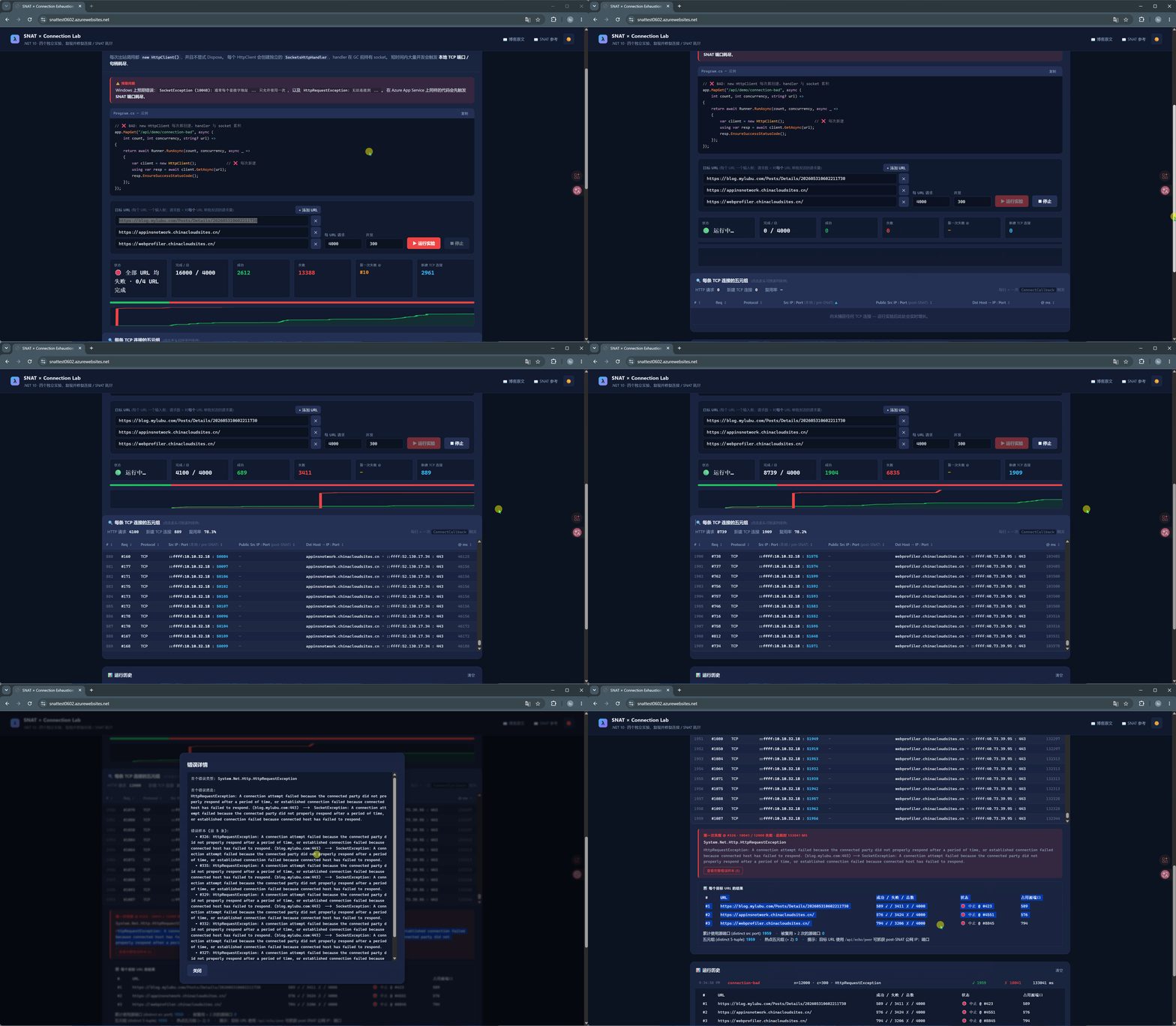
HttpRequestException: A connection attempt failed because the connected party did not properly respond after a period of time, or established connection failed because connected host has failed to respond. (blog.mylubu.com:443) --> SocketException: A connection attempt failed because the connected party did not properly respond after a period of time, or established connection failed because connected host has failed to respond.
实验结果截图:
实验 2:Connection 优化:用单例 HttpClient / IHttpClientFactory 复用
优化思路是:只保留少量长期存活的连接,让请求复用这些连接。
- 复用
HttpClient或使用IHttpClientFactory; - 用
PooledConnectionLifetime定期刷新连接,避免 DNS 漂移; - 用
MaxConnectionsPerServer控制到同一目标的物理连接数。
实验2的代码片段:

// GOOD: 在 DI 中注册一次
builder.Services.AddHttpClient("pooled", c => c.Timeout = TimeSpan.FromSeconds(30))
    .ConfigurePrimaryHttpMessageHandler(() => new SocketsHttpHandler
    {
        PooledConnectionLifetime = TimeSpan.FromMinutes(2),   // 解决 DNS 漂移
        MaxConnectionsPerServer  = 20,                        // 受限连接池
    });

app.MapGet("/api/demo/connection-good", async (
    int count, int concurrency, string? url, IHttpClientFactory factory) =>
{
    var client = factory.CreateClient("pooled");              // 从工厂复用
    return await Runner.RunAsync(count, concurrency, async _ =>
    {
        using var resp = await client.GetAsync(url);
        resp.EnsureSuccessStatusCode();
    });
});
关键优化(vs 实验 1)
- 不再 new HttpClient():用
IHttpClientFactory.CreateClient("pooled")拿到共享实例。 - 配置 PooledConnectionLifetime = 2min:定期回收连接,避免 DNS 漂移问题。
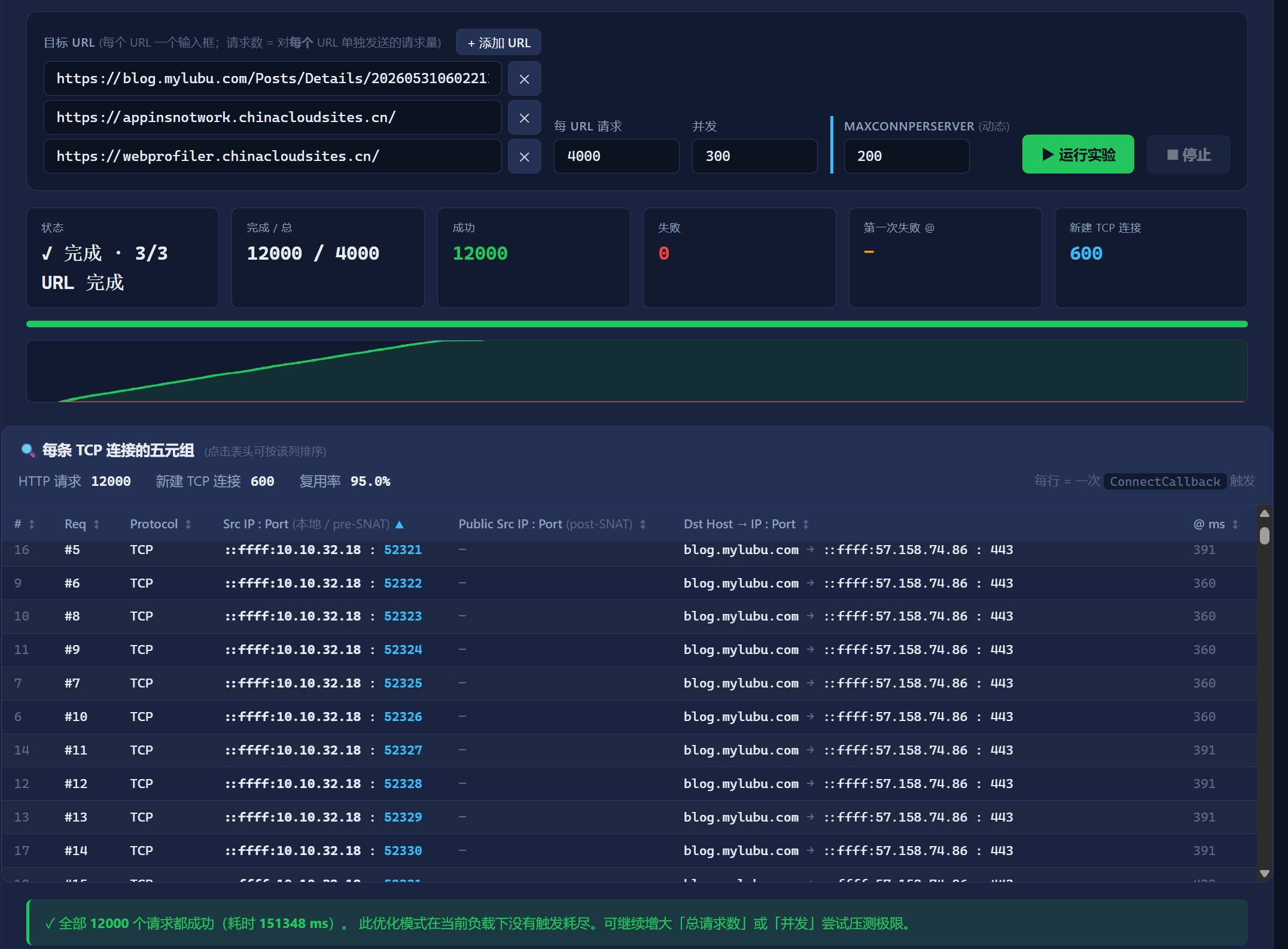
- 配置 MaxConnectionsPerServer = 20(可在上方参数区动态调节):把单一目的端的并发物理连接控制在安全水位。
- 结果:N 个 HTTP 请求 ↔ 至多 20 条物理 TCP 流,socket 不再泄漏。
实验结果截图:
实验 3:让 App Service Instance 的 SNAT Port 耗尽
Connection 优化解决的是 worker 本地资源,但 SNAT 是另一层限制。
只要每个 HTTP 请求都是一条新的 TCP 流,出站负载均衡器仍然要不断分配新的 SNAT 端口。
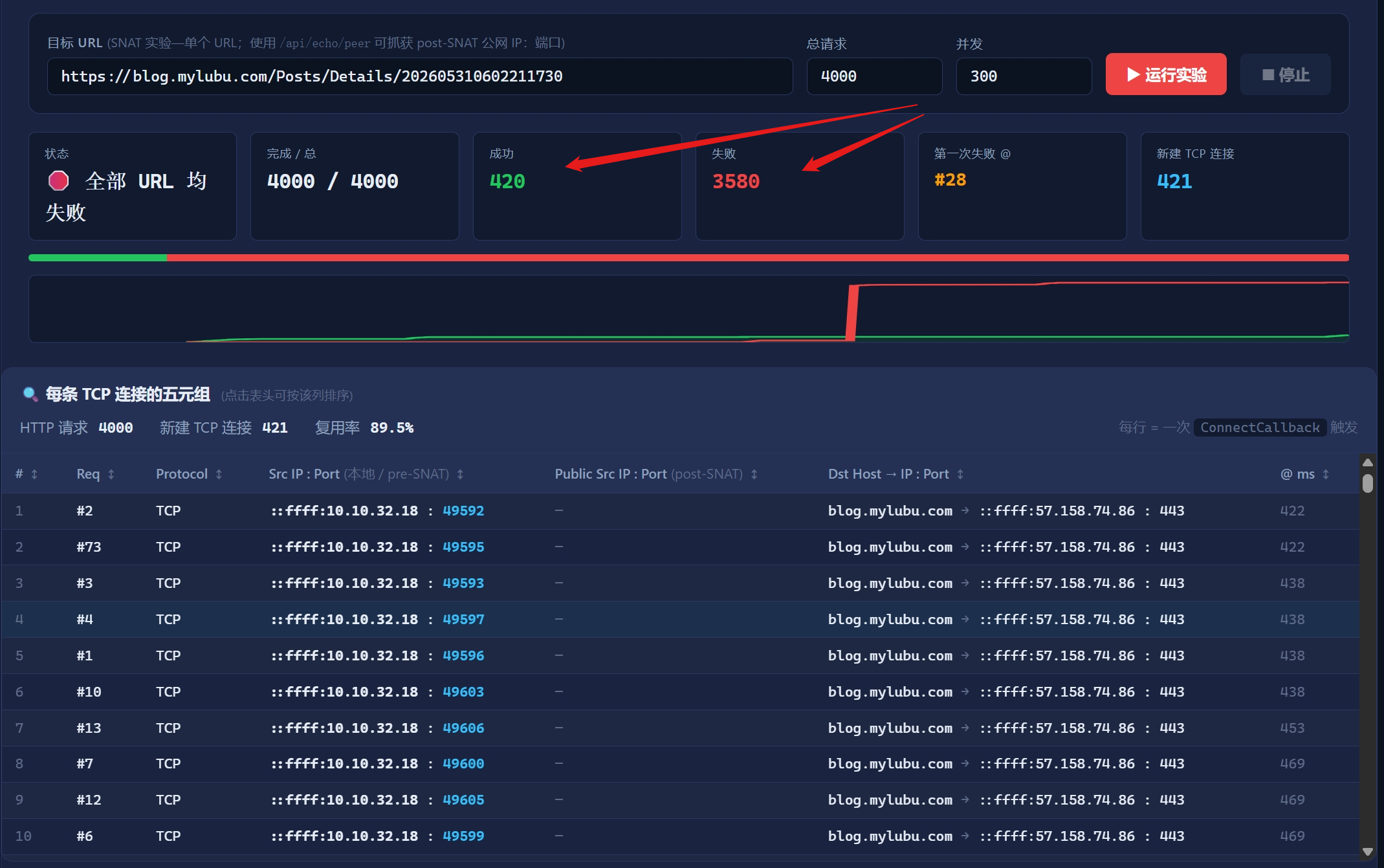
App Service 单实例通常按 128 个 SNAT 端口 估算,耗尽后新连接会卡住直到超时。
这个反例通过禁用连接池 + Connection: close,强制每个请求都新建 TCP 连接。
实验3的代码片段:

// BAD: 禁用连接池 + Connection: close => 每个请求都是一条全新 TCP 流
app.MapGet("/api/demo/snat-bad", async (
    int count, int concurrency, string? url) =>
{
    return await Runner.RunAsync(count, concurrency, async _ =>
    {
        using var handler = new SocketsHttpHandler
        {
            PooledConnectionLifetime = TimeSpan.Zero,    //  禁用连接池
        };
        using var client = new HttpClient(handler);
        client.DefaultRequestHeaders.ConnectionClose = true; // 强制断开
        using var resp = await client.GetAsync(url);
        resp.EnsureSuccessStatusCode();
    });
});

异常错误信息:
HttpRequestException: A connection attempt failed because the connected party did not properly respond after a period of time, or established connection failed because connected host has failed to respond. (blog.mylubu.com:443)
-->
SocketException: A connection attempt failed because the connected party did not properly respond after a period of time, or established connection failed because connected host has failed to respond.
实验结果截图:实验测试SNAT的端口占用数 > 128 个

智能硬件社区聚焦AI智能硬件技术生态,汇聚嵌入式AI、物联网硬件开发者,打造交流分享平台,同步全国赛事资讯、开展 OPC 核心人才招募,助力技术落地与开发者成长。
更多推荐
 3
3 0
0- 0


 已为社区贡献1条内容

所有评论(0)