STM32N6570-DK上部署 object detection dog
Object Detection dog
Object Detection 模型训练流程:
原始训练模型 (.h5/.keras)
↓
【量化】Quantization → 生成 INT8 模型 (.tflite)
↓
【评估】Evaluation → 验证精度是否达标
↓
【基准测试】Benchmarking → 测试板端性能
↓
【部署】Deployment → 烧录到 STM32N6570-DK
1. Setup develop environment
1.1 设置 Conda + GPU版环境
1.1.1 安装 Miniconda(推荐,省心管理 CUDA)
# 下载 Miniconda
Invoke-WebRequest -Uri "https://repo.anaconda.com/miniconda/Miniconda3-latest-Windows-x86_64.exe" -OutFile "$env:TEMP/miniconda.exe"

# 静默安装到用户目录
Start-Process -FilePath "$env:TEMP/miniconda.exe" -ArgumentList "/S /D=$env:USERPROFILE/miniconda3" -Wait

# 初始化 PowerShell
& "$env:USERPROFILE/miniconda3/Scripts/conda.exe" init powershell
关闭 PowerShell 窗口,重新打开,让 conda 生效。
1.1.2 创建 GPU 环境并安装依赖
重新打开 PowerShell 后执行:
# 创建 Python 3.10 环境
conda create -n st_zoo_py310 python=3.10 -y
# 接受所有安装条款
conda tos accept --all

# 激活环境
conda activate st_zoo_py310

# 一键安装 CUDA 11.2 + cuDNN 8.1(conda 自动管理)
conda install -c conda-forge cudatoolkit=11.2 cudnn=8.1 -y

# 设置 CUDA 环境变量(Linux 风格路径,conda 内部用)
$env:LD_LIBRARY_PATH = "$env:CONDA_PREFIX/lib;$env:LD_LIBRARY_PATH"
1.1.3 安装 GPU 版 TensorFlow 和 Model Zoo 依赖
# 确保在 st_zoo_py310 环境中
conda activate st_zoo_py310

# 安装 GPU 版 TensorFlow 2.10.1(Windows 原生 GPU 最后一个版本)
# pip install tensorflow==2.10.1 -i https://pypi.tuna.tsinghua.edu.cn/simple

# 进入 Model Zoo 目录
cd C:/Users/wyang/Documents/git_repo/stm32AI/stm32ai-modelzoo-services

# 修改 requirements.txt, 原生的 requirements.txt 中有 tensorflow==2.8.3 ,需要替换为 tensorflow==2.10.1
Set-Content -Path "C:/Users/wyang/Documents/git_repo/stm32AI/stm32ai-modelzoo-services/requirements.txt" -Value "tensorflow==2.10.1"
# 安装 Model Zoo 的其他依赖(requirements.txt)
# pip install -r requirements.txt
pip install -r requirements.txt -i https://pypi.tuna.tsinghua.edu.cn/simple

# 安装其他常用包
# pip install opencv-python pillow numpy matplotlib pyyaml -i https://pypi.tuna.tsinghua.edu.cn/simple
conda install setuptools -y
conda install mlflow -y
1.1.4 验证 GPU 可用
conda activate st_zoo_py310

python -c "import tensorflow as tf; print('TF:', tf.__version__); print('GPU:', tf.config.list_physical_devices('GPU')); print('CUDA:', tf.test.is_built_with_cuda())"
期望输出:
plain
TF: 2.10.1
GPU: [PhysicalDevice(name=‘/physical_device:GPU:0’, device_type=‘GPU’)]
CUDA: True
1.1.5 设置环境变量持久化(重要)
为了让 CUDA 路径每次激活环境时自动设置:
# 在 conda 环境中创建激活脚本
$activateDir = "$env:CONDA_PREFIX/etc/conda/activate.d"
New-Item -ItemType Directory -Force -Path $activateDir | Out-Null

# 写入环境变量脚本
Set-Content -Path "$activateDir/env_vars.bat" -Value '@set PATH=%CONDA_PREFIX%/Library/bin;%PATH%'
Set-Content -Path "$activateDir/env_vars.ps1" -Value '$env:PATH = "$env:CONDA_PREFIX/Library/bin;$env:PATH"'
1.2 Evaluation ENV
1.2.1 配置 STEdgeAI 使用本地的 GCC 路径
# 编辑 C:/ST/STEdgeAI/2.2/scripts/N6_scripts/config.json

#arm-none-eabi- 工具的路径:
#C:/ST/STM32CubeIDE_2.0.0/STM32CubeIDE/plugins/com.st.stm32cube.ide.mcu.externaltools.gnu-tools-for-stm32.13.3.rel1.win32_1.0.100.202509120712/tools/bin

# gdb_server_path
# C:/ST/STM32CubeIDE_2.0.0/STM32CubeIDE/plugins/com.st.stm32cube.ide.mcu.externaltools.stlink-gdb-server.win32_2.2.300.202509021040/tools/bin/ST-LINK_gdbserver.exe

# STM32_Programmer_CLI
# C:/ST/STM32CubeIDE_2.0.0/STM32CubeIDE/plugins/com.st.stm32cube.ide.mcu.externaltools.cubeprogrammer.win32_2.2.300.202508131133/tools/bin/STM32_Programmer_CLI.exe

# CubeIDE directory
# C:/ST/STM32CubeIDE_2.0.0/STM32CubeIDE
1.2.2 修改 STM32N6570-DK 加载配置文件
# 编辑 C:/ST/STEdgeAI/2.2/scripts/N6_scripts/config_n6l.json
{
	// The 2lines below are _only used if you call n6_loader.py ALONE (memdump is optional and will be the parent dir of network.c by default)
	"network.c": "C:/ST/STEdgeAI/2.2/scripts/N6_scripts/st_ai_output/network.c",
	//"memdump_path": "C:/Users/foobar/CODE/stm.ai/stm32ai_output",
	// Location of the "validation" project  + build config name to be built (if applicable)
	"project_path": "C:/ST/STEdgeAI/2.2/Projects/STM32N6570-DK/Applications/NPU_Validation",
	// If using the NPU_Validation project, valid build_conf names are "N6-DK", "N6-DK-USB", "N6-Nucleo", "N6-Nucleo-USB"
	"project_build_conf": "N6-DK",
	// Skip programming weights to earn time (but lose accuracy) -- useful for performance tests
	"skip_external_flash_programming": false,
	"skip_ram_data_programming": false
}
1.3 选择训练模型
本工程选择的模型是: ssd_mobilenet_v2_fpnlite
| 模型 | 框架 | 输入分辨率 | NPU推理时间 | 精度 | 模型大小 | 适用场景 | 推荐度 |
|---|---|---|---|---|---|---|---|
| ST Yolo X Nano | PyTorch/TF | 192×192 ~ 480×480 | 6ms ~ 32ms | 中高 | ~1-5MB | 通用目标检测 | ⭐⭐⭐⭐⭐ |
| Tiny YOLO v2 | TF Keras | 224×224 | ~30ms | 中 (~94% mAP) | ~1-2MB | 轻量检测 | ⭐⭐⭐⭐ |
| SSD MobileNet v2 FPNLite | TF Keras | 256×256 | ~15-25ms | 中高 | ~2-4MB | 通用目标检测 | ⭐⭐⭐⭐ |
| YOLOv8n (OD) | PyTorch | 640×640 | ~20-40ms | 高 | ~3-6MB | 高精度需求 | ⭐⭐⭐ |
| YOLO11 (OD) | PyTorch | 640×640 | ~20-40ms | 高 | ~3-6MB | 最新架构 | ⭐⭐⭐ |
| BlazeFace Front | TFLite | 128×128 | 4ms | 中 | ~200KB | 人脸检测 | ⭐⭐⭐⭐⭐ (人脸专用) |
| YuNet | ONNX | 320×320 | ~10-15ms | 中高 | ~1MB | 人脸检测 | ⭐⭐⭐⭐ (人脸专用) |
| ST Yolo LC v1 | TF | 可变 | ~15-25ms | 中 | ~1-3MB | 轻量检测 | ⭐⭐⭐ |
2. Standford Dog + COCO 2017 数据集
数据集要求
要在STM32N6570-DK上部署目标检测,用来在电梯轿内识别dog。
dog数据集来自于本地的Standford dog dataset.
从本地COCO 2017数据集中找出以下负数据集:
| 类型 | 具体类别 | 约数量 | 电梯场景重要性 |
|---|---|---|---|
| 四足动物 | cat, bear, horse, cow, sheep, elephant, zebra, giraffe | ~5,500 | 🔴 高:避免"四足=狗" |
| 人 | person | ~1,200 | 🔴 高:避免人误检 |
| 圆形/玩具 | sports ball, frisbee, clock, teddy bear | ~1,500 | 🟡 中:玩具熊等 |
| 专用 | teddy bear, handbag, suitcase, backpack, umbrella | ~1,500 | 🔴 最高:常见干扰物 |
| 家具 | chair, couch, dining table | ~700 | 🟡 中 |
| 其他 | 交通、食物、建筑 | ~500 | 🟢 低 |
将主数据集和负数据集合并用来train, val, test。
COCO 2017的本地路径:
${repo_path}/COCO_2017。
COCO 2017 数据集结构:
COCO_2017/train2017/.jpg
COCO_2017/val2017/.jpg
COCO_2017/annotation/instances_train2017.json
COCO_2017/annotation/instances_val2017.json
Standford dog data的本地路径:
r e p o p a t h / S t a n f o r d D o g s D a t a s e t 。 S t a n d f o r d d o g d a t a 数据集结构: S t a n f o r d D o g s D a t a s e t / a n n o t a t i o n / {repo_path}/Stanford_Dogs_Dataset。 Standford dog data数据集结构: Stanford_Dogs_Dataset/annotation/ repopath/StanfordDogsDataset。Standforddogdata数据集结构:StanfordDogsDataset/annotation/{sub-dog-class}/ a n n o t a t i o n f i l e S t a n f o r d D o g s D a t a s e t / i m a g e s / {annotation_file} Stanford_Dogs_Dataset/images/ annotationfileStanfordDogsDataset/images/{sub-dog-class}/*.jpg
给出脚本,把新的数据集拷贝到${repo_path}/Stanford_Dogs_YOLO下的train, val, test
standford dog数据集一共 20580 张有效图片,从COCO数据集找出总计20580*30%的负样本图片,不需要把COCO里所有的负样本都copy过来。
输出的数据集结构:
Stanford_Dogs_YOLO/train/.jpg, Stanford_Dogs_YOLO/train/.txt;
Stanford_Dogs_YOLO/val/.jpg, Stanford_Dogs_YOLO/val/.txt;
Stanford_Dogs_YOLO/test/.jpg, Stanford_Dogs_YOLO/test/.txt;
2.1 处理数据集
合并+拷贝数据集
运行脚本: merge_stanford_coco_flat.py
创建tfs文件
修改yaml设置:object_detection/datasets/dataset_create_tfs/dataset_config.yaml
exclude_unlabeled_images 改为 False, 为负样本生成 tfs文件
运行脚本: object_detection/datasets/dataset_create_tfs/dataset_create_tfs.py
3. 训练
训练有2种方式:
单步训练: 直接用一个模型、一次优化完成从输入到最终输出的映射。
分别修改 object_detection/src/config_file_examples/ 里面的 xxx_train.yaml, xxx_quantization.yaml, xxx_evaluation.yaml, xxx_benchmark.yaml 等文件
并运行 object_detection/src/training, object_detection/src/quantization, object_detection/src/evaluate, object_detection/src/benchmark 等脚本
链式训练:将任务拆分为多个阶段,逐阶段训练或依次优化。
结合使用——用链式做粗粒度拆解保证可控性,在关键模块内部用端到端训练提升性能。
3.1 创建链式训练配置文件
修改链式配置文件 xxx_chain_tqeb.yaml
# =============================================================================
# STM32AI-ModelZoo - SSD MobileNet v2 FPNLite Dog Detection
# 电梯场景负样本训练版
# 适配:coco_neg_前缀负样本 + 空txt+空tfs + 防坏图 + 负样本加权 + 正确预训练权重
# =============================================================================

general:
  project_name: Stanford_Dogs_Elevator_NegSamples
  # 正确写法:model_path=imagenet 加载官方ImageNet预训练权重
  # model_path: imagenet
  model_type: ssd_mobilenet_v2_fpnlite
  saved_models_dir: saved_models
  gpu_memory_limit: 6
  global_seed: 42

operation_mode: chain_tqeb

dataset:
  name: Stanford_Dogs_Elevator
  class_names: [dog]
  training_path: C:/Users/wyang/Documents/git_repo/stm32AI/stm32ai-modelzoo-services/object_detection/datasets/Stanford_Dogs_Dataset/Stanford_Dogs_YOLO/train
  validation_path: C:/Users/wyang/Documents/git_repo/stm32AI/stm32ai-modelzoo-services/object_detection/datasets/Stanford_Dogs_Dataset/Stanford_Dogs_YOLO/val
  test_path: C:/Users/wyang/Documents/git_repo/stm32AI/stm32ai-modelzoo-services/object_detection/datasets/Stanford_Dogs_Dataset/Stanford_Dogs_YOLO/test
  quantization_path: C:/Users/wyang/Documents/git_repo/stm32AI/stm32ai-modelzoo-services/object_detection/datasets/Stanford_Dogs_Dataset/Stanford_Dogs_YOLO/train
  quantization_split: 0.2
  seed: 42
  # skip_corrupted_data: true
  # treat_empty_anno_as_negative: true
  # filter_empty_annotations: false
  # pad_boxes_to_fixed_num: true
  # max_boxes: 10

preprocessing:
  rescaling:
    scale: 1/255.0
    offset: 0
  resizing:
    aspect_ratio: crop
    interpolation: bilinear
  color_mode: rgb

data_augmentation:
  random_flip:
    mode: horizontal
  random_crop:
    crop_center_x: (0.35, 0.65)
    crop_center_y: (0.35, 0.65)
    crop_width: (0.7, 0.99)
    crop_height: (0.7, 0.99)
    change_rate: 0.3
  random_contrast:
    factor: 0.2
  random_brightness:
    factor: 0.15

training:
  model:
    input_shape: [256, 256, 3]
    alpha: 1.0
  batch_size: 16
  epochs: 100
  # use_pretrained_weights: true
  # negative_loss_weight: 1.8
  optimizer:
    Adam:
      learning_rate: 0.0001
  callbacks:
    ReduceLROnPlateau:
      monitor: val_map
      patience: 8
      factor: 0.5
      min_lr: 1.0e-7
      verbose: 1
    ModelCheckpoint:
      monitor: val_map
      mode: max
    EarlyStopping:
      monitor: val_map
      patience: 20
      mode: max
      restore_best_weights: True

postprocessing:
  confidence_thresh: 0.25
  NMS_thresh: 0.45
  IoU_eval_thresh: 0.5
  plot_metrics: False
  max_detection_boxes: 10

quantization:
  quantizer: TFlite_converter
  quantization_type: PTQ
  quantization_input_type: uint8
  quantization_output_type: float
  granularity: per_tensor
  export_dir: quantized_models

tools:
  stedgeai:
    version: 2.2.0
    optimization: balanced
    on_cloud: False
    path_to_stedgeai: C:/ST/STEdgeAI/2.2/Utilities/windows/stedgeai.exe
  path_to_cubeIDE: C:/ST/STM32CubeIDE_2.0.0/STM32CubeIDE/stm32cubeide.exe

benchmarking:
  board: STM32N6570-DK

deployment:
  c_project_path: ../application_code/object_detection/STM32N6/
  IDE: GCC
  verbosity: 1
  hardware_setup:
    serie: STM32N6
    board: STM32N6570-DK

mlflow:
  uri: ./experiments_outputs/mlruns

hydra:
  run:
    dir: ./experiments_outputs/${now:%Y_%m_%d_%H_%M_%S}
3.2 开始训练
conda activate st_zoo_py310

cd C:/Users/wyang/Documents/git_repo/stm32AI/stm32ai-modelzoo-services/object_detection

python stm32ai_main.py --config-path ./src/config_file_examples/ --config-name dog_n6_ssd_mobilenet_v2_fpnlite_config_with_negative.yaml
3.3 训练结果
训练结果存储在 object_detection/experiments_outputs/YYYY_MM_DD_HH_MM_SS/
训练后的模型存储在 quantized_models/quantized_model.tflite
3.4 测试 tflite 模型
创建测试脚本,并准备要测试的图片(xxx_dog.png, xxx_non_dog.png)
import tensorflow as tf
import numpy as np
from PIL import Image

# 加载板端同一个 tflite
interpreter = tf.lite.Interpreter(model_path="${your_tflite}.tflite")
interpreter.allocate_tensors()

input_details = interpreter.get_input_details()[0]
output_details = interpreter.get_output_details()

print("Input shape:", input_details['shape'], "dtype:", input_details['dtype'])

# 加载一张照片(从你的训练/验证集里找)
img = Image.open("test_negative_1.jpg").convert("RGB").resize((256, 256))
img_array = np.array(img, dtype=np.uint8)
input_data = np.expand_dims(img_array, axis=0)

interpreter.set_tensor(input_details['index'], input_data)
interpreter.invoke()

# SSD 输出:scores, boxes, anchors
for i, out in enumerate(output_details):
    data = interpreter.get_tensor(out['index'])
    print(f"Output {i}: shape={data.shape}, max={data.max():.4f}, min={data.min():.4f}")

# 检查 dog 类分数(假设 scores 是 output 0,shape [1, 6820, 2])
scores = interpreter.get_tensor(output_details[0]['index'])
print(f"/nMax dog score: {scores[0, :, 1].max():.6f}")
print(f"Scores[0] = {scores[0, 0]}")  # [background, dog]
期待输出
- non_dog: Max dog score: 0.011719
INFO: Created TensorFlow Lite XNNPACK delegate for CPU.
Input shape: [  1 256 256   3] dtype: <class 'numpy.uint8'>
Output 0: shape=(1, 6820, 2), max=0.9961, min=0.0000
Output 1: shape=(1, 6820, 4), max=3.6796, min=-2.6707
Output 2: shape=(1, 6820, 4), max=1.5260, min=-0.5329

Max dog score: 0.011719
Scores[0] = [0.99609375 0.        ]
- dog: Max dog score: 0.996094
INFO: Created TensorFlow Lite XNNPACK delegate for CPU.
Input shape: [  1 256 256   3] dtype: <class 'numpy.uint8'>
Output 0: shape=(1, 6820, 2), max=0.9961, min=0.0000
Output 1: shape=(1, 6820, 4), max=4.4511, min=-6.5283
Output 2: shape=(1, 6820, 4), max=1.5260, min=-0.5329

Max dog score: 0.996094
Scores[0] = [0.99609375 0.        ]
4. 部署
部署步骤主要参考 application_code/object_detection/STM32N6/Doc/Deploy-your-tflite-Model-STM32N6570-DK.md。
Note
烧录时,要在 DEV模式下: DIP Switch都拨到右边
运行时,要在 BOOT模式下: DIP Switch都拨到左边
4.1 用STEdgeAI把上述的tflite模型转换成C语言代码
把训练生成的 tflite文件 copy到 application_code/object_detection/STM32N6/Model/${your_tflite}.tflite.
运行如下命令:
#!/bin/bash
# ==========================================
# 1. 导入工具链路径(放在脚本开头)
# ==========================================

# STEdgeAI 路径
export PATH="/C/ST/STEdgeAI/2.2/Utilities/windows:$PATH"

# arm-none-eabi-objcopy 路径(根据你的实际版本号调整)
export PATH="/C/ST/STM32CubeIDE_2.0.0/STM32CubeIDE/plugins/com.st.stm32cube.ide.mcu.externaltools.gnu-tools-for-stm32.13.3.rel1.win32_1.0.100.202509120712/tools/bin/:$PATH"

stedgeai generate --model dog_tqeb_ssd_stabdford_coco_negative.tflite --target stm32n6 --st-neural-art default@user_neuralart_STM32N6570-DK.json --input-data-type uint8 --output-data-type float32

cp st_ai_output/network.c STM32N6570-DK/
cp st_ai_output/network_ecblobs.h STM32N6570-DK/
cp st_ai_output/network_atonbuf.xSPI2.raw STM32N6570-DK/network_data.xSPI2.bin
arm-none-eabi-objcopy -I binary STM32N6570-DK/network_data.xSPI2.bin --change-addresses 0x70380000 -O ihex STM32N6570-DK/network_data.hex
最终生成的 Model/STM32N6570-DK/network_data.hex 就是模型数据了, 把这个数据烧录到STM32N6570-DK。
烧录说明参考 application_code/object_detection/STM32N6/Doc/Program-Hex-Files-STM32CubeProgrammer.md.
4.2 修改 app_config.h文件
根据训练模型修改 app_config.h 文件, 包括:
#define POSTPROCESS_TYPE POSTPROCESS_OD_ST_SSD_UF
#define NN_HEIGHT     (256)
#define NN_WIDTH      (256)
#define NN_BPP        (3)

#define NB_CLASSES 2
static const char* classes_table[NB_CLASSES] = {
    "other",
    "dog",
};

/* SSD postprocessing (2 classes: background + dog) */
#define AI_OD_SSD_ST_PP_TOTAL_DETECTIONS    (6820)
#define AI_OD_SSD_ST_PP_NB_CLASSES          (2)
#define AI_OD_SSD_ST_PP_CONF_THRESHOLD      (0.15f)
#define AI_OD_SSD_ST_PP_IOU_THRESHOLD       (0.45f)
#define AI_OD_SSD_ST_PP_MAX_BOXES_LIMIT     (10)
4.3 编译并烧录
在 CubeIDE 中编译完成后,运行以下指令为bin文件签名:
# STM32CubeProgrammer V2.20及之前版本
STM32_SigningTool_CLI -bin STM32N6570-DK_GettingStarted_ObjectDetection.bin -nk -t ssbl -hv 2.3 -o ST_YOLO_V2_sign.bin
# STM32CubeProgrammer V2.21及之后版本
STM32_SigningTool_CLI -bin application_code/object_detection/STM32N6/Application/STM32N6570-DK/STM32CubeIDE/Debug/STM32N6570-DK_GettingStarted_ObjectDetection.bin -nk -t ssbl -hv 2.3 -o ObjectDetection_SSD.bin -align
Program the signed binary at address 0x70100000.
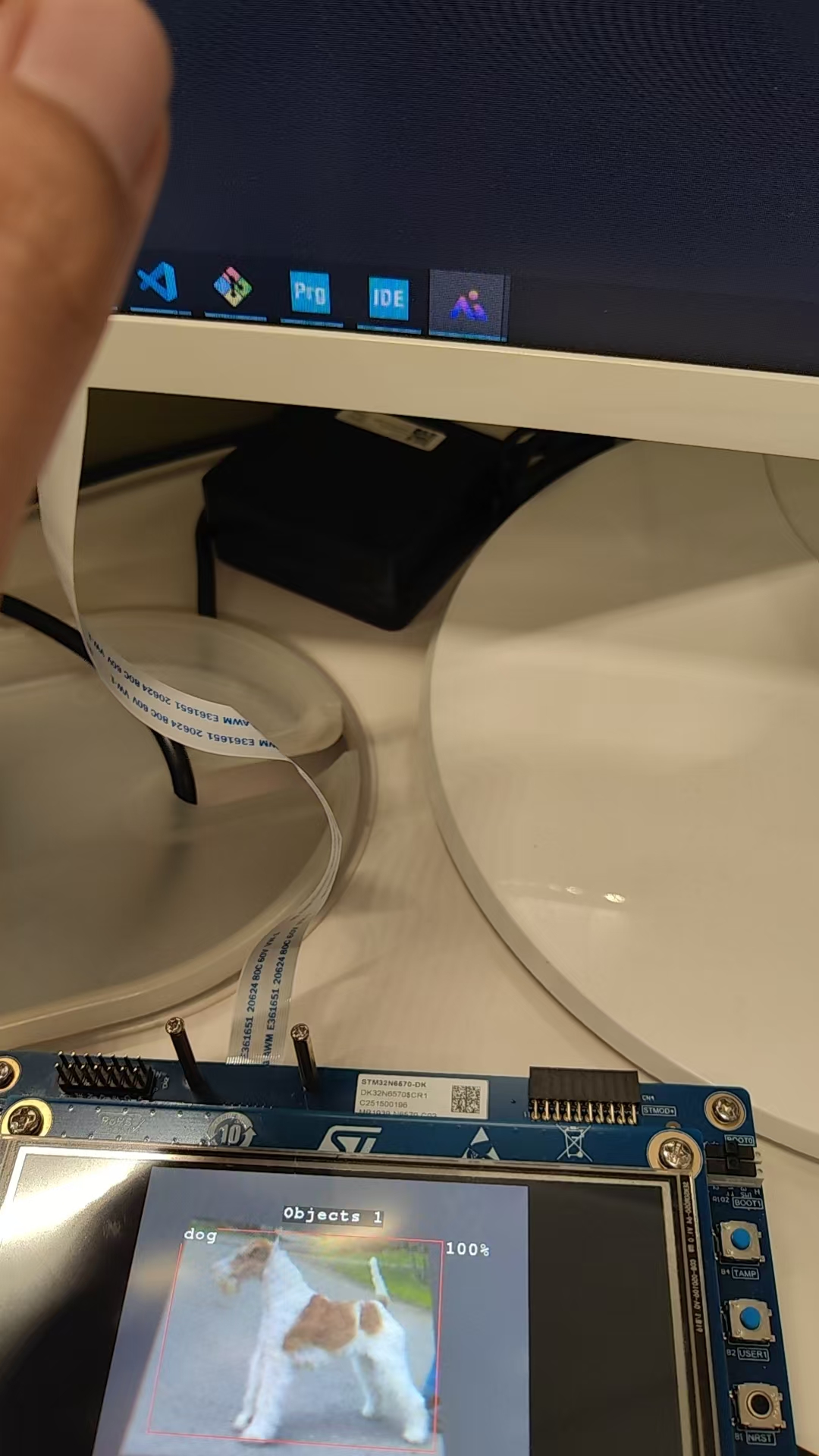
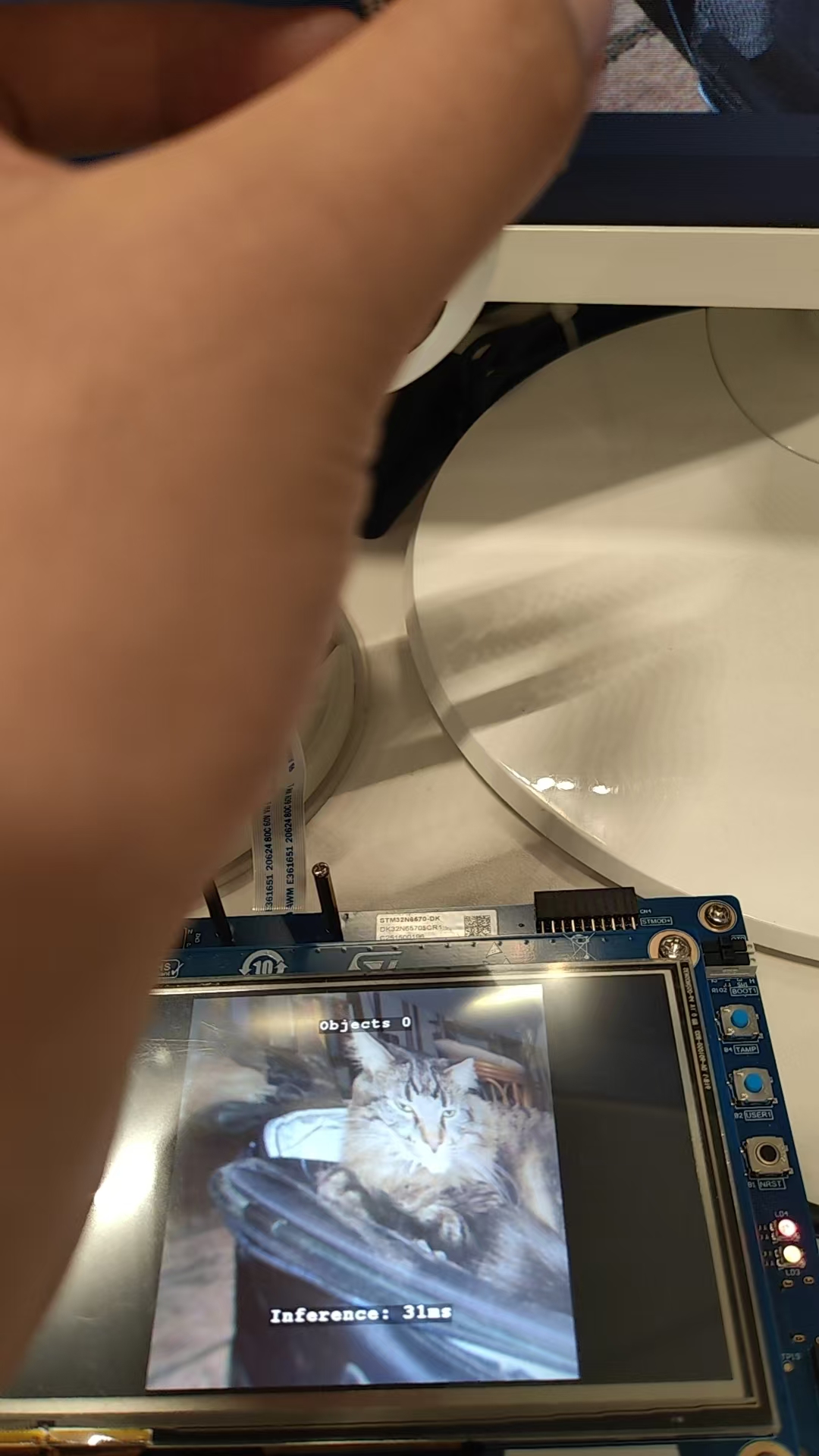
4.4 运行

智能硬件社区聚焦AI智能硬件技术生态,汇聚嵌入式AI、物联网硬件开发者,打造交流分享平台,同步全国赛事资讯、开展 OPC 核心人才招募,助力技术落地与开发者成长。
更多推荐
 0
0 0
0- 0


 已为社区贡献2条内容

所有评论(0)