ESP32-S3 + LVGL 显示驱动实战:从零开始点亮你的屏幕
·
一、屏幕介绍
分辨率:240XRGBX320
显示驱动芯片:ST7789V
电容触摸驱动芯片:FT6336U
这块屏幕使用到的协议是SPI+IIC,SPI协议是用来驱动显示的,IIC协议是用来驱动触摸屏的,本讲主要是通过使用SPI协议来显示屏幕。
二、定义驱动引脚
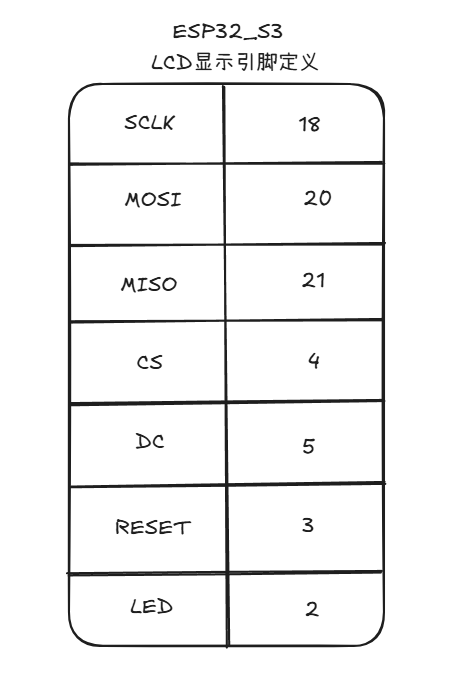
esp32的GPIO矩阵映射很灵活,可以根据自己的需求,选取引脚,下图是我个人使用的GPIO引脚。
三、引入头文件
#include "freertos/FreeRTOS.h"
#include "freertos/task.h"
#include "stdio.h"
#include "esp_log.h"
#include "esp_lcd_panel_io.h"
#include "esp_lcd_panel_vendor.h"
#include "esp_lcd_panel_ops.h"
#include "esp_lcd_panel_st7789.h"
#include "driver/spi_master.h"
#include "driver/gpio.h"
#include "esp_heap_caps.h"
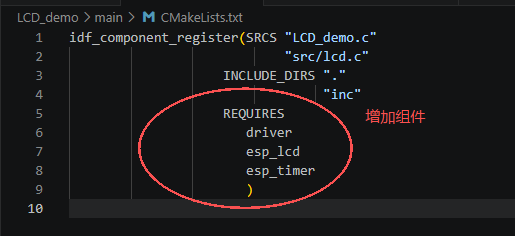
在CMakeList中添加组件
四、编写功能代码
#include "inc/lcd.h"
#include "freertos/FreeRTOS.h"
#include "freertos/task.h"
#include "stdio.h"
#include "esp_log.h"
#include "esp_lcd_panel_io.h"
#include "esp_lcd_panel_vendor.h"
#include "esp_lcd_panel_ops.h"
#include "esp_lcd_panel_st7789.h"
#include "driver/spi_master.h"
#include "driver/gpio.h"
#include "esp_heap_caps.h"

////////////////////////////////////////////////////////////////////////////////////////////////////////////////////////
//////////////////// Please update the following configuration according to your LCD spec //////////////////////////////
////////////////////////////////////////////////////////////////////////////////////////////////////////////////////////
#define LCD_SCLK  18
#define LCD_MOSI  20
#define LCD_MISO  21
#define LCD_CS    4
#define LCD_DC    5
#define LCD_RESET 3
#define LCD_LED   2
// The pixel number in horizontal and vertical
#define EXAMPLE_LCD_H_RES              240
#define EXAMPLE_LCD_V_RES              320
#define LCD_HOST                       SPI2_HOST

static const char *TAG = "LCD";

esp_lcd_panel_handle_t panel_handle = NULL;
void lcd_init(void)
{
    ESP_LOGI(TAG,"1.Init LED");
    gpio_config_t led_gpio_config = {
        .mode = GPIO_MODE_OUTPUT,
        .pin_bit_mask = 1ULL << LCD_LED
    };
    gpio_config(&led_gpio_config);
    gpio_set_level(LCD_LED, 1);  // 打开背光

    ESP_LOGI(TAG,"2.Init SPI");
    spi_bus_config_t busconfig = {
    .sclk_io_num = LCD_SCLK,
    .mosi_io_num = LCD_MOSI,
    .miso_io_num = LCD_MISO,
    .quadwp_io_num = -1,
    .quadhd_io_num = -1,
    .max_transfer_sz = EXAMPLE_LCD_H_RES * 80 *sizeof(uint16_t),
     };
     ESP_ERROR_CHECK(spi_bus_initialize(LCD_HOST, &busconfig, SPI_DMA_CH_AUTO));

     ESP_LOGI(TAG,"3.Config LCD SPI IO");

     esp_lcd_panel_io_handle_t io_handle = NULL;

     esp_lcd_panel_io_spi_config_t io_config = {
        .dc_gpio_num = LCD_DC,
        .cs_gpio_num = LCD_CS,
        .pclk_hz = 20 * 1000 * 1000,
        .lcd_cmd_bits = 8,
        .lcd_param_bits = 8,
        .spi_mode = 0,
        .trans_queue_depth =10,
     };
    ESP_ERROR_CHECK(esp_lcd_new_panel_io_spi(LCD_HOST, &io_config, &io_handle));

    ESP_LOGI(TAG,"4.Init ST7789V FACE");

    esp_lcd_panel_dev_config_t panel_config = {
        .reset_gpio_num = LCD_RESET,
        .rgb_ele_order = LCD_RGB_ELEMENT_ORDER_RGB,  // ST7789V用RGB
        .bits_per_pixel = 16,
    };
    ESP_ERROR_CHECK(esp_lcd_new_panel_st7789(io_handle, &panel_config, &panel_handle));
    ESP_LOGI(TAG,"5.RESET LCD");
    ESP_ERROR_CHECK(esp_lcd_panel_reset(panel_handle));
    ESP_ERROR_CHECK(esp_lcd_panel_init(panel_handle));

    //Is there any reverse display?
    ESP_ERROR_CHECK(esp_lcd_panel_invert_color(panel_handle, true));
    //set direction
    ESP_ERROR_CHECK(esp_lcd_panel_mirror(panel_handle, true, false));
    //Flip the screen
    #if 0
       ESP_ERROR_CHECK(esp_lcd_panel_swap_xy(panel_handle, false));
    #endif

    ESP_LOGI(TAG,"6.Open display");
    ESP_ERROR_CHECK(esp_lcd_panel_disp_on_off(panel_handle, true));
    ESP_LOGI(TAG,"Init LCD is success!");
 }

 void display_test(void)
 {
    //Display box
     uint16_t color[] =  {0XFFFF,0x0000,0x001F,0xFFE0};
    uint16_t *color_buf = heap_caps_malloc(240 * 320 *sizeof(uint16_t),MALLOC_CAP_DMA);
    if(color_buf)
    {
        for(uint8_t j =0;j<4;j++)
        {
            for(uint32_t i = 0;i < 240*320; i++)
            {
                color_buf[i] =((color[j]>>8)|((color[j])<<8));
            }
            esp_lcd_panel_draw_bitmap(panel_handle, 0, 0, 240, 320, color_buf);
            vTaskDelay(pdMS_TO_TICKS(1000));
        }
        free(color_buf);
    }
 }
五:注意点
5.1SPI模式选择
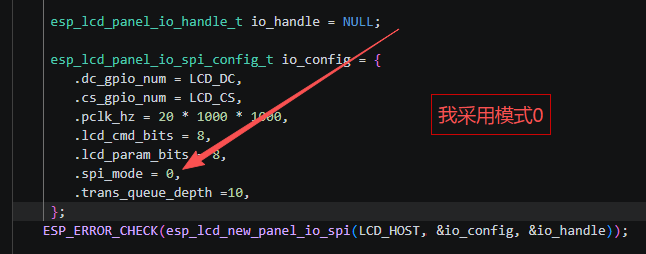
我这款屏幕驱动可以采用模式0和模式3来进行驱动,需要根据自己的屏幕来选择SPI模式,主控的SPI模式与屏幕的SPI模式不一致是无法进行驱动的。
5.2花屏现象
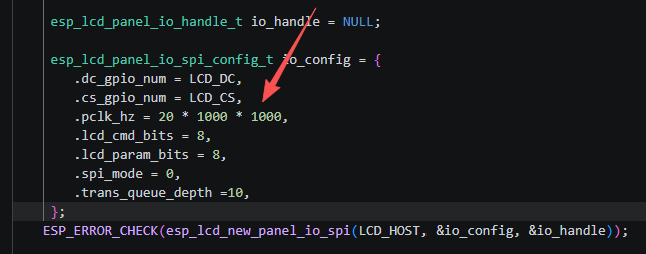
如果发现有花屏的情况,可以降低SPI的速率,可以从5M速率开始尝试,我目前是使用的20M速率
可以正常显示颜色。
5.3屏幕是否需要显示反向
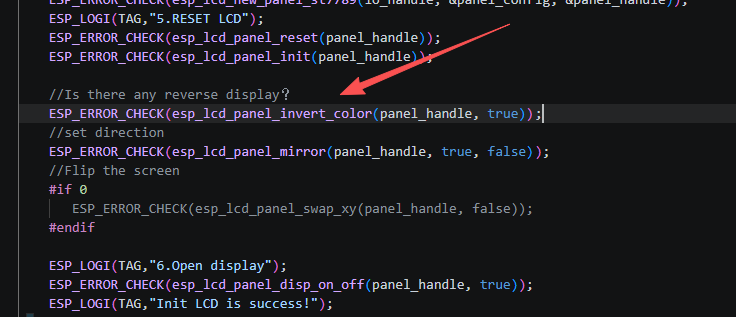
我遇到的问题是,本应该0xFFFF是显示白色,但是实际显示是黑色,颜色显示上基本上显示不正常,这其实是跟ST7789V芯片有关系,在芯片手册中这2个指令,用于显示返现功能
0x21 INVON   // Display Inversion On
0x20 INVOFF  // Display Inversion Off
在esp32s3中被封装层一个函数‘
esp_err_t esp_lcd_panel_invert_color(esp_lcd_panel_handle_t panel, bool invert_color_data)我在驱动屏幕的过程中,是需要进行返显的,颜色显示才算正常
六:最后简单的测试代码
#define WHITE         	 0xFFFF
#define BLACK         	 0x0000
#define BLUE         	 0x001F
#define BRED             0XF81F
#define GRED 			 0XFFE0
#define GBLUE			 0X07FF
#define RED           	 0xF800
#define MAGENTA       	 0xF81F
#define GREEN         	 0x07E0
#define CYAN          	 0x7FFF
#define YELLOW        	 0xFFE0
#define BROWN 			 0XBC40 //棕色
#define BRRED 			 0XFC07 //棕红色
#define GRAY  			 0X8430 //灰色
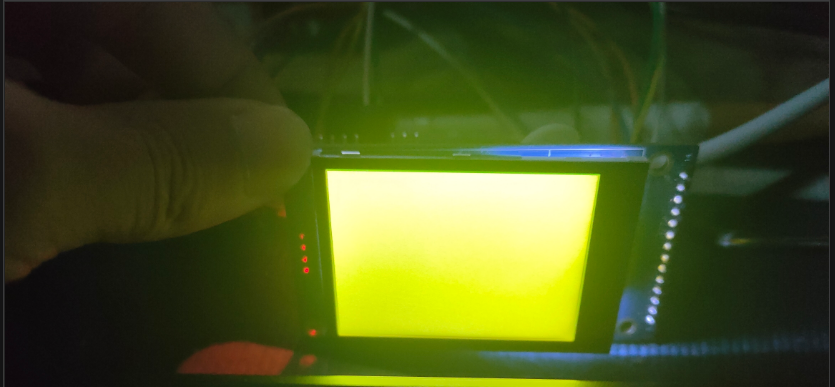
依次显示:白->黑->蓝->黄
 void display_test(void)
 {
    //Display box
     uint16_t color[] =  {0XFFFF,0x0000,0x001F,0xFFE0};
    uint16_t *color_buf = heap_caps_malloc(240 * 320 *sizeof(uint16_t),MALLOC_CAP_DMA);
    if(color_buf)
    {
        for(uint8_t j =0;j<4;j++)
        {
            for(uint32_t i = 0;i < 240*320; i++)
            {
                color_buf[i] =((color[j]>>8)|((color[j])<<8));
            }
            esp_lcd_panel_draw_bitmap(panel_handle, 0, 0, 240, 320, color_buf);
            vTaskDelay(pdMS_TO_TICKS(1000));
        }
        free(color_buf);
    }
 }
注意点:大小端序问题
esp32是小端序机器,比如uint16_t color = 0xFFE0 在内存里的字节顺序是:E0 FF
但是SPI LCD屏幕中,接收RGB数据时,希望收到是:FF 00
也就是高字节在前,低字节在后。
所以,一开始导致我的颜色显示不正常,0xFFFF显示黑色了
成功显示
七.参考官方历程

智能硬件社区聚焦AI智能硬件技术生态,汇聚嵌入式AI、物联网硬件开发者,打造交流分享平台,同步全国赛事资讯、开展 OPC 核心人才招募,助力技术落地与开发者成长。
更多推荐
 9
9 0
0- 0


 已为社区贡献2条内容

所有评论(0)