STemWin移植
目录
芯片为STM32F103C8T6
一、下载STemWin源码
进入官网https://www.st.com选择工具与软件 -> 嵌入式软件 -> STM32微控制器软件
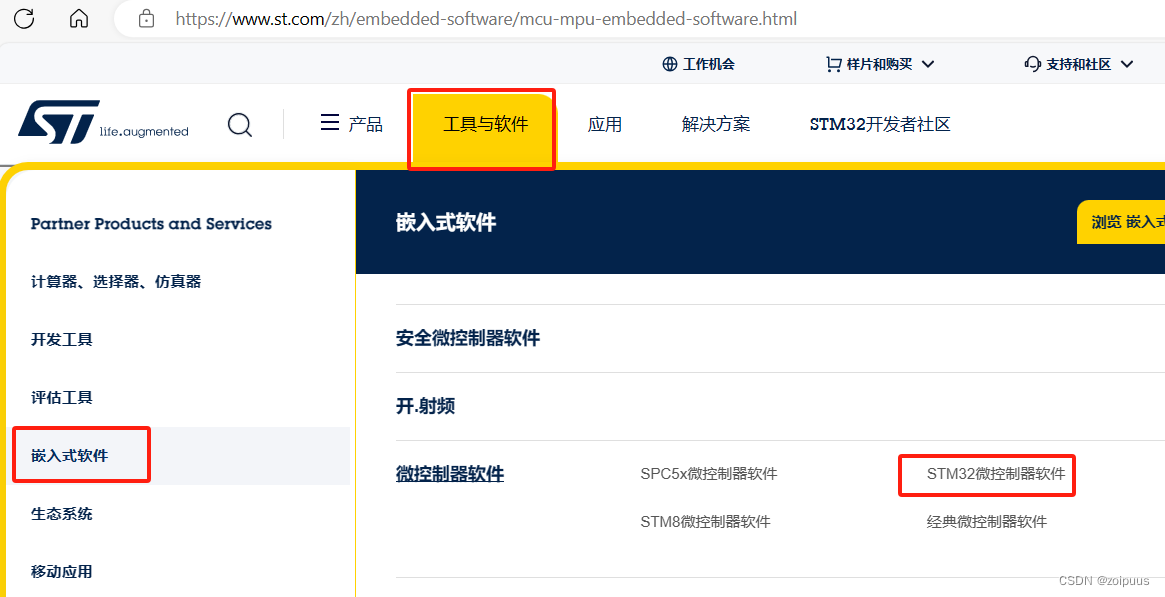
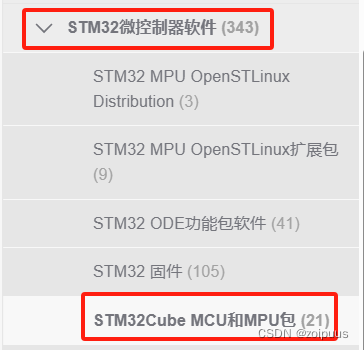
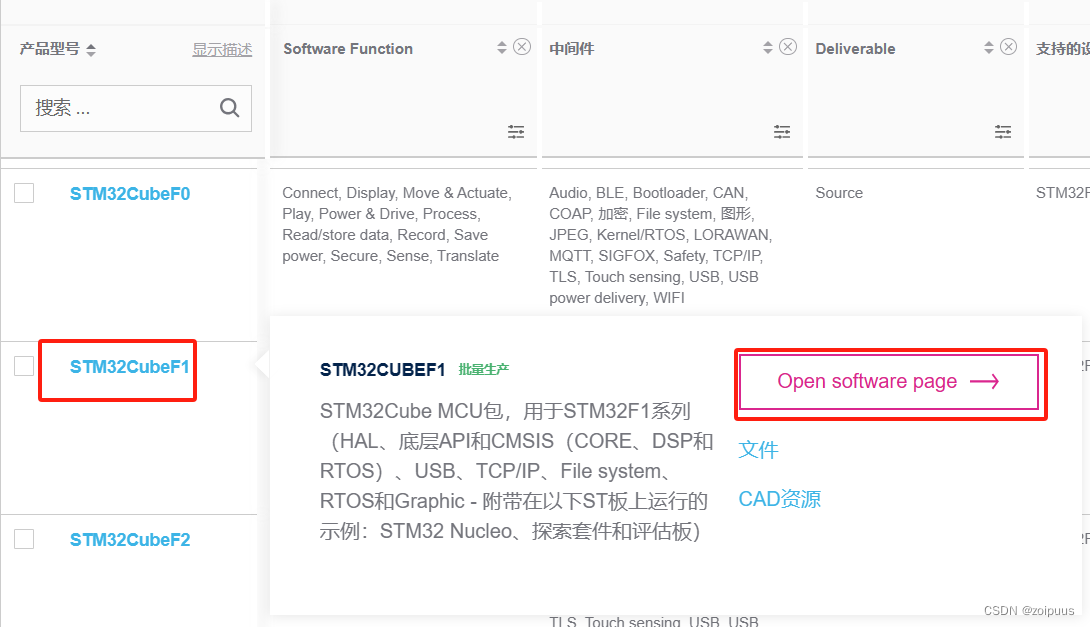
-> STM32Cube MCU和MPU包,根据自己的产品型号点击"Open software page"即可
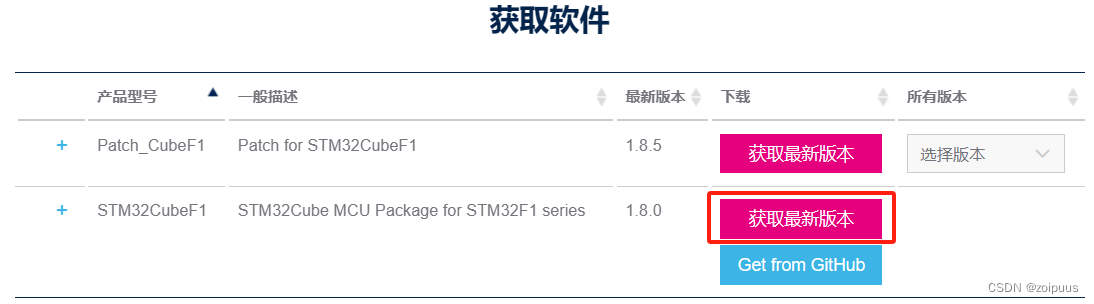
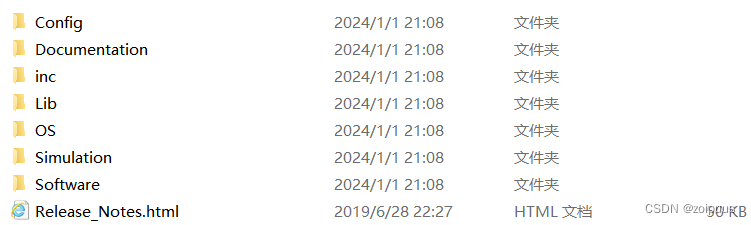
解压后,源码就在STM32Cube_FW_F1_V1.8.0\Middlewares\ST\STemWin文件夹中
二、裸机移植
2.1、导入文件
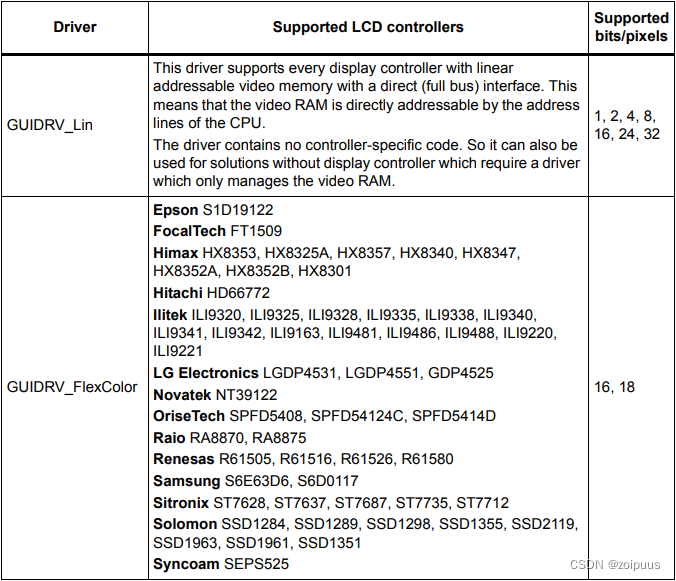
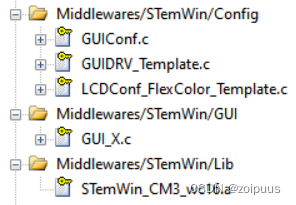
移除多余文件及文件夹,剩下Config、inc、Lib和OS文件夹,Config是配置GUI和LCD,inc是小控件的头文件,Lib是依赖包,STemWin没有开放源码,是以依赖包的形式提供,以前的版本是.lib,现在变为.a,后续导入需要配置IDE。Lib和OS里面的文件,裸机开发选不带OS的,否则就选带OS的,LCD配置文件可以根据个人的LCD驱动器选择,我的LCD驱动器为ST7735,所以选择LCDConf_FlexColor_Template.c
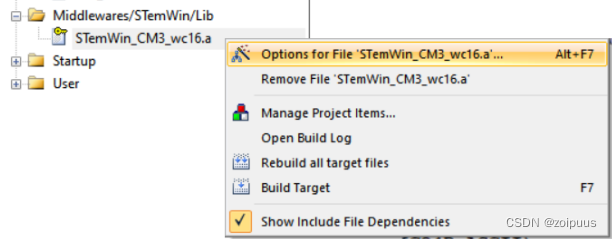
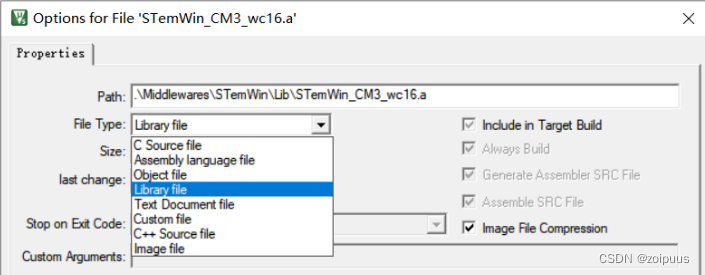
Lib依赖文件选择STemWin_CM3_wc16.a,右击文件,选择Options for file
File Type选择Library file即可
裸机移植需要导入的.c文件和依赖文件如下:
2.2、修改文件
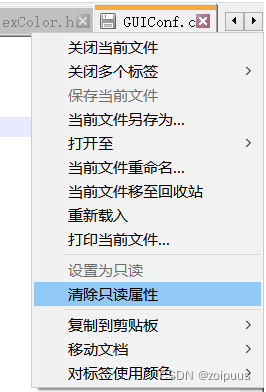
STemWin需要修改的文件有Config的配置文件和inc的个别头文件,把要修改的文件清除只读属性,我是用Notepad++打开的文件,右击鼠标选择清除只读属性即可编辑,文件名也修改了
①、修改GUIConf.c的内存分配空间,#define GUI_NUMBYTES 0x2000 ,否则会导致空间不足

diff --git a/Middlewares/STemWin/Config/GUIConf.c b/Middlewares/STemWin/Config/GUIConf.c
index 42abe4b..df7462b 100644
--- a/Middlewares/STemWin/Config/GUIConf.c
+++ b/Middlewares/STemWin/Config/GUIConf.c
@@ -57,7 +57,7 @@ Purpose     : Display controller initialization
 //
 // Define the available number of bytes available for the GUI
 //
-#define GUI_NUMBYTES  0x200000
+#define GUI_NUMBYTES  0x2000

 /*********************************************************************
 *
②、修改GUIDRV_Template.c(我改为GUIDRV.c),把LCD驱动函数的画点、读点、填充和画线等函数添加到GUIDRV_Template.c里面,如下:
diff --git a/Middlewares/STemWin/Config/GUIDRV.c b/Middlewares/STemWin/Config/GUIDRV.c
index d030bbe..9ba43e7 100644
--- a/Middlewares/STemWin/Config/GUIDRV.c
+++ b/Middlewares/STemWin/Config/GUIDRV.c
@@ -53,6 +53,8 @@ Purpose     : Template driver, could be used as starting point for new
 #include "GUI_Private.h"
 #include "LCD_ConfDefaults.h"

+#include "LCD_TFT_ST7735S.h"
+
 /*********************************************************************
 *
 *       Defines
@@ -154,6 +156,7 @@ static void _SetPixelIndex(GUI_DEVICE * pDevice, int x, int y, int PixelIndex) {
       //
       // TBD by customer...
       //
+      LCD_DrawPoint(x, y, PixelIndex);
     }
     #if (LCD_MIRROR_X == 0) && (LCD_MIRROR_Y == 0) && (LCD_SWAP_XY == 0)
       #undef xPhys
@@ -193,7 +196,7 @@ static unsigned int _GetPixelIndex(GUI_DEVICE * pDevice, int x, int y) {
       //
       // TBD by customer...
       //
-      PixelIndex = 0;
+      PixelIndex = LCD_ReadPoint(x, y);
     }
     #if (LCD_MIRROR_X == 0) && (LCD_MIRROR_Y == 0) && (LCD_SWAP_XY == 0)
       #undef xPhys
@@ -221,9 +224,13 @@ static void _XorPixel(GUI_DEVICE * pDevice, int x, int y) {
 */
 static void _FillRect(GUI_DEVICE * pDevice, int x0, int y0, int x1, int y1) {
   LCD_PIXELINDEX PixelIndex;
-  int x;

   PixelIndex = LCD__GetColorIndex();
+
+  LCD_Fill(x0, y0, x1, y1, PixelIndex);
+
+#if 0
+  int x;
   if (GUI_pContext->DrawMode & LCD_DRAWMODE_XOR) {
     for (; y0 <= y1; y0++) {
       for (x = x0; x <= x1; x++) {
@@ -237,6 +244,7 @@ static void _FillRect(GUI_DEVICE * pDevice, int x0, int y0, int x1, int y1) {
       }
     }
   }
+#endif
 }

 /*********************************************************************
@@ -491,9 +499,12 @@ static void  _DrawBitLine8BPP(GUI_DEVICE * pDevice, int x, int y, U8 const GUI_U
 *   Only required for 16bpp color depth of target. Should be removed otherwise.
 */
 static void _DrawBitLine16BPP(GUI_DEVICE * pDevice, int x, int y, U16 const GUI_UNI_PTR * p, int xsize) {
+  LCD_DrawLine(x, y, xsize+x-1, y, *p);
+#if 0
   for (;xsize > 0; xsize--, x++, p++) {
     _SetPixelIndex(pDevice, x, y, *p);
   }
+#endif
 }

 /*********************************************************************
③、修改LCDConf_FlexColor_Template.c(我的修改为LCDConf.c),必须要有LCDConf.h头文件,否则会报错
.\Middlewares\STemWin\inc\LCD_Private.h(51): error:  #5: cannot open source input file "LCDConf.h": No such file or directory
  #include "LCDConf.h"
Middlewares\STemWin\Config\GUIDRV.c: 0 warnings, 1 error
diff --git a/Middlewares/STemWin/Config/LCDConf.c b/Middlewares/STemWin/Config/LCDConf.c
index 9f6df46..7c4c831 100644
--- a/Middlewares/STemWin/Config/LCDConf.c
+++ b/Middlewares/STemWin/Config/LCDConf.c
@@ -49,6 +49,8 @@ Purpose : Display controller configuration (single layer)
#include "GUI.h"
#include "GUIDRV_FlexColor.h"
+#include "LCD_TFT_ST7735S.h"
+
/*********************************************************************
*
* Layer configuration (to be modified)
@@ -59,8 +61,8 @@ Purpose : Display controller configuration (single layer)
//
// Physical display size
//
-#define XSIZE_PHYS 240 // To be adapted to x-screen size
-#define YSIZE_PHYS 320 // To be adapted to y-screen size
+#define XSIZE_PHYS ST7735S_LCD_W // To be adapted to x-screen size
+#define YSIZE_PHYS ST7735S_LCD_H // To be adapted to y-screen size
/*********************************************************************
*
@@ -163,12 +165,13 @@ void LCD_X_Config(void) {
//
// Set display driver and color conversion
//
- pDevice = GUI_DEVICE_CreateAndLink(GUIDRV_FLEXCOLOR, GUICC_565, 0, 0);
+ pDevice = GUI_DEVICE_CreateAndLink(GUIDRV_FLEXCOLOR, GUICC_M565, 0, 0);
//
// Display driver configuration, required for Lin-driver
//
LCD_SetSizeEx (0, XSIZE_PHYS , YSIZE_PHYS);
LCD_SetVSizeEx(0, VXSIZE_PHYS, VYSIZE_PHYS);
+#if 0
//
// Orientation
//
@@ -182,6 +185,7 @@ void LCD_X_Config(void) {
PortAPI.pfWriteM16_A1 = LcdWriteDataMultiple;
PortAPI.pfReadM16_A1 = LcdReadDataMultiple;
GUIDRV_FlexColor_SetFunc(pDevice, &PortAPI, GUIDRV_FLEXCOLOR_F66708, GUIDRV_FLEXCOLOR_M16C0B16);
+#endif
}
/*********************************************************************GUICC_565替换为GUICC_M565,否则设置GUI_SetColor时颜色对不上
④、修改GUIDRV_FlexColor.h的硬件加速API定义
因为GUIDRV_Template.c(GUIDRV.c)里面定义的API函数定义的是const GUI_DEVICE_API GUIDRV_Template_API,所以要修改GUIDRV_FlexColor.h,否则执行GUI_Init();会卡死
diff --git a/Middlewares/STemWin/inc/GUIDRV_FlexColor.h b/Middlewares/STemWin/inc/GUIDRV_FlexColor.h
index 4bc7a07..b466e1b 100644
--- a/Middlewares/STemWin/inc/GUIDRV_FlexColor.h
+++ b/Middlewares/STemWin/inc/GUIDRV_FlexColor.h
@@ -145,7 +145,7 @@ extern const GUI_DEVICE_API GUIDRV_FlexColor_API;

 #else

-  #define GUIDRV_FLEXCOLOR &GUIDRV_FlexColor_API
+  #define GUIDRV_FLEXCOLOR &GUIDRV_Template_API

 #endif
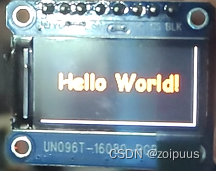
main函数功能:LCD居中显示Hello World!
int main(void) {
	int xPos, yPos;
	RCC_AHBPeriphClockCmd(RCC_AHBPeriph_CRC, ENABLE);
	LCD_TFT_ST7735S_Init();

	GUI_Init();

	xPos = LCD_GetXSize() / 2;
	yPos = LCD_GetYSize() / 3;
	GUI_SetBkColor(GUI_BLACK);
	GUI_SetColor(GUI_RED);
	GUI_SetFont(GUI_FONT_COMIC24B_ASCII);
	GUI_DispStringHCenterAt("Hello World!", xPos, yPos);
	while(1);
}

智能硬件社区聚焦AI智能硬件技术生态,汇聚嵌入式AI、物联网硬件开发者,打造交流分享平台,同步全国赛事资讯、开展 OPC 核心人才招募,助力技术落地与开发者成长。
更多推荐
 2
2 0
0- 0


 已为社区贡献1条内容

所有评论(0)