Android蓝牙文件分享代码实战指南
# Android蓝牙文件分享实战指南
一、前言
在 Android 开发中,蓝牙文件分享是一项常见需求。
通过蓝牙技术,用户可以在设备之间快速传输图片、音频、文档等各类文件。
本文基于实际项目经验,详细讲解 Android 蓝牙文件分享的完整实现方案,包括单文件分享、多文件批量分享、权限配置、关键 API 使用及常见问题解决方案。
二、蓝牙文件分享核心原理
### 1、蓝牙文件分享机制详解
Android 蓝牙文件分享主要依赖 *OBEX(Object Exchange)协议*,通过系统蓝牙服务实现文件传输。核心流程如下:
```
应用准备文件 → 通过 FileProvider 获取 URI → 构建 ACTION_SEND Intent
→ 指定蓝牙包名 → 系统蓝牙服务接收 → 弹出设备选择 → 用户选择目标设备 → 开始传输
```
*关键步骤说明*:
| 步骤 | 说明 | 技术要点 |
|------|------|----------|
| 文件准备 | 将文件复制到可访问目录 | assets → cache 或外部存储 |
| URI 获取 | 通过 FileProvider 生成 content:// URI | Android 7+ 禁止 file:// URI |
| Intent 构建 | 创建 ACTION_SEND 或 ACTION_SEND_MULTIPLE | 设置 MIME 类型和 EXTRA_STREAM |
| 权限授予 | 添加 FLAG_GRANT_READ_URI_PERMISSION | 蓝牙服务需要读取权限 |
| 服务调起 | 指定蓝牙包名 com.android.bluetooth | 直接调起系统蓝牙分享界面 |
### 2、文件URI授权机制
Android 7.0(API 24)引入 *StrictMode API 政策*,禁止应用向其他应用暴露 file:// 格式的 URI。必须使用 content:// 格式的 URI,并通过 FileProvider 进行授权。
*授权流程*:
```
应用 A 准备文件 → FileProvider.getUriForFile() 生成 content:// URI
→ Intent 添加 FLAG_GRANT_READ_URI_PERMISSION → 系统临时授权给应用 B(蓝牙服务)
→ 应用 B 可读取该 URI 指向的文件
```
关键代码:
// 获取 content:// URI

Uri fileUri = FileProvider.getUriForFile(context,

  BuildConfig.APPLICATION_ID + ".fileprovider", file);


// 添加权限标志

shareIntent.addFlags(Intent.FLAG_GRANT_READ_URI_PERMISSION);

shareIntent.addFlags(Intent.FLAG_GRANT_WRITE_URI_PERMISSION);
### 3、MIME类型与文件识别
MIME(Multipurpose Internet Mail Extensions)类型用于标识文件的性质和格式,蓝牙分享时必须正确设置,否则接收方无法正确识别文件类型。
*常见文件类型 MIME 映射*:
| 文件类型 | 扩展名 | MIME 类型 |
|---|---|---|
| 图片 | .jpg/.jpeg | image/jpeg |
| 图片 | .png | image/png |
| 图片 | .gif | image/gif |
| 音频 | .mp3 | audio/mpeg |
| 音频 | .wav | audio/wav |
| 音频 | .aac | audio/aac |
| 视频 | .mp4 | video/mp4 |
| 视频 | .avi | video/avi |
| 文档 | application/pdf |
|
| 文档 | .txt | text/plain |
| 文档 | .doc/.docx | application/msword / application/vnd.openxmlformats-officedocument.wordprocessingml.document |
| 文档 | .xls/.xlsx | application/vnd.ms-excel / application/vnd.openxmlformats-officedocument.spreadsheetml.sheet |
| 压缩 | .zip | application/zip |
| 压缩 | .rar | application/x-rar-compressed |
| 未知 | 任意 | */* |
—
三、核心代码实现
### 1、权限配置
*AndroidManifest.xml*:
<?xml version="1.0" encoding="utf-8"?>
<manifest xmlns:android="http://schemas.android.com/apk/res/android"
xmlns:tools="http://schemas.android.com/tools">
<!-- 蓝牙权限(Android 12+) -->
<uses-permission android:name="android.permission.BLUETOOTH" />
<uses-permission android:name="android.permission.BLUETOOTH_ADMIN" />
<uses-permission android:name="android.permission.BLUETOOTH_CONNECT" />
<uses-permission android:name="android.permission.BLUETOOTH_SCAN" />
<!-- 文件读写权限(Android 10 以下) -->
<uses-permission android:name="android.permission.READ_EXTERNAL_STORAGE" />
<uses-permission android:name="android.permission.WRITE_EXTERNAL_STORAGE" />
<!-- 管理外部存储权限(Android 11+) -->
<uses-permission android:name="android.permission.MANAGE_EXTERNAL_STORAGE"
tools:ignore="ScopedStorage" />
<!-- 声明蓝牙硬件特性 -->
<uses-feature android:name="android.hardware.bluetooth" android:required="true" />
<application ...>
<!-- FileProvider 配置 -->
<provider
android:name="androidx.core.content.FileProvider"
android:authorities="${applicationId}.fileprovider"
android:exported="false"
android:grantUriPermissions="true">
<meta-data
android:name="android.support.FILE_PROVIDER_PATHS"
android:resource="@xml/file_paths" />
</provider>
<activity ...>
...
</activity>
</application>
</manifest>
*权限说明*:
| 权限 | 作用 | 适用版本 |
|---|---|---|
BLUETOOTH |
基础蓝牙操作 | API 1-30 |
BLUETOOTH_ADMIN |
蓝牙管理权限 | API 1-30 |
BLUETOOTH_CONNECT |
蓝牙连接权限 | API 31+ |
BLUETOOTH_SCAN |
蓝牙扫描权限 | API 31+ |
READ_EXTERNAL_STORAGE |
读取外部存储 | API 1-29 |
WRITE_EXTERNAL_STORAGE |
写入外部存储 | API 1-29 |
MANAGE_EXTERNAL_STORAGE |
管理所有文件 | API 30+ |
### 2、FileProvider配置
*file_paths.xml*(res/xml/file_paths.xml):
<?xml version="1.0" encoding="utf-8"?>

<paths>

  <!-- 外部存储根目录 -->

  <external-path name="external_files" path="." />


  <!-- 应用缓存目录 -->

  <cache-path name="cache_files" path="." />


  <!-- 应用私有外部存储目录 -->

  <external-files-path name="external_files_dir" path="." />


  <!-- 应用私有目录 -->

  <files-path name="files" path="." />


  <!-- 外部存储图片目录 -->

  <external-media-path name="external_media" path="." />

</paths>
*路径类型说明*:
| 路径类型 | 对应目录 | 用途 |
|---|---|---|
external-path |
Environment.getExternalStorageDirectory() |
外部存储根目录 |
cache-path |
Context.getCacheDir() |
应用缓存目录 |
external-files-path |
Context.getExternalFilesDir(null) |
应用私有外部存储 |
files-path |
Context.getFilesDir() |
应用私有文件目录 |
external-media-path |
Context.getExternalMediaDirs() |
外部媒体目录 |
### 3、单文件蓝牙分享
*核心代码*:
/**
\* 通过蓝牙分享单个文件
\* @param file 要分享的文件
*/
private void shareFileViaBluetooth(File file) {
if (!checkBluetoothEnabled()) {
return;
}
try {
// 1. 通过 FileProvider 获取文件 URI
Uri fileUri = FileProvider.getUriForFile(this,
getPackageName() + ".fileprovider", file);
Log.d(TAG, "分享文件: " + file.getAbsolutePath());
Log.d(TAG, "文件URI: " + fileUri.toString());
// 2. 构建分享 Intent
Intent shareIntent = new Intent(Intent.ACTION_SEND);
// 3. 设置 MIME 类型
shareIntent.setType(getMimeType(file.getName()));
// 4. 添加文件 URI
shareIntent.putExtra(Intent.EXTRA_STREAM, fileUri);
// 5. 设置 ClipData(Android 10+ 必需)
ClipData clipData = ClipData.newRawUri(file.getName(), fileUri);
shareIntent.setClipData(clipData);
// 6. 添加权限标志
shareIntent.addFlags(Intent.FLAG_GRANT_READ_URI_PERMISSION);
shareIntent.addFlags(Intent.FLAG_GRANT_WRITE_URI_PERMISSION);
shareIntent.addFlags(Intent.FLAG_ACTIVITY_NEW_TASK);
// 7. 指定蓝牙包名
shareIntent.setPackage("com.android.bluetooth");
// 8. 启动分享(带兼容性处理)
try {
startActivity(shareIntent);
updateStatus("已打开蓝牙设备选择界面");
showToast("请选择蓝牙设备");
} catch (ActivityNotFoundException e) {
// 厂商自定义蓝牙包名,使用系统选择器
shareIntent.setPackage(null);
startActivity(Intent.createChooser(shareIntent, "选择分享方式"));
}
} catch (Exception e) {
Log.e(TAG, "分享文件失败", e);
updateStatus("分享失败: " + e.getMessage());
showToast("异常: " + e.getMessage());
}
}
*代码解析*:
| 步骤 | 代码 | 说明 |
|---|---|---|
| 获取 URI | FileProvider.getUriForFile() |
生成 content:// 格式 URI |
| 设置动作 | Intent.ACTION_SEND |
单文件分享动作 |
| 设置类型 | setType(getMimeType()) |
指定文件 MIME 类型 |
| 添加数据 | putExtra(EXTRA_STREAM, uri) |
添加文件数据 |
| 设置 ClipData | ClipData.newRawUri() |
Android 10+ 必须设置 |
| 授权权限 | FLAG_GRANT_READ_URI_PERMISSION |
授予蓝牙服务读取权限 |
| 指定包名 | setPackage("com.android.bluetooth") |
直接调起系统蓝牙 |
| 启动 Activity | startActivity() |
显示设备选择界面 |
### 4、多文件批量分享
*核心代码*:
/**
\* 通过蓝牙批量分享多个文件
\* @param files 要分享的文件列表
*/
private void shareMultipleFilesViaBluetooth(List<File> files) {
if (!checkBluetoothEnabled() || files == null || files.isEmpty()) {
return;
}
try {
// 1. 为每个文件生成 URI
ArrayList<Uri> uris = new ArrayList<>();
for (File file : files) {
Uri fileUri = FileProvider.getUriForFile(this,
getPackageName() + ".fileprovider", file);
uris.add(fileUri);
}
// 2. 构建多文件分享 Intent
Intent shareIntent = new Intent(Intent.ACTION_SEND_MULTIPLE);
// 3. 设置 MIME 类型(根据文件类型决定)
shareIntent.setType(determineMultipleMimeType(files));
// 4. 添加多个文件 URI
shareIntent.putParcelableArrayListExtra(Intent.EXTRA_STREAM, uris);
// 5. 设置 ClipData(Android 10+ 必需)
if (!uris.isEmpty()) {
ClipData clipData = ClipData.newRawUri("files", uris.get(0));
for (int i = 1; i < uris.size(); i++) {
clipData.addItem(new ClipData.Item(uris.get(i)));
}
shareIntent.setClipData(clipData);
}
// 6. 添加权限标志
shareIntent.addFlags(Intent.FLAG_GRANT_READ_URI_PERMISSION);
shareIntent.addFlags(Intent.FLAG_GRANT_WRITE_URI_PERMISSION);
shareIntent.addFlags(Intent.FLAG_ACTIVITY_NEW_TASK);
// 7. 指定蓝牙包名(带兼容性处理)
shareIntent.setPackage("com.android.bluetooth");
try {
startActivity(shareIntent);
} catch (ActivityNotFoundException e) {
shareIntent.setPackage(null);
startActivity(Intent.createChooser(shareIntent, "选择分享方式"));
}
updateStatus("已打开蓝牙设备选择(" + files.size() + "个文件)");
showToast("请选择蓝牙设备,共" + files.size() + "个文件");
} catch (Exception e) {
Log.e(TAG, "批量分享文件失败", e);
updateStatus("分享失败: " + e.getMessage());
showToast("异常: " + e.getMessage());
}
}
/**
\* 确定多文件分享的 MIME 类型
\* @param files 文件列表
\* @return MIME 类型
*/
private String determineMultipleMimeType(List<File> files) {
if (files == null || files.isEmpty()) {
return "*/*";
}
// 获取第一个文件的 MIME 类型
String firstMimeType = getMimeType(files.get(0).getName());
// 检查所有文件是否同类型
for (File file : files) {
if (!getMimeType(file.getName()).equals(firstMimeType)) {
return "*/*"; // 混合类型使用通配符
}
}
return firstMimeType; // 全部同类型,使用具体类型
}
*调用示例*:
// 准备要分享的文件列表

List<File> filesToShare = new ArrayList<>();

filesToShare.add(new File(getCacheDir(), "music.mp3"));

filesToShare.add(new File(getCacheDir(), "photo.jpg"));

filesToShare.add(new File(getCacheDir(), "document.pdf"));


// 批量分享

shareMultipleFilesViaBluetooth(filesToShare);
*单文件 vs 多文件对比*:
| 对比项 | 单文件分享 | 多文件分享 |
|-------|-----------|-----------|
| Intent 动作 | ACTION_SEND | ACTION_SEND_MULTIPLE |
| 数据传递 | putExtra(EXTRA_STREAM, uri) | putParcelableArrayListExtra(EXTRA_STREAM, uris) |
| MIME 类型 | 单个文件类型 | 同类型使用具体类型,混合使用 */* |
| ClipData | 单个 URI | 多个 URI |
### 5、蓝牙状态检查
*核心代码*:
private BluetoothAdapter bluetoothAdapter;
/**
\* 初始化蓝牙适配器
*/
private void initBluetooth() {
BluetoothManager bluetoothManager =
(BluetoothManager) getSystemService(Context.BLUETOOTH_SERVICE);
if (bluetoothManager != null) {
bluetoothAdapter = bluetoothManager.getAdapter();
}
if (bluetoothAdapter == null) {
showToast("设备不支持蓝牙");
finish();
}
}
/**
\* 检查蓝牙是否开启
\* @return true 已开启,false 未开启
*/
private boolean checkBluetoothEnabled() {
if (bluetoothAdapter == null) {
showToast("设备不支持蓝牙");
return false;
}
if (!bluetoothAdapter.isEnabled()) {
// 请求用户开启蓝牙
Intent enableBtIntent = new Intent(BluetoothAdapter.ACTION_REQUEST_ENABLE);
if (ActivityCompat.checkSelfPermission(this,
Manifest.permission.BLUETOOTH_CONNECT) == PackageManager.PERMISSION_GRANTED) {
bluetoothEnableLauncher.launch(enableBtIntent);
} else {
showToast("缺少蓝牙连接权限");
requestBluetoothPermission();
}
return false;
}
return true;
}
/**
\* 请求蓝牙权限(Android 12+)
*/
private void requestBluetoothPermission() {
if (Build.VERSION.SDK_INT >= Build.VERSION_CODES.S) {
permissionLauncher.launch(new String[]{
Manifest.permission.BLUETOOTH_CONNECT,
Manifest.permission.BLUETOOTH_SCAN
});
}
}
*蓝牙状态检查流程*:
检查蓝牙适配器 → 适配器为空 → 提示不支持蓝牙 → 结束
↓
适配器不为空
↓
检查蓝牙状态 → 已开启 → 返回 true
↓
蓝牙未开启 → 请求开启蓝牙 → 返回 false
### 6、MIME类型获取
*核心代码*:
/**
\* 获取文件 MIME 类型(推荐:使用系统 MimeTypeMap)
\* @param fileName 文件名
\* @return MIME 类型
*/
private String getMimeType(String fileName) {
String extension = MimeTypeMap.getFileExtensionFromUrl(fileName);
if (extension != null) {
String mimeType = MimeTypeMap.getSingleton()
.getMimeTypeFromExtension(extension.toLowerCase());
if (mimeType != null) {
return mimeType;
}
}
return "*/*"; // 未知类型使用通配符
}
*两种获取方式对比*:
| 方式 | 优点 | 缺点 | 适用场景 |
|---|---|---|---|
| 硬编码映射 | 简单直接,不依赖系统 | 需要维护映射表,不支持新类型 | 固定文件类型场景 |
| MimeTypeMap | 系统维护,支持所有类型 | 部分罕见类型可能返回 null | 通用场景(推荐) |
*硬编码方式示例*(不推荐,仅作对比):
private String getMimeTypeHardCode(String fileName) {
if (fileName.endsWith(".mp3")) {
return "audio/mpeg";
} else if (fileName.endsWith(".jpg") || fileName.endsWith(".jpeg")) {
return "image/jpeg";
} else if (fileName.endsWith(".png")) {
return "image/png";
} else if (fileName.endsWith(".pdf")) {
return "application/pdf";
}
return "*/*";
}
四、关键API速查表
| API | 所属类 | 作用 | 最低API版本 |
|---|---|---|---|
FileProvider.getUriForFile() |
androidx.core.content.FileProvider |
获取 content:// 格式文件 URI | 24 |
Intent.ACTION_SEND |
android.content.Intent |
单文件分享动作 | 1 |
Intent.ACTION_SEND_MULTIPLE |
android.content.Intent |
多文件分享动作 | 1 |
Intent.EXTRA_STREAM |
android.content.Intent |
文件数据 Extra 键 | 1 |
ClipData.newRawUri() |
android.content.ClipData |
创建剪贴数据 | 16 |
FLAG_GRANT_READ_URI_PERMISSION |
android.content.Intent |
授予 URI 读取权限 | 1 |
FLAG_GRANT_WRITE_URI_PERMISSION |
android.content.Intent |
授予 URI 写入权限 | 1 |
BluetoothManager.getAdapter() |
android.bluetooth.BluetoothManager |
获取蓝牙适配器 | 18 |
BluetoothAdapter.isEnabled() |
android.bluetooth.BluetoothAdapter |
检查蓝牙是否开启 | 1 |
BluetoothAdapter.ACTION_REQUEST_ENABLE |
android.bluetooth.BluetoothAdapter |
请求开启蓝牙 | 1 |
MimeTypeMap.getSingleton() |
android.webkit.MimeTypeMap |
获取 MIME 类型映射单例 | 1 |
MimeTypeMap.getMimeTypeFromExtension() |
android.webkit.MimeTypeMap |
根据扩展名获取 MIME 类型 | 1 |
## 五、常见问题与解决方案
### 问题1:FileProvider找不到文件
*现象*:抛出 IllegalArgumentException: Failed to find configured root that contains xxx
*原因*:
- file_paths.xml 中未配置对应的文件路径
- 文件实际存储路径与配置路径不匹配
*解决方案*:
<!-- file_paths.xml 确保包含文件所在目录 -->

<paths>

  <external-path name="external_files" path="." />   <!-- 外部存储根目录 -->

  <cache-path name="cache_files" path="." />      <!-- 应用缓存目录 -->

  <external-files-path name="external_files_dir" path="." /> <!-- 应用私有外部存储 -->

  <files-path name="files" path="." />         <!-- 应用私有目录 -->

</paths>
*路径对应关系*:
| 代码中的目录 | file_paths.xml 配置 |
|---|---|
Environment.getExternalStorageDirectory() |
<external-path> |
Context.getCacheDir() |
<cache-path> |
Context.getExternalFilesDir(null) |
<external-files-path> |
Context.getFilesDir() |
<files-path> |
### 问题2:蓝牙包名兼容性
*现象*:部分设备调用 startActivity() 时抛出 ActivityNotFoundException
*原因*:部分厂商自定义了蓝牙应用的包名,不是标准的 com.android.bluetooth
*解决方案*:
shareIntent.setPackage("com.android.bluetooth");

try {

  startActivity(shareIntent);

} catch (ActivityNotFoundException e) {

  // 包名不匹配,使用系统选择器

  shareIntent.setPackage(null);

  startActivity(Intent.createChooser(shareIntent, "选择分享方式"));

}
*常见非标准蓝牙包名*:
| 厂商 | 蓝牙包名 |
|---|---|
| 小米 | com.android.bluetooth(部分版本为 com.miui.bluetooth) |
| 华为 | com.android.bluetooth(部分版本为 com.huawei.bluetooth) |
| 三星 | com.android.bluetooth |
| OPPO | com.android.bluetooth |
| VIVO | com.android.bluetooth |
### 问题3:Android 10+文件访问受限
*现象*:无法读取或写入外部存储文件
*原因*:Android 10(API 29)引入 *Scoped Storage*,限制应用对外部存储的访问
*解决方案*:
*方案1:使用应用私有目录*(推荐)
// 使用应用缓存目录

File cacheFile = new File(getCacheDir(), "myfile.pdf");


// 使用应用私有外部存储

File externalFile = new File(getExternalFilesDir(null), "myfile.pdf");
*方案2:请求 MANAGE_EXTERNAL_STORAGE 权限*(仅适用于文件管理类应用)
if (Build.VERSION.SDK_INT >= Build.VERSION_CODES.R) {
if (!Environment.isExternalStorageManager()) {
Intent intent = new Intent(Settings.ACTION_MANAGE_APP_ALL_FILES_ACCESS_PERMISSION);
intent.setData(Uri.parse("package:" + getPackageName()));
manageStorageLauncher.launch(intent);
}
}
### 问题4:分享失败无响应
*现象*:调用 startActivity() 后无任何反应,也不报错
*原因分析*:
| 可能原因 | 排查方法 |
|---|---|
| 蓝牙未开启 | 检查 bluetoothAdapter.isEnabled() |
| 文件不存在 | 检查 file.exists() |
| URI 授权失败 | 确保添加 FLAG_GRANT_READ_URI_PERMISSION |
| ClipData 未设置 | Android 10+ 必须设置 ClipData |
| MIME 类型错误 | 使用 */* 测试 |
*完整排查代码*:
private void shareFileViaBluetooth(File file) {
// 1. 检查文件
if (file == null || !file.exists()) {
showToast("文件不存在");
return;
}
// 2. 检查蓝牙
if (!checkBluetoothEnabled()) {
return;
}
try {
Uri fileUri = FileProvider.getUriForFile(this,
getPackageName() + ".fileprovider", file);
Intent shareIntent = new Intent(Intent.ACTION_SEND);
shareIntent.setType("*/*"); // 使用通配符测试
shareIntent.putExtra(Intent.EXTRA_STREAM, fileUri);
// 必须设置 ClipData
ClipData clipData = ClipData.newRawUri(file.getName(), fileUri);
shareIntent.setClipData(clipData);
// 必须添加权限标志
shareIntent.addFlags(Intent.FLAG_GRANT_READ_URI_PERMISSION);
shareIntent.addFlags(Intent.FLAG_GRANT_WRITE_URI_PERMISSION);
// 先不指定包名,使用选择器测试
startActivity(Intent.createChooser(shareIntent, "选择分享方式"));
} catch (Exception e) {
Log.e(TAG, "分享失败", e);
showToast("分享失败: " + e.getMessage());
}
}
五、粗糙的示例demo
只实现了功能,代码未优化,有需要的自行优化。
1、效果:
(1)界面
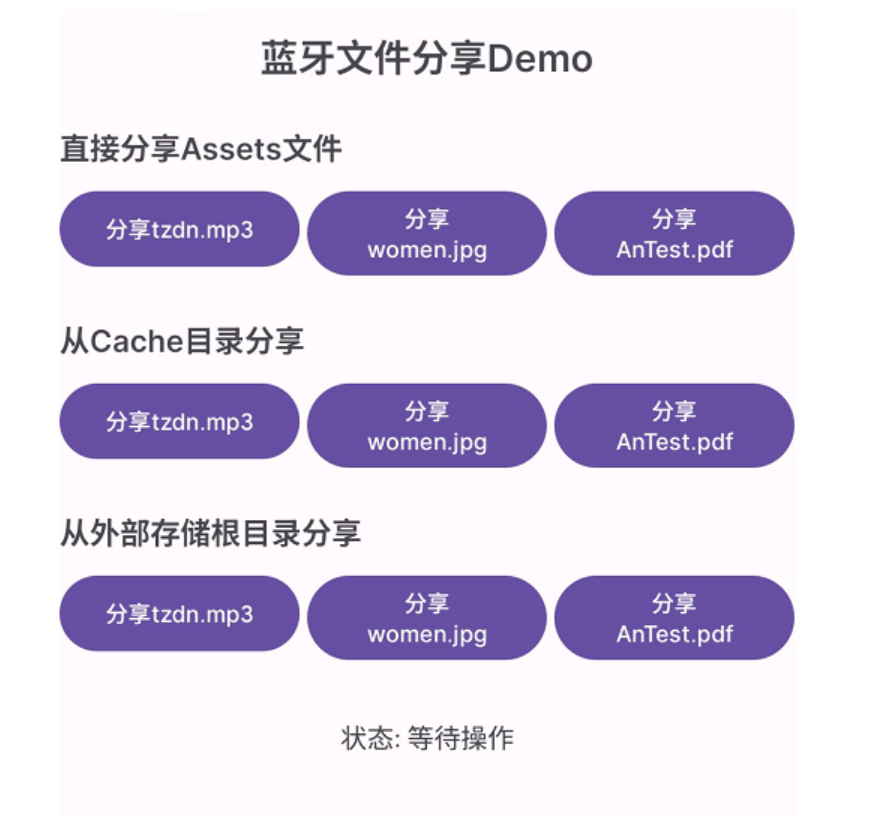
其实Assets 目录文件的分享是失败的;试了很多方案都不行。
但是可以把文件复制到data目录或者sdcard目录进行分享就可以了。
蓝牙分享选择蓝牙设备:
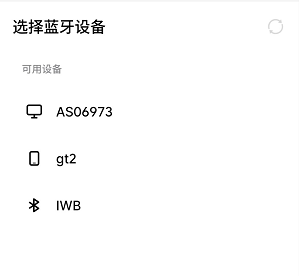
这个选择蓝牙界面是Settings的界面。
蓝牙文件接收过程: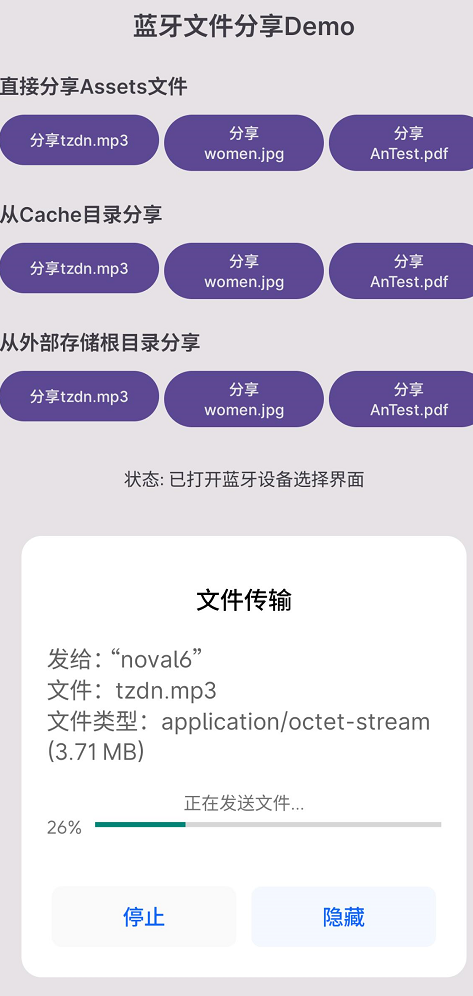
这个蓝牙传输过程的界面是系统的。
2、代码
AndroidManifest.xml
<?xml version="1.0" encoding="utf-8"?>
<manifest xmlns:android="http://schemas.android.com/apk/res/android"
    xmlns:tools="http://schemas.android.com/tools"
    >
    <!--    android:sharedUserId="android.uid.system"-->

    <!-- 蓝牙权限 -->
    <uses-permission android:name="android.permission.BLUETOOTH" />
    <uses-permission android:name="android.permission.BLUETOOTH_ADMIN" />
    <uses-permission android:name="android.permission.BLUETOOTH_CONNECT" />
    <uses-permission android:name="android.permission.BLUETOOTH_SCAN" />
    <uses-permission android:name="android.permission.BLUETOOTH_ADVERTISE" />

    <!-- 文件读写权限 -->
    <uses-permission android:name="android.permission.READ_EXTERNAL_STORAGE" />
    <uses-permission android:name="android.permission.WRITE_EXTERNAL_STORAGE" />

    <!-- 管理外部存储权限 (Android 11+) -->
    <uses-permission android:name="android.permission.MANAGE_EXTERNAL_STORAGE"
        tools:ignore="ScopedStorage" />

    <uses-feature android:name="android.hardware.bluetooth" android:required="true" />

    <application
        android:allowBackup="true"
        android:dataExtractionRules="@xml/data_extraction_rules"
        android:fullBackupContent="@xml/backup_rules"
        android:icon="@mipmap/ic_launcher"
        android:label="@string/app_name"
        android:roundIcon="@mipmap/ic_launcher_round"
        android:supportsRtl="true"
        android:theme="@style/Theme.BluetoothShareDemo"
        tools:targetApi="31">

        <!-- FileProvider配置 -->
        <provider
            android:name="androidx.core.content.FileProvider"
            android:authorities="${applicationId}.fileprovider"
            android:exported="false"
            android:grantUriPermissions="true">
            <meta-data
                android:name="android.support.FILE_PROVIDER_PATHS"
                android:resource="@xml/file_paths" />
        </provider>

        <activity
            android:name=".MainActivity"
            android:exported="true">
            <intent-filter>
                <action android:name="android.intent.action.MAIN" />

                <category android:name="android.intent.category.LAUNCHER" />
            </intent-filter>
        </activity>
    </application>

</manifest>
activity_main.xml
<?xml version="1.0" encoding="utf-8"?>
<androidx.constraintlayout.widget.ConstraintLayout xmlns:android="http://schemas.android.com/apk/res/android"
    xmlns:app="http://schemas.android.com/apk/res-auto"
    xmlns:tools="http://schemas.android.com/tools"
    android:id="@+id/main"
    android:layout_width="match_parent"
    android:layout_height="match_parent"
    android:padding="16dp"
    tools:context=".MainActivity">

    <TextView
        android:id="@+id/tvTitle"
        android:layout_width="wrap_content"
        android:layout_height="wrap_content"
        android:text="蓝牙文件分享Demo"
        android:textSize="20sp"
        android:textStyle="bold"
        app:layout_constraintEnd_toEndOf="parent"
        app:layout_constraintStart_toStartOf="parent"
        app:layout_constraintTop_toTopOf="parent" />

    <!-- 直接分享assets文件 -->
    <TextView
        android:id="@+id/tvDirectShare"
        android:layout_width="wrap_content"
        android:layout_height="wrap_content"
        android:layout_marginTop="24dp"
        android:text="直接分享Assets文件"
        android:textSize="16sp"
        android:textStyle="bold"
        app:layout_constraintStart_toStartOf="parent"
        app:layout_constraintTop_toBottomOf="@id/tvTitle" />

    <Button
        android:id="@+id/btnShareMp3Direct"
        android:layout_width="0dp"
        android:layout_height="wrap_content"
        android:layout_marginTop="8dp"
        android:layout_marginEnd="4dp"
        android:text="分享tzdn.mp3"
        android:textSize="12sp"
        app:layout_constraintEnd_toStartOf="@id/btnShareJpgDirect"
        app:layout_constraintStart_toStartOf="parent"
        app:layout_constraintTop_toBottomOf="@id/tvDirectShare" />

    <Button
        android:id="@+id/btnShareJpgDirect"
        android:layout_width="0dp"
        android:layout_height="wrap_content"
        android:layout_marginTop="8dp"
        android:layout_marginEnd="4dp"
        android:text="分享women.jpg"
        android:textSize="12sp"
        app:layout_constraintEnd_toStartOf="@id/btnSharePdfDirect"
        app:layout_constraintStart_toEndOf="@id/btnShareMp3Direct"
        app:layout_constraintTop_toBottomOf="@id/tvDirectShare" />

    <Button
        android:id="@+id/btnSharePdfDirect"
        android:layout_width="0dp"
        android:layout_height="wrap_content"
        android:layout_marginTop="8dp"
        android:text="分享AnTest.pdf"
        android:textSize="12sp"
        app:layout_constraintEnd_toEndOf="parent"
        app:layout_constraintStart_toEndOf="@id/btnShareJpgDirect"
        app:layout_constraintTop_toBottomOf="@id/tvDirectShare" />

    <!-- 从Cache目录分享 -->
    <TextView
        android:id="@+id/tvCacheShare"
        android:layout_width="wrap_content"
        android:layout_height="wrap_content"
        android:layout_marginTop="24dp"
        android:text="从Cache目录分享"
        android:textSize="16sp"
        android:textStyle="bold"
        app:layout_constraintStart_toStartOf="parent"
        app:layout_constraintTop_toBottomOf="@id/btnShareMp3Direct" />

    <Button
        android:id="@+id/btnShareMp3Cache"
        android:layout_width="0dp"
        android:layout_height="wrap_content"
        android:layout_marginTop="8dp"
        android:layout_marginEnd="4dp"
        android:text="分享tzdn.mp3"
        android:textSize="12sp"
        app:layout_constraintEnd_toStartOf="@id/btnShareJpgCache"
        app:layout_constraintStart_toStartOf="parent"
        app:layout_constraintTop_toBottomOf="@id/tvCacheShare" />

    <Button
        android:id="@+id/btnShareJpgCache"
        android:layout_width="0dp"
        android:layout_height="wrap_content"
        android:layout_marginTop="8dp"
        android:layout_marginEnd="4dp"
        android:text="分享women.jpg"
        android:textSize="12sp"
        app:layout_constraintEnd_toStartOf="@id/btnSharePdfCache"
        app:layout_constraintStart_toEndOf="@id/btnShareMp3Cache"
        app:layout_constraintTop_toBottomOf="@id/tvCacheShare" />

    <Button
        android:id="@+id/btnSharePdfCache"
        android:layout_width="0dp"
        android:layout_height="wrap_content"
        android:layout_marginTop="8dp"
        android:text="分享AnTest.pdf"
        android:textSize="12sp"
        app:layout_constraintEnd_toEndOf="parent"
        app:layout_constraintStart_toEndOf="@id/btnShareJpgCache"
        app:layout_constraintTop_toBottomOf="@id/tvCacheShare" />

    <!-- 从外部存储根目录分享 -->
    <TextView
        android:id="@+id/tvExternalShare"
        android:layout_width="wrap_content"
        android:layout_height="wrap_content"
        android:layout_marginTop="24dp"
        android:text="从外部存储根目录分享"
        android:textSize="16sp"
        android:textStyle="bold"
        app:layout_constraintStart_toStartOf="parent"
        app:layout_constraintTop_toBottomOf="@id/btnShareMp3Cache" />

    <Button
        android:id="@+id/btnShareMp3External"
        android:layout_width="0dp"
        android:layout_height="wrap_content"
        android:layout_marginTop="8dp"
        android:layout_marginEnd="4dp"
        android:text="分享tzdn.mp3"
        android:textSize="12sp"
        app:layout_constraintEnd_toStartOf="@id/btnShareJpgExternal"
        app:layout_constraintStart_toStartOf="parent"
        app:layout_constraintTop_toBottomOf="@id/tvExternalShare" />

    <Button
        android:id="@+id/btnShareJpgExternal"
        android:layout_width="0dp"
        android:layout_height="wrap_content"
        android:layout_marginTop="8dp"
        android:layout_marginEnd="4dp"
        android:text="分享women.jpg"
        android:textSize="12sp"
        app:layout_constraintEnd_toStartOf="@id/btnSharePdfExternal"
        app:layout_constraintStart_toEndOf="@id/btnShareMp3External"
        app:layout_constraintTop_toBottomOf="@id/tvExternalShare" />

    <Button
        android:id="@+id/btnSharePdfExternal"
        android:layout_width="0dp"
        android:layout_height="wrap_content"
        android:layout_marginTop="8dp"
        android:text="分享AnTest.pdf"
        android:textSize="12sp"
        app:layout_constraintEnd_toEndOf="parent"
        app:layout_constraintStart_toEndOf="@id/btnShareJpgExternal"
        app:layout_constraintTop_toBottomOf="@id/tvExternalShare" />

    <TextView
        android:id="@+id/tvStatus"
        android:layout_width="wrap_content"
        android:layout_height="wrap_content"
        android:layout_marginTop="32dp"
        android:text="状态: 等待操作"
        android:textSize="14sp"
        app:layout_constraintEnd_toEndOf="parent"
        app:layout_constraintStart_toStartOf="parent"
        app:layout_constraintTop_toBottomOf="@id/btnShareMp3External" />

</androidx.constraintlayout.widget.ConstraintLayout>
MainActivity.java
package com.bluetooth.share;

import android.Manifest;
import android.bluetooth.BluetoothAdapter;
import android.bluetooth.BluetoothManager;
import android.content.ClipData;
import android.content.Context;
import android.content.Intent;
import android.content.pm.PackageManager;
import android.net.Uri;
import android.os.Build;
import android.os.Bundle;
import android.os.Environment;
import android.provider.Settings;
import android.util.Log;
import android.widget.TextView;
import android.widget.Toast;

import androidx.activity.result.ActivityResultLauncher;
import androidx.activity.result.contract.ActivityResultContracts;
import androidx.appcompat.app.AppCompatActivity;
import androidx.core.app.ActivityCompat;
import androidx.core.content.ContextCompat;
import androidx.core.content.FileProvider;
import androidx.core.graphics.Insets;
import androidx.core.view.ViewCompat;
import androidx.core.view.WindowInsetsCompat;

import java.io.File;
import java.io.FileOutputStream;
import java.io.IOException;
import java.io.InputStream;

/**
 * 蓝牙文件分享Demo
 * 实现九种不同的文件分享方式
 */
public class MainActivity extends AppCompatActivity {

    private static final String TAG = "BluetoothShareDemo";

    // 文件名常量
    private static final String MP3_FILE = "tzdn.mp3";
    private static final String JPG_FILE = "women.jpg";
    private static final String PDF_FILE = "AnTest.pdf";

    // 分享类型枚举
    private static final int SHARE_TYPE_DIRECT = 0;      // 直接从assets分享
    private static final int SHARE_TYPE_CACHE = 1;       // 从cache目录分享
    private static final int SHARE_TYPE_EXTERNAL = 2;    // 从外部存储根目录分享

    private BluetoothAdapter bluetoothAdapter;
    private TextView tvStatus;

    // 当前分享状态
    private int currentShareType = -1;
    private String currentFileName = null;
    private File currentFileToShare = null;

    // 权限请求启动器
    private ActivityResultLauncher<String[]> permissionLauncher;
    private ActivityResultLauncher<Intent> bluetoothEnableLauncher;
    private ActivityResultLauncher<Intent> manageStorageLauncher;

    @Override
    protected void onCreate(Bundle savedInstanceState) {
        super.onCreate(savedInstanceState);
        setContentView(R.layout.activity_main);

        ViewCompat.setOnApplyWindowInsetsListener(findViewById(R.id.main), (v, insets) -> {
            Insets systemBars = insets.getInsets(WindowInsetsCompat.Type.systemBars());
            v.setPadding(systemBars.left, systemBars.top, systemBars.right, systemBars.bottom);
            return insets;
        });

        initViews();
        initBluetooth();
        initPermissionLaunchers();
        checkPermissions();
    }

    private void initViews() {
        tvStatus = findViewById(R.id.tvStatus);

        // 直接分享按钮
        findViewById(R.id.btnShareMp3Direct).setOnClickListener(v ->
            startShareProcess(MP3_FILE, SHARE_TYPE_DIRECT));
        findViewById(R.id.btnShareJpgDirect).setOnClickListener(v ->
            startShareProcess(JPG_FILE, SHARE_TYPE_DIRECT));
        findViewById(R.id.btnSharePdfDirect).setOnClickListener(v ->
            startShareProcess(PDF_FILE, SHARE_TYPE_DIRECT));

        // Cache目录分享按钮
        findViewById(R.id.btnShareMp3Cache).setOnClickListener(v ->
            startShareProcess(MP3_FILE, SHARE_TYPE_CACHE));
        findViewById(R.id.btnShareJpgCache).setOnClickListener(v ->
            startShareProcess(JPG_FILE, SHARE_TYPE_CACHE));
        findViewById(R.id.btnSharePdfCache).setOnClickListener(v ->
            startShareProcess(PDF_FILE, SHARE_TYPE_CACHE));

        // 外部存储分享按钮
        findViewById(R.id.btnShareMp3External).setOnClickListener(v ->
            startShareProcess(MP3_FILE, SHARE_TYPE_EXTERNAL));
        findViewById(R.id.btnShareJpgExternal).setOnClickListener(v ->
            startShareProcess(JPG_FILE, SHARE_TYPE_EXTERNAL));
        findViewById(R.id.btnSharePdfExternal).setOnClickListener(v ->
            startShareProcess(PDF_FILE, SHARE_TYPE_EXTERNAL));
    }

    private void initBluetooth() {
        BluetoothManager bluetoothManager = (BluetoothManager) getSystemService(Context.BLUETOOTH_SERVICE);
        if (bluetoothManager != null) {
            bluetoothAdapter = bluetoothManager.getAdapter();
        }

        if (bluetoothAdapter == null) {
            showToast("设备不支持蓝牙");
            finish();
        }
    }

    private void initPermissionLaunchers() {
        permissionLauncher = registerForActivityResult(
            new ActivityResultContracts.RequestMultiplePermissions(),
            result -> {
                boolean allGranted = true;
                for (Boolean granted : result.values()) {
                    if (!granted) {
                        allGranted = false;
                        break;
                    }
                }
                if (allGranted) {
                    checkManageStoragePermission();
                } else {
                    showToast("权限被拒绝,部分功能可能无法使用");
                }
            });

        bluetoothEnableLauncher = registerForActivityResult(
            new ActivityResultContracts.StartActivityForResult(),
            result -> {
                if (result.getResultCode() == RESULT_OK) {
                    showToast("蓝牙已开启");
                } else {
                    showToast("蓝牙未开启");
                }
            });

        manageStorageLauncher = registerForActivityResult(
            new ActivityResultContracts.StartActivityForResult(),
            result -> {
                if (Build.VERSION.SDK_INT >= Build.VERSION_CODES.R) {
                    if (Environment.isExternalStorageManager()) {
                        showToast("存储管理权限已获取");
                    } else {
                        showToast("存储管理权限被拒绝,外部存储功能受限");
                    }
                }
            });
    }

    private void checkPermissions() {
        java.util.ArrayList<String> permissionsToRequest = new java.util.ArrayList<>();

        // 蓝牙权限
        if (Build.VERSION.SDK_INT >= Build.VERSION_CODES.S) {
            if (ContextCompat.checkSelfPermission(this, Manifest.permission.BLUETOOTH_CONNECT)
                != PackageManager.PERMISSION_GRANTED) {
                permissionsToRequest.add(Manifest.permission.BLUETOOTH_CONNECT);
            }
            if (ContextCompat.checkSelfPermission(this, Manifest.permission.BLUETOOTH_SCAN)
                != PackageManager.PERMISSION_GRANTED) {
                permissionsToRequest.add(Manifest.permission.BLUETOOTH_SCAN);
            }
        }

        // 存储权限
        if (Build.VERSION.SDK_INT < Build.VERSION_CODES.R) {
            if (ContextCompat.checkSelfPermission(this, Manifest.permission.READ_EXTERNAL_STORAGE)
                != PackageManager.PERMISSION_GRANTED) {
                permissionsToRequest.add(Manifest.permission.READ_EXTERNAL_STORAGE);
            }
            if (ContextCompat.checkSelfPermission(this, Manifest.permission.WRITE_EXTERNAL_STORAGE)
                != PackageManager.PERMISSION_GRANTED) {
                permissionsToRequest.add(Manifest.permission.WRITE_EXTERNAL_STORAGE);
            }
        }

        if (!permissionsToRequest.isEmpty()) {
            permissionLauncher.launch(permissionsToRequest.toArray(new String[0]));
        } else {
            checkManageStoragePermission();
        }
    }

    private void checkManageStoragePermission() {
        if (Build.VERSION.SDK_INT >= Build.VERSION_CODES.R) {
            if (!Environment.isExternalStorageManager()) {
                try {
                    Intent intent = new Intent(Settings.ACTION_MANAGE_APP_ALL_FILES_ACCESS_PERMISSION);
                    intent.setData(Uri.parse("package:" + getPackageName()));
                    manageStorageLauncher.launch(intent);
                } catch (Exception e) {
                    Intent intent = new Intent(Settings.ACTION_MANAGE_ALL_FILES_ACCESS_PERMISSION);
                    manageStorageLauncher.launch(intent);
                }
            }
        }
    }

    /**
     * 开始分享流程
     */
    private void startShareProcess(String fileName, int shareType) {
        if (!checkBluetoothEnabled()) {
            return;
        }

        currentFileName = fileName;
        currentShareType = shareType;

        updateStatus("准备文件中...");
        showToast("开始分享: " + fileName);

        // 准备文件
        new Thread(() -> {
            try {
                File preparedFile = prepareFile(fileName, shareType);
                if (preparedFile != null && preparedFile.exists()) {
                    currentFileToShare = preparedFile;

                    runOnUiThread(() -> {
                        updateStatus("文件准备完成,正在打开蓝牙设备选择...");
                        shareFileViaBluetooth(preparedFile);
                    });
                } else {
                    runOnUiThread(() -> {
                        updateStatus("文件准备失败");
                        showToast("异常: 文件准备失败");
                    });
                }
            } catch (Exception e) {
                Log.e(TAG, "准备文件失败", e);
                runOnUiThread(() -> {
                    updateStatus("文件准备异常: " + e.getMessage());
                    showToast("异常: " + e.getMessage());
                });
            }
        }).start();
    }

    /**
     * 准备要分享的文件
     */
    private File prepareFile(String fileName, int shareType) throws IOException {
        switch (shareType) {
            case SHARE_TYPE_DIRECT:
                // 直接从assets分享,复制到外部存储根目录(和SHARE_TYPE_EXTERNAL一样)
                return copyAssetToExternalStorage(fileName);

            case SHARE_TYPE_CACHE:
                // 复制到cache目录,然后再复制到外部存储根目录
                File cacheFile = copyAssetToCache(fileName, fileName);
                return copyFileToExternalStorage(cacheFile, fileName);

            case SHARE_TYPE_EXTERNAL:
                // 复制到外部存储根目录
                return copyAssetToExternalStorage(fileName);

            default:
                return null;
        }
    }

    /**
     * 从assets复制文件到外部存储根目录
     */
    private File copyAssetToExternalStorage(String assetFileName) throws IOException {
        File externalDir = Environment.getExternalStorageDirectory();
        if (externalDir == null) {
            throw new IOException("无法访问外部存储目录");
        }

        File targetFile = new File(externalDir, assetFileName);

        // 如果文件已存在,删除后重新复制
        if (targetFile.exists()) {
            targetFile.delete();
        }

        try (InputStream is = getAssets().open(assetFileName);
             FileOutputStream fos = new FileOutputStream(targetFile)) {
            byte[] buffer = new byte[4096];
            int bytesRead;
            while ((bytesRead = is.read(buffer)) != -1) {
                fos.write(buffer, 0, bytesRead);
            }
        }

        Log.d(TAG, "文件已复制到外部存储: " + targetFile.getAbsolutePath());
        return targetFile;
    }

    /**
     * 复制文件到外部存储根目录
     */
    private File copyFileToExternalStorage(File sourceFile, String targetFileName) throws IOException {
        File externalDir = Environment.getExternalStorageDirectory();
        if (externalDir == null) {
            throw new IOException("无法访问外部存储目录");
        }

        File targetFile = new File(externalDir, targetFileName);

        java.io.FileInputStream fis = new java.io.FileInputStream(sourceFile);
        java.io.FileOutputStream fos = new java.io.FileOutputStream(targetFile);
        byte[] buffer = new byte[4096];
        int bytesRead;
        while ((bytesRead = fis.read(buffer)) != -1) {
            fos.write(buffer, 0, bytesRead);
        }
        fis.close();
        fos.close();

        Log.d(TAG, "文件已复制到外部存储: " + targetFile.getAbsolutePath());
        return targetFile;
    }

    /**
     * 从assets复制文件到cache目录
     */
    private File copyAssetToCache(String assetFileName, String targetFileName) throws IOException {
        File cacheFile = new File(getCacheDir(), targetFileName);

        try (InputStream is = getAssets().open(assetFileName);
             FileOutputStream fos = new FileOutputStream(cacheFile)) {
            byte[] buffer = new byte[4096];
            int bytesRead;
            while ((bytesRead = is.read(buffer)) != -1) {
                fos.write(buffer, 0, bytesRead);
            }
        }

        Log.d(TAG, "文件已复制到Cache: " + cacheFile.getAbsolutePath());
        return cacheFile;
    }

    /**
     * 检查蓝牙是否开启
     */
    private boolean checkBluetoothEnabled() {
        if (bluetoothAdapter == null) {
            showToast("设备不支持蓝牙");
            return false;
        }

        if (!bluetoothAdapter.isEnabled()) {
            Intent enableBtIntent = new Intent(BluetoothAdapter.ACTION_REQUEST_ENABLE);
            if (ActivityCompat.checkSelfPermission(this, Manifest.permission.BLUETOOTH_CONNECT)
                == PackageManager.PERMISSION_GRANTED) {
                bluetoothEnableLauncher.launch(enableBtIntent);
            } else {
                showToast("缺少蓝牙连接权限");
                requestBluetoothPermission();
            }
            return false;
        }

        return true;
    }

    private void requestBluetoothPermission() {
        if (Build.VERSION.SDK_INT >= Build.VERSION_CODES.S) {
            permissionLauncher.launch(new String[]{
                Manifest.permission.BLUETOOTH_CONNECT,
                Manifest.permission.BLUETOOTH_SCAN
            });
        }
    }

    /**
     * 通过系统蓝牙分享文件
     */
    private void shareFileViaBluetooth(File file) {
        try {
            // 使用FileProvider获取URI - 外部存储根目录用 external_files 路径
            Uri fileUri = FileProvider.getUriForFile(this,
                getPackageName() + ".fileprovider", file);

            Log.d(TAG, "分享文件: " + file.getAbsolutePath());
            Log.d(TAG, "分享文件URI: " + fileUri.toString());

            // 创建蓝牙分享Intent
            Intent shareIntent = new Intent(Intent.ACTION_SEND);
            shareIntent.setType(getMimeType(file.getName()));
            shareIntent.putExtra(Intent.EXTRA_STREAM, fileUri);

            // 使用ClipData授权
            ClipData clipData = ClipData.newRawUri(file.getName(), fileUri);
            shareIntent.setClipData(clipData);

            // 添加权限标志
            shareIntent.addFlags(Intent.FLAG_GRANT_READ_URI_PERMISSION); //不要直接addFlags(FLAG_GRANT_READ_URI_PERMISSION),系统UID加了会被拦截
            shareIntent.addFlags(Intent.FLAG_GRANT_WRITE_URI_PERMISSION);
            shareIntent.addFlags(Intent.FLAG_ACTIVITY_NEW_TASK);

            // 直接指定蓝牙包名
            shareIntent.setPackage("com.android.bluetooth");

            startActivity(shareIntent);
            updateStatus("已打开蓝牙设备选择界面");
            showToast("请选择蓝牙设备");

        } catch (Exception e) {
            Log.e(TAG, "分享文件失败", e);
            updateStatus("分享失败: " + e.getMessage());
            showToast("异常: " + e.getMessage());
        }
    }

    /**
     * 获取文件MIME类型
     */
    private String getMimeType(String fileName) {
        if (fileName.endsWith(".mp3")) {
            return "audio/mpeg";
        } else if (fileName.endsWith(".jpg") || fileName.endsWith(".jpeg")) {
            return "image/jpeg";
        } else if (fileName.endsWith(".png")) {
            return "image/png";
        } else if (fileName.endsWith(".mp4")) {
            return "video/mp4";
        } else if (fileName.endsWith(".pdf")) {
            return "application/pdf";
        }
        return "*/*";
    }

    /**
     * 更新状态显示
     */
    private void updateStatus(String status) {
        if (tvStatus != null) {
            tvStatus.setText("状态: " + status);
        }
    }

    /**
     * 显示Toast提示
     */
    private void showToast(String message) {
        runOnUiThread(() -> Toast.makeText(this, message, Toast.LENGTH_SHORT).show());
    }
}
没空优化了,将就着用,有需求的自行修改。
六、总结
-
Android 蓝牙文件分享核心是通过
ACTION_SEND/ACTION_SEND_MULTIPLEIntent 调用系统蓝牙服务; -
Android 7+ 必须使用
FileProvider获取content://格式 URI,并授予临时读取权限; -
MIME 类型必须正确设置,否则接收方无法识别文件类型;
-
蓝牙包名存在兼容性问题,建议使用 try-catch + Intent.createChooser 处理;
-
Android 10+ 建议使用应用私有目录存储待分享文件,避免 Scoped Storage 限制;
-
多文件分享使用
ACTION_SEND_MULTIPLE+ArrayList<Uri>,混合类型文件使用*/*MIME 类型。
在实际项目中遇到一个问题:
311D2 16 系统上 uid 系统签名的应用进行蓝牙文件分享是失败的;
311D2 13-14系统上没有这个问题,并且不加uid系统签名的应用分析也是正常的。
其他供应商方案上没有这个问题的。目前还在分析解决。
*参考资料*:
- Android 官方文档:Bluetooth
- Android 官方文档:FileProvider
- Android 官方文档:Intent.ACTION_SEND

智能硬件社区聚焦AI智能硬件技术生态,汇聚嵌入式AI、物联网硬件开发者,打造交流分享平台,同步全国赛事资讯、开展 OPC 核心人才招募,助力技术落地与开发者成长。
更多推荐

 6
6 0
0- 0


 已为社区贡献6条内容

所有评论(0)