ESP32-S3 ov5640 降温测试
·
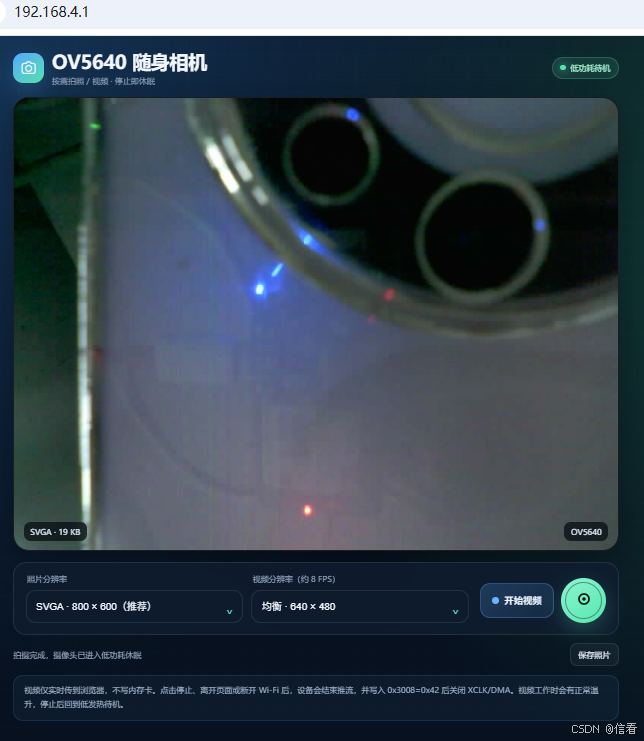
ESP32 AP 摄像头拍摄是发热厉害,让其不工作就进去休眠(0x3008 = 0x42),拍照是恢复(0x3008 = 0x02)方案,可以有效降低发热量,如果持续拍摄视频,注意采取风扇等散热措施
#include <Arduino.h>
#include <WiFi.h>
#include <WebServer.h>
#include <errno.h>
#include <sys/socket.h>
#include "esp_camera.h"

// ============================================================
// Wi-Fi AP:无密码热点
// ============================================================
static const char *AP_SSID = "C-esp32";
static const IPAddress AP_IP(192, 168, 4, 1);
static const IPAddress AP_GATEWAY(192, 168, 4, 1);
static const IPAddress AP_SUBNET(255, 255, 255, 0);

// ============================================================
// OV5640 DVP 引脚:与当前 ESP32-S3 摄像头板一致
// ============================================================
#define CAM_PIN_PWDN  -1
#define CAM_PIN_RESET -1
#define CAM_PIN_XCLK  39
#define CAM_PIN_SIOD  15
#define CAM_PIN_SIOC  16
#define CAM_PIN_D0    7
#define CAM_PIN_D1    8
#define CAM_PIN_D2    9
#define CAM_PIN_D3    10
#define CAM_PIN_D4    11
#define CAM_PIN_D5    12
#define CAM_PIN_D6    13
#define CAM_PIN_D7    14
#define CAM_PIN_VSYNC 42
#define CAM_PIN_HREF  41
#define CAM_PIN_PCLK  46

static WebServer server(80);
static bool cameraActive = false;
static const uint32_t VIDEO_FRAME_INTERVAL_MS = 125;  // 约 8 FPS,降低 CPU/Wi-Fi 负载

struct ResolutionOption {
  const char *name;
  framesize_t frameSize;
  uint16_t width;
  uint16_t height;
};

static const ResolutionOption RESOLUTIONS[] = {
  {"QVGA",   FRAMESIZE_QVGA,   320,  240},
  {"VGA",    FRAMESIZE_VGA,    640,  480},
  {"SVGA",   FRAMESIZE_SVGA,   800,  600},
  {"XGA",    FRAMESIZE_XGA,   1024,  768},
  {"SXGA",   FRAMESIZE_SXGA,  1280, 1024},
  {"UXGA",   FRAMESIZE_UXGA,  1600, 1200},
  {"QSXGA",  FRAMESIZE_QSXGA, 2592, 1944},
};

static const size_t RESOLUTION_COUNT =
    sizeof(RESOLUTIONS) / sizeof(RESOLUTIONS[0]);

// ============================================================
// 手机拍照 / 按需视频页面
// ============================================================
static const char INDEX_HTML[] PROGMEM = R"HTML(
<!doctype html>
<html lang="zh-CN">
<head>
  <meta charset="utf-8">
  <meta name="viewport" content="width=device-width,initial-scale=1,viewport-fit=cover">
  <meta name="theme-color" content="#07111f">
  <title>OV5640 随身相机</title>
  <style>
    :root{--bg:#07111f;--card:rgba(15,28,47,.86);--line:rgba(255,255,255,.09);
      --text:#f5f8ff;--muted:#93a4bb;--accent:#58e6b0;--accent2:#55a7ff;--danger:#ff7b84}
    *{box-sizing:border-box}body{margin:0;min-height:100vh;color:var(--text);
      font-family:Inter,"PingFang SC","Microsoft YaHei",sans-serif;
      background:radial-gradient(circle at 15% 0,#15375b 0,transparent 34%),
      radial-gradient(circle at 95% 12%,#123f39 0,transparent 30%),var(--bg)}
    body:before{content:"";position:fixed;inset:0;pointer-events:none;opacity:.25;
      background-image:linear-gradient(rgba(255,255,255,.025) 1px,transparent 1px),
      linear-gradient(90deg,rgba(255,255,255,.025) 1px,transparent 1px);background-size:28px 28px}
    .app{position:relative;width:min(940px,100%);margin:auto;padding:20px 16px 34px}
    header{display:flex;align-items:center;justify-content:space-between;gap:14px;margin-bottom:16px}
    .brand{display:flex;align-items:center;gap:12px}.logo{display:grid;place-items:center;width:46px;
      height:46px;border-radius:15px;background:linear-gradient(145deg,var(--accent2),var(--accent));
      box-shadow:0 12px 34px rgba(85,167,255,.24)}
    h1{font-size:clamp(20px,5vw,28px);margin:0}.sub{color:var(--muted);font-size:12px;margin-top:3px}
    .sleep{display:flex;align-items:center;gap:7px;color:#aaf2d6;background:rgba(88,230,176,.1);
      border:1px solid rgba(88,230,176,.24);padding:8px 11px;border-radius:999px;font-size:12px;white-space:nowrap}
    .dot{width:8px;height:8px;border-radius:50%;background:var(--accent);box-shadow:0 0 14px var(--accent)}
    .viewer{position:relative;min-height:320px;border-radius:24px;overflow:hidden;background:#03070c;
      border:1px solid var(--line);box-shadow:0 24px 70px rgba(0,0,0,.34)}
    #media{display:none;width:100%;height:auto;min-height:320px;max-height:68vh;object-fit:contain;background:#000}
    .empty{position:absolute;inset:0;display:grid;place-items:center;text-align:center;padding:28px}
    .emptyIcon{width:72px;height:72px;margin:auto;border-radius:24px;display:grid;place-items:center;
      color:var(--accent);background:rgba(88,230,176,.08);border:1px solid rgba(88,230,176,.16)}
    .empty h2{font-size:19px;margin:15px 0 7px}.empty p{color:var(--muted);margin:0;font-size:13px;line-height:1.7}
    .overlay{position:absolute;left:14px;right:14px;bottom:14px;display:none;justify-content:space-between;
      align-items:center;gap:8px;pointer-events:none}.tag{padding:7px 10px;border-radius:10px;
      background:rgba(2,8,14,.7);backdrop-filter:blur(8px);font-size:12px;color:#dce8f6}
    .liveTag{display:none;align-items:center;gap:7px;color:#fff;background:rgba(244,68,87,.82)}
    .liveDot{width:7px;height:7px;border-radius:50%;background:#fff;animation:pulse 1.1s ease-in-out infinite}
    @keyframes pulse{50%{opacity:.28}}
    .panel{display:grid;grid-template-columns:minmax(0,1fr) auto;align-items:end;gap:16px;margin-top:16px;
      padding:17px;border-radius:20px;background:var(--card);border:1px solid var(--line);backdrop-filter:blur(18px)}
    .selectors{display:grid;grid-template-columns:1fr 1fr;gap:12px}
    label{display:block;color:var(--muted);font-size:12px;margin:0 0 8px 2px}.selectWrap{position:relative}
    select{appearance:none;width:100%;height:50px;border:1px solid var(--line);border-radius:14px;
      padding:0 44px 0 14px;background:#0d1b2d;color:var(--text);font-size:15px;outline:none}
    .selectWrap:after{content:"⌄";position:absolute;right:16px;top:11px;font-size:20px;color:var(--accent);pointer-events:none}
    .buttons{display:flex;align-items:center;gap:10px}.shutter{width:68px;height:68px;border:0;border-radius:50%;cursor:pointer;position:relative;
      color:#04130e;background:linear-gradient(145deg,#8bf5ce,var(--accent));
      box-shadow:0 11px 30px rgba(88,230,176,.24);transition:.18s transform,.18s opacity}
    .shutter:before{content:"";position:absolute;inset:6px;border:2px solid rgba(4,19,14,.42);border-radius:50%}
    .shutter:hover{transform:translateY(-2px)}.shutter:active{transform:scale(.95)}
    .shutter:disabled{opacity:.45;cursor:not-allowed;transform:none}.shutter svg{position:relative;z-index:1}
    .videoBtn{height:52px;min-width:112px;padding:0 17px;border-radius:15px;border:1px solid rgba(85,167,255,.28);
      color:#eaf4ff;background:linear-gradient(145deg,rgba(85,167,255,.22),rgba(85,167,255,.1));
      font-size:14px;font-weight:650;cursor:pointer;display:flex;align-items:center;justify-content:center;gap:8px}
    .videoBtn.stop{border-color:rgba(255,123,132,.5);background:rgba(255,123,132,.15);color:#ffd9dd}
    .videoBtn:disabled{opacity:.45;cursor:not-allowed}.videoSymbol{width:10px;height:10px;border-radius:50%;background:#69b4ff}
    .videoBtn.stop .videoSymbol{border-radius:2px;background:var(--danger)}
    .statusRow{display:flex;align-items:center;justify-content:space-between;gap:12px;margin-top:12px;
      color:var(--muted);font-size:12px}.statusText{display:flex;align-items:center;gap:7px}
    .spinner{display:none;width:13px;height:13px;border:2px solid rgba(255,255,255,.2);border-top-color:var(--accent);
      border-radius:50%;animation:spin .7s linear infinite}@keyframes spin{to{transform:rotate(360deg)}}
    .actions{display:flex;gap:8px}.smallBtn{display:none;text-decoration:none;color:#dce8f6;padding:8px 11px;
      border-radius:10px;border:1px solid var(--line);background:rgba(255,255,255,.04)}
    .note{margin-top:13px;padding:13px 15px;border-radius:15px;color:#9eb0c6;font-size:12px;line-height:1.7;
      border:1px solid rgba(85,167,255,.14);background:rgba(85,167,255,.06)}
    @media(max-width:700px){.app{padding-top:14px}.sub{display:none}.sleep{padding:7px 9px}.viewer{min-height:50vh}
      #media{min-height:50vh}.panel{grid-template-columns:1fr;padding:14px}.selectors{grid-template-columns:1fr 1fr}
      .buttons{justify-content:flex-end}.shutter{width:62px;height:62px}.videoBtn{height:50px}}
    @media(max-width:430px){.selectors{grid-template-columns:1fr}}
  </style>
</head>
<body>
  <main class="app">
    <header>
      <div class="brand">
        <div class="logo"><svg width="26" height="26" viewBox="0 0 24 24" fill="none"><path d="M8.5 6 10 4h4l1.5 2H18a3 3 0 0 1 3 3v8a3 3 0 0 1-3 3H6a3 3 0 0 1-3-3V9a3 3 0 0 1 3-3h2.5Z" stroke="currentColor" stroke-width="1.8"/><circle cx="12" cy="13" r="4" stroke="currentColor" stroke-width="1.8"/></svg></div>
        <div><h1>OV5640 随身相机</h1><div class="sub">按需拍照 / 视频 · 停止即休眠</div></div>
      </div>
      <div class="sleep"><span class="dot"></span><span id="powerLabel">低功耗待机</span></div>
    </header>

    <section class="viewer">
      <img id="media" alt="OV5640 画面">
      <div class="empty" id="empty">
        <div><div class="emptyIcon"><svg width="34" height="34" viewBox="0 0 24 24" fill="none"><path d="M8.5 6 10 4h4l1.5 2H18a3 3 0 0 1 3 3v8a3 3 0 0 1-3 3H6a3 3 0 0 1-3-3V9a3 3 0 0 1 3-3h2.5Z" stroke="currentColor" stroke-width="1.5"/><circle cx="12" cy="13" r="4" stroke="currentColor" stroke-width="1.5"/></svg></div>
          <h2>准备拍摄</h2><p>可以拍照或启动实时视频<br>摄像头只在拍摄期间工作</p></div>
      </div>
      <div class="overlay" id="overlay"><span class="tag" id="mediaInfo">—</span><span class="tag liveTag" id="liveTag"><span class="liveDot"></span>LIVE</span><span class="tag">OV5640</span></div>
    </section>

    <section class="panel">
      <div class="selectors">
        <div><label for="photoResolution">照片分辨率</label><div class="selectWrap"><select id="photoResolution">
          <option value="QVGA">QVGA · 320 × 240</option><option value="VGA">VGA · 640 × 480</option>
          <option value="SVGA" selected>SVGA · 800 × 600(推荐)</option><option value="XGA">XGA · 1024 × 768</option>
          <option value="SXGA">SXGA · 1280 × 1024</option><option value="UXGA">UXGA · 1600 × 1200</option>
          <option value="QSXGA">QSXGA · 2592 × 1944</option>
        </select></div></div>
        <div><label for="videoResolution">视频分辨率(约 8 FPS)</label><div class="selectWrap"><select id="videoResolution">
          <option value="QVGA">流畅 · 320 × 240</option><option value="VGA" selected>均衡 · 640 × 480</option>
          <option value="SVGA">清晰 · 800 × 600</option>
        </select></div></div>
      </div>
      <div class="buttons">
        <button class="videoBtn" id="video"><span class="videoSymbol"></span><span id="videoText">开始视频</span></button>
        <button class="shutter" id="capture" aria-label="拍照"><svg width="30" height="30" viewBox="0 0 24 24" fill="none"><circle cx="12" cy="12" r="6" stroke="currentColor" stroke-width="2"/><circle cx="12" cy="12" r="2" fill="currentColor"/></svg></button>
      </div>
    </section>

    <div class="statusRow"><div class="statusText"><span class="spinner" id="spinner"></span><span id="status">摄像头正在休眠,等待拍摄</span></div>
      <div class="actions"><a class="smallBtn" id="download" download="OV5640_photo.jpg">保存照片</a></div></div>
    <div class="note">视频仅实时传到浏览器,不写内存卡。点击停止、离开页面或断开 Wi‑Fi 后,设备会结束推流,并写入 0x3008=0x42 后关闭 XCLK/DMA。视频工作时会有正常温升,停止后回到低发热待机。</div>
  </main>
  <script>
    const capture=document.getElementById('capture'),video=document.getElementById('video');
    const photoResolution=document.getElementById('photoResolution'),videoResolution=document.getElementById('videoResolution');
    const media=document.getElementById('media'),empty=document.getElementById('empty'),overlay=document.getElementById('overlay');
    const statusText=document.getElementById('status'),spinner=document.getElementById('spinner');
    const powerLabel=document.getElementById('powerLabel'),download=document.getElementById('download');
    const mediaInfo=document.getElementById('mediaInfo'),liveTag=document.getElementById('liveTag'),videoText=document.getElementById('videoText');
    const blank='data:image/gif;base64,R0lGODlhAQABAAD/ACwAAAAAAQABAAACADs=';
    let photoUrl='',streaming=false;

    function showViewer(){media.style.display='block';empty.style.display='none';overlay.style.display='flex'}
    function stopVideo(message='视频已停止,摄像头正在进入休眠'){
      if(!streaming)return;
      streaming=false;media.src=blank;media.style.display='none';empty.style.display='grid';overlay.style.display='none';
      video.classList.remove('stop');videoText.textContent='开始视频';capture.disabled=false;
      photoResolution.disabled=false;videoResolution.disabled=false;liveTag.style.display='none';
      powerLabel.textContent='低功耗待机';statusText.textContent=message;
    }

    video.addEventListener('click',()=>{
      if(streaming){stopVideo();return}
      if(photoUrl){URL.revokeObjectURL(photoUrl);photoUrl=''}
      streaming=true;download.style.display='none';capture.disabled=true;photoResolution.disabled=true;videoResolution.disabled=true;
      video.classList.add('stop');videoText.textContent='停止视频';liveTag.style.display='flex';
      mediaInfo.textContent=videoResolution.value+' · 约 8 FPS';powerLabel.textContent='视频工作中';
      statusText.textContent='正在启动实时视频…';showViewer();
      media.src='/stream?size='+encodeURIComponent(videoResolution.value)+'&t='+Date.now();
      setTimeout(()=>{if(streaming)statusText.textContent='视频传输中;可随时点击停止或断开 Wi‑Fi'},900);
    });

    capture.addEventListener('click',async()=>{
      capture.disabled=true;spinner.style.display='inline-block';powerLabel.textContent='正在拍摄';
      statusText.textContent='正在唤醒 OV5640,并校准曝光与白平衡…';
      try{
        const size=photoResolution.value;
        const response=await fetch('/capture?size='+encodeURIComponent(size)+'&t='+Date.now(),{cache:'no-store'});
        if(!response.ok)throw new Error(await response.text()||'拍摄失败');
        const blob=await response.blob();
        if(photoUrl)URL.revokeObjectURL(photoUrl);photoUrl=URL.createObjectURL(blob);
        media.src=photoUrl;showViewer();liveTag.style.display='none';
        download.href=photoUrl;download.download='OV5640_'+size+'_'+Date.now()+'.jpg';download.style.display='inline-block';
        mediaInfo.textContent=size+' · '+Math.round(blob.size/1024)+' KB';
        statusText.textContent='拍摄完成,摄像头已进入低功耗休眠';powerLabel.textContent='低功耗待机';
      }catch(error){statusText.textContent='拍摄失败:'+error.message;powerLabel.textContent='待机';}
      finally{capture.disabled=false;spinner.style.display='none';}
    });
    media.addEventListener('error',()=>{if(streaming)stopVideo('视频连接已断开,摄像头将自动休眠')});
    document.addEventListener('visibilitychange',()=>{if(document.hidden&&streaming)stopVideo('页面已离开,视频自动停止')});
    window.addEventListener('pagehide',()=>{if(streaming){media.src=blank;streaming=false}});
  </script>
</body>
</html>
)HTML";

static const ResolutionOption *findResolution(const String &name) {
  for (size_t i = 0; i < RESOLUTION_COUNT; ++i) {
    if (name.equalsIgnoreCase(RESOLUTIONS[i].name)) {
      return &RESOLUTIONS[i];
    }
  }
  return &RESOLUTIONS[2];  // 默认 SVGA
}

static camera_config_t makeCameraConfig(framesize_t frameSize) {
  camera_config_t config = {};
  config.ledc_channel = LEDC_CHANNEL_0;
  config.ledc_timer = LEDC_TIMER_0;
  config.pin_d0 = CAM_PIN_D0;
  config.pin_d1 = CAM_PIN_D1;
  config.pin_d2 = CAM_PIN_D2;
  config.pin_d3 = CAM_PIN_D3;
  config.pin_d4 = CAM_PIN_D4;
  config.pin_d5 = CAM_PIN_D5;
  config.pin_d6 = CAM_PIN_D6;
  config.pin_d7 = CAM_PIN_D7;
  config.pin_xclk = CAM_PIN_XCLK;
  config.pin_pclk = CAM_PIN_PCLK;
  config.pin_vsync = CAM_PIN_VSYNC;
  config.pin_href = CAM_PIN_HREF;
  config.pin_sccb_sda = CAM_PIN_SIOD;
  config.pin_sccb_scl = CAM_PIN_SIOC;
  config.pin_pwdn = CAM_PIN_PWDN;
  config.pin_reset = CAM_PIN_RESET;
  config.xclk_freq_hz = 20000000;
  config.pixel_format = PIXFORMAT_JPEG;
  config.frame_size = frameSize;
  config.jpeg_quality = 12;
  config.fb_count = 1;
  config.fb_location = CAMERA_FB_IN_PSRAM;
  config.grab_mode = CAMERA_GRAB_WHEN_EMPTY;
  return config;
}

// 写 0x3008=0x42 让 OV5640 软件待机,然后反初始化摄像头。
// esp_camera_deinit() 会停止摄像头接口、XCLK、DMA,并释放帧缓冲。
static void cameraSleepAndStop() {
  if (!cameraActive) {
    return;
  }

  sensor_t *sensor = esp_camera_sensor_get();
  if (sensor != nullptr) {
    sensor->set_reg(sensor, 0x3008, 0xFF, 0x42);
    delay(20);
  }

  esp_camera_deinit();
  cameraActive = false;
  Serial.println("[POWER] OV5640 standby (0x3008=0x42), XCLK/DMA stopped");
}

static bool cameraStart(const ResolutionOption &resolution, String &error) {
  camera_config_t config = makeCameraConfig(resolution.frameSize);
  esp_err_t result = esp_camera_init(&config);
  if (result != ESP_OK) {
    error = "摄像头初始化失败,错误码 0x" + String((uint32_t)result, HEX);
    return false;
  }
  cameraActive = true;

  sensor_t *sensor = esp_camera_sensor_get();
  if (sensor == nullptr || sensor->id.PID != 0x5640) {
    error = "没有识别到 OV5640";
    cameraSleepAndStop();
    return false;
  }

  // 明确退出待机,并恢复正常色彩、自动曝光、自动增益和自动白平衡。
  sensor->set_reg(sensor, 0x3008, 0xFF, 0x02);
  sensor->set_framesize(sensor, resolution.frameSize);
  sensor->set_quality(sensor, 12);
  sensor->set_special_effect(sensor, 0);
  sensor->set_brightness(sensor, 0);
  sensor->set_contrast(sensor, 0);
  sensor->set_saturation(sensor, 0);
  sensor->set_gain_ctrl(sensor, 1);
  sensor->set_exposure_ctrl(sensor, 1);
  sensor->set_whitebal(sensor, 1);
  sensor->set_wb_mode(sensor, 0);
  sensor->set_awb_gain(sensor, 1);
  sensor->set_hmirror(sensor, 1);

  Serial.printf("[CAM] OV5640 awake, resolution %s (%ux%u)\n",
                resolution.name, resolution.width, resolution.height);
  return true;
}

static void discardWarmupFrames(const ResolutionOption &resolution) {
  // 高分辨率需要更长时间让 AEC/AGC/AWB 收敛,避免首帧偏绿、过暗。
  const uint8_t discardCount =
      (resolution.frameSize >= FRAMESIZE_UXGA) ? 6 : 5;

  delay(500);
  for (uint8_t i = 0; i < discardCount; ++i) {
    camera_fb_t *frame = esp_camera_fb_get();
    if (frame != nullptr) {
      esp_camera_fb_return(frame);
    }
    delay(80);
  }
}

// 分块发送并限制网络堵塞等待时间。浏览器停止、关闭页面或 Wi-Fi 断开后,
// 此函数会尽快返回 false,让推流处理函数执行摄像头休眠。
static bool writeClientData(WiFiClient &client, const uint8_t *data,
                            size_t length, uint32_t stallTimeoutMs = 2000) {
  size_t sent = 0;
  uint32_t lastProgress = millis();
  while (sent < length) {
    if (!client.connected() || WiFi.softAPgetStationNum() == 0) {
      return false;
    }

    const size_t remaining = length - sent;
    const size_t chunk = remaining > 1460 ? 1460 : remaining;
    // 直接使用非阻塞 socket,避免 NetworkClient::write() 内部最长约 10 秒重试。
    // 这样异常断网时也能在 stallTimeoutMs 到期后关闭摄像头。
    const int written = ::send(client.fd(), data + sent, chunk, MSG_DONTWAIT);
    if (written > 0) {
      sent += static_cast<size_t>(written);
      lastProgress = millis();
    } else if (written == 0 ||
               (errno != EAGAIN && errno != EWOULDBLOCK)) {
      return false;
    } else {
      if (millis() - lastProgress >= stallTimeoutMs) {
        return false;
      }
      delay(2);
    }
    yield();
  }
  return true;
}

static void sendJpeg(camera_fb_t *frame) {
  WiFiClient client = server.client();
  client.print("HTTP/1.1 200 OK\r\n");
  client.print("Content-Type: image/jpeg\r\n");
  client.printf("Content-Length: %u\r\n", (unsigned int)frame->len);
  client.print("Cache-Control: no-store, no-cache, must-revalidate\r\n");
  client.print("Pragma: no-cache\r\n");
  client.print("Connection: close\r\n\r\n");

  size_t sent = 0;
  uint32_t lastProgress = millis();
  while (sent < frame->len && client.connected()) {
    const size_t remaining = frame->len - sent;
    const size_t chunk = remaining > 1460 ? 1460 : remaining;
    const size_t written = client.write(frame->buf + sent, chunk);
    if (written > 0) {
      sent += written;
      lastProgress = millis();
    } else {
      delay(1);
      if (millis() - lastProgress > 3000) {
        break;
      }
    }
    yield();
  }
  Serial.printf("[HTTP] JPEG sent: %u/%u bytes\n",
                (unsigned int)sent, (unsigned int)frame->len);
}

static void handleCapture() {
  const ResolutionOption *resolution =
      findResolution(server.hasArg("size") ? server.arg("size") : "SVGA");

  String error;
  if (!cameraStart(*resolution, error)) {
    server.send(500, "text/plain; charset=utf-8", error);
    return;
  }

  discardWarmupFrames(*resolution);
  camera_fb_t *frame = esp_camera_fb_get();
  if (frame == nullptr || frame->format != PIXFORMAT_JPEG) {
    if (frame != nullptr) {
      esp_camera_fb_return(frame);
    }
    cameraSleepAndStop();
    server.send(500, "text/plain; charset=utf-8", "拍照失败,请重试");
    return;
  }

  sendJpeg(frame);
  esp_camera_fb_return(frame);
  cameraSleepAndStop();
}

static void handleStream() {
  const ResolutionOption *resolution =
      findResolution(server.hasArg("size") ? server.arg("size") : "VGA");

  // 视频页面只提供 QVGA/VGA/SVGA。即使手工修改 URL,也限制在 SVGA,
  // 避免 500 万像素连续 JPEG 带来的大电流、严重卡顿和额外温升。
  if (resolution->frameSize > FRAMESIZE_SVGA) {
    resolution = findResolution("SVGA");
  }

  String error;
  if (!cameraStart(*resolution, error)) {
    server.send(500, "text/plain; charset=utf-8", error);
    return;
  }

  sensor_t *sensor = esp_camera_sensor_get();
  if (sensor != nullptr) {
    sensor->set_quality(sensor, 14);  // 视频帧稍高压缩率,降低网络和 CPU 负载
  }
  discardWarmupFrames(*resolution);

  WiFiClient client = server.client();
  client.setTimeout(1000);
  static const char STREAM_HEADER[] =
      "HTTP/1.1 200 OK\r\n"
      "Content-Type: multipart/x-mixed-replace; boundary=frame\r\n"
      "Cache-Control: no-store, no-cache, must-revalidate\r\n"
      "Pragma: no-cache\r\n"
      "Access-Control-Allow-Origin: *\r\n"
      "Connection: close\r\n\r\n";

  bool keepStreaming = writeClientData(
      client, reinterpret_cast<const uint8_t *>(STREAM_HEADER),
      strlen(STREAM_HEADER));
  uint32_t frameCount = 0;
  Serial.printf("[VIDEO] Started %s (%ux%u), target about 8 FPS\n",
                resolution->name, resolution->width, resolution->height);

  while (keepStreaming && client.connected() &&
         WiFi.softAPgetStationNum() > 0) {
    const uint32_t frameStartedAt = millis();
    camera_fb_t *frame = esp_camera_fb_get();
    if (frame == nullptr || frame->format != PIXFORMAT_JPEG) {
      if (frame != nullptr) {
        esp_camera_fb_return(frame);
      }
      Serial.println("[VIDEO] Failed to capture frame");
      break;
    }

    char partHeader[112];
    const int headerLength = snprintf(
        partHeader, sizeof(partHeader),
        "--frame\r\nContent-Type: image/jpeg\r\nContent-Length: %u\r\n\r\n",
        (unsigned int)frame->len);
    keepStreaming =
        headerLength > 0 &&
        writeClientData(client,
                        reinterpret_cast<const uint8_t *>(partHeader),
                        static_cast<size_t>(headerLength)) &&
        writeClientData(client, frame->buf, frame->len) &&
        writeClientData(client,
                        reinterpret_cast<const uint8_t *>("\r\n"), 2);

    esp_camera_fb_return(frame);
    ++frameCount;

    const uint32_t elapsed = millis() - frameStartedAt;
    if (keepStreaming && elapsed < VIDEO_FRAME_INTERVAL_MS) {
      delay(VIDEO_FRAME_INTERVAL_MS - elapsed);
    }
  }

  client.stop();
  Serial.printf("[VIDEO] Client disconnected, frames sent: %u\n",
                (unsigned int)frameCount);
  cameraSleepAndStop();
}

static void handleRoot() {
  server.sendHeader("Cache-Control", "no-store");
  server.send_P(200, "text/html; charset=utf-8", INDEX_HTML);
}

static void handleNotFound() {
  server.send(404, "text/plain; charset=utf-8", "Not found");
}

void setup() {
  Serial.begin(115200);
  delay(300);
  setCpuFrequencyMhz(160);
  Serial.println();
  Serial.println("OV5640 low-power photo camera starting...");

  // 启动时不初始化摄像头:没有拍照请求时,XCLK 和 DMA 始终关闭。
  WiFi.mode(WIFI_AP);
  WiFi.softAPConfig(AP_IP, AP_GATEWAY, AP_SUBNET);
  if (!WiFi.softAP(AP_SSID)) {
    Serial.println("[WiFi] Failed to start AP");
    return;
  }

  server.on("/", HTTP_GET, handleRoot);
  server.on("/capture", HTTP_GET, handleCapture);
  server.on("/stream", HTTP_GET, handleStream);
  server.on("/favicon.ico", HTTP_GET, []() { server.send(204); });
  server.onNotFound(handleNotFound);
  server.begin();

  Serial.printf("[WiFi] AP SSID: %s, password: none\n", AP_SSID);
  Serial.printf("[HTTP] Open http://%s/\n", WiFi.softAPIP().toString().c_str());
  Serial.println("[POWER] Camera is off; waiting for capture request");
}

void loop() {
  server.handleClient();
  delay(2);
}
- 1)0x3008 = 0x42:bit6=1,进入 Software Power Down,内部电路活动暂停,但寄存器内容会保留。
- 2)0x3008 = 0x02:bit6=0,退出 Software Power Down,恢复工作;不少官方/参考驱动也是用 0x42 关、0x02 开。
- 3)要注意:Software Power Down 不等于彻底断电,XCLK仍可能存在,所以如果目的是降低发热和功耗,仅写0x42效果有限;OV5640应用说明更推荐真正 Power Off来省电。

智能硬件社区聚焦AI智能硬件技术生态,汇聚嵌入式AI、物联网硬件开发者,打造交流分享平台,同步全国赛事资讯、开展 OPC 核心人才招募,助力技术落地与开发者成长。
更多推荐

 6
6 0
0- 0


 已为社区贡献1条内容

所有评论(0)