STM32外挂合宙ESP32-C3
一、固件移植
一、官方固件移植
1、硬件电路连接
按以下图示接好相关电路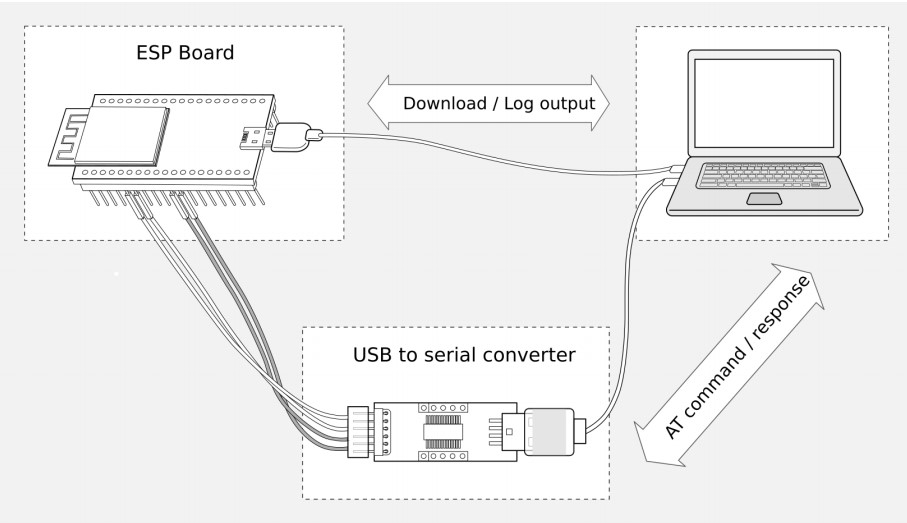
2、下载官方驱动
按照以下步骤将 AT 固件下载至 PC:
• 前往AT 固件 https://docs.espressif.com/projects/esp-at/zh_CN/latest/esp32c3/AT_Binary_Lists/index.html
• 找到模组所对应的 AT 固件
• 点击相应链接进行下载
我们下载了 ESP32-C3-MINI-1 对应的 ESP32-C3-MINI-1-AT-V3.3.0.0 固件。
3、下载乐鑫官方flash工具
https://dl.espressif.com/public/flash_download_tool.zip
- 打开 Flash 下载工具
- 选择芯片类型(此处,我们选择
ESP32-C3) - 根据你的需求选择一种工作模式(此处,我们选择
develop) - 根据你的需求选择一种下载接口(此处,我们选择
usb)
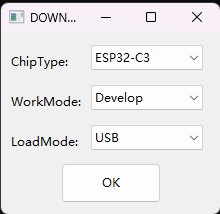
将 AT 固件烧录至设备:
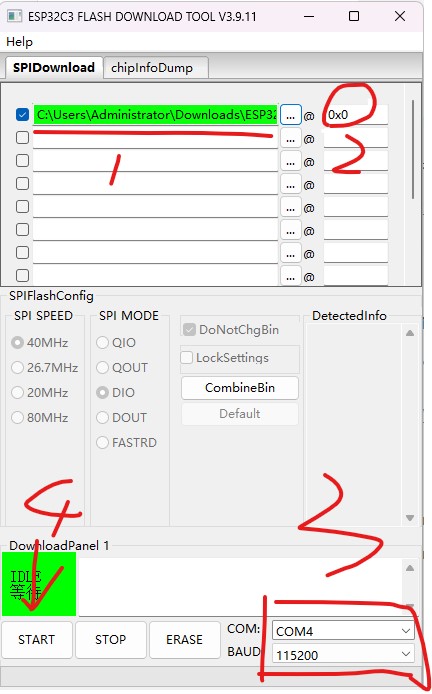
直接下载打包好的量产固件(即 build/factory 目录下的 factory_XXX.bin)至 0x0 地址:勾选 “DoNotChgBin”,使用量产固件的默认配置;
为了避免烧录出现问题,请查看开发板的下载接口的 COM 端口号,并从 “COM:” 下拉列表中选择该端口号。有关如何查看端口号的详细介绍请参考 在 Windows 上查看端口。烧录完成后请检查 AT 固件是否烧录成功。
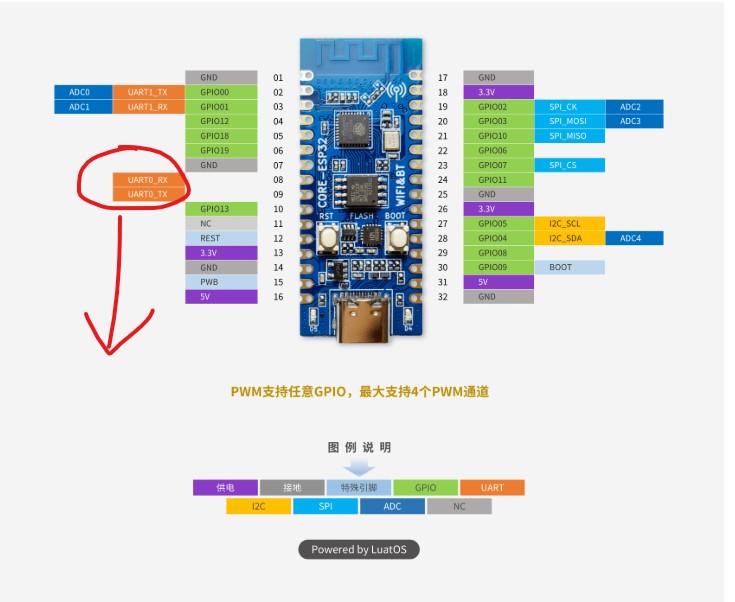
按照合宙ESP32-C3的管脚分布,连接好串口0(烧录专用串口)。烧录成功后串口会打印“W (21596) at-common: write dlen:0”。<如果一直进入下载模式,可以在在 GPIO9 和 3.3V 之间焊接一个 10kΩ 上拉电阻,然后彻底断电再上电>
二、修改官方驱动
1、修改AT串口引脚
访问 at.py 页面,点击 Download raw file 按钮,将 at.py 文件下载到本地。
esp-at/tools/at.py at b5b66078bc00a28a1dc133111aa86f580b29cc8d · espressif/esp-at
修改 UART 配置
可修改的 UART 配置,仅包括AT 命令端口 的 UART 配置。可修改的参数配置如下表所示:
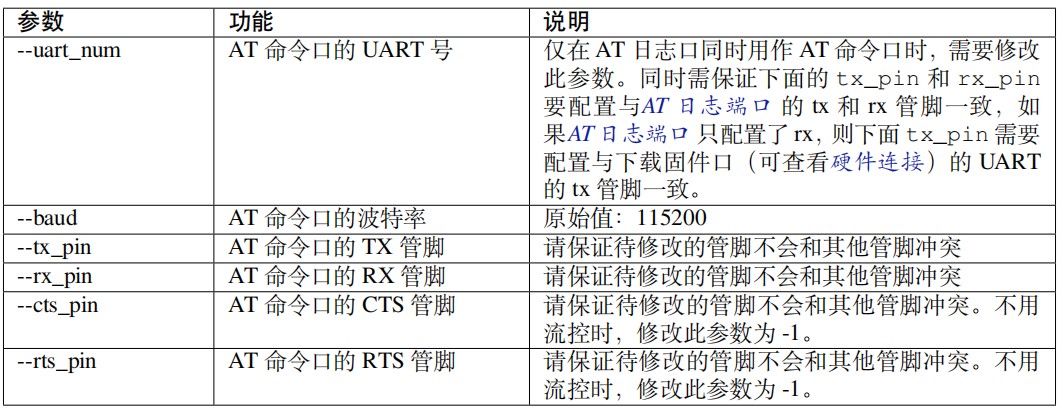
按照合宙的引脚分布,重新修改AT串口
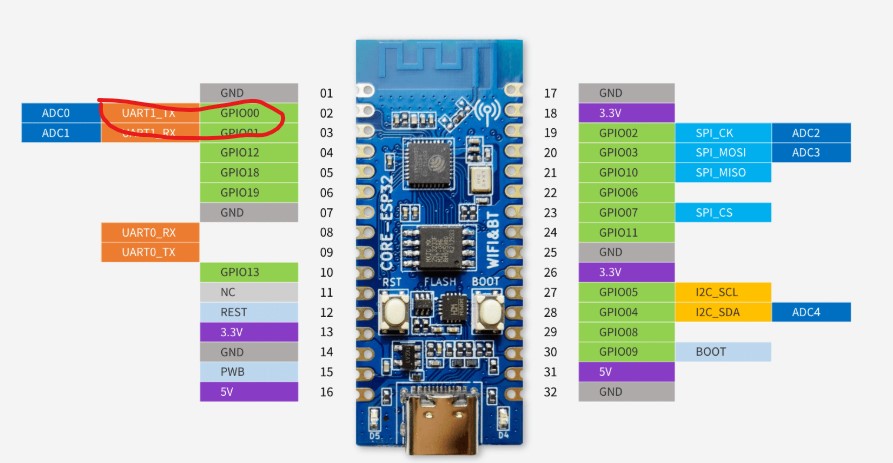
python at.py modify_bin --baud 115200 --tx_pin 0 --rx_pin 1 --cts_pin -1 --rts_pin -1 --input factory_MINI-1.bin
//factory_MINI-1.bin 是前面烧录的官方固件

运行成功后,会生成一个targe.bin文件。然后按照移植官方驱动把该文件重新烧录。
2、连接好AT串口引脚
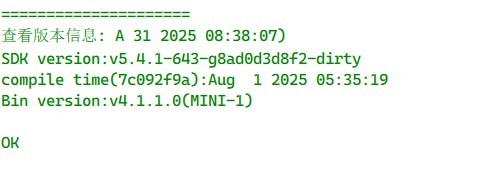
输入“AT+GMR”命令,并且换行 (CR LF);
若如下所示,响应是 OK, 则表示 AT 固件烧录成功。
二、STM32外挂ESP32
1、串口初始化
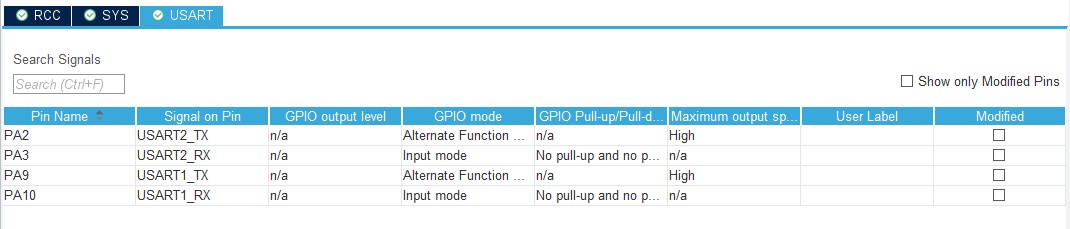
按以下配置初始化串口1和串口2,其中串口1和PC通信,串口2和ESP32通信。
2、ESP32驱动书写
#ifndef __ESP32_H__
#define __ESP32_H__
#include "usart.h"
#include "string.h"
#include "stdio.h"

void ESP32_Init(void);
void ESP32_Send_CMD(uint8_t *cmd, uint16_t cmdLength);
void ESP32_ReadResponse(uint8_t responeBuff[], uint16_t size);


#endif
#include "esp32.h"
uint8_t rBuff[1000] = {0};

void ESP32_Init(void)
{
    MX_USART2_UART_Init();
    printf("esp32 初始化完成\r\n");
    /* 2. 重启 ESP32 */
    uint8_t *atCmd = "AT+RST=0\r\n";
    ESP32_Send_CMD(atCmd, strlen((char *)atCmd));
    HAL_Delay(3000);
}
void ESP32_Send_CMD(uint8_t *cmd, uint16_t cmdLength)
{
    HAL_UART_Transmit(&huart2, cmd, cmdLength, 1000);
    do
    {
        ESP32_ReadResponse(rBuff, 1000);
        printf("esp32 响应: %s", rBuff);
    }while(strcmp((char *)rBuff, "OK") == NULL);
    printf("\r\n=====================\r\n");

}
void ESP32_ReadResponse(uint8_t responeBuff[], uint16_t size)
{
    memset(responeBuff, 0, size);
    uint16_t rxLen = 0;
    HAL_UARTEx_ReceiveToIdle(&huart2, responeBuff, size, &rxLen, 10000);
}
3、main.c代码书写
/* USER CODE BEGIN Header */
/**
  ******************************************************************************
  * @file           : main.c
  * @brief          : Main program body
  ******************************************************************************
  * @attention
  *
  * Copyright (c) 2026 STMicroelectronics.
  * All rights reserved.
  *
  * This software is licensed under terms that can be found in the LICENSE file
  * in the root directory of this software component.
  * If no LICENSE file comes with this software, it is provided AS-IS.
  *
  ******************************************************************************
  */
/* USER CODE END Header */
/* Includes ------------------------------------------------------------------*/
#include "main.h"
#include "usart.h"
#include "gpio.h"

/* Private includes ----------------------------------------------------------*/
/* USER CODE BEGIN Includes */
#include "esp32.h"
/* USER CODE END Includes */

/* Private typedef -----------------------------------------------------------*/
/* USER CODE BEGIN PTD */

/* USER CODE END PTD */

/* Private define ------------------------------------------------------------*/
/* USER CODE BEGIN PD */

/* USER CODE END PD */

/* Private macro -------------------------------------------------------------*/
/* USER CODE BEGIN PM */
uint8_t buff[10000];
/* USER CODE END PM */

/* Private variables ---------------------------------------------------------*/

/* USER CODE BEGIN PV */

/* USER CODE END PV */

/* Private function prototypes -----------------------------------------------*/
void SystemClock_Config(void);
/* USER CODE BEGIN PFP */

/* USER CODE END PFP */

/* Private user code ---------------------------------------------------------*/
/* USER CODE BEGIN 0 */

/* USER CODE END 0 */

/**
  * @brief  The application entry point.
  * @retval int
  */
int main(void)
{

  /* USER CODE BEGIN 1 */

  /* USER CODE END 1 */

  /* MCU Configuration--------------------------------------------------------*/

  /* Reset of all peripherals, Initializes the Flash interface and the Systick. */
  HAL_Init();

  /* USER CODE BEGIN Init */

  /* USER CODE END Init */

  /* Configure the system clock */
  SystemClock_Config();

  /* USER CODE BEGIN SysInit */

  /* USER CODE END SysInit */

  /* Initialize all configured peripherals */
  MX_GPIO_Init();
  MX_USART1_UART_Init();
  MX_USART2_UART_Init();
  /* USER CODE BEGIN 2 */
  ESP32_Init();
  /*启动测试*/
  ESP32_Send_CMD("AT\r\n", 4);
  ESP32_ReadResponse(buff, 1000);
  printf("测试AT启动: %s", buff);
  memset(buff, 0, sizeof(buff));

  /* 2. 查看版本信息 */
  ESP32_Send_CMD("AT+GMR\r\n", 8);
  ESP32_ReadResponse(buff, 1000);
  printf("查看版本信息: %s", buff);
  /* USER CODE END 2 */

  /* Infinite loop */
  /* USER CODE BEGIN WHILE */
  while (1)
  {

    /* USER CODE END WHILE */

    /* USER CODE BEGIN 3 */
  }
  /* USER CODE END 3 */
}

/**
  * @brief System Clock Configuration
  * @retval None
  */
void SystemClock_Config(void)
{
  RCC_OscInitTypeDef RCC_OscInitStruct = {0};
  RCC_ClkInitTypeDef RCC_ClkInitStruct = {0};

  /** Initializes the RCC Oscillators according to the specified parameters
  * in the RCC_OscInitTypeDef structure.
  */
  RCC_OscInitStruct.OscillatorType = RCC_OSCILLATORTYPE_HSE;
  RCC_OscInitStruct.HSEState = RCC_HSE_ON;
  RCC_OscInitStruct.HSEPredivValue = RCC_HSE_PREDIV_DIV1;
  RCC_OscInitStruct.HSIState = RCC_HSI_ON;
  RCC_OscInitStruct.PLL.PLLState = RCC_PLL_ON;
  RCC_OscInitStruct.PLL.PLLSource = RCC_PLLSOURCE_HSE;
  RCC_OscInitStruct.PLL.PLLMUL = RCC_PLL_MUL9;
  if (HAL_RCC_OscConfig(&RCC_OscInitStruct) != HAL_OK)
  {
    Error_Handler();
  }

  /** Initializes the CPU, AHB and APB buses clocks
  */
  RCC_ClkInitStruct.ClockType = RCC_CLOCKTYPE_HCLK|RCC_CLOCKTYPE_SYSCLK
                              |RCC_CLOCKTYPE_PCLK1|RCC_CLOCKTYPE_PCLK2;
  RCC_ClkInitStruct.SYSCLKSource = RCC_SYSCLKSOURCE_PLLCLK;
  RCC_ClkInitStruct.AHBCLKDivider = RCC_SYSCLK_DIV1;
  RCC_ClkInitStruct.APB1CLKDivider = RCC_HCLK_DIV2;
  RCC_ClkInitStruct.APB2CLKDivider = RCC_HCLK_DIV1;

  if (HAL_RCC_ClockConfig(&RCC_ClkInitStruct, FLASH_LATENCY_2) != HAL_OK)
  {
    Error_Handler();
  }
}

/* USER CODE BEGIN 4 */

/* USER CODE END 4 */

/**
  * @brief  This function is executed in case of error occurrence.
  * @retval None
  */
void Error_Handler(void)
{
  /* USER CODE BEGIN Error_Handler_Debug */
  /* User can add his own implementation to report the HAL error return state */
  __disable_irq();
  while (1)
  {
  }
  /* USER CODE END Error_Handler_Debug */
}
#ifdef USE_FULL_ASSERT
/**
  * @brief  Reports the name of the source file and the source line number
  *         where the assert_param error has occurred.
  * @param  file: pointer to the source file name
  * @param  line: assert_param error line source number
  * @retval None
  */
void assert_failed(uint8_t *file, uint32_t line)
{
  /* USER CODE BEGIN 6 */
  /* User can add his own implementation to report the file name and line number,
     ex: printf("Wrong parameters value: file %s on line %d\r\n", file, line) */
  /* USER CODE END 6 */
}
#endif /* USE_FULL_ASSERT */
4、程序验证
编译烧录代码

通过VOFA串口工具连接STM32,可以看到已经成功通过PC发送指令到STM32,STM32透传给ESP32。实现了STM32外挂ESP32-C3(合宙)开发板。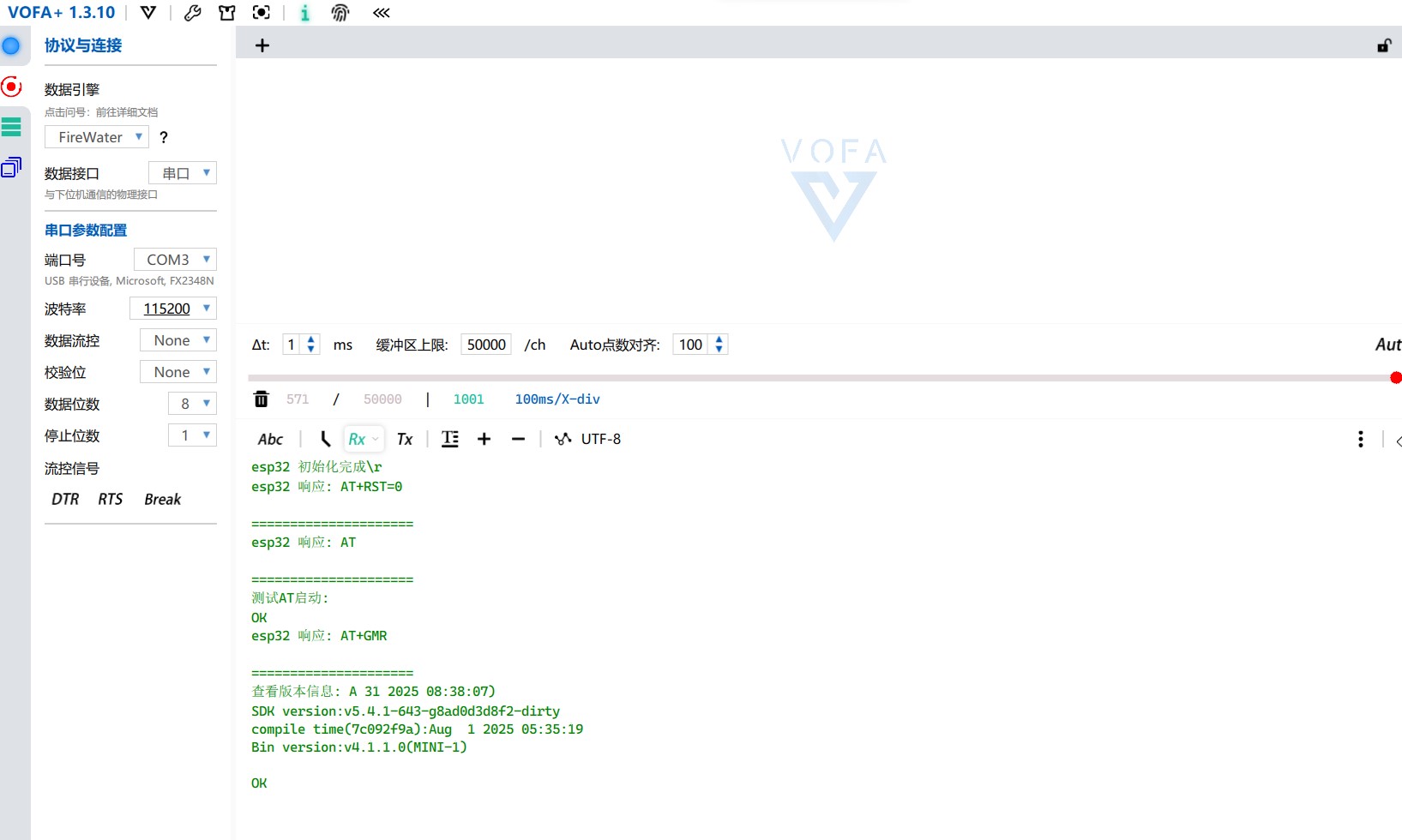

智能硬件社区聚焦AI智能硬件技术生态,汇聚嵌入式AI、物联网硬件开发者,打造交流分享平台,同步全国赛事资讯、开展 OPC 核心人才招募,助力技术落地与开发者成长。
更多推荐
 7
7 0
0- 0


 已为社区贡献1条内容

所有评论(0)