命令行接口(CLI)设计:串口调试shell的实现与扩展——解析器、历史记录
文章目录

每日一句正能量
步子稳一点,心态松一点,路反而能走得更长久。
急则易错,紧则易崩。人生是长跑而非冲刺,“稳”保证不摔跤,“松”保证不内耗。两者结合,看似慢,实则胜率高、续航久。
前言
在嵌入式开发中,命令行接口(CLI)是调试和诊断的"瑞士军刀"。无论是现场排查问题、参数在线调整,还是自动化测试脚本执行,一个设计良好的CLI Shell都能大幅提升开发效率。然而,与Linux Shell(如Bash)相比,嵌入式CLI面临独特的约束:ROM仅几十KB、RAM仅几KB、没有MMU、中断响应必须实时。
本文将从零开始,系统讲解嵌入式CLI的设计与实现,涵盖命令解析器、历史记录、Tab补全、VT100终端控制等核心模块,并提供可直接集成到STM32、ESP32、nRF52等MCU的完整代码框架。
一、嵌入式CLI系统架构
1.1 为什么需要CLI?
在嵌入式开发的不同阶段,CLI的价值各异:
| 阶段 | CLI用途 | 典型场景 |
|---|---|---|
| 开发调试 | 寄存器读写、内存转储、GPIO控制 | “read 0x20000000 256” |
| 工厂测试 | 自动化测试序列、校准参数 | “test adc calibrate” |
| 现场维护 | 配置查看与修改、固件信息 | “config set wifi_ssid xxx” |
| 故障诊断 | 日志导出、状态查询 | “log dump” / “status” |
1.2 系统分层架构
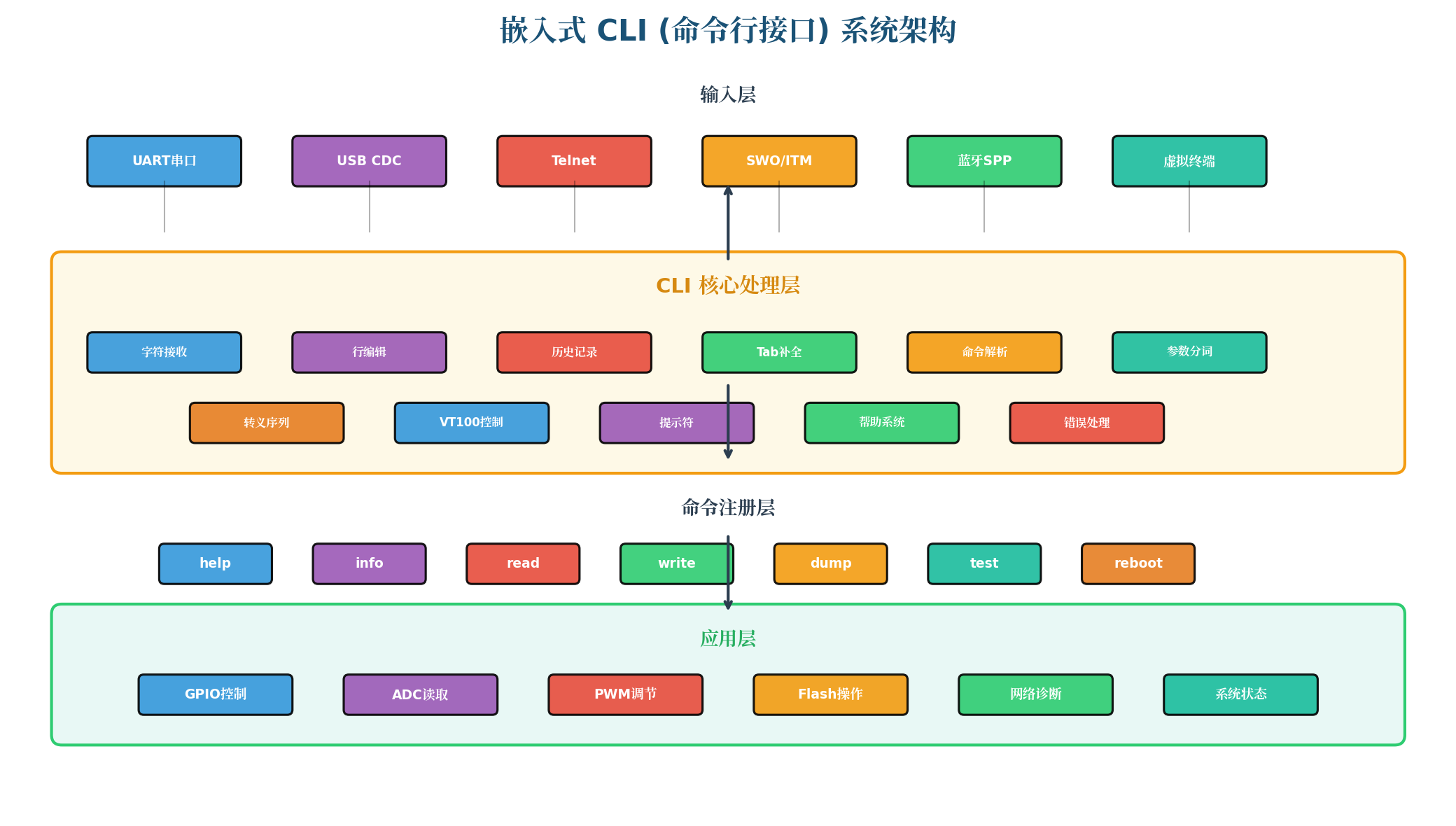
图1:嵌入式CLI系统架构。四层架构:输入层(UART/USB/Telnet/蓝牙SPP等多种通道)→ CLI核心处理层(字符接收、行编辑、历史记录、Tab补全、命令解析、参数分词)→ 命令注册层(动态命令表)→ 应用层(GPIO/ADC/PWM/Flash/网络等具体功能)。
核心设计原则:
- 输入无关性:CLI核心不依赖特定输入源,UART、USB、Telnet统一接口
- 零动态分配:命令表静态注册,历史记录环形缓冲,无malloc
- 可裁剪性:通过宏开关启用/禁用历史记录、Tab补全、VT100等功能
- 中断安全:字符接收在中断中完成,解析在主循环中执行
二、命令解析器:CLI的心脏
2.1 解析器状态机设计
命令解析器的核心任务是将一行输入字符串分解为命令名和参数列表。采用状态机实现,内存占用固定,无递归风险。
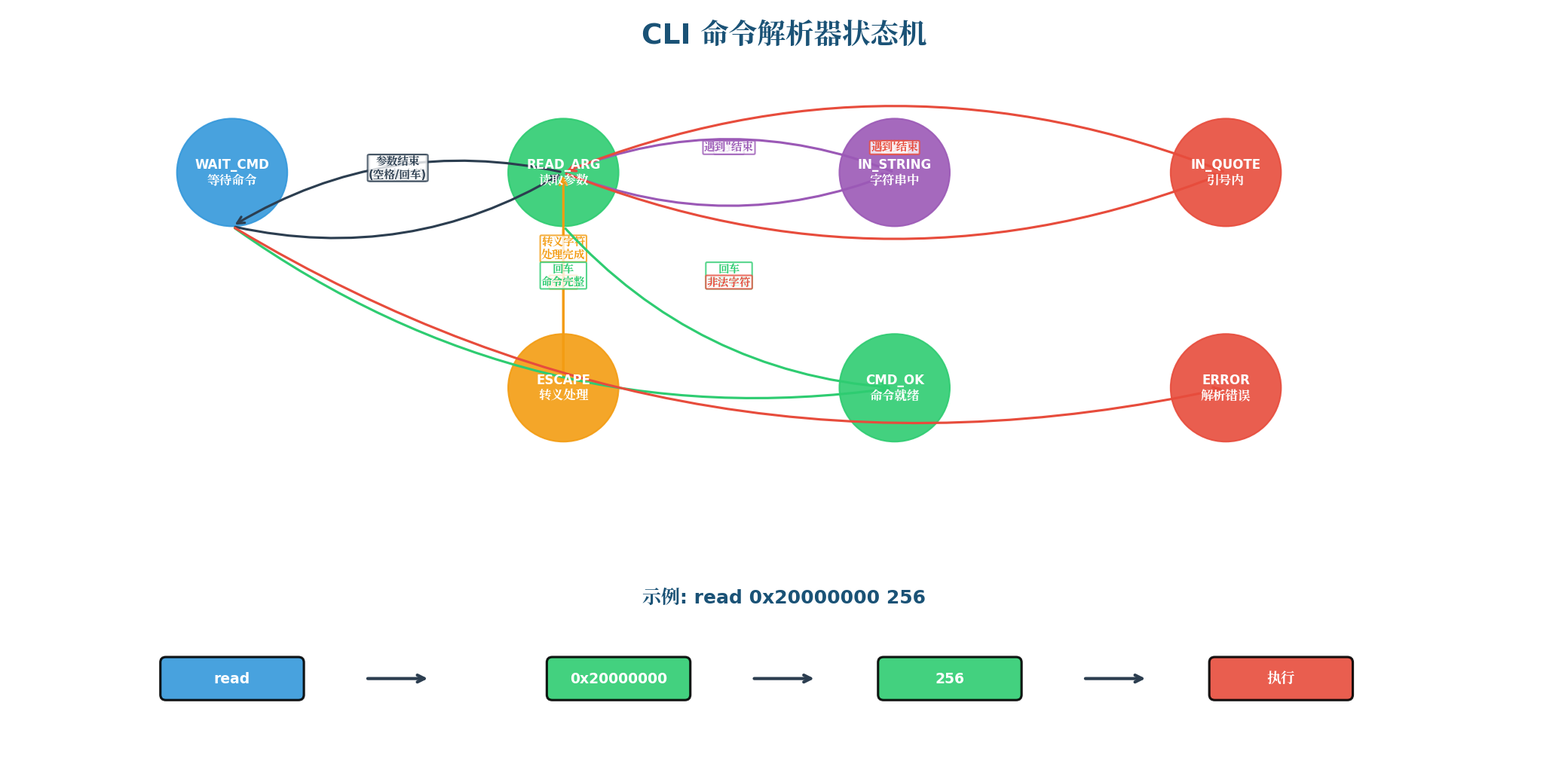
图2:CLI命令解析器状态机。包含WAIT_CMD(等待命令)、READ_ARG(读取参数)、IN_STRING(字符串中)、IN_QUOTE(引号内)、ESCAPE(转义处理)、CMD_OK(命令就绪)、ERROR(解析错误)等状态。每个输入字符触发确定性状态转换,如遇到空格从READ_ARG回到WAIT_CMD,遇到回车进入CMD_OK状态。
2.2 核心解析器代码
/**
 * @file cli_parser.h
 * @brief CLI命令解析器头文件
 */

#ifndef CLI_PARSER_H
#define CLI_PARSER_H

#include <stdint.h>
#include <stdbool.h>

#define CLI_MAX_ARGS        16      /* 最大参数个数 */
#define CLI_MAX_CMD_LEN     32      /* 最大命令长度 */
#define CLI_MAX_ARG_LEN     64      /* 最大参数长度 */
#define CLI_MAX_LINE_LEN    256     /* 最大行长度 */

/* 解析结果 */
typedef struct {
    char cmd[CLI_MAX_CMD_LEN];                  /* 命令名 */
    char args[CLI_MAX_ARGS][CLI_MAX_ARG_LEN];   /* 参数数组 */
    uint8_t argc;                                /* 参数个数 */
    bool valid;                                  /* 解析是否有效 */
} cli_parsed_t;

/* 解析状态 */
typedef enum {
    PARSE_IDLE = 0,     /* 等待命令 */
    PARSE_CMD,          /* 读取命令名 */
    PARSE_ARG,          /* 读取参数 */
    PARSE_STRING,       /* 双引号字符串 */
    PARSE_SQSTRING,     /* 单引号字符串 */
    PARSE_ESCAPE,       /* 转义字符 */
    PARSE_DONE,         /* 解析完成 */
    PARSE_ERROR,        /* 解析错误 */
} parse_state_t;

void cli_parser_init(void);
int cli_parser_feed_char(char c, cli_parsed_t *result);
int cli_parser_feed_line(const char *line, cli_parsed_t *result);

#endif /* CLI_PARSER_H */
/**
 * @file cli_parser.c
 * @brief CLI命令解析器实现
 */

#include "cli_parser.h"
#include <string.h>
#include <ctype.h>

static parse_state_t g_state;
static cli_parsed_t g_result;
static uint16_t g_pos;           /* 当前缓冲区位置 */
static uint8_t g_arg_idx;        /* 当前参数索引 */
static uint16_t g_arg_pos;       /* 当前参数内位置 */

void cli_parser_init(void) {
    memset(&g_result, 0, sizeof(g_result));
    g_state = PARSE_IDLE;
    g_pos = 0;
    g_arg_idx = 0;
    g_arg_pos = 0;
}

/**
 * @brief 单字符Feed解析(状态机核心)
 */
int cli_parser_feed_char(char c, cli_parsed_t *result) {
    switch (g_state) {
        case PARSE_IDLE:
            if (isspace((unsigned char)c)) {
                /* 跳过前导空白 */
                return 0;
            }
            if (c == '\"') {
                g_state = PARSE_STRING;
                g_arg_pos = 0;
            } else if (c == '\\') {
                g_state = PARSE_ESCAPE;
            } else if (c == '\r' || c == '\n') {
                /* 空行 */
                g_result.valid = false;
                *result = g_result;
                cli_parser_init();
                return 1;  /* 解析完成(空) */
            } else {
                g_state = PARSE_CMD;
                g_result.cmd[0] = c;
                g_pos = 1;
            }
            break;

        case PARSE_CMD:
            if (isspace((unsigned char)c)) {
                g_result.cmd[g_pos] = '\0';
                g_state = PARSE_ARG;
                g_arg_idx = 0;
                g_arg_pos = 0;
            } else if (c == '\r' || c == '\n') {
                g_result.cmd[g_pos] = '\0';
                g_result.argc = 0;
                g_result.valid = true;
                *result = g_result;
                cli_parser_init();
                return 1;  /* 解析完成 */
            } else {
                if (g_pos < CLI_MAX_CMD_LEN - 1) {
                    g_result.cmd[g_pos++] = c;
                } else {
                    g_state = PARSE_ERROR;
                }
            }
            break;

        case PARSE_ARG:
            if (isspace((unsigned char)c)) {
                /* 参数间空白,跳过 */
            } else if (c == '\r' || c == '\n') {
                /* 结束当前参数 */
                if (g_arg_pos > 0) {
                    g_result.args[g_arg_idx][g_arg_pos] = '\0';
                    g_arg_idx++;
                }
                g_result.argc = g_arg_idx;
                g_result.valid = true;
                *result = g_result;
                cli_parser_init();
                return 1;  /* 解析完成 */
            } else if (c == '\"') {
                g_state = PARSE_STRING;
                g_arg_pos = 0;
            } else if (c == '\\') {
                g_state = PARSE_ESCAPE;
            } else {
                g_state = PARSE_ARG;
                g_result.args[g_arg_idx][0] = c;
                g_arg_pos = 1;
            }
            break;

        case PARSE_STRING:
            if (c == '\"') {
                g_result.args[g_arg_idx][g_arg_pos] = '\0';
                g_arg_idx++;
                if (g_arg_idx >= CLI_MAX_ARGS) {
                    g_state = PARSE_ERROR;
                } else {
                    g_state = PARSE_ARG;
                    g_arg_pos = 0;
                }
            } else if (c == '\\') {
                /* 字符串内转义,暂存状态 */
                g_state = PARSE_ESCAPE;
            } else if (c == '\r' || c == '\n') {
                g_state = PARSE_ERROR;  /* 字符串未闭合 */
            } else {
                if (g_arg_pos < CLI_MAX_ARG_LEN - 1) {
                    g_result.args[g_arg_idx][g_arg_pos++] = c;
                }
            }
            break;

        case PARSE_ESCAPE: {
            char decoded;
            switch (c) {
                case 'n':  decoded = '\n'; break;
                case 'r':  decoded = '\r'; break;
                case 't':  decoded = '\t'; break;
                case '0':  decoded = '\0'; break;
                case '\\': decoded = '\\'; break;
                case '\"': decoded = '\"'; break;
                case '\'': decoded = '\''; break;
                default:   decoded = c;    break;
            }
            if (g_state == PARSE_ESCAPE) {
                /* 根据之前状态写入 */
                if (g_pos > 0 && g_state == PARSE_CMD) {
                    /* 实际上需要记录之前状态,简化处理 */
                }
                /* 简化:回退到之前的状态 */
                g_state = PARSE_ARG;
                if (g_arg_pos < CLI_MAX_ARG_LEN - 1) {
                    g_result.args[g_arg_idx][g_arg_pos++] = decoded;
                }
            }
            break;
        }

        case PARSE_DONE:
        case PARSE_ERROR:
            /* 错误状态,等待重置 */
            return -1;
    }

    return 0;  /* 继续解析 */
}

/**
 * @brief 整行Feed解析
 */
int cli_parser_feed_line(const char *line, cli_parsed_t *result) {
    cli_parser_init();
    for (uint16_t i = 0; line[i] != '\0'; i++) {
        int ret = cli_parser_feed_char(line[i], result);
        if (ret != 0) return ret;
    }
    /* 模拟回车结束 */
    return cli_parser_feed_char('\n', result);
}
2.3 命令注册与分发
/**
 * @file cli_command.h
 * @brief CLI命令注册系统
 */

#ifndef CLI_COMMAND_H
#define CLI_COMMAND_H

#include "cli_parser.h"

/* 命令处理函数类型 */
typedef int (*cli_cmd_handler_t)(uint8_t argc, char *argv[]);

/* 命令表条目 */
typedef struct {
    const char *name;           /* 命令名 */
    cli_cmd_handler_t handler; /* 处理函数 */
    const char *help;           /* 帮助文本 */
    const char *usage;          /* 用法示例 */
} cli_cmd_entry_t;

/* 命令表(静态分配,编译时确定大小) */
#define CLI_MAX_COMMANDS    32

/* 注册命令(宏封装,简化使用) */
#define CLI_REGISTER_CMD(_name, _handler, _help, _usage) \
    static const cli_cmd_entry_t _cli_cmd_##_handler \
    __attribute__((used, section(\"cli_cmd_table\"))) = { \
        .name = _name, \
        .handler = _handler, \
        .help = _help, \
        .usage = _usage \
    }

/* API */
void cli_cmd_init(void);
int cli_cmd_execute(const cli_parsed_t *parsed);
int cli_cmd_find(const char *prefix, char *matches[], uint8_t max_matches);
void cli_cmd_list_all(void);

#endif /* CLI_COMMAND_H */
/**
 * @file cli_command.c
 * @brief CLI命令注册与执行
 */

#include "cli_command.h"
#include <string.h>
#include <stdio.h>

/* 链接器脚本中定义的符号(命令表起止) */
extern const cli_cmd_entry_t _cli_cmd_table_start[];
extern const cli_cmd_entry_t _cli_cmd_table_end[];

void cli_cmd_init(void) {
    /* 命令表已通过section自动收集,无需初始化 */
}

/**
 * @brief 执行解析后的命令
 */
int cli_cmd_execute(const cli_parsed_t *parsed) {
    if (!parsed->valid) return -1;

    const cli_cmd_entry_t *cmd = _cli_cmd_table_start;
    const cli_cmd_entry_t *end = _cli_cmd_table_end;

    while (cmd < end) {
        if (strcmp(cmd->name, parsed->cmd) == 0) {
            return cmd->handler(parsed->argc, (char **)parsed->args);
        }
        cmd++;
    }

    printf(\"Unknown command: %s\\r\\n\", parsed->cmd);
    printf(\"Type 'help' for available commands.\\r\\n\");\n    return -1;
}

/**
 * @brief 前缀查找(用于Tab补全)
 */
int cli_cmd_find(const char *prefix, char *matches[], uint8_t max_matches) {
    uint8_t count = 0;
    size_t prefix_len = strlen(prefix);

    const cli_cmd_entry_t *cmd = _cli_cmd_table_start;
    const cli_cmd_entry_t *end = _cli_cmd_table_end;

    while (cmd < end && count < max_matches) {
        if (strncmp(cmd->name, prefix, prefix_len) == 0) {
            matches[count++] = (char *)cmd->name;
        }
        cmd++;
    }

    return count;
}

/**
 * @brief 列出所有命令
 */
void cli_cmd_list_all(void) {
    const cli_cmd_entry_t *cmd = _cli_cmd_table_start;
    const cli_cmd_entry_t *end = _cli_cmd_table_end;

    printf(\"Available commands:\\r\\n\");
    printf(\"%-16s %s\\r\\n\", \"Command\", \"Description\");
    printf(\"---------------- --------------------\\r\\n\");

    while (cmd < end) {
        printf(\"%-16s %s\\r\\n\", cmd->name, cmd->help);
        cmd++;
    }
}

/* 示例命令实现 */
static int cmd_help(uint8_t argc, char *argv[]) {
    if (argc == 0) {
        cli_cmd_list_all();
    } else {
        /* 查找特定命令的帮助 */
        const cli_cmd_entry_t *cmd = _cli_cmd_table_start;
        const cli_cmd_entry_t *end = _cli_cmd_table_end;
        while (cmd < end) {
            if (strcmp(cmd->name, argv[0]) == 0) {
                printf(\"Usage: %s\\r\\n\", cmd->usage);
                printf(\"%s\\r\\n\", cmd->help);
                return 0;
            }
            cmd++;
        }
        printf(\"Command not found: %s\\r\\n\", argv[0]);
    }
    return 0;
}
CLI_REGISTER_CMD(\"help\", cmd_help, \"Show help information\", \"help [command]\");

static int cmd_info(uint8_t argc, char *argv[]) {
    printf(\"System Information:\\r\\n\");
    printf(\"  MCU: STM32F407VG\\r\\n\");
    printf(\"  Clock: 168MHz\\r\\n\");
    printf(\"  Flash: 1024KB\\r\\n\");
    printf(\"  RAM: 192KB\\r\\n\");
    printf(\"  CLI Version: 2.0.0\\r\\n\");
    return 0;
}
CLI_REGISTER_CMD(\"info\", cmd_info, \"Show system information\", \"info\");

static int cmd_read(uint8_t argc, char *argv[]) {
    if (argc < 2) {
        printf(\"Usage: read <address> <length>\\r\\n\");
        return -1;
    }
    uint32_t addr = (uint32_t)strtoul(argv[0], NULL, 0);
    uint32_t len = (uint32_t)strtoul(argv[1], NULL, 0);

    printf(\"Reading %lu bytes from 0x%08lX:\\r\\n\", len, addr);
    uint8_t *p = (uint8_t *)addr;
    for (uint32_t i = 0; i < len; i++) {
        if (i % 16 == 0) printf(\"\\r\\n%08lX: \", addr + i);
        printf(\"%02X \", p[i]);
    }
    printf(\"\\r\\n\");\n    return 0;
}
nCLI_REGISTER_CMD(\"read\", cmd_read, \"Read memory\", \"read <address> <length>\");

static int cmd_write(uint8_t argc, char *argv[]) {
    if (argc < 2) {
        printf(\"Usage: write <address> <value>\\r\\n\");
        return -1;
    }
    uint32_t addr = (uint32_t)strtoul(argv[0], NULL, 0);
    uint32_t value = (uint32_t)strtoul(argv[1], NULL, 0);

    volatile uint32_t *p = (volatile uint32_t *)addr;
    *p = value;
    printf(\"Wrote 0x%08lX to 0x%08lX\\r\\n\", value, addr);
    return 0;
}
CLI_REGISTER_CMD(\"write\", cmd_write, \"Write memory\", \"write <address> <value>\");

/* 链接器脚本片段(ld文件):
 * .cli_cmd_table : {
 *     _cli_cmd_table_start = .;
 *     KEEP(*(cli_cmd_table));
 *     _cli_cmd_table_end = .;
 * } > FLASH
 */
三、历史记录:提升交互效率
3.1 环形缓冲区实现
历史记录是CLI的"时间机器",允许用户通过上下箭头键快速调用之前输入的命令。采用环形缓冲区实现,固定内存占用,无需动态分配。
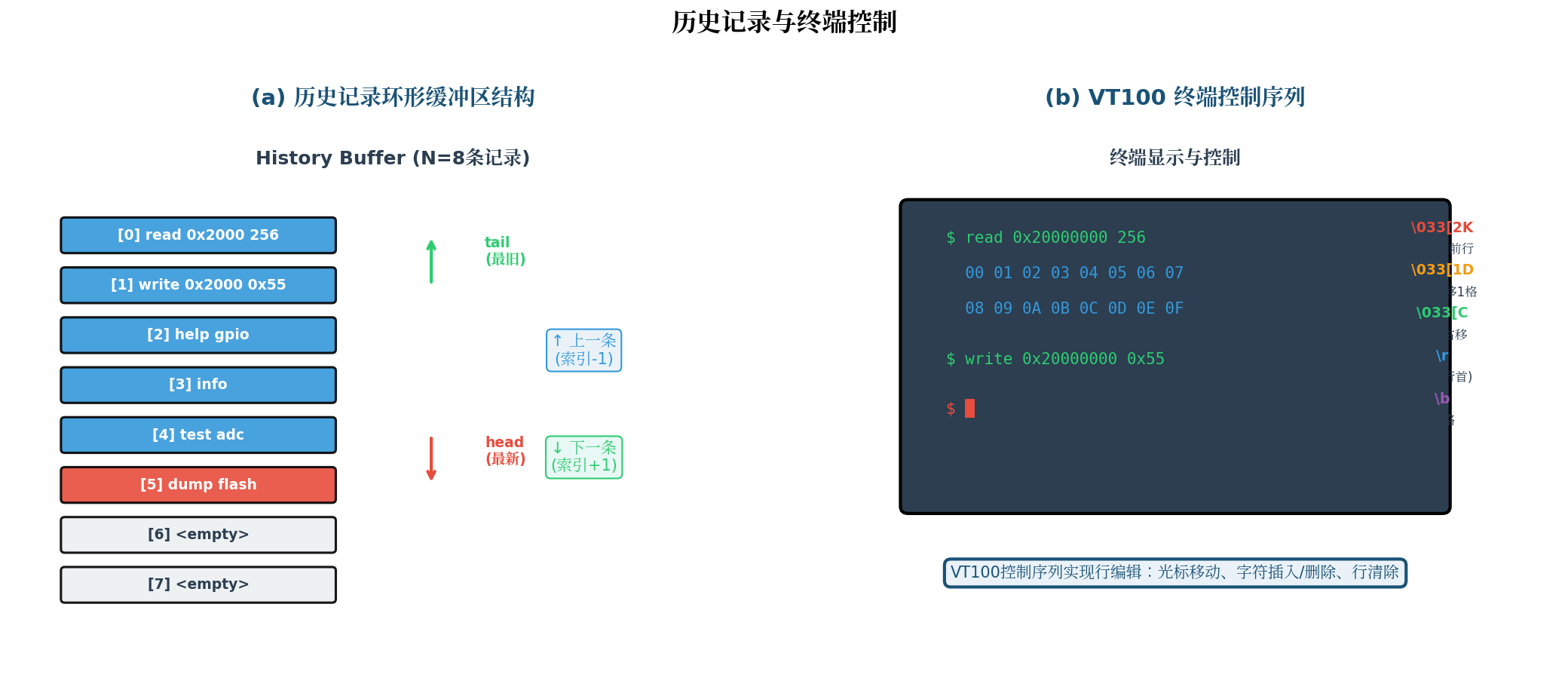
图3:历史记录与终端控制。(a) 历史记录环形缓冲区结构:N=8条记录,head指向最新记录,tail指向最旧记录,支持循环覆盖。用户按↑键索引-1(取上一条),按↓键索引+1(取下一条);(b) VT100终端控制序列:通过发送转义序列控制光标位置、清除行、移动光标,实现行编辑功能。
/**
 * @file cli_history.h
 * @brief CLI历史记录管理
 */

#ifndef CLI_HISTORY_H
#define CLI_HISTORY_H

#include <stdint.h>
#include <stdbool.h>

#define CLI_HISTORY_SIZE    8       /* 历史记录条数 */
#define CLI_HISTORY_LEN     256     /* 每条最大长度 */

typedef struct {
    char buffer[CLI_HISTORY_SIZE][CLI_HISTORY_LEN];  /* 历史缓冲区 */
    uint8_t head;                                      /* 写入位置 */
    uint8_t count;                                     /* 有效记录数 */
    int8_t browse_idx;                                 /* 浏览索引 (-1=当前输入) */
    bool modified;                                     /* 当前行是否被修改 */
} cli_history_t;

void cli_history_init(cli_history_t *hist);
void cli_history_add(cli_history_t *hist, const char *line);
const char *cli_history_prev(cli_history_t *hist);
const char *cli_history_next(cli_history_t *hist);
void cli_history_reset_browse(cli_history_t *hist);

#endif /* CLI_HISTORY_H */
/**
 * @file cli_history.c
 * @brief CLI历史记录实现
 */

#include \"cli_history.h\"
#include <string.h>

void cli_history_init(cli_history_t *hist) {
    memset(hist, 0, sizeof(cli_history_t));
    hist->browse_idx = -1;
}

void cli_history_add(cli_history_t *hist, const char *line) {
    if (line == NULL || line[0] == '\\0') return;
    /* 检查是否与上一条重复 */
    if (hist->count > 0) {
        uint8_t prev = (hist->head + CLI_HISTORY_SIZE - 1) % CLI_HISTORY_SIZE;
        if (strcmp(hist->buffer[prev], line) == 0) return;
        }
        /* 写入新记录 */
        strncpy(hist->buffer[hist->head], line, CLI_HISTORY_LEN - 1);
        hist->buffer[hist->head][CLI_HISTORY_LEN - 1] = '\\0';
        hist->head = (hist->head + 1) % CLI_HISTORY_SIZE;
        if (hist->count < CLI_HISTORY_SIZE) {
        hist->count++;
        }
        hist->browse_idx = -1;
        hist->modified = false;
        }

const char *cli_history_prev(cli_history_t *hist) {
    if (hist->count == 0) return NULL;
    if (hist->browse_idx < 0) {
    hist->browse_idx = hist->count - 1;
    } else if (hist->browse_idx > 0) {
    hist->browse_idx--;
    } else {
    return hist->buffer[(hist->head + CLI_HISTORY_SIZE - 1) % CLI_HISTORY_SIZE];
    }
    uint8_t idx = (hist->head + CLI_HISTORY_SIZE - hist->count + hist->browse_idx) % CLI_HISTORY_SIZE;
    return hist->buffer[idx];
    }

const char *cli_history_next(cli_history_t *hist) {
    if (hist->count == 0 || hist->browse_idx < 0) return NULL;
    hist->browse_idx++;
    if (hist->browse_idx >= hist->count) {
    hist->browse_idx = -1;
    return NULL;  /* 回到当前输入 */
    }
    uint8_t idx = (hist->head + CLI_HISTORY_SIZE - hist->count + hist->browse_idx) % CLI_HISTORY_SIZE;
    return hist->buffer[idx];
    }

void cli_history_reset_browse(cli_history_t *hist) {
    hist->browse_idx = -1;
    hist->modified = false;
    }
四、VT100终端控制与行编辑
4.1 VT100转义序列
现代终端(如PuTTY、SecureCRT、Minicom)支持VT100控制序列,通过发送转义字符(ESC = 0x1B)实现光标控制、清屏、颜色等功能。
常用VT100序列:
| 序列 | 功能 | 应用场景 |
|---|---|---|
\033[2K |
清除当前行 | 行编辑时清除旧内容 |
\033[1D |
光标左移1格 | 处理退格键 |
\033[C |
光标右移1格 | 处理右箭头 |
\033[K |
清除光标到行尾 | 删除字符 |
\r |
回车(移到行首) | 刷新提示符 |
\033[?25l |
隐藏光标 | 批量输出时 |
\033[?25h |
显示光标 | 恢复交互 |
\033[31m |
红色文字 | 错误提示 |
\033[32m |
绿色文字 | 成功提示 |
\033[0m |
重置颜色 | 恢复默认 |
4.2 行编辑实现
/**
n * @file cli_edit.h
n * @brief CLI行编辑(VT100终端控制)
n */

#ifndef CLI_EDIT_H
#define CLI_EDIT_H

#include <stdint.h>

#define CLI_EDIT_BUF_SIZE   256

typedef struct {
    char buffer[CLI_EDIT_BUF_SIZE];  /* 行缓冲区 */
    uint16_t len;                    /* 当前长度 */
    uint16_t cursor;                 /* 光标位置 */
    } cli_edit_t;

void cli_edit_init(cli_edit_t *edit);
int cli_edit_insert(cli_edit_t *edit, char c);
int cli_edit_backspace(cli_edit_t *edit);
int cli_edit_delete(cli_edit_t *edit);
int cli_edit_cursor_left(cli_edit_t *edit);
int cli_edit_cursor_right(cli_edit_t *edit);
void cli_edit_clear_line(cli_edit_t *edit);
const char *cli_edit_get_line(const cli_edit_t *edit);
void cli_edit_set_line(cli_edit_t *edit, const char *line);\
#endif /* CLI_EDIT_H */
/**
 * @file cli_edit.c
 * @brief CLI行编辑实现
 */

#include \"cli_edit.h\"
#include <string.h>

/* VT100序列 */
#define VT100_CLEAR_LINE    \"\\033[2K\"
#define VT100_CURSOR_LEFT   \"\\033[D\"
#define VT100_CURSOR_RIGHT  \"\\033[C\"
#define VT100_CURSOR_HOME   \"\\r\"
void cli_edit_init(cli_edit_t *edit) {
memset(edit, 0, sizeof(cli_edit_t));
}

int cli_edit_insert(cli_edit_t *edit, char c) {
if (edit->len >= CLI_EDIT_BUF_SIZE - 1) return -1;
/* 在光标位置插入字符 */
if (edit->cursor < edit->len) {
memmove(&edit->buffer[edit->cursor + 1],
&edit->buffer[edit->cursor],
edit->len - edit->cursor);
}
edit->buffer[edit->cursor] = c;
edit->cursor++;
edit->len++;
edit->buffer[edit->len] = '\\0';
return 0;
}

int cli_edit_backspace(cli_edit_t *edit) {
if (edit->cursor == 0) return -1;
/* 删除光标前字符 */
edit->cursor--;
if (edit->cursor < edit->len - 1) {
memmove(&edit->buffer[edit->cursor],
&edit->buffer[edit->cursor + 1],
edit->len - edit->cursor - 1);
}
edit->len--;
edit->buffer[edit->len] = '\\0';
return 0;
}

int cli_edit_delete(cli_edit_t *edit) {
if (edit->cursor >= edit->len) return -1;
/* 删除光标处字符 */
if (edit->cursor < edit->len - 1) {
memmove(&edit->buffer[edit->cursor],
&edit->buffer[edit->cursor + 1],
edit->len - edit->cursor - 1);
}
edit->len--;
edit->buffer[edit->len] = '\\0';
return 0;
}

void cli_edit_set_line(cli_edit_t *edit, const char *line) {
strncpy(edit->buffer, line, CLI_EDIT_BUF_SIZE - 1);
edit->buffer[CLI_EDIT_BUF_SIZE - 1] = '\\0';
edit->len = strlen(edit->buffer);
edit->cursor = edit->len;
}

const char *cli_edit_get_line(const cli_edit_t *edit) {
return edit->buffer;
}
五、Tab补全与命令注册机制
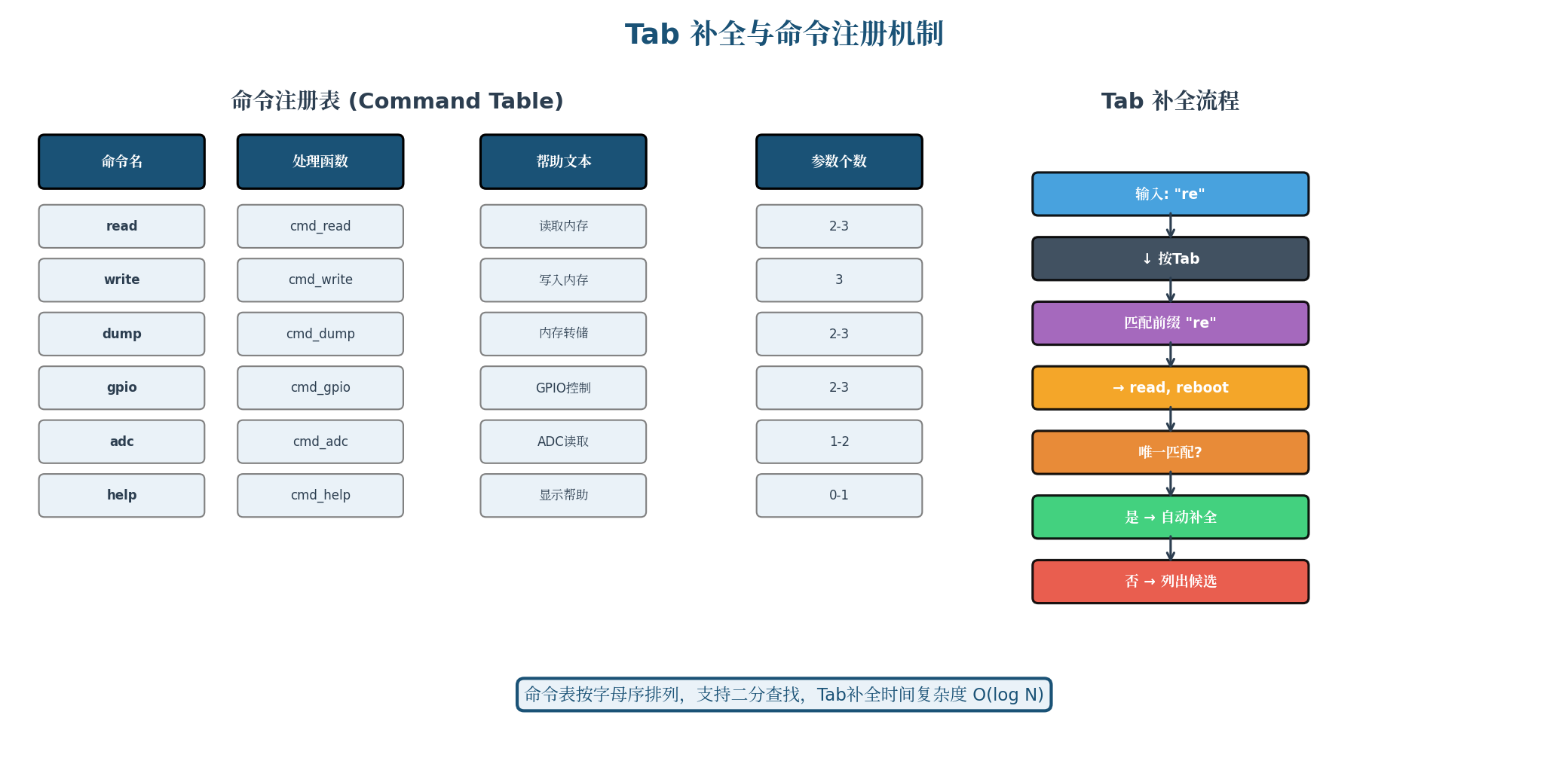
图4:Tab补全与命令注册机制。左侧为命令注册表(Command Table),包含命令名、处理函数、帮助文本和参数个数;右侧为Tab补全流程:输入"re"后按Tab,匹配前缀"re"得到候选read/reboot,若唯一匹配则自动补全,否则列出所有候选。命令表按字母序排列,支持二分查找,Tab补全时间复杂度O(log N)。
5.1 Tab补全实现
/**
 * @brief 处理Tab键补全
 */
static void cli_handle_tab(cli_shell_t *shell) {
char *matches[8];
int count = cli_cmd_find(shell->edit.buffer, matches, 8);
if (count == 0) {
/* 无匹配,响铃 */
shell->putchar('\\a');
} else if (count == 1) {
/* 唯一匹配,自动补全 */
const char *match = matches[0];
size_t prefix_len = strlen(shell->edit.buffer);
size_t match_len = strlen(match);
/* 补全剩余部分 */
for (size_t i = prefix_len; i < match_len; i++) {
cli_edit_insert(&shell->edit, match[i]);
shell->putchar(match[i]);
}
/* 补全后加空格 */
cli_edit_insert(&shell->edit, ' ');
shell->putchar(' ');
} else {
/* 多个匹配,列出候选 */
shell->puts(\"\\r\\n\");
for (int i = 0; i < count; i++) {
shell->puts(matches[i]);
shell->puts(\"  \");
}
shell->puts(\"\\r\\n\");
cli_print_prompt(shell);
shell->puts(shell->edit.buffer);
}
}
六、完整的CLI Shell实现
6.1 Shell核心结构
/**
 * @file cli_shell.h
 * @brief CLI Shell主头文件
 */

#ifndef CLI_SHELL_H
#define CLI_SHELL_H

#include \"cli_parser.h\"
#include \"cli_history.h\"
#include \"cli_edit.h\"
/* 字符输出函数类型 */
typedef void (*cli_putchar_t)(char c);
typedef void (*cli_puts_t)(const char *s);
typedef struct {
cli_parser_t parser;
cli_history_t history;
cli_edit_t edit;
cli_putchar_t putchar;
cli_puts_t puts;
const char *prompt;         /* 提示符 */
bool echo;                   /* 是否回显 */
bool vt100;                  /* 是否支持VT100 */
char esc_seq[8];            /* 转义序列缓冲区 */
uint8_t esc_pos;            /* 转义序列位置 */
bool in_esc;               /* 是否在转义序列中 */
} cli_shell_t;
void cli_shell_init(cli_shell_t *shell, cli_putchar_t putc_fn, cli_puts_t puts_fn);
void cli_shell_set_prompt(cli_shell_t *shell, const char *prompt);
void cli_shell_process_char(cli_shell_t *shell, char c);
void cli_shell_run(cli_shell_t *shell);  /* 主循环 */
#endif /* CLI_SHELL_H */
/**
 * @file cli_shell.c
 * @brief CLI Shell主实现
 */

#include \"cli_shell.h\"
#include <string.h>
#include <stdio.h>

#define ESC     '\\033'
#define DEL     '\\177'
#define BS      '\\010'
#define TAB     '\\t'
#define CR      '\\r'
#define LF      '\\n'
void cli_shell_init(cli_shell_t *shell, cli_putchar_t putc_fn, cli_puts_t puts_fn) {
memset(shell, 0, sizeof(cli_shell_t));
shell->putchar = putc_fn;
shell->puts = puts_fn;
shell->prompt = \"$ \";
shell->echo = true;
shell->vt100 = true;
cli_parser_init(&shell->parser);
cli_history_init(&shell->history);
cli_edit_init(&shell->edit);
}

static void cli_print_prompt(cli_shell_t *shell) {
shell->puts(shell->prompt);
}

static void cli_refresh_line(cli_shell_t *shell) {
if (!shell->vt100) return;
/* 回到行首,清除行,重新输出 */
shell->puts(\"\\r\");
shell->puts(VT100_CLEAR_LINE);
cli_print_prompt(shell);
shell->puts(shell->edit.buffer);
/* 光标回到正确位置 */
int cursor_back = shell->edit.len - shell->edit.cursor;
for (int i = 0; i < cursor_back; i++) {
shell->puts(VT100_CURSOR_LEFT);
}
}

void cli_shell_process_char(cli_shell_t *shell, char c) {
/* 处理转义序列(VT100功能键) */
if (shell->in_esc) {
shell->esc_seq[shell->esc_pos++] = c;
/* 检测完整的转义序列 */
if (shell->esc_pos >= 2 && shell->esc_seq[0] == '[') {
switch (c) {
case 'A':  /* 上箭头 */
{
const char *hist = cli_history_prev(&shell->history);
if (hist) {
cli_edit_set_line(&shell->edit, hist);
cli_refresh_line(shell);
}
break;
}
case 'B':  /* 下箭头 */
{
const char *hist = cli_history_next(&shell->history);
if (hist) {
cli_edit_set_line(&shell->edit, hist);
} else {
cli_edit_init(&shell->edit);
}
cli_refresh_line(shell);
break;
}
case 'C':  /* 右箭头 */
if (cli_edit_cursor_right(&shell->edit) == 0) {
shell->puts(VT100_CURSOR_RIGHT);
}
break;
case 'D':  /* 左箭头 */
if (cli_edit_cursor_left(&shell->edit) == 0) {
shell->puts(VT100_CURSOR_LEFT);
}
 break;
 case '3':  /* Delete键前缀 */
 /* 等待 ~ */
 return;
 case '~':
 if (shell->esc_pos >= 2 && shell->esc_seq[1] == '3') {
 /* Delete键 */
 cli_edit_delete(&shell->edit);
 cli_refresh_line(shell);
 }
 break;
 }
 shell->in_esc = false;
 shell->esc_pos = 0;
 } else if (shell->esc_pos >= 3) {
 /* 未知序列,放弃 */
 shell->in_esc = false;
 shell->esc_pos = 0;
 }
 return;
 }
 /* 检测ESC开始转义序列 */
 if (c == ESC) {
 shell->in_esc = true;
 shell->esc_pos = 0;
 shell->esc_seq[shell->esc_pos++] = c;
 return;
 }
 /* 处理普通字符 */
 switch (c) {
 case CR:
 case LF:
 /* 回车执行 */
 if (shell->echo) shell->puts(\"\\r\\n\");
 if (shell->edit.len > 0) {
 /* 解析并执行 */
 cli_parsed_t parsed;
 if (cli_parser_feed_line(shell->edit.buffer, &parsed) == 1 && parsed.valid) {
 cli_cmd_execute(&parsed);
 }
 /* 加入历史记录 */
 cli_history_add(&shell->history, shell->edit.buffer);
 }
 /* 重置编辑状态 */
 cli_edit_init(&shell->edit);
 cli_history_reset_browse(&shell->history);
 cli_print_prompt(shell);
 break;
 case BS:
 case DEL:
 /* 退格 */
 if (cli_edit_backspace(&shell->edit) == 0) {
 if (shell->vt100) {
 shell->puts(VT100_CURSOR_LEFT);
 shell->puts(\" \");
 shell->puts(VT100_CURSOR_LEFT);
 } else if (shell->echo) {
 shell->puts(\"\\b \\b\");
 }
 }
 break;
 case TAB:
 /* Tab补全 */
 cli_handle_tab(shell);
 break;
 case CTRL_C:
 /* Ctrl+C 取消当前输入 */
 shell->puts(\"^C\\r\\n\");
 cli_edit_init(&shell->edit);
 cli_print_prompt(shell);
 break;
 default:
 /* 可打印字符 */
 if (c >= 32 && c < 127) {
 if (cli_edit_insert(&shell->edit, c) == 0) {
 if (shell->echo) {
 if (shell->vt100 && shell->edit.cursor < shell->edit.len) {
 /* 插入模式,需要刷新整行 */
 cli_refresh_line(shell);
 } else {
 shell->putchar(c);
 }
 }
 }
 }
 break;
 }
 }

/* UART中断中调用 */
void UART_IRQHandler(void) {
while (UART_DataAvailable()) {
char c = UART_ReadByte();
cli_shell_process_char(&g_shell, c);
}
}
七、不同CLI方案对比
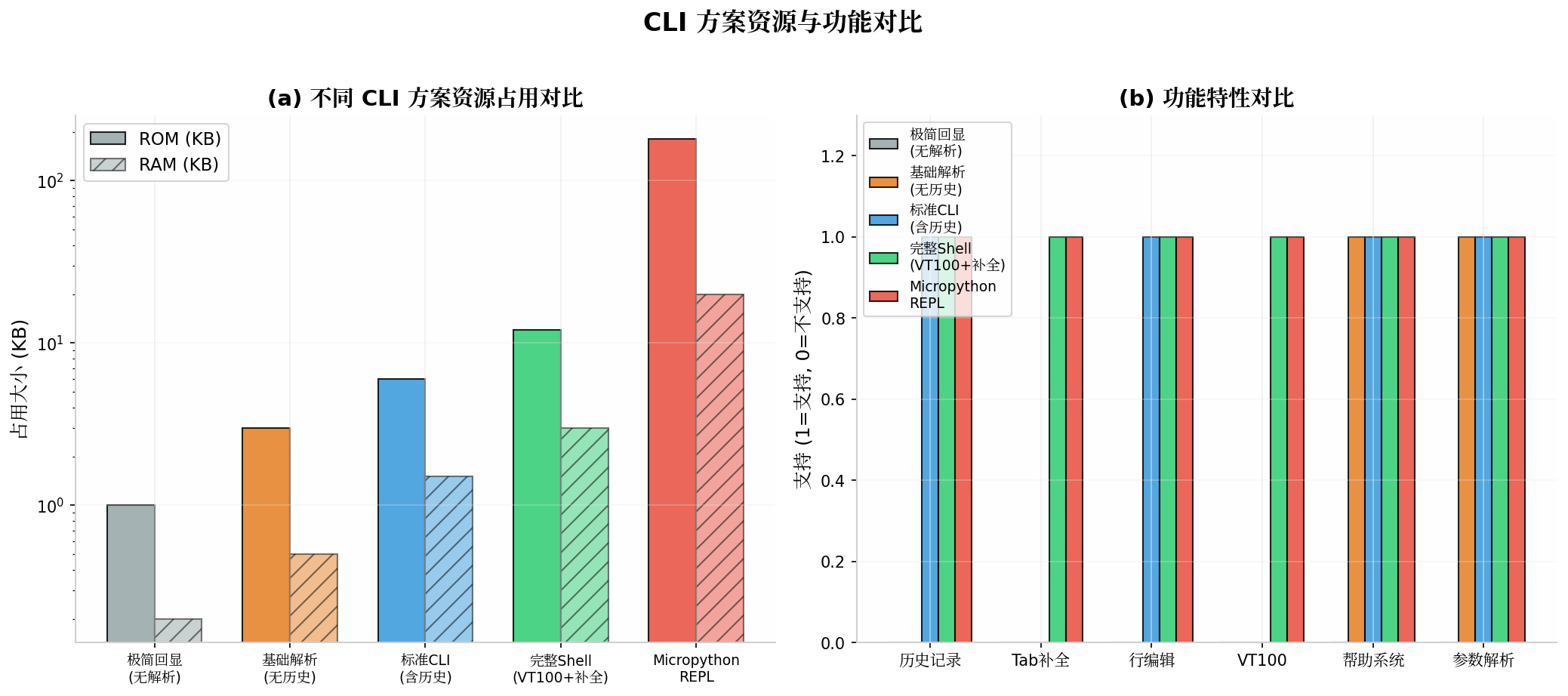
图5:CLI方案资源与功能对比。(a) 资源占用:极简回显ROM 1KB/RAM 0.2KB,完整Shell ROM 12KB/RAM 3KB,MicroPython REPL ROM 180KB/RAM 20KB;(b) 功能特性:完整Shell支持历史记录、Tab补全、行编辑、VT100、帮助系统和参数解析全部功能。
| 方案 | ROM | RAM | 历史 | Tab | VT100 | 适用场景 |
|---|---|---|---|---|---|---|
| 极简回显 | 1KB | 0.2KB | ✗ | ✗ | ✗ | 资源极端受限 |
| 基础解析 | 3KB | 0.5KB | ✗ | ✗ | ✗ | 简单调试 |
| 标准CLI | 6KB | 1.5KB | ✓ | ✗ | ✗ | 常规调试 |
| 完整Shell | 12KB | 3KB | ✓ | ✓ | ✓ | 推荐方案 |
| MicroPython | 180KB | 20KB | ✓ | ✓ | ✓ | 脚本化开发 |
推荐:对于绝大多数嵌入式项目,完整Shell方案(ROM 12KB/RAM 3KB)是性价比最高的选择,提供了接近Linux终端的交互体验。
八、CLI交互时序
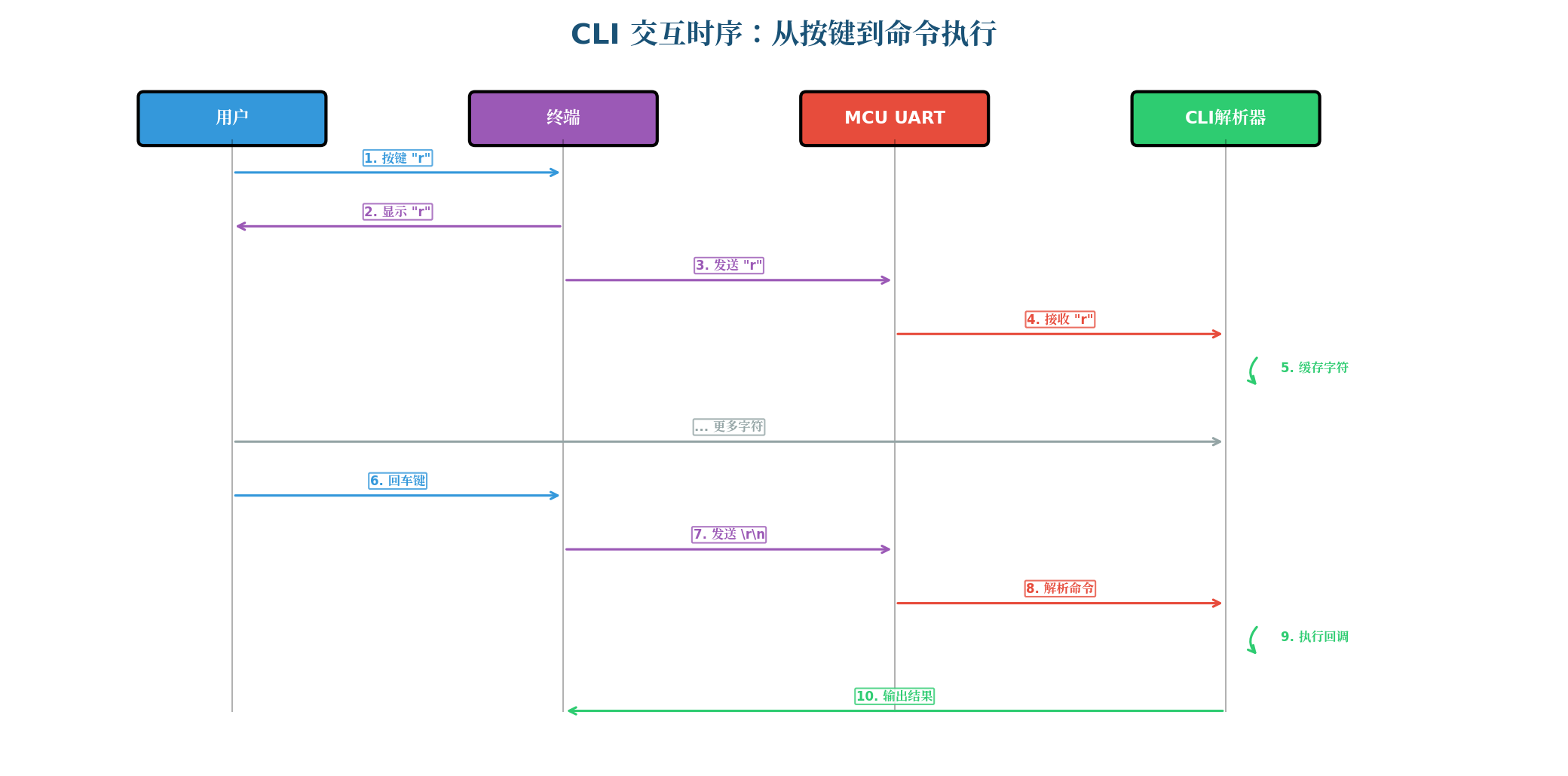
图6:CLI交互时序——从按键到命令执行。完整流程:用户按键"r" → 终端显示"r" → 终端发送"r"到MCU UART → UART接收并传递给CLI解析器 → 解析器缓存字符 → 用户继续输入 → 用户按回车键 → 终端发送\r\n → MCU解析命令 → 执行回调函数 → 输出结果到终端。
九、扩展功能:脚本与宏
9.1 命令脚本支持
/**
 * @brief 执行命令脚本(分号分隔的多条命令)
 */
static int cmd_script(uint8_t argc, char *argv[]) {
if (argc < 1) {
printf(\"Usage: script <cmd1;cmd2;cmd3>\\r\\n\");
return -1;
}
/* 组合所有参数为完整脚本 */
char script[256];
script[0] = '\\0';
for (uint8_t i = 0; i < argc; i++) {
if (i > 0) strcat(script, \" \");
strcat(script, argv[i]);
}
/* 按分号分割执行 */
char *cmd = strtok(script, \";\");
while (cmd != NULL) {
/* 去除前后空白 */
while (isspace(*cmd)) cmd++;
cli_parsed_t parsed;
if (cli_parser_feed_line(cmd, &parsed) == 1 && parsed.valid) {
printf(\"$ %s\\r\\n\", cmd);
cli_cmd_execute(&parsed);
}
cmd = strtok(NULL, \";\");
}
return 0;
}
CLI_REGISTER_CMD(\"script\", cmd_script, \"Execute command script\", \"script <cmd1;cmd2>\");
9.2 命令别名
/* 别名表 */
typedef struct {
const char *alias;
const char *target;
} cli_alias_t;
static const cli_alias_t aliases[] = {
{\"r\", \"read\"},
{\"w\", \"write\"},
{\"d\", \"dump\"},
{\"?\", \"help\"},
};
/* 在命令查找前解析别名 */
static const char *cli_resolve_alias(const char *cmd) {
for (uint8_t i = 0; i < sizeof(aliases)/sizeof(aliases[0]); i++) {
if (strcmp(cmd, aliases[i].alias) == 0) {
return aliases[i].target;
}
}
return cmd;
}
十、总结
一个设计良好的嵌入式CLI Shell,是提升开发效率和现场诊断能力的关键工具。本文从解析器状态机、历史记录环形缓冲、VT100终端控制到Tab补全,完整构建了嵌入式CLI的技术体系。
核心要点回顾:
- 解析器:状态机驱动,零递归,支持引号字符串和转义字符
- 历史记录:环形缓冲区,固定内存,支持上下箭头浏览
- VT100控制:转义序列实现光标移动、行清除、颜色输出
- Tab补全:前缀匹配,唯一匹配自动补全,多匹配列出候选
- 命令注册:链接器section自动收集,零运行时注册开销
- 资源控制:完整Shell仅12KB ROM / 3KB RAM,适合绝大多数MCU
掌握本文所述技术,你将能够在任何嵌入式平台上构建专业级的调试Shell。
转载自:https://blog.csdn.net/u014727709/article/details/162621908
欢迎 👍点赞✍评论⭐收藏,欢迎指正

智能硬件社区聚焦AI智能硬件技术生态,汇聚嵌入式AI、物联网硬件开发者,打造交流分享平台,同步全国赛事资讯、开展 OPC 核心人才招募,助力技术落地与开发者成长。
更多推荐

 0
0 0
0- 0


 已为社区贡献43条内容

所有评论(0)